How to get social login credentials for Magento 2
Where to create each sign-in app, which callback URL and scopes to use, what each provider charges or reviews, and where the keys go in the Magento admin.
To offer social login on Magento 2 you create one app at each provider, register your store's callback URL in it, and copy the app's client ID and secret into Stores > Configuration > Softaware > Social Login. Google, Microsoft, LinkedIn, Amazon and GitHub are free and need no review for basic sign-in. Apple needs a paid Apple Developer Program membership, Facebook needs a live Meta app, and X now charges for API use.
The steps below were checked against each provider's official documentation in October 2026. Provider consoles change their menus often, so the date matters: if a label has moved, the provider's own page linked in each section is the reference.
What do you need before you start?
- An HTTPS store URL. Every provider requires HTTPS for live callback URLs.
- A privacy policy page. Google, Meta, LinkedIn and Amazon ask for its URL; name the sign-in providers you use in it.
- The exact callback URL for each provider. The module shows it under each provider's Enabled field once you set it to Yes. The format is:
https://www.example.com/sociallogin/auth/callback/provider/<code>/| Provider | Code in the URL | Module |
|---|---|---|
google | Social Login | |
facebook | Social Login | |
| X | twitter | Social Login |
| Apple | apple | Social Login Pro |
| Microsoft | microsoft | Social Login Pro |
| GitHub | github | Social Login Pro |
linkedin | Social Login Pro | |
| Amazon | amazon | Social Login Pro |
Copy the URL exactly as Magento shows it, including https, www and the trailing slash. If your store views have different domains or store codes in their URLs, each store view has its own callback URL and each one must be registered. Most redirect_uri_mismatch errors come from a missing www or slash.
Which provider costs what, and which needs a review?
| Provider | Where you create the app | Cost (October 2026) | Review for basic sign-in | What you paste into Magento |
|---|---|---|---|---|
| Google Cloud console, Google Auth Platform | Free | No, for openid, email, profile only | Client ID, Client Secret | |
| Meta for Developers | Free | Meta says email and public_profile need no App Review; the app must be published (Live) | App ID, App Secret, Graph API version | |
| X | X Developer Console | Pay-per-use credits | No review, but API calls are billed | Client ID, Client Secret |
| Apple | Apple Developer, Certificates, Identifiers & Profiles | Apple Developer Program, US$99 a year | No | Services ID, Team ID, Key ID, .p8 key |
| Microsoft | Microsoft Entra admin centre | Free | No; publisher verification is optional | Application (client) ID, Client Secret, Tenant |
| LinkedIn Developers | Free | No, but the app must be verified by a LinkedIn Page admin | Client ID, Client Secret | |
| Amazon | Amazon Developer Console, Login with Amazon | No fee listed | No | Client ID, Client Secret |
| GitHub | GitHub Settings, Developer settings | Free | No | Client ID, Client Secret |
The scopes in the next table are what the modules request. You do not type them anywhere at most providers, but they tell you which permissions the app needs.
| Provider | Scopes requested by the module |
|---|---|
openid email profile | |
email,public_profile | |
| X | users.read tweet.read, plus users.email when Request Email Address is on |
| Apple | name email |
| Microsoft | openid email profile |
openid profile email | |
| Amazon | profile |
| GitHub | read:user user:email |
How do you get a Google client ID and secret?
Google moved OAuth settings into the Google Auth Platform section of the Google Cloud console. The older route, APIs & Services > Credentials, still leads to the same clients. Checked October 2026.
- Open the Google Cloud console and select or create a project for your store.
- Go to Google Auth Platform > Branding. Enter the app name customers will see, a support email, your store's home page, privacy policy link and authorised domain, and a developer contact address. Save.
- Go to Audience. Choose External so any Google account can sign in, then select Publish app to move it from Testing to In production. Google's documentation says apps that request only the basic
openid,emailandprofilescopes do not need test users, show no unverified-app warning and are not subject to the 7-day expiry of test authorisations. - Go to Clients and select Create client. Choose Web application and give it a name.
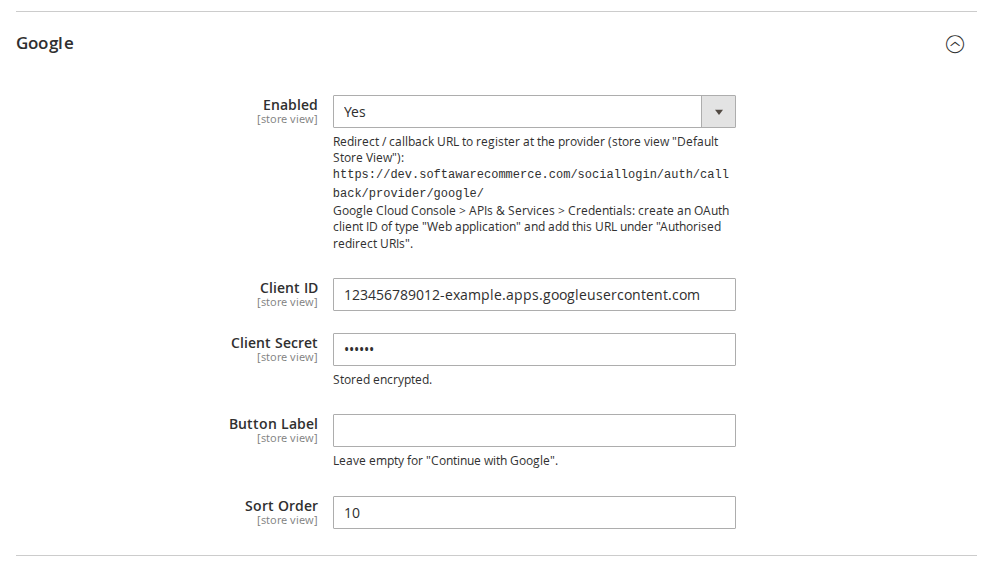
- Under Authorised redirect URIs, add the callback URL from Magento (
.../provider/google/). Redirect URIs must use HTTPS, may not use wildcards or IP addresses, and must match exactly. Leave Authorised JavaScript origins empty: the module does not use Google's JavaScript. - Select Create and copy the Client ID and Client secret immediately. For clients created since June 2025, Google shows the full secret only at creation; afterwards you see only its last four characters and must rotate it if lost.
- Changes to redirect URIs can take from five minutes to a few hours to apply.
In Magento: Google > Client ID and Client Secret.
Verification and cost. There is no charge. Google's verification requirements expect a home page on a verified domain, a privacy policy linked from the home page and consent screen, and sign-in buttons that follow Google's branding guidelines. Sensitive or restricted scopes need a full review; sign-in with openid, email and profile does not use them.
How do you get a Facebook App ID and App Secret?
Meta's developer dashboard is organised around "use cases" and changes regularly. Checked October 2026.
- Register as a developer at Meta for Developers and go to developers.facebook.com/apps/creation/.
- Enter an app name and contact email.
- Choose the use case Authenticate and request data from users with Facebook Login. Use cases cannot be removed after the app is created.
- Connect a business portfolio, or choose I don't want to connect a business portfolio yet, then review the requirements and go to the dashboard.
- In the Facebook Login settings, under Client OAuth Settings, add the Magento callback URL (
.../provider/facebook/) to Valid OAuth Redirect URIs. - Make sure the
emailpermission is added to the use case next topublic_profile. Meta's Facebook Login for the web guide says these two permissions "do not require app review" and are granted automatically to apps using Facebook Login. Check the dashboard's requirements list, because Meta asks for Business Verification when an app requests Advanced Access. - In App settings > Basic, copy the App ID and App Secret, and fill in the privacy policy URL and the data deletion setting. Meta requires apps that access user data to give a Data Deletion Request URL or deletion instructions.
- Publish the app (switch it to Live). Until then only people with a role on the app can sign in, which is useful for testing with your own account.
In Magento: Facebook > App ID, App Secret and Graph API Version. The module's default is v23.0, which Meta supports until 8 October 2027. The newest version in October 2026 is v26.0 (released 29 July 2026). Set the version your app dashboard shows, and change it before Meta retires it; Meta lists the dates on its Graph API changelog.
How do you get an X (Twitter) client ID and secret?
X changed both its developer console and its pricing in 2026. Checked October 2026.
- Sign in at console.x.com and select Create App. Enter a name, description and use case.
- Open the app's User authentication settings and switch on OAuth 2.0.
- App permissions: Read is enough for sign-in.
- Type of App: Web App. Web Apps are confidential clients and receive a client secret.
- Callback URI / Redirect URL: add the Magento callback URL (
.../provider/twitter/). X matches it exactly, including the trailing slash, and allows up to ten per app. - Add your website URL, and the terms of service and privacy policy URLs if you want email addresses.
- To receive the shopper's email address, switch on Request email from users. Without it, X never returns an email and the module asks the shopper to type one in and confirm it.
- In Keys and tokens, copy the OAuth 2.0 Client ID and Client Secret. X shows credentials once, so save them straight away. Do not use the API key and secret; those belong to OAuth 1.0a.
In Magento: X (Twitter) > Client ID (the OAuth 2.0 client ID, not the API key), Client Secret, and Request Email Address = Yes only if the app has the email permission.
Cost. X's official pricing page describes pay-per-use pricing: you buy credits in the Developer Console and each request is deducted. It lists no free tier, only promotional credits. Each sign-in reads the shopper's profile once (GET /2/users/me). The pricing page lists "User: Read" at US$0.010 per resource but does not name this endpoint, so check the rate in your console before switching X on, and set a spending limit.
How do you set up Sign in with Apple?
Sign in with Apple needs four values: a Services ID, your Team ID, a Key ID and a private key file. Checked October 2026.
Before you start: you need an Apple Developer Program membership, which costs US$99 a year, and the Account Holder or Admin role. Apple asks for a primary App ID even if you have no iPhone app, because the website configuration is grouped under it.
- Create the primary App ID. In Certificates, Identifiers & Profiles, go to Identifiers, select +, choose App IDs, then App. Enter a description and an explicit Bundle ID such as
com.example.shop, tick Sign in with Apple, then Continue and Register. - Create the Services ID. Back in Identifiers, select + and choose Services IDs. Enter a description and an identifier such as
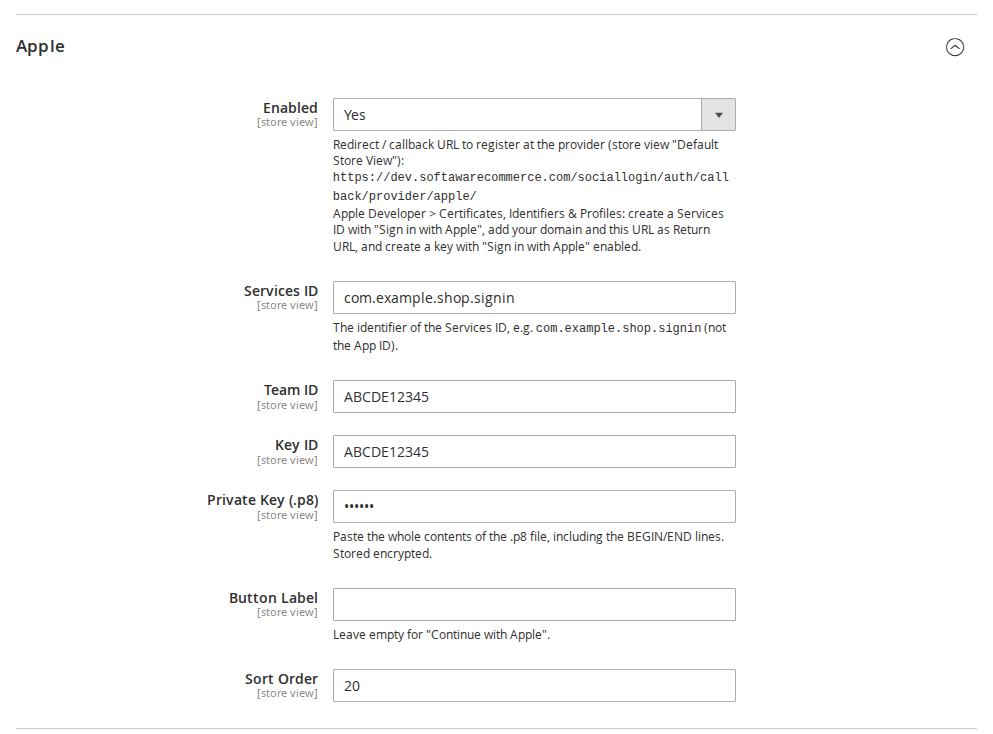
com.example.shop.signin, then register it. This identifier is what Magento calls the Services ID. - Configure it for your website. Open the Services ID, tick Sign in with Apple and select Configure. Choose the primary App ID from step 1. Under Website URLs, enter your store's domain (for example
www.example.com) and add the Magento callback URL (.../provider/apple/) as a return URL. Select Done, Continue and Save. No verification file is needed on your server. - Create the key. Go to Keys, select +, name the key, tick Sign in with Apple and configure it with the same primary App ID. Confirm, then Download the
.p8file. Apple stores no copy and you cannot download it again, so keep it somewhere safe. Note the Key ID shown with the key. - Find your Team ID. It is shown in your developer account's membership details.
- Register your email domains. Customers can hide their address behind Apple's private relay. For your order and account emails to reach them, go to Services, select Configure under Sign in with Apple for Email Communication, and register the domains or addresses Magento sends from. Apple requires them to pass SPF, and recommends DKIM as well; unregistered senders bounce.
In Magento: Apple > Services ID (the Services ID identifier, not the App ID), Team ID, Key ID, and Private Key (.p8): paste the whole file including the BEGIN and END lines.
Apple sends the customer's name only on the very first authorisation. If a customer has signed in to your store with Apple before (for example while you were testing), Apple will not send the name again and the module asks for it once.
How do you register a Microsoft (Entra ID) app?
Microsoft renamed Azure Active Directory to Microsoft Entra ID and keeps adjusting the admin centre's labels. Checked October 2026.
- Sign in to the Microsoft Entra admin centre with an account that has at least the Application Developer role. Microsoft's guide lists an Azure account as a prerequisite; a free one is enough.
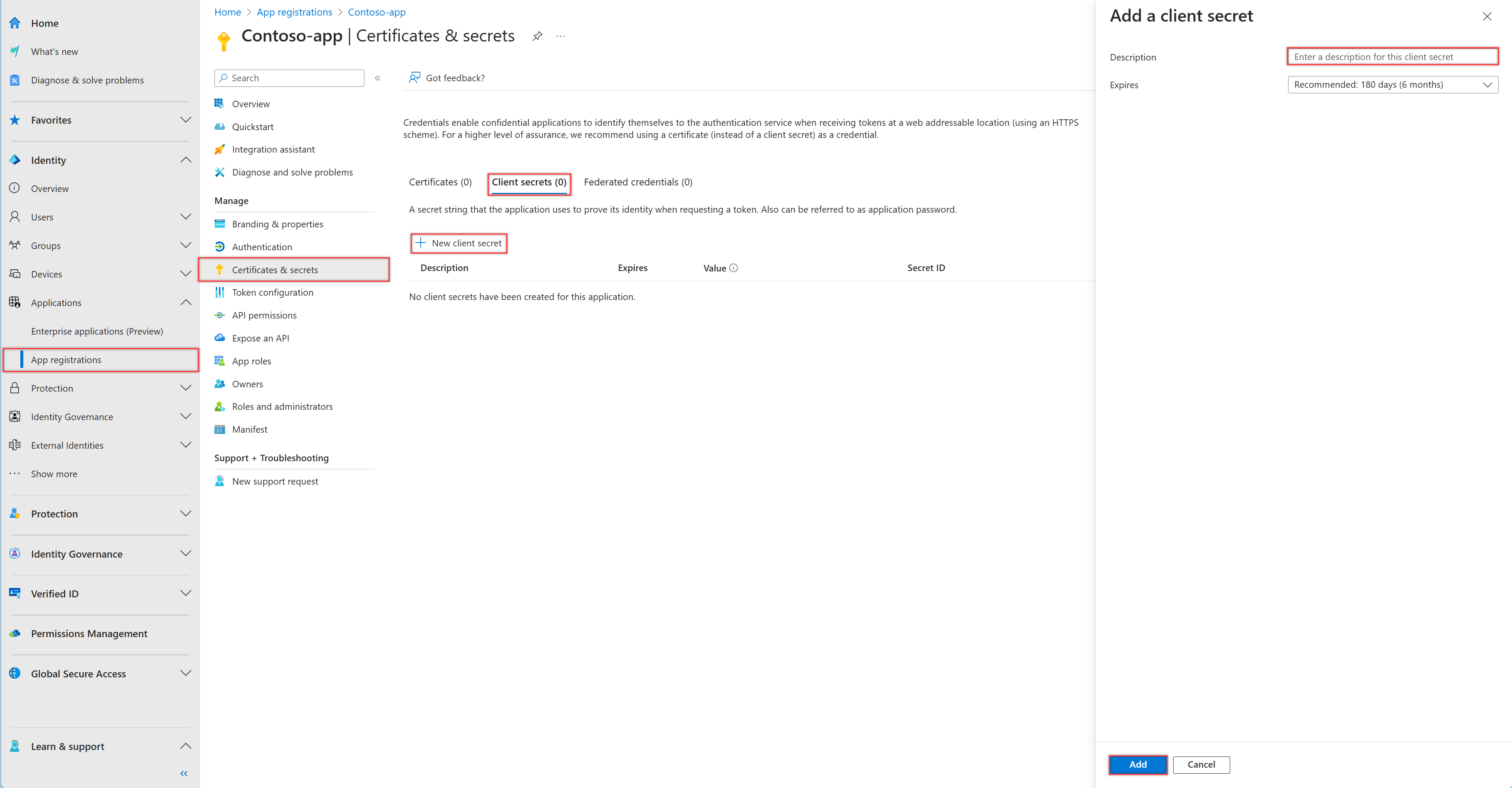
- Go to Entra ID > App registrations and select New registration.
- Enter a name customers will recognise, such as your store name.
- Supported account types: to let both personal and work accounts sign in, choose Any Entra ID Tenant + Personal Microsoft accounts (shown in older consoles as "Accounts in any organisational directory and personal Microsoft accounts"). For personal accounts only, choose Personal accounts only; for one company's staff, choose Single tenant only.
- Select Register. On the Overview page, copy the Application (client) ID.
- Under Manage > Authentication, select Add Redirect URI, choose the Web platform and enter the Magento callback URL (
.../provider/microsoft/). Select Configure. - Under Certificates & secrets > Client secrets, select New client secret, add a description and choose an expiry. Secrets last at most 24 months and Microsoft recommends less than 12. Select Add and copy the secret's Value (not the Secret ID) at once; it is never shown again.
- Optional: under Token configuration, add the optional claims
given_nameandfamily_name. Without them the module splits the display name into first and last name.
Which Tenant value to use in Magento:
| Supported account types in Entra | Tenant in Magento |
|---|---|
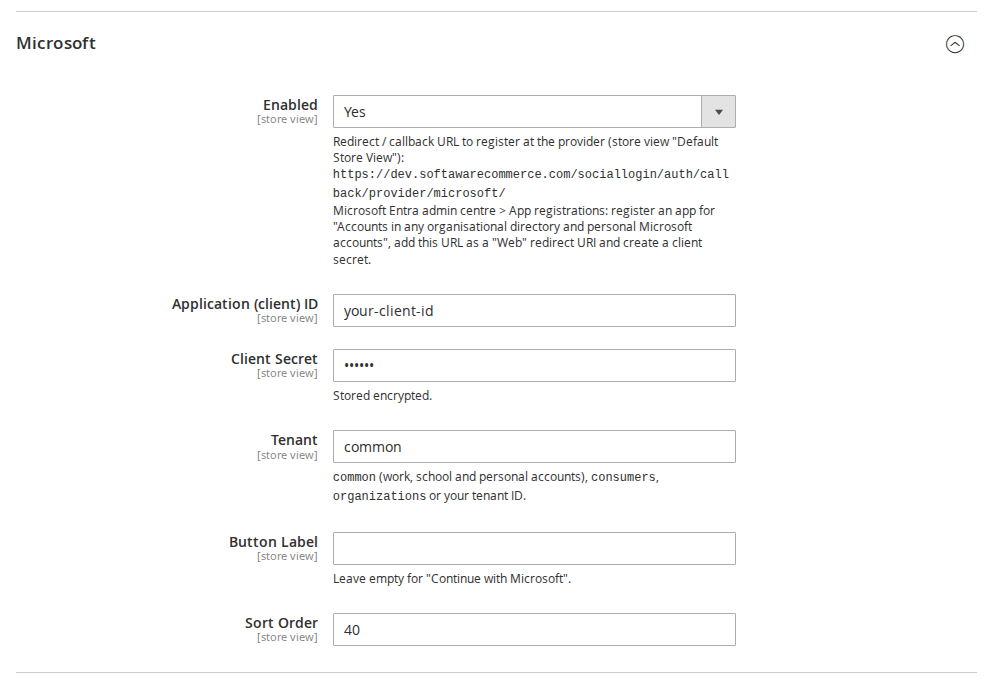
| Any Entra ID Tenant + Personal Microsoft accounts | common (default) |
| Personal accounts only | consumers |
| Multiple Entra ID tenants (work and school only) | organizations |
| Single tenant only | your tenant ID |
In Magento: Microsoft > Application (client) ID, Client Secret and Tenant.
Verification and cost. App registration is free. Publisher verification, which adds a blue "verified" badge to Microsoft's consent screen, is optional and free but needs a verified Microsoft AI Cloud Partner Program account. Microsoft's consent restrictions for unverified publishers apply to apps that ask for more than basic sign-in and profile permissions, which this sign-in does not. Put a reminder in your calendar for the secret's expiry date: when it expires, Microsoft sign-in stops until you paste a new one.
How do you get LinkedIn client credentials?
LinkedIn ties every developer app to a LinkedIn Page. Checked October 2026.
- Go to LinkedIn Developers > My apps and select Create app.
- Enter the app name, choose your company's LinkedIn Page (it acts as the app's publisher; you can create a Page from the form if you have none), add your privacy policy URL and a logo, and accept the terms.
- Verify the app. On the app's Settings tab, select Verify to generate a link and send it to a super admin of the Page. They have 30 days to approve it. LinkedIn says the approval cannot be undone and makes the admin responsible for the app.
- On the Products tab, request Sign In with LinkedIn using OpenID Connect. It is a self-serve product and gives the
openid,profileandemailscopes. - On the Auth tab, add the Magento callback URL (
.../provider/linkedin/) under Authorized redirect URLs for your app. LinkedIn requires absolute HTTPS URLs without#. - On the same tab, copy the Client ID and Primary Client Secret.
In Magento: LinkedIn > Client ID and Client Secret.
LinkedIn notes that Sign In with LinkedIn "does not verify user identities and should not be marketed as such". The module still checks LinkedIn's email_verified flag before linking an existing account.
How do you get Login with Amazon credentials?
Login with Amazon is set up through a "security profile". Checked October 2026; Amazon's registration page was last updated in December 2023.
- Open the Login with Amazon console and sign in, creating an Amazon Developer account if this is your first time.
- Select Create a New Security Profile. Enter a Name (shown to customers on the consent screen), a Description and the Consent Privacy Notice URL, which is required. A consent logo is optional. Save.
- In the Manage column, open Web Settings and select Edit.
- Add the Magento callback URL (
.../provider/amazon/) under Allowed Return URLs. Allowed Origins is only needed for Amazon's JavaScript SDK, which the module does not use. Save. - Copy the Client ID and Client Secret from the security profile's web settings.
In Magento: Amazon > Client ID and Client Secret.
Amazon's documentation does not say whether the email address it returns has been verified. The module therefore treats Amazon addresses as unverified: new accounts get Magento's confirmation email, and existing customers enter their password once to connect Amazon.
How do you create a GitHub OAuth app?
GitHub changed how callback URLs are matched in August 2026. Checked October 2026.
- On GitHub, open your profile picture menu, then Settings > Developer settings > OAuth Apps and select New OAuth App (or Register a new application if it is your first). For a company, create it under the organisation's settings instead, so it does not depend on one person's account.
- Enter the Application name, Homepage URL (your store) and an optional description.
- In Authorization callback URL, enter the Magento callback URL (
.../provider/github/). You can add up to ten callback URLs with Add callback URL, one per store view URL. - Leave Enable Device Flow off. Expire user access tokens can stay on; the module uses the token only during sign-in.
- Select Register application. Copy the Client ID, then select Generate a new client secret and copy the secret straight away.
- Since 3 August 2026, wildcard matching can be switched on or off per callback URL; apps created before that date have it on for their original callback. The module always sends the exact URL, so you can switch wildcard matching off.
In Magento: GitHub > Client ID and Client Secret.
The module reads the email address from the shopper's verified GitHub addresses, so an unverified GitHub email is never used.
Where do the credentials go in Magento?
All eight providers sit in one place: Stores > Configuration > Softaware > Social Login, also reachable from Softaware > Social Login > Configuration. Apple, Microsoft, GitHub, LinkedIn and Amazon appear there once Social Login Pro is installed; Google, Facebook and X come with Social Login for Magento 2.
- Set General > Enabled to Yes.
- Use the scope switcher at the top left if each website or store view has its own provider apps; every setting, including the credentials, can be set per store view.
- Open the provider's group, set Enabled to Yes, and paste the values. Secrets and the Apple key are stored encrypted.
- Optionally change the Button Label (empty means "Continue with ...") and Sort Order.
- Select Save Config and flush the cache.
To check the installation without contacting any provider, run:
bin/magento softaware:social-login:self-testThen sign in on the storefront with your own account at each provider. If something fails, var/log/softaware_sociallogin.log records the technical reason without secrets or tokens.
Frequently asked questions
What callback URL does the Magento social login module use?
It uses https://your-store/sociallogin/auth/callback/provider/<code>/, where the code is google, facebook, twitter, apple, microsoft, github, linkedin or amazon. The exact URL for the current store view is shown under each provider's Enabled field in the Magento admin. Copy it from there, because a missing www, store code or trailing slash makes the provider reject the sign-in.
Is Sign in with Apple free?
Not quite. Apple charges nothing per sign-in, but the Services ID and key can only be created with an Apple Developer Program membership, which costs US$99 a year. You also need a primary App ID, even without an iPhone app, and you should register your email sending domains with Apple so that order emails reach customers who hide their address.
Does Facebook Login need App Review for a Magento store?
For sign-in, normally not. Meta's Facebook Login for the web guide says the email and public_profile permissions do not require App Review. The app must still be published (Live), with a privacy policy URL and a data deletion URL or instructions. Check the requirements list in your app dashboard, because Meta asks for Business Verification for Advanced Access.
Does X charge for social login?
X's API uses pay-per-use pricing in 2026: you buy credits in the Developer Console and each request is deducted, with no free tier listed. Each sign-in reads the shopper's profile once. X lists user reads at US$0.010 per resource but does not name the sign-in endpoint, so confirm the rate in your console and set a spending limit before switching X on.
Why does Google show "redirect_uri_mismatch"?
The callback URL in the sign-in request does not exactly match one registered in your Google client. Compare the URL shown in the Magento admin with the Authorised redirect URIs in Google Auth Platform: scheme, www, store code and trailing slash must all match. Google can take from five minutes to a few hours to apply a changed redirect URI.
Can each store view use its own provider apps?
Yes. All settings, including client IDs and secrets, can be set per website and store view in Magento. Every store view URL also has its own callback URL, which must be registered with the provider. Most providers accept several callback URLs per app; GitHub and X allow up to ten. Separate apps let each brand show its own name on the consent screen.
Do Microsoft client secrets expire?
Yes. Microsoft limits client secrets to at most 24 months and recommends less than 12. When a secret expires, Microsoft sign-in stops working until you create a new secret in the Entra admin centre and paste its Value into Magento. Note the expiry date when you create it and set a reminder a few weeks before.
What to do next
Start with one provider, usually Google, on a staging store: register the callback URL, paste the credentials, run the self-test and sign in with your own account. Then add the others one at a time, publishing each provider app before you switch it on in production. If you are still deciding which providers to offer, our article on social login usage and provider choice summarises the published data.
Sources
Checked on 8 October 2026.
- Google Identity, "OpenID Connect": https://developers.google.com/identity/protocols/oauth2/openid-connect
- Google Cloud Help, "Manage OAuth Clients": https://support.google.com/cloud/answer/15549257
- Google Cloud Help, "Manage App Audience": https://support.google.com/cloud/answer/15549945
- Google Cloud Help, "OAuth App Verification Help Center" (verification requirements): https://support.google.com/cloud/answer/13464321
- Meta for Developers, "Facebook Login for the Web": https://developers.facebook.com/docs/facebook-login/web
- Meta for Developers, "Create an App": https://developers.facebook.com/docs/development/create-an-app
- Meta for Developers, "Data Deletion Callback": https://developers.facebook.com/docs/development/create-an-app/app-dashboard/data-deletion-callback
- Meta for Developers, "Permissions Reference": https://developers.facebook.com/docs/permissions
- Meta for Developers, "Graph API changelog: versions": https://developers.facebook.com/docs/graph-api/changelog/versions
- X Developer Platform, "Apps": https://docs.x.com/fundamentals/developer-apps
- X Developer Platform, "OAuth 2.0 Authorization Code Flow with PKCE": https://docs.x.com/resources/fundamentals/authentication/oauth-2-0/authorization-code
- X Developer Platform, "Pricing": https://docs.x.com/x-api/getting-started/pricing
- X Developers community, "Announcing support for email address retrieval with OAuth 2.0 in the X API v2": https://devcommunity.x.com/t/announcing-support-for-email-address-retrieval-with-oauth-2-0-in-the-x-api-v2/240555
- Apple Developer, "Apple Developer Program": https://developer.apple.com/programs/
- Apple Developer, "Configure Sign in with Apple for the web": https://developer.apple.com/help/account/capabilities/configure-sign-in-with-apple-for-the-web/
- Apple Developer, "Register an App ID": https://developer.apple.com/help/account/identifiers/register-an-app-id/
- Apple Developer, "Create a private key": https://developer.apple.com/help/account/keys/create-a-private-key/
- Apple Developer, "Configure private email relay service": https://developer.apple.com/help/account/capabilities/configure-private-email-relay-service/
- Microsoft Learn, "How to register an app in Microsoft Entra ID": https://learn.microsoft.com/en-us/entra/identity-platform/quickstart-register-app
- Microsoft Learn, "How to add a redirect URI to your application": https://learn.microsoft.com/en-us/entra/identity-platform/how-to-add-redirect-uri
- Microsoft Learn, "Add and manage app credentials in Microsoft Entra ID": https://learn.microsoft.com/en-us/entra/identity-platform/how-to-add-credentials
- Microsoft Learn, "Publisher verification overview": https://learn.microsoft.com/en-us/entra/identity-platform/publisher-verification-overview
- Microsoft Learn (LinkedIn), "Sign In with LinkedIn using OpenID Connect": https://learn.microsoft.com/en-us/linkedin/consumer/integrations/self-serve/sign-in-with-linkedin-v2
- Microsoft Learn (LinkedIn), "LinkedIn 3-Legged OAuth Flow": https://learn.microsoft.com/en-us/linkedin/shared/authentication/authorization-code-flow
- LinkedIn Help, "Associate an app with a LinkedIn Page": https://www.linkedin.com/help/linkedin/answer/a548360
- LinkedIn Help, "Send an app verification request for a LinkedIn Page": https://www.linkedin.com/help/linkedin/answer/a1665329
- Amazon Developer, "Register for Login with Amazon" (web): https://developer.amazon.com/docs/login-with-amazon/register-web.html
- Amazon Developer, "Customer Profile": https://developer.amazon.com/docs/login-with-amazon/customer-profile.html
- GitHub Docs, "Creating an OAuth app": https://docs.github.com/en/apps/oauth-apps/building-oauth-apps/creating-an-oauth-app
- GitHub Docs, "Authorizing OAuth apps" (redirect URLs): https://docs.github.com/en/apps/oauth-apps/building-oauth-apps/authorizing-oauth-apps
- SoftAware Social Login and Social Login Pro user guides (module documentation, version 1.3.0 and 1.0.0).
From our shop
Related Products
-
Social Login for Magento 2
One-click sign-in and registration with Google, Facebook and X — on the sign-in page, at checkout and anywhere you place the buttons.
- Magento 2.4.7 – 2.4.9
- Hyvä
- Luma
- Version v1.3.0
Free
-
Social Login Pro
Add Apple, Microsoft, LinkedIn, Amazon and GitHub sign-in to Softaware Social Login — same buttons, same settings, same account rules.
- Magento 2.4.7 – 2.4.9
- Hyvä
- Luma
- Version v1.0.0
From$149

