Every extra form field costs you customers. Social Login lets shoppers sign in and create an account with Google, Facebook or X in one click: on the sign-in page, the registration page, the checkout and anywhere else you place the buttons.
It is built for production stores: no third-party SDKs, every ID token fully validated, PKCE where the provider supports it, and careful rules for linking an existing account so a social sign-in can never be used to take over someone else's account. It works on Luma and Hyvä, per website and store view, and stores nothing but the link between the customer and the provider.
Sign up in one click
Shoppers use the account they already have. No form to fill in and no new password to remember.
Sign in at checkout
The buttons sit in the checkout sign-in popup and above the email field, right where shoppers decide.
Safe by design
Every ID token is validated and accounts are only linked when the email address can be trusted.
All features
What is included
Providers
Google (OpenID Connect with PKCE)
Facebook (Graph API with appsecret_proof)
X / Twitter (OAuth 2.0 with PKCE, optional email)
Your own button labels and order
More providers with Social Login Pro
Where the buttons appear
Sign-in page
Create-account page
Authentication popup and checkout sign-in
Checkout email step (guests)
CMS widget and layout block
Accounts
New accounts in the customer group you choose
Optional welcome email
Link existing customers automatically or after their password
Existing customers only mode for B2B and trade shops
Works with Softaware Customer Approval
Customer experience
Popup or full-page sign-in
Icon and text or icon only, light or dark
Stay on the page, go to My Account or a custom URL
Connected Accounts in My Account
Short form when a provider gives no email or name
Security and privacy
Single-use state bound to the browser
ID tokens validated: signature, issuer, audience, expiry, nonce
Email addresses trusted only when verified
Confirmation email for unverified addresses
No access tokens stored; links deleted with the customer
Admin and developers
Linked Accounts grid and customer tab
Separate ACL permissions
CLI: list, unlink and self-test
Per website and store view settings
Extension point for more providers
Feature tour
Everything your shoppers and your team see
01 / 07
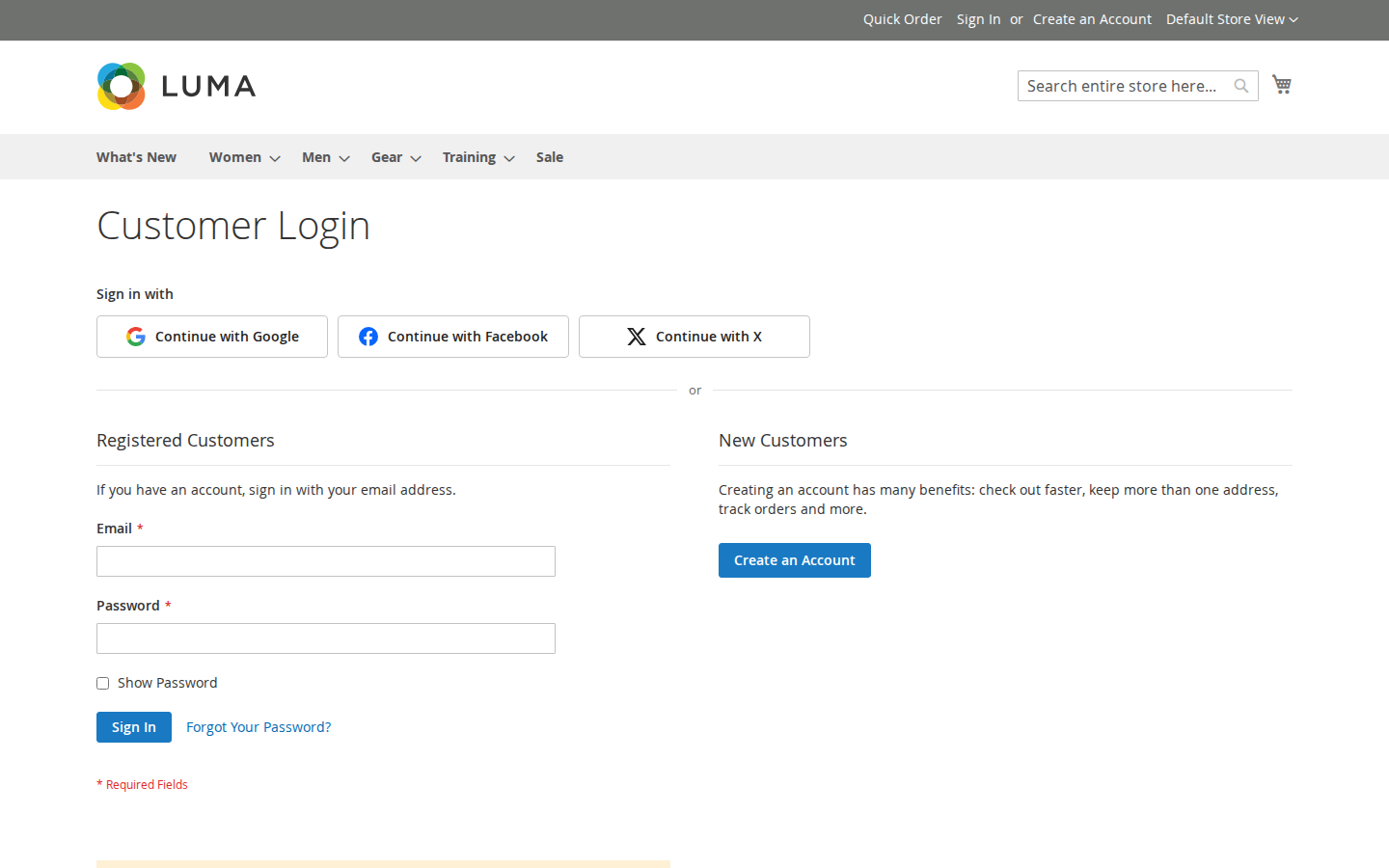
One click instead of a form
Buttons above the sign-in and registration forms. Icon and text or icon only, light or dark, in the order you choose.
02 / 07
Sign in without leaving the checkout
The "Sign In" popup on the checkout page and the authentication popup show the same buttons, so returning customers check out faster.
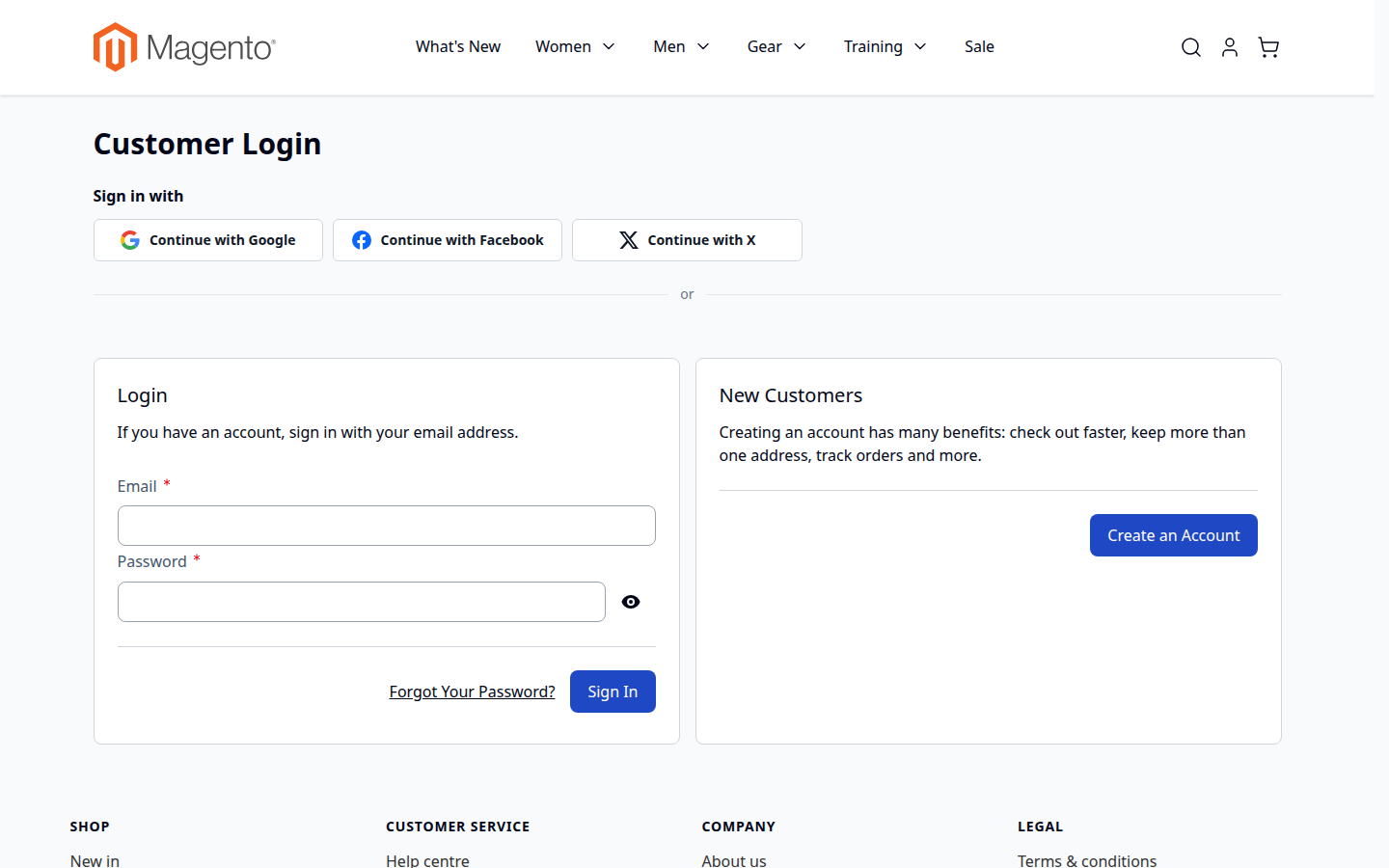
03 / 07
Native Hyvä templates
Alpine.js and Tailwind templates for Hyvä 1.3+, picked automatically. Luma, Blank and their child themes work out of the box.
04 / 07
Made for small screens
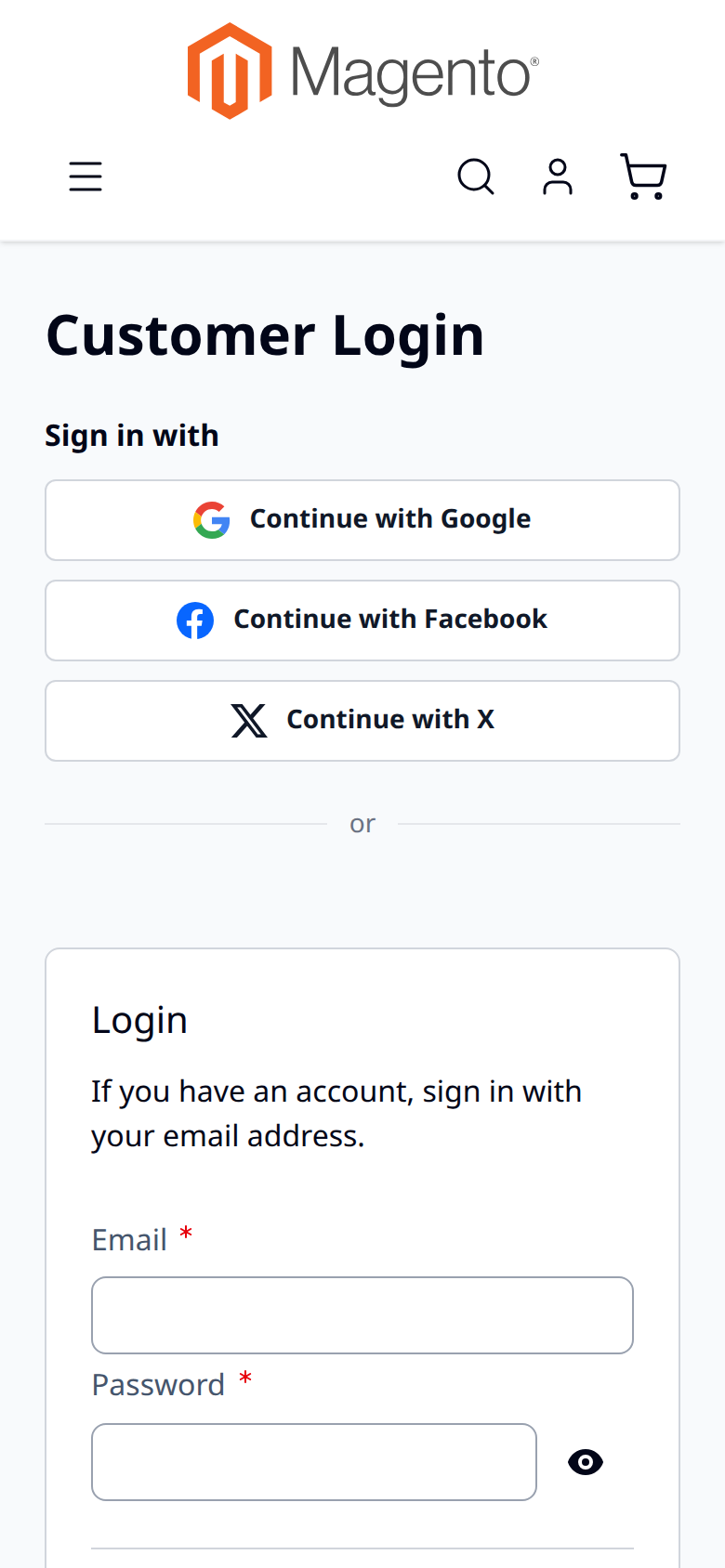
Buttons stack into full-width rows on phones, where typing an email address and a password is hardest.
05 / 07
Customers manage their connections
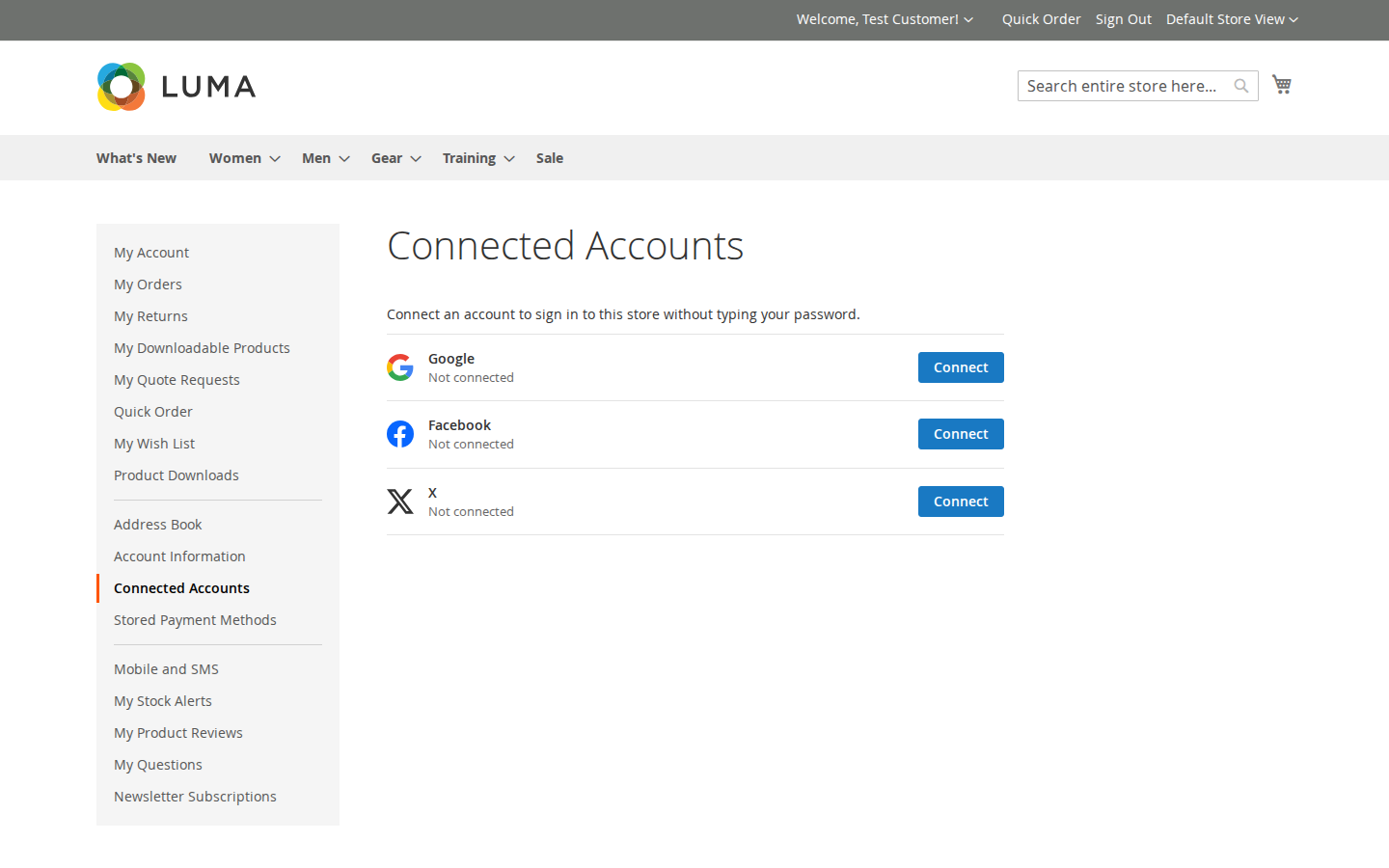
My Account › Connected Accounts lists the linked providers. Customers connect another one or disconnect one — never the last way to sign in.
06 / 07
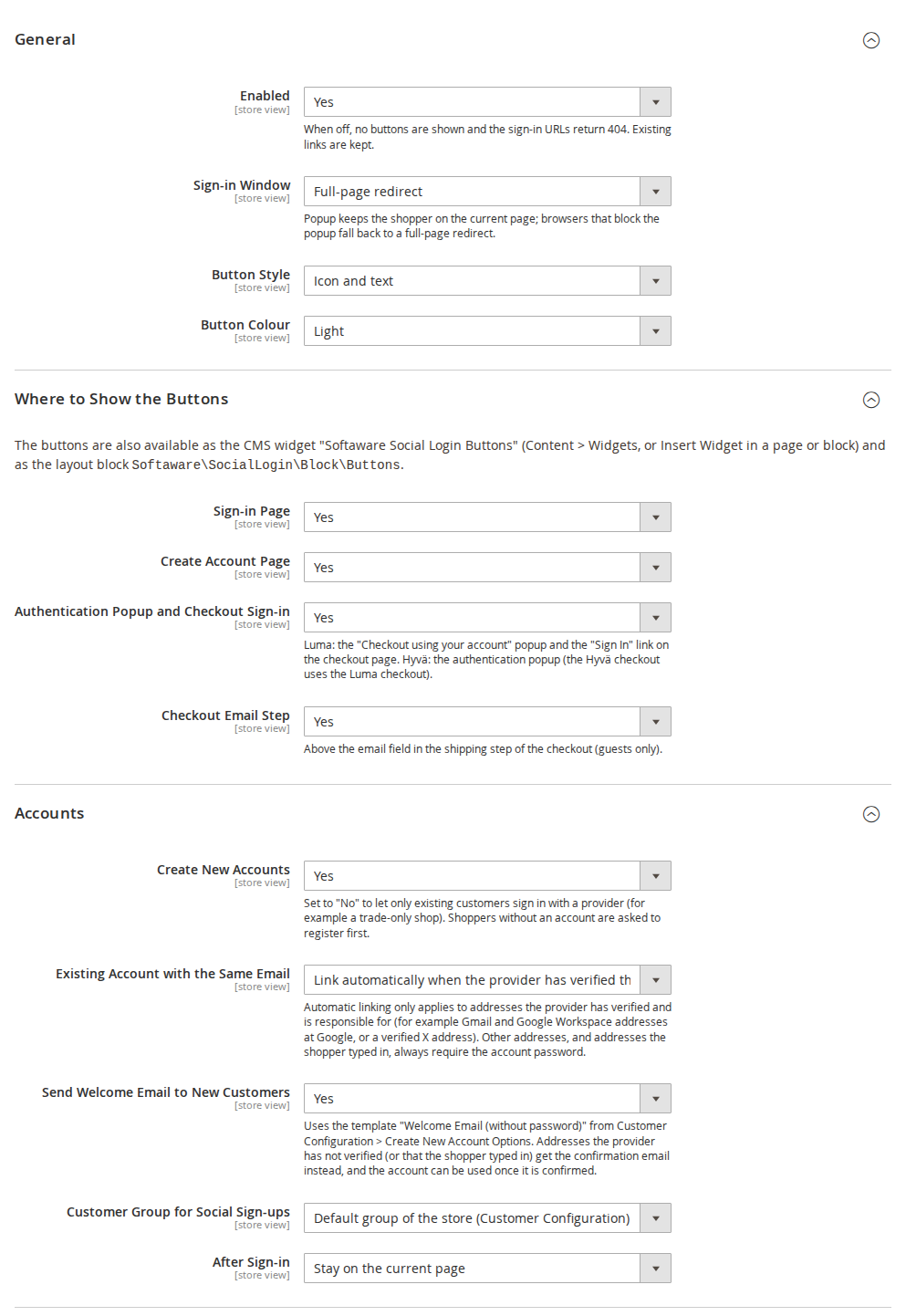
One settings page, per store view
Choose where the buttons appear, how they look, what happens after sign-in and which customer group new accounts join.
07 / 07
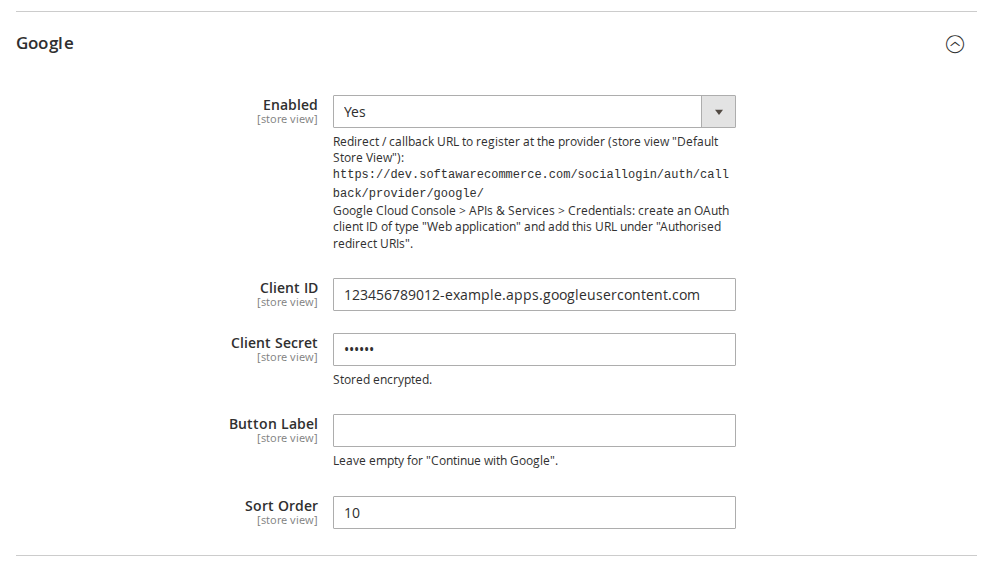
The exact callback URL, ready to copy
Each provider shows the callback URL to register for the current store view, with short setup steps. Secrets are stored encrypted.
Live demo
Try it before you install it
A full Magento store with the module installed, on Luma and on Hyvä. The admin demo signs you in with one click.
The last three are only needed in production mode.
Prefer a zip? Every version you are entitled to can be downloaded from My modules. More about Composer access
User guide
How to set up and use Social Login
For version 1.3.0. The same guide comes with the module, in docs/user-guide.md.
Let customers sign in and register with Google, Facebook and X (Twitter) in one click. This guide covers installation, configuration, provider setup and day-to-day use.
No provider SDKs or JWT libraries are installed: the module talks to the providers through Magento's own HTTP client and PHP's OpenSSL extension.
2. Installation
With Composer (recommended). Use the access keys from your account on shop.softawarecommerce.com:
composer config repositories.softaware composer https://repo.softawarecommerce.com
composer config --auth http-basic.repo.softawarecommerce.com PUBLIC_KEY PRIVATE_KEY
composer require softaware/module-social-login
bin/magento setup:upgrade
bin/magento setup:di:compile # production mode only
bin/magento setup:static-content:deploy # production mode only
bin/magento cache:flush
On Hyvä, the module's templates are picked automatically. If you build Tailwind CSS from your theme, run your usual Hyvä build after installing so the button styles are included.
To update later: composer update softaware/module-social-login, then the same bin/magento commands.
3. Quick start (10 minutes)
Stores > Configuration > Softaware > Social Login (also under Softaware > Social Login > Configuration).
General > Enabled = Yes.
Open a provider group, e.g. Google, set Enabled = Yes. Below the field you now see the callback URL for the current store view, for example https://www.example.com/sociallogin/auth/callback/provider/google/.
Create an OAuth app at the provider (see section 5), register that callback URL exactly as shown, and copy the client ID and secret back into Magento.
Save Config and flush the cache. The buttons appear on the sign-in and create-account pages.
Google provider settings with the callback URL
4. Settings
General, display and account settings
All settings can be set per website and store view, so each domain can use its own provider apps.
General
Setting
What it does
Enabled
Switches the whole module on or off. When off, no buttons are shown and the sign-in URLs return 404; existing links between customers and providers are kept.
Sign-in Window
Full-page redirect or Popup. A popup keeps the shopper on the current page; browsers that block it fall back to a redirect.
Button Style
Icon and text, or icon only.
Button Colour
Light or dark.
Where to Show the Buttons
Setting
What it does
Sign-in Page
Buttons above the sign-in form.
Create Account Page
Buttons above the registration form.
Authentication Popup and Checkout Sign-in
Luma: the "Checkout using your account" popup and the "Sign In" link on the checkout page. Hyvä: the authentication popup.
Checkout Email Step
Buttons above the email field in the shipping step (guests only).
The buttons are also available as a CMS widget and a layout block (section 7).
Accounts
Setting
What it does
Create New Accounts
Yes: shoppers without an account get one on their first social sign-in. No: only existing customers can sign in with a provider (useful for trade-only shops).
Existing Account with the Same Email
Link automatically when the provider has verified the address and is responsible for it, or Ask for the password every time. Other addresses always ask for the account password once.
Send Welcome Email to New Customers
Sends the "Welcome Email (without password)" template.
Customer Group for Social Sign-ups
The store's default group or a fixed group.
After Sign-in
Stay on the current page, go to My Account, or a custom URL.
Providers
Each provider has Enabled, its credentials (stored encrypted), an optional Button Label (empty = "Continue with …") and a Sort Order for the button position.
5. Setting up the providers
Register the callback URL shown under the provider's Enabled field. With several store views or domains, register one callback URL per store view URL.
Provider
Where to create the app
What to enter in Magento
Google
Google Cloud Console > APIs & Services > Credentials > Create OAuth client ID (Web application); add the callback under "Authorised redirect URIs".
Client ID, Client Secret
Facebook
Meta for Developers: add the Facebook Login product, enter the callback under "Valid OAuth Redirect URIs", request the email permission.
App ID, App Secret, Graph API version
X
X Developer Portal > User authentication settings: OAuth 2.0, type "Web App", callback URL.
Client ID, Client Secret; "Request Email Address" only if the app has the email permission
6. What your customers see
Signing in or registering. The customer clicks a button, approves at the provider and is signed in. A new customer gets an account with the name and email from the provider. If the provider gives no email (X without the email permission) or no name, the customer fills in a short form once.
Existing customers. If a customer with the same email already exists, the identity is linked to that account (automatically or after the password, see Accounts). From then on the provider signs them in directly.
Unverified addresses. A new account made from an address the provider has not verified must be confirmed with Magento's confirmation email before it can be used, even if your store does not normally require confirmation.
Connected Accounts. Under My Account > Connected Accounts customers see their linked providers, connect another one or disconnect one. Disconnecting is refused when it would leave the account without any way to sign in (no password and no other provider).
Connected Accounts in My Account
Hyvä and mobile. The Hyvä templates are included and the buttons stack on small screens.
Hyvä
Mobile
7. Widget and layout block
CMS widget: Content > Widgets > Add Widget > "Softaware Social Login Buttons" (heading, style, colour), or Insert Widget in a page or block.
The block picks the Luma or Hyvä template automatically and hides itself for signed-in customers in the browser, so it is safe on full-page-cached pages.
8. Admin tools
Softaware > Social Login > Linked Accounts: every link between a customer and a provider, with filters, last sign-in and number of sign-ins; remove links singly or in bulk.
Customers > edit customer > Social Login tab: the customer's links.
ACL: separate permissions for viewing links, removing links and the configuration.
Links of a provider that is not installed (for example after removing an add-on) stay visible with their provider code and can be removed; customers can remove them under Connected Accounts too.
self-test lists the registered providers and checks the security pieces (PKCE, ID token validation including tampered, expired and wrong-audience tokens, return URL handling, email trust rules) without calling any provider. Installed add-ons such as Social Login Pro add their own checks. With --accounts it also checks the account-matching rules using temporary test customers that are deleted afterwards.
10. Privacy (GDPR)
The module stores only the link between a customer and a provider account (provider, provider user ID, email and display name at the provider, link date, last sign-in and number of sign-ins). No access tokens are kept.
Links are deleted together with the customer.
Pending sign-in data is deleted after 15 minutes by cron.
Mention the sign-in providers you use in your privacy policy.
11. Troubleshooting
Problem
Solution
The buttons do not appear
Check General > Enabled, the provider's Enabled, client ID and secret for the store view you are looking at, then flush the cache.
"redirect_uri_mismatch" or similar at the provider
The callback URL registered at the provider differs from the one shown in Magento (http vs https, www, store code, trailing slash). Copy it again exactly.
The popup does not open
The browser blocked it; the module falls back to a full-page redirect. Choose Full-page redirect if you prefer.
Customer is asked for the password
Expected when the provider has not verified the address or is not responsible for it (see Accounts). It happens once; afterwards the provider signs them in directly.
Sign-in fails
See var/log/softaware_sociallogin.log for the technical reason (no secrets or tokens are logged).
12. More providers: Social Login Pro
The add-on Social Login Pro (softaware/module-social-login-pro) adds Sign in with Apple, Microsoft (Entra ID), LinkedIn, Amazon and GitHub. After installing it (composer require softaware/module-social-login-pro, then the bin/magento commands from section 2), the new providers appear as groups in the same configuration section and use all the settings in this guide. Its own user guide describes the provider setup.
If Social Login Pro is installed, remove it first (composer remove softaware/module-social-login-pro).
Customers created through social sign-in keep their accounts; they can set a password with "Forgot Your Password?".
Changelog
Release notes
1.3.0
Latest
Works with Social Login Pro (Apple, Microsoft, LinkedIn, Amazon and GitHub): the add-on's providers appear in the same configuration section, button rows, Connected Accounts page, admin grid and self-test.
Extension points for modules that add providers: button icons per provider code (icons argument of ViewModel\ProviderIcons), self-test checks (Model\SelfTest\CheckInterface, checks argument of the self-test command), and the callback URL comment for the admin (documented in the README together with the provider pool and the settings).
Links of providers that are not installed are handled safely: the Linked Accounts grid (column and filter), the customer tab and Connected Accounts show them with their provider code, customers and admins can remove them, and they do not count as a way to sign in when the customer disconnects another provider.
Self-test: lists the registered providers; ES256 ID token checks (valid token, tampered payload, algorithm whitelist); a rejected issuer for issuer patterns; the handling of links whose provider is not installed.
README, user guide and FAQ: provider extension points for developers, Social Login Pro; new screenshots.
1.2.1
Documentation
User guide (docs/user-guide.md): installation, every setting, provider setup, admin tools, CLI, privacy, troubleshooting.
FAQ (docs/faq.md) and screenshots (docs/images/).
README: demo links; compatibility corrected to Magento 2.4.7-2.4.9 and softaware/module-core ^1.0.
1.2.0
Requires softaware/module-core instead of softaware/module-base. The admin menu and ACL now sit under Softaware_Core::core ("Softaware"); roles that had access keep it (migrated by module-core). After updating all SoftAware modules, softaware/module-base can be removed.
1.1.0
Open redirect after sign-in fixed: return URLs such as https:///evil.example/ or https://evil.example\@your-shop/ passed the "own host" check (PHP and browsers read them differently) and sent the customer to another site after signing in. Return URLs are now parsed strictly (no backslashes, control characters, user info or empty hosts) before the host check.
Pre-account hijacking: an account created from an email address the provider has not verified (typed in by the shopper, Amazon, the test provider) now always needs Magento's email confirmation before it can be used, whether or not the store requires confirmation. Before, anybody could create an account in someone else's name through a provider without email (e.g. X) and keep access through the linked provider after the real owner had reset the password.
Linking to an existing account by email is limited to providers that are responsible for the address: Google only for Gmail and Google Workspace addresses (Google's own guidance), Facebook no longer (the Graph API has no verification flag). Everything else asks for the account password once, as before for unverified addresses. The same rule applies when an unconfirmed account is confirmed through a provider.
Accounts > Create New Accounts (default Yes). Set to No to let only existing customers sign in with a provider; shoppers without an account are asked to register first.
Hint on the "Connect your account" password step for customers who signed up with another provider and have no password.
Self-test: return URL (open redirect) checks and email trust rules per provider.
With "Require Emails Confirmation" switched on, a new social customer with an unverified address got the "welcome (no password)" email without a confirmation link and could never activate the account. The confirmation email is now sent.
With "Require Emails Confirmation" switched on, accounts created from a verified address stayed unconfirmed in the database (password sign-in later said "not confirmed"). They are now confirmed.
When another module refused the sign-in (e.g. Softaware Customer Approval: account waiting for approval), the customer saw two messages; now only the other module's explanation is shown. A refused sign-in is also detected when the session ends up with a different customer.
1.0.0
First release.
Sign-in and registration with Google, Sign in with Apple, Facebook, Microsoft (Entra ID), GitHub, LinkedIn, Amazon and X (Twitter), implemented directly on OAuth 2.0 / OpenID Connect (no provider SDKs).
State, nonce and PKCE (S256) where supported; ID token signature validation via JWKS (RS256/ES256) for Google, Microsoft, Apple and LinkedIn; browser-bound, single-use state stored server-side.
Apple: ES256 client secret from the .p8 key, form_post callback with session restore.
Buttons on the sign-in and create-account pages, the Luma authentication popup, the checkout sign-in and (optional) checkout email step, the Hyvä authentication popup, a CMS widget and a layout block. Icon+text or icon-only, light or dark, popup or full-page redirect.
Account matching: verified email links automatically (or asks for the password, configurable); missing email or name is asked for on a short form; new customers get a configurable group and optional welcome email.
My Account > Connected Accounts (connect, disconnect with lock-out protection).
Admin grid Softaware > Social Login > Linked Accounts, "Social Login" tab on the customer edit page.
Google, Facebook and X (Twitter). Each one can be switched on separately, per website or store view.
Can I offer Apple, Microsoft, LinkedIn, Amazon or GitHub as well?
Yes, with the add-on Social Login Pro. It adds these five providers to the same configuration section, buttons, Connected Accounts page and admin tools; everything described here applies to them too.
Does it work with Hyvä?
Yes. Hyvä templates are included (Hyvä 1.3+, tested with 1.5). On the Hyvä checkout the Luma checkout fallback is used, so the checkout buttons are the Luma ones.
Does it install third-party SDKs?
No. OAuth 2.0 and OpenID Connect are implemented on Magento's HTTP client and PHP's OpenSSL extension, so there are no extra libraries to keep up to date or to conflict with other extensions.
Where can the buttons appear?
On the sign-in page, the create-account page, the authentication popup and the checkout sign-in, above the email field in checkout (guests), anywhere as a CMS widget, and anywhere in your layout as a block.
What happens if a customer already has an account with the same email?
The provider is linked to that account. If the provider has verified the address and is responsible for it (for example Gmail addresses at Google), this happens automatically; otherwise, or if you choose so, the customer enters their account password once. After that the provider signs them in directly.
Can I allow only existing customers to sign in with a provider?
Yes: set Create New Accounts to No. Shoppers without an account are asked to register first. This is useful for B2B and trade-only shops.
Does it work with customer approval?
Yes, with Softaware Customer Approval: social sign-ups get an approval status like any other registration, and pending or rejected customers are not signed in.
What if the provider does not give an email address?
X never returns one unless your app has the email permission. The customer then enters an email address once; an account created from a typed-in address must be confirmed by email before it can be used.
Can customers remove a connection?
Yes, under My Account > Connected Accounts. The module refuses to remove the last way to sign in (no password and no other provider). Admins can remove links under Softaware > Social Login > Linked Accounts.
Is it GDPR friendly?
Only the link between the customer and the provider account is stored, no access tokens. Links are deleted with the customer, and pending sign-in data is deleted after 15 minutes.
How is it protected against account takeover?
Every sign-in uses a single-use state bound to the browser, PKCE where the provider supports it, and full ID token validation (signature, issuer, audience, expiry, nonce). Email addresses are only trusted when the provider has verified them, and accounts from unverified addresses must be confirmed by email first. Return URLs are restricted to your own store.
Can I use different provider apps for each domain?
Yes. All settings, including the credentials, can be set per website and store view. Register one callback URL per store view URL at the provider.
Can I add another provider?
Yes, developers can implement ProviderInterface (or extend AbstractOidcProvider) and register it in di.xml; icons, settings and self-test checks have extension points too. See the README.
What happens to links of a provider that is not installed (for example after removing an add-on)?
They are kept and shown with their provider code in the admin and under Connected Accounts, where they can be removed. They are not counted as a way to sign in, so customers are never left without one.
Which Magento and PHP versions are supported?
Magento Open Source and Adobe Commerce 2.4.7 – 2.4.9, PHP 8.2 – 8.5.
Why Luma extensions break on a Hyvä storefront, how to check an extension before you buy or migrate, and the four ways to fix it: vendor support, a compatibility module, the Luma theme fallback or your own compat module.
A practical walkthrough of installing, updating and removing Magento 2 extensions with Composer, including private repositories, auth.json and the errors you are most likely to meet.
Buy when the requirement is common and a well-built extension fits your processes. Build when the logic is unique to your business or ties into your own systems. Here is how to tell the difference.
What the published data says about social login: how often it is used, which providers win, how passkeys and in-app browsers change the picture, and what that means for a Magento store.
Where to create each sign-in app, which callback URL and scopes to use, what each provider charges or reviews, and where the keys go in the Magento admin.
Read the guide →
We value your privacy
We use necessary cookies to run this site and, with your permission, Google Analytics to understand how it is used. You can accept analytics, reject it or choose in the settings. Cookie policy
Cookie preferences
Choose which cookies you allow. Necessary cookies are always on because the shop cannot work without them. You can change your choice at any time with the "Cookie settings" link.
Always on
Needed for the basket, checkout, login and security. They do not track you.
Google Analytics: how many people visit, which pages they read and how they found the site. It sets the _ga cookies and sends usage data to Google.