Who changed this price? Tracking admin changes and sign-ins in Magento 2
Magento Open Source records when a product was last updated, but not who changed it or what the old value was. Here is how to trace a price change and what an admin activity log adds.
Say a customer emails on Monday morning. On Saturday a jacket was £89 in your shop; today it is £69, and she wants the difference back. You open the product in the admin and the price field says £89. Somebody in the team says they did not touch it. Another remembers a weekend promotion but is not sure whether it ever went live.
In Magento Open Source you cannot settle this from the admin. Magento stores the current values of a product and a last updated time, but not who changed what, or what the value was before. Adobe Commerce has an Action Logs report for this; Adobe describes it as available only in Adobe Commerce, not in Magento Open Source1. On Open Source the history has to come from somewhere else: an extension, your own logging, or a lot of guesswork.
First, find where the price came from
Before asking who changed a price, it is worth checking which price the customer actually saw, because the number on the product page is not always the price field.
Check the product in the right scope. If your price scope is set to website, a price edited for one website does not show on the default scope, and the person looking at the default scope sees the old figure. Then look at Advanced Pricing on the product: a special price with from and to dates, or a tier or customer group price, changes what a customer pays without touching the price field. Then look at Marketing > Catalog Price Rules. A rule with dates can switch itself on over a weekend: rules are applied by the catalog rule indexer and by a daily cron job (catalogrule_apply_all, at 01:00 by default), so the effect of a dated rule can appear long after someone saved it.
Finally, ask whether anything outside the admin writes prices: an ERP or PIM integration through the REST API, a scheduled import, a script run on the server. On many stores that is the most likely source, and it is also the one an admin log cannot see.
If all of that comes back clean and the price field itself changed, you are looking for a person, and that is where Magento's own records run out.
What Magento records on its own
Magento Open Source does keep a few traces. The admin_user table has the time of each user's last sign-in and a count of sign-ins. The Magento_Security module keeps admin sessions with their IP address, so an admin can see their own other sessions and sign them out. Accounts are locked after too many failed attempts and listed under System > Permissions > Locked Users. Products and most other records have an updated_at column.
None of this answers the question. updated_at tells you that the jacket was saved on Saturday at 22:14, not by whom, not in which scope and not what the old price was. Session records are cleaned up after they expire. There is no list of failed sign-ins, and no record of a changed configuration value apart from the new value itself.
What a useful log records
An admin activity log is useful when it answers a dispute in one look. For a price that means the admin user, the time, the record, the field, the old value and the new value, the scope, and the IP address the change came from. For a sign-in it means who tried, from where, whether it worked and, if not, why. And it has to cover the records people actually argue about: products, categories, price rules, CMS content, customers, orders and configuration.
That is what we built Admin Activity Log to do. Every create, update and delete of those records in the admin is stored with a field by field list of old and new values. The detail view shows the change, a link to open the record, the admin page it was made on and any other changes made in the same request.
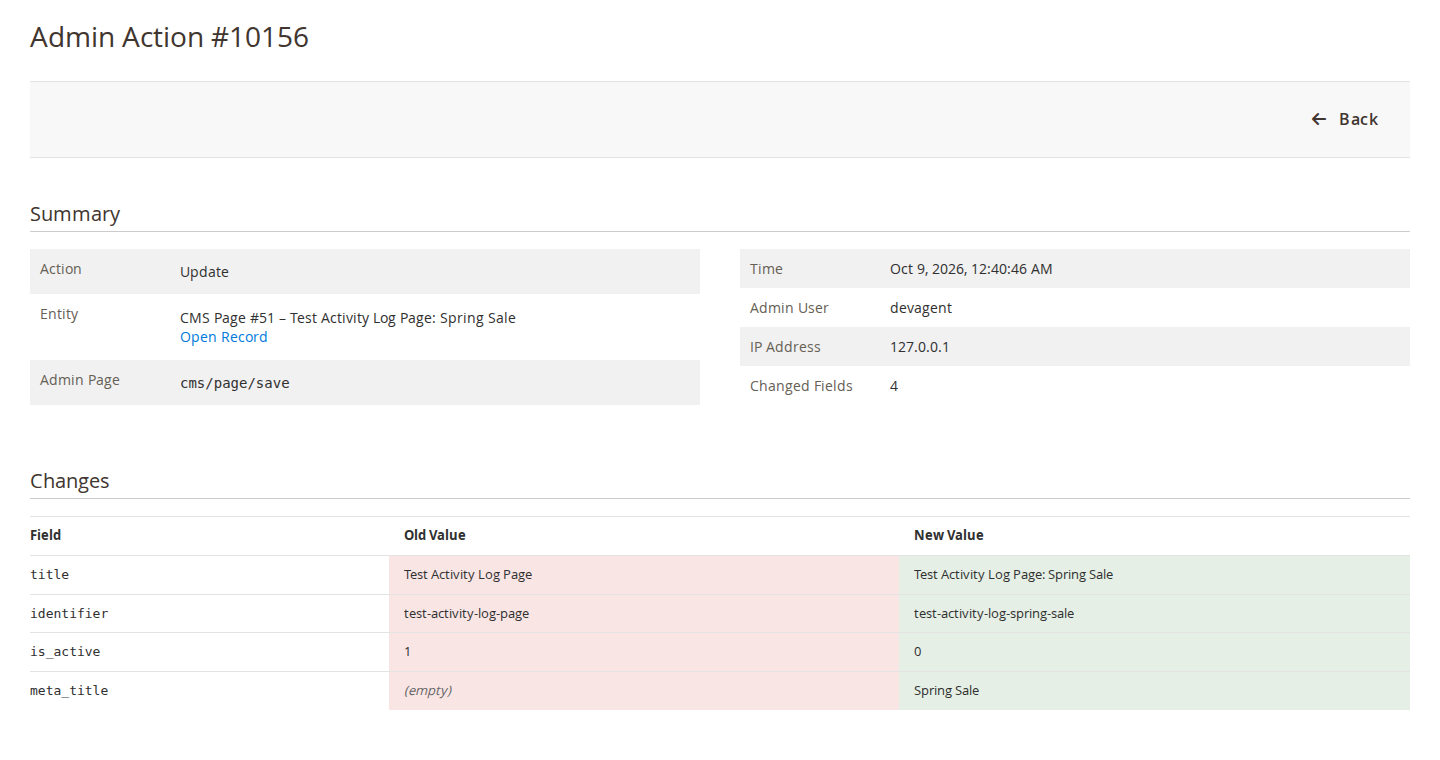
In the jacket example, you would filter the Admin Actions grid by the product, see an Update entry from Saturday evening with the old and new value of price or, just as useful, no such entry at all. If a catalog price rule was saved instead, the rule has its own entry with its dates and discount, because cart price rules and catalog price rules are logged too. Mass actions and the product "Update attributes" action are logged with the selection and the parameters, and imports from System > Data Transfer > Import are logged with the entity, behaviour and the created, updated and deleted counts.
Sign-ins have their own log: successful and failed attempts with the reason (unknown username, wrong password, inactive account, locked), lockouts, sign-ins refused by the optional IP allowlist, and sign-outs, each with IP address and browser. The Active Sessions page shows who is signed in right now, and you can end a session from there. Alerts by email and in the admin inbox can be sent after repeated failed sign-ins from one IP address, on a lockout, and when an admin signs in from an IP address they have not used before.
A log of admin activity must not become a list of secrets, so passwords, tokens, API keys, card fields and configuration values Magento marks as sensitive are stored as ******. You can still see that they changed. Entries are kept for 90 days by default and removed by a daily cron job, and changes to the log's own settings are always kept, so shortening the retention or switching logging off stays on record.
What it will not tell you
The limits matter as much as the features, because a log that you think is complete is worse than none.
The module logs changes made in the admin panel and configuration changes made with bin/magento config:set. It does not log changes made through the REST or SOAP API, by cron jobs, by command-line imports or by direct SQL. If an ERP updates your prices through the API, the log will show nothing for that product, which at least points you to the integration. Some "Update attributes" runs go through Magento's message queue and are written with direct SQL; those show as the mass action that started them, not as one entry per product. Very large field values are cut to 5,000 characters in the diff.
It also starts recording when you install it. It cannot tell you what happened last Saturday if it was not installed last Saturday. And it can only name the admin account that was used. If three people share one login called admin, the log tells you it was admin. One account per person is the cheapest security improvement most stores can make, with or without an extension.
If you run Adobe Commerce, compare its Action Logs report with what you need before adding anything. If you run Open Source and have ever had the jacket conversation, the Admin Activity Log page shows what is recorded, with a link to try it in the demo admin.
Sources
- Adobe Experience League, "Action Logs report", https://experienceleague.adobe.com/en/docs/commerce-admin/systems/action-logs/action-log-report, checked 9 October 2026. ↩
From our shop
Related Products
-
Admin Activity Log
See who changed what in the Magento admin, with old and new values, plus every admin sign-in, the active sessions and alerts for suspicious sign-ins.
- Version v1.3.2
$139
