Admin activity log for Magento 2: field-level change history, admin login log, active session control, security notifications and an admin IP allowlist.
The last three are only needed in production mode.
Prefer a zip? Every version you are entitled to can be downloaded from My modules. More about Composer access
User guide
How to set up and use Admin Activity Log
For version 1.3.2. The same guide comes with the module, in docs/user-guide.md.
See who changed what in the Magento admin, with the old and new value of every field, every admin sign-in and failed attempt, and the admin sessions that are active right now. Get alerts for suspicious sign-ins and, if you want, limit the admin to a list of IP addresses. This guide covers installation, configuration and day-to-day use.
softaware/module-core (installed automatically) and Magento_Security (part of Magento)
2. Installation
Install with Composer from repo.softawarecommerce.com. The access keys are in your account on softawarecommerce.com; see Composer access for details.
composer config repositories.softaware composer https://repo.softawarecommerce.com
composer config --auth http-basic.repo.softawarecommerce.com PUBLIC_KEY PRIVATE_KEY
composer require softaware/module-admin-activity-log
bin/magento setup:upgrade
bin/magento setup:di:compile # production mode only
bin/magento setup:static-content:deploy # production mode only
bin/magento cache:flush
To update later: composer update softaware/module-admin-activity-log, then the same bin/magento commands.
Logging starts straight after installation. The admin menu has Softaware > Admin Activity Log with Admin Actions, Login Log, Active Sessions and Settings.
3. Settings
Stores > Configuration > Softaware > Admin Activity Log (also Softaware > Admin Activity Log > Settings). All settings are global (default scope).
General settings
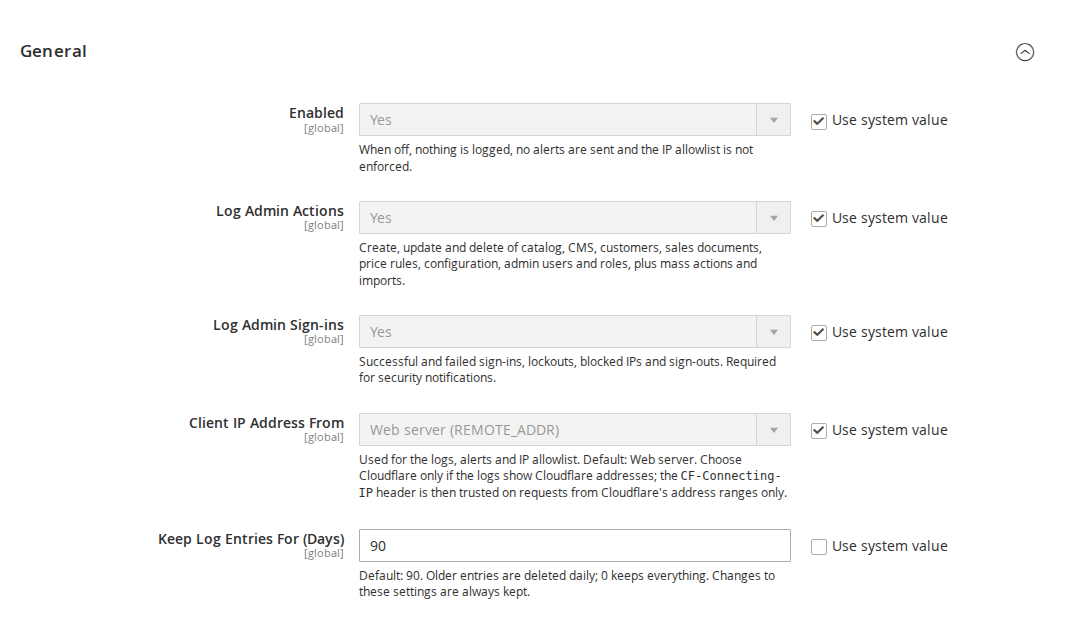
General
Setting
What it does
Enabled
Default Yes. When No, nothing is logged, no alerts are sent and the IP allowlist is not enforced.
Log Admin Actions
Default Yes. Create, update and delete of the records listed in section 4, plus mass actions and imports.
Log Admin Sign-ins
Default Yes. Successful and failed sign-ins, lockouts, blocked IPs and sign-outs. Required for security notifications.
Client IP Address From
Web server (REMOTE_ADDR, default) or Cloudflare. With Cloudflare, the CF-Connecting-IP and CF-IPCountry headers are trusted only on requests from Cloudflare's address ranges. Used for the logs, the alerts and the allowlist.
Keep Log Entries For (Days)
Default 90. Older entries are deleted daily; 0 keeps everything. Changes to these settings are always kept.
Exclusions
Setting
What it does
Do Not Log These Entities
Changes to the selected record types are not logged. Default: none.
Do Not Log These Configuration Paths
One path per line, * is a wildcard, for example design/*. Secret values are always masked, so they do not need to be listed.
Security Notifications
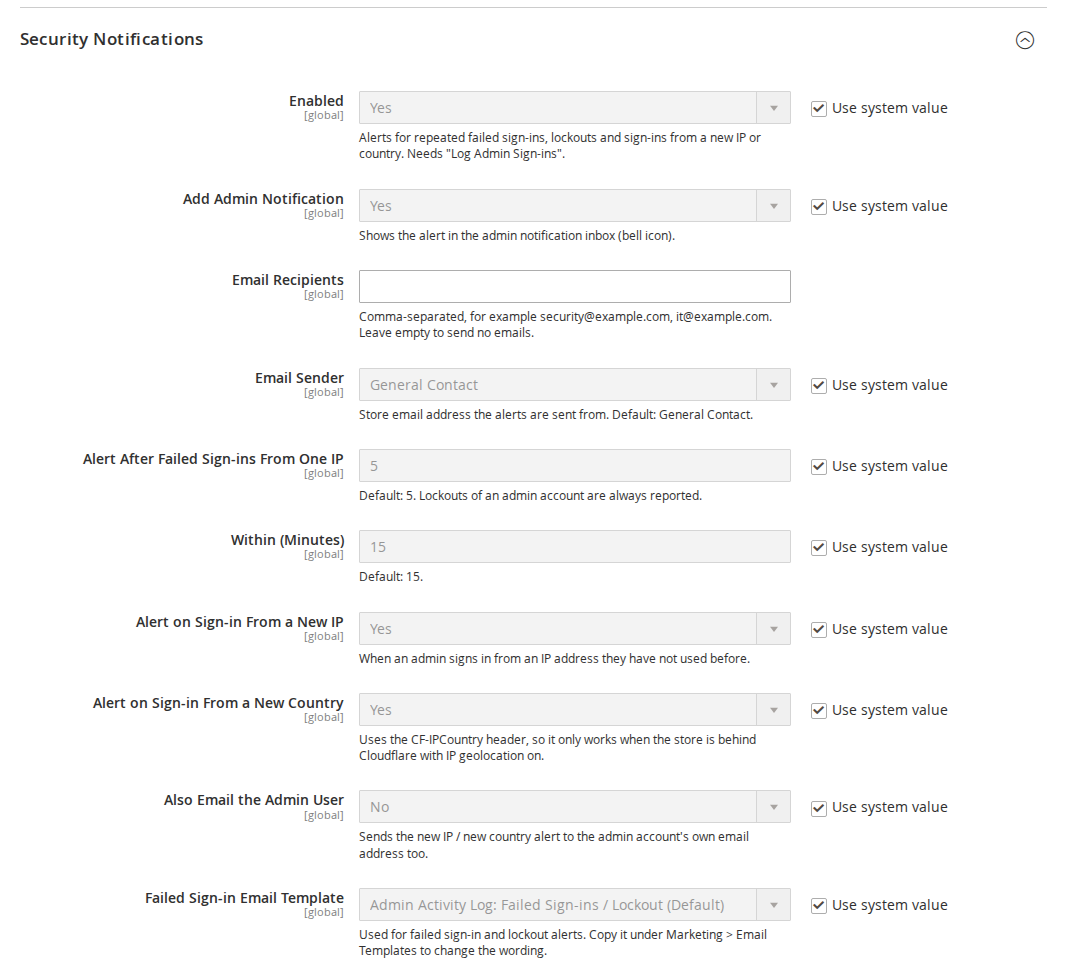
Security notification settings
Setting
What it does
Enabled
Default Yes. Alerts for repeated failed sign-ins, lockouts and sign-ins from a new IP or country. Needs "Log Admin Sign-ins".
Add Admin Notification
Default Yes. Shows the alert in the admin notification inbox (bell icon).
Email Recipients
Comma-separated addresses. Leave empty to send no emails (the admin notification still appears).
Email Sender
Store email identity the alerts are sent from. Default General Contact.
Alert After Failed Sign-ins From One IP
Default 5. Lockouts of an admin account are always reported.
Within (Minutes)
Default 15.
Alert on Sign-in From a New IP
Default Yes. When an admin signs in from an IP address they have not used before.
Alert on Sign-in From a New Country
Default Yes. Uses the CF-IPCountry header, so it only works behind Cloudflare with IP geolocation on.
Also Email the Admin User
Default No. Sends the new IP or new country alert to the admin account's own email address too.
Default "Admin Activity Log: Sign-in From New IP or Country".
Copy a template under Marketing > Email Templates to change its wording, then select your copy here.
Admin IP Allowlist
Setting
What it does
Enabled
Default No. Only the listed IP addresses can sign in to and use the admin panel.
Allowed IP Addresses
One IP address or CIDR range per line, IPv4 or IPv6, for example 203.0.113.4 or 198.51.100.0/24. Text after # is a comment. Your current IP address is shown below the field. An empty list allows every address.
An enabled allowlist cannot be saved unless your current IP address is on it (checked with the "Client IP Address From" value saved in the same form). An admin session used from an IP address outside the list is treated as signed out, and the refused sign-in is recorded in the Login Log. If you are locked out anyway (for example after your IP address changed), see section 9.
4. Admin Actions
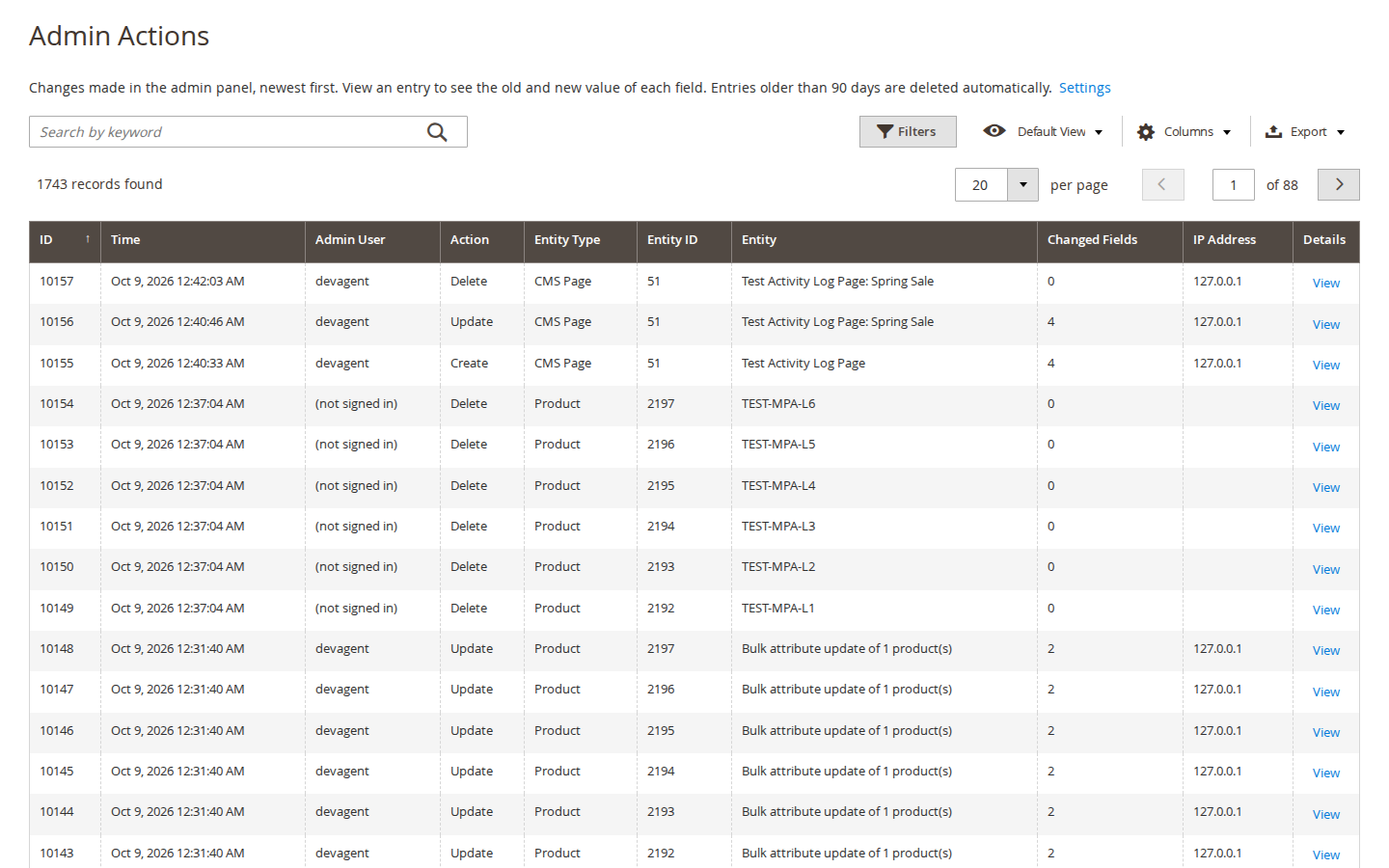
Softaware > Admin Activity Log > Admin Actions lists every recorded change, newest first.
What is logged:
Catalog: products, categories (including moves in the category tree), cart price rules, catalog price rules.
Content: CMS pages and blocks.
Customers and sales: customers, orders, invoices, shipments, credit memos, order and document comments.
System: configuration (path, scope, old and new value), admin users, admin roles and role permissions.
Mass actions: grid mass actions and the product "Update attributes" action, with the selection and the parameters. Records saved by the mass action are logged individually and linked by the request ID.
Imports under System > Data Transfer > Import: entity, behaviour, processed rows and the created, updated and deleted counts.
Command line: configuration changes made with bin/magento config:set (admin page "cli: config:set").
Columns: ID, Time, Admin User, Action (Create, Update, Delete, Move, Mass action, Import), Entity Type, Entity ID, Entity, Changed Fields, IP Address and Details. The grid has keyword search (admin user, entity, entity ID, IP address, admin page, request ID), filters, saved views, a column chooser and Export to CSV or XML. The line above the grid says how long entries are kept, and a warning appears when the action log is switched off.
Entry details
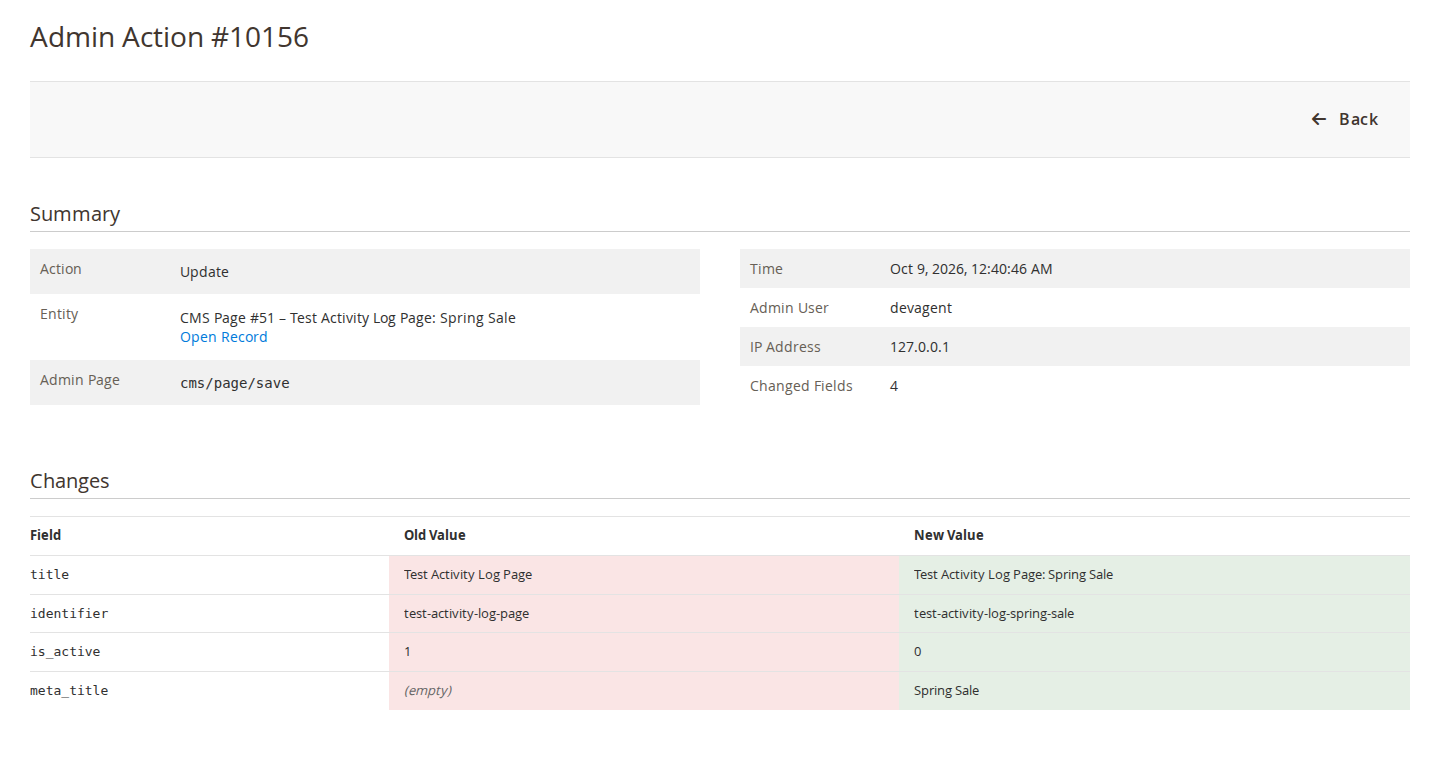
Click View to open an entry. The summary shows the action, the entity with an Open Record link (or Open Configuration Section for configuration), the admin page, time, admin user, IP address and number of changed fields. Below it, Changes lists each field with its old and new value. New records, mass actions and imports show one column of values ("Saved Values", "Mass Action Parameters", "Import Result"). Other changes made in the same request are listed too.
Entry detail with old and new values
Masked values
Passwords, tokens, API, private and licence keys, passphrases, card fields, hashes, encrypted and obscured configuration fields, configuration paths Magento declares sensitive and paths that look like keys or passwords are stored as ******. Nested mass-action parameters are masked the same way. Very large values are cut to 5,000 characters.
5. Login Log
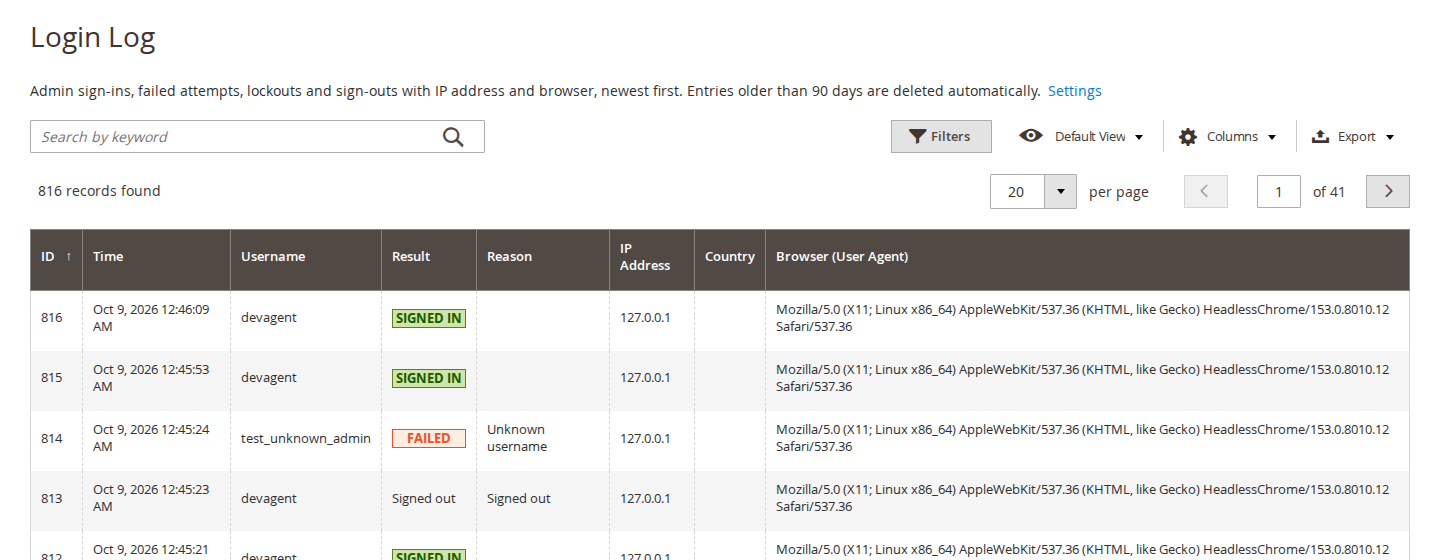
Softaware > Admin Activity Log > Login Log lists sign-in events, newest first, with time, username, result, reason, IP address, country and browser.
Login Log
Result
Meaning
Signed in
A successful sign-in.
Failed
A failed sign-in, with the reason: Unknown username, Wrong password, Account is inactive, or the account is locked.
Locked out
Magento locked the admin account after too many failed attempts.
Blocked (IP)
The IP address is not on the admin allowlist.
Signed out
The admin signed out.
The country column is filled from Cloudflare's CF-IPCountry header when it is present. An unknown username that could be a password typed into the wrong field (7 or more characters with letters and digits, not an email address) is stored partly masked, for example Se*** (masked, may be a password). The grid has keyword search, filters and CSV or XML export.
6. Active Sessions
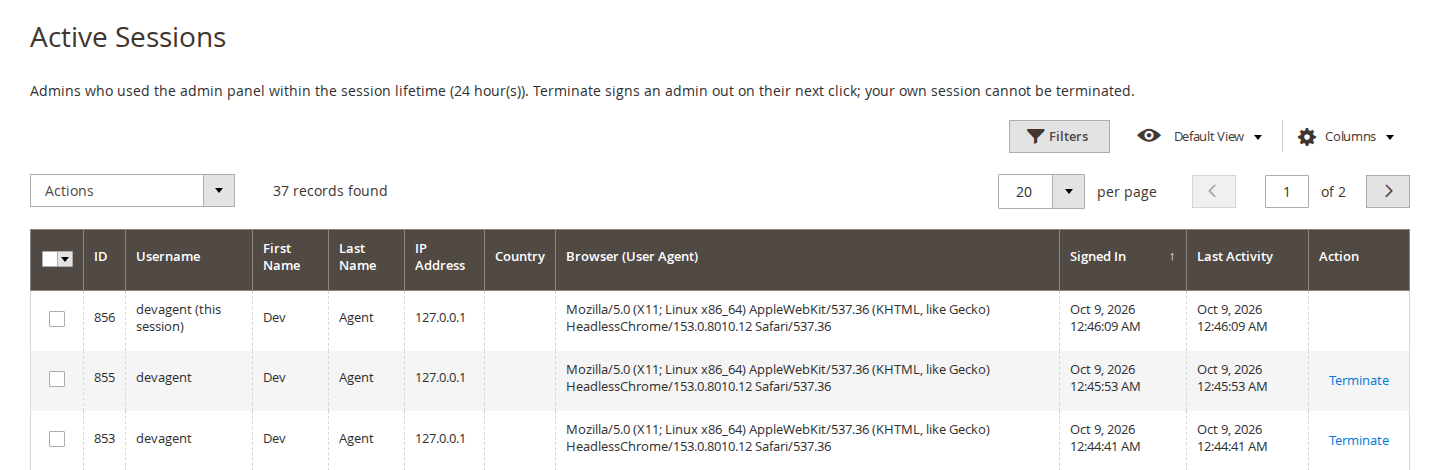
Softaware > Admin Activity Log > Active Sessions shows every admin who used the admin panel within the session lifetime: username, name, IP address, country, browser, sign-in time and last activity. Your own session is marked "(this session)".
Active Sessions
Click Terminate on a row, or select several sessions and use the Terminate mass action. Each asks for confirmation. The admin is signed out on their next click (Magento_Security behaviour). Your own session cannot be terminated; use Sign Out instead.
7. Security notifications
When notifications are on, the module raises an alert for:
the set number of failed sign-ins from one IP address within the set number of minutes;
a lockout of an admin account (always);
a sign-in from an IP address the admin has not used before;
a sign-in from a country the admin has not signed in from before (Cloudflare only).
Alerts appear in the admin notification inbox (if "Add Admin Notification" is on) and are emailed to the recipients you entered. New IP and new country alerts can also go to the admin user's own email address.
8. Retention and clean-up
The cron job softaware_activitylog_cleanup runs daily at 03:17 and deletes entries older than "Keep Log Entries For (Days)" in batches. Entries that record changes to the Activity Log's own settings are always kept, so switching logging off or shortening the retention stays on record. Magento's cron must be running.
clean: deletes entries older than the retention period, or older than N days with --days.
allowlist: shows whether the allowlist is on and the allowed addresses. --add adds an IP address or CIDR range. --disable switches the allowlist off: your way back in after a lock-out.
10. Permissions (ACL)
Under System > Permissions > User Roles > Role Resources > Softaware > Admin Activity Log:
Resource
Allows
View Admin Actions
The Admin Actions grid and entry details
View Login Log
The Login Log grid
Manage Active Sessions
The Active Sessions grid and Terminate
Settings
The configuration section
11. For developers
Other modules can have their own entities tracked by adding an item to the types argument of Softaware\ActivityLog\Model\EntityTypeResolver in their di.xml, with the keys class, label, label_fields, extra_fields and ignore_fields.
12. Troubleshooting
Problem
Solution
Nothing is logged
Check Enabled and Log Admin Actions / Log Admin Sign-ins, and that the record type is not under Do Not Log These Entities. Changes made through the API, cron or direct SQL are not logged.
All IP addresses are the same (a proxy or Cloudflare address)
Configure the web server to pass the real client IP, or set Client IP Address From to Cloudflare if the store is behind Cloudflare.
The country column is empty, or there are no new country alerts
These need Cloudflare with IP geolocation, which sends the CF-IPCountry header.
No alert emails
Enter Email Recipients and check that the store can send email. Alerts still appear in the admin notification inbox.
Locked out by the allowlist
Run bin/magento softaware:activity-log:allowlist --disable on the server, or add your new IP address with --add.
A terminated admin still sees the admin page
They are signed out on their next click.
Entries disappear after some time
That is the retention period (default 90 days). Set 0 to keep everything.
Switch the allowlist off before you remove the module. The log tables softaware_activity_log and softaware_activity_log_login stay in the database; drop them yourself if you no longer need the history.
Changelog
Release notes
1.3.2
Latest
Product listing, FAQ and user guide (docs/).
1.3.1
Fixed
README: the module requires softaware/module-core ^1.0 (the README said ^1.2; composer.json was right).
1.3.0
Keyword search on the Admin Actions grid (admin user, entity, entity ID, IP address, admin page, request ID) and the Login Log grid (username, IP address, reason, browser). Adds a full-text index to both log tables.
Grid pages start with a one-line explanation (what is listed, how long entries are kept, session lifetime on Active Sessions) and a warning with a link to the settings when the matching log is switched off.
"Allowed IP Addresses" shows your current IP address, so you can add it before switching the allowlist on.
Login Log: the result is shown as a coloured status badge (signed in, failed, locked out, blocked by allowlist).
Admin Actions grid: Entity ID is hidden by default (still available under Columns) so the grid fits narrower screens; the link column is headed "Details" instead of a second "Action"; entries from the command line show "(command line)" instead of an empty admin user.
Entry detail page: standard Back button; compact two-column summary; old and new values in equal columns that wrap long values and scroll very long ones (such as encoded files) inside the cell; empty values shown as "(empty)"; created records, mass actions and imports are listed as one value column ("Saved Values", "Mass Action Parameters", "Import Result") instead of under "New value" next to an empty "Old value" column; "Open Record" / "Open Configuration Section" links; a note when more than 100 related entries exist.
Active Sessions: confirmation dialogs say when the admin is signed out; result messages say what happened; Session ID hidden by default; Country filter added; long browser strings wrap.
Page titles match the menu ("Login Log", "Active Sessions"); labels in title case throughout.
Settings: shorter field comments with defaults and examples, comments added to every field, email recipients validated, "Allowed IP Addresses" only shown when the allowlist is enabled; the General group is always open.
1.2.0
Requires softaware/module-core instead of softaware/module-base. The admin menu and ACL now sit under Softaware_Core::core ("Softaware"); roles that had access keep it (migrated by module-core). After updating all SoftAware modules, softaware/module-base can be removed.
1.1.0
"Client IP Address From" setting: Web server (default, unchanged) or Cloudflare. With Cloudflare, CF-Connecting-IP and CF-IPCountry are used only on requests from Cloudflare's address ranges, so they cannot be faked by connecting to the server directly. The allowlist's own-IP check uses the IP source being saved.
Changes to the Activity Log's own settings are kept by the retention clean-up (tamper evidence).
Log entries are written every 500 entries during long requests instead of only at the end.
Unknown usernames of failed sign-ins that could be a password typed into the wrong field are stored partly masked (also in alert emails and admin notices).
More secrets are masked: API/private/licence keys, passphrases and card fields; config fields of type obscure/password with a custom backend; config paths Magento declares sensitive; nested values in mass-action parameters (were stored as JSON in clear).
1.0.0
Admin action log with field-level diff for catalog, CMS, customers, sales documents and comments, price rules, configuration, admin users, roles and permissions; mass actions and imports.
Login log (success, failure with reason, lockout, blocked IP, sign-out) with IP, browser and country.
Active admin sessions grid with terminate.
Security notifications (failed sign-ins per IP, lockouts, new IP, new country) by email and admin inbox.
Admin IP allowlist with CIDR support and CLI fallback.
Changes made in the Magento admin (create, update and delete with the old and new value of each field), every admin sign-in attempt and sign-out, and the admin sessions that are active right now.
Which records are covered?
Products, categories (including moves in the category tree), CMS pages and blocks, customers, orders, invoices, shipments, credit memos, order and document comments, cart price rules, catalog price rules, configuration, admin users, admin roles and role permissions. Grid mass actions, the product "Update attributes" action and imports under System > Data Transfer > Import are logged too.
Are changes made outside the admin logged?
Configuration changes made with bin/magento config:set are. Changes through the REST or SOAP API, cron jobs, command-line imports and direct SQL are not. Records that Magento or other extensions write with direct SQL (for example some stock updates) only appear as the mass action that started them.
Are passwords and API keys stored in the log?
No. Passwords, tokens, API, private and licence keys, card fields, hashes, encrypted configuration fields and configuration paths Magento declares sensitive are stored as **, so you still see that they changed. A failed sign-in with an unknown username that looks like a password is stored partly masked.
Does it slow down the admin?
Tracking only runs in the admin area. The diff is built from data Magento has already loaded, the entries are kept in memory and written with one multi-row insert at the end of the request, and nothing is written if the database transaction is rolled back. The storefront is not affected.
How long are entries kept?
90 days by default. A daily cron job deletes older entries in batches; set 0 to keep everything. Changes to the Activity Log's own settings are always kept, so shortening the retention or switching logging off stays on record.
Can I leave some records or settings out?
Yes. Under Exclusions choose entity types that are never logged, and list configuration paths (with * wildcards, for example design/*) that are never logged.
Which alerts are there?
A number of failed sign-ins from one IP address within a number of minutes (default 5 within 15), lockouts of an admin account, and sign-ins from an IP address or country the admin has not used before. Alerts go to the admin notification inbox and, if you enter recipients, by email. The new IP and new country alert can also go to the admin user's own email address.
How does the country detection work?
From Cloudflare's CF-IPCountry header. New country alerts and the country column therefore need the store to be behind Cloudflare with IP geolocation switched on.
Can I end another admin's session?
Yes, under Active Sessions with Terminate (single or mass action). The admin is signed out on their next click. Your own session cannot be terminated; use Sign Out instead.
How does the IP allowlist work, and can I lock myself out?
When the allowlist is on, only the listed IP addresses and CIDR ranges (IPv4 and IPv6) can sign in and use the admin. The module refuses to save a list that does not include your current IP address. If you are locked out anyway, for example after your IP address changed, run bin/magento softaware:activity-log:allowlist --disable on the server.
My store is behind Cloudflare and the log shows Cloudflare IP addresses. What should I do?
Either configure the web server to pass the real visitor IP (for example nginx real_ip with Cloudflare's ranges), or set "Client IP Address From" to Cloudflare. The CF-Connecting-IP header is then trusted only on requests that come from Cloudflare's published address ranges.
Can I export the log?
Yes. The Admin Actions and Login Log grids export to CSV and XML, with the filters you have set.
Which Magento and PHP versions are supported?
Magento Open Source and Adobe Commerce 2.4.7 to 2.4.9, PHP 8.2 to 8.5. The module is admin only.
Magento Open Source records when a product was last updated, but not who changed it or what the old value was. Here is how to trace a price change and what an admin activity log adds.
Read the guide →
We value your privacy
We use necessary cookies to run this site and, with your permission, Google Analytics to understand how it is used. You can accept analytics, reject it or choose in the settings. Cookie policy
Cookie preferences
Choose which cookies you allow. Necessary cookies are always on because the shop cannot work without them. You can change your choice at any time with the "Cookie settings" link.
Always on
Needed for the basket, checkout, login and security. They do not track you.
Google Analytics: how many people visit, which pages they read and how they found the site. It sets the _ga cookies and sends usage data to Google.