Product questions and answers in Magento 2 without the spam
Shoppers ask the same questions about the same products by email. Here is how a moderated Q&A section on the product page works in Magento 2, and how to keep it clean.
A shopper looks at a travel backpack and wants to know one thing: does a 16 inch laptop fit in the sleeve? The product description gives the outer size but not the sleeve. She sends an email, someone measures the sample in the office and replies. Two weeks later another person asks the same thing through the contact form, and then a third on the phone. The answer exists, but it lives in three inboxes instead of on the page where the next shopper would read it.
A questions and answers section on the product page fixes that. A shopper asks in public, you answer once, and everybody after her sees the answer. The catch is that any open form on a website attracts spam, and a question section that fills up with links to dubious sites does more harm than having none. So the useful version is moderated: nothing appears until someone has looked at it, staff hear about new questions quickly, and the good answers are easy to promote.
Why reviews are not the place for it
Magento already has a moderated form on the product page: reviews. In the core code every review posted on the storefront is saved with the status Pending, and guests may write reviews unless you switch that off under Stores > Configuration > Catalog > Product Reviews. That makes it tempting to use reviews for questions as well.
It works badly. A review is an opinion, often with a star rating, and a question has nothing to rate. If ratings are required, the shopper has to pick some stars anyway and the average moves; if you reject the "review", she never gets an answer. Reviews also have no place for the store's answer and no way to tell the asker that something happened. Magento has no separate questions feature, so this is a gap you fill with an extension or your own module.
How the questions get in, and how spam stays out
Our Product Q&A module adds a "Questions & Answers" section to the product page: a tab with the number of questions on Luma, a full-width section on Hyvä. Shoppers can search the questions, filter answered ones, sort by most helpful and mark answers as helpful. The "Ask a question" form asks for a name (shown), an email address (never shown), the question and a tick box for "Email me when my question is answered".
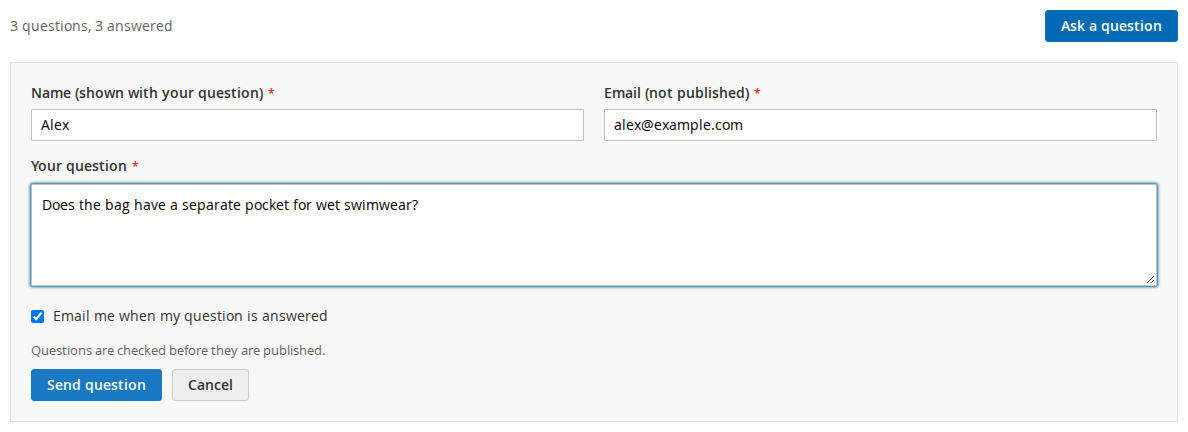
The spam protection works in layers:
- A hidden honeypot field that people do not see and simple bots fill in.
- A limit of messages per IP address per hour (5 by default), counted separately for questions and answers.
- Google reCAPTCHA on the question form, using Magento's own reCAPTCHA modules and keys when they are installed.
- Review before publishing. Guest questions always wait for a person. Questions from signed-in customers wait too, unless you allow them to go live straight away.
On top of that, any question or answer containing a web address (http://, www. or a domain name) is held for review even when auto-publishing is on. We added that rule in version 1.0.1. In the same release we stopped new, unreviewed submissions from cleaning the page cache. Before, every posted question flushed the product page from the full page cache, which meant anyone could keep a page cold by posting the form over and over. Now the cache is only cleaned when published content changes.
One practical point if your shop sits behind Cloudflare, Varnish or a load balancer: Magento has to see the real visitor IP address. If it does not, every visitor appears to come from the same address, and the hourly limit applies to all of them together.
Answering, and telling people about it
Store staff get an email for each new question and each new customer answer, with a link to the admin. The recipients default to the General Contact address, or you enter your own list. In Softaware > Product Q&A > Questions a grid shows every question with its status, product, whether it is answered and whether customer answers are waiting. Mass actions approve, reject or mark questions as FAQ.
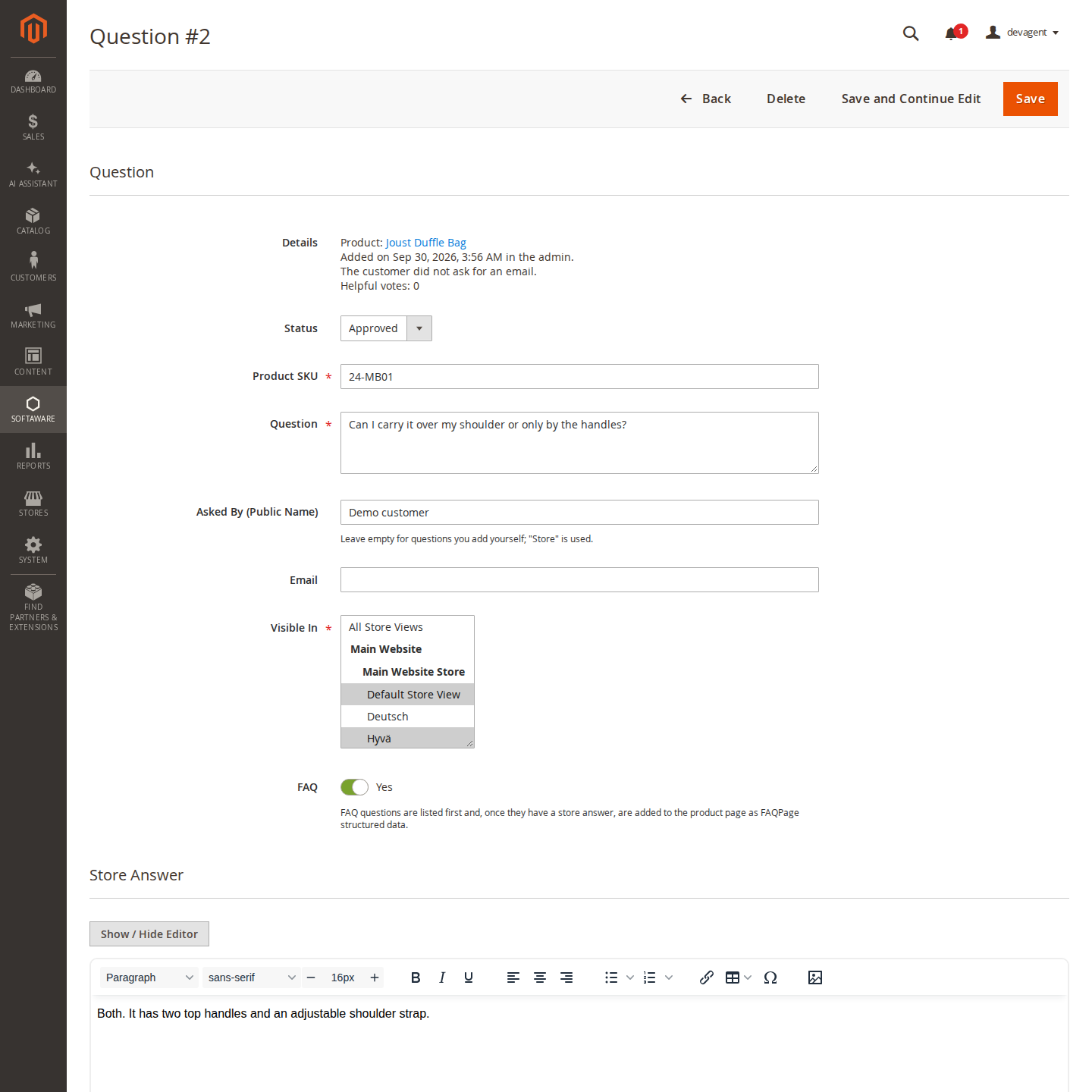
Opening a question gives you the store answer in a rich text editor, signed "Answered by" your store name, and a choice of the store views it appears in. When the question is approved and answered, saving sends the asker one email, but only if she ticked the box on the form. The same goes for customer answers: signed-in customers can answer each other's questions if you allow it, those answers are moderated by default, and approving one notifies the asker once. Customers can also see their own questions and their status under My Account > My Questions.
Turning good answers into an FAQ
After a while some questions turn out to be the ones everybody asks. Marking a question as FAQ lists it first on the product page and makes it available under the FAQ filter. You can also add questions yourself with "Add Question", for the things you already know people will ask, before anyone has.
FAQ questions that are approved and have a store answer are also printed as FAQPage structured data. Customer answers are never included, only the store's own. Whether that markup still does anything in Google is a separate question, and the honest answer has changed this year; we wrote it up in FAQ structured data on product pages: does it still help?. The setting can be switched off if your SEO extension prints its own FAQ markup.
What to know before you switch it on
A Q&A section only helps if someone answers. If questions sit unanswered for weeks, the section tells shoppers that nobody is listening, which is worse than no section. Decide who gets the staff emails before you go live.
Search, filters and "Show more" work on the questions rendered into the page, up to 100 by default. A product with more than that shows a note with the total. Guest helpful votes are limited per browser cookie and IP address for 24 hours, so a determined person can still vote again later. For privacy, IP addresses are only stored as keyed hashes. When a customer account is deleted, the name and email stay on that person's questions, so delete the questions too if someone asks to be forgotten.
The Product Q&A page has the user guide and links to the Luma and Hyvä demos, where a duffle bag has a few answered example questions.
From our shop
Related Products
-
Product Q&A
Questions and answers on your product pages, moderated in the admin, with helpful votes, email notifications and optional FAQ structured data, for Luma and Hyvä.
- Version v1.1.3
$159
