FAQ structured data on product pages: does it still help?
Google stopped showing FAQ rich results in May 2026. Here is what its documentation says now, what to do with existing FAQPage markup, and why the questions on the page still matter.
Product questions and answers for Magento 2 (Luma and Hyvä): moderation, helpful votes, email notifications and optional FAQ structured data.
One-off payment, with 12 months of updates.
No subscription or automatic renewal. Keep using the versions included in your update period. Update and licence details
Composer package softaware/module-product-qa
Questions and answers sit on the product page, so the next shopper with the same doubt finds the answer without contacting you.
New questions wait for your review. A honeypot, an hourly limit per IP address and optional reCAPTCHA keep spam out.
One database query per product on a cache miss, its own cache type and full page cache tags, so the product page stays cacheable.
All features
Feature tour
01 / 06
Approved questions with the store answer and customer answers, FAQ questions first. Shoppers search, filter and sort in the browser without extra requests.
02 / 06
Alpine.js and Tailwind templates for Hyvä, shown as a full-width section with the count in the heading. Picked automatically.
03 / 06
Name, email (never published), the question and "Email me when my question is answered". You decide whether guests may ask.
04 / 06
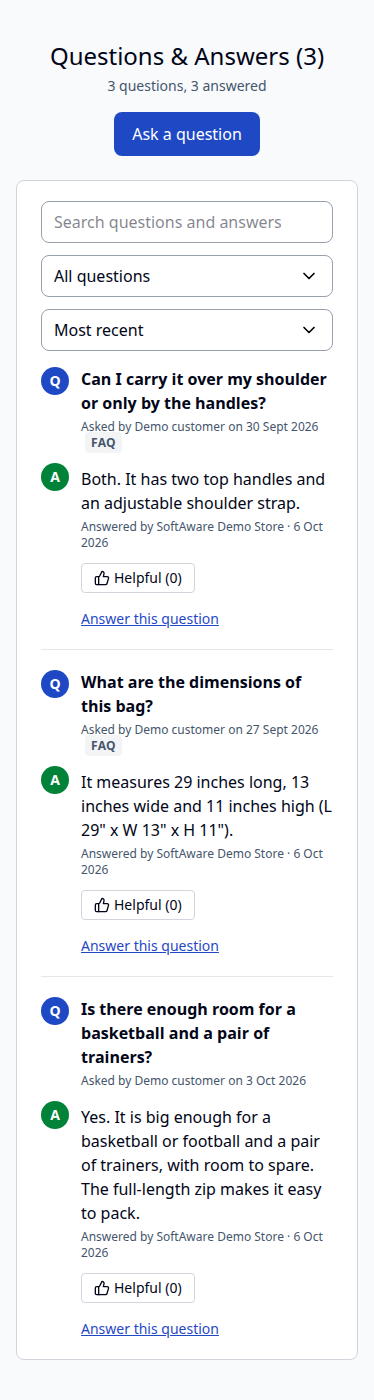
Search, filters and answers stack into one column on small screens.
05 / 06
Filter by status, product, author or store view, then approve, reject, set to pending, mark as FAQ or delete in bulk.
06 / 06
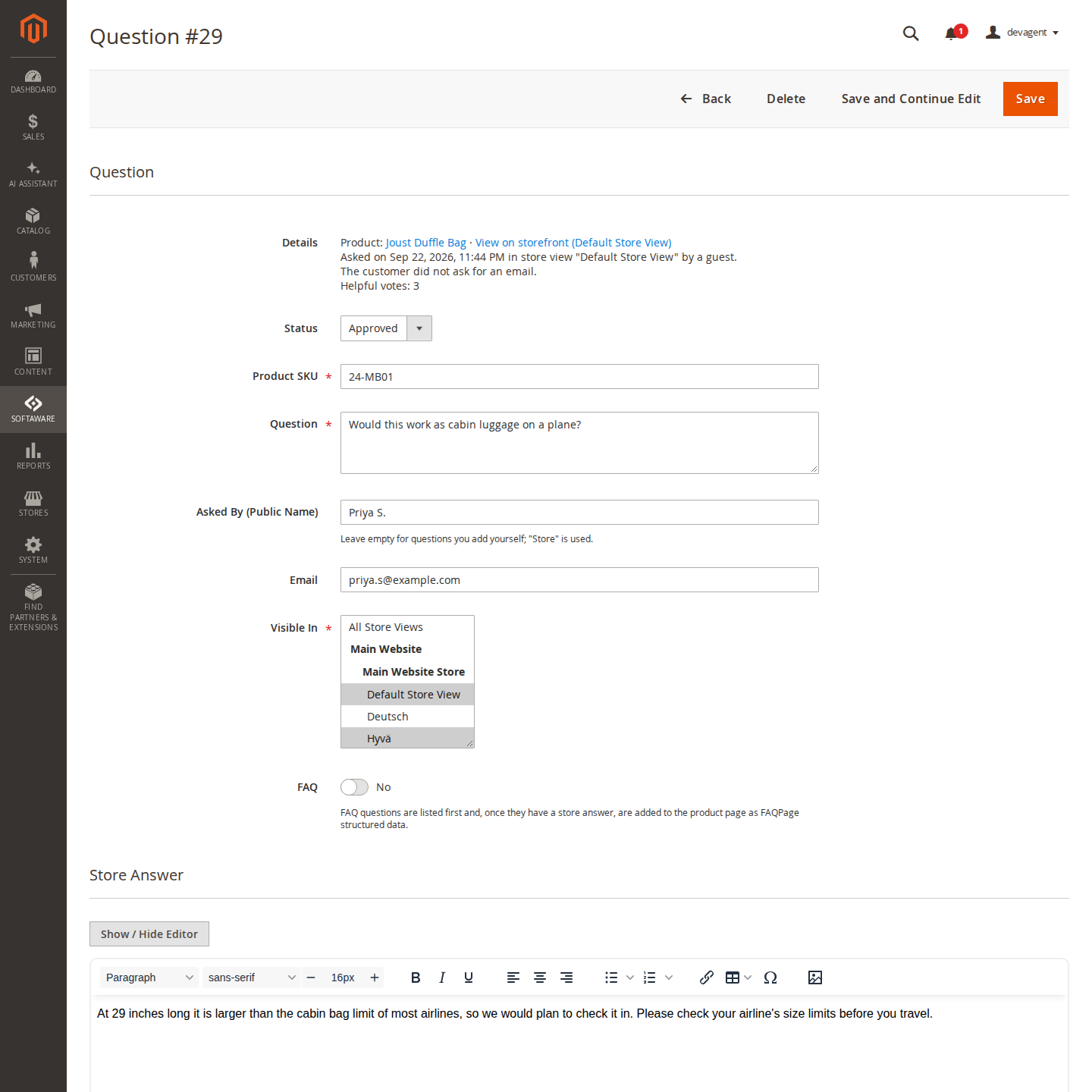
Set the status, the store views the question appears in and the FAQ mark, write the store answer and email the customer.
Live demo
A full Magento store with the module installed, on Luma and on Hyvä. The admin demo signs you in with one click.
Compatibility
| Magento | 2.4.7 – 2.4.9 |
|---|---|
| Storefront themes | Luma Blank Hyvä |
| PHP | 8.2 – 8.5 |
| Latest version | 1.2.1 |
| composer.json requires | php ~8.2.0||~8.3.0||~8.4.0||~8.5.0 magento/framework ~103.0.7 softaware/module-core ^1.0 magento/module-backend * magento/module-catalog * magento/module-cms * magento/module-customer * magento/module-email * magento/module-page-cache * magento/module-store * magento/module-ui * magento/module-url-rewrite * magento/module-widget * |
Installation
After you buy, create a Composer key in your account. Then, in the root of your Magento project:
01Add the repository and your key (once per project)
composer config repositories.softaware composer https://repo.softawarecommerce.com
composer config --auth http-basic.repo.softawarecommerce.com PUBLIC_KEY PRIVATE_KEY
02Install the module
composer require softaware/module-product-qa
03Enable it
bin/magento setup:upgrade
bin/magento setup:di:compile
bin/magento setup:static-content:deploy
bin/magento cache:flush
The last three are only needed in production mode.
Prefer a zip? Every version you are entitled to can be downloaded from My modules. More about Composer access
User guide
For version 1.2.1. The same guide comes with the module, in docs/user-guide.md.
Let shoppers ask questions on your product pages and answer them from the admin. Approved questions and answers appear in a "Questions & Answers" section on the product page, with search, helpful votes and optional FAQ structured data. This guide covers installation, every setting and day-to-day use.
| Magento | Magento Open Source or Adobe Commerce 2.4.7 to 2.4.9 |
| PHP | 8.2 to 8.5 |
| Themes | Luma, Blank and themes based on them; Hyvä 1.3 or later (tested with Hyvä 1.5) |
| Other | softaware/module-core (installed automatically) |
| Optional | Magento's reCAPTCHA modules (Magento_ReCaptchaUi), for Google reCAPTCHA on the question form |
Install with Composer from repo.softawarecommerce.com. Your access keys and the full set-up are described at https://softawarecommerce.com/shop/composer-access/.
composer config repositories.softaware composer https://repo.softawarecommerce.com
composer config --auth http-basic.repo.softawarecommerce.com PUBLIC_KEY PRIVATE_KEY
composer require softaware/module-product-qa
bin/magento setup:upgrade
bin/magento setup:di:compile            # production mode only
bin/magento setup:static-content:deploy # production mode only
bin/magento cache:flush
The installer adds and enables the "Softaware Product Q&A" cache type. On Hyvä, run your usual Tailwind build after installing so the module's classes are included (the module registers itself for Hyvä's Tailwind source scanning).
To update later: composer update softaware/module-product-qa, then the same bin/magento commands.
All settings are under Stores > Configuration > Softaware > Product Q&A and can be set per website and store view (the reCAPTCHA type per website). Every field shows its default in the comment and has "Use system value".
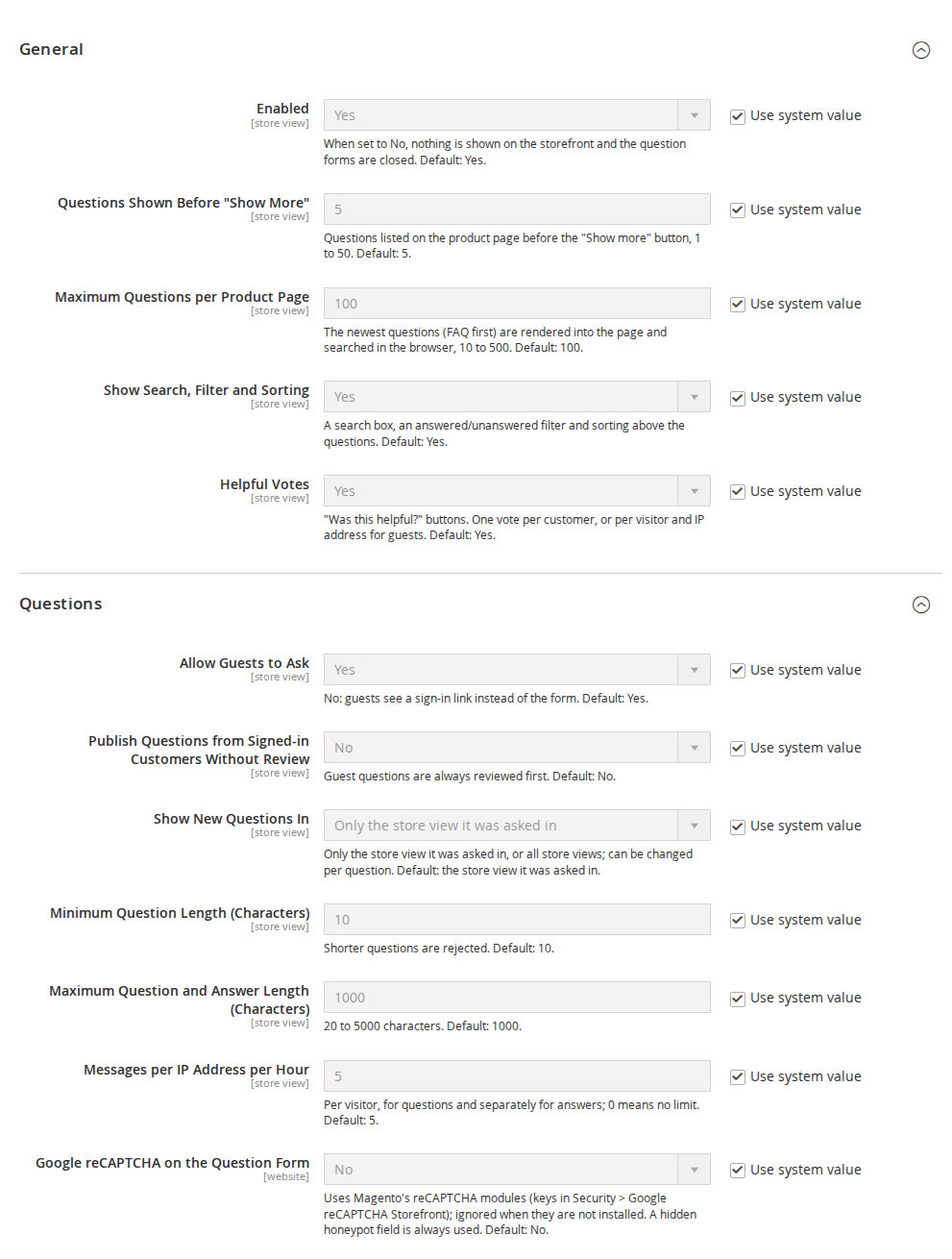
| Setting | What it does |
|---|---|
| Enabled | When No, nothing is shown on the storefront and the question forms are closed. Default: Yes. |
| Questions Shown Before "Show More" | Questions listed before the "Show more questions" button, 1 to 50. Default: 5. |
| Maximum Questions per Product Page | The newest questions (FAQ first) rendered into the page and searched in the browser, 10 to 500. Default: 100. |
| Show Search, Filter and Sorting | A search box, a filter (all, answered, FAQ) and sorting (most recent, most helpful) above the questions. Default: Yes. |
| Helpful Votes | "Helpful" buttons on answered questions and customer answers. One vote per customer, or per visitor and IP address for guests. Default: Yes. |
| Setting | What it does |
|---|---|
| Allow Guests to Ask | No: guests see a sign-in link instead of the form. Default: Yes. |
| Publish Questions from Signed-in Customers Without Review | Guest questions are always reviewed first. Default: No. |
| Show New Questions In | Only the store view the question was asked in, or all store views. Can be changed per question. Default: the store view it was asked in. |
| Minimum Question Length (Characters) | Shorter questions are rejected. Default: 10. |
| Maximum Question and Answer Length (Characters) | 20 to 5000. Default: 1000. |
| Messages per IP Address per Hour | Per visitor, counted separately for questions and answers; 0 means no limit. Default: 5. |
| Google reCAPTCHA on the Question Form | The reCAPTCHA type for the question form. Uses Magento's reCAPTCHA modules and their keys (Security > Google reCAPTCHA Storefront); ignored when the modules are not installed. Default: No. |
| Setting | What it does |
|---|---|
| Store Answers Signed As | Shown as "Answered by ...". Default: empty, which uses the store name from General > Store Information. |
| Signed-in Customers Can Answer | Lets signed-in customers answer other customers' questions. Default: Yes. |
| Publish Customer Answers Without Review | No: customer answers wait under Customer Answers. Default: No. |
| Setting | What it does |
|---|---|
| Email Store Staff About New Questions and Answers | An email for each new question and each new customer answer, with a link to the admin. Default: Yes. |
| Staff Email Address(es) | Separate several addresses with commas. Default: empty, which uses the General Contact address. |
| Staff Email Template | The template for staff emails. |
| Email Customers When Their Question Is Answered | Only when the customer ticked "Email me when my question is answered"; sent once for the store answer and once per published customer answer. Default: Yes. |
| Customer Email Template | The template for customer emails. |
| Email Sender | The store email identity the notifications are sent from. Default: General Contact. |
Both templates can be copied and edited under Marketing > Communications > Email Templates.
| Setting | What it does |
|---|---|
| Output FAQPage JSON-LD | Optional FAQPage structured data for FAQ questions with a store answer (never customer answers). Google no longer shows FAQ rich results (since 7 May 2026), so this is off by default. Leave it off if your SEO extension outputs the FAQ itself. Default: No. |
| Setting | What it does |
|---|---|
| Show "N answered questions" | A link under products in category and search listings to the product's Q&A, only for products with an answered question. Default: Yes. |
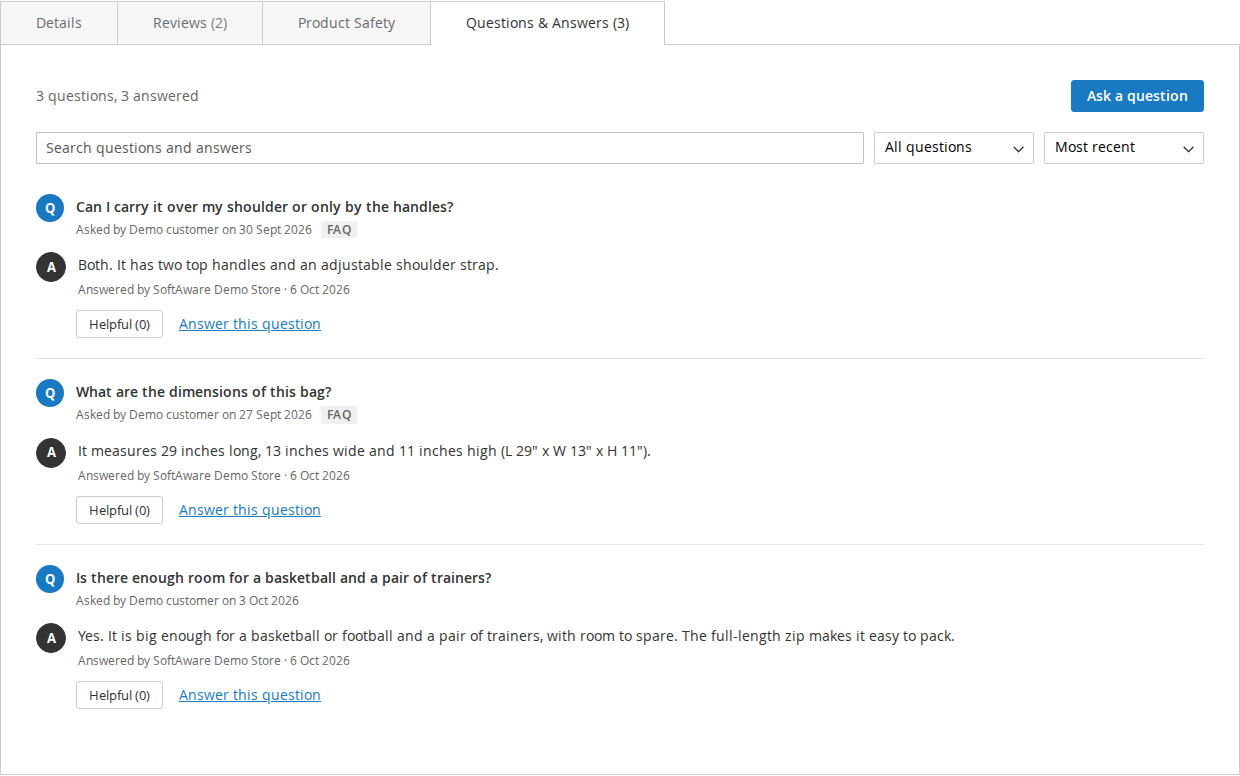
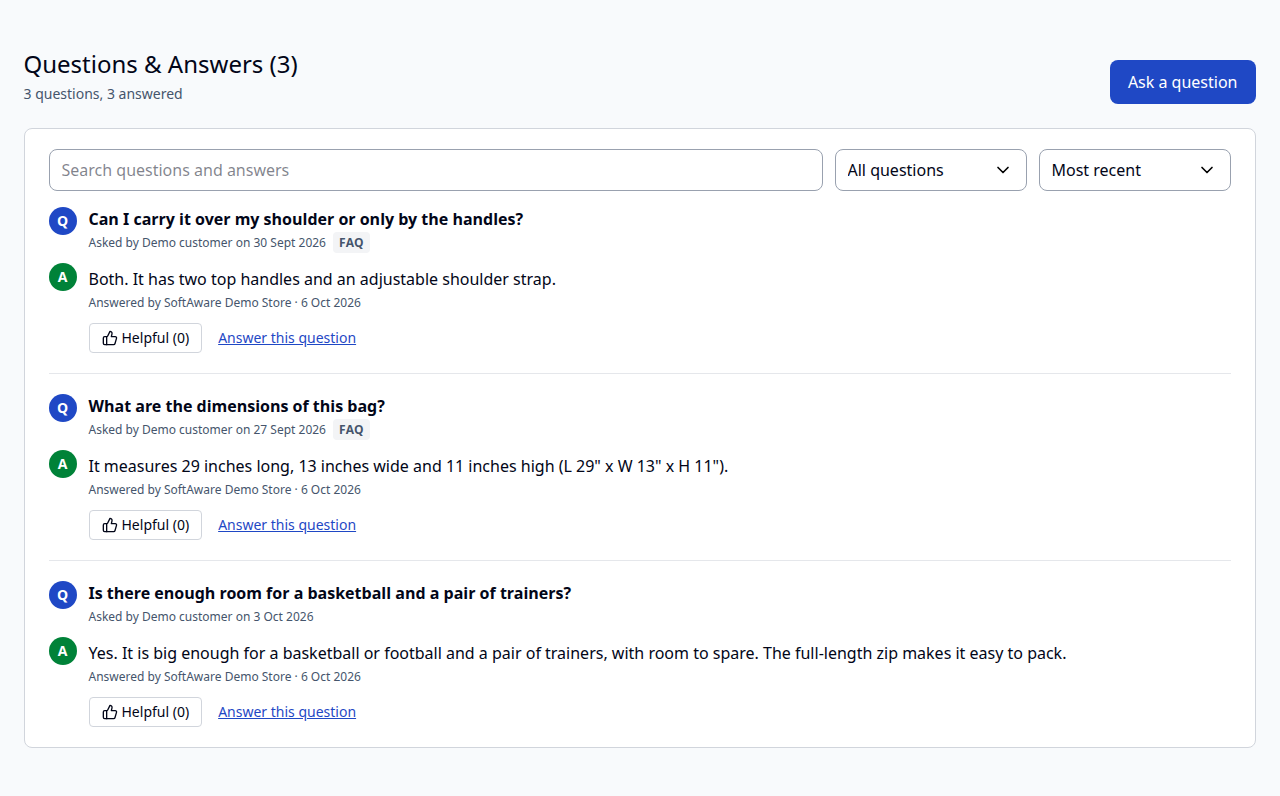
The Questions & Answers section. On Luma it is a tab next to Details and Reviews, titled "Questions & Answers (3)" with the number of published questions. On Hyvä it is a full-width section below the product information with the count in the heading. Each question shows who asked it and when, the store answer ("Answered by" your store name) and the approved customer answers. Questions marked as FAQ are listed first.
| Hyvä | Mobile |
|---|---|
 |  |
Search, filter and sort. Shoppers search the questions and answers, show all, answered or FAQ questions, sort by most recent or most helpful, and load more with "Show more questions". All of this runs in the browser over the questions in the page, so there are no extra requests. A product with more questions than "Maximum Questions per Product Page" shows a note with the total.
Helpful votes. Shoppers mark answered questions and customer answers as helpful. Each customer votes once; a guest is recognised by a cookie (sw_qa_visitor, set only when a guest votes) and their IP address for 24 hours. Duplicate votes are rejected.
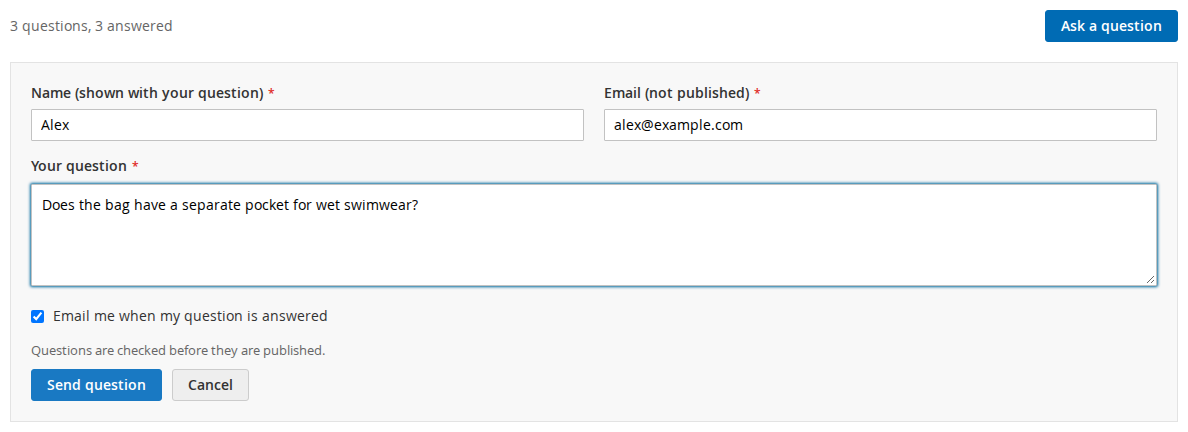
Asking a question. "Ask a question" opens a form with name (shown with the question), email (not published), the question and "Email me when my question is answered". Signed-in customers get their name and email filled in. After sending, the shopper sees that the question will be published once it has been reviewed.
Answering a question. With "Signed-in Customers Can Answer" on, every question has an "Answer this question" link. Guests are sent to the sign-in page first.
My Questions. Signed-in customers find their questions under My Account > My Questions, with the status (waiting for review, published or not published) and the published answers.
Links to the Q&A. Add #softaware-product-qa to a product URL to open the Questions & Answers tab (Luma) or jump to the section (Hyvä), for example https://example.com/joust-duffle-bag.html#softaware-product-qa. Add #question-<id> to open one question: it is shown even when it is behind "Show more questions", highlighted and scrolled into view. A question that is not published in that store view opens the Q&A section instead. The listing badge, the widget, the customer emails and the admin "View on storefront" link use these links.
Listings and widget. Products with an answered question show "N answered questions" under the product in category and search listings, linking to the Q&A section. For CMS pages and blocks there is the widget Softaware: Latest Product Questions (Content > Widgets, or Insert Widget) with a title, the number of questions and an "Answered Questions Only" option.
Softaware > Product Q&A > Questions lists all questions with ID, question, SKU, product, status (Pending, Approved, Rejected), answered, FAQ, pending customer answers, asked by, visible in, helpful votes and date. The asker's email is available under Columns. Filter by any of them or use the keyword search.
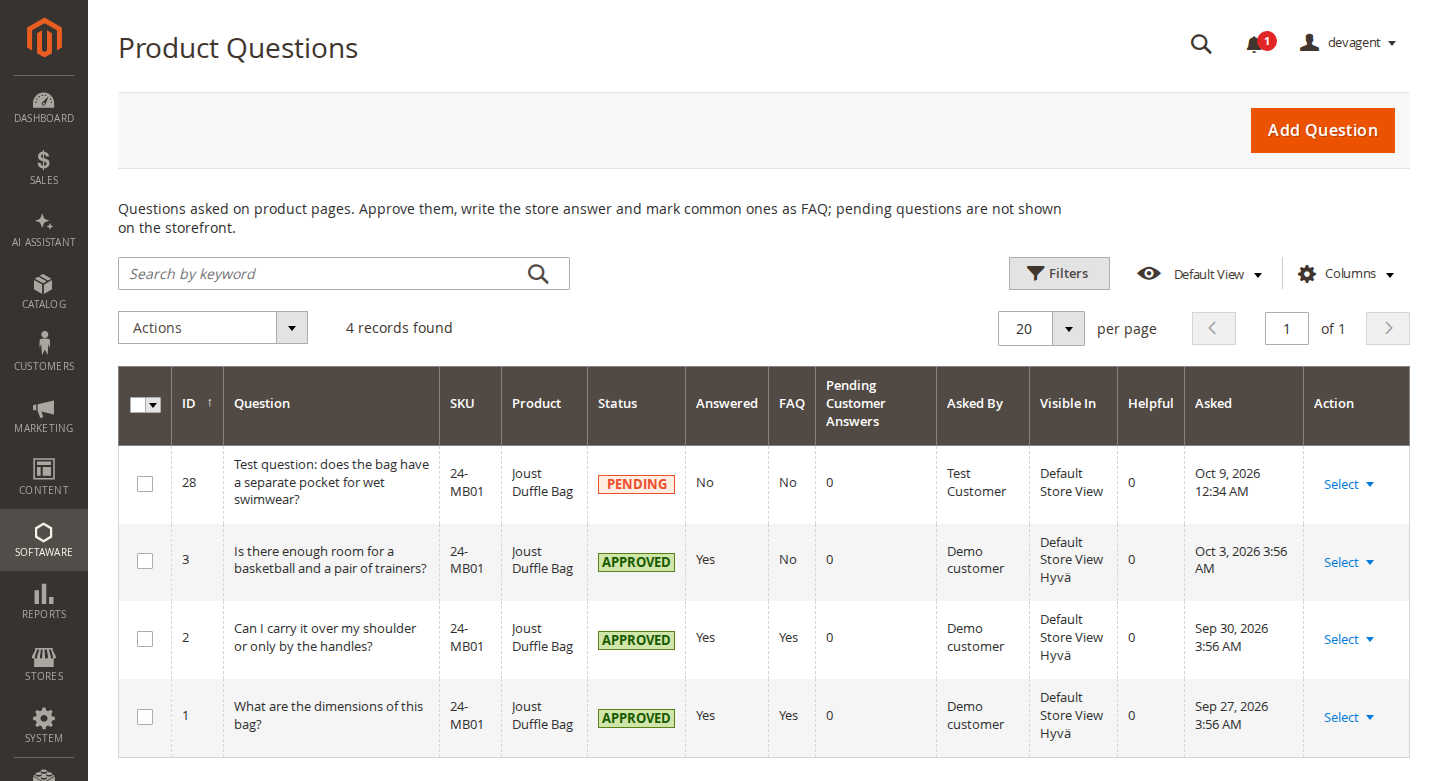
Mass actions: Approve, Reject, Set to Pending, Mark as FAQ, Remove FAQ Mark and Delete.
Add Question creates a question yourself, for example a common question you want to answer in advance.
Open a question to edit it:
Softaware > Product Q&A > Customer Answers lists the answers from customers, with mass actions Approve, Reject, Set to Pending and Delete. Approving an answer emails the asker if they asked to be told.
Under System > Permissions > User Roles > Role Resources > Softaware > Product Q&A:
| Resource | Allows |
|---|---|
| Questions | Viewing the Product Questions grid |
| Questions > Edit, Answer and Moderate | Editing, answering, approving and rejecting questions, Add Question |
| Questions > Delete | Deleting questions |
| Customer Answers | Viewing the Customer Answers grid |
| Customer Answers > Moderate | Approving, rejecting and setting customer answers to pending |
| Customer Answers > Delete | Deleting customer answers |
| Stores > Configuration > Softaware Product Q&A | The settings |
When "Output FAQPage JSON-LD" is set to Yes, FAQ questions that are approved, visible in the store view and have a store answer are printed on the product page as FAQPage JSON-LD (<script type="application/ld+json"> at the end of the page). Customer answers are never included. The setting is off by default: this is optional structured data, and Google no longer uses it for FAQ rich results (they stopped appearing in Google Search on 7 May 2026).
SEO extensions can use Softaware\ProductQa\Api\FaqProviderInterface:
getFaqItems($productId, $storeId): the question and answer pairs;getFaqPageData($productId, $storeId, $pageUrl): a FAQPage node without @context, for an @graph;suppressStandaloneOutput(): stops this module printing its own script.The event softaware_productqa_faq_jsonld (with transport, data, render and product) lets you change or drop the node.
bin/magento softaware:product-qa:seed-demo [--sku=24-MB01] [--stores=0] [--file=qa.json] [--remove]
bin/magento softaware:product-qa:email-preview --question=<id> [--answer=<id>] [--type=asker|admin] [-o file.html]
bin/magento softaware:product-qa:recount
seed-demo adds three answered example questions to one product (for demo stores), or removes them with --remove. --file takes a JSON list of question, author, answer and faq.email-preview renders a notification email to a file or the screen without sending it.recount recalculates the answer and vote counters (for example after importing data with SQL) and refreshes the caches.The Q&A section is part of the full page cache. On a cache miss the questions and customer answers of the product are read with one query and stored in the "Softaware Product Q&A" cache type (System > Cache Management). Publishing, changing, unpublishing or deleting a published question or answer cleans the product's cache tag (built-in cache and Varnish). New questions waiting for review do not touch the page cache, so posting the form cannot be used to flush it. Helpful votes do not clean the page cache either: the voter sees the new count at once, everyone else after the next refresh of that product page.
| Problem | Solution |
|---|---|
| The section does not appear | Check General > Enabled for the store view, and that the product page uses a Luma-based or Hyvä theme. Flush the cache. |
| A question does not appear after approval | Check Visible In on the question includes the store view you are looking at, and that the cache was refreshed. |
| Shoppers see "You have sent several messages in a short time" | The hourly limit per IP address was reached. Behind Cloudflare, Varnish or a load balancer, make sure Magento sees the real visitor IP (web server real-IP set-up), otherwise all visitors share one address. |
| No emails arrive | Check Email Notifications, the sender identity and that Magento can send email. Customers only get emails when they ticked the box on the form. Use email-preview to check the content. |
| Hyvä styles look wrong | Rebuild the Hyvä theme CSS after installing or updating. |
| reCAPTCHA does not show | Magento's reCAPTCHA modules must be installed with keys under Security > Google reCAPTCHA Storefront. On Luma, the v2 checkbox type is the most reliable choice with this form. |
bin/magento module:disable Softaware_ProductQa
composer remove softaware/module-product-qa
bin/magento setup:upgrade
The tables softaware_product_qa_question, softaware_product_qa_question_store, softaware_product_qa_answer, softaware_product_qa_question_vote and softaware_product_qa_answer_vote stay in the database until you drop them.
Changelog
#question-<id> now highlight the question on Luma and Hyvä, and a link to a question that is not shown (waiting for review, another store view) opens the Q&A tab or section instead of doing nothing. The links also work when the fragment changes on an open page.softaware/module-core instead of softaware/module-base. The admin menu and ACL now sit under Softaware_Core::core ("Softaware"); roles that had access keep it (migrated by module-core). After updating all SoftAware modules, softaware/module-base can be removed.FaqProviderInterface for SEO extensions.softaware-productqa customer-data section.softaware:product-qa:seed-demo, softaware:product-qa:email-preview, softaware:product-qa:recount.FAQ
Something else on your mind? The developers who wrote the module answer before and after you buy.
Ask a question →Already installed it? Open a support ticket
Yes. Hyvä templates (Alpine.js and Tailwind) are included and picked automatically; it was tested with Hyvä 1.5. The module registers itself for Tailwind scanning, so rebuild your theme CSS after installing. Luma, Blank and themes based on them use the Luma templates.
No. Questions from guests always wait for your review. Questions from signed-in customers wait too, unless you switch on "Publish Questions from Signed-in Customers Without Review". Questions and answers that contain a web address are always held for review, whatever the setting.
Yes, by default. Set "Allow Guests to Ask" to No and guests see a sign-in link instead of the form. The email address on the form is never published; it is used for the "Email me when my question is answered" notification.
Yes, signed-in customers can, when "Signed-in Customers Can Answer" is on (the default). Their answers are moderated in the Customer Answers grid unless you publish them without review. Customer answers are plain text; the store answer is rich text.
The form has a hidden honeypot field and an hourly limit of messages per IP address (5 by default), and Google reCAPTCHA can be added to the question form when Magento's reCAPTCHA modules are installed. Everything a guest posts is reviewed before it appears.
Store staff get an email for each new question and each new customer answer, sent to the addresses you enter or to the General Contact address. The customer gets an email when the store answers their question or when a customer answer is approved, but only if they ticked "Email me when my question is answered".
Questions marked as FAQ are listed first on the product page and can be filtered. If you switch on "Output FAQPage JSON-LD" (off by default), FAQ questions that are approved, visible in the store view and have a store answer are also added to the page as FAQPage structured data (JSON-LD). Customer answers are never included.
No. Google stopped showing FAQ rich results on 7 May 2026. The FAQPage markup is optional, valid schema.org structured data that Google no longer uses for FAQ rich results, so "Output FAQPage JSON-LD" is off by default. Switch it on only if you want the markup for another reason. If your SEO extension outputs the FAQ itself, leave it off, or let the extension use FaqProviderInterface.
The section is part of the full page cache. On a cache miss the questions and customer answers of a product are read with one database query and kept in the "Softaware Product Q&A" cache type. Visitor data (signed in or not, earlier votes) comes from a customer-data section, so nothing private ends up in cached pages.
Yes. Each question has a "Visible In" setting with one or more store views. New questions are shown in the store view they were asked in, or in all store views if you change "Show New Questions In".
Yes, under My Account > My Questions, with the status of each question (waiting for review, published or not published) and the published answers.
Yes. "Add Question" in the Product Questions grid creates a question for any product SKU, for example common questions you want to answer before anyone asks.
Questions are deleted with their product. When a customer account is deleted, the link to the customer is removed but the name and email stay on the question, so delete the question as well if a customer asks to be forgotten. IP addresses are only stored as keyed hashes.
Yes. Add #softaware-product-qa to the product URL to open the Questions & Answers tab (Luma) or section (Hyvä), or #question-<id> to open and highlight one question. In the admin, "View on storefront" on the question page builds this link for you.
Support
From the blog
Google stopped showing FAQ rich results in May 2026. Here is what its documentation says now, what to do with existing FAQPage markup, and why the questions on the page still matter.
Shoppers ask the same questions about the same products by email. Here is how a moderated Q&A section on the product page works in Magento 2, and how to keep it clean.
We use necessary cookies to run this site and, with your permission, Google Analytics to understand how it is used. You can accept analytics, reject it or choose in the settings. Cookie policy
Choose which cookies you allow. Necessary cookies are always on because the shop cannot work without them. You can change your choice at any time with the "Cookie settings" link.
Needed for the basket, checkout, login and security. They do not track you.
Google Analytics: how many people visit, which pages they read and how they found the site. It sets the _ga cookies and sends usage data to Google.