
Magento 2 module
Social Login for Magento 2
One-click sign-in and registration with Google, Facebook and X — on the sign-in page, at checkout and anywhere you place the buttons.
- Version 1.3.0
- Magento 2.4.7 – 2.4.9
- PHP 8.2 – 8.5
- Hyvä compatible
- Luma compatible
Key features
- Google, Facebook and X (Twitter) sign-in
- Buttons on sign-in, registration and checkout
- Popup or full-page sign-in
- Safe linking of existing customer accounts
- Connected Accounts in My Account
- Linked Accounts grid in the admin
- Hyvä and Luma templates included
- No third-party SDKs
See it in action
-
One click instead of a form
-
Sign in without leaving the checkout
-
Native Hyvä templates
-
Made for small screens
-
Customers manage their connections
-
One settings page, per store view
-
The exact callback URL, ready to copy
Sign in with the account they already have
Every extra form field costs you customers. Social Login lets shoppers sign in and create an account with Google, Facebook or X in one click: on the sign-in page, the registration page, the checkout and anywhere else you place the buttons.
It is built for production stores: no third-party SDKs, every ID token fully validated, PKCE where the provider supports it, and careful rules for linking an existing account so a social sign-in can never be used to take over someone else's account. It works on Luma and Hyvä, per website and store view, and stores nothing but the link between the customer and the provider.
-
Sign up in one click
Shoppers use the account they already have. No form to fill in and no new password to remember.
-
Sign in at checkout
The buttons sit in the checkout sign-in popup and above the email field, right where shoppers decide.
-
Safe by design
Every ID token is validated and accounts are only linked when the email address can be trusted.
Feature tour
Everything your shoppers and your team see
01 / 07
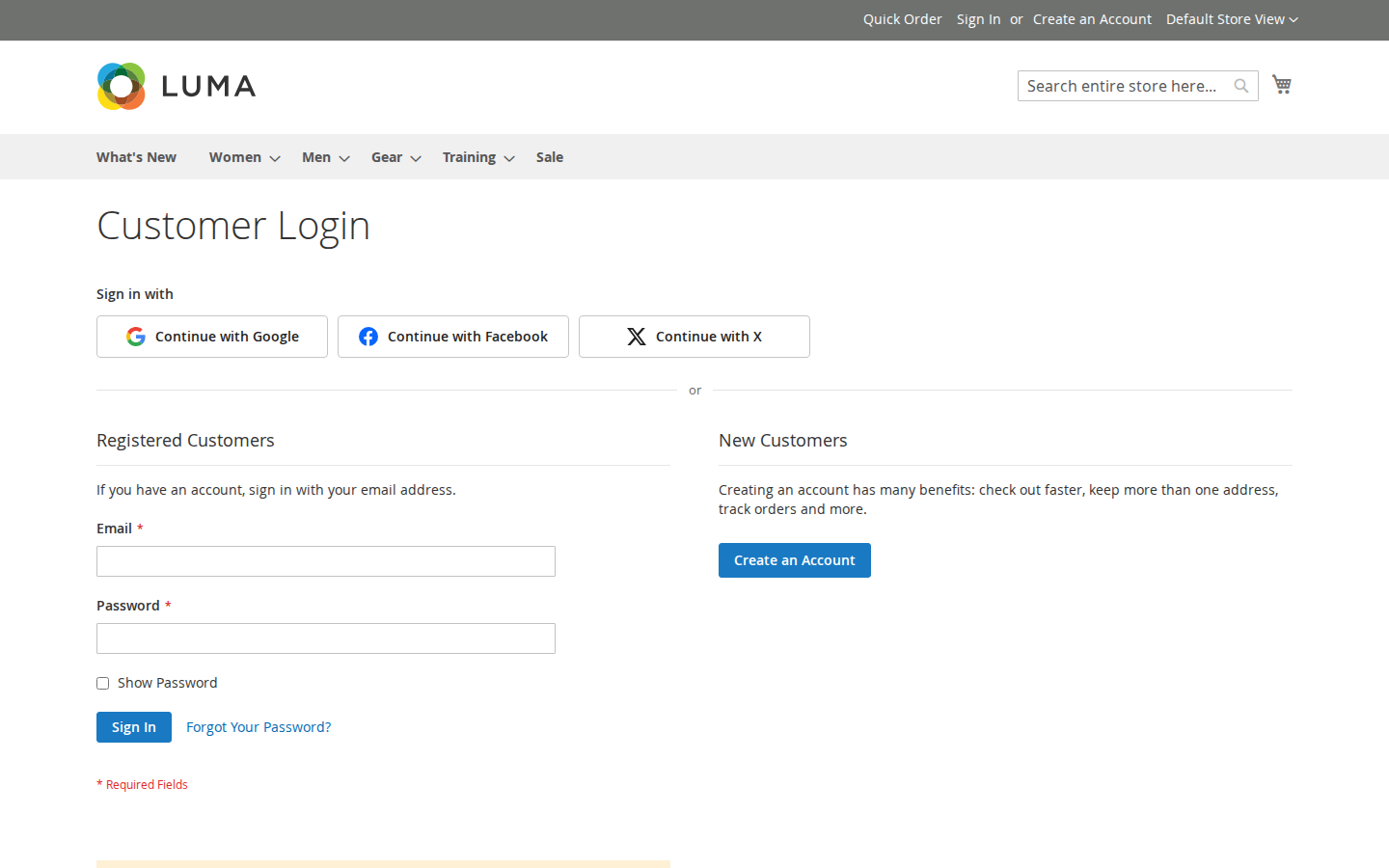
One click instead of a form
Buttons above the sign-in and registration forms. Icon and text or icon only, light or dark, in the order you choose.
02 / 07
Sign in without leaving the checkout
The "Sign In" popup on the checkout page and the authentication popup show the same buttons, so returning customers check out faster.
03 / 07
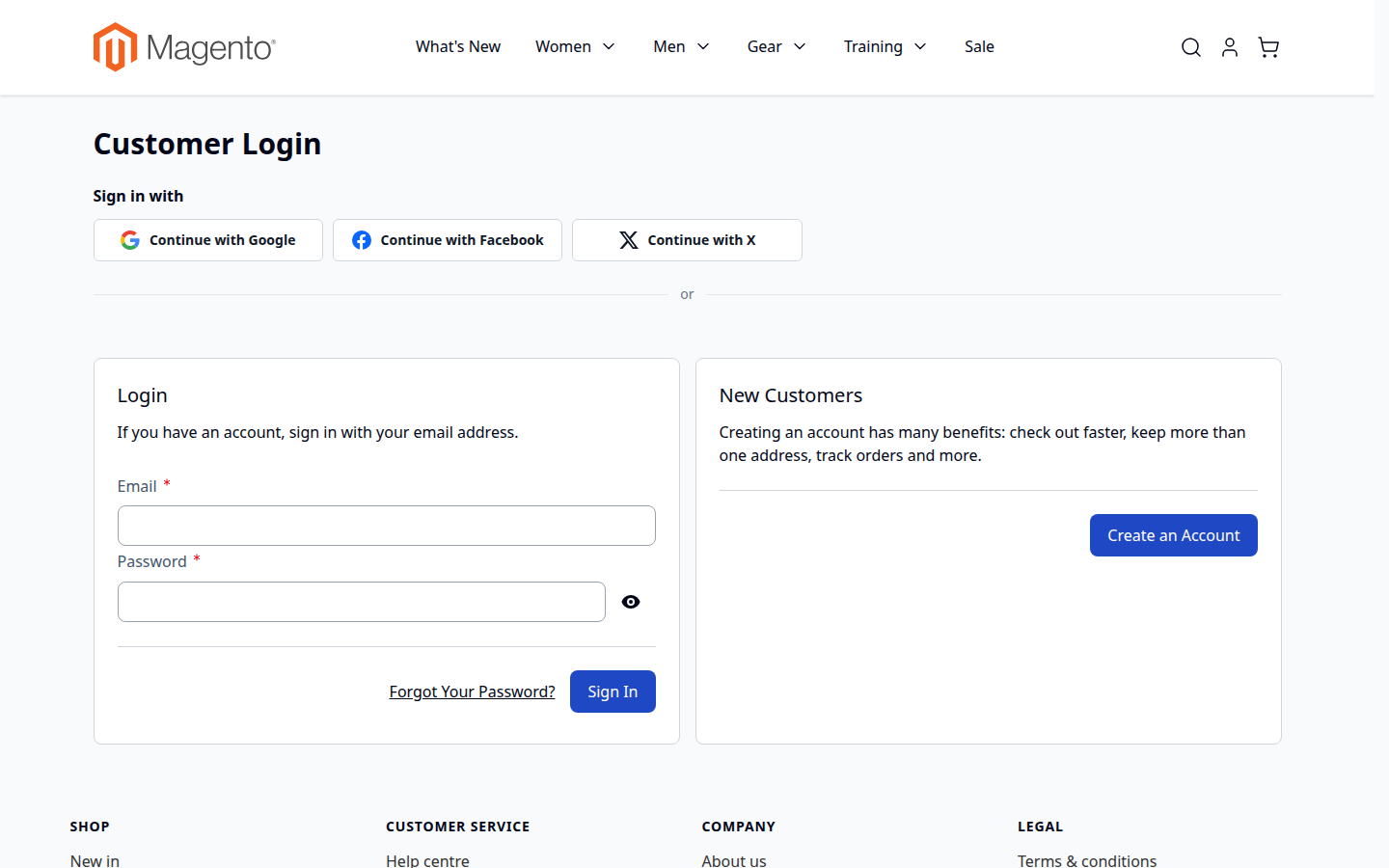
Native Hyvä templates
Alpine.js and Tailwind templates for Hyvä 1.3+, picked automatically. Luma, Blank and their child themes work out of the box.
04 / 07
Made for small screens
Buttons stack into full-width rows on phones, where typing an email address and a password is hardest.
05 / 07
Customers manage their connections
My Account › Connected Accounts lists the linked providers. Customers connect another one or disconnect one — never the last way to sign in.
06 / 07
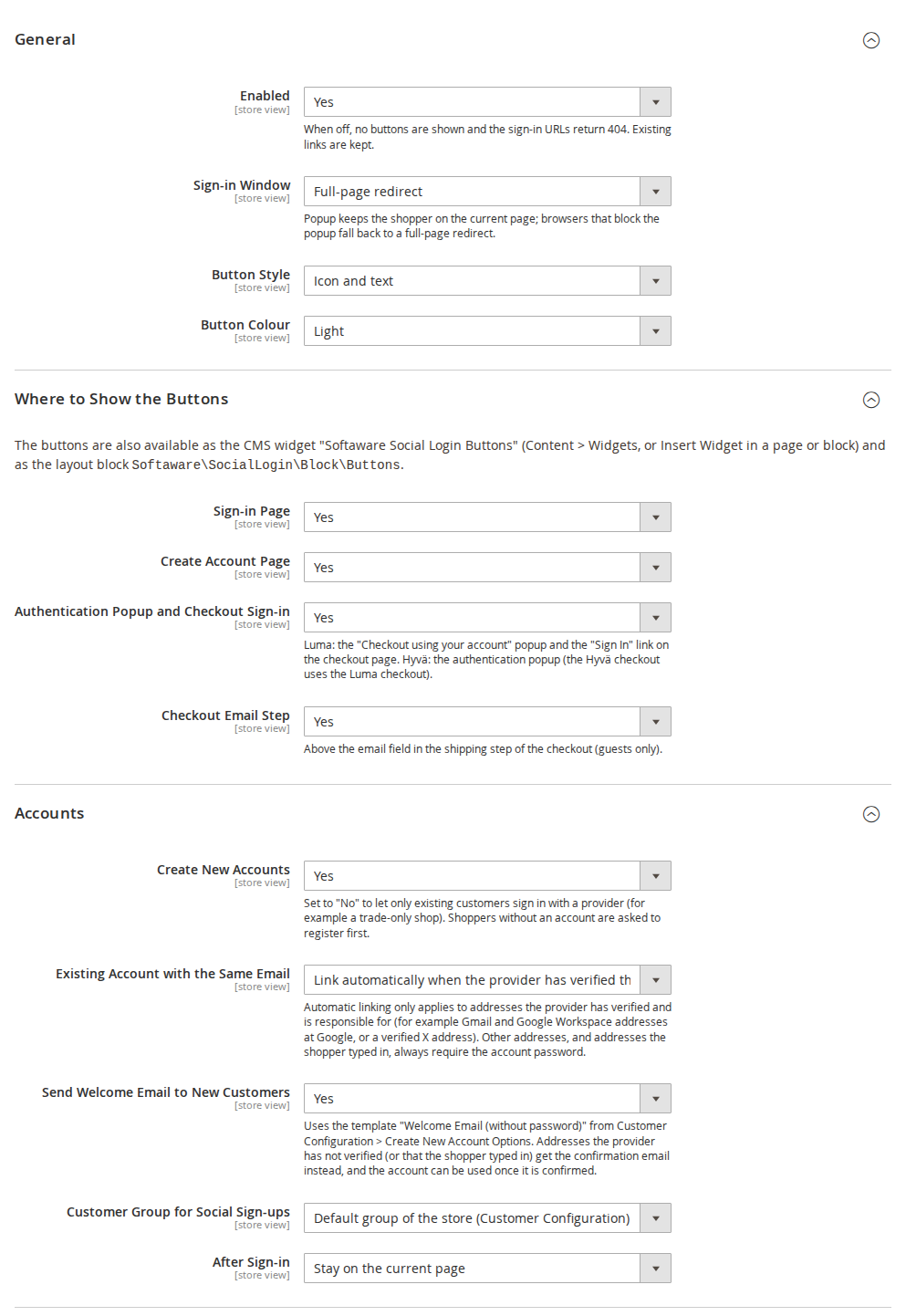
One settings page, per store view
Choose where the buttons appear, how they look, what happens after sign-in and which customer group new accounts join.
07 / 07
The exact callback URL, ready to copy
Each provider shows the callback URL to register for the current store view, with short setup steps. Secrets are stored encrypted.
All features
What is included
Providers
- Google (OpenID Connect with PKCE)
- Facebook (Graph API with appsecret_proof)
- X / Twitter (OAuth 2.0 with PKCE, optional email)
- Your own button labels and order
- More providers with Social Login Pro
Where the buttons appear
- Sign-in page
- Create-account page
- Authentication popup and checkout sign-in
- Checkout email step (guests)
- CMS widget and layout block
Accounts
- New accounts in the customer group you choose
- Optional welcome email
- Link existing customers automatically or after their password
- Existing customers only mode for B2B and trade shops
- Works with Softaware Customer Approval
Customer experience
- Popup or full-page sign-in
- Icon and text or icon only, light or dark
- Stay on the page, go to My Account or a custom URL
- Connected Accounts in My Account
- Short form when a provider gives no email or name
Security and privacy
- Single-use state bound to the browser
- ID tokens validated: signature, issuer, audience, expiry, nonce
- Email addresses trusted only when verified
- Confirmation email for unverified addresses
- No access tokens stored; links deleted with the customer
Admin and developers
- Linked Accounts grid and customer tab
- Separate ACL permissions
- CLI: list, unlink and self-test
- Per website and store view settings
- Extension point for more providers
Live demo
Try it before you install it
A full Magento store with the module installed, on Luma and on Hyvä. The admin demo signs you in with one click.
FAQ
Questions, answered
Something else on your mind? The developers who wrote the module answer before and after you buy.
Ask a question →Already installed it? Open a support ticket
Which providers are supported?
Google, Facebook and X (Twitter). Each one can be switched on separately, per website or store view.
Can I offer Apple, Microsoft, LinkedIn, Amazon or GitHub as well?
Yes, with the add-on Social Login Pro. It adds these five providers to the same configuration section, buttons, Connected Accounts page and admin tools; everything described here applies to them too.
Does it work with Hyvä?
Yes. Hyvä templates are included (Hyvä 1.3+, tested with 1.5). On the Hyvä checkout the Luma checkout fallback is used, so the checkout buttons are the Luma ones.
Does it install third-party SDKs?
No. OAuth 2.0 and OpenID Connect are implemented on Magento's HTTP client and PHP's OpenSSL extension, so there are no extra libraries to keep up to date or to conflict with other extensions.
Where can the buttons appear?
On the sign-in page, the create-account page, the authentication popup and the checkout sign-in, above the email field in checkout (guests), anywhere as a CMS widget, and anywhere in your layout as a block.
What happens if a customer already has an account with the same email?
The provider is linked to that account. If the provider has verified the address and is responsible for it (for example Gmail addresses at Google), this happens automatically; otherwise, or if you choose so, the customer enters their account password once. After that the provider signs them in directly.
Can I allow only existing customers to sign in with a provider?
Yes: set Create New Accounts to No. Shoppers without an account are asked to register first. This is useful for B2B and trade-only shops.
Does it work with customer approval?
Yes, with Softaware Customer Approval: social sign-ups get an approval status like any other registration, and pending or rejected customers are not signed in.
What if the provider does not give an email address?
X never returns one unless your app has the email permission. The customer then enters an email address once; an account created from a typed-in address must be confirmed by email before it can be used.
Can customers remove a connection?
Yes, under My Account > Connected Accounts. The module refuses to remove the last way to sign in (no password and no other provider). Admins can remove links under Softaware > Social Login > Linked Accounts.
Is it GDPR friendly?
Only the link between the customer and the provider account is stored, no access tokens. Links are deleted with the customer, and pending sign-in data is deleted after 15 minutes.
How is it protected against account takeover?
Every sign-in uses a single-use state bound to the browser, PKCE where the provider supports it, and full ID token validation (signature, issuer, audience, expiry, nonce). Email addresses are only trusted when the provider has verified them, and accounts from unverified addresses must be confirmed by email first. Return URLs are restricted to your own store.
Can I use different provider apps for each domain?
Yes. All settings, including the credentials, can be set per website and store view. Register one callback URL per store view URL at the provider.
Can I add another provider?
Yes, developers can implement ProviderInterface (or extend AbstractOidcProvider) and register it in di.xml; icons, settings and self-test checks have extension points too. See the README.
What happens to links of a provider that is not installed (for example after removing an add-on)?
They are kept and shown with their provider code in the admin and under Connected Accounts, where they can be removed. They are not counted as a way to sign in, so customers are never left without one.
Which Magento and PHP versions are supported?
Magento Open Source and Adobe Commerce 2.4.7 – 2.4.9, PHP 8.2 – 8.5.
Changelog
Release notes
1.3.0 Latest
- Works with Social Login Pro (Apple, Microsoft, LinkedIn, Amazon and GitHub): the add-on's providers appear in the same configuration section, button rows, Connected Accounts page, admin grid and self-test.
- Extension points for modules that add providers: button icons per provider code (
iconsargument ofViewModel\ProviderIcons), self-test checks (Model\SelfTest\CheckInterface,checksargument of the self-test command), and the callback URL comment for the admin (documented in the README together with the provider pool and the settings). - Links of providers that are not installed are handled safely: the Linked Accounts grid (column and filter), the customer tab and Connected Accounts show them with their provider code, customers and admins can remove them, and they do not count as a way to sign in when the customer disconnects another provider.
- Self-test: lists the registered providers; ES256 ID token checks (valid token, tampered payload, algorithm whitelist); a rejected issuer for issuer patterns; the handling of links whose provider is not installed.
- README, user guide and FAQ: provider extension points for developers, Social Login Pro; new screenshots.
1.2.1
Documentation
- User guide (docs/user-guide.md): installation, every setting, provider setup, admin tools, CLI, privacy, troubleshooting.
- FAQ (docs/faq.md) and screenshots (docs/images/).
- README: demo links; compatibility corrected to Magento 2.4.7-2.4.9 and softaware/module-core ^1.0.
1.2.0
- Requires
softaware/module-coreinstead ofsoftaware/module-base. The admin menu and ACL now sit underSoftaware_Core::core("Softaware"); roles that had access keep it (migrated by module-core). After updating all SoftAware modules,softaware/module-basecan be removed.
1.1.0
- Open redirect after sign-in fixed: return URLs such as
https:///evil.example/orhttps://evil.example\@your-shop/passed the "own host" check (PHP and browsers read them differently) and sent the customer to another site after signing in. Return URLs are now parsed strictly (no backslashes, control characters, user info or empty hosts) before the host check. - Pre-account hijacking: an account created from an email address the provider has not verified (typed in by the shopper, Amazon, the test provider) now always needs Magento's email confirmation before it can be used, whether or not the store requires confirmation. Before, anybody could create an account in someone else's name through a provider without email (e.g. X) and keep access through the linked provider after the real owner had reset the password.
- Linking to an existing account by email is limited to providers that are responsible for the address: Google only for Gmail and Google Workspace addresses (Google's own guidance), Facebook no longer (the Graph API has no verification flag). Everything else asks for the account password once, as before for unverified addresses. The same rule applies when an unconfirmed account is confirmed through a provider.
- Accounts > Create New Accounts (default Yes). Set to No to let only existing customers sign in with a provider; shoppers without an account are asked to register first.
- Hint on the "Connect your account" password step for customers who signed up with another provider and have no password.
- Self-test: return URL (open redirect) checks and email trust rules per provider.
- With "Require Emails Confirmation" switched on, a new social customer with an unverified address got the "welcome (no password)" email without a confirmation link and could never activate the account. The confirmation email is now sent.
- With "Require Emails Confirmation" switched on, accounts created from a verified address stayed unconfirmed in the database (password sign-in later said "not confirmed"). They are now confirmed.
- When another module refused the sign-in (e.g. Softaware Customer Approval: account waiting for approval), the customer saw two messages; now only the other module's explanation is shown. A refused sign-in is also detected when the session ends up with a different customer.
1.0.0
First release.
- Sign-in and registration with Google, Sign in with Apple, Facebook, Microsoft (Entra ID), GitHub, LinkedIn, Amazon and X (Twitter), implemented directly on OAuth 2.0 / OpenID Connect (no provider SDKs).
- State, nonce and PKCE (S256) where supported; ID token signature validation via JWKS (RS256/ES256) for Google, Microsoft, Apple and LinkedIn; browser-bound, single-use state stored server-side.
- Apple: ES256 client secret from the .p8 key,
form_postcallback with session restore. - Buttons on the sign-in and create-account pages, the Luma authentication popup, the checkout sign-in and (optional) checkout email step, the Hyvä authentication popup, a CMS widget and a layout block. Icon+text or icon-only, light or dark, popup or full-page redirect.
- Account matching: verified email links automatically (or asks for the password, configurable); missing email or name is asked for on a short form; new customers get a configurable group and optional welcome email.
- My Account > Connected Accounts (connect, disconnect with lock-out protection).
- Admin grid Softaware > Social Login > Linked Accounts, "Social Login" tab on the customer edit page.
- CLI:
softaware:social-login:links,softaware:social-login:unlink,softaware:social-login:self-test. - Luma and Hyvä templates; en_US and de_DE translations.
- Test provider for development (developer mode only, disabled by default).
Installation
Up and running in minutes
Get it free, create a Composer key in your account, then in the root of your Magento project:
-
01Add the repository and your key (once per project)
composer config repositories.softaware composer https://repo.softawarecommerce.com
composer config --auth http-basic.repo.softawarecommerce.com PUBLIC_KEY PRIVATE_KEY
-
02Install the module
composer require softaware/module-social-login -
03Enable it
bin/magento setup:upgrade
bin/magento setup:di:compile
bin/magento setup:static-content:deploy
bin/magento cache:flush
The last three are only needed in production mode.
Prefer a zip? Every version you are entitled to can be downloaded from My modules. More about Composer access
Requirements
Compatibility
- Magento
- 2.4.7 – 2.4.9
- PHP
- 8.2 – 8.5
- Themes
- Luma, Blank and Hyvä
- composer.json
- php ~8.2.0||~8.3.0||~8.4.0||~8.5.0 ext-json * ext-openssl * magento/framework ~103.0.7 softaware/module-core ^1.0 magento/module-backend * magento/module-checkout * magento/module-config * magento/module-customer * magento/module-store * magento/module-ui * magento/module-widget *