Mapping Magento categories to Google product categories, and why it is worth the hour
Google assigns a product category on its own, but there are cases where your own mapping decides which attributes are required and how your campaigns are split. Here is how to map a Magento category tree sensibly.

Your Shopping campaign is split by product category, and one group called "Bags" keeps spending money on a set of hiking boots. In Merchant Center the boots show a Google category nobody chose. Meanwhile your store's own category tree is careful and well kept: Women, Men, Gear, Sale, New In. None of that reached Google, because Google does not use your Magento categories at all.
Google has its own product taxonomy, a fixed list of about 5,600 categories, each with a numeric ID. The attribute that carries it is google_product_category. Mapping your categories to it takes an hour or two for a typical catalogue, and it is worth doing for a few specific reasons. It is also worth knowing when it makes little difference, because Google treats the value you send as an override of its own choice.
What Google does with the category today
Google's help page says it plainly: all products are automatically assigned a category from Google's taxonomy, and google_product_category is optional.1 The value you send is treated as an override, and Google says it only accepts an override in three cases: to enforce category-specific attribute requirements, to target Google Ads campaigns, and for alcohol.1
That sounds like a reason to skip it, but those three cases cover most of what matters to a shop.
The first is required attributes. Some categories add requirements: clothing needs colour, size, gender and age group for the UK, the US and four other countries, for example.2 If Google files your product in the wrong category, it can ask for attributes the product does not need, or fail to ask for ones it does. Setting the category yourself puts the right requirements on the right products. Google lists a few categories where the value is mandatory or has to be specific, such as gift cards, alcoholic drinks, software subscriptions and phones sold with a contract.1
The second is campaigns. If your Google Ads campaigns or product groups are divided by Google product category, the category decides which campaign a product falls into. A boot in the "Bags" group is spending that group's budget.
The third, alcohol, is simple: it must be categorised as alcohol.1
Google also asks for the most specific category that fits, and warns against broad ones such as "Electronics".1 You may send either the ID or the full path, not both, and Google recommends the ID.2
Google category and product type are different things
There is a second attribute that people mix up with this one. product_type is your own classification, in your own words, with the full path, such as "Gear > Bags".2 Google uses only the first value, and you can use it to organise bidding and reporting in Shopping campaigns.2 Your Magento category path is a natural fit for product_type, and it costs nothing to send.
So a sensible feed sends both: product_type from your Magento category path, which you control completely, and google_product_category from a mapping, where you pick from Google's list. Our Google Shopping template does exactly that, with the deepest Magento category path as product_type.
How to map a Magento category tree
The good news is that you do not map products, you map categories, and you do not have to map every category. In Data Feed Manager the mapping page lists your store categories as a tree, and each row has a search field where you type a word such as "hoodies" and pick from Google's taxonomy. A category without its own mapping inherits the nearest mapped parent, shown in grey. In practice you map a handful of upper and middle categories and only add deeper ones where Google has a more specific category.
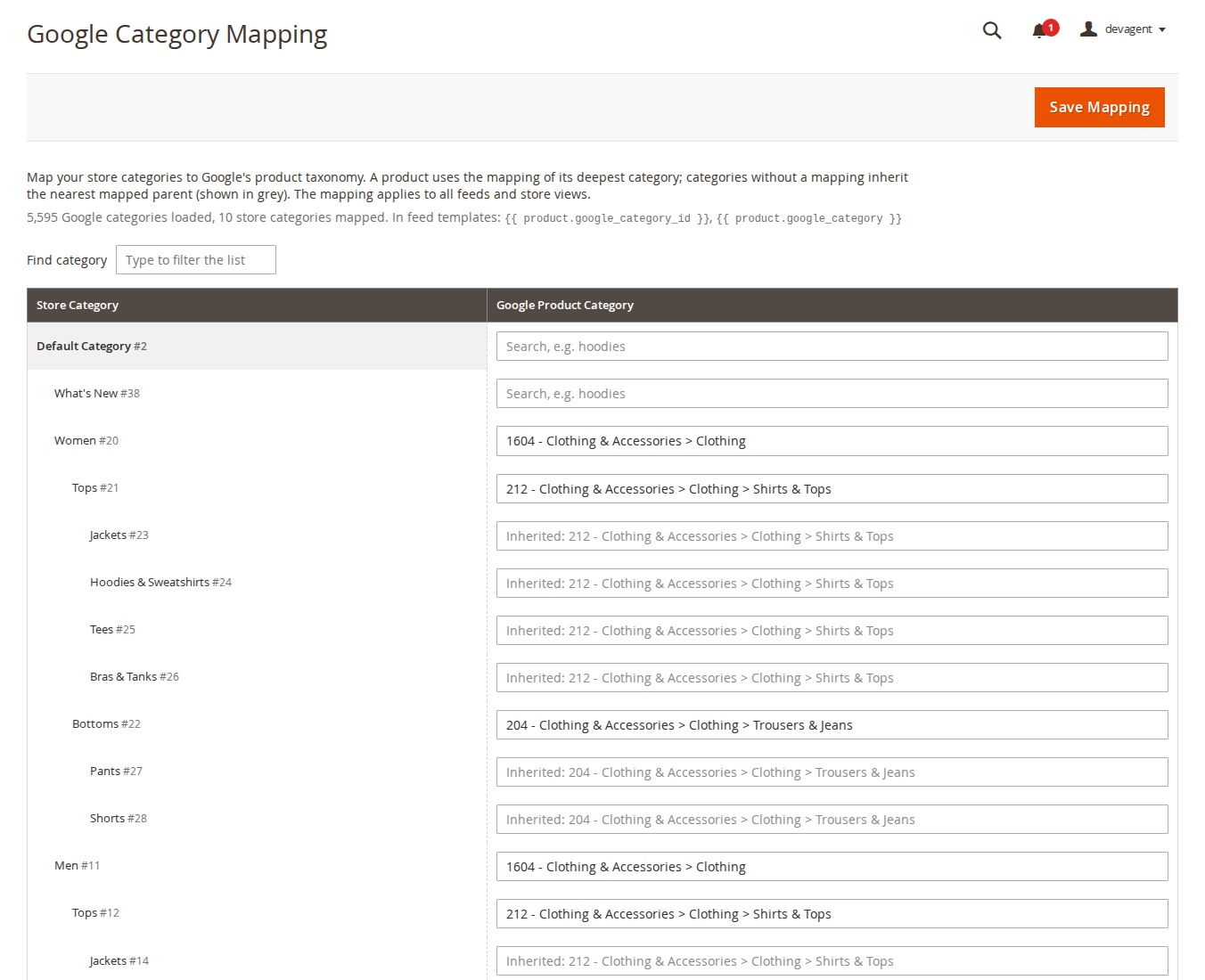
A product then uses the mapping of its deepest category. The module goes through the product's categories from the deepest level up and takes the first one that has a mapping, either its own or inherited from a parent. That rule has one practical consequence for Magento stores, where products sit in more than one category:
- Leave merchandising categories such as Sale, New In, Gifts or Bestsellers unmapped. They say nothing about what the product is, and if one of them is deeper than the real category (a "Sale > Last chance" branch, say) and inherits a mapping, it would win.
- Map the categories that describe the product type, at the level where Google's taxonomy has a matching entry. If Google has "Clothing & Accessories > Clothing > Shirts & Tops", map your Tops category there and let Jackets, Tees and Hoodies inherit it unless Google has something more specific for them.
- Check the products that sit only in a merchandising category. With no mapped category, they are sent without
google_product_categoryand Google assigns one itself, which is fine unless they fall under one of the three cases above.
The mapping applies to all feeds and all store views, because Google's category IDs are the same in every language. That is also why changing the taxonomy language does not break anything. The English (en-GB) taxonomy is imported when you install the module; for German, French or another language you download Google's taxonomy-with-ids file for that locale and import it, and your existing mappings stay valid. The bundled file and the file Google serves today both carry the version date 21 September 2021, so Google's list has not changed for some time.
When you can leave it
If you have a small catalogue in one obvious category, do not split your campaigns or product groups by Google category, and sell nothing with special rules, Google's own categorisation is probably fine. Send product_type from your category path, look at what Google assigned in Merchant Center, and only map the categories it gets wrong.
The limits on our side: the mapping is global, so you cannot send a different Google category for the same Magento category in two feeds, and it works per category, not per product. A product that really belongs to a different Google category than its siblings needs its own Magento category, or a small change in the feed template using an attribute instead of the mapping.
The mapping page is part of Data Feed Manager, and our post on building a Google Merchant Center feed from Magento 2 covers the rest of the feed.
Sources
- Google Merchant Center Help, "Google product category [google_product_category]", https://support.google.com/merchants/answer/6324436, checked 9 October 2026. ↩1 ↩2 ↩3 ↩4 ↩5
- Google Merchant Center Help, "Product data specification", https://support.google.com/merchants/answer/7052112, checked 9 October 2026. ↩1 ↩2 ↩3 ↩4
From our shop
Related Products
-
Data Feed Manager
Product feeds for Google Shopping, Meta, Pinterest, Microsoft/Bing Shopping and other channels, as XML, JSON, CSV or TXT, generated on a schedule and checked before they go live.
- Magento 2.4.7 – 2.4.9
- Hyvä
- Luma
- Version v1.5.2
$179
