Data Feed Manager: export product data as XML, JSON, CSV or delimited TXT feeds for Google Shopping, Meta, Pinterest, Bing, price comparison sites and ERPs.
Start from a ready template for Google Shopping, Meta, Pinterest or Microsoft, or build your own feed for a price comparison site or an ERP.
No broken files online
Every item and the finished file are checked. An invalid file is never published, and the previous one stays in place.
Fresh feeds without effort
Feeds are rebuilt at the times you choose, in batches, so even large catalogues are generated without blocking the store.
All features
What is included
Feeds and formats
XML, JSON, CSV and delimited TXT
Templates: Google Shopping, Meta, Pinterest, Microsoft/Bing, generic JSON
Store view and currency per feed
Public URL or a private folder below var/
Random file names, so URLs cannot be guessed
Product data
Any attribute, with option labels
Prices with and without tax, special and tier prices
Stock, URLs, images and categories
Parent values and item_group_id for variants
Reviews count and rating
Generation
Daily at set times or a cron expression
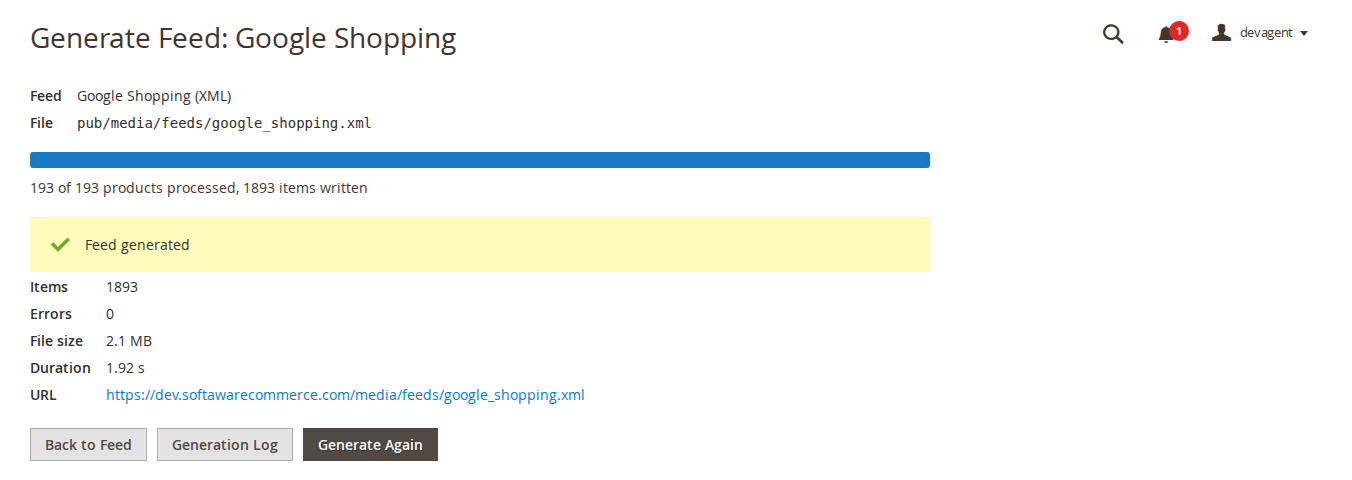
Generate Now in the admin with a progress bar
Batches by product ID
Items and file validated before publishing
Generation log with errors and file size
Delivery and admin
SFTP, FTP or FTPS upload with Test Connection
Encrypted password and SFTP host key check
Separate permissions for feeds, generation, deletion, mapping and log
CLI: list, generate, preview, taxonomy import
Taxonomy in other languages can be imported
Feature tour
Everything your shoppers and your team see
01 / 06
All feeds at a glance
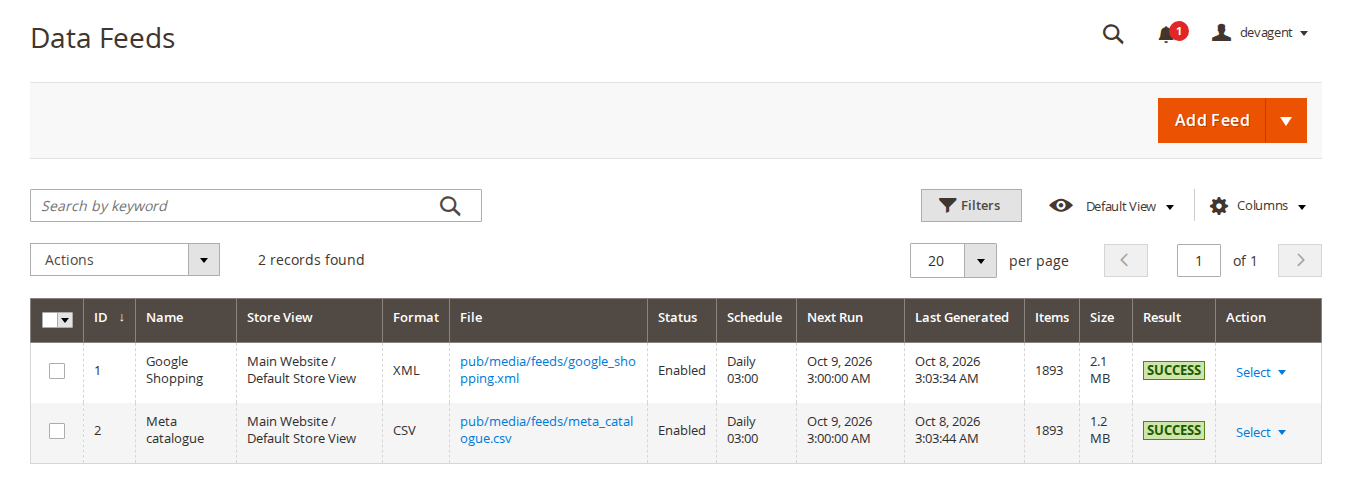
File link, schedule, next run, last result, items and size for every feed. Generate, duplicate, enable or disable feeds from the grid.
02 / 06
A template language made for feeds
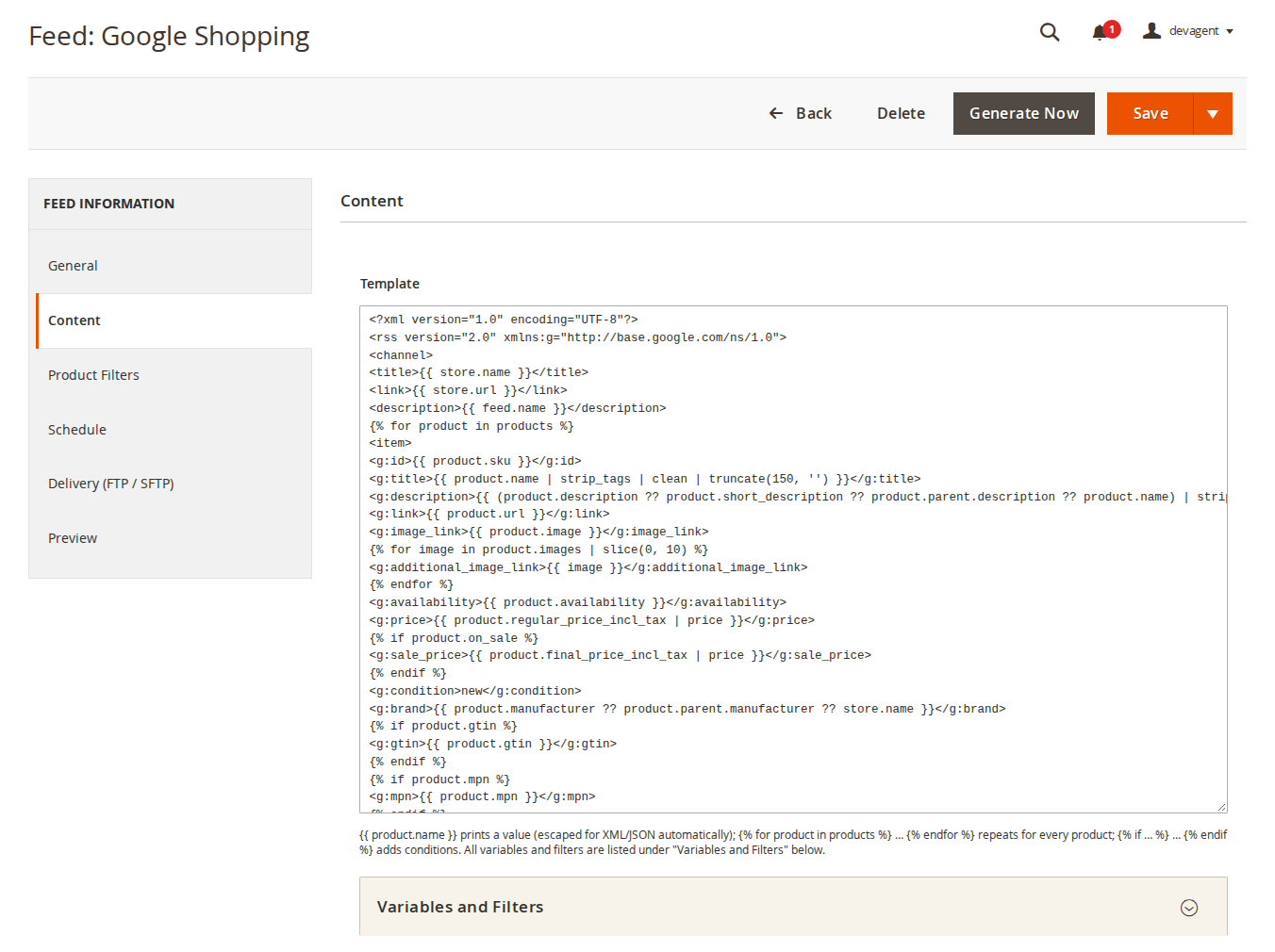
Print any product value with filters such as strip_tags, truncate or price. Output is escaped for XML or JSON automatically and the language has no access to PHP.
03 / 06
Columns in a simple mapper
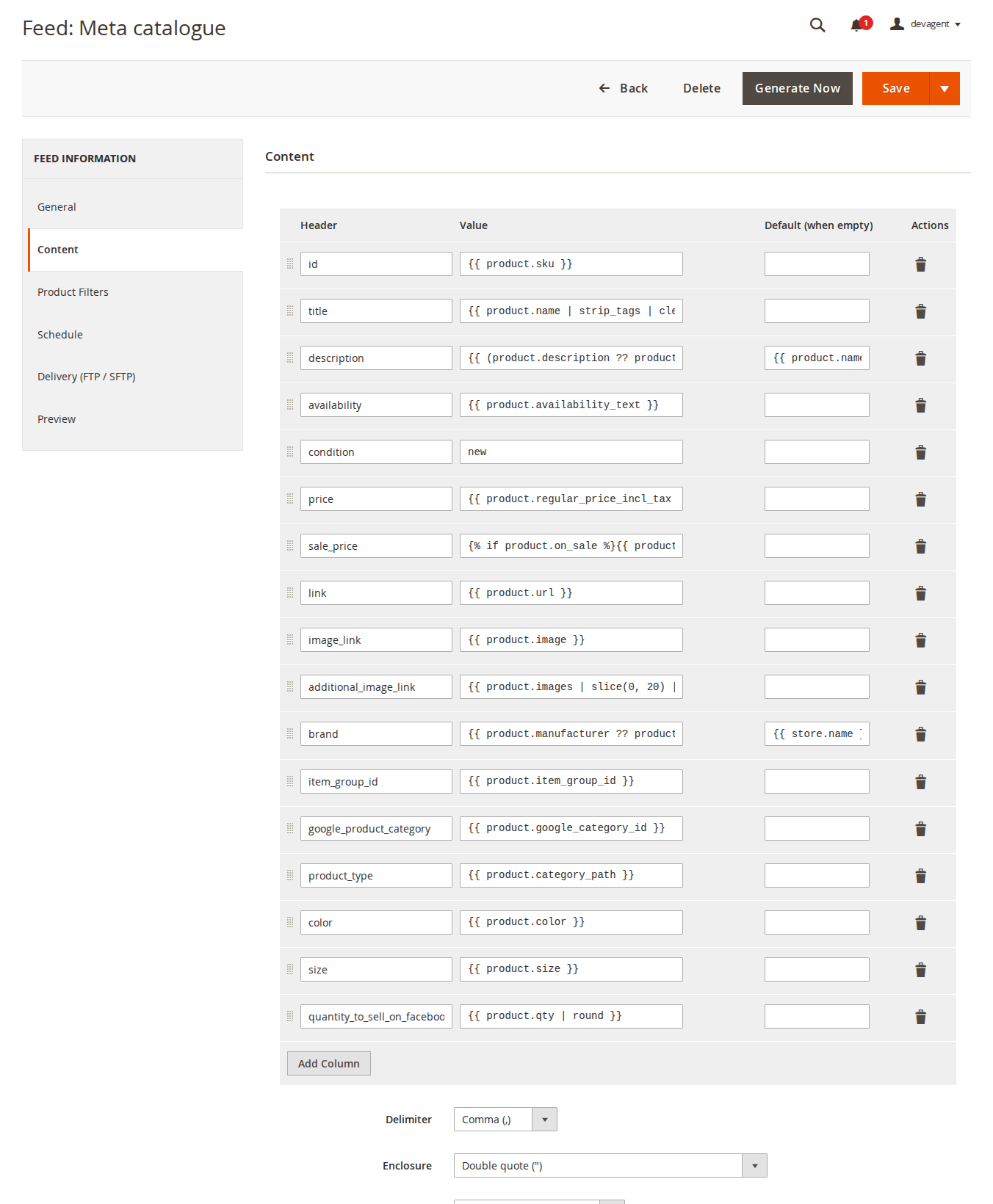
Header, value and default per column, drag to reorder, with delimiter, enclosure, encoding, line ending and header row options.
04 / 06
Check before you save
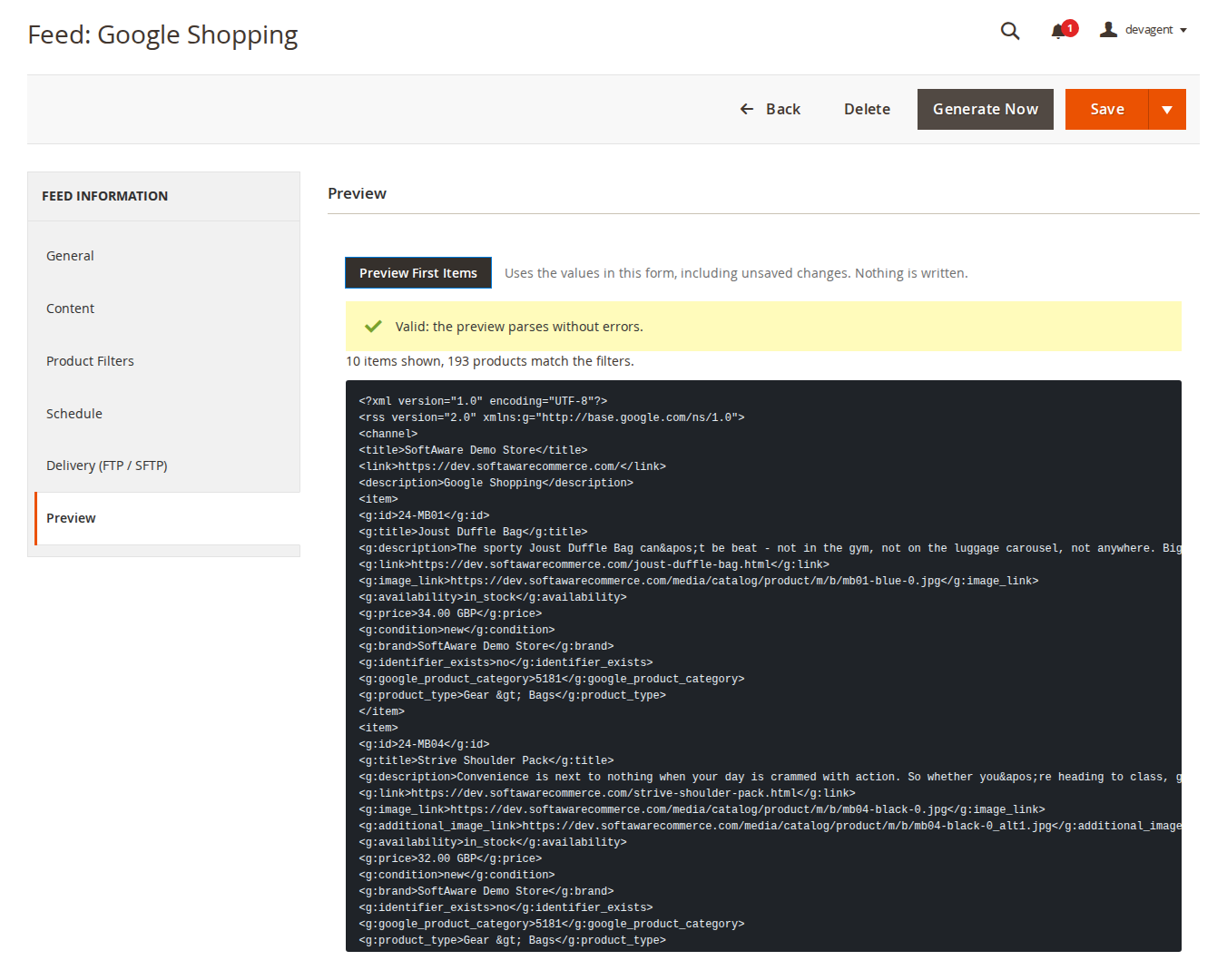
The Preview tab renders the first items from the values in the form, including unsaved changes, and validates them. Nothing is written.
05 / 06
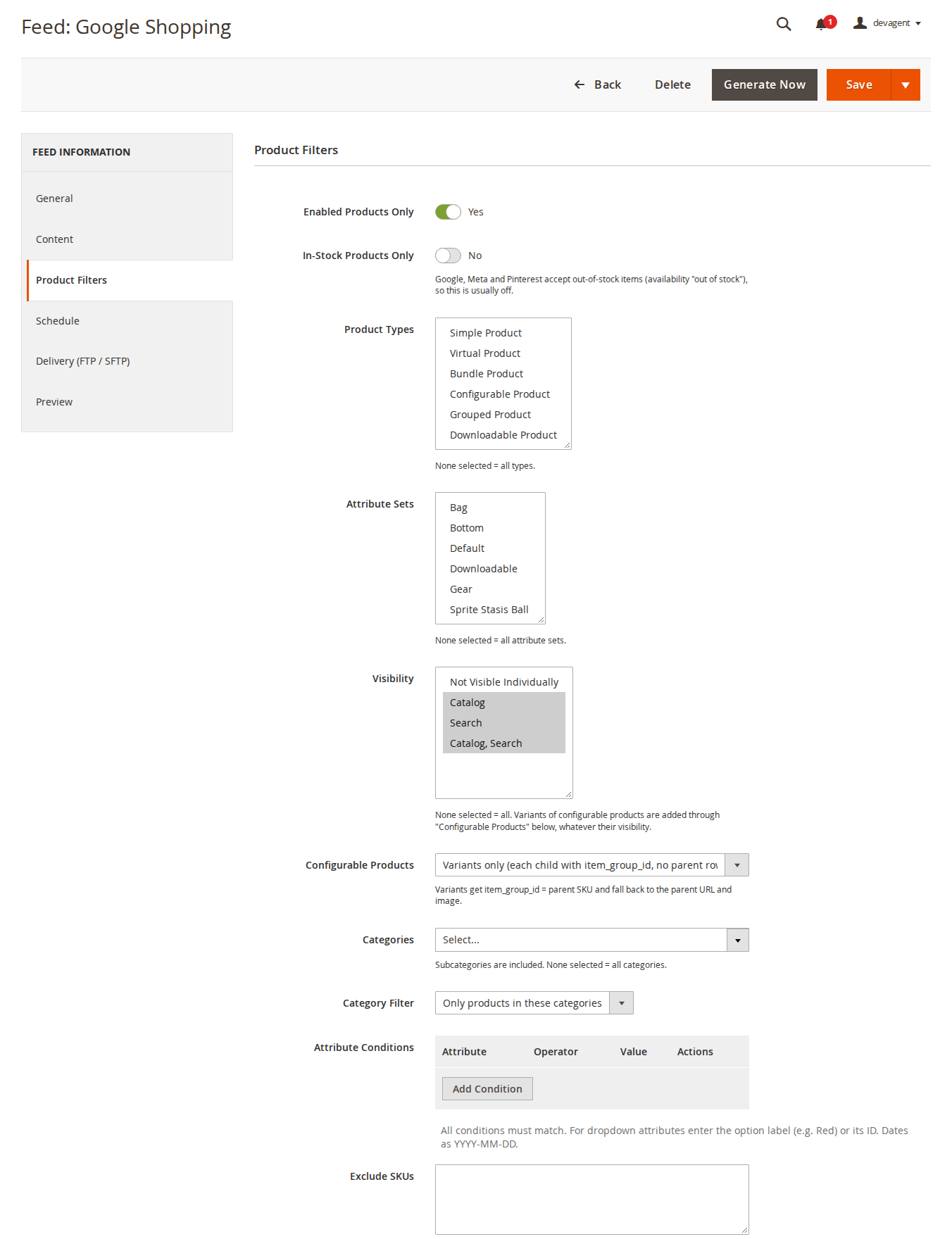
Only the products the channel needs
Status, stock, product types, attribute sets, visibility, categories, attribute conditions and excluded SKUs. Configurable products as parents, variants or both.
06 / 06
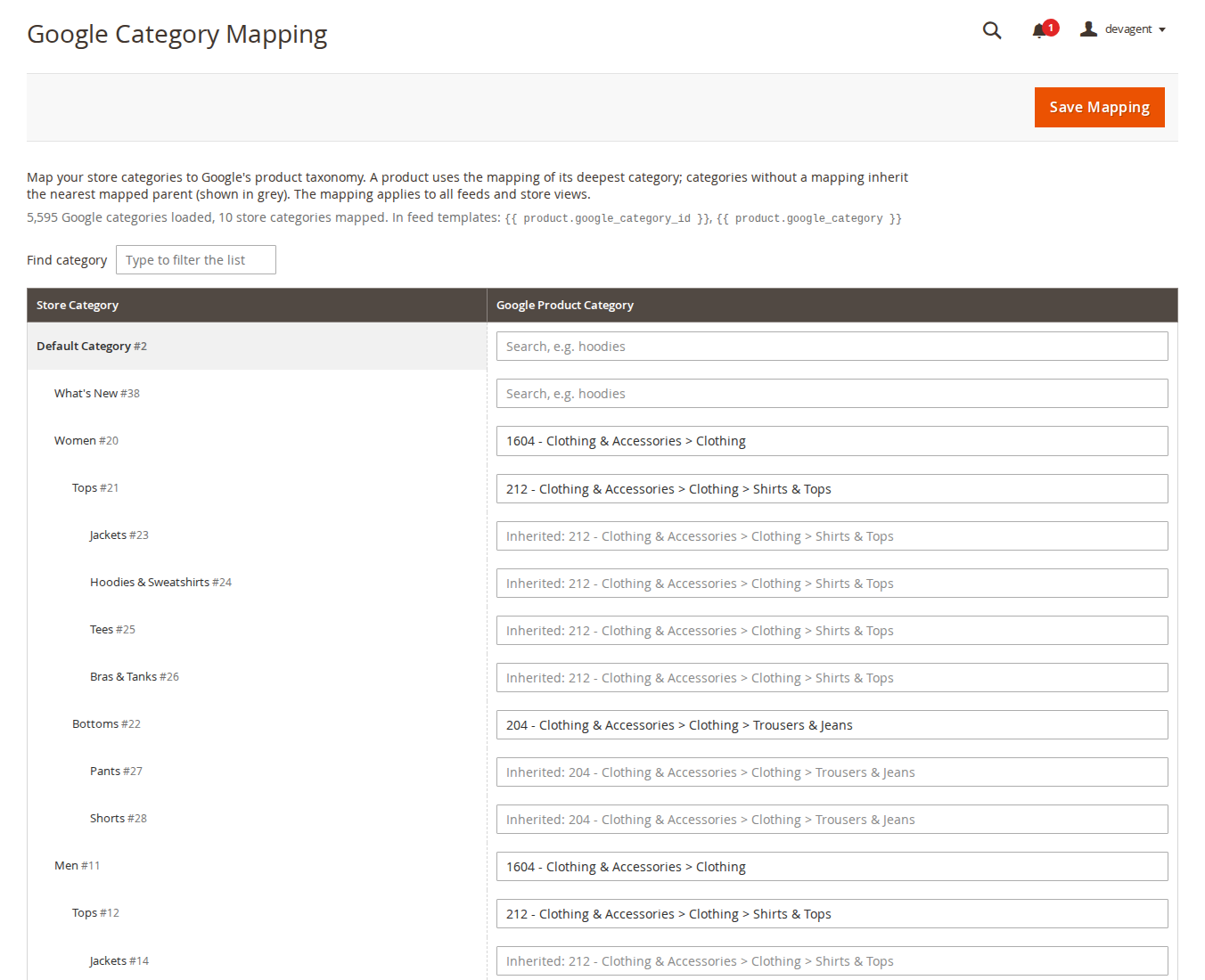
Map your categories to Google's taxonomy
Search Google's product categories by name. Subcategories inherit the nearest mapped parent, so a few mappings cover the whole tree.
Live demo
Try it before you install it
A full Magento store with the module installed, on Luma and on Hyvä. The admin demo signs you in with one click.
The last three are only needed in production mode.
Prefer a zip? Every version you are entitled to can be downloaded from My modules. More about Composer access
User guide
How to set up and use Data Feed Manager
For version 1.3.1. The same guide comes with the module, in docs/user-guide.md.
Data Feed Manager exports your products as XML, JSON, CSV or delimited TXT feeds for Google Shopping, Meta (Facebook and Instagram), Pinterest, Microsoft/Bing Shopping, price comparison sites and ERPs. Feeds are generated in batches by cron, from the admin or on the command line, checked before they are published, and can be uploaded by SFTP, FTP or FTPS.
composer config repositories.softaware composer https://repo.softawarecommerce.com
composer config --auth http-basic.repo.softawarecommerce.com PUBLIC_KEY PRIVATE_KEY
composer require softaware/module-data-feed-manager
bin/magento setup:upgrade
bin/magento setup:di:compile # production mode only
bin/magento setup:static-content:deploy # production mode only
bin/magento cache:flush
The installation imports Google's product taxonomy in English (en-GB). Make sure Magento's cron is running (bin/magento cron:install) for scheduled feeds. To update later, run composer update softaware/module-data-feed-manager and the same bin/magento commands.
3. Settings
Stores > Configuration > Softaware > Data Feed Manager (also under Softaware > Data Feed Manager > Settings). Store view, currency and schedule are set per feed; these settings apply to all feeds.
Setting
What it does
General > Enabled
When set to No, no feeds are generated (cron, admin or command line). Existing feed files stay in place. Default: Yes.
Generation > Batch Size
Products loaded at a time, 10 to 5000. Default: 250. Lower it if generation runs out of memory.
Generation > Preview Items
Items shown on the feed's Preview tab, 1 to 100. Default: 10.
Generation > Keep Generation Log For (Days)
Older log entries are deleted daily. Default: 30; 0 keeps the log for ever.
4. Creating a feed
Go to Softaware > Data Feed Manager > Feeds and open the Add Feed split button. Choose From template: Google Shopping, Meta catalogue, Pinterest catalogue, Microsoft/Bing Shopping or generic JSON, or Blank feed. The feed form has tabs on the left.
General
Field
What it does
Enabled
Disabled feeds are not generated by cron.
Name
Your name for the feed.
Store View
Product values, prices, URLs and stock come from this store view and its website.
Format
XML, JSON, CSV or TXT (delimited).
File Name
For example google_shopping_k3v9q2xa.xml. New feeds get a random part so the URL cannot be guessed. The extension (.xml, .json, .csv, .txt or .tsv) must match the format.
Directory
Relative to the Magento root. Below pub/media/ the file gets a public URL; below var/ it stays private (use the upload).
Currency
Prices are converted from the base currency with the rates in Stores > Currency Rates.
{{ … }} prints a value, escaped for XML or JSON automatically.
{% for product in products %} … {% endfor %} marks the repeated item (exactly one, at the top level). Everything before it is the header, everything after it the footer.
{% if %}, {% elseif %}, {% else %}, {% for image in product.images %}, {% set x = … %} and {# comments #}; loop.index, loop.first and loop.last inside loops.
Operators: and or not == != < > <= >= in ~ + - * /, the fallback a ?? b and a ? b : c.
Filters include strip_tags, truncate, upper, lower, capitalize, title, trim, clean, number_format, round, price, default, replace, regex_replace, prepend, append, join, split, first, last, slice, count, unique, date, html_decode, url_encode, json, cdata, raw and escape.
Variables and Filters below the editor lists every variable with a description: product attributes (store view values and option labels, product.raw.<code> for the stored value), prices (regular_price, final_price, special_price, min_price, max_price, each also _incl_tax and _excl_tax, tier_prices, on_sale), stock (qty, is_in_stock, is_salable, availability), url, images (image, images, all_images and more), categories (category, category_path, google_category_id, google_category), parent.* and item_group_id for variants, variants and children, reviews (reviews_count, rating), store.*, feed.* and now.
The language is a sandbox: it has no access to PHP, files or configuration. For safety, XML feeds may not contain XHTML, SVG, MathML, XSLT or XLink content or an xml-stylesheet instruction.
Content: columns (CSV and TXT)
Column mapper
Each column has a Header, a Value (the same template syntax, or static text such as new) and a Default (when empty). Drag the handle to reorder columns. Below the columns: Delimiter (comma, semicolon, tab, pipe), Enclosure (double quote, single quote, none), Encoding (UTF-8, UTF-8 with BOM for Excel, ISO-8859-1, Windows-1252), Line Ending (LF or CRLF) and Header Row.
Product Filters
Product filters
Field
What it does
Enabled Products Only
Leave out disabled products.
In-Stock Products Only
Leave out products that are out of stock. Google, Meta and Pinterest accept out-of-stock items, so this is usually off.
Product Types, Attribute Sets, Visibility
None selected means all.
Configurable Products
Parents only, variants only (each variant with item_group_id = parent SKU, no parent row), or parents and variants.
Categories, Category Filter
Only products in these categories, or products not in these categories. Subcategories are included.
Attribute Conditions
Attribute, operator (= != > < >= <=, contains, does not contain, is one of, is not one of, is empty, is not empty) and value. All conditions must match. For dropdowns enter the option label (for example Red) or its ID; dates as YYYY-MM-DD.
Exclude SKUs
One per line or comma separated.
Schedule
Generate: Manual only (admin or CLI), Daily at set times (for example 03:00, 15:00) or a Cron expression (for example 0 */4 * * *), in the store view's timezone. The form shows the next run.
Delivery (FTP / SFTP)
Upload After Generation uploads the file after each generation; the local file is always written too. Fields: Protocol (SFTP, FTP, FTPS with explicit TLS), Host, Port (empty = 22 for SFTP, 21 for FTP and FTPS), Username, Password (stored encrypted), Remote Directory (must exist), SFTP Host Key and Passive Mode (FTP). Test Connection checks the settings in the form.
SFTP host key check: the server's key fingerprint (SHA256:…) is saved on the first upload, or you enter it. If the server later presents another key, the upload stops before the password is sent. Clear the field when the server was really replaced.
After changing the host or protocol, enter the password again; the saved password is not sent to another host.
A failed upload marks the run as a warning; the local file is still updated.
Tested status: FTP upload was tested against a local FTP server. SFTP has not yet been tested against a real SFTP server. FTPS does not verify the server's TLS certificate (a limit of PHP's FTP extension), so prefer SFTP.
Preview
Preview of the first items
Preview First Items renders the first items (Preview Items setting) from the values in the form, including unsaved changes, and validates them. Nothing is written. It also shows how many products match the filters.
Saving
Save keeps you on the form; the split button also has Save & Close and Save & Generate Now. Invalid file locations and template syntax errors are refused on save, and the entered values are kept.
5. Generating feeds
By cron: feeds with a schedule are generated in the cron group softaware_datafeed.
In the admin:Generate Now (in the form or the grid's Select menu) runs batch by batch in the browser with a progress bar, then shows items, errors, file size, duration and the URL.
On the command line: see section 9.
Generate Now
Each run writes to a temporary file. Items that fail their check are skipped and logged. The finished file is validated (streamed XML parse, JSON decode) and only then replaces the old file, in one step. If the file is invalid, it is not published and the previous file stays. Two runs of the same feed cannot overlap.
The grid shows each feed's file link, schedule, next run, last generated time, result, items and size, and has a keyword search. Mass actions: enable, disable and delete. Row actions: Edit, Generate Now, View Log, Duplicate and Delete.
Softaware > Data Feed Manager > Generation Log lists every run: feed, start time, started by (cron, admin or CLI), status, seconds, items, errors, file size and messages.
6. Google category mapping
Google category mapping
Softaware > Data Feed Manager > Google Category Mapping lists your store categories. Type in the field next to a category (for example "hoodies") and pick a Google category. A product uses the mapping of its deepest category; categories without a mapping inherit the nearest mapped parent (shown in grey). Use Find category to filter the list and Save Mapping to save. In templates use {{ product.google_category_id }} or {{ product.google_category }}. The mapping applies to all feeds and store views.
Taxonomy Language: download taxonomy-with-ids.<locale>.txt from Google (for example taxonomy-with-ids.de-DE.txt) and import it at the bottom of the page or with softaware:feed:taxonomy-import. Category IDs are the same in every language, so existing mappings stay valid.
7. File locations and privacy
Feeds can be written below pub/ (public; below pub/media/ the URL is the media URL) or below var/ (private). pub/static/, pub/errors/ and hidden folders are not allowed.
File names may only contain letters, digits, ., - and _.
Outside pub/media/feeds/ a feed can only create a new file: a location where another file already exists (for example pub/robots.txt) is refused.
Public files can be read by anyone who has the URL. Put feeds with private data (cost, stock levels) below var/ and upload them by SFTP.
8. Permissions (ACL)
Under System > Permissions > User Roles > Role Resources > Softaware > Data Feed Manager:
Resource
Allows
Manage Feeds
The feed grid and form.
Manage Feeds > Generate Feeds
Generate Now and Save & Generate Now.
Manage Feeds > Delete Feeds
Deleting feeds.
Google Category Mapping
The mapping page and taxonomy import.
Generation Log
The log.
Data Feed Manager Settings
The configuration section.
9. Command line
bin/magento softaware:feed:list                                   # feeds with schedule, last run, items, status and URL
bin/magento softaware:feed:generate <id> [<id> ...]               # generate the given feeds
bin/magento softaware:feed:generate --all                         # generate all enabled feeds
bin/magento softaware:feed:preview <id> [--limit=3]               # print the first items
bin/magento softaware:feed:taxonomy-import [path/to/taxonomy-with-ids.de-DE.txt]
10. Troubleshooting
Problem
Solution
A scheduled feed is not generated
Check that Magento's cron runs, that the feed and General > Enabled are on, and the next run in the Schedule tab.
"The file was not published because it is invalid"
Open the Generation Log for the line and the reason, fix the template and use Preview. The previous file is still online.
Items are missing
Check the Product Filters and the Configurable Products mode, and the log for skipped items.
Prices are outdated
Feeds use the price index: reindex prices.
Upload fails
Use Test Connection. Check host, port, remote directory (it must exist) and, for SFTP, whether the host key changed.
Generation runs out of memory
Lower Batch Size.
11. Limitations
Prices are guest prices from the price index; tax uses the store's default tax destination.
Attribute conditions apply to the selected products, not to variants added through the Configurable Products mode.
The Google category mapping is global, not per store view or feed.
CSV values are written as they are, without protection against spreadsheet formulas; do not open feeds built from untrusted text in a spreadsheet program.
SFTP upload has not yet been tested against a real SFTP server; FTPS does not verify TLS certificates.
Feed files that were already generated stay where they are; delete them yourself if channels should no longer read them.
Changelog
Release notes
1.3.1
Latest
Product listing, FAQ and user guide (docs/)
1.3.0
Keyword search in the feed grid (name and file name; new full-text index on the feed table).
Empty states: the feed grid and the generation log explain what they are for and link to the next step ("Create your first feed", "Go to Feeds") instead of showing an empty table.
The feed form uses proper vertical tabs on the left (General, Content, Product Filters, Schedule, Delivery, Preview) instead of a long page of sections that opened downwards. The Content tab shows the template (XML, JSON) or the columns (CSV, TXT) for the selected format, with the variables reference below it.
Feed grid: the Status column says Enabled / Disabled; long file paths wrap and Items / Size are hidden by default (still under Columns), so the grid fits narrower screens.
Google Category Mapping: "Save Mapping" is in the page action bar, the intro is shorter, category indentation uses the module stylesheet instead of inline styles, and the taxonomy import has a labelled file field and an "Import Taxonomy" button.
Generation log: "Back to Feeds" button.
Settings: split into General (always open) and Generation groups, every field shows its default and can be reset to it (config paths unchanged).
Shorter, clearer help texts in the feed form.
1.2.0
Requires softaware/module-core instead of softaware/module-base. The admin menu and ACL now sit under Softaware_Core::core ("Softaware"); roles that had access keep it (migrated by module-core). After updating all SoftAware modules, softaware/module-base can be removed.
1.1.0
SFTP host key check: the server's key fingerprint is saved on the first upload (or entered in the new "SFTP Host Key" field) and uploads stop before the password is sent if the key changes. Test Connection shows it.
New feeds get a file name with a random part, so public feed URLs cannot be guessed.
XML feeds can no longer contain XHTML, SVG, MathML, XSLT or XLink content or an xml-stylesheet instruction. Such a file, served from the store's domain, ran scripts in the browser (stored XSS for anyone opening the feed URL, including other admins). Affected items are skipped and logged; a header or footer with it stops publishing.
Feed locations: hidden folders (e.g. pub/.well-known/) are refused, and outside pub/media/feeds/ a feed can no longer overwrite an existing file it did not create (e.g. pub/robots.txt).
The saved FTP/SFTP password is no longer sent when the host or protocol was changed in the form (Save and Test Connection); it has to be entered again.
"Start anyway" on the generation page no longer replaces a generation that is still running (cron, CLI or another tab), which could mix two runs in one file.
XML namespace declarations in single quotes (xmlns:g='…') in the template header are recognised when items are checked.
1.0.0
Feeds with store view, format (XML, JSON, CSV, delimited TXT), file location, currency, schedule and delivery
Ready templates: Google Shopping (XML), Meta catalogue (CSV), Pinterest catalogue (CSV), Microsoft/Bing Shopping (TXT), generic JSON
Sandboxed template language for XML/JSON and column mapper for CSV/TXT with delimiter, enclosure, encoding and line ending options
Product variables for attributes, prices with/without tax, stock, URLs, images, categories, Google category, parent and variant data, bundle/grouped children and reviews
Google product taxonomy (en-GB bundled, other languages importable) and category mapping with inheritance
Batched generation by cron (daily times or cron expression), admin progress page and CLI; preview of unsaved changes; output validation; generation log
Optional SFTP/FTP/FTPS upload with encrypted password and connection test
FAQ
Questions, answered
Something else on your mind? The developers who wrote the module answer before and after you buy.
Any channel that reads an XML, JSON, CSV or delimited TXT file from a URL or an upload. Ready templates are included for Google Shopping (RSS 2.0 XML with the g: namespace), Meta catalogue (CSV), Pinterest catalogue (CSV), Microsoft/Bing Shopping (tab-delimited TXT) and a generic JSON feed. For other channels, start from a blank feed or change a template.
Do I need to know PHP to change a feed?
No. XML and JSON feeds use a small template language: {{ product.name | truncate(150) }} prints a value, {% for product in products %} marks the repeated item, and {% if %} adds conditions. CSV and TXT feeds use a column mapper with a header, a value and a default per column. The full list of variables and filters is shown in the feed form.
Can a broken template take my feed offline?
No. Each item is checked on its own, and the finished file is validated (XML parsed, JSON decoded) before it replaces the old one. Broken items are skipped and logged; an invalid file is not published and the previous file stays in place. Files are replaced in one step, so a channel never downloads a half-written file.
How large can my catalogue be?
Products are loaded in batches (Batch Size, default 250), so memory use does not grow with the catalogue. Scheduled feeds run in their own cron group, and "Generate Now" in the admin runs one batch per request with a progress bar.
How are configurable products exported?
You choose per feed: parents only, variants only (each variant with item_group_id set to the parent SKU), or both. Variants without their own URL or image use the parent's.
Which prices are used?
Guest prices (customer group "NOT LOGGED IN") from Magento's price index: regular, final, special, minimum and maximum price and tier prices, each also with or without tax, converted to the feed's currency. Tax is calculated for the store's default tax destination. If a feed shows outdated prices, reindex prices.
How does the Google product category get into the feed?
Under Softaware > Data Feed Manager > Google Category Mapping you map your store categories to Google's product taxonomy with autocomplete. Categories without a mapping inherit the nearest mapped parent. The English (en-GB) taxonomy is installed with the module; other languages can be imported. The mapping is global, not per feed.
Can feeds be uploaded to a server?
Yes, by SFTP, FTP or FTPS after each generation, with a Test Connection button. The password is stored encrypted, and for SFTP the server's host key is saved on the first upload and checked on every later one. Please note: FTP upload was tested against a local FTP server, but SFTP has not yet been tested against a real SFTP server. FTPS uses PHP's FTP extension, which does not verify the server's TLS certificate, so prefer SFTP. A failed upload marks the run as a warning; the local file is still updated.
Are feed files public?
Files below pub/ have a public URL, and new feeds get a file name with a random part so the URL cannot be guessed. Anyone who has the URL can read the file, so put feeds with private data (cost, stock levels) below var/ and upload them by SFTP instead.
Does it support Multi-Source Inventory (MSI)?
Stock values come from the default stock. Per-source quantities are not exported.
Does it change the storefront?
No. The module only works in the admin, by cron and on the command line, so it works with Luma, Hyvä and any other theme.
Can I generate feeds from the command line?
Yes: bin/magento softaware:feed:generate <id> (or --all), softaware:feed:list, softaware:feed:preview <id> and softaware:feed:taxonomy-import for another taxonomy language.
Google assigns a product category on its own, but there are cases where your own mapping decides which attributes are required and how your campaigns are split. Here is how to map a Magento category tree sensibly.
Google's product data specification, read with a Magento catalogue in mind: where each required value comes from, and the Magento habits behind the most common disapprovals.
Read the guide →
We value your privacy
We use necessary cookies to run this site and, with your permission, Google Analytics to understand how it is used. You can accept analytics, reject it or choose in the settings. Cookie policy
Cookie preferences
Choose which cookies you allow. Necessary cookies are always on because the shop cannot work without them. You can change your choice at any time with the "Cookie settings" link.
Always on
Needed for the basket, checkout, login and security. They do not track you.
Google Analytics: how many people visit, which pages they read and how they found the site. It sets the _ga cookies and sends usage data to Google.