A Google Merchant Center feed from Magento 2: what Google needs and why products get disapproved
Google's product data specification, read with a Magento catalogue in mind: where each required value comes from, and the Magento habits behind the most common disapprovals.

The feed has been live for a week. Merchant Center shows a few hundred products approved and a long list under "Needs attention": mismatched price on some, mismatched availability on others, missing identifiers on most of the rest. Nothing in Magento looks wrong. The prices on the product pages are right and the stock is right. The problem is almost always the gap between how Magento stores a value and how Google reads it.
This post goes through Google's product data specification with a Magento catalogue in mind: which values Google requires, where each one comes from in Magento 2, and the Magento habits that lead to the disapprovals above. Google's rules were checked on 9 October 2026; they change often, so check the linked pages before you rely on a detail.
The values Google asks for, and where they live in Magento
Google's specification lists id, title, description, link, image_link, availability and price as required for every product.1 On top of that, brand is required for new products (with exceptions for films, books and music), gtin is required for every product that has one, mpn is required when a product has no manufacturer-assigned GTIN, and condition is required when a product is used or refurbished.1 Clothing sold in the UK, the US and four other countries also needs color, size, gender and age_group, and variants sold there need item_group_id.1
Most of these map onto Magento without much thought. The SKU is a good id, and Google itself suggests using the SKU and keeping it stable.1 Name, description, product URL and main image map to title, description, link and image. Stock status maps to availability. A few need a decision:
- Brand. Magento ships with a
manufacturerattribute, but many stores never fill it. Google says to leave brand empty for unbranded products rather than writing "Generic" or "N/A".1 Our Google Shopping template uses the manufacturer, then the parent product's manufacturer, then the store name. The last step is only right when you make the products yourself, so change it if you resell other brands. - GTIN. Magento 2.4.9 has no GTIN attribute out of the box. You create one (often called
gtinorean) and fill it. Google is strict here: an incorrect GTIN leads to disapproval, and you should only send one if you are sure it is correct.1 When a product really has no GTIN or MPN, the feed should sayidentifier_exists=no; if you leave the attribute out, Google assumesyes.1 - Condition. Optional for new products. A fixed value of
newis fine for most shops.
Price mismatches
"Mismatched product price" means the price in your feed does not match what Google finds on the landing page or in its structured data.2 Google's own list of causes includes prices added with JavaScript after the page loads, time differences between updates on the site and in Merchant Center, and incorrect structured data.2 In Magento, a few settings make this more likely than it needs to be.
Tax is the first one. For the UK and EU, Google wants the price including VAT; for the US and Canada, without tax.3 Magento can store catalogue prices with or without tax and display them either way, so the feed has to send the same number your product page shows. Our Google template sends the regular price including tax, which suits a UK store; a US store should switch it to the price excluding tax.
Sales are the second. Google wants the normal price in price and the reduced one in sale_price.3 A Magento special price with from and to dates, or a catalogue price rule, changes the price on the product page from a given date. If the feed is generated once a day at 6am and the sale starts or ends at another time, there are hours when the two disagree. Generating the feed more often around sale start and end dates helps. Our module reads guest prices from Magento's price index, so a price index that is behind will also put old prices in the feed; reindex prices if they look out of date.
Currency is the third. The price has to be in the currency your landing page shows for the target country.3 A feed in euros pointing at a page in pounds will not match.
Availability mismatches
Google accepts in_stock, out_of_stock, preorder and backorder, and wants the value to match the landing page and checkout.4 It also says not to mark a product out of stock just to hide it while it is still for sale.4 In Magento the common causes are a stale stock index, products that allow backorders (Magento shows them as in stock, where Google has a separate backorder value), and configurable products where the parent is in stock but the particular variant in the feed is not. Our module writes in_stock or out_of_stock from Magento's stock status. If you sell on preorder or backorder, you need to change the template so those products send the right value.
Images and variants
Google says not to send placeholder or generic images, and has announced a minimum of 500 by 500 pixels for all product images, enforced from 31 January 2027.1 Magento shows a placeholder for products without their own image, and our image variable falls back to the placeholder too (after the parent's image), so find products without an image before Google does; the has_image variable tells you which ones.
For configurable products, decide whether Google sees the parent or the individual variants. Variants with item_group_id set to the parent SKU are what Google expects for clothing in the countries mentioned above. In our module that is the "variants only" option. Variants that are not visible on their own use the parent's URL, so make sure the page a shopper lands on shows a price and stock that match the variant, or Google will report a mismatch.
Producing the file
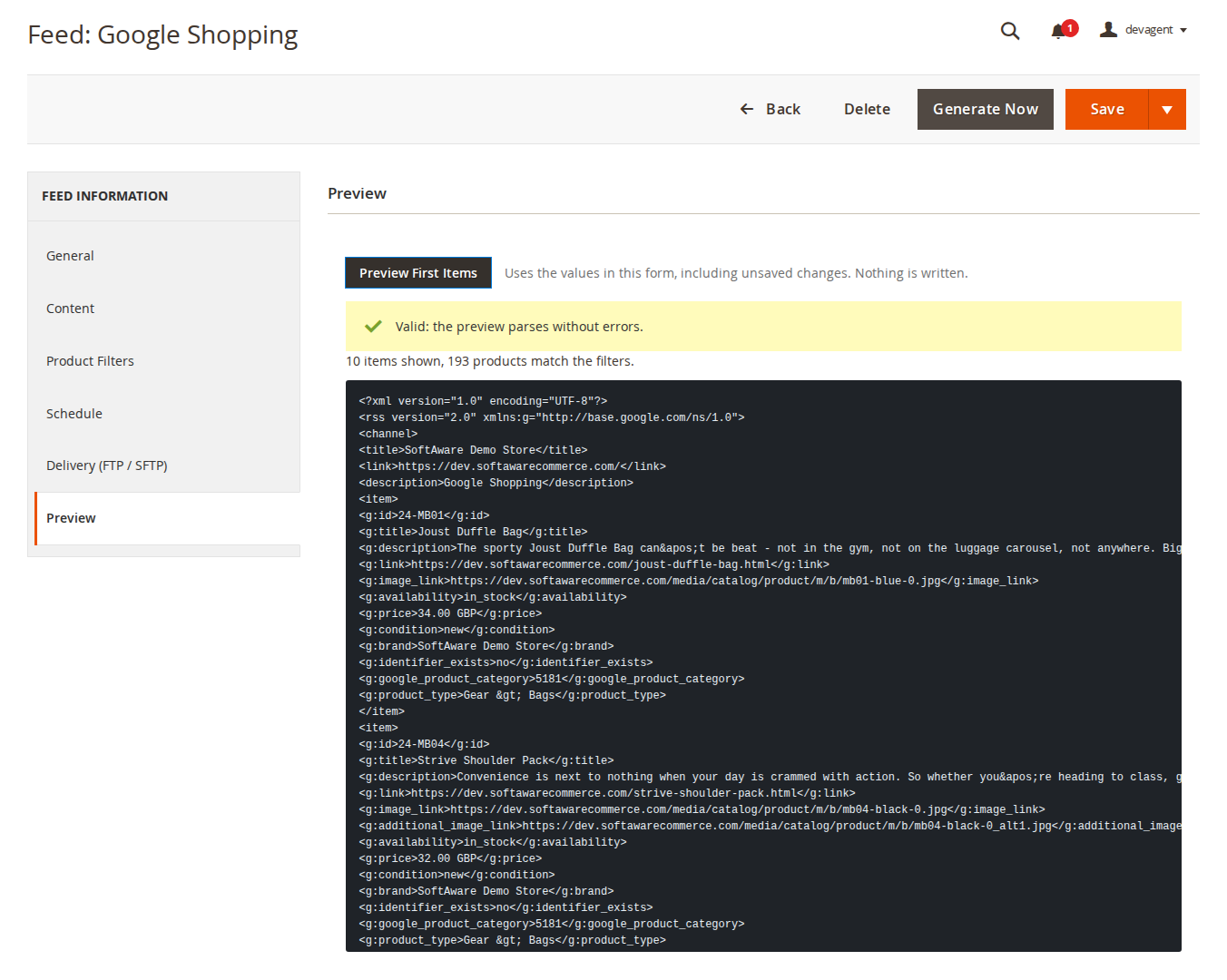
You can build all of this yourself: a cron job, a product collection, some XML. The effort is less in the first version than in the edge cases above, and in making sure a broken template never replaces a working feed. In Data Feed Manager we validate each item and the finished file before it replaces the old one, so a template error leaves yesterday's feed online instead of an empty one, and the Preview tab shows the first items from the form before you save. The ready Google Shopping template covers the attributes in this post, and you can change any line of it.
Two limits are worth knowing up front. Prices are guest prices from the price index, with tax worked out for the store's default tax destination. And the Google category mapping is global rather than per feed. Category mapping has its own post: mapping Magento categories to Google product categories.
The Data Feed Manager page links to a sample Google Shopping feed generated on our demo store, which is the quickest way to see what the template produces.
Sources
- Google Merchant Center Help, "Product data specification", https://support.google.com/merchants/answer/7052112, checked 9 October 2026. ↩1 ↩2 ↩3 ↩4 ↩5 ↩6 ↩7 ↩8
- Google Merchant Center Help, "How to fix: Mismatched product price", https://support.google.com/merchants/answer/12159029, checked 9 October 2026. ↩1 ↩2
- Google Merchant Center Help, "Price [price]", https://support.google.com/merchants/answer/6324371, checked 9 October 2026. ↩1 ↩2 ↩3
- Google Merchant Center Help, "Availability [availability]", https://support.google.com/merchants/answer/6324448, checked 9 October 2026. ↩1 ↩2
From our shop
Related Products
-
Data Feed Manager
Product feeds for Google Shopping, Meta, Pinterest, Microsoft/Bing Shopping and other channels, as XML, JSON, CSV or TXT, generated on a schedule and checked before they go live.
- Magento 2.4.7 – 2.4.9
- Hyvä
- Luma
- Version v1.5.2
$179
