Rescheduling or pausing one Magento cron job without changing code
Magento has no switch to pause a cron job and only a few jobs have a schedule setting. Here is what you can do with configuration, what needs code, and how to do it from the admin.

Say a supplier tells you their stock API will be down for maintenance all weekend. Your import job runs every ten minutes, so from Friday evening it will fail every ten minutes, fill the exception log and, if you have alerts, wake someone up for nothing. What you want is simple: stop that one job until Monday, and leave the other hundred alone.
Or the opposite case: a feed export that runs every 15 minutes is heavy, and you would rather it ran once an hour, outside the busy morning. Again, one job, a different schedule.
Magento can do both, but not from a screen. Most cron schedules live in a crontab.xml file inside a module, and Adobe's own documentation says plainly that cron jobs do not have a disable feature1. The documented way to change or stop a job is a small custom module that overrides the job's schedule. For a handful of jobs there is an admin setting, and there is also a configuration path a developer can set. Below is what each route does, and what to think about before you change a schedule at all.
What Magento offers on its own
A few core jobs already take their schedule from configuration, so you can change them in Stores > Configuration without any code. Examples are the XML sitemap generation, the currency rate import and the product price and stock alerts: their settings pages write a cron expression to a path such as crontab/default/jobs/sitemap_generate/schedule/cron_expr. If the job you want to change is one of these, use its own setting and stop there.
For every other job, the route Adobe documents is a custom module with its own crontab.xml that declares the same job with a new schedule. To stop a job, the documentation suggests a schedule that never comes round, such as 0 0 30 2 *, which is midnight on 30 February1. It works, but it means writing, deploying and later removing a module for what is often a temporary change.
There is a configuration route as well. Magento merges values under crontab/<group>/jobs/<job_code>/schedule/cron_expr from the store configuration over the schedules in crontab.xml (you can see this in Magento\Cron\Model\Config\Data). A developer can set that path in app/etc/config.php or env.php. It avoids a module, but it is still a file change and a deploy, and the setting is easy to forget once the reason for it has passed.
Things to check before you change a schedule
Whichever route you take, a few points from Magento's own cron code are worth knowing.
Schedules are matched in the store's configured timezone, while the cron_schedule table stores times in UTC. "Daily at 03:00" means 03:00 in your store's timezone, and it will show as a different hour in the table for most of the year unless your store runs on UTC.
A new schedule does not take effect on the minute. Magento writes upcoming runs into cron_schedule ahead of time and only regenerates that queue every 15 minutes by default (the "Generate Schedules Every" setting of the cron group). Rows already queued at times that no longer match the new expression are removed when the queue is regenerated.
Pausing a job is not the same as cancelling one that is already running. A job that has started will finish; only new runs are prevented.
And some jobs are not safe to pause for long. indexer_update_all_views keeps "Update by Schedule" indexes current, consumers_runner starts message queue consumers, and the sales_send_*_emails jobs send emails when asynchronous sending is on. Stopping one of these does not show an error anywhere; things just stop happening. Before pausing a job you do not know, look at its class and method and find out what it does.
If a job is slow because its code is slow, a new schedule only moves the problem. That is a case for the module's author, not for the crontab.
Doing it from the admin with Cron Manager
We built Cron Manager because the routes above all need a developer and a deploy for what is usually an operational decision. In the module, each job has a page with its default and current schedule, the next runs in the store timezone and its last run, and a form with two fields: the state (Enabled or Disabled) and the schedule.
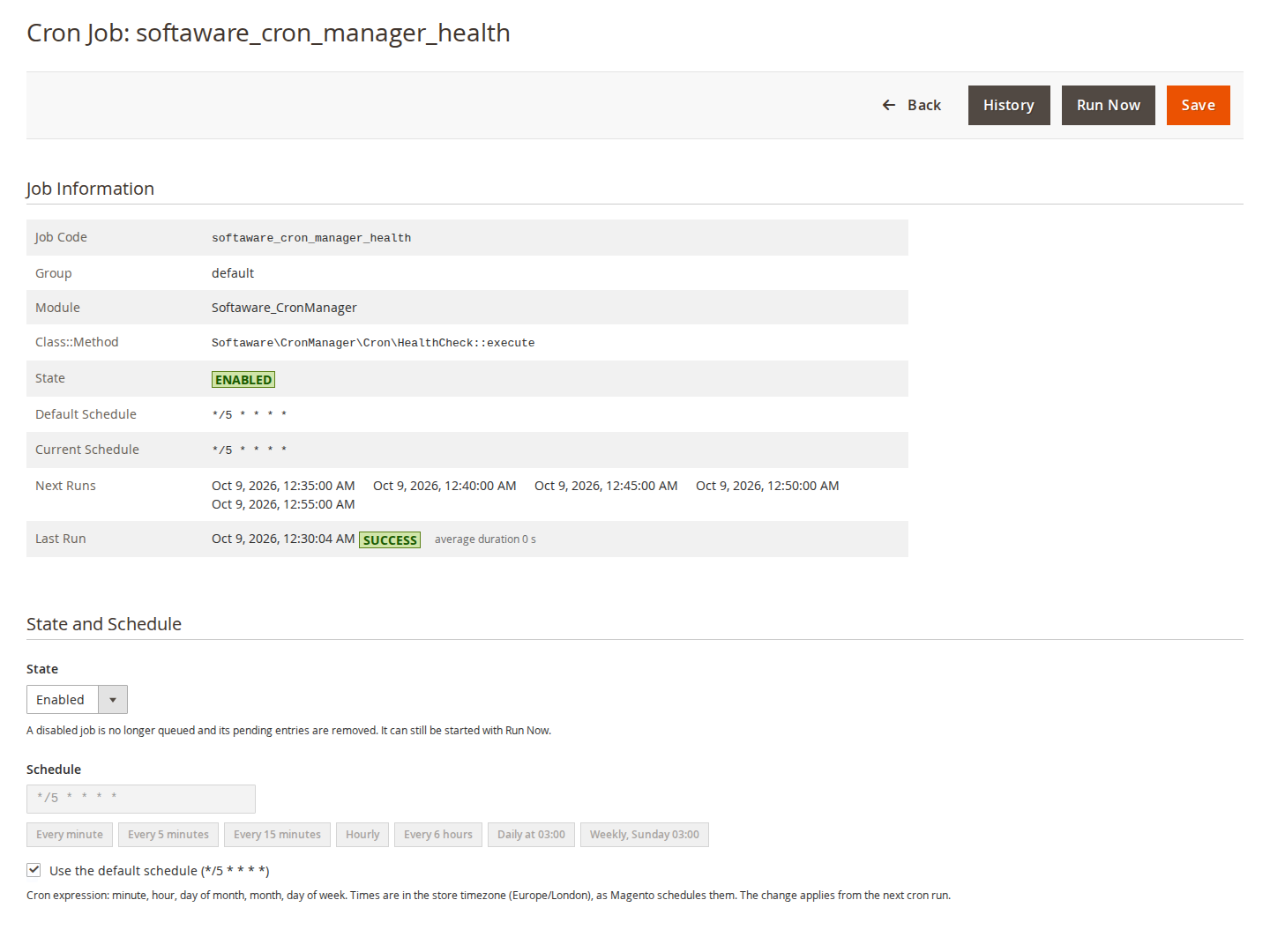
The expression is checked with Magento's own cron parser before it is saved, and there are presets for the common cases (every 5 or 15 minutes, hourly, every 6 hours, daily at 03:00, weekly on Sunday at 03:00). Disabling a job keeps its definition but gives it no schedule, so Magento queues nothing new for it, and its pending rows are removed straight away. A disabled job can still be started by hand with Run Now, which helps when you want to test the supplier's API on Monday morning before switching the import back on. "Use the default schedule" removes the change again.
Under the hood the module does not edit any crontab.xml. It stores its changes as one configuration value, softaware_cron_manager/overrides/jobs, and a plugin on Magento's cron configuration applies them when Magento reads the job list. We chose configuration on purpose: the changes survive deployments, can be exported with bin/magento app:config:dump, and can be kept in version control like other settings. If the value is set in config.php or env.php, the file wins, and the admin shows the changes as read-only instead of saving changes that would have no effect.
The same changes are available on the command line, which is useful in deployment scripts:
bin/magento softaware:cron:set supplier_stock_import --disable
bin/magento softaware:cron:set feed_export --schedule="0 * * * *"
bin/magento softaware:cron:set supplier_stock_import feed_export --default
The job codes here are made up for the example; softaware:cron:list --disabled and --overridden list the jobs you have paused or rescheduled. In the Cron Jobs grid those jobs are marked "Changed", with the default shown on hover, so a pause that was meant for one weekend does not stay unnoticed for a year.
Two limits to be clear about. Cron Manager changes when Magento's cron starts a job; it still needs the server crontab running bin/magento cron:run every minute. And if you switch the module off or remove it, every job goes back to its default schedule, because the changes are only applied while the module is active.
If you only ever change the sitemap or currency schedule, the core settings are enough. If you pause and reschedule jobs more often than that, the Cron Manager page describes the rest of the module, including the schedule grid, the timeline and the health warnings. We have also written about how to tell that Magento cron has stopped running.
Sources
- Adobe Experience League, "Custom cron job and cron group reference", https://experienceleague.adobe.com/en/docs/commerce-operations/configuration-guide/crons/custom-cron-reference, checked 9 October 2026. ↩1 ↩2
From our shop
Related Products
-
Cron Manager
See, run and control every Magento cron job from the admin, and get warned when cron stops or a job keeps failing.
- Magento 2.4.7 – 2.4.9
- Hyvä
- Luma
- Version v1.3.1
$99
