Magento 2 cron has stopped running: how to tell and what to check
When order emails, indexes or price rules quietly stop updating, cron is often the cause. Here is how to confirm it from the cron_schedule table and what to check next.

Say your store sends order emails asynchronously. On Tuesday afternoon they stop going out. Nobody notices until Thursday, when a customer writes in to ask whether her order went through. The order is in the admin, the payment is captured, and the email is still waiting to be sent. The mail server is fine. Cron is not.
That is how a stopped cron usually shows itself in Magento: not as an error page, but as a slow pile of things that did not happen. Magento does nothing on a schedule by itself. A line in the server's crontab runs bin/magento cron:run every minute, and that run is what queues and starts every scheduled job. If the line is missing, or the command fails every time, the shop keeps taking orders while emails, indexes, price rules and sitemaps quietly fall behind. Magento does not show a warning in the admin when this happens. The quickest way to find out is to look at the cron_schedule table.
How Magento's cron works, in short
When you run bin/magento cron:install, Magento adds a block to the crontab of the user you ran it as, between #~ MAGENTO START and #~ MAGENTO END markers. The entry runs bin/magento cron:run every minute and appends its output to var/log/magento.cron.log1. Each run does two things for each cron group: it writes upcoming runs of every job into cron_schedule as pending rows, and it starts the pending rows that are due.
Every row then moves through a small set of statuses, defined in Magento\Cron\Model\Schedule:
pending: queued for a time in the near future (by default up to 20 minutes ahead for the default group).running: started and not finished yet.success: finished without an exception.error: the job threw an exception; the message is in themessagescolumn.missed: the row was still pending when its time window passed. For the default group that window is 15 minutes, the setting "Missed if Not Run Within" under Stores > Configuration > Advanced > System > Cron2.
Two details catch people out. First, the times in cron_schedule are stored in UTC, while the cron expressions are matched in the store's configured timezone. A daily job set for 03:00 in London appears as 02:00 in the table during summer time. Second, Magento only keeps a short history: successful rows are deleted after 60 minutes and failed or missed rows after 4,320 minutes (three days) in the default group. An empty history of successes is normal; an empty history of everything is not.
Reading cron_schedule to see what is wrong
Start with the most recent activity:
SELECT MAX(executed_at) AS last_started, MAX(finished_at) AS last_finished
FROM cron_schedule;
If last_started is more than a few minutes behind UTC now, cron is not running at all, and the problem is on the server, not in Magento. Then look at the spread of statuses:
SELECT status, COUNT(*) FROM cron_schedule GROUP BY status;Each pattern points somewhere different. A long list of missed rows across many jobs, all from the same hour, usually means cron stopped and then started again: when it came back, every row whose window had passed was marked missed with the message "Cron Job ... is missed at ...". That is a record of the gap, not a new problem. Missed rows that keep appearing for one job while everything else succeeds usually mean that job takes longer than its interval. Magento only starts a job when it can take that job's lock, so the next runs wait, and the ones that wait too long become missed.
error rows are the easiest to act on, because the reason is in the messages column and the full exception is in var/log/cron.log or var/log/exception.log.
running rows need a closer look. A row stays running if the PHP process died halfway, for example after a deploy, a server restart or the process being killed for using too much memory. Magento cleans these up in two ways. In 2.4.9, when the same job is started again and gets its lock, its leftover running rows are set to error. Rows that are still left are set to error with the message "Time out" by the history clean-up, but only once their scheduled time is more than a day old. So a row that has been running for hours is either a job that really is that slow, or a job that has not been able to start again since.
SELECT job_code, scheduled_at, executed_at
FROM cron_schedule
WHERE status = 'running' AND executed_at < UTC_TIMESTAMP() - INTERVAL 2 HOUR;
What to check on the server
If nothing has run recently, work from the outside in. Run crontab -l as the user that owns the Magento files and check that the Magento block is there and points to the right PHP binary and the right directory. A server move, a PHP upgrade that removed the old binary, or a deploy into a new release directory can each leave a crontab line that runs nothing. Then run the command from that line by hand, as that user, and read the output. Permission errors, a missing PHP extension in the CLI configuration or a database connection failure will show up straight away. var/log/magento.cron.log holds the output of earlier runs.
If cron runs but one group is stuck, check whether a long job in that group holds everything up, and whether the group runs in its own process ("Use Separate Process"). A group that runs in its own process writes its output to a log named after the group, for example var/log/magento.cron.index.log for the index group, so check that file too.
Once cron runs again, the missed rows clear themselves with the rest of the failure history.
Seeing this without SQL
None of the above needs an extension. A database client and the crontab are enough, and on a store with one developer who checks regularly, that may be all you need. What Magento does not give you is a warning when cron stops, or a place in the admin where someone without database access can see what ran and what failed.
That is why we built Cron Manager. Its status panel on the Cron Jobs and Schedule pages shows when cron was last active, the successful, failed and missed runs of the last 24 hours, the pending and stuck entries in the queue, and the jobs that failed several times in a row.
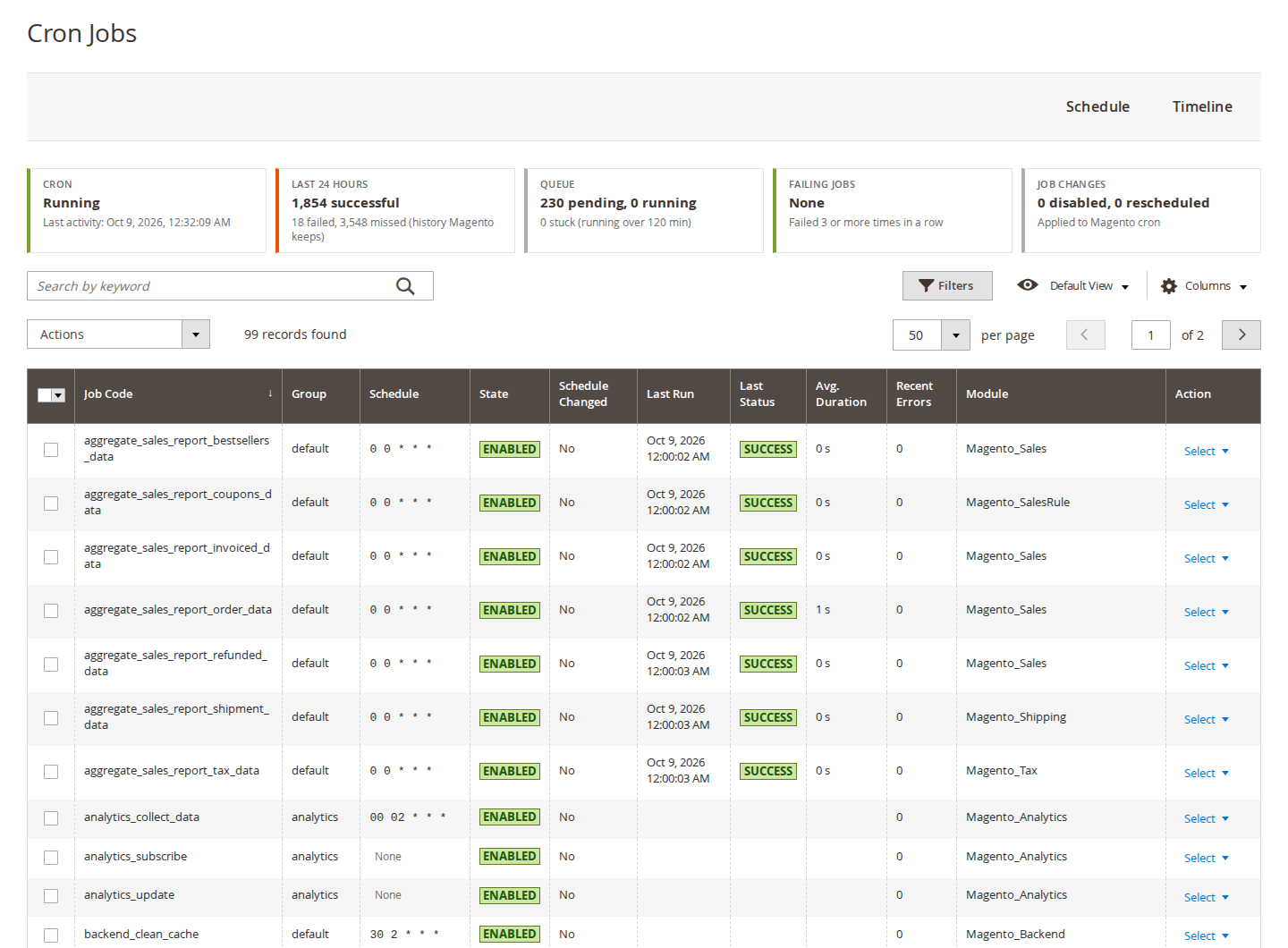
It adds an admin system message when cron has not run for a set number of minutes (15 by default), when a job fails a set number of times in a row, or when a job runs longer than a maximum runtime. The timeline draws one row per job for the last 1 to 24 hours, coloured by status, which makes a gap or a job that always overruns easy to spot. Stuck jobs can be marked as failed automatically after the maximum runtime (120 minutes by default) instead of waiting for Magento's one-day clean-up.
It has limits worth knowing. It works with Magento's cron and does not replace it, so the server crontab still has to be right. Its history only goes back as far as Magento keeps it. And the optional failure email about cron itself being down can only be sent once cron runs again, because the email is sent by a cron job; the admin message covers the time in between.
If you would rather see this in the admin than in a database client, the Cron Manager page has the details and a link to try it in the demo admin.
Sources
- Adobe Experience League, "Configure and run cron jobs", https://experienceleague.adobe.com/en/docs/commerce-operations/configuration-guide/cli/configure-cron-jobs, checked 9 October 2026. ↩
- Adobe Experience League, "Cron (scheduled tasks)", https://experienceleague.adobe.com/en/docs/commerce-admin/systems/tools/cron, checked 9 October 2026. ↩
From our shop
Related Products
-
Cron Manager
See, run and control every Magento cron job from the admin, and get warned when cron stops or a job keeps failing.
- Magento 2.4.7 – 2.4.9
- Hyvä
- Luma
- Version v1.3.1
$99
