Rescheduling or pausing one Magento cron job without changing code
Magento has no switch to pause a cron job and only a few jobs have a schedule setting. Here is what you can do with configuration, what needs code, and how to do it from the admin.
Cron Manager for Magento 2: list, run, enable, disable and reschedule cron jobs, schedule grid and timeline, health warnings and failure e-mails.
One-off payment, with 12 months of updates.
No subscription or automatic renewal. Keep using the versions included in your update period. Update and licence details
Composer package softaware/module-cron-manager
A status panel and admin messages tell you when cron has stopped, a job keeps failing or a job is stuck.
Run a job now, switch a noisy job off or move it to a quieter time from the admin, with the change applied to Magento's own cron.
Separate permissions for viewing, running, changing and cleaning up, and every manual run is recorded with who started it.
All features
Feature tour
01 / 05
Group, schedule, state, last run, last status, average duration and recent errors for every job, with filters, keyword search and row actions.
02 / 05
Enable or disable a job, enter a cron expression or pick a preset, and see the next runs in the store timezone before you save.
03 / 05
A chart per job for the last 1 to 24 hours, coloured by status, with details on hover and a filter for jobs with problems.
04 / 05
Remove pending or missed entries, mark stuck jobs as failed and delete old history, for all jobs or one job, each after a confirmation.
05 / 05
Set when to warn, how long a job may run, which jobs to ignore and who receives failure e-mails. Every field shows its default.
Live demo
A full Magento store with the module installed, on Luma and on Hyvä. The admin demo signs you in with one click.
Compatibility
| Latest version | 1.3.1 · 9 Oct 2026 |
|---|---|
| composer.json requires | php ~8.2.0||~8.3.0||~8.4.0||~8.5.0 magento/framework ~103.0.7 softaware/module-core ^1.0 magento/module-admin-notification * magento/module-backend * magento/module-config * magento/module-cron * magento/module-email * magento/module-store * magento/module-ui * |
Installation
After you buy, create a Composer key in your account. Then, in the root of your Magento project:
01Add the repository and your key (once per project)
composer config repositories.softaware composer https://repo.softawarecommerce.com
composer config --auth http-basic.repo.softawarecommerce.com PUBLIC_KEY PRIVATE_KEY
02Install the module
composer require softaware/module-cron-manager
03Enable it
bin/magento setup:upgrade
bin/magento setup:di:compile
bin/magento setup:static-content:deploy
bin/magento cache:flush
The last three are only needed in production mode.
Prefer a zip? Every version you are entitled to can be downloaded from My modules. More about Composer access
User guide
For version 1.3.1. The same guide comes with the module, in docs/user-guide.md.
See and control Magento's cron from the admin: every job with its schedule and run statistics, the cron schedule as a grid and as a timeline, Run Now, enable, disable and reschedule jobs, clean up the queue, and get warned when cron stops or a job keeps failing. This guide covers installation, configuration and day-to-day use.
| Magento | Open Source or Adobe Commerce 2.4.7 to 2.4.9 |
| PHP | 8.2 to 8.5, with a PHP command-line binary for Run Now |
| Database | MySQL 8 or MariaDB 10.4 or later (window functions are used) |
| Storefront | None: the module is admin only |
| Other | softaware/module-core (installed automatically) |
Magento's cron must be set up on the server as usual (bin/magento cron:install or your own crontab entry). Cron Manager works with Magento's cron; it does not replace it.
Install with Composer from repo.softawarecommerce.com. The access keys are in your account on softawarecommerce.com; see Composer access for details.
composer config repositories.softaware composer https://repo.softawarecommerce.com
composer config --auth http-basic.repo.softawarecommerce.com PUBLIC_KEY PRIVATE_KEY
composer require softaware/module-cron-manager
bin/magento setup:upgrade
bin/magento setup:di:compile            # production mode only
bin/magento setup:static-content:deploy # production mode only
bin/magento cache:flush
To update later: composer update softaware/module-cron-manager, then the same bin/magento commands.
After installation the admin menu has Softaware > Cron Manager with four items: Cron Jobs, Schedule, Timeline and Settings.
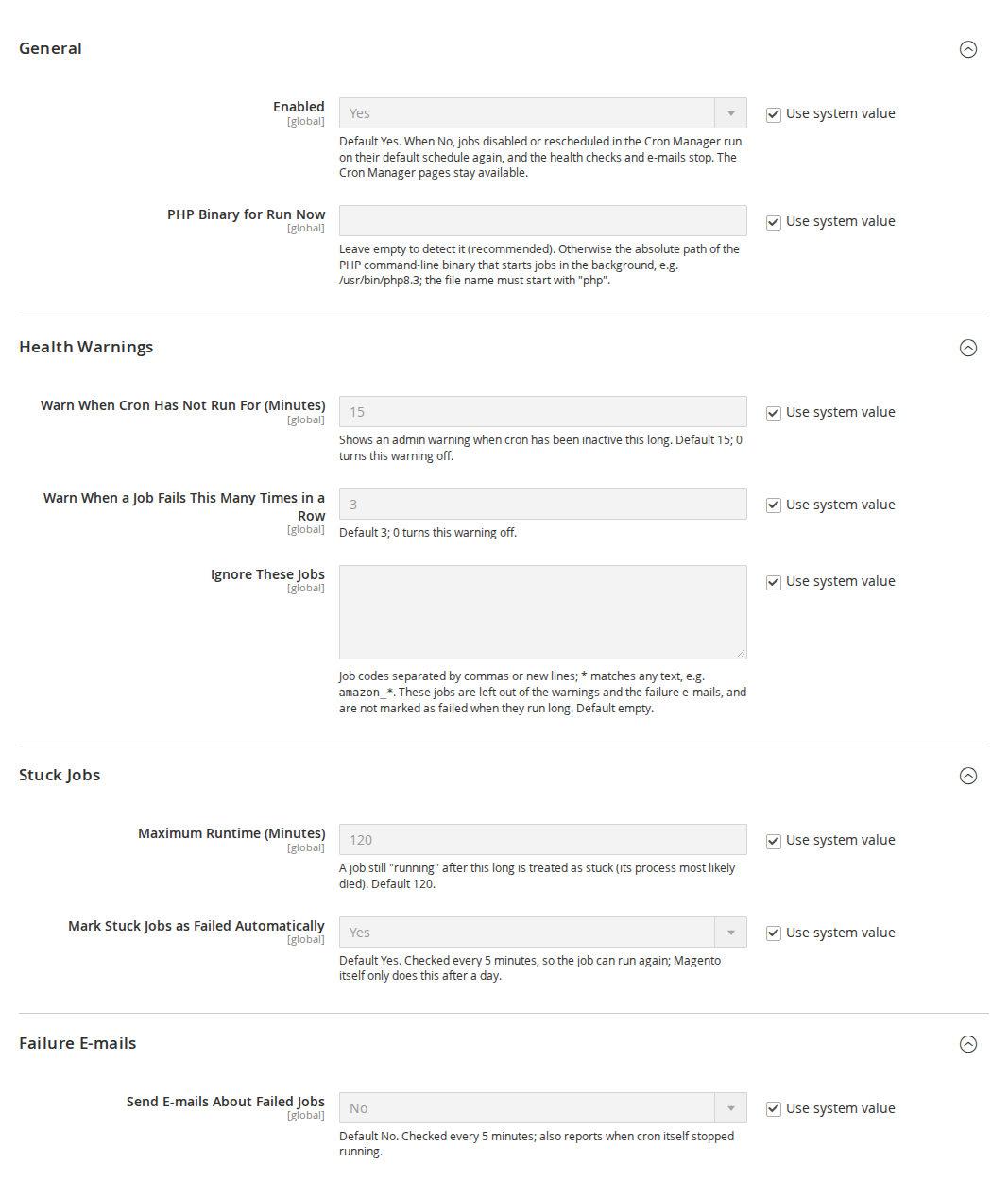
Stores > Configuration > Softaware > Cron Manager (also Softaware > Cron Manager > Settings). All settings are global (default scope). Every field states its default and has a "Use system value" checkbox to restore it.
| Setting | What it does |
|---|---|
| Enabled | Default Yes. When No, jobs you disabled or rescheduled in the Cron Manager run on their default schedule again, and the health checks and e-mails stop. The pages stay available and your changes are kept. |
| PHP Binary for Run Now | Leave empty to detect it (recommended). Otherwise the absolute path of the PHP command-line binary, for example /usr/bin/php8.3. Only an absolute path to an executable whose file name starts with php is accepted. |
| Setting | What it does |
|---|---|
| Warn When Cron Has Not Run For (Minutes) | Shows an admin warning when cron has been inactive this long. Default 15; 0 turns the warning off. |
| Warn When a Job Fails This Many Times in a Row | Default 3; 0 turns the warning off. |
| Ignore These Jobs | Job codes separated by commas or new lines; * matches any text, for example amazon_*. These jobs are left out of the warnings, the status panel and the failure e-mails, and are not marked as failed when they run long. Default empty. |
| Setting | What it does |
|---|---|
| Maximum Runtime (Minutes) | A job still "running" after this long is treated as stuck (its process most likely died). Default 120. |
| Mark Stuck Jobs as Failed Automatically | Default Yes. Checked every 5 minutes, so the job can run again; Magento itself only does this after a day. |
| Setting | What it does |
|---|---|
| Send E-mails About Failed Jobs | Default No. Checked every 5 minutes; also reports when cron itself stopped running. |
| Send To | One or more e-mail addresses, separated by commas. |
| Sender | The store e-mail identity the e-mails are sent from. Default General Contact. |
| E-mail Template | Default "Cron Manager: Failed Cron Jobs". Create your own under Marketing > Email Templates. |
| At Most One E-mail Every (Minutes) | Failures in between are collected into the next e-mail. Default 60. |
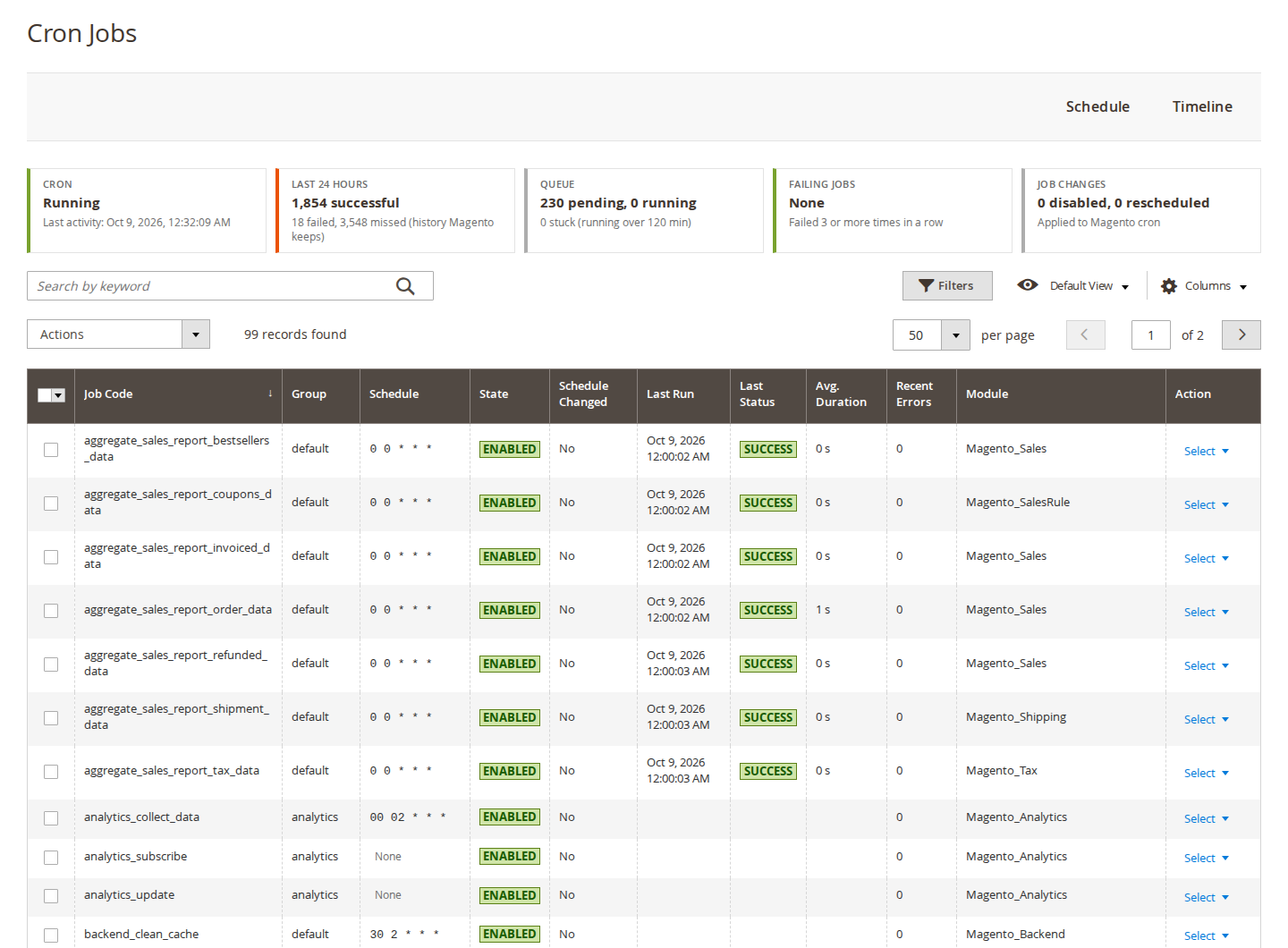
Softaware > Cron Manager > Cron Jobs lists every job Magento knows: the jobs from crontab.xml files and jobs whose schedule comes from the configuration.
Columns: Job Code, Group, Schedule (the one in use), Default Schedule, State, Schedule Changed, Last Run, Last Status, Avg. Duration, Recent Errors, Pending, Module, Class::Method and Last Message. Some columns are hidden by default; show them with Columns. The grid has filters, keyword search, sorting and saved views. A job whose schedule was changed in the Cron Manager is marked "Changed" in the Schedule column; hover over it to see the default.
Row actions: Edit, Run Now, Enable or Disable, History (the job's entries in the Schedule grid).
Mass actions: Run Now (up to 20 jobs at a time), Enable, Disable, Restore Default Schedule.
Above the Cron Jobs and Schedule grids, a status panel shows:
The figures are cached for 3 minutes so the admin stays fast.
Click Edit on a job. The page Cron Job: <code> shows the job information (group, module, class and method, state, default and current schedule, the next runs in the store timezone, and the last run with its status and average duration), and a form to change it.
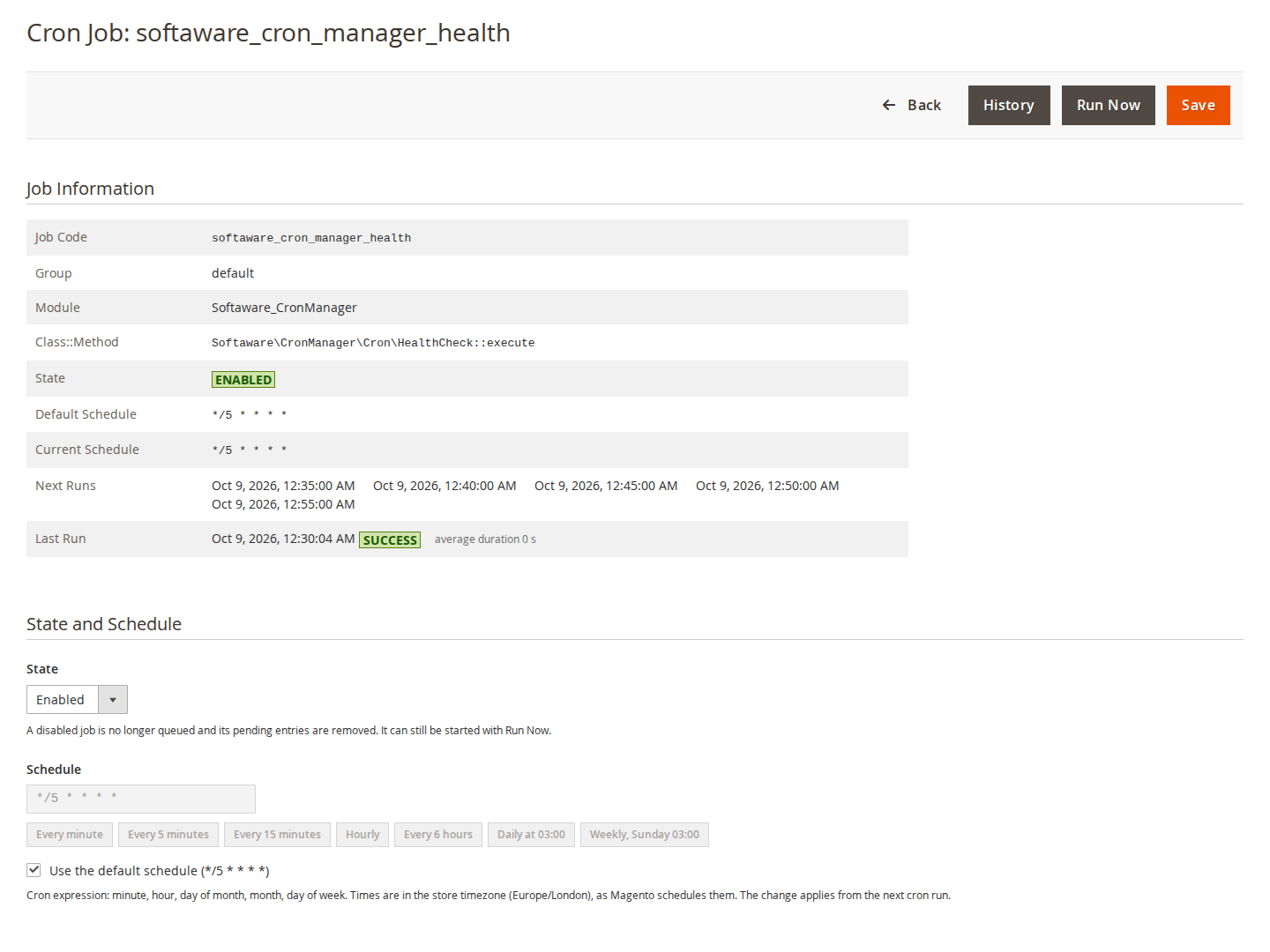
The buttons above the page are Back, History, Run Now (asks for confirmation) and Save. Changes apply from the next cron run. They are stored in the configuration (softaware_cron_manager/overrides/jobs) and can be exported with bin/magento app:config:dump. If that value is set in app/etc/config.php or env.php, the Cron Manager shows the changes as read-only and refuses to change them.
Run Now starts bin/magento softaware:cron:run <job_code> in the background, so the admin request does not wait for the job. The run:
var/log/softaware_cron_manager.log.After a Run Now from the grid you are taken to the Schedule page, where the new entry appears.
Softaware > Cron Manager > Schedule shows the cron_schedule table as a grid: keyword search (job code or message), filters by job, status, dates and message, a duration column, coloured statuses and a mass delete action.
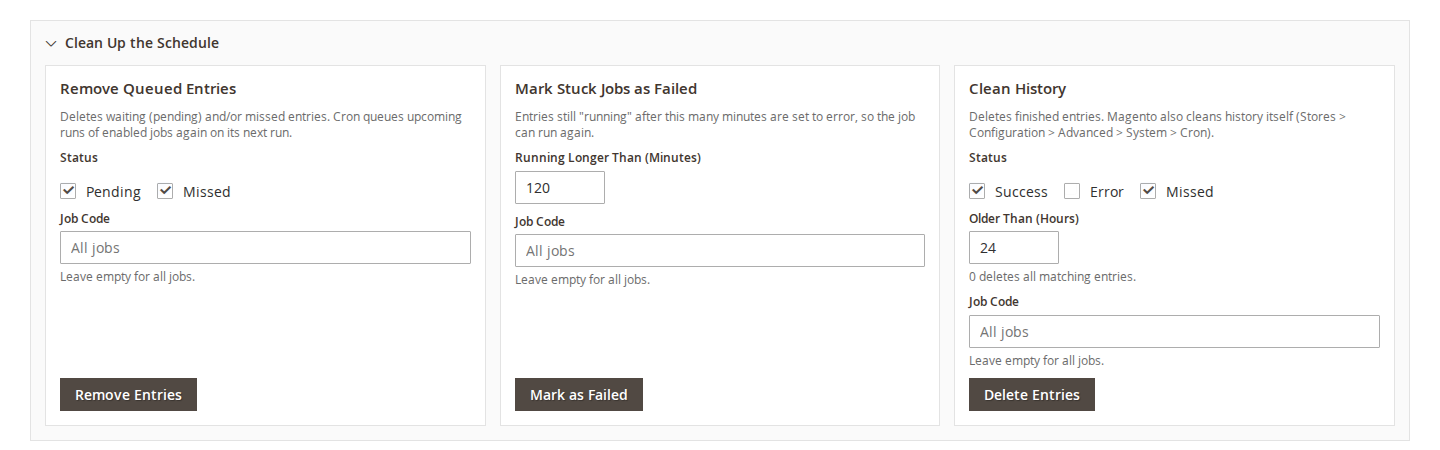
Open the Clean Up the Schedule panel above the grid. Each action asks for confirmation before it runs, and each can be limited to one job code (leave the field empty for all jobs).
| Action | What it does |
|---|---|
| Remove Queued Entries | Deletes pending and/or missed entries. Cron queues upcoming runs of enabled jobs again on its next run. |
| Mark Stuck Jobs as Failed | Entries still "running" after the given number of minutes are set to error, so the job can run again. |
| Clean History | Deletes finished entries (success, error, missed) older than the given number of hours; 0 deletes all matching entries. |
Softaware > Cron Manager > Timeline draws one row per job for a period of 1, 3, 6, 12 or 24 hours. Bars are coloured by status (success, error, running, missed, pending), a line marks the current time, and hovering over a bar shows its details. Filter by group, by job code or to "Only jobs with problems (error, missed or running)", and move with Earlier, Now and Later.
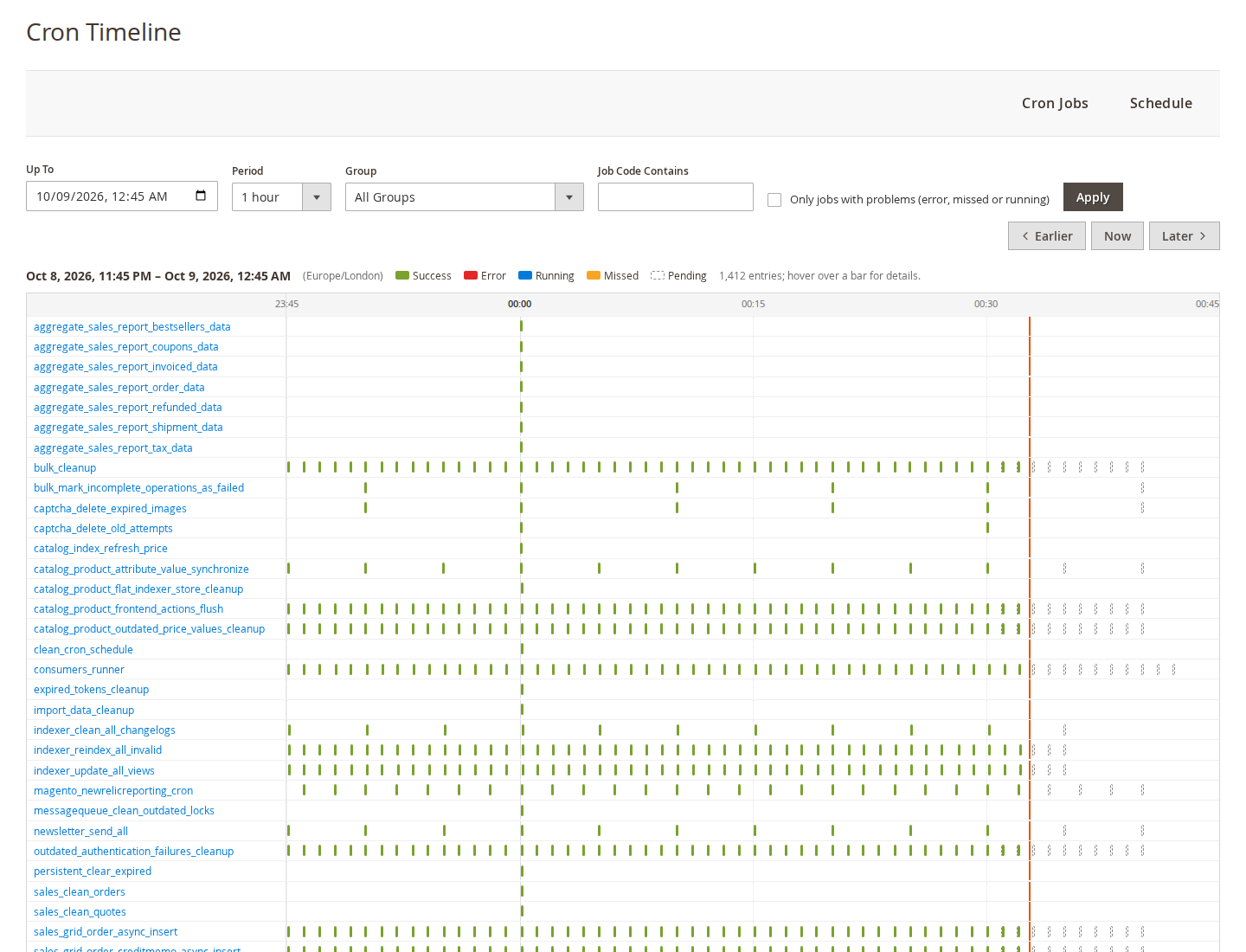
The timeline and the statistics only cover the history Magento keeps (Stores > Configuration > Advanced > System > Cron). Successful runs are kept for a short time by default.
Admin messages appear in Magento's system messages when:
Failure e-mails (off by default) are sent by the cron job softaware_cron_manager_health, which runs every 5 minutes. It e-mails new failures at most once per interval, collecting failures in between, and reports gaps when cron itself did not run. Gaps are measured in the cron history of the last hour, so rescheduling the health job does not cause false alarms. The same job marks stuck jobs as failed when that setting is on.
bin/magento softaware:cron:list [--group=<group>] [--search=<text>] [--disabled] [--overridden] [--failed]
bin/magento softaware:cron:run <job_code> [--trigger=cli] [--user=<name>]
bin/magento softaware:cron:status
bin/magento softaware:cron:set <job_code> [<job_code> ...] [--enable|--disable] [--schedule="*/15 * * * *"]
bin/magento softaware:cron:set <job_code> [<job_code> ...] --defaultlist: all jobs with schedule, state, last run and average duration.run: runs a job now in the foreground (also disabled jobs); the run is recorded in the cron schedule.status: last activity, failing and stuck jobs, counts, disabled and rescheduled jobs.set: makes the same changes as the Cron Jobs page, useful in deployment scripts. --default removes all changes of the jobs.Under System > Permissions > User Roles > Role Resources > Softaware > Cron Manager:
| Resource | Allows |
|---|---|
| View Cron Jobs | The Cron Jobs grid |
| Run Jobs Now | Run Now (single and mass action) |
| Enable, Disable and Reschedule Jobs | The job page and its changes, Enable, Disable, Restore Default Schedule |
| View Schedule and Timeline | The Schedule and Timeline pages |
| Clean Up Schedule | The clean-up tools and mass delete on the Schedule page |
| Cron Manager Settings | The configuration section |
| Problem | Solution |
|---|---|
| "Cron has not run for N minutes" | Check the server crontab (crontab -l for the web server user) and that bin/magento cron:run works. The message goes away once cron runs again. |
| Run Now does nothing | The PHP binary was not found, or the server does not allow starting processes. Set PHP Binary for Run Now to the absolute path of the PHP CLI binary and check var/log/softaware_cron_manager.log. |
| "Not started: the job is already running" | The job holds Magento's cron lock. Wait for it to finish, or mark it as failed if it is stuck. |
| My schedule change has no effect | Check that Enabled is Yes, and whether the status panel says "Read-only": the changes are then set in app/etc/config.php or env.php and must be changed there. |
| The timeline or statistics look empty | They only cover the history Magento keeps. Raise the history lifetimes under Stores > Configuration > Advanced > System > Cron if you need more. |
| Too many warnings from one extension | Add its job codes, or a pattern such as vendor_*, to Ignore These Jobs. |
| The e-mail is only sent after cron is back | Expected: e-mails are sent by cron. The admin warning covers the time cron is down. |
bin/magento module:disable Softaware_CronManager
composer remove softaware/module-cron-manager
bin/magento setup:upgrade
Once the module is removed, all jobs run on their default schedule again. The settings and stored job changes stay in the core_config_data table (paths starting with softaware_cron_manager/); delete those rows if you want a clean database.
Changelog
softaware/module-core instead of softaware/module-base. The admin menu and ACL now sit under Softaware_Core::core ("Softaware"); roles that had access keep it (migrated by module-core). After updating all SoftAware modules, softaware/module-base can be removed.*): left out of the health warnings, the status bar and the failure e-mails, and not marked as failed automatically when they run long.softaware:cron:set to enable, disable, reschedule or reset jobs (e.g. from deployment scripts).php, in the settings and again before a job is started, so the setting cannot be used to run another program.app/etc/config.php or env.php (e.g. after app:config:dump), changes in the admin are refused with an explanation instead of being saved without effect; the status bar shows "read-only".softaware:cron:list, softaware:cron:run, softaware:cron:status.FAQ
Something else on your mind? The developers who wrote the module answer before and after you buy.
Ask a question →Already installed it? Open a support ticket
No. Magento's own cron (bin/magento cron:run from the server's crontab) still runs the jobs. Cron Manager shows what cron does, lets you change which jobs run and when, and warns you when something goes wrong. You still need a working system crontab.
Every job Magento knows: the jobs from the crontab.xml files of Magento and your extensions, and jobs whose schedule comes from the configuration. The grid shows the group, the schedule in use and the default one, the state, the last run and status, the average duration, recent errors, the module and the class and method.
It starts bin/magento softaware:cron:run <job> in the background, so the admin page does not wait for the job. The run takes the same lock as Magento's cron, so it cannot overlap with a scheduled run of the same job. It is written to the cron schedule with its status, start and finish time, a message with who started it, and to var/log/softaware_cron_manager.log. You can run up to 20 jobs at once from the grid, and a disabled job can still be run manually.
The job keeps its definition but gets no schedule, so Magento queues nothing new for it, and its pending entries are removed. Enable it again, or use "Restore Default Schedule", to go back to the original behaviour.
They are stored in the configuration (softaware_cron_manager/overrides/jobs), so they survive deployments and can be exported with bin/magento app:config:dump. If that value is set in app/etc/config.php or env.php, it wins over the database: the Cron Manager then shows the changes as read-only and refuses to change them, instead of saving changes that would have no effect.
Yes. Open the job, enter a cron expression or pick a preset (every minute, every 5 or 15 minutes, hourly, every 6 hours, daily at 03:00, weekly on Sunday at 03:00), and check the preview of the next runs. The expression is checked with Magento's own cron parser before it is saved.
An admin system message appears when cron has not run for the number of minutes you set (default 15). Further messages appear when a job fails a set number of times in a row (default 3) or runs longer than the maximum runtime (default 120 minutes). The status panel on the Cron Jobs and Schedule pages shows the same information at a glance.
Yes, but it is off by default. Switch on "Send E-mails About Failed Jobs" and enter one or more recipients. A check runs every 5 minutes and sends at most one e-mail per interval you choose (default 60 minutes); failures in between are collected into the next e-mail. It also reports when cron itself did not run, once cron runs again.
Add its job code to "Ignore These Jobs". Patterns with * work too, for example amazon_*. Ignored jobs are left out of the warnings, the status panel and the e-mails, and are not marked as failed when they run long.
Yes. The permissions are separate: View Cron Jobs, Run Jobs Now, Enable, Disable and Reschedule Jobs, View Schedule and Timeline, Clean Up Schedule, and Cron Manager Settings. Set them under System > Permissions > User Roles. A role with only View Cron Jobs and View Schedule and Timeline can look at everything but change nothing.
No. It is an admin-only module and adds nothing to storefront pages.
Your job changes are no longer applied, so all jobs use their default schedule, and the health checks and e-mails stop. The Cron Manager pages stay available, and your changes come back when you switch it on again.
Magento Open Source and Adobe Commerce 2.4.7 to 2.4.9, PHP 8.2 to 8.5, with MySQL 8 or MariaDB 10.4 or later.
Support
From the blog
Magento has no switch to pause a cron job and only a few jobs have a schedule setting. Here is what you can do with configuration, what needs code, and how to do it from the admin.
When order emails, indexes or price rules quietly stop updating, cron is often the cause. Here is how to confirm it from the cron_schedule table and what to check next.
We use necessary cookies to run this site and, with your permission, Google Analytics to understand how it is used. You can accept analytics, reject it or choose in the settings. Cookie policy
Choose which cookies you allow. Necessary cookies are always on because the shop cannot work without them. You can change your choice at any time with the "Cookie settings" link.
Needed for the basket, checkout, login and security. They do not track you.
Google Analytics: how many people visit, which pages they read and how they found the site. It sets the _ga cookies and sends usage data to Google.