Approving new customer accounts on a trade-only Magento shop
Magento Open Source lets anyone register and sign in straight away. Here is how to hold new accounts for review on a trade-only shop, and which core settings you still need to change.

Say you sell catering supplies to restaurants at trade prices. Your price list is not meant for the public, and your sales team wants to check each new business before it can order. Then one Monday you find a dozen new accounts from people who are clearly not restaurants, and two of them have already placed orders.
On Magento Open Source that is simply how registration works. Anyone can fill in the "Create New Customer Account" form, and the new customer is signed in as soon as the form is sent. To run a trade-only shop you need two things: new accounts that wait for a person to approve them, and no way round that wait. Core Magento gives you neither, so you either add an extension or write your own module. This post explains what to look for, and the core settings you still have to change either way.
What Magento does on its own
The closest core setting is Require Emails Confirmation, under Stores > Configuration > Customers > Customer Configuration > Create New Account Options. It is off by default. When it is on, a new customer has to click a link in an email before they can sign in. That proves the email address works, but it says nothing about who the customer is. Anyone with a working inbox gets through, and nobody on your team is asked.
Adobe Commerce has a real approval step for companies: in the B2B extension, a company account requested on the storefront has the status Pending Approval until an administrator approves or rejects it.1 Adobe offers that extension for Adobe Commerce,2 and a Magento Open Source 2.4.9 installation has no company module at all. If you are on Open Source, which most smaller trade shops are, you need something else.
What a usable approval step has to cover
Holding back the registration form is the easy part. The hard part is every other door into a customer account. A customer who registered a minute ago can try the normal sign-in form, the sign-in popup in checkout, a REST or GraphQL token request from a headless frontend or app, a social login button, or the link in a confirmation email. If any one of those still works, the approval step is decoration.
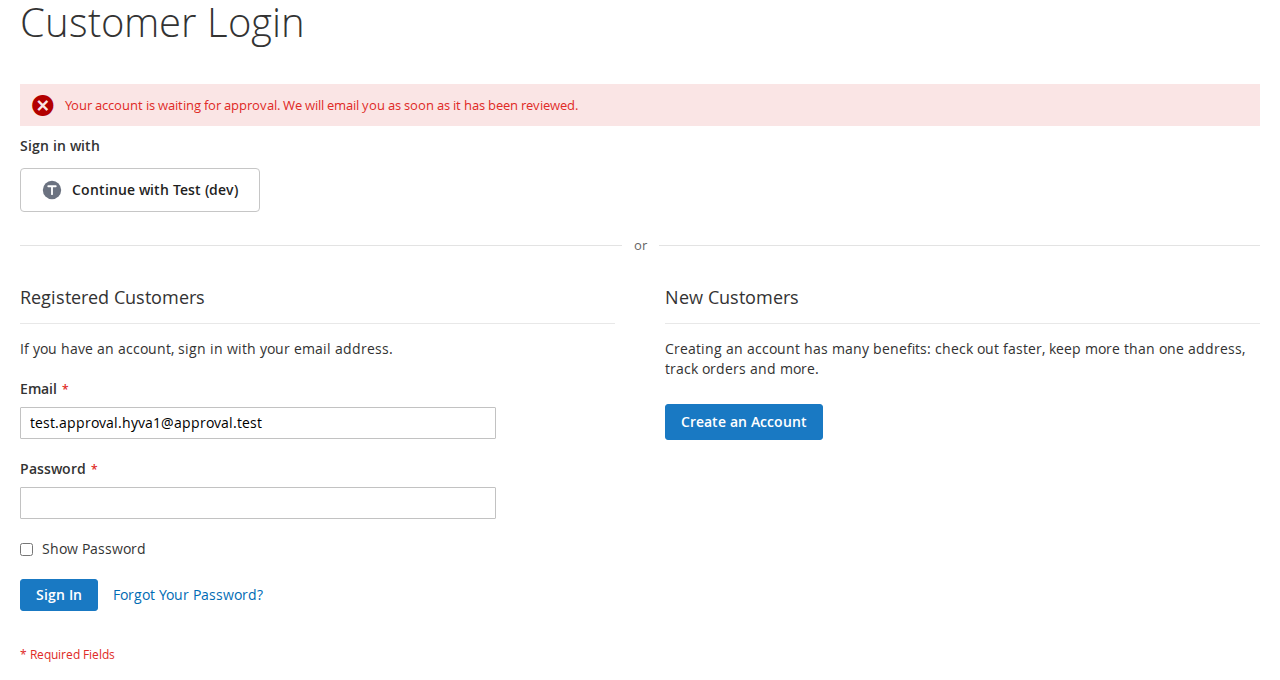
When we built Customer Approval we started from that list. A new account gets its approval status from your rules however it is created: the registration form, checkout, REST, GraphQL, social login, or another module that saves customers through Magento's customer repository. A pending or rejected customer is then refused everywhere they could sign in, including the password-less routes such as social login, the confirmation link, the automatic sign-in after registration, Login as Customer and store switching. An early version missed accounts created directly through the customer repository by a social login module, which counted as approved; the changelog for version 1.0.1 records the fix. That is a good example of why this needs testing across every sign-in route, not only the form.
The rules themselves are set per website. You can require approval for all new accounts or only for chosen customer groups, approve some groups straight away, and approve email domains you trust, such as your own staff's domain or *.example.com for a group of companies. Accounts your team creates in the admin, through the admin API or on the command line are approved at once, and customers who already exist when the module is installed are marked as approved, so nobody is locked out on day one.
The day-to-day side
The waiting accounts have to land somewhere your team will notice. In our module they appear in an Approval Queue with name, email, group, company and registration date, and the menu shows how many are waiting. The shop team gets an email for each new account once you enter the recipients (no email is sent while that field is empty, which catches people out). You approve or reject from the queue, from buttons on the customer page, with a mass action in the customer grid, through the admin REST API or with a CLI command.
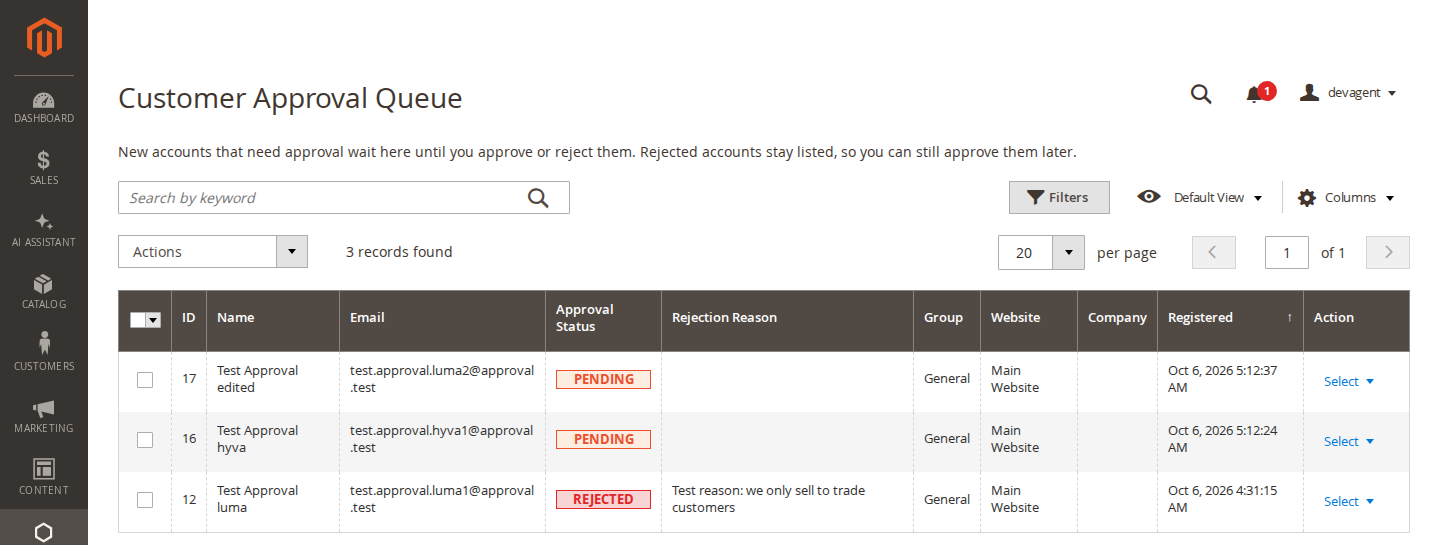
Rejecting asks for an optional reason, which you can include in the "Account Not Approved" email. Rejecting a customer who was already approved, or setting them back to pending, also signs them out, ends their "Remember Me" session and revokes their API tokens. That matters when you stop trading with a business: changing a flag is not much use if the old session keeps working.
What approval does not do for you
This is where trade shops most often leave a gap, so it is worth being plain about it.
Approval controls who can sign in. It does not stop people from buying without an account. Magento's Allow Guest Checkout setting (Stores > Configuration > Sales > Checkout > Checkout Options) is on by default, and as long as it is on, a visitor can put products in the basket and pay as a guest without ever registering. On a trade-only shop you will want to switch it off.
It also does not hide prices or the catalogue from visitors who are not signed in. Our module does not do that, and you should not expect an approval extension to. If your trade prices must stay private, you need a theme change or another extension for that part, and you should decide whether showing retail prices to the public and trade prices only to an approved customer group is enough for you. Customer groups and catalogue price rules in core Magento can handle the second approach.
Two smaller limits of our module are written in its README. Through the REST and GraphQL token endpoints, Magento replaces every sign-in error with its own generic message, so a headless frontend cannot show "your account is waiting for approval" from that response, and each refused attempt counts towards Magento's account lockout. And the admin links in the shop-team email have no admin secret key, so with "Add Secret Key to URLs" switched on, the link opens the dashboard first.
A short checklist before you switch it on
If you are setting up a trade-only shop on Magento Open Source, these are the settings to look at together:
- Approval switched on for the right website, not only the default scope, with the groups and trusted domains you want.
- Guest checkout switched off for that website.
- Recipients filled in for the shop-team email, and the customer emails worded the way you talk to trade customers.
- A notice on the registration form so applicants know their account will be reviewed, and a CMS page explaining how long that usually takes.
- A test account registered on the storefront, then approved, before you announce anything.
The module is installed switched off, so it does not start holding registrations until you enable it. If you want to see the queue and the settings before deciding, the admin demo linked from the Customer Approval page shows both, and the user guide there covers every setting.
Sources
- Adobe Commerce documentation, "Approve a company account", https://experienceleague.adobe.com/en/docs/commerce-admin/b2b/companies/account-company-approve, checked 9 October 2026. ↩
- Adobe Commerce documentation, "Install the Adobe Commerce B2B extension", https://experienceleague.adobe.com/en/docs/commerce-admin/b2b/install, checked 9 October 2026. ↩
From our shop
Related Products
-
Customer Approval
New customer accounts wait for your approval before they can sign in, with rules per website, an approval queue and emails to your team and your customers.
- Magento 2.4.7 – 2.4.9
- Hyvä
- Luma
- Version v1.2.2
$89
