Back-in-stock emails on Magento 2: opt-in, unsubscribe and consent done properly
A back-in-stock form is easy to add. Getting the confirmation, the unsubscribe, the size options and the line between a service message and marketing right takes more thought.

A shopper comes back for the linen shirt they looked at last week. Size M has sold out, the other sizes are still there, and the page offers them nothing but a greyed-out swatch. Some will check again. Many will buy elsewhere, and you will never know they wanted it.
A "tell me when it is back" form fixes that, and the form itself is the easy part. What decides whether it works is less visible: whether the address really belongs to the person who typed it, whether the alert is for the exact size they wanted, whether they can stop it in one click, and whether the email you send stays the message they asked for rather than turning into marketing you had no permission to send. This post goes through those parts on Magento 2.
What Magento already does
Magento has product alerts built in. Under Stores > Configuration > Catalog > Catalog > Product Alerts you can allow stock alerts and price alerts; in 2.4.9 both are off by default. Adobe's documentation says guests are prompted to open an account with your store3, and in the code the alert controller sends anyone who is not signed in to the login page first. Alerts are sent on a daily, weekly or monthly schedule set in the same section, and the subscribers for a product are listed on a Product Alerts tab on its edit page3.
If most of your shoppers have accounts and you only need a basic notice, that is a reasonable place to start and you do not need an extension. The gaps show up with guests and with sizes and colours.
Proving the address belongs to the person who typed it
Once guests can sign up, anyone can enter anyone's address. Without a check, your store ends up emailing people who never asked for anything.
In our Back in Stock module, guests confirm by email by default. They get a short confirmation message first, and a sign-up that is never confirmed is never used; it is deleted after seven days (you can change the number). The link in that email opens a page with a "Confirm alert" button instead of confirming on the spot, because some mail scanners open every link in a message on their own, and we did not want a scanner to confirm on the shopper's behalf.
Two smaller details matter more than they look. The form gives a guest the same answer whether the address is new, already waiting or has stopped all alerts, and the confirmation email is sent by a cron job rather than during the request, so nobody can use the form or its response time to find out who has signed up. And one address gets at most five confirmation emails a day, however many people try to sign it up.
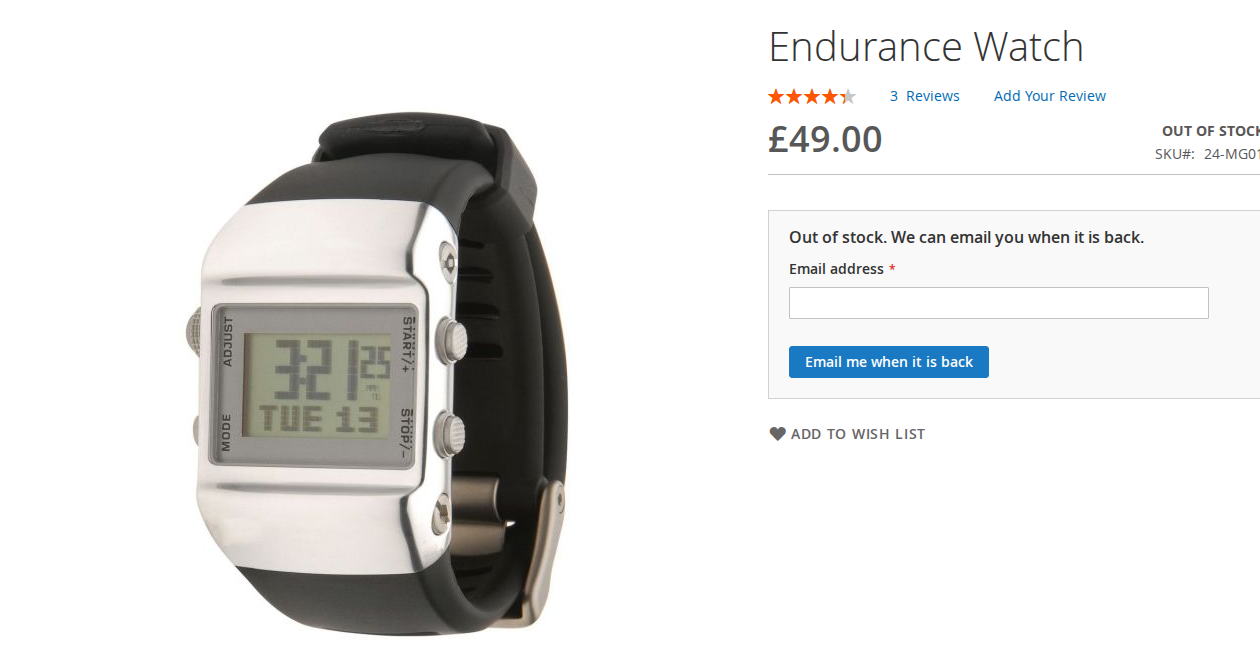
The alert has to be for size M, not for "the shirt"
For a configurable product, an alert on the parent is close to useless: the shirt is "in stock" as long as one size is left.
The module lists the options that are out of stock (for example "M, Blue") in the form, also when other options of the product can still be bought. The shopper picks the option there; the form does not follow the swatches they clicked on the page, which is a limit worth knowing. The email names the option, and on Luma the link opens the product with that option already selected. Bundle and grouped products get one alert for the whole product.
Sending is done by cron every five minutes, oldest sign-ups first, with a cap on emails per run. If ten people are waiting for size M and two units arrive, "Send When Quantity Reaches" can hold the alerts until more can be sold. Each alert sends one email and then ends, so nobody gets a second email every time stock moves.
Service message or marketing: what the ICO says
In the UK, marketing by email falls under PECR, and the ICO's guidance draws two lines that matter here. First, messages sent purely for administrative or customer service purposes "do not count as direct marketing if they only provide administrative information and do not promote anything", but "if you add advertising or marketing material the message becomes direct marketing"1. Second, marketing is solicited when "someone specifically asks you to send a particular message or type of information". The ICO's example is a person who asks you to email your summer brochure: sending it is solicited, while a later email about a new offer is not, because they did not ask for that specific email1.
For solicited messages the ICO says "you can send solicited electronic mail marketing without the recipient's consent". What still applies is that you must not hide your identity and you must give a valid contact address for people to opt out2. For unsolicited marketing to individuals you need their consent or the soft opt-in, consent must be freely given, pre-ticked boxes are not allowed, and you should keep a record of who consented, when and how2.
The ICO pages we read do not mention back-in-stock alerts by name, so we are not going to tell you how a regulator would classify yours. What the guidance does make clear is where the risk sits: in what you add. The module's stock email shows the product, the option, the price and a link, then explains that the shopper is getting it because they asked and that the alert has now ended. If you edit the template to add a "you might also like" row or a discount on other products, you are adding exactly the kind of material the ICO says changes the nature of a message.
If you want to use these addresses for marketing later, ask separately. The module has an optional marketing consent box: when you enter a text, an unticked box with that text appears on the form, and the answer is stored with the alert and shown in the admin grid and CSV export. Nothing else is done with it; it does not add anyone to your newsletter. The module stores the yes or no and the date of the sign-up, not the wording of the box, so if you change the text, keep a note of when.
This is not legal advice. For EU countries the equivalent rules come from each country's own law and regulator, and we have not summarised them here.
Unsubscribe that actually stops things
Every alert email has an unsubscribe link, and on Magento 2.4.8 and later it also carries the List-Unsubscribe and List-Unsubscribe-Post headers for one-click unsubscribe (RFC 8058), which many mail apps show as a button. The page behind the link lets the shopper stop this one alert, or all stock and price alerts for their address, and switch them back on if they change their mind. Addresses that stopped all alerts are skipped by the sender, and new guest sign-ups for them are ignored. This list is kept apart from your newsletter, so stopping stock alerts does not unsubscribe anyone from anything else, and the other way round.
Signed-in customers also see their alerts under My Stock Alerts in their account. IP addresses are only stored as a keyed hash for the hourly sign-up limit, and sent or stopped alerts are deleted after 365 days by default.
If you want guests and per-option alerts with the confirmation and unsubscribe handled for you, the Back in Stock and Price Drop Alerts module page has the details and a link to the admin demo.
Sources
- Information Commissioner's Office, "Key concepts for direct marketing using electronic mail", https://ico.org.uk/for-organisations/direct-marketing-and-privacy-and-electronic-communications/guidance-on-direct-marketing-using-electronic-mail/key-concepts-for-direct-marketing-using-electronic-mail/, checked 9 October 2026. ↩1 ↩2
- Information Commissioner's Office, "How do we comply with the PECR electronic mail marketing rules?" (guidance on direct marketing using electronic mail, last updated 28 April 2026), https://ico.org.uk/for-organisations/direct-marketing-and-privacy-and-electronic-communications/guidance-on-direct-marketing-using-electronic-mail/how-do-we-comply-with-the-pecr-electronic-mail-marketing-rules/, checked 9 October 2026. ↩1 ↩2
- Adobe Commerce Admin documentation, "Product alerts", https://experienceleague.adobe.com/en/docs/commerce-admin/inventory/configuration/product-alerts/alert-setup, checked 9 October 2026. ↩1 ↩2
From our shop
Related Products
-
Back In Stock
Let guests and customers ask for an email when an out-of-stock product or option is back, or when its price drops, and see which products people are waiting for.
- Magento 2.4.7 – 2.4.9
- Hyvä
- Luma
- Version v1.2.4
$139
