Using out-of-stock demand to decide what to reorder, and when price drop alerts help
Sales reports only show what you sold. Back-in-stock sign-ups show what people wanted while you had none, which is useful when you decide what to buy next.
Back in stock and price drop alerts for Magento 2: guests and customers, per configurable option, double opt-in, MSI-aware batched sending, unsubscribe links, My account list, admin grid with CSV export and a Most Wanted Products report. Luma and Hyvä.
One-off payment, with 12 months of updates.
No subscription or automatic renewal. Keep using the versions included in your update period. Update and licence details
Composer package softaware/module-back-in-stock
Shoppers leave their email address instead of leaving empty-handed, and get one email with a link to the product when it can be bought again.
Most Wanted Products lists the products and options with the most people waiting, with their stock now and a CSV export.
Guests confirm their address first, every email has an unsubscribe link, and the form never reveals who has signed up.
All features
Feature tour
01 / 06
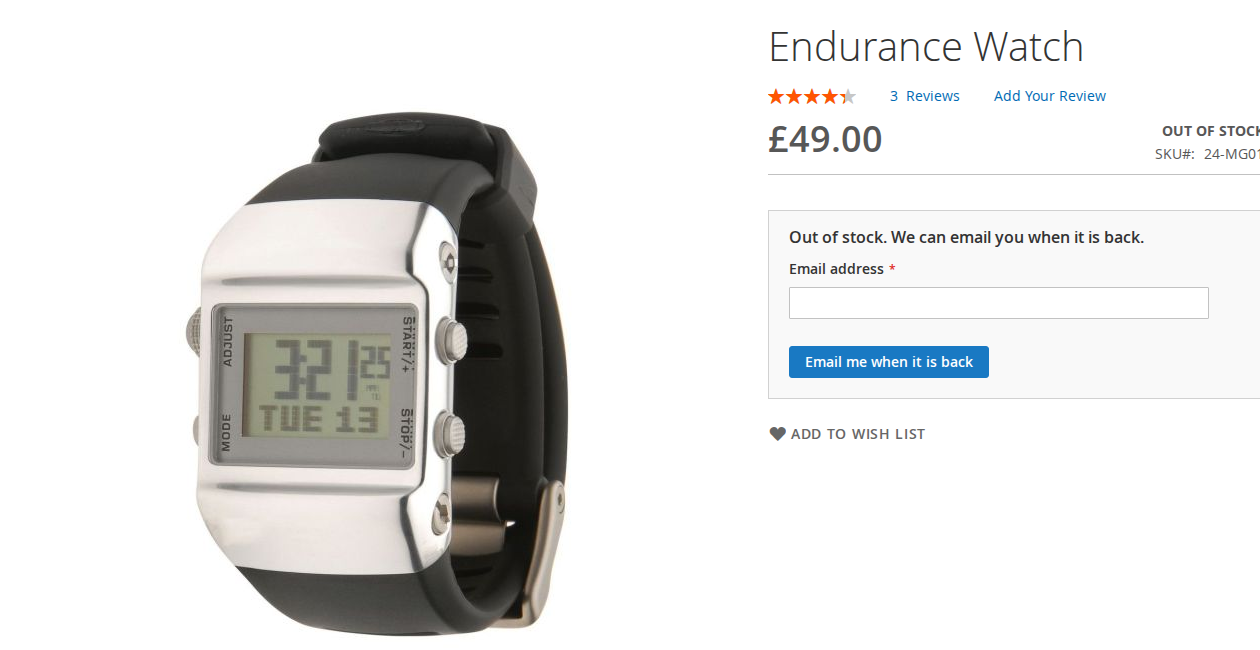
Out-of-stock products show "Out of stock. We can email you when it is back." Guests enter an email address, signed-in customers sign up with one click.
02 / 06
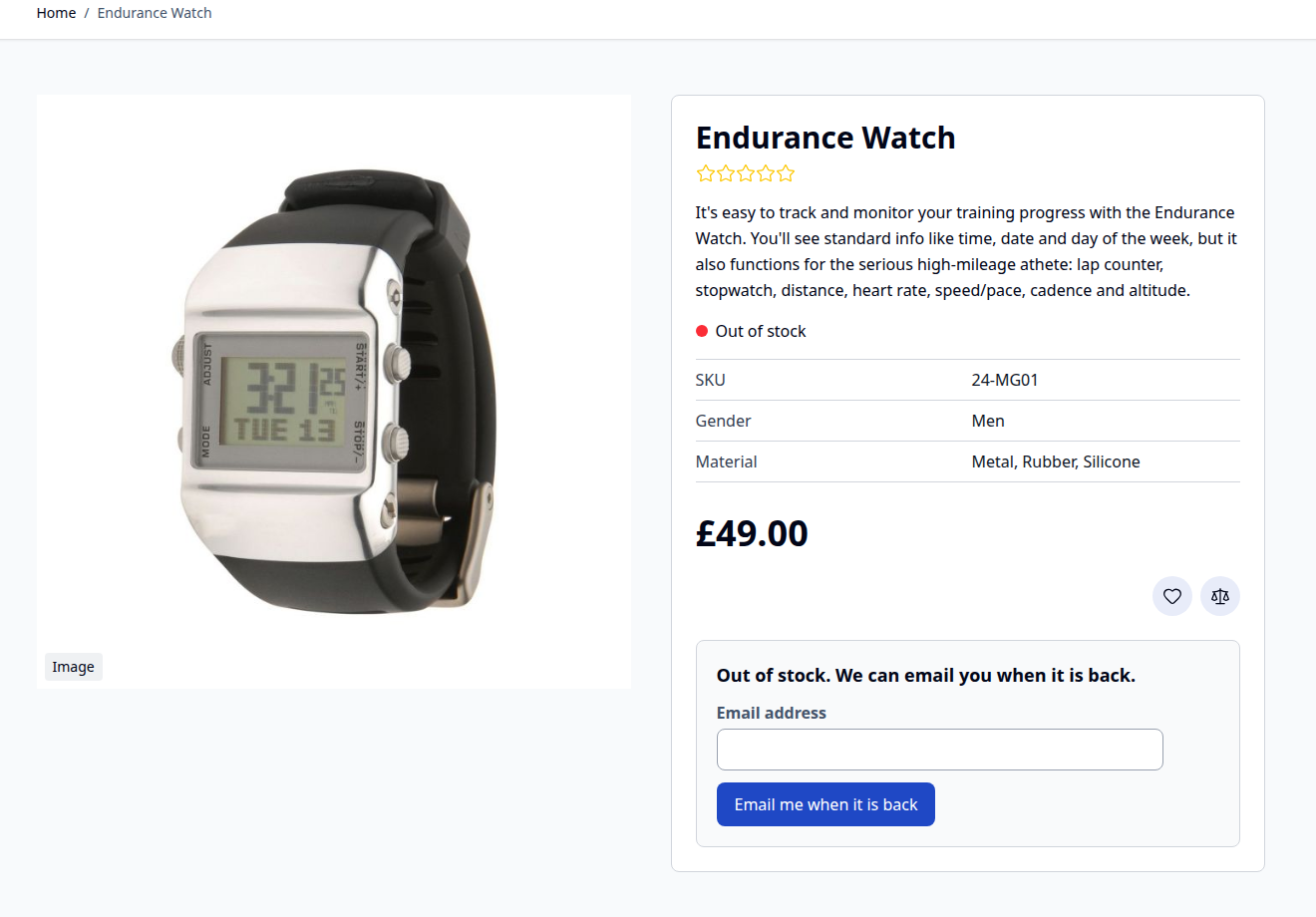
Alpine.js and Tailwind templates for Hyvä, picked automatically. The page stays in the full-page cache on both themes.
03 / 06
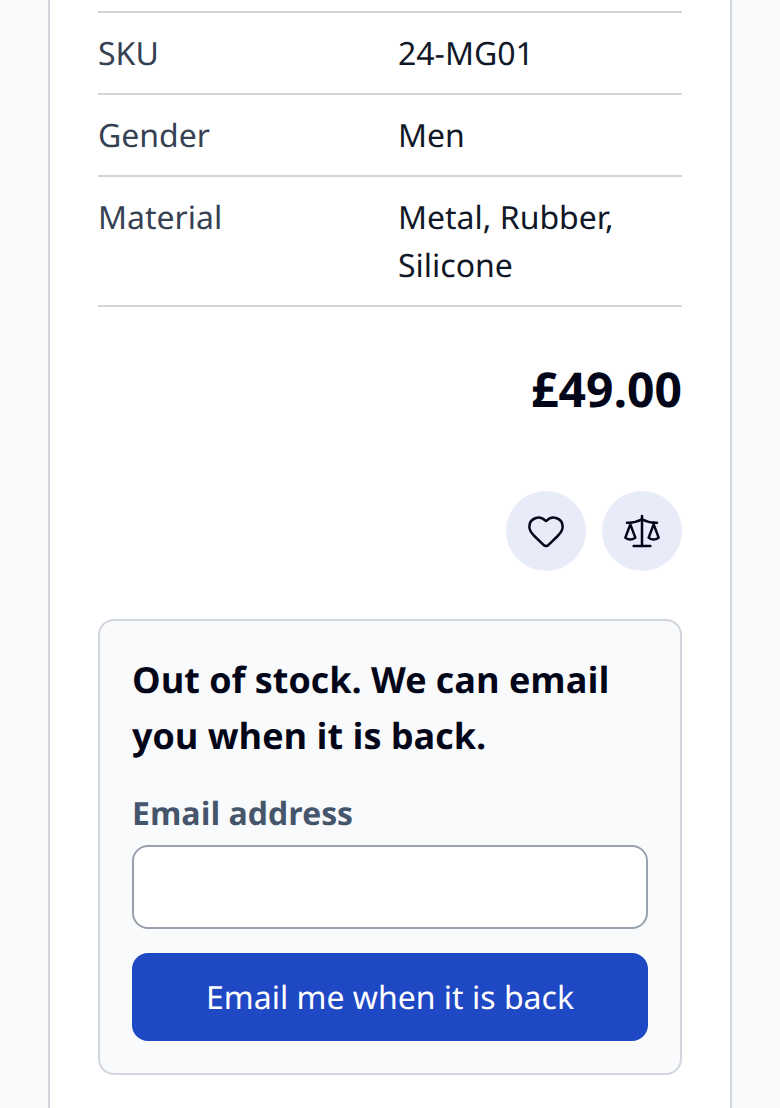
The form uses the full width on phones, and the email field opens the email keyboard.
04 / 06
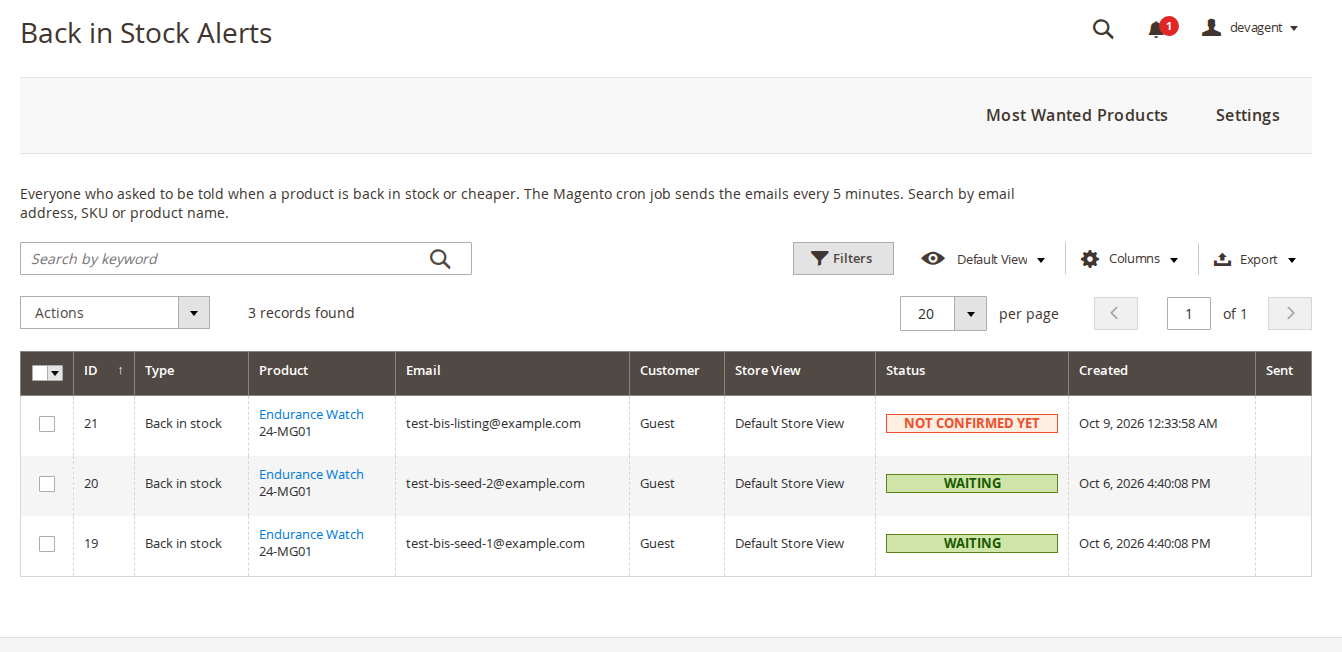
Type, product, email, customer, store view and status, with keyword search, filters, mass delete and CSV export.
05 / 06
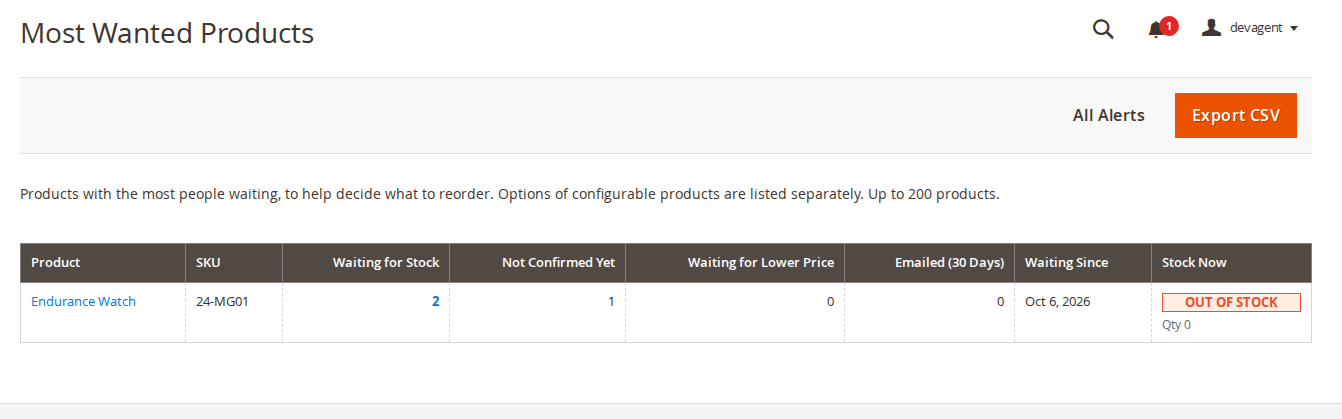
Products and options with the most people waiting, unconfirmed sign-ups, price watchers, emails in the last 30 days and the stock now.
06 / 06
Guests, double opt-in, price drop alerts, category page links and a marketing consent box, each with its default named in the admin.
Live demo
A full Magento store with the module installed, on Luma and on Hyvä. The admin demo signs you in with one click.
Compatibility
| Latest version | 1.2.3 · 9 Oct 2026 |
|---|---|
| composer.json requires | php ~8.2.0||~8.3.0||~8.4.0||~8.5.0 magento/framework ~103.0.7 softaware/module-core ^1.0 magento/module-backend * magento/module-catalog * magento/module-catalog-inventory * magento/module-config * magento/module-configurable-product * magento/module-customer * magento/module-email * magento/module-store * magento/module-tax * magento/module-ui * |
Installation
After you buy, create a Composer key in your account. Then, in the root of your Magento project:
01Add the repository and your key (once per project)
composer config repositories.softaware composer https://repo.softawarecommerce.com
composer config --auth http-basic.repo.softawarecommerce.com PUBLIC_KEY PRIVATE_KEY
02Install the module
composer require softaware/module-back-in-stock
03Enable it
bin/magento setup:upgrade
bin/magento setup:di:compile
bin/magento setup:static-content:deploy
bin/magento cache:flush
The last three are only needed in production mode.
Prefer a zip? Every version you are entitled to can be downloaded from My modules. More about Composer access
User guide
For version 1.2.3. The same guide comes with the module, in docs/user-guide.md.
Let shoppers ask for an email when an out-of-stock product, or one option of a configurable product, is back in stock, or when a price drops. Guests and signed-in customers can sign up. This guide covers installation, every setting, what shoppers see, the admin pages and the command line.
| Magento | Open Source or Adobe Commerce 2.4.7 to 2.4.9 |
| PHP | 8.2 to 8.5 |
| Themes | Luma, Blank and themes based on them; Hyvä 1.4 and later (tested on 1.5) |
| Other | softaware/module-core (installed automatically) |
| Optional | MSI (Inventory modules), Magento's reCAPTCHA modules |
Without MSI, stock is read from Magento's stock index. With MSI, from the salable status and salable quantity of the website's stock. The MSI and reCAPTCHA integrations follow Magento's APIs but were not tested on a store with those modules installed.
Install with Composer from repo.softawarecommerce.com. Your access keys and the full set-up are described at https://softawarecommerce.com/shop/composer-access/.
composer config repositories.softaware composer https://repo.softawarecommerce.com
composer config --auth http-basic.repo.softawarecommerce.com PUBLIC_KEY PRIVATE_KEY
composer require softaware/module-back-in-stock
bin/magento setup:upgrade
bin/magento setup:di:compile            # production mode only
bin/magento setup:static-content:deploy # production mode only
bin/magento cache:flush
Magento's cron must be running, because the emails are sent by cron jobs. On Hyvä, run your usual Tailwind build after installing so the module's classes are included (the module registers itself for Hyvä's Tailwind source scanning).
No set-up is needed after installing: out-of-stock product pages show the form and the cron job sends the emails. To update later: composer update softaware/module-back-in-stock, then the same bin/magento commands.
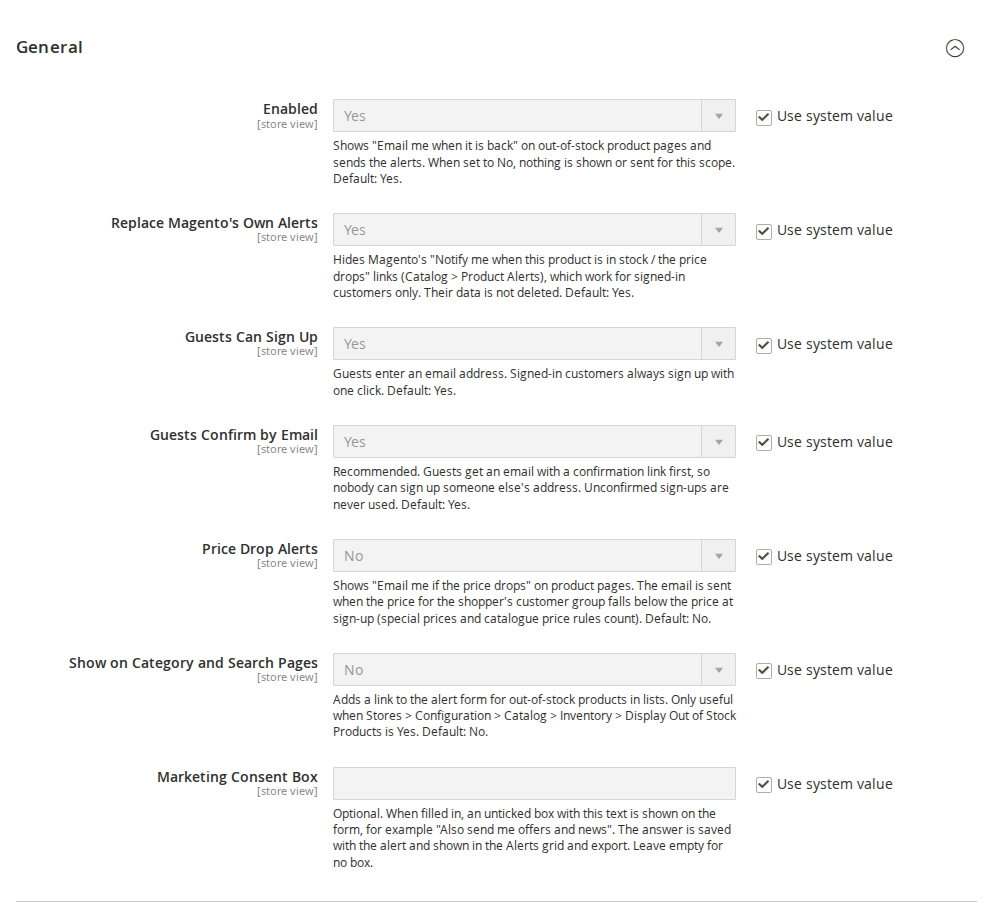
Stores > Configuration > Softaware > Back in Stock Alerts (also Softaware > Back in Stock Alerts > Settings).
| Setting | Default | What it does |
|---|---|---|
| Enabled | Yes | Shows the form on out-of-stock product pages and sends the alerts. When No, nothing is shown or sent for this scope. |
| Replace Magento's Own Alerts | Yes | Hides Magento's "Notify me when this product is in stock / the price drops" links. Their data is not deleted. |
| Guests Can Sign Up | Yes | Guests enter an email address. Signed-in customers always sign up with one click. |
| Guests Confirm by Email | Yes | Guests get a confirmation link first; unconfirmed sign-ups are never used. Recommended. |
| Price Drop Alerts | No | Shows "Email me if the price drops" on in-stock products. |
| Show on Category and Search Pages | No | Adds a link (Luma) or bell button (Hyvä) to out-of-stock products in lists, opening the product page at the form. Only useful when Catalog > Inventory > Display Out of Stock Products is Yes. |
| Marketing Consent Box | empty | When filled in, an unticked box with this text is shown on the form. The answer is stored with the alert and shown in the grid and export. Nothing else is done with it. |
| Setting | Default |
|---|---|
| Email Sender | General Contact |
| Back in Stock Email | the module's template |
| Price Drop Email | the module's template (shown when Price Drop Alerts is Yes) |
| Confirmation Email (Guests) | the module's template (shown when guests confirm by email) |
To change the wording, create a template from the module's template under Marketing > Email Templates and select it here. The product box in the emails (image, name, option, price, link) is the template Softaware_BackInStock::email/product.phtml, which a theme can override.
| Setting | Default | Scope | What it does |
|---|---|---|---|
| Send When Quantity Reaches | 1 | website | Waits until this many units can be sold (for products that track quantity without backorders). |
| Emails per Run | 100 | global | Maximum alert emails per cron run, oldest sign-ups first. |
| Delete Unconfirmed Sign-ups After (Days) | 7 | global | Unconfirmed guest sign-ups are deleted after this. |
| Delete Sent and Stopped Alerts After (Days) | 365 | global | 0 keeps them. |
| Setting | Default | What it does |
|---|---|---|
| Sign-ups per Hour per Visitor | 10 | Limit per IP address and session for guests. |
| Google reCAPTCHA on the Alert Form | No | Uses the reCAPTCHA keys of Magento's reCAPTCHA modules. |
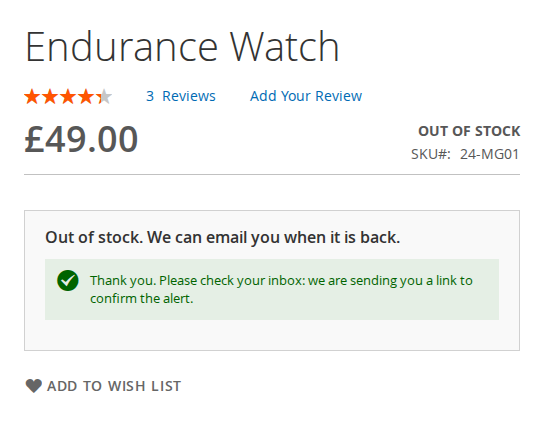
Out-of-stock products. Below the price, the product page shows "Out of stock. We can email you when it is back." Guests enter their email address and click Email me when it is back. Signed-in customers see one button; the alert goes to their account address.
| Hyvä | Mobile |
|---|---|
 |  |
Configurable products. The form lists the options that are out of stock (for example "M, Blue"), also when the product itself is still in stock: "Option out of stock? We can email you when it is back." The shopper picks the option in the form.
Guest confirmation. With double opt-in, the guest sees a message that a confirmation link is on its way. The confirmation email is sent by cron within a minute. The link opens a page with a Confirm alert button.
Price drops. With price drop alerts on, in-stock products (simple, virtual, downloadable, configurable and bundle) show Email me if the price drops. The price at sign-up is the final price for the shopper's customer group and website from Magento's price index, so special prices and catalogue price rules count. For configurable and bundle products the "as low as" price is compared.
The alert email. When the product can be bought again, or the price falls below the price at sign-up, the shopper gets one email with the product image, name, chosen option, price (old and new for price drops) and a link to the product. The alert then ends.
Unsubscribe. Every alert email has an unsubscribe link and one-click unsubscribe headers (RFC 8058, Magento 2.4.8 and later). The page offers Stop this alert and Stop all alerts for the address, and Switch alerts back on. This list is separate from the newsletter and from other modules.
My Account > My Stock Alerts. Signed-in customers see their waiting alerts (with Remove) and the ones already emailed.
Softaware > Back in Stock Alerts > Alerts lists every sign-up: ID, type (Back in stock or Price drop), product (linked, with SKU and option SKU), email, customer, store view, status, created and sent. Hidden columns: consent, confirmed, price at sign-up, source and note.
Softaware > Back in Stock Alerts > Most Wanted Products shows the products and options with the most people waiting, to help decide what to reorder: waiting for stock, not confirmed yet, waiting for a lower price, emailed in the last 30 days, waiting since and stock now. The "Waiting for Stock" number opens the alerts for that product. The report can be exported as CSV.
Each product has a Back in Stock Alerts (N waiting) section with the counts for the product and its options, and links to its alerts and to Most Wanted Products.
| Job | Schedule | What it does |
|---|---|---|
softaware_back_in_stock_confirm | every minute | Sends guest confirmation emails. |
softaware_back_in_stock_process | every 5 minutes | Checks stock and prices of products with waiting alerts and sends the alert emails. |
softaware_back_in_stock_cleanup | daily | Deletes unconfirmed and old alerts. |
Stock and prices are read from Magento's indexes. With indexers on "Update by Schedule", an alert is sent once the index has been updated, which is also when the storefront shows the product as in stock. Emails are only sent for products that are enabled and visible on the alert's website.
bin/magento softaware:back-in-stock:run [--limit=N] [--cleanup]
bin/magento softaware:back-in-stock:preview <alert id> [--email=stock|price|confirm] [-o file.html]
bin/magento softaware:back-in-stock:import-native [--type=stock|price|all] [--dry-run]
run does what the cron jobs do, now. --cleanup also deletes unconfirmed and old alerts.preview renders an email for an existing alert without sending it or changing anything.import-native copies Magento's own alerts of existing customers (unsent stock alerts and price alerts) into this module. Alerts that exist already are skipped, so it can be run twice. Magento's tables are not changed.Under System > Permissions > User Roles > Role Resources > Softaware > Back in Stock Alerts:
| Resource | Allows |
|---|---|
| View Alerts | The Alerts grid and export |
| Delete Alerts | Deleting alerts in the grid |
| Most Wanted Products | The report and its export |
| Settings | The configuration section |
| Problem | Solution |
|---|---|
| The form does not appear | Check General > Enabled for the store view and that the product is out of stock (or, for configurable products, that an option is). Flush the cache. |
| No emails are sent | Check that Magento's cron runs and that the stock index is up to date. Run bin/magento softaware:back-in-stock:run to send now. Check Send When Quantity Reaches. |
| Guest alerts stay "Not confirmed yet" | The guest has not clicked Confirm alert in the confirmation email. Check that the confirmation cron job runs and that your store can send email. |
| Magento's own "Notify me" links still show | Set Replace Magento's Own Alerts to Yes and flush the cache. |
| The category page link does not show | Switch on Show on Category and Search Pages and set Display Out of Stock Products to Yes. |
| An email looks wrong | Render it with bin/magento softaware:back-in-stock:preview <alert id> -o preview.html. |
bin/magento module:disable Softaware_BackInStock
composer remove softaware/module-back-in-stock
bin/magento setup:upgrade
The tables softaware_back_in_stock_alert and softaware_back_in_stock_unsubscribe keep their data until you drop them. Magento's own product alerts were never changed, so they work again as before once the module is removed.
Changelog
softaware/module-core ^1.0 (the README said ^1.2; composer.json was right).?search=<SKU>), used by the new links below.view/adminhtml/web/css/admin.css, was report.css).softaware/module-core instead of softaware/module-base. The admin menu and ACL now sit under Softaware_Core::core ("Softaware"); roles that had access keep it (migrated by module-core). After updating all SoftAware modules, softaware/module-base can be removed.softaware:back-in-stock:run, softaware:back-in-stock:preview, softaware:back-in-stock:import-native.FAQ
Something else on your mind? The developers who wrote the module answer before and after you buy.
Ask a question →Already installed it? Open a support ticket
Magento's alerts work for signed-in customers only and have no reporting. This module lets guests sign up too (with email confirmation), handles each option of a configurable product separately, has a Most Wanted Products report, an admin grid with CSV export, an unsubscribe page and a My Stock Alerts page in the customer account. While "Replace Magento's Own Alerts" is Yes, Magento's "Notify me" links are hidden. Magento's tables are not changed.
Both. Guests enter an email address; signed-in customers sign up with one click and the alert goes to their account address. You can switch guest sign-ups off with Guests Can Sign Up = No.
By default, yes: Guests Confirm by Email sends a confirmation email first, and only confirmed sign-ups get alerts. The link opens a page with a "Confirm alert" button, because mail scanners open links on their own. Unconfirmed sign-ups are deleted after 7 days (configurable).
Yes. The form lists the options that are out of stock (for example "M, Blue"), also when other options of the product are still in stock. The shopper picks the option in the form; it does not follow the swatches clicked on the page. Bundle and grouped products get one alert for the whole product.
They are off by default. When switched on, in-stock products show "Email me if the price drops". The module stores the final price for the shopper's customer group and website from Magento's price index at sign-up, so special prices and catalogue price rules count. The email is sent when that price falls below the stored price.
A cron job runs every 5 minutes. It checks the products that have waiting alerts and sends at most "Emails per Run" emails (100 by default), oldest sign-ups first. With Send When Quantity Reaches you can wait until a given number of units can be sold. Each alert sends one email and then ends; a shopper who wants another one signs up again.
The code checks stock through MSI when its modules are installed (salable status and salable quantity of the website's stock) and through Magento's stock index when they are not. Our tests ran on a store without MSI; the MSI path follows Magento's MSI interfaces but has not been tested on a store with MSI installed.
Yes. Hyvä templates are included (Hyvä 1.4 and later, tested on 1.5): product page form, category list button, confirmation and unsubscribe pages, and My Stock Alerts. Luma and themes based on it use the Luma templates.
No. The product page HTML is the same for every visitor and stays in the full-page cache. Whether the shopper is signed in comes from Magento's customer data (Luma) or Hyvä's private content in the browser. Stock checks and emails run in cron, not during page requests.
The sign-up form is POST only with a form key, checks the address, has a hidden honeypot field and an hourly limit per visitor (10 by default). One address gets at most 5 confirmation emails a day. Google reCAPTCHA can be switched on through Magento's reCAPTCHA modules; this option follows Magento's reCAPTCHA API but was not tested on our dev store.
No. Guests always get the same answer, whether the address is new, already waiting or has stopped all alerts, and confirmation emails are sent by cron, so the response time gives nothing away either.
Every alert email has an unsubscribe link and one-click unsubscribe headers (List-Unsubscribe, RFC 8058, on Magento 2.4.8 and later). The page lets the shopper stop that alert, or all stock and price alerts for the address, and switch them back on later.
Yes, with bin/magento softaware:back-in-stock:import-native. It copies customers' unsent stock alerts and their price alerts, skips alerts that exist already and does not change Magento's tables. Use --dry-run to count first.
Magento Open Source and Adobe Commerce 2.4.7 to 2.4.9, PHP 8.2 to 8.5.
Support
From the blog
Sales reports only show what you sold. Back-in-stock sign-ups show what people wanted while you had none, which is useful when you decide what to buy next.
A back-in-stock form is easy to add. Getting the confirmation, the unsubscribe, the size options and the line between a service message and marketing right takes more thought.
We use necessary cookies to run this site and, with your permission, Google Analytics to understand how it is used. You can accept analytics, reject it or choose in the settings. Cookie policy
Choose which cookies you allow. Necessary cookies are always on because the shop cannot work without them. You can change your choice at any time with the "Cookie settings" link.
Needed for the basket, checkout, login and security. They do not track you.
Google Analytics: how many people visit, which pages they read and how they found the site. It sets the _ga cookies and sends usage data to Google.