Sale, new and low-stock labels that keep themselves up to date in Magento 2
Hand-made sale and stock badges go out of date the day the price or stock changes. Here is what Magento shows on its own and how rule-based labels fill the gap.
Product labels and badges for Magento 2 (Luma and Hyvä): rule-based labels with smart conditions, indexed for fast listings.
One-off payment, with 12 months of updates.
No subscription or automatic renewal. Keep using the versions included in your update period. Update and licence details
Composer package softaware/module-product-labels
Rules pick the products: on sale, new, low in stock, best sellers or any attribute condition. No product needs to be edited by hand.
An indexer stores which product gets which label, so category pages read the result instead of checking rules while they render.
An hourly cron re-checks labels that depend on time, stock or sales, and cleans the page cache when a dated label starts or ends.
All features
Feature tour
01 / 07
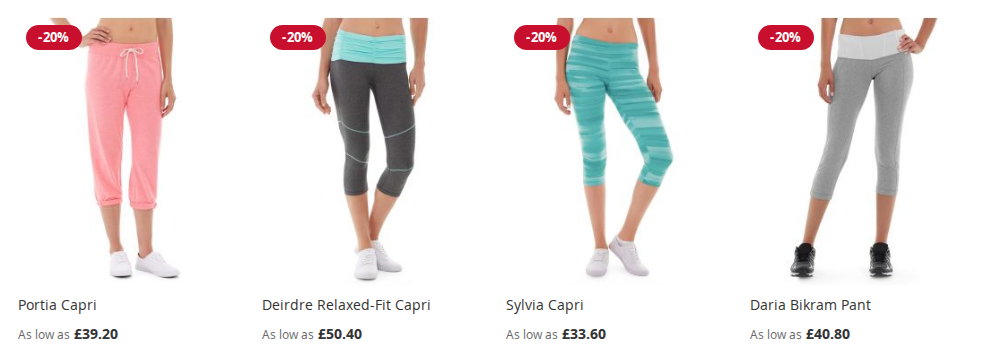
"-{discount_percent}%" becomes -20% on each product, worked out from the special price or catalogue price rule the visitor actually gets.
02 / 07
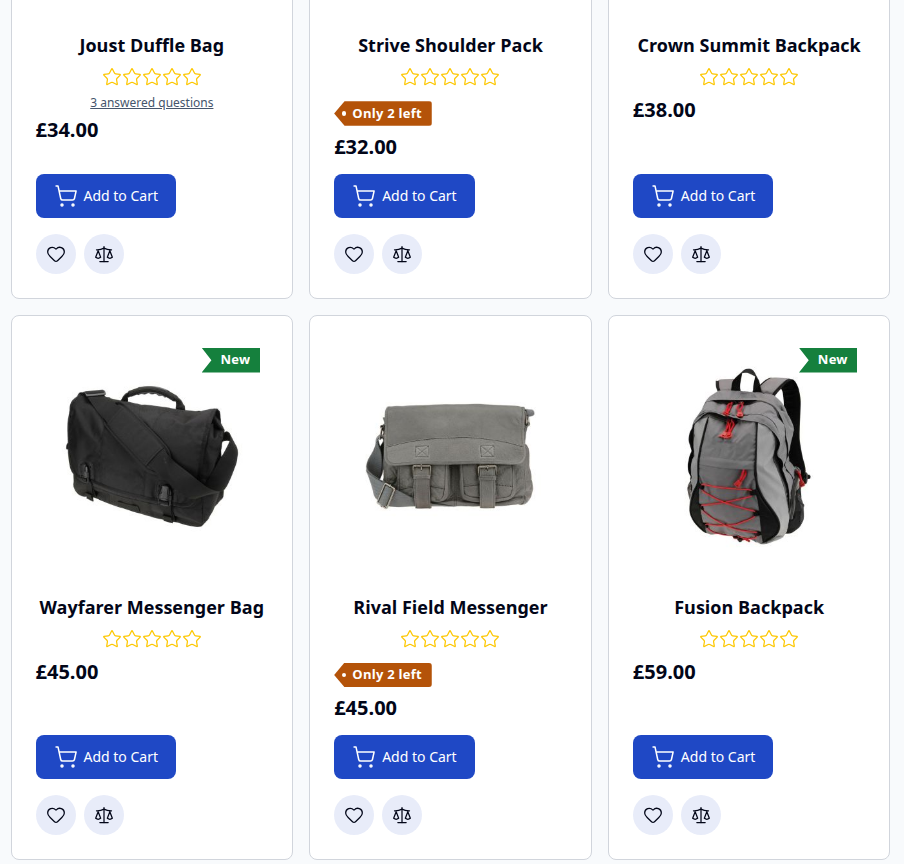
Labels on Hyvä category pages and widgets, with the label CSS added to your theme's Tailwind build. Here: "New" ribbons and an "Only 2 left" tag under the product name.
03 / 07
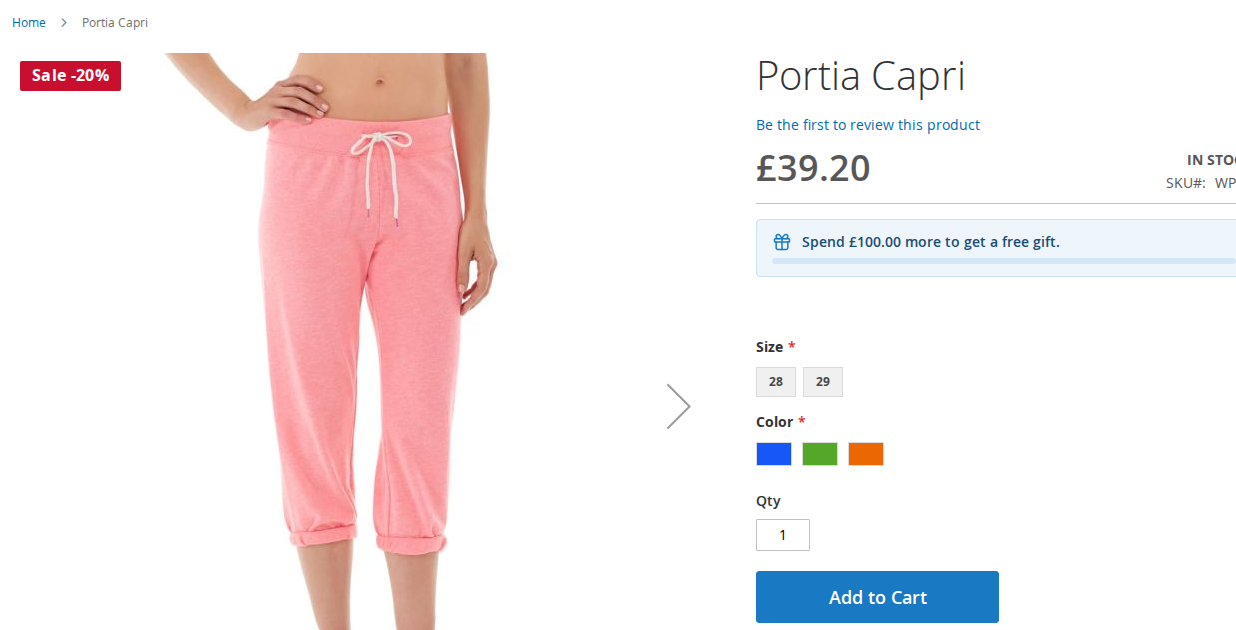
Each label has its own text, shape, colours, size and position for the product page, for example a larger "Sale -20%" on the main gallery image.
04 / 07
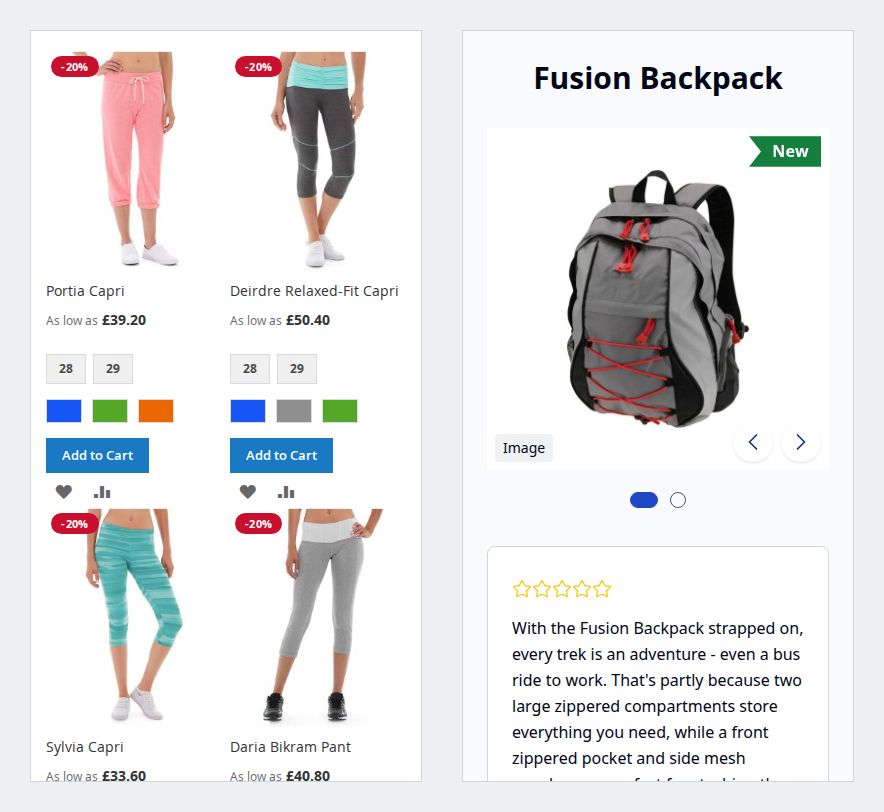
Labels stay on the product image on phones, on Luma (left) and Hyvä (right).
05 / 07
Preview, status, priority, store views, dates and the number of matching products per label, with mass enable, disable and delete and "Apply All Labels Now".
06 / 07
Switch on On Sale (with a minimum discount), New, Low Stock, Out of Stock, Best Seller or Free Shipping, and combine them with a price range, product types and attribute conditions.
07 / 07
Text or image, shape, colours, size and position, with a live preview for the product page and for listings.
Live demo
A full Magento store with the module installed, on Luma and on Hyvä. The admin demo signs you in with one click.
Compatibility
| Latest version | 1.2.2 · 9 Oct 2026 |
|---|---|
| composer.json requires | php ~8.2.0||~8.3.0||~8.4.0||~8.5.0 magento/framework ~103.0.7 softaware/module-core ^1.0 magento/module-backend * magento/module-catalog * magento/module-catalog-inventory * magento/module-catalog-rule * magento/module-config * magento/module-customer * magento/module-indexer * magento/module-rule * magento/module-sales * magento/module-store * magento/module-ui * |
Installation
After you buy, create a Composer key in your account. Then, in the root of your Magento project:
01Add the repository and your key (once per project)
composer config repositories.softaware composer https://repo.softawarecommerce.com
composer config --auth http-basic.repo.softawarecommerce.com PUBLIC_KEY PRIVATE_KEY
02Install the module
composer require softaware/module-product-labels
03Enable it
bin/magento setup:upgrade
bin/magento setup:di:compile
bin/magento setup:static-content:deploy
bin/magento cache:flush
The last three are only needed in production mode.
Prefer a zip? Every version you are entitled to can be downloaded from My modules. More about Composer access
User guide
For version 1.2.2. The same guide comes with the module, in docs/user-guide.md.
Show rule-based labels ("badges") such as Sale -20%, New or Only 3 left on product images, under the product name or after the price, on Luma and Hyvä. This guide covers installation, configuration, creating labels and day-to-day use.
| Magento | Open Source or Adobe Commerce 2.4.7 to 2.4.9 |
| PHP | 8.2 to 8.5 |
| Themes | Luma and themes based on it; Hyvä (tested with Hyvä 1.5 and the default theme 3.0) |
| Other | softaware/module-core (installed automatically) |
Stock conditions read the CatalogInventory tables (cataloginventory_stock_item). Setups with Multi-Source Inventory have not been tested.
Install with Composer from the SoftAware Commerce repository. The access keys are in your account; see Composer access.
composer config repositories.softaware composer https://repo.softawarecommerce.com
composer config --auth http-basic.repo.softawarecommerce.com PUBLIC_KEY PRIVATE_KEY
composer require softaware/module-product-labels
bin/magento setup:upgrade
bin/magento setup:di:compile            # production mode only
bin/magento setup:static-content:deploy # production mode only
bin/magento cache:flush
Hyvä: the module registers itself for Hyvä's Tailwind build and adds its label CSS from view/frontend/tailwind/tailwind-source.css. After installing, rebuild your theme CSS (npm run build in the theme's web/tailwind folder). Luma and themes based on it load css/product-labels.css and need no build step.
To update later: composer update softaware/module-product-labels, then the same bin/magento commands.
-{discount_percent}%, Shape to Rounded rectangle (pill) and pick the colours. The preview on the right shows the result.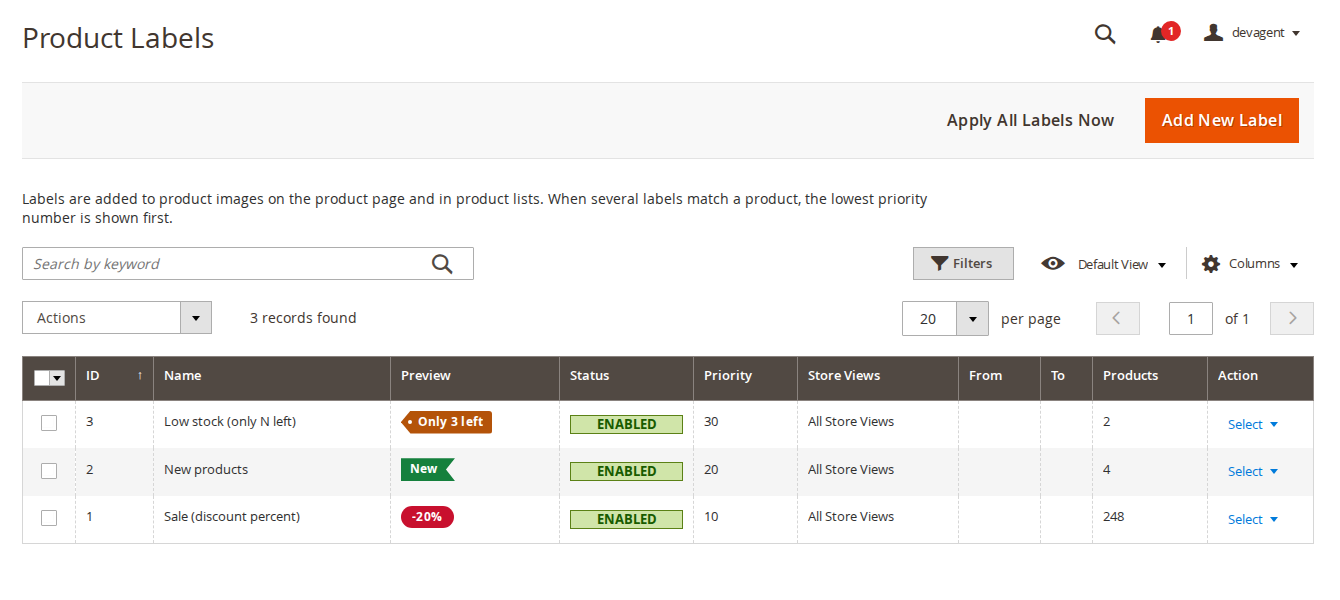
Softaware > Product Labels > Manage Labels lists every label with its preview, status, priority, store views, From/To dates, the number of products it is assigned to and the last update.
| Field | What it does |
|---|---|
| Name | Internal name, only shown in the admin. |
| Enabled | Switches the label on or off. |
| Priority | Labels are shown in priority order; lower numbers first. |
| Stop Further Labels | Labels with a higher priority number are not shown on products that have this label. |
| Store Views | The store views where the label is used. |
| Customer Groups | Show the label only to these groups. Leave empty for all customer groups. |
| From / To | Optional dates. The label is shown only between them (store view time zone). |
Customer groups, dates and the real discount are checked when the page is rendered. When a dated label starts or ends, the hourly cron cleans the page cache of the label's products, so cached pages follow within the hour.
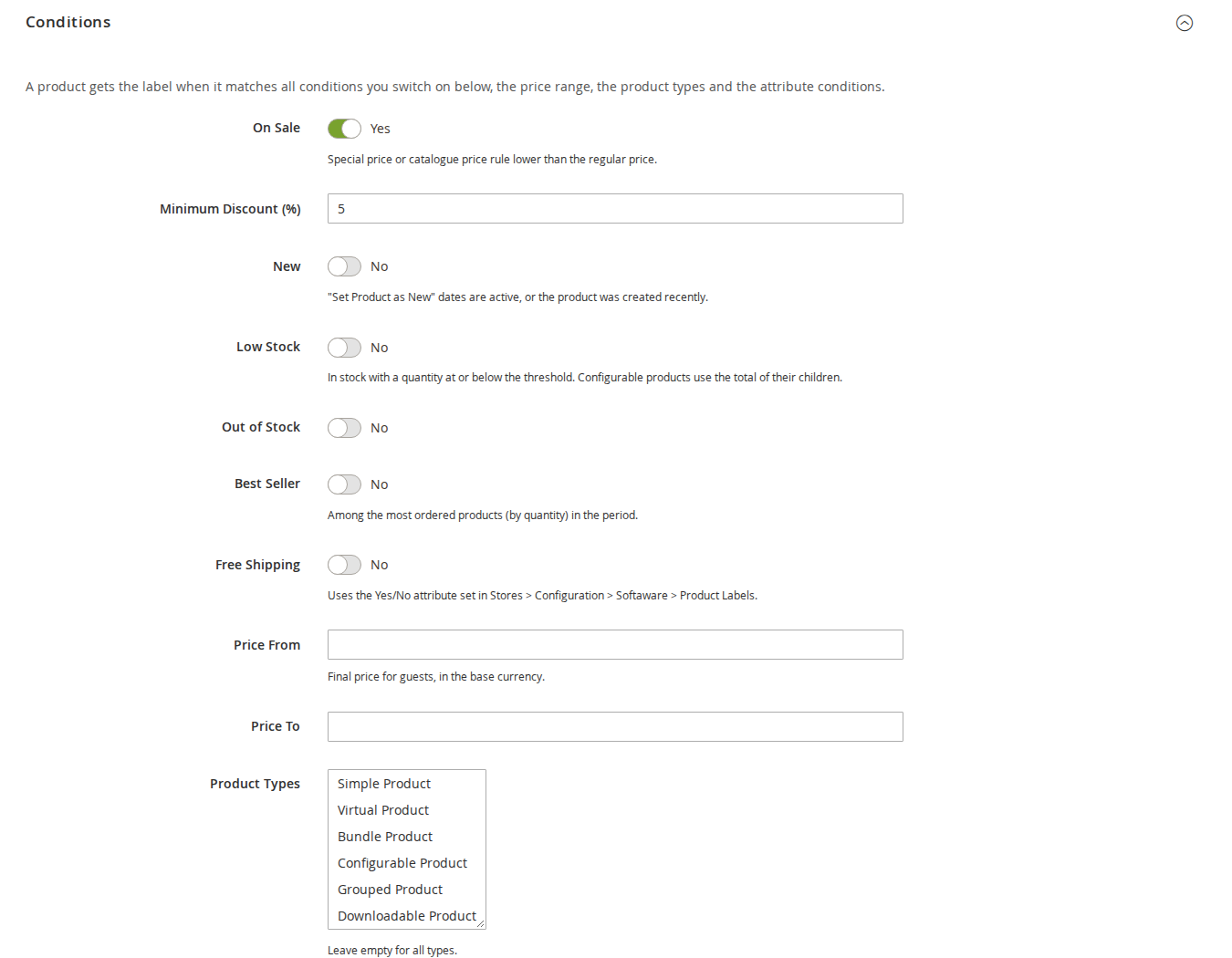
A product gets the label when it matches all conditions you switch on, the price range, the product types and the attribute conditions. A label with no conditions at all applies to every product.
| Condition | What it checks |
|---|---|
| On Sale | Special price or catalogue price rule lower than the regular price. Minimum Discount (%) is optional. |
| New | "Set Product as New" dates are active. Or Created Within (days) also counts products created in the last N days; leave it empty to use only the dates. |
| Low Stock | In stock with a quantity at or below the Low Stock Threshold. Configurable products use the total of their in-stock children. |
| Out of Stock | The product is out of stock. |
| Best Seller | Among the Top N Products by ordered quantity in the last Period (days). Order states set in the configuration are ignored. Sales are counted over all store views. |
| Free Shipping | The Yes/No attribute chosen under Free Shipping Attribute in the configuration is set to Yes. |
| Price From / Price To | Final price for guests, in the base currency (indexed price of the store view's website). |
| Product Types | Simple, configurable, bundle and so on. Leave empty for all types. |
| Attribute Conditions | The catalogue price rule condition builder: attributes, attribute set, category, SKU and more. |
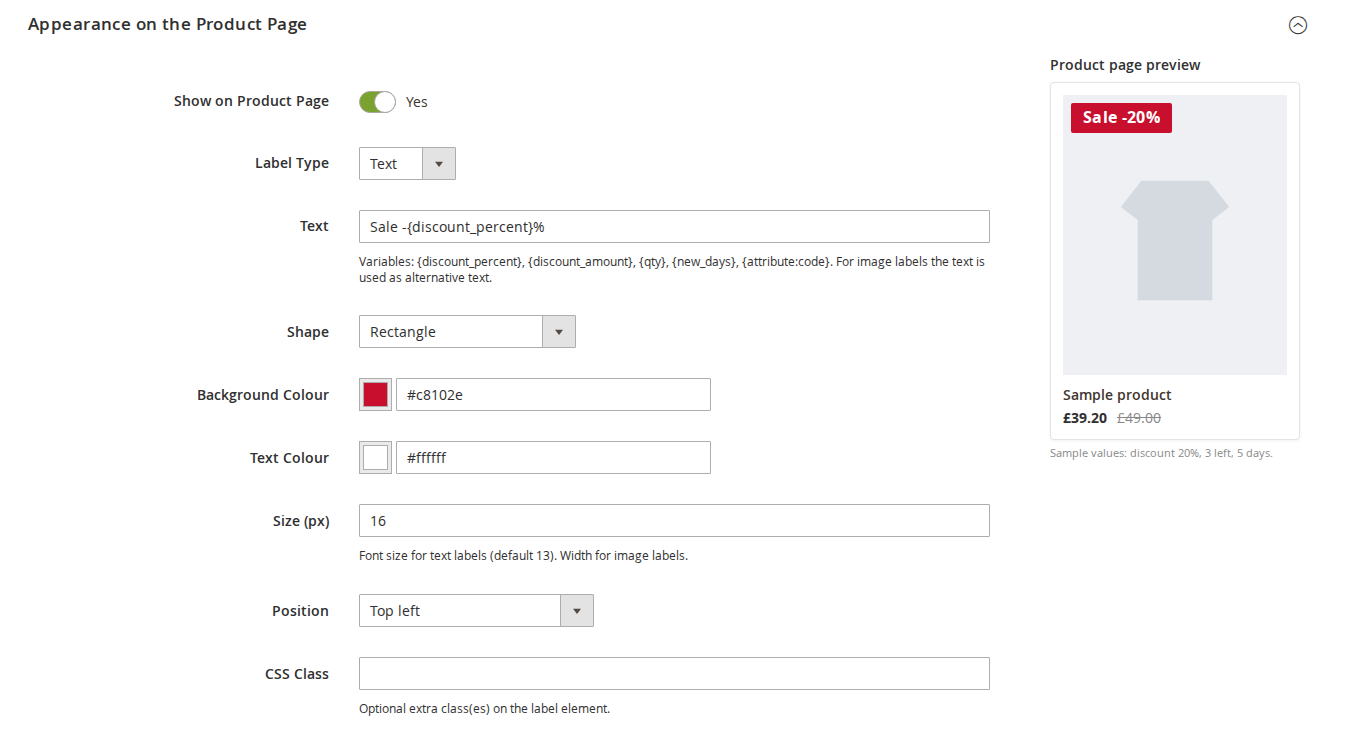
Each label has two independent appearance sections: Appearance on the Product Page and Appearance on Listings (category pages, search results, widgets, related products, up-sells and cross-sells). Switch either off with Show on Product Page or Show on Listings. A live preview next to each section shows the label on a sample product (sample values: discount 20%, 3 left, 5 days).
| Field | What it does |
|---|---|
| Label Type | Text or Image. |
| Text | The label text. For image labels it is used as alternative text. |
| Image | JPG, PNG, GIF or WebP, up to 2 MB. A transparent PNG or WebP works best. |
| Shape | Rectangle, Rounded rectangle (pill), Circle, Ribbon or Tag. |
| Background Colour / Text Colour | Colour pickers. |
| Size (px) | Font size for text labels (default 13). Width for image labels. |
| Position | On the image: top, middle or bottom, each left, centre or right. Next to the text: Under the product name or After the price. |
| CSS Class | Optional extra class or classes on the label element, for your own styling. |
| Variable | Replaced by |
|---|---|
{discount_percent} | The discount in per cent, rounded, for example 20. |
{discount_amount} | The discount as a formatted amount, for example £9.80. |
{qty} | The quantity in stock. |
{new_days} | The number of days since the product became new. |
{attribute:code} | The value of any product attribute, for example {attribute:material}. Option labels are resolved. |
Labels appear on category pages, search results, catalogue widgets, related products, up-sells, cross-sells and the recently viewed and compared widgets, and on the product page on the main gallery image, under the product name or after the price.
On Hyvä the labels use the module's Hyvä templates and the CSS added to the Tailwind build:
On phones the labels stay on the product image (Luma left, Hyvä right):
Product page placement: on Luma the label sits on the Fotorama gallery stage; on Hyvä it uses the gallery's gallery.additional container. On listings, "Under the product name" is shown just above the price box.
Stores > Configuration > Softaware > Product Labels (also under Softaware > Product Labels > Configuration).
| Setting | What it does |
|---|---|
| Enabled | When set to No, no labels are shown on the storefront. Default: Yes. |
| Show on Product Listings | Category pages, search results, widgets, related products, up-sells and cross-sells. Default: Yes. |
| Show on Product Page | Labels on the product page. Default: Yes. |
| Maximum Labels per Product | Labels are taken in priority order; 0 means no limit. Default: 0. |
| Additional Listing Image IDs | Only for themes or extensions with their own product list image IDs (from the theme's etc/view.xml), comma-separated, for example my_slider_image. Default: empty. |
| Setting | What it does |
|---|---|
| Free Shipping Attribute | The Yes/No product attribute used by the Free Shipping condition. Default: none. |
| Best Seller: Ignore Order States | Comma-separated order states that do not count as sales. Default: canceled,closed. |
| Setting | What it does |
|---|---|
| Hourly Refresh of Time and Stock Dependent Labels | Re-checks labels using New, Low Stock, Out of Stock or Best Seller once an hour by cron. Default: Yes. A full reindex also runs every night. |
The module adds two indexers under System > Index Management: Softaware Product Labels (by label) and Softaware Product Labels (by product). They share one index table and can run in "Update on Save" or "Update by Schedule" mode.
Cron jobs (group index):
| Job | Schedule | What it does |
|---|---|---|
softaware_product_labels_refresh | hourly (minute 17) | Re-checks time, stock and sales dependent labels (if Hourly Refresh is on) and cleans the page cache of dated labels that started or ended. |
softaware_product_labels_full_reindex | nightly (01:25) | Full rebuild of the label index. |
Magento cron must be running (bin/magento cron:run from the system crontab).
bin/magento softaware:product-labels:apply                    # re-evaluate all labels
bin/magento softaware:product-labels:apply --label=3 --label=5 # only these labels
bin/magento softaware:product-labels:apply --time-dependent   # only labels with new, stock, best seller, sale conditions or dates
bin/magento softaware:product-labels:check 24-MB02            # labels indexed for a SKU, per store view
bin/magento indexer:reindex softaware_product_labelIn System > Permissions > User Roles > Role Resources:
| Resource | Allows |
|---|---|
Softaware > Product Labels (Softaware_ProductLabels::labels) | View the Manage Labels grid and forms. |
Edit Labels (Softaware_ProductLabels::labels_save) | Create, edit, enable and disable labels, upload images, Apply All Labels Now. |
Delete Labels (Softaware_ProductLabels::labels_delete) | Delete labels. |
Stores > Configuration > Softaware Product Labels (Softaware_ProductLabels::config) | The configuration section. |
| Problem | Solution |
|---|---|
| A label does not appear | Check that the label is enabled, the store view and customer group match and today is within From/To. Run bin/magento softaware:product-labels:check <sku> to see whether the product is in the index. In "Update by Schedule" mode, wait for the indexer cron or click Apply All Labels Now. |
| Labels are unstyled on Hyvä | Rebuild the theme CSS (npm run build in the theme's web/tailwind folder) and flush the cache. |
| No labels on a theme's product slider | The slider uses its own image ID. Add it under General > Additional Listing Image IDs. Images not built through Magento's product image factory cannot get labels. |
{qty} or a stock label is out of date | Stock changes from orders are picked up by the hourly refresh in "Update by Schedule" mode. Hyvä caches product list items for up to an hour. |
| Free Shipping condition matches nothing | Choose a Yes/No attribute under Label Conditions > Free Shipping Attribute and set it on your products. |
bin/magento module:disable Softaware_ProductLabels
composer remove softaware/module-product-labels
bin/magento setup:upgrade
The tables softaware_product_label, softaware_product_label_store, softaware_product_label_customer_group and softaware_product_label_index and the uploaded label images in pub/media/softaware/productlabels are not deleted by these commands; remove them by hand if you no longer need them.
Changelog
docs/listing.json, docs/faq.md, docs/user-guide.md and screenshots in docs/images/ (Luma, Hyvä, mobile and admin) for the product page on softawarecommerce.com.softaware/module-core instead of softaware/module-base. The admin menu and ACL now sit under Softaware_Core::core ("Softaware"); roles that had access keep it (migrated by module-core). After updating all SoftAware modules, softaware/module-base can be removed.FAQ
Something else on your mind? The developers who wrote the module answer before and after you buy.
Ask a question →Already installed it? Open a support ticket
Smart conditions (On Sale with an optional minimum discount, New, Low Stock, Out of Stock, Best Seller and Free Shipping), a price range, product types, and attribute conditions built with the same condition builder as catalogue price rules (attributes, attribute set, category, SKU and so on). A product gets the label when it matches every condition you switched on.
Yes. The module has Hyvä layout handles and registers itself for Hyvä's Tailwind build, so the label styles are added to your theme CSS. After installing, rebuild the theme CSS once. Luma and themes based on it load a small CSS file instead.
On category pages, search results, catalogue widgets, related products, up-sells, cross-sells and the recently viewed and compared widgets, and on the product page (main gallery image, under the product name or after the price). Labels are not added to cart, mini cart, wishlist or compare thumbnails.
Labels are assigned by an indexer, so category pages read the stored result with one query per product list instead of evaluating rules for every product. Only rows that changed are written, and only the page cache of products whose labels changed is cleaned.
Yes. Use {discount_percent} or {discount_amount} in the label text. The discount comes from the special price or catalogue price rule and is worked out when the page is rendered, so it matches the price the visitor sees. Other variables are {qty} (quantity in stock), {new_days} (days since the product became new) and {attribute:code} (any product attribute; option labels are resolved).
Yes. Set Label Type to Image and upload a JPG, PNG, GIF or WebP file of up to 2 MB. The label text is then used as alternative text. A transparent PNG or WebP works best.
Labels are shown in priority order (lower numbers first). Stop Further Labels on a label hides labels with a higher priority number on the products that have it, and Maximum Labels per Product in the configuration limits the number of labels per product.
Yes. Each label has store views, customer groups and From/To dates. They are checked when the page is rendered. When a dated label starts or ends, the hourly cron cleans the page cache of its products, so cached pages follow within the hour.
It takes the top N products by ordered quantity in the last X days. Order states listed under Best Seller: Ignore Order States (default canceled,closed) are not counted. Sales are counted over all store views.
The stock conditions and {qty} read the CatalogInventory stock tables. Setups with Multi-Source Inventory have not been tested.
Listing labels are added to images built through Magento's product image factory with known image IDs. If your theme or a slider uses its own image IDs, add them under General > Additional Listing Image IDs (comma-separated, from the theme's etc/view.xml).
Run bin/magento softaware:product-labels:check <sku>. It lists the labels indexed for the product per store view, with priority and status. Remember that customer groups, dates and the real discount are checked later, when the page is rendered.
Support
From the blog
Hand-made sale and stock badges go out of date the day the price or stock changes. Here is what Magento shows on its own and how rule-based labels fill the gap.
We use necessary cookies to run this site and, with your permission, Google Analytics to understand how it is used. You can accept analytics, reject it or choose in the settings. Cookie policy
Choose which cookies you allow. Necessary cookies are always on because the shop cannot work without them. You can change your choice at any time with the "Cookie settings" link.
Needed for the basket, checkout, login and security. They do not track you.
Google Analytics: how many people visit, which pages they read and how they found the site. It sets the _ga cookies and sends usage data to Google.