Changing prices on hundreds of Magento products without a CSV import
Magento's own tools can set one price for many products, or import a spreadsheet. Neither can add 5% and round to .99, and neither can undo. Here is the gap and how we filled it.
Extra mass actions for the Magento 2 product grid: prices, categories, websites, stock, attributes, links, images and more, run in batches with a job log and undo.
One-off payment, with 12 months of updates.
No subscription or automatic renewal. Keep using the versions included in your update period. Update and licence details
Composer package softaware/module-mass-product-actions
Tick the products in the grid, pick an action, fill in a short form. No exports, spreadsheets or re-imports.
The old values are kept for each changed product, so a price change or category move can be reversed from the job log.
Every action has its own permission, and the job log shows who changed what, when and on how many products.
All features
Feature tour
01 / 06
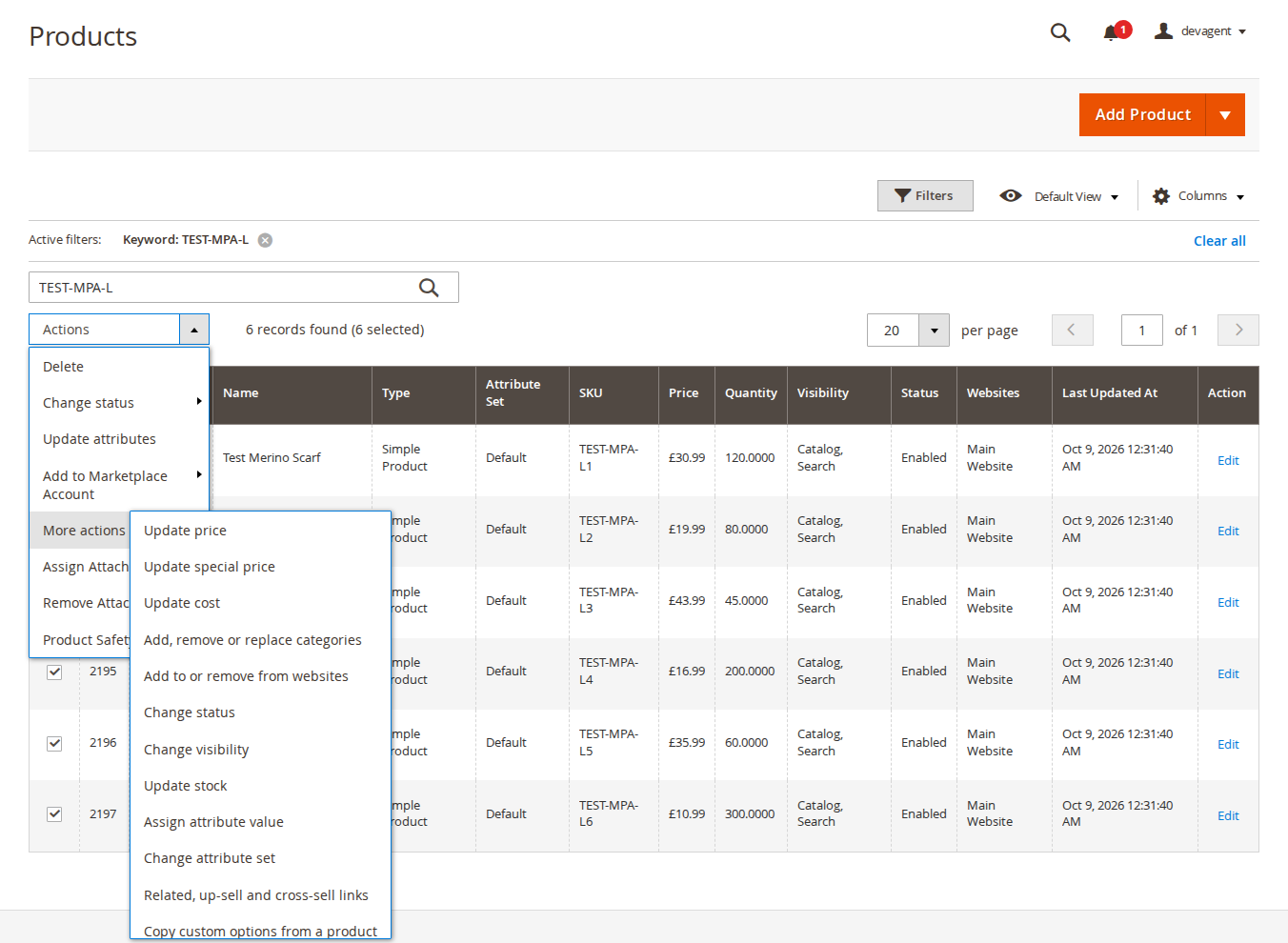
Catalog > Products > Actions > More actions lists the extra actions. Magento's own actions stay as they are, and each admin only sees the actions their role allows.
02 / 06
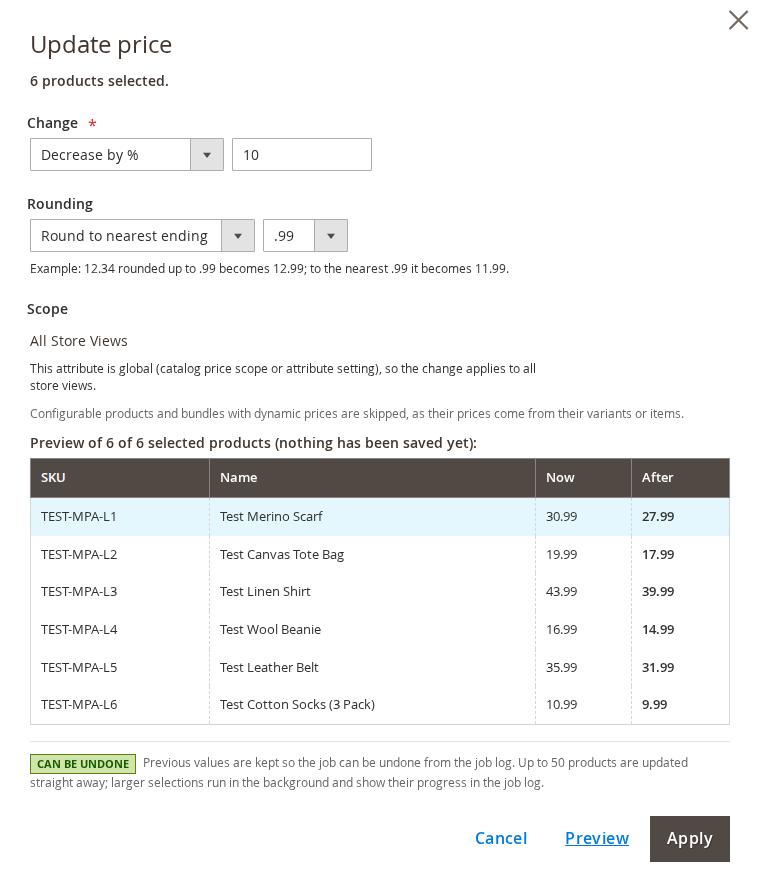
Set, increase or decrease by an amount or a percentage, round to an ending such as .99, and press Preview to compare the current and new price before you apply.
03 / 06
Assign a value to text, select, multiselect, number, date and yes/no attributes, for all store views or one, or go back to the default value.
04 / 06
Who started it, what it changed, and how many products were updated, skipped or failed, with live progress for queued jobs.
05 / 06
Undo restores the values from before the job. The job page warns when later jobs changed the same fields of the same products.
06 / 06
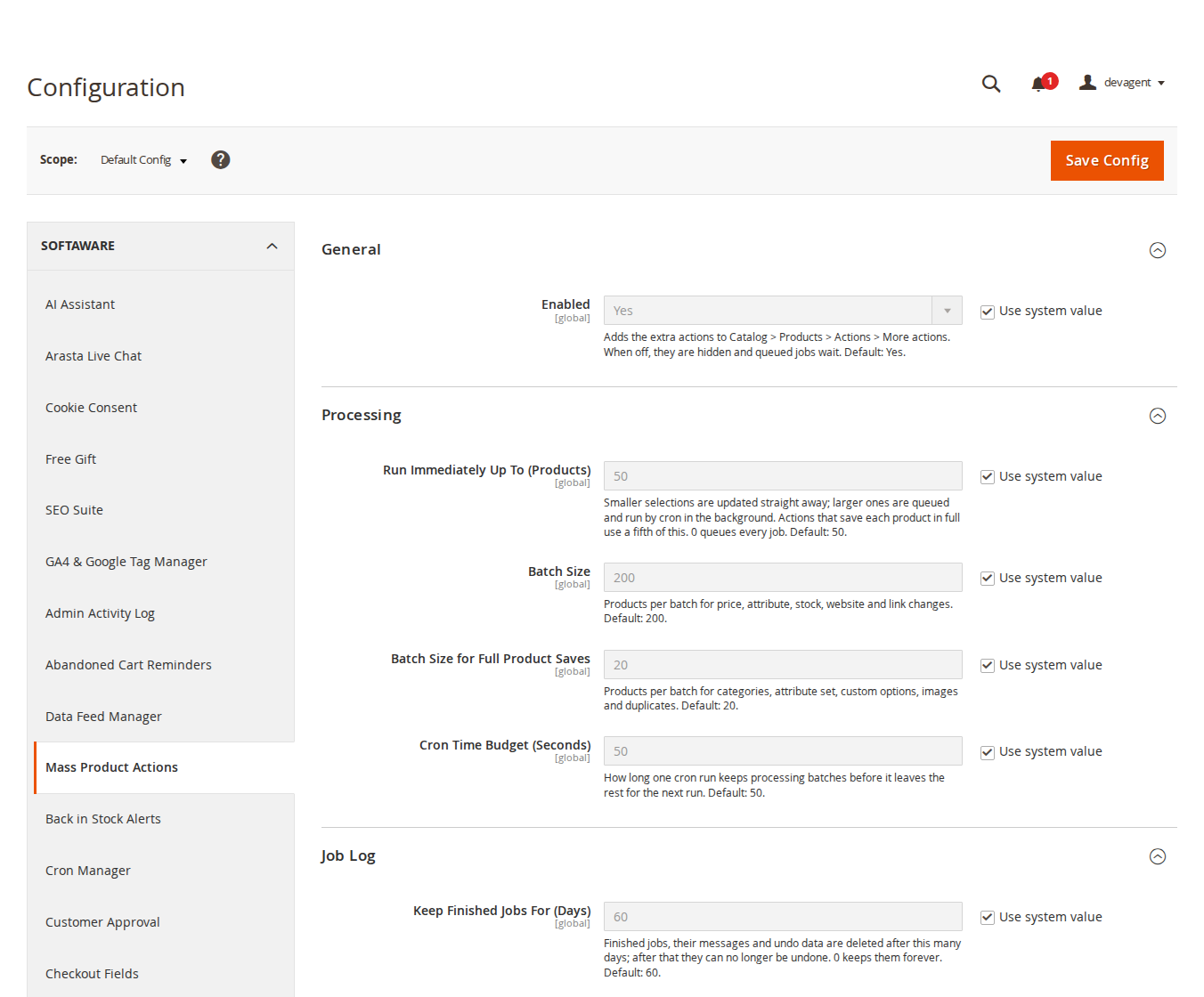
Choose how many products run straight away, the batch sizes for cron and how long finished jobs and their undo data are kept.
Live demo
A full Magento store with the module installed, on Luma and on Hyvä. The admin demo signs you in with one click.
Compatibility
| Latest version | 1.2.2 · 9 Oct 2026 |
|---|---|
| composer.json requires | php ~8.2.0||~8.3.0||~8.4.0||~8.5.0 magento/framework ~103.0.7 softaware/module-core ^1.0 magento/module-backend * magento/module-catalog * magento/module-catalog-inventory * magento/module-catalog-rule * magento/module-catalog-search * magento/module-config * magento/module-configurable-product * magento/module-eav * magento/module-media-storage * magento/module-store * magento/module-ui * magento/module-user * |
Installation
After you buy, create a Composer key in your account. Then, in the root of your Magento project:
01Add the repository and your key (once per project)
composer config repositories.softaware composer https://repo.softawarecommerce.com
composer config --auth http-basic.repo.softawarecommerce.com PUBLIC_KEY PRIVATE_KEY
02Install the module
composer require softaware/module-mass-product-actions
03Enable it
bin/magento setup:upgrade
bin/magento setup:di:compile
bin/magento setup:static-content:deploy
bin/magento cache:flush
The last three are only needed in production mode.
Prefer a zip? Every version you are entitled to can be downloaded from My modules. More about Composer access
User guide
For version 1.2.2. The same guide comes with the module, in docs/user-guide.md.
Mass Product Actions adds fifteen extra mass actions to the Catalog > Products grid in the Magento admin. Each run is a job with a log, per-product messages and, for most actions, undo. This guide covers installation, the settings, every action, the job log, permissions and the command line.
| Magento | Magento Open Source 2.4.7 to 2.4.9 (Adobe Commerce content staging is not supported) |
| PHP | 8.2 to 8.5 |
| Inventory | Default stock (CatalogInventory); Multi-Source Inventory per-source quantities are not supported |
| Themes | Not involved: the module only works in the admin |
| Other | softaware/module-core (installed automatically) |
Install with Composer. The access keys come from your account; see https://softawarecommerce.com/shop/composer-access/ for the details.
composer config repositories.softaware composer https://repo.softawarecommerce.com
composer config --auth http-basic.repo.softawarecommerce.com PUBLIC_KEY PRIVATE_KEY
composer require softaware/module-mass-product-actions
bin/magento setup:upgrade
bin/magento setup:di:compile            # production mode only
bin/magento setup:static-content:deploy # production mode only
bin/magento cache:flush
Make sure Magento's cron is running (bin/magento cron:install): larger selections are processed by cron. To update later, run composer update softaware/module-mass-product-actions and the same bin/magento commands.
Stores > Configuration > Softaware > Mass Product Actions (also under Softaware > Mass Product Actions > Settings). All settings are global.
| Setting | What it does |
|---|---|
| General > Enabled | Adds the extra actions to Actions > More actions. When off, they are hidden and queued jobs wait. Default: Yes. |
| Processing > Run Immediately Up To (Products) | Selections up to this size are updated straight away; larger ones are queued for cron. Actions that save each product in full use a fifth of this. 0 queues every job. Default: 50. |
| Processing > Batch Size | Products per batch for price, attribute, stock, website and link changes. Default: 200. |
| Processing > Batch Size for Full Product Saves | Products per batch for categories, attribute set, custom options, images and duplicates. Default: 20. |
| Processing > Cron Time Budget (Seconds) | How long one cron run keeps processing batches before it leaves the rest for the next run. Default: 50. |
| Job Log > Keep Finished Jobs For (Days) | Finished jobs, their messages and undo data are deleted after this many days; after that they can no longer be undone. 0 keeps them forever. Default: 60. |
Each form shows whether the action can be undone. Products the action does not apply to (for example the price of a configurable product) are skipped with a reason instead of failing the job.
Change: Set to, Increase by amount, Decrease by amount, Increase by %, Decrease by %. Rounding: no rounding (2 decimals), or round to the nearest ending, up to an ending or down to an ending, with the endings .99, .95, .90, .50, .49 and .00. Configurable products and bundles with dynamic prices are skipped, as their prices come from their variants or items. Amounts and results are checked (up to 999,999,999,999.99, never negative).
Set the special price as a % below the price, an amount below the price, a fixed special price, or remove the special price. Dates: keep the current dates, set a from and to date, or clear them.
Add the products to the chosen categories (existing ones are kept), remove them from the chosen categories, or replace all categories. "Replace" with no category chosen removes all categories. Each product is saved in full, so URL rewrites and category indexes are updated as when you edit a product. Undo restores the categories and their positions.
Uses Magento's own website assignment, including URL rewrites. A product removed from all websites is no longer sold anywhere.
Enabled or Disabled, and the visibility options, for all store views or one store view. Status has website scope in Magento, so a store-view change applies to all store views of that website. Optionally remove values set on individual store views so the new value applies everywhere.
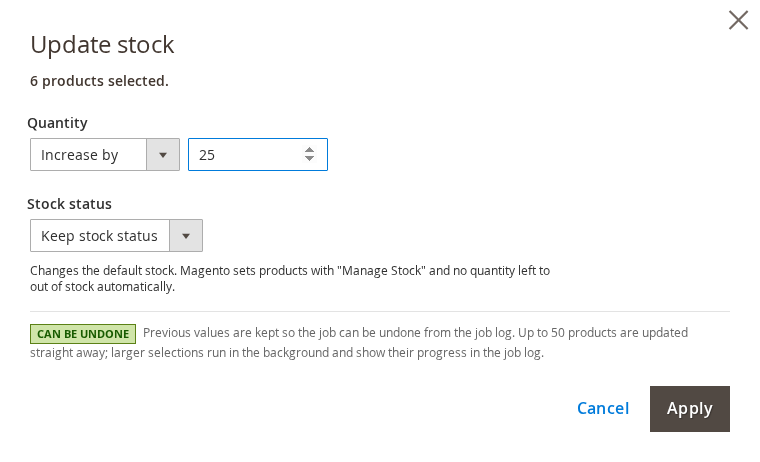
Quantity: keep, set to, increase by or decrease by. Stock status: keep, in stock or out of stock. This changes the default stock. Magento sets products with "Manage Stock" and no quantity left to out of stock automatically.
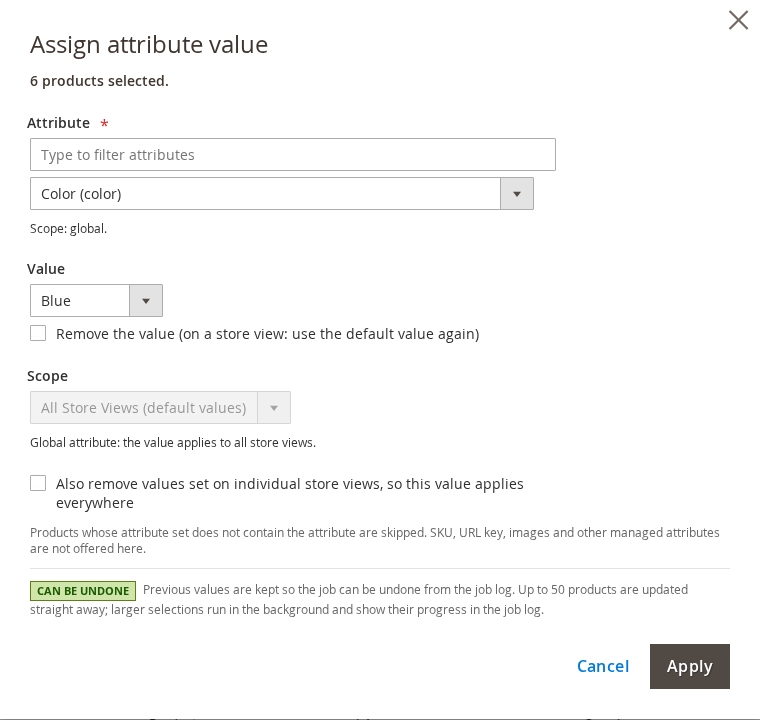
Choose any editable product attribute (a filter box helps with long lists) and enter the value. Text, text area, select, multiselect, number, date and yes/no attributes are supported. Multiselect values can replace, add to or remove from the current options. Remove the value empties it, or on a store view goes back to the default value. Choose the store view in Scope; global attributes always apply to all store views. Products whose attribute set does not contain the attribute are skipped. SKU, URL key, images and other attributes Magento manages itself are not offered.
Moves the products to a new attribute set, with safety checks: configurable products and their variants are skipped if the new set lacks any of their configurable attributes, and products are skipped if a required attribute of the new set has no value. Values of attributes that are not in the new set stay in the database but are no longer shown or used.
Choose the link type, then: link the selected products to each other (up to 200 products), link the selected products to these SKUs (optionally in both directions), remove links to these SKUs, or remove all links of this type. Enter SKUs one per line or separated by commas.
Enter the SKU to copy from, then keep the existing options and add the copied ones (options with the same title are not added twice), or delete the existing options and use only the copied ones. Grouped products are skipped. Cannot be undone.
Enter the SKU to copy from, then keep the existing images and add the copied ones, or use only the copied images, optionally with the source's image roles. The image files are copied, so every product keeps its own files. Cannot be undone.
Uses Magento's "Save & Duplicate": 1 to 5 copies per product, an optional text added to the name (for example " (copy)"), and optionally enable the copies (copies are disabled by default). The new SKUs are listed in the job log. Cannot be undone. Duplicating needs Magento's admin configuration, so cron does not run it: large duplicate jobs run from the open job page in the admin or with softaware:mass-actions:process.
Fields: name, description, short description, meta title, meta keywords and meta description. Append text at the end, Add text at the start, or Find and replace (with Match case). Spaces are kept, so start with a space to append " Sale" to "Blue Shirt". Leave the text empty with "Find and replace" to delete the found text. A name can never be emptied.
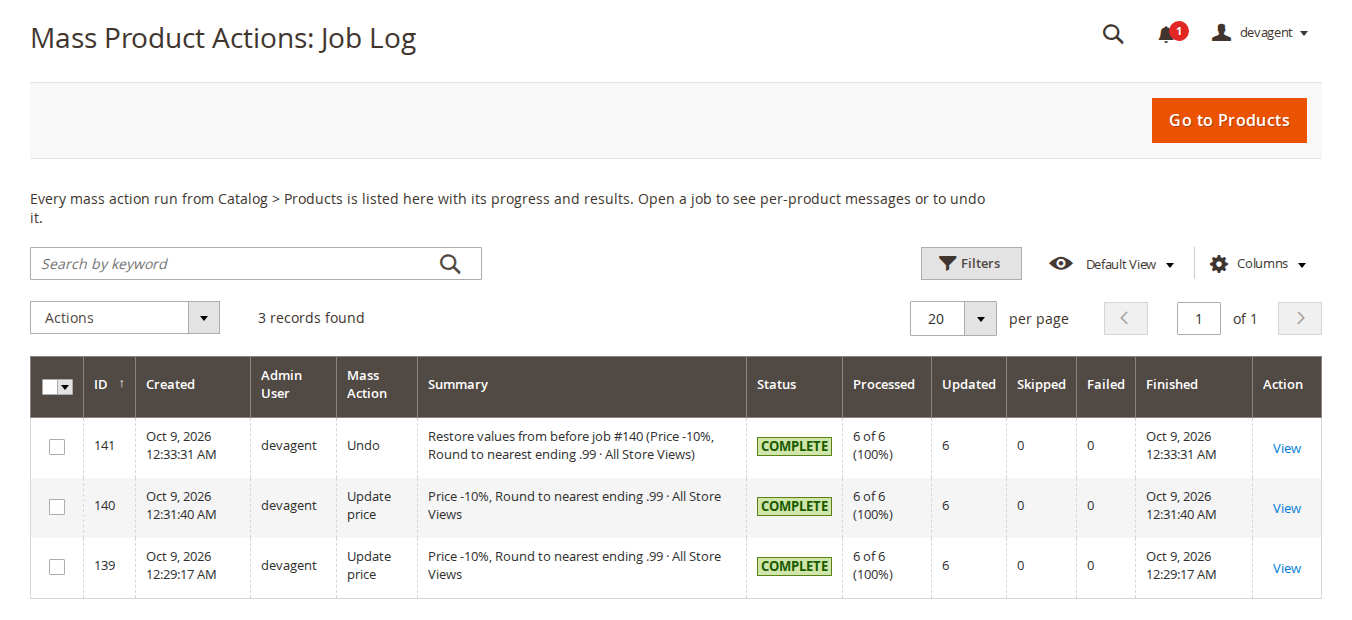
Softaware > Mass Product Actions > Job Log lists every run: ID, created, admin user, mass action, summary, status, processed, updated, skipped and failed counts. Open a job with View.
The job page shows the progress (live for queued jobs), the details, the per-product messages (skipped products and errors with their SKU) and, under Technical details, the parameters. From there you can:
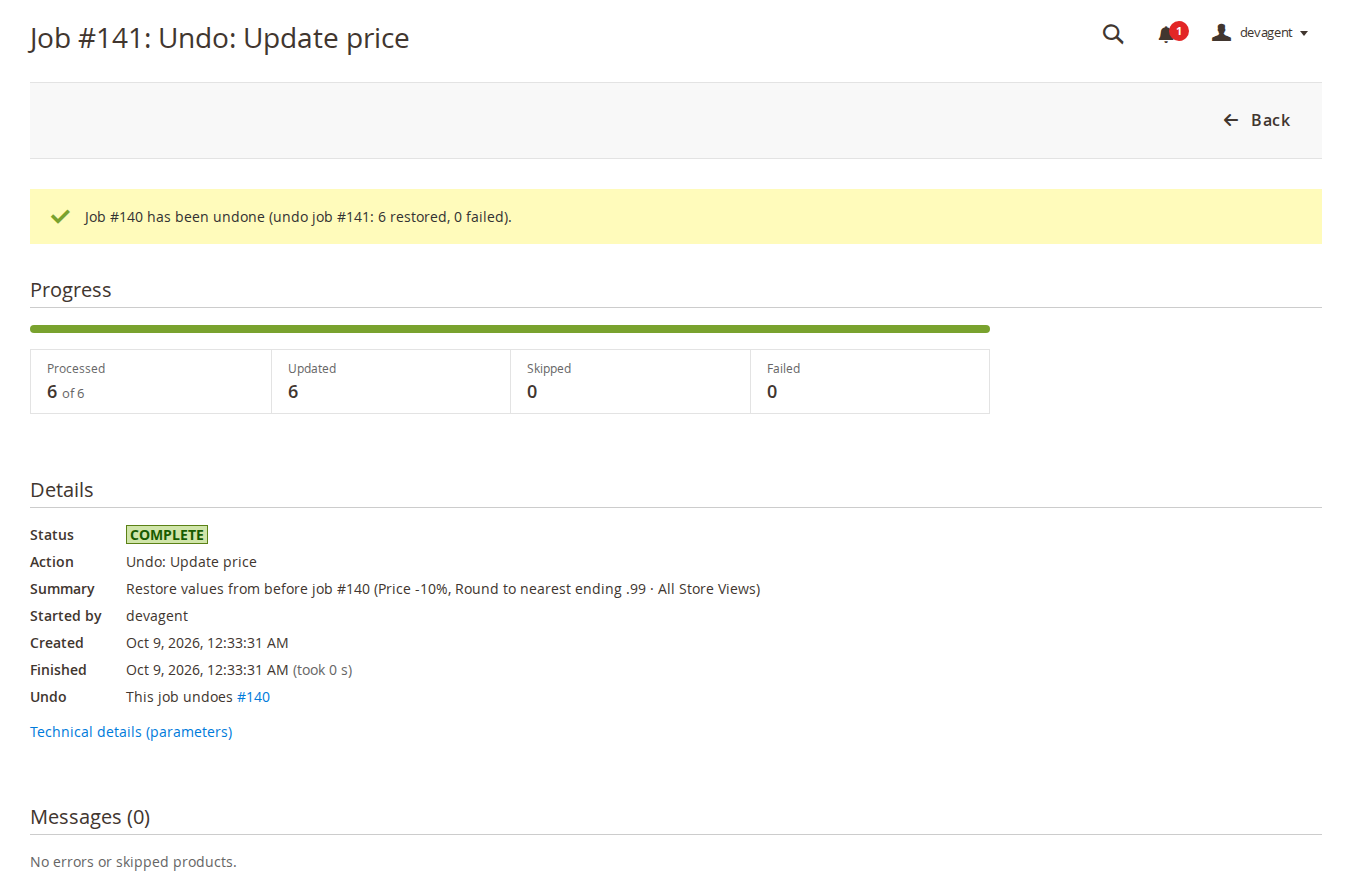
Undo is available for update price, special price and cost, categories, websites, status, visibility, stock, attribute value, attribute set, links and text. It is not available for copying custom options, copying images and duplicating.
softaware_mass_product_actions_process runs every minute in its own cron group (softaware_mass_product_actions), which Magento runs as a separate process, so a long queue does not delay other cron jobs. Each run processes batches until the time budget is used.Product\Action::updateAttributes(), with the same events and plugins as the native "Update attributes". Categories, attribute set, options, images and duplicates save each product in full.Under System > Permissions > User Roles > Role Resources > Softaware > Mass Product Actions:
| Resource | Allows |
|---|---|
| Run Mass Actions > (one per action) | Running that action. The More actions menu only lists the allowed actions. |
| View Job Log | The job log and job pages. |
| View Job Log > Cancel and Delete Jobs | Cancelling and deleting jobs. |
| View Job Log > Undo Jobs | Undoing jobs. |
| Mass Product Actions Settings | The configuration section. |
Assign attribute value also requires the matching price permission for price, special price and cost (Update Price, Update Special Price, Update Cost), and Magento's "Edit Product Design" permission for design attributes such as the page layout and custom design.
bin/magento softaware:mass-actions:process [--job=ID] [--time=3600]   # process queued jobs now
bin/magento softaware:mass-actions:jobs [--limit=20] [--status=pending|running|complete|complete_errors|failed|cancelled]
process is useful for large duplicate jobs, or to run a big queue without waiting for cron.
| Problem | Solution |
|---|---|
| "More actions" is missing | Check General > Enabled and the user's role permissions under Run Mass Actions. |
| A queued job stays at 0% | Magento's cron is not running, or the module is switched off. Check bin/magento cron:install, or run bin/magento softaware:mass-actions:process. |
| Products were skipped | Open the job: each skipped product has a message with the reason (for example an attribute not in its attribute set, or a configurable product for a price change). |
| Undo is not offered | The action cannot be undone (custom options, images, duplicate), the job is too old (undo data deleted with the job), or your role lacks Undo Jobs. |
| Prices do not change on the storefront | With indexers on "Update by Schedule", Magento applies the changes at the next indexer cron run. |
bin/magento module:disable Softaware_MassProductActions
composer remove softaware/module-mass-product-actions
bin/magento setup:upgrade
Product changes made with the module stay.
Changelog
softaware/module-core instead of softaware/module-base. The admin menu and ACL now sit under Softaware_Core::core ("Softaware"); roles that had access keep it (migrated by module-core). After updating all SoftAware modules, softaware/module-base can be removed.softaware_mass_product_actions, separate process), so a long queue no longer holds up the default cron group for up to 50 seconds a minute.1e20, or results of large percentage increases, were silently cut by MySQL to the column maximum and reported as success; 1e400 failed with a raw JSON error. Amounts and results are now checked.softaware:mass-actions:process and softaware:mass-actions:jobs.FAQ
Something else on your mind? The developers who wrote the module answer before and after you buy.
Ask a question →Already installed it? Open a support ticket
On Catalog > Products: tick the products, open Actions and then More actions. Each action opens a short form in a pop-up. Magento's own actions (Delete, Change status, Update attributes) are not changed.
Fifteen: update price, special price and cost; add, remove or replace categories; add to or remove from websites; change status; change visibility; update stock; assign attribute value; change attribute set; related, up-sell and cross-sell links; copy custom options from a product; copy images from a product; duplicate products; append or replace text.
Yes, for update price, update special price, update cost and append or replace text. The Preview button shows the current and the new value for the first 10 selected products, or why a product would be skipped. Nothing is saved until you press Apply.
Yes, for 12 of the 15 actions: everything except copying custom options, copying images and duplicating. The module keeps the values from before the job for every changed product, and Undo Job on the job page puts them back. Undo overwrites later changes to the same fields of those products; the job page lists later jobs that touched the same fields, and the confirmation names them. Undo data is kept as long as the job (60 days by default).
Selections up to Run Immediately Up To (Products) (default 50) are updated straight away. Larger ones are queued and processed by cron in batches, in their own cron group so that other cron jobs are not held up. The job page shows the progress, and an interrupted job continues where it stopped.
Yes. Attribute changes go through Magento's own updateAttributes() (the same path as the native "Update attributes"), then the price, EAV, category, stock, flat, search and catalogue rule indexers are run for the changed products, or left to Magento when indexers are set to "Update by Schedule". The page cache is cleaned for those products.
Status, visibility and attribute values can be set for all store views or for one. Global attributes (for example the price with catalogue price scope "Global") are always written to all store views, and website-scope attributes apply to all store views of that website, as in Magento itself. You can also remove store-view values so the default value applies again.
Yes. Every action has its own permission under Softaware > Mass Product Actions > Run Mass Actions, plus permissions for the job log, cancelling and deleting jobs, undo and the settings. The More actions menu only lists what the user may run. Assigning price attributes also needs the matching price permission, and design attributes need Magento's "Edit Product Design" permission.
Only with the default stock. Update stock changes the default stock quantity and status; quantities per source are not supported.
Adobe Commerce content staging (scheduled updates with row versions) is not supported, so the module is meant for Magento Open Source 2.4.7 to 2.4.9.
No. It only adds admin features. Products you change behave on Luma, Hyvä or any other theme exactly as if you had edited them in the product form.
Yes: bin/magento softaware:mass-actions:process processes queued jobs straight away (also one job with --job), and bin/magento softaware:mass-actions:jobs lists recent jobs.
Support
From the blog
Magento's own tools can set one price for many products, or import a spreadsheet. Neither can add 5% and round to .99, and neither can undo. Here is the gap and how we filled it.
We use necessary cookies to run this site and, with your permission, Google Analytics to understand how it is used. You can accept analytics, reject it or choose in the settings. Cookie policy
Choose which cookies you allow. Necessary cookies are always on because the shop cannot work without them. You can change your choice at any time with the "Cookie settings" link.
Needed for the basket, checkout, login and security. They do not track you.
Google Analytics: how many people visit, which pages they read and how they found the site. It sets the _ga cookies and sends usage data to Google.