Ask your Magento store: an AI assistant for the jobs nobody has time for
AI already writes our emails and plans our trips. In the Magento admin, it can save the hours spent clicking through screens to find out why something is not working.
Softaware AI Assistant: an AI chat for selected admin users with read-only access to the store data, code and logs, CSV reports, issue tickets and cost analytics. Store-specific knowledge and tools are added by other modules.
One-off payment, with 12 months of updates.
No subscription or automatic renewal. Keep using the versions included in your update period. Update and licence details
Composer package softaware/module-ai-assistant
Queries run in read-only transactions on their own connection, so the database itself rejects writes. The assistant can only create a few things, through write tools defined in code, after the user presses Yes.
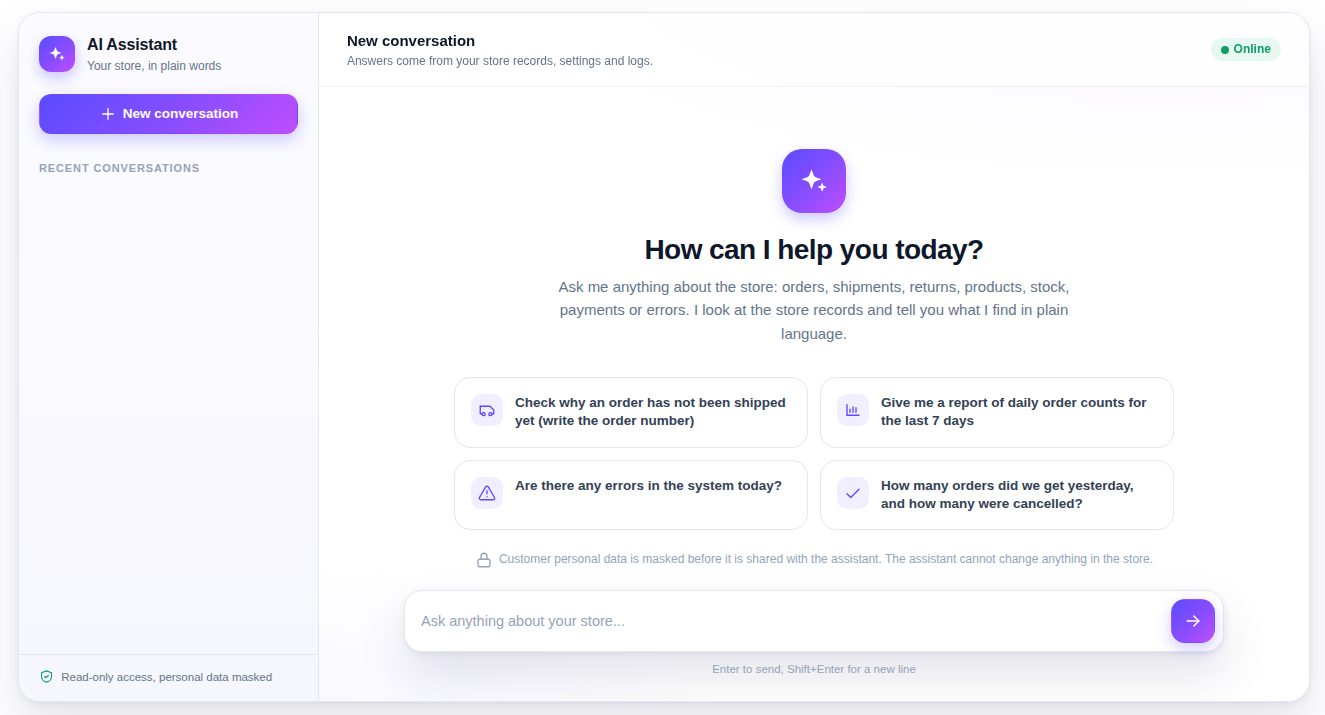
Ask why an order has not shipped, what went wrong in the logs today or how a setting is configured. The assistant looks at the store records, logs, configuration and code and answers in the user's language.
Every request is priced per user, model and conversation in Cost Analytics. Set a daily question limit per user and a monthly budget; when it is used up, the chat waits until next month.
All features
Feature tour
01 / 06
AI Assistant > Chat, or the floating chat on any admin page. Only the admin users you allow can use it, and their role needs the Chat permission.
02 / 06
Anthropic is the default provider, OpenAI is optional. The API key is stored encrypted, "Refresh model list" loads the models your key can use, and Answer Depth sets how thoroughly the assistant investigates.
03 / 06
The assistant and Ready Reports read through their own connection in read-only transactions. For extra safety, add a database user with SELECT grants only: the module prints the SQL for it.
04 / 06
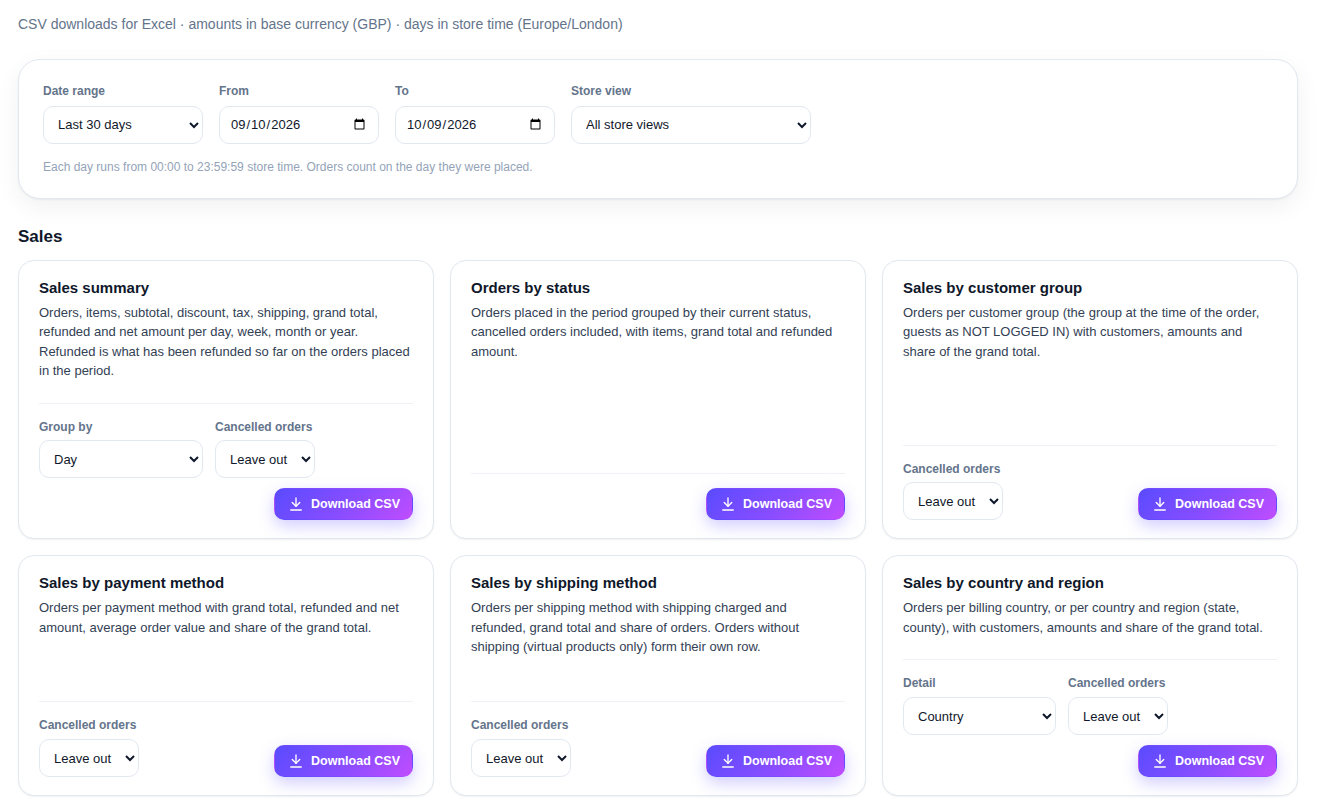
Sales, products and stock, customers and carts, tax, refunds and coupons as CSV downloads for Excel. They run in the store database and cost nothing.
05 / 06
When a user asks, the assistant can prepare an inactive CMS page or an inactive cart price rule. The server shows a summary with Yes and No; nothing is created before Yes, and every creation goes into the write log.
06 / 06
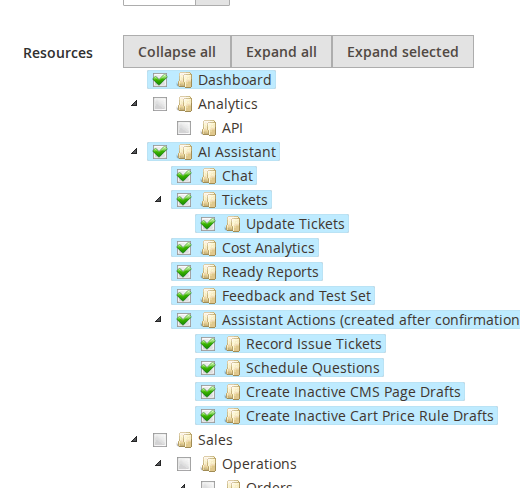
Chat, tickets, Cost Analytics, Ready Reports, feedback and each write tool have their own ACL resource under AI Assistant, so every role gets exactly what it needs.
Live demo
A full Magento store with the module installed, on Luma and on Hyvä. The admin demo signs you in with one click.
Compatibility
| Latest version | 1.5.3 · 9 Oct 2026 |
|---|---|
| composer.json requires | php ~8.3.0||~8.4.0||~8.5.0 magento/framework * softaware/module-core ^1.0 magento/module-backend * magento/module-store * magento/module-user * magento/module-sales * magento/module-catalog * magento/module-customer * magento/module-cms * magento/module-sales-rule * magento/module-cron * anthropic-ai/sdk ^0.54 |
Installation
After you buy, create a Composer key in your account. Then, in the root of your Magento project:
01Add the repository and your key (once per project)
composer config repositories.softaware composer https://repo.softawarecommerce.com
composer config --auth http-basic.repo.softawarecommerce.com PUBLIC_KEY PRIVATE_KEY
02Install the module
composer require softaware/module-ai-assistant
03Enable it
bin/magento setup:upgrade
bin/magento setup:di:compile
bin/magento setup:static-content:deploy
bin/magento cache:flush
The last three are only needed in production mode.
Prefer a zip? Every version you are entitled to can be downloaded from My modules. More about Composer access
User guide
For version 1.5.3. The same guide comes with the module, in docs/user-guide.md.
An AI chat in the Magento admin for the admin users you choose. They ask about orders, shipments, stock, errors and settings in plain language; the assistant reads the store database (read-only, personal data masked), configuration, logs and code, and answers in the user's language. This guide covers installation, setup, every setting, the admin pages, the command line and permissions.
| Magento | Open Source or Adobe Commerce 2.4.7 to 2.4.9 |
| PHP | 8.3 to 8.5 |
| Database | MySQL 8 (read-only transactions; tested on MySQL 8.4) |
| Themes | Admin only. CMS page drafts and their preview work on Luma and Hyvä storefronts |
| Other | softaware/module-core and anthropic-ai/sdk (both installed automatically by Composer); Magento cron running |
| AI provider | Your own API key from Anthropic (default) or OpenAI |
About the API key and costs. Questions go to the AI provider you choose with your own API key, and the provider bills you for that usage. The module records the cost of every request (section 6) and lets you set limits. Ready Reports do not use the provider.
Install with Composer using the access keys from your account (see https://softawarecommerce.com/shop/composer-access/):
composer config repositories.softaware composer https://repo.softawarecommerce.com
composer config --auth http-basic.repo.softawarecommerce.com PUBLIC_KEY PRIVATE_KEY
composer require softaware/module-ai-assistant
bin/magento setup:upgrade
bin/magento setup:di:compile            # production mode only
bin/magento setup:static-content:deploy # production mode only
bin/magento cache:flush
To update later: composer update softaware/module-ai-assistant, then the same bin/magento commands.
bin/magento softaware:ai-assistant:user:allow jane john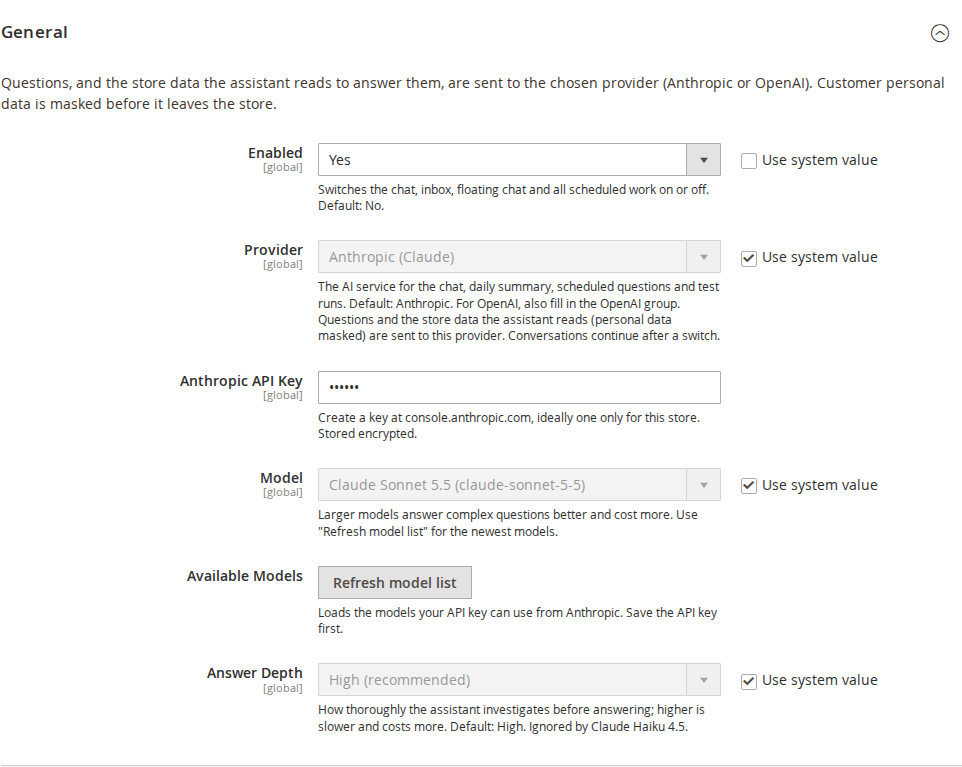
All settings are in Stores > Configuration > Softaware > AI Assistant at default scope. API keys and tokens are stored encrypted and are never shown to the assistant or written to the log.
| Setting | What it does |
|---|---|
| Enabled | Switches the chat, inbox, floating chat and all scheduled work on or off. Default: No. |
| Provider | Anthropic (default) or OpenAI. Used for the chat, daily summary, scheduled questions and test runs. Conversations continue after a switch. |
| Anthropic API Key | Create a key at console.anthropic.com, ideally one only for this store. |
| Model | The Claude model for the chat. Default: Claude Sonnet 5.5. Larger models answer complex questions better and cost more. |
| Available Models | Refresh model list loads the models your saved key can use. |
| Answer Depth | How thoroughly the assistant investigates before answering. Higher is slower and costs more. Default: High. |
| Setting | What it does |
|---|---|
| OpenAI API Key | Needed when Provider is OpenAI, and for generated images in CMS drafts with either provider. |
| OpenAI Model | Chat model when Provider is OpenAI. Answer Depth becomes the reasoning effort for reasoning models. |
| OpenAI Model for Summaries and Scheduled Questions | Used instead of the Anthropic models for background work when Provider is OpenAI. |
| Available OpenAI Models | Refresh OpenAI model list fetches the chat models your key can use. |
| Generate Images for CMS Drafts | CMS page drafts may get generated illustrations. Images are made only after Yes; the proposal shows the estimated cost. Default: Yes (only with an OpenAI key). |
| Image Model, Image Quality, Images per Page | Default gpt-image-2, Medium, 4 (0 to 12). |
| Setting | What it does |
|---|---|
| Questions per User per Day | Default 50; 0 means no limit. |
| Monthly Budget (USD) | When this calendar month's recorded cost reaches it, the chat takes no new questions and scheduled work waits until next month. Empty or 0 means no limit. |
| Maximum Investigation Steps per Question | Each step is one call to the AI provider. Default 15 (1 to 40). |
| Keep Conversations (Days) | Unused conversations are deleted nightly after this many days. Tickets and costs are kept. Default 90; 0 keeps them. |
Each optional feature can be switched on or off on its own.
| Setting | Default | What it does |
|---|---|---|
| Charts in Answers / Chart Frequency | Yes / Medium | Bar, line or pie charts drawn in the browser from the numbers in an answer. |
| Conversation Sharing | Yes | Read-only links to a conversation for other assistant users. |
| Voice Input | No | A microphone button. The browser sends the speech to its own provider (Google, Microsoft or Apple), outside the module's masking; users see this warning first. Not in Firefox. |
| Floating Chat | Yes | A chat button on every admin page. On an order, product or customer page the assistant knows which record is open. |
| Inbox and Daily Summary | No | A summary of the previous day (orders, stuck orders, integration errors) in AI Assistant > Inbox. Time and model can be chosen. |
| Scheduled Questions | No | Questions answered regularly into the Inbox (daily, chosen weekdays, chosen hour). Model and the number per user (default 5) can be set. |
| Company Knowledge Base | No | The assistant reads the chosen CMS pages to answer process questions and links them. |
| Third-party Read Access | No | Read-only lookups in systems your store already connects to, through tools other modules add. |
| Feedback and Test Set | No | Thumbs up or down on key answers; answers rated down can be run again as a test set. |
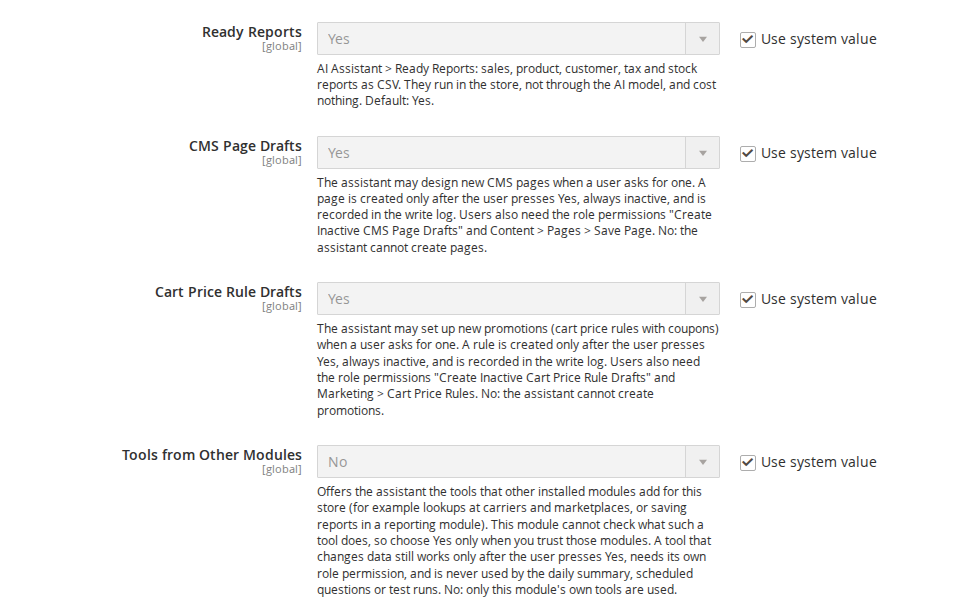
| Ready Reports | Yes | The Ready Reports page and the matching chat tool. |
| CMS Page Drafts | Yes | The assistant may create inactive CMS pages after Yes. |
| Cart Price Rule Drafts | Yes | The assistant may create inactive cart price rules after Yes. |
| Tools from Other Modules | No | Offers tools that other installed modules add. Choose Yes only when you trust those modules. |
| GitHub Issues Export | No | "Export to GitHub" on the ticket page, with a repository (owner/name) and a fine-grained token with only "Issues: Read and write". |
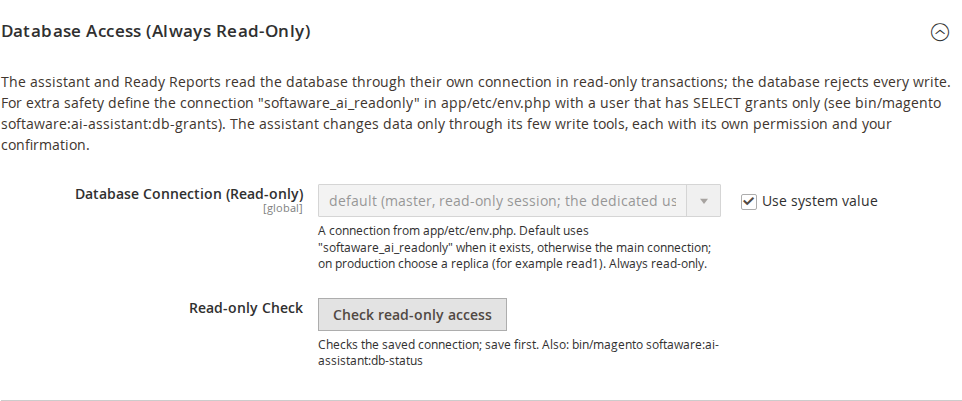
Database Connection (Read-only) chooses a connection from app/etc/env.php. The default uses a connection named softaware_ai_readonly when it exists, otherwise the main connection; on production you can choose a replica. Whichever connection is chosen, every statement runs in a read-only transaction, so the database rejects writes. Check read-only access tests the saved connection.
For extra safety create a database user with SELECT grants only. The module prints the SQL; review it, replace CHANGE_ME with a strong password and run it as a database administrator, then add the connection it prints to env.php as softaware_ai_readonly:
bin/magento softaware:ai-assistant:db-grants > ai_assistant_grants.sql
bin/magento softaware:ai-assistant:db-status
Run db-grants again after deployments that add tables.
New Relic: Enabled, a User API key (NRAK-...) of a user with a read-only role, the Account ID, the Data Center (US or EU) and optionally the APM application name. Test connection checks the saved settings.
Costs > Model Prices: USD per million tokens per model, prefilled for the Claude models. Add a row for any model you use that is not listed; OpenAI models without a row use a built-in table.
Chat. Open AI Assistant > Chat or the floating chat button. The start page suggests questions such as "Are there any errors in the system today?". While working, the status line shows what the assistant is looking at. Answers can contain links to admin pages (only index, view and edit pages), charts and CSV reports with a download button. Conversations can be renamed, pinned, archived and shared from their menu.
What it reads. The store database (one SELECT-like statement at a time, sensitive tables denied), the configuration, the logs, the code in app/code, app/design and vendor/magento (credential files such as env.php are refused), the chosen knowledge base pages and, when set up, New Relic. Personal data and secrets are masked before anything is sent to the provider.
What it can create. Only through four write tools defined in the module's code, each with its own permission:
| Tool | Creates | Permission (AI Assistant > Assistant Actions) |
|---|---|---|
| Issue ticket | A ticket in AI Assistant > Issue Tickets | Record Issue Tickets |
| Scheduled question | A question answered into the Inbox | Schedule Questions |
| CMS page draft | An inactive CMS page | Create Inactive CMS Page Drafts, plus Content > Pages > Save Page |
| Cart price rule draft | An inactive cart price rule with its coupon | Create Inactive Cart Price Rule Drafts, plus Marketing > Cart Price Rules |
The first call shows the user a summary written by the server with Yes and No; the item is created only after Yes and only with exactly the content shown. The tools never change or delete existing data. The daily summary, scheduled questions and test runs never get a write tool. List everything that was created with bin/magento softaware:ai-assistant:write-log.
CMS page drafts. Ask, for example, "Make a landing page for our autumn sale with a hero, three feature blocks and an FAQ". The page is built from sections with inline styles only, cleaned on the server, and created inactive. The chat shows a link to the page and a preview link valid for one hour.
Cart price rule drafts. Ask, for example, "10% off bags over £50 for logged-in customers next weekend, coupon AUTUMN10". Percent, fixed and buy X get Y discounts, dates, groups, coupons and conditions are supported. When something is unclear, the assistant asks instead of guessing.
Issue tickets. When the assistant finds a problem or a missing feature it proposes a ticket. In AI Assistant > Issue Tickets users with Update Tickets change the status, priority and resolution note, and can export a ticket to GitHub.
Inbox and scheduled questions. AI Assistant > Inbox shows the daily summaries and the answers to scheduled questions. Scheduled questions are added from the chat ("send me yesterday's orders every morning at 8") or with the form on the Inbox page, and can be paused or deleted there.

Ready Reports. AI Assistant > Ready Reports offers 16 reports on sales, products and stock, customers and carts, tax, refunds and coupons. Pick a date range and store view, set the report's options and click Download CSV. Files are UTF-8 for Excel, amounts in base currency, days in the store time zone.
Feedback and Test Set. Key answers ask "Was this helpful?". Answers rated down in AI Assistant > Feedback can be added to the Test Set and run again after a change of model or settings. Each run is sent to the provider again and costs money.
AI Assistant > Cost Analytics shows the cost of every request by day, user, model, provider and conversation, for quick ranges or a custom range. With a monthly budget set, it shows how much of it is used. Requests of the daily summary and scheduled questions are listed too.
| Command | What it does |
|---|---|
softaware:ai-assistant:user:allow <username>... | Adds admin users to the allowed users and prints the list. |
softaware:ai-assistant:user:revoke <username or ID>... | Removes users; the others stay. |
softaware:ai-assistant:ready-report [code] | Lists the reports, or writes one to CSV (--preset, --from, --to, --store, -o name=value, --output). |
softaware:ai-assistant:write-log [--limit=50] | Lists what the assistant created. |
softaware:ai-assistant:db-grants | Prints the SQL for a read-only database user (runs nothing). |
softaware:ai-assistant:db-status | Shows how the database connection is kept read-only. |
softaware:ai-assistant:daily-summary | Prepares today's daily summary now. |
softaware:ai-assistant:test-set:run | Runs the test set again. |
softaware:ai-assistant:images:cleanup [--delete] | Lists (or deletes) generated draft images that no page or block uses. |
System > Permissions > User Roles > Role Resources > AI Assistant:
The settings page is under Stores > Settings > Configuration > AI Assistant Configuration. On installation, roles with Chat get Record Issue Tickets and Schedule Questions; the two draft permissions are given to nobody except full administrators.
user:allow command.db-grants again.softaware_ai_assistant must run; check var/log/ai_assistant.log.var/log/ai_assistant.log logs model and tool calls without questions, answers or data.bin/magento module:disable Softaware_AiAssistant
composer remove softaware/module-ai-assistant
bin/magento setup:upgrade
bin/magento cache:flushThe module's tables (softaware_ai_assistant_*), its settings (softaware_ai_assistant/* in core_config_data), the files under var/softaware_ai_assistant/ and generated images in pub/media/wysiwyg/softaware-ai/ are not removed automatically. CMS pages and cart price rules the assistant created are normal Magento entities and stay. Remove the softaware_ai_readonly database user and connection if you created them.
Changelog
softaware/module-core (^1.0) and loads after Softaware_Core, like the other SoftAware modules.docs/listing.json, docs/faq.md, docs/user-guide.md and screenshots in docs/images/.gpt-6.1-sol), the model for daily summaries and scheduled questions (default gpt-6-luna) and "Refresh OpenAI model list" (GET /v1/models, chat models only). OpenAI is called through the Responses API (stateless) with Magento's HTTP client, no new Composer package. Model\Assistant\MessageGatewayInterface with ProviderGateway; Model\OpenAi\ResponsesTranslator translates requests and answers (tools <-> function tools, tool_use / tool_result <-> function_call / function_call_output, parallel calls, usage with cached tokens, refusals, content filter, truncation). Stored conversations keep the Anthropic block format.Model\Cost\OpenAiPrices, from developers.openai.com/api/docs/pricing on 2026-10-06); a row in Costs > Model Prices still wins. OpenAI requests count in Cost Analytics and the monthly budget like Anthropic ones.model on softaware_ai_assistant_message.gpt-image-2, with either chat provider): "Generate Images for CMS Drafts" (default Yes, active only with an OpenAI key), Image Model, Image Quality (default medium), Images per Page (default 4). Optional generate_image (prompt, alt, aspect ratio) on hero and image-with-text sections; generated only after Yes, listed in the proposal with an estimated cost, checked against the monthly budget per image and recorded in Cost Analytics; re-encoded to WebP with GD (metadata removed, cropped, max 1600 px), random names under pub/media/wysiwyg/softaware-ai/<yyyy>/<mm>/, {{media url=...}} with width, height and alt. Failed images (OpenAI refusal, error, budget) leave the section without an image and are named in the answer and in the page's write log entry (prompt, model, cost, file per image). It is output of the existing create_cms_page_draft tool; the write tools stay four.softaware:ai-assistant:images:cleanup (lists generated images no CMS page or block uses; --delete removes them; --min-age-hours, default 24).AnthropicRequestGoldenTest, seven scenarios recorded from 1.2.0).generate_image field in the create_cms_page_draft tool definition (plus one sentence in its description) and one sentence about generated images in the instructions.AnthropicGateway implements MessageGatewayInterface; ChatService and HeadlessRunner take the interface (di.xml preference ProviderGateway).create_cms_page_draft, permission AI Assistant > Assistant Actions > "Create Inactive CMS Page Drafts" plus Content > Pages > Save Page): the assistant designs a page from sections (hero, text, features, image with text, FAQ, testimonials, call to action, simple HTML) and optional colours; the store renders it as self-contained, responsive HTML with inline styles that looks the same on Luma and Hyvä without a theme build, stays within Magento's CMS HTML rules (checked strictly before saving) and opens in the WYSIWYG editor (Page Builder places it in an HTML Code element). Server-side cleaning removes scripts, styles, iframes, forms, embeds, event and binding attributes, unsafe URLs and CSS, and every {{...}} directive. Title, unique URL key, meta data, store views (default all) and layout; always created inactive, with links to the page and to an admin-only storefront preview (signed link valid for one hour, never cached, noindex, with a notice).create_cart_rule_draft, permission "Create Inactive Cart Price Rule Drafts" plus Marketing > Cart Price Rules): percent, fixed per item, fixed for the whole cart, buy X get Y; dates, customer groups, websites, no / specific / generated coupons, uses per customer and coupon, priority, discard subsequent rules, label, cart subtotal and quantity conditions, items by category, SKU or attribute set. Everything is checked against the store (ids, SKUs, coupon uniqueness, ranges); missing essentials make the assistant ask instead of guess.softaware_ai_assistant_write_log and command softaware:ai-assistant:write-log: every entity the assistant created, with the admin who confirmed it, time, conversation, confirming message and request.softaware:ai-assistant:db-status and the "Check read-only access" button (Database Access): shows whether a dedicated SELECT-only user or a read-only session is used.ToolPool::WRITE_TOOLS, WriteToolInterface): own permission, server-side validation, new entities only, proposal with a server-written summary and creation only after the user's answer with exactly that content, write log. Runs without a user never get a write tool.softaware_ai_readonly is used automatically when it exists; the session is set read-only before every statement and each statement runs in START TRANSACTION READ ONLY ... ROLLBACK (a statement switching the session to READ WRITE no longer affects later ones). Ready Reports previously streamed from Magento's writable default connection. db-grants prints the env.php snippet for the new connection name.ConfirmationOptions::matchesProposal() for tools of other modules.index, view, edit) and without URL options (_direct, key, form_key). Links carry the viewer's URL secret key, so an answer steered by text in store data could otherwise offer a one-click link to an action that deletes or changes data.softaware_ai_assistant_feedback, _test_case, _test_result, _inbox, _scheduled_question, _report_file), PayPal API certificates (paypal_cert) and Adobe IMS tokens (admin_adobe_ims_webapi, adobe_user_profile).SELECT * could return login secrets that the guard only refuses when a statement names them: customer confirmation keys, newsletter confirmation codes, order cancel keys and download link hashes are now masked for the model, and CSV reports (unmasked for their owner) write [hidden] for credential columns (password hashes, reset tokens, keys, card data). Column names in CSV reports get the same formula guard as the values.bin/magento config:set softaware_ai_assistant/general/allowed_users ..., as documented, failed with "path doesn't exist"; the path is now declared (still not shown in the form).composer.json no longer has a version field; the release tag sets the version. New dependency magento/module-sales-rule.aiassistant/readyreport/index, permission Softaware_AiAssistant::ready_reports, setting Capabilities > "Ready Reports", default Yes): 16 predefined reports downloaded as CSV for a date range (today, yesterday, last 7 / 30 days, this / last month, this / last year, custom) and an optional store view: sales summary by day / week / month / year, orders by status, sales by customer group, payment method, shipping method, country / region, product and category, low stock (threshold), products not sold in the period, new vs returning customers, top customers (with lifetime figures), abandoned carts, tax by rate, refunds (credit memos) and coupon usage. UTF-8 with BOM, base currency amounts with 2 decimals, whole days in the store time zone (daylight saving aware grouping), formula-safe text.Model\ReadyReport\ReportInterface with ReportPool (di.xml argument reports).run_ready_report (offered while Ready Reports is on; needs the Ready Reports permission): prepares a ready report with a download button; the model sees a masked 10-row preview.softaware:ai-assistant:ready-report (list reports, write a report to a CSV file).ReportFileStore::createFileName() and register() for report files written directly to disk.i18n/en_US.csv; Turkish translations for the new texts.~8.3.0||~8.4.0||~8.5.0.Maintenance release.
FAQ
Something else on your mind? The developers who wrote the module answer before and after you buy.
Ask a question →Already installed it? Open a support ticket
An API key from the AI provider you choose: Anthropic (the default) or OpenAI. You create the key in your own provider account, and the provider bills you directly for what the assistant uses. The module itself makes no charge per question. Image generation for CMS page drafts needs an OpenAI key in any case.
That depends on the model, how much the assistant has to look up and the provider's prices, so there is no fixed figure. Every request is recorded with its token counts and cost in AI Assistant > Cost Analytics, per user, model and conversation, at the prices in Costs > Model Prices (check them against your provider's pricing page). You can limit Questions per User per Day and set a Monthly Budget (USD). Ready Reports run in the store database and cost nothing.
Only the admin users you add with bin/magento softaware:ai-assistant:user:allow <username>, and only if their role has AI Assistant > Chat. Everyone else sees a short explanation with the command an administrator has to run.
It cannot change or delete existing data. Every query it writes runs on a separate connection in read-only transactions, so MySQL itself rejects INSERT, UPDATE, DELETE and similar statements. It can only create new things through four write tools defined in the module's code: issue tickets, scheduled questions, inactive CMS pages and inactive cart price rules. Each one needs its own role permission, shows a summary written by the server with Yes and No buttons, is created only after Yes and is recorded in the write log (bin/magento softaware:ai-assistant:write-log).
The questions, the store data the assistant reads to answer them and, when it looks at code, parts of the store's source code. Names, e-mail addresses, phone numbers, addresses, credentials and similar values are masked before they leave the store, and password hashes and tokens are hidden even in CSV reports. Files such as env.php and auth.json cannot be read at all. Check that your provider's terms and your data protection duties allow this before you switch the module on.
Anthropic is the default and the module's reference provider. OpenAI works with the same tools, permissions, read-only connection, masking, confirmation and budget. Every answer shows which provider and model wrote it, and conversations continue when you switch.
No. CMS pages and cart price rules made by the assistant are always created inactive. A CMS draft can be checked through a signed preview link that only admins with the Pages permission get, valid for one hour. You activate the page or rule yourself in the usual Magento screens. Both draft tools can also be switched off in Capabilities.
Yes. AI Assistant > Ready Reports offers 16 predefined reports (sales, products and stock, customers and carts, tax, refunds and coupons) as CSV files for a date range and store view, with no model involved. The same reports are available from the command line with bin/magento softaware:ai-assistant:ready-report.
The assistant answers in the language the user writes in. The admin screens come with English and Turkish translations; other languages can be added with a standard Magento translation file.
No. The module works in the admin only. Daily summaries, scheduled questions and test runs run in their own cron group (softaware_ai_assistant), so they do not delay other cron jobs. The only storefront part is the admin-only preview of CMS drafts, which is never cached and marked noindex.
Yes. Choose CMS pages (for example returns, shipping or FAQ) under Capabilities > Knowledge Base Pages and the assistant reads them for process questions and links the source page. Developers can add store knowledge, extra denied tables, tools and ready reports from their own module; see the README.
With New Relic set up (a User API key of a read-only user), the assistant can query errors and slow transactions. With Third-party Read Access and Tools from Other Modules switched on, tools added by other modules can look up statuses in systems your store already connects to. Both are off by default.
Support
From the blog
AI already writes our emails and plans our trips. In the Magento admin, it can save the hours spent clicking through screens to find out why something is not working.
We use necessary cookies to run this site and, with your permission, Google Analytics to understand how it is used. You can accept analytics, reject it or choose in the settings. Cookie policy
Choose which cookies you allow. Necessary cookies are always on because the shop cannot work without them. You can change your choice at any time with the "Cookie settings" link.
Needed for the basket, checkout, login and security. They do not track you.
Google Analytics: how many people visit, which pages they read and how they found the site. It sets the _ga cookies and sends usage data to Google.