DPD Shipping
DPD Germany for Shipping Connect: DPD Pickup parcel shops at checkout, multi-parcel PDF and ZPL labels, tracking with delivery dates and return labels, straight from your Magento admin.
- Magento 2.4.7 – 2.4.9
- PHP 8.2 – 8.5
- Version 1.0.2
One-off payment, with 12 months of updates.
What is included
- 12 months of new versions and fixes; the versions released in that time stay yours
- Install with Composer, or download a zip from your account
- Licence for one production domain, staging and development copies included
- 30-day money-back guarantee, refund policy
No subscription or automatic renewal. Keep using the versions included in your update period. Update and licence details
Key features
- DPD Pickup parcel shop search at checkout
- Map and list on Luma and Hyvä
- PDF (A6, A4) and ZPL labels
Composer package softaware/module-shipping-dpd
-
Parcel shops at checkout
Shoppers search DPD Pickup parcel shops by postcode or town and pick one on a map or a list, with distance and opening hours.
-
Labels in a few clicks
Create the DPD label and the Magento shipment with its tracking numbers from the order view, or for up to 50 orders at once.
-
Tracking that updates itself
A cron job reads DPD tracking events, stores the status and the delivery date and can e-mail your customers on milestones.
All features
What is included
DPD services
- DPD CLASSIC, 8:30, 12:00 and 18:00
- DPD Express International, PARCELLetter and MAX
- Parcel shop delivery with DPD CLASSIC
- Predict e-mail with the delivery time window (can be switched off)
- Higher insurance on the first parcel
Labels
- PDF labels in A6 or A4, ZPL labels (203 dpi, A6)
- Several parcels in one shipment, one tracking number each
- Magento shipment and tracking numbers created with the label
- Mass action for up to 50 orders, one merged PDF
- DPD return labels from the order view
Checkout and tracking
- DPD Pickup parcel shop search (map and list)
- Parcel shop stored with the order, shown in e-mails and PDFs
- Tracking events, status and delivery date by cron
- Optional order status and customer e-mails on delivery milestones
- Tracking link to the DPD tracking page
Admin and developers
- Stage (test) and live switch per connection
- Credentials stored encrypted; disabled connections are never called
- API log with passwords and tokens masked
- CLI: test connection, create labels, update tracking
- Separate ACL permissions
Feature tour
Everything your shoppers and your team see
01 / 07
DPD Pickup parcel shops next to the map
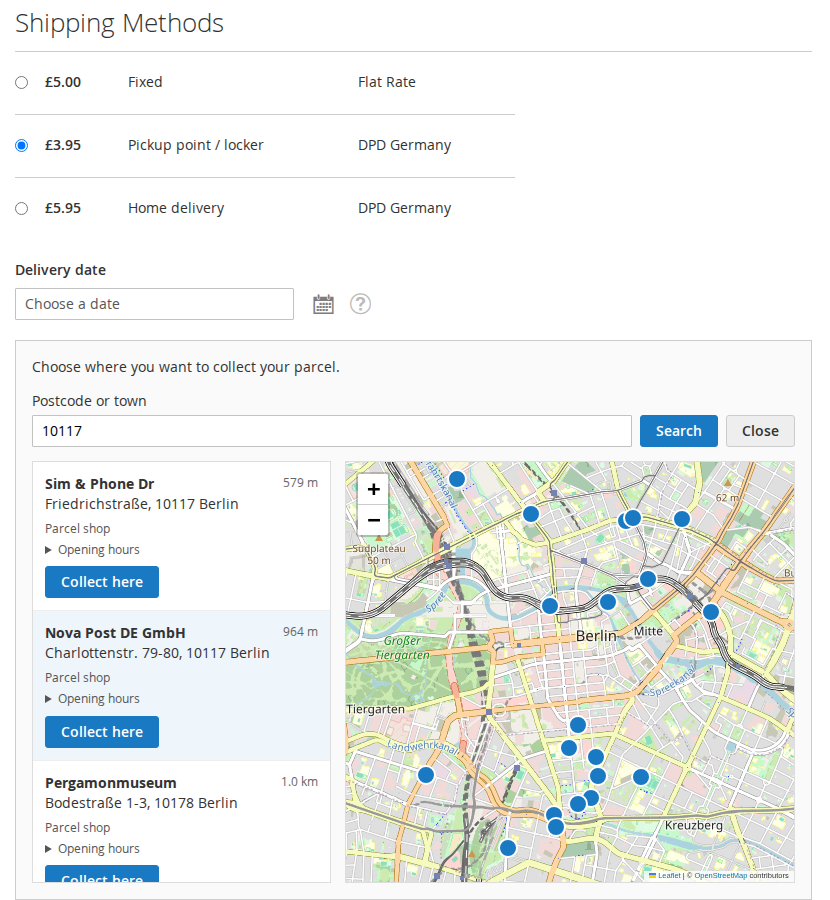
"Choose pickup point" under the shipping methods opens a search by postcode or town. Points come from DPD's parcel shop finder, are listed with distance, type and opening hours and shown on an OpenStreetMap map.
02 / 07
The same search on a phone
Map on top, list below. Hyvä storefronts use it through the Luma checkout fallback, and the point is required before the payment step.
03 / 07
Delis ID, password and a test button
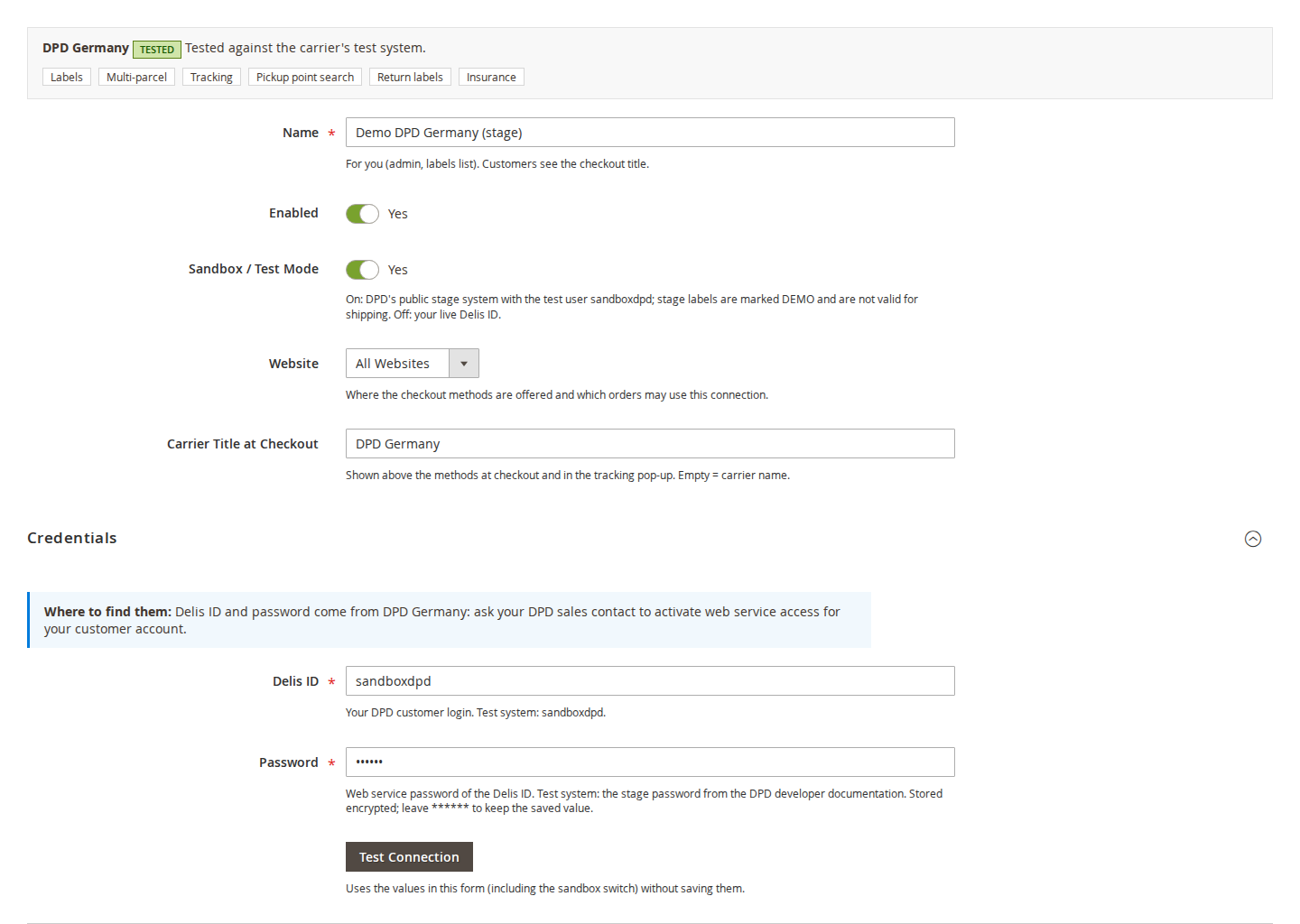
Enter the Delis ID and web service password from DPD Germany, switch between the stage system and live, and check the login with "Test Connection" before you save.
04 / 07
Depot, paper format and Predict
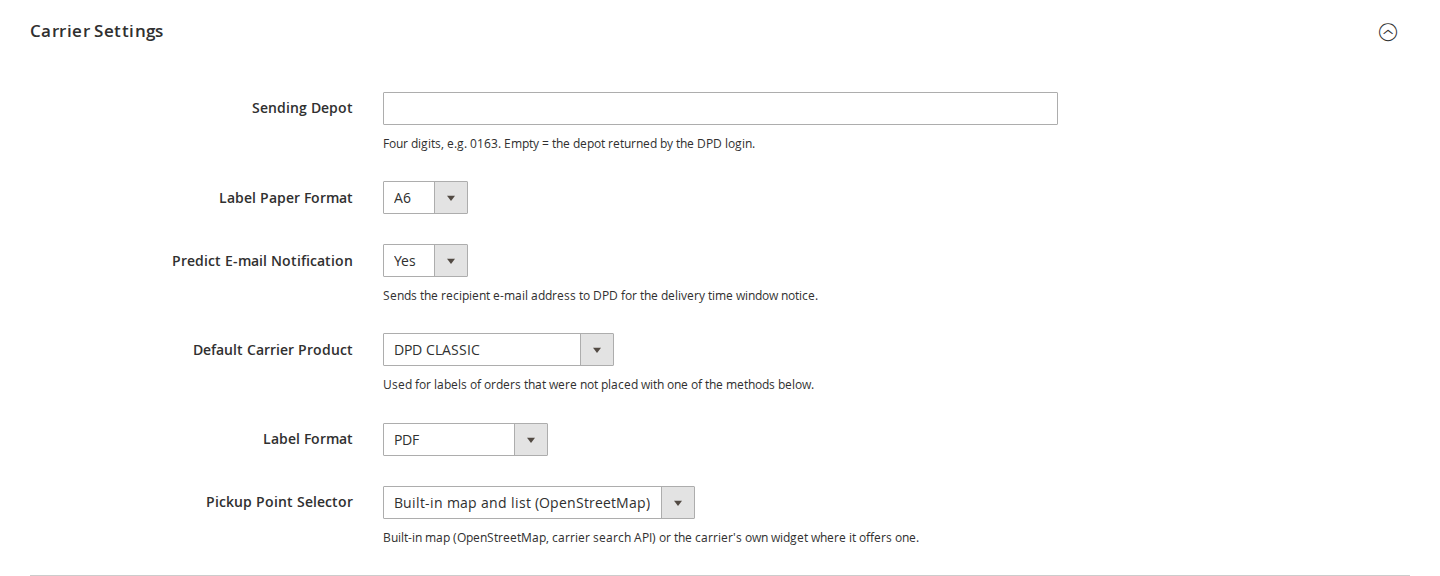
Set the sending depot (or use the one from the DPD login), A6 or A4 PDF labels, whether the Predict e-mail is requested and the default DPD product.
05 / 07
Home delivery and parcel shop methods
Each connection offers its own checkout methods with a DPD product, a flat price or a weight or subtotal table, free shipping from a subtotal and allowed countries.
06 / 07
Parcels, sizes and insurance per order
Check connection, DPD product, number of parcels, weight, dimensions and insured value, then create the labels. The chosen parcel shop is carried over from the order.
07 / 07
Every DPD event on the label page
Status, tracking numbers and the DPD event history with time and location. "Update Tracking" checks now instead of waiting for the cron.
Live demo
Try it before you install it
A full Magento store with the module installed, on Luma and on Hyvä. The admin demo signs you in with one click.
Compatibility
Requirements and compatibility
| Magento | 2.4.7 – 2.4.9 |
|---|---|
| PHP | 8.2 – 8.5 |
| Latest version | 1.0.2 |
| composer.json requires | php ~8.2.0||~8.3.0||~8.4.0||~8.5.0 magento/framework ~103.0.7 softaware/module-shipping-core ^1.1 |
Installation
Up and running in minutes
After you buy, create a Composer key in your account. Then, in the root of your Magento project:
-
01Add the repository and your key (once per project)
composer config repositories.softaware composer https://repo.softawarecommerce.com
composer config --auth http-basic.repo.softawarecommerce.com PUBLIC_KEY PRIVATE_KEY
-
02Install the module
composer require softaware/module-shipping-dpd -
03Enable it
bin/magento setup:upgrade
bin/magento setup:di:compile
bin/magento setup:static-content:deploy
bin/magento cache:flush
The last three are only needed in production mode.
Prefer a zip? Every version you are entitled to can be downloaded from My modules. More about Composer access
User guide
How to set up and use DPD Shipping
For version 1.0.2. The same guide comes with the module, in docs/user-guide.md.
Ship with DPD Germany from Magento: DPD Pickup parcel shops at checkout, PDF and ZPL labels for one or many parcels, tracking with delivery dates and DPD return labels. This package is a carrier for Shipping Connect (softaware/module-shipping-core, free), which provides the checkout methods, the pickup point map, label printing, tracking and the API log.
- Admin demo (all Shipping Connect carriers): https://demo.softawarecommerce.com/try-admin/shipping
- Changelog: Release notes · Questions: FAQ
The demo connections have no credentials and are switched off, so the demo shows the admin screens and example labels but does not contact DPD.
1. Requirements
| Magento | Open Source or Adobe Commerce 2.4.7 to 2.4.9 |
| PHP | 8.2 to 8.5 |
| Themes | Luma checkout; Hyvä storefront through Hyva_LumaCheckout (tested with Hyvä 1.5) |
| Other | softaware/module-shipping-core ^1.1 and softaware/module-core (both installed automatically) |
| DPD | DPD Germany customer contract with web service access for your Delis ID (for live labels) |
A DPD business account is required for live use. The Delis ID and its web service password come from DPD Germany: ask your DPD sales contact to activate web service access for your customer account. For testing you can use DPD's public stage system without a contract (see section 4).
2. Installation
With Composer. Use the Composer keys from your account on softawarecommerce.com (see https://softawarecommerce.com/shop/composer-access/):
composer config repositories.softaware composer https://repo.softawarecommerce.com
composer config --auth http-basic.repo.softawarecommerce.com PUBLIC_KEY PRIVATE_KEY
composer require softaware/module-shipping-dpd
bin/magento setup:upgrade
bin/magento setup:di:compile            # production mode only
bin/magento setup:static-content:deploy # production mode only
bin/magento cache:flush
Shipping Core is installed with it. To update later: composer update softaware/module-shipping-dpd, then the same bin/magento commands.
3. Quick start
- Stores > Configuration > Softaware > Shipping Connect > General > Enabled = Yes.
- Softaware > Shipping Connect > Carrier Connections > Add Carrier Connection, choose DPD Germany.
- Enter a Name (for you), switch Enabled on, choose the Website.
- Under Credentials enter the Delis ID and Password, then click Test Connection. The answer shows the system (stage or live), the Delis ID and the depot DPD returned.
- Under Checkout Methods add for example "Home delivery" and "Pickup point / locker" with a price.
- Fill in the Sender Address and Parcel Defaults and click Save.
The methods now appear at checkout for addresses in the allowed countries.
4. The DPD connection in detail
General
| Setting | What it does |
|---|---|
| Name | Shown to you in the admin and the labels list. Customers see the checkout title. |
| Enabled | Only enabled connections offer checkout methods and create labels. Disabled connections are never called. |
| Sandbox / Test Mode | On: DPD's public stage system with the test user sandboxdpd; stage labels are marked DEMO and are not valid for shipping. Off: your live Delis ID. |
| Website | Where the checkout methods are offered and which orders may use this connection. |
| Carrier Title at Checkout | Shown above the methods at checkout and in the tracking pop-up. Empty = "DPD Germany". |
You can create several DPD connections, for example one per website or one for stage tests and one for live.
Credentials
| Field | Value |
|---|---|
| Delis ID | Your DPD customer login. Test system: sandboxdpd. |
| Password | Web service password of the Delis ID. Test system: the stage password from the DPD developer documentation. |
Credentials are stored encrypted and are never shown again; leave ****** in the password field to keep the saved value. Test Connection uses the values in the form (including the sandbox switch) without saving them. The DPD login token is cached for 12 hours and renewed automatically.
Carrier Settings
| Setting | What it does |
|---|---|
| Sending Depot | Four digits, for example 0163. Empty = the depot returned by the DPD login. |
| Label Paper Format | A6 (default) or A4 for PDF labels. ZPL labels are always A6. |
| Predict E-mail Notification | Yes (default): the recipient's e-mail address is sent to DPD for the Predict notice with the delivery time window. No: no e-mail address is sent for home deliveries. |
| Default Carrier Product | Used for labels of orders that were not placed with one of this connection's methods. |
| Label Format | PDF or ZPL (203 dpi, A6). |
| Pickup Point Selector | The built-in map and list (OpenStreetMap) with DPD's parcel shop search. |
Checkout Methods
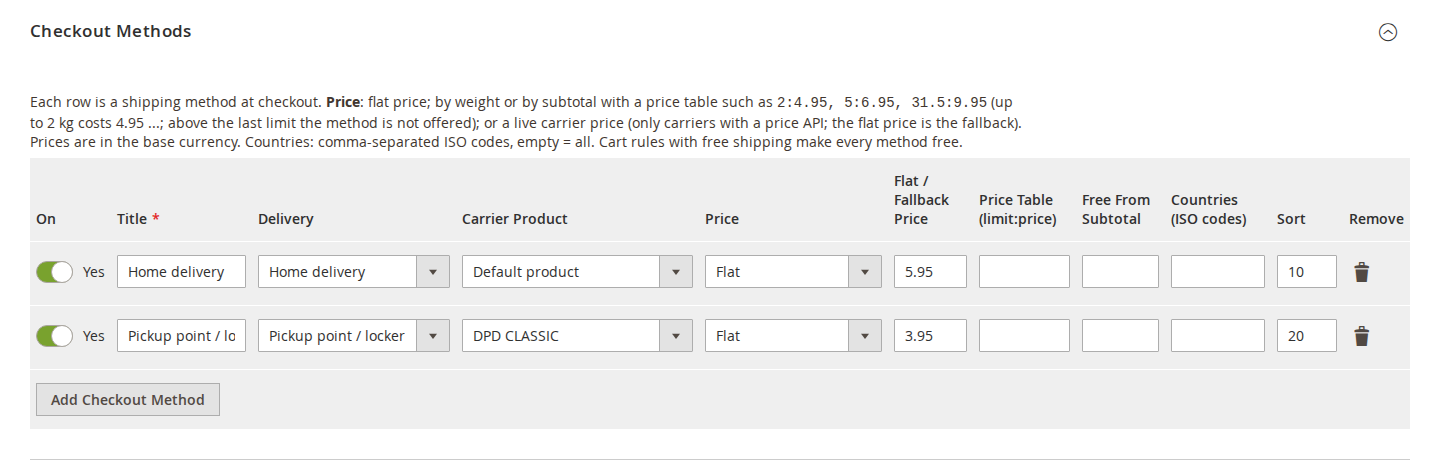
Each row is a shipping method at checkout:
- On, Title (what the customer sees) and Sort.
- Delivery: Home delivery, or Pickup point / locker (DPD Pickup parcel shops).
- Carrier Product: one of the DPD products below. Parcel shop delivery uses DPD CLASSIC.
- Price: flat; by weight or by subtotal with a price table such as
2:4.95, 5:6.95, 31.5:9.95(up to 2 kg costs 4.95 and so on; above the last limit the method is not offered). DPD Germany has no price API in this package, so live carrier prices are not available for DPD. - Free From Subtotal and Countries (ISO codes) (comma separated, empty = all).
Prices are in the base currency. Cart rules with free shipping make every method free.
DPD products: DPD CLASSIC (CL), DPD 8:30 (E830), DPD 12:00 (E12), DPD 18:00 (E18), DPD Express International (IE2), DPD PARCELLetter (PL) and DPD MAX (MAX). Which products you may book depends on your DPD contract.
Sender Address and Parcel Defaults
The sender address is printed on the label; it can also come from an MSI inventory source (Use Address of Inventory Source). Parcel defaults (weight in kg, length, width and height in cm) pre-fill the label form when the order has no better data. Dimensions are sent to DPD as the parcel volume.
5. Parcel shops at checkout
When the customer selects a "Pickup point / locker" method, a Choose pickup point button appears under the shipping methods. The customer searches by postcode or town; the module asks DPD's parcel shop finder and shows the parcel shops in a list (name, address, distance, type, opening hours) next to an OpenStreetMap map. Collect here selects a shop.
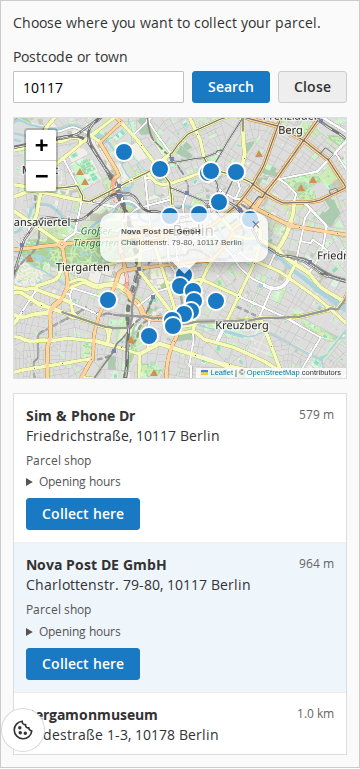
- The point is required before the payment step and checked again when the order is placed (also for REST and GraphQL checkouts). Points must come from the search the server cached, not from the browser.
- The chosen point is stored with the order and shown in the admin order view, the customer's order view (Luma and Hyvä), order e-mails and invoice and shipment PDFs.
- The label is booked with DPD parcel shop delivery to that shop; DPD sends the parcel shop notification to the customer's e-mail address.
- Searches are rate limited per visitor and for the whole shop. Settings: Stores > Configuration > Softaware > Shipping Connect > Pickup Points at Checkout (points per search, searches per minute, map tile URL).
6. Creating labels
One order: open the order and click Create Shipment and Label. Several orders: select them in the order grid and choose Create Shipments and Labels (up to 50 orders at a time).
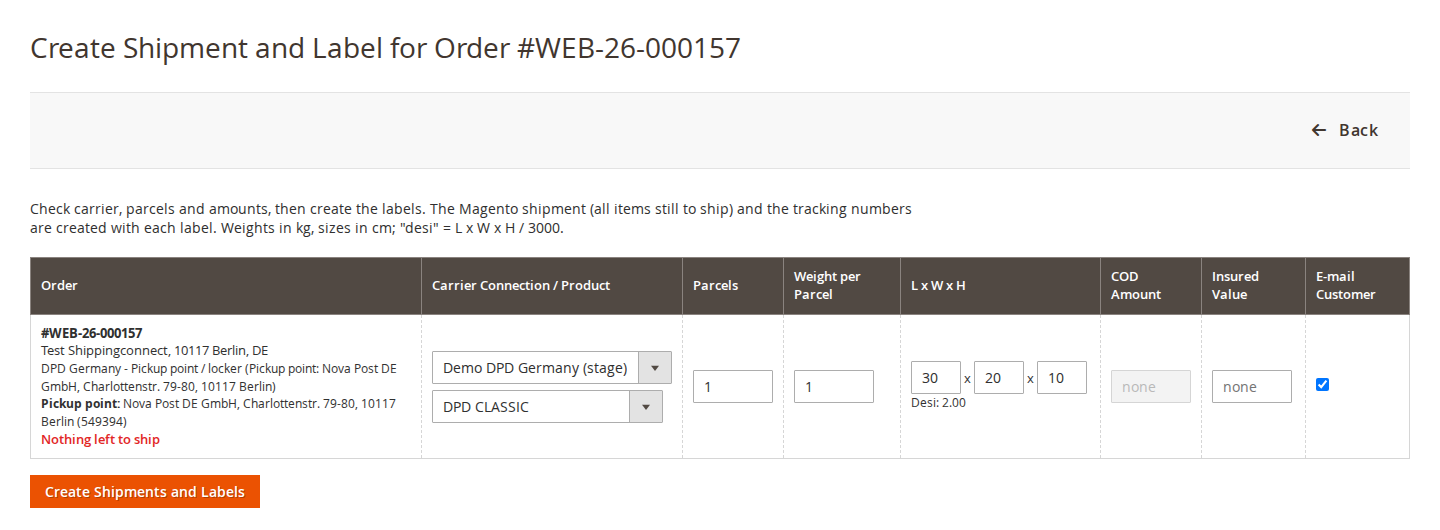
Per order you check the connection, the DPD product, the number of parcels, the weight per parcel, the dimensions, the insured value and whether the customer gets the shipment e-mail. Then click Create Shipments and Labels.
- DPD returns one tracking number per parcel; the module creates the Magento shipment for the items still to ship with all tracking numbers, or adds the label to an existing shipment ("Label for Shipment #").
- An insured value is booked as DPD higher insurance on the first parcel.
- Print All Labels gives one merged PDF. The order grid action Print Shipping Connect Labels prints the labels of the selected orders. PDF labels are also stored on the Magento shipment.
- A label is never created twice by accident: the order is locked while the label is created, and a request that may have reached DPD is not repeated.
- DPD has no cancel call: a label that is never scanned is not charged, so just do not use it.
- Cash on delivery is not offered: DPD removed it from the shipment web service version this package uses.
7. Tracking
A cron job every 15 minutes checks open DPD parcels (more often while they move, less often when they are older) and stores DPD's events, the current status and the delivery date. Tracking stops after delivery or after the number of days you set.
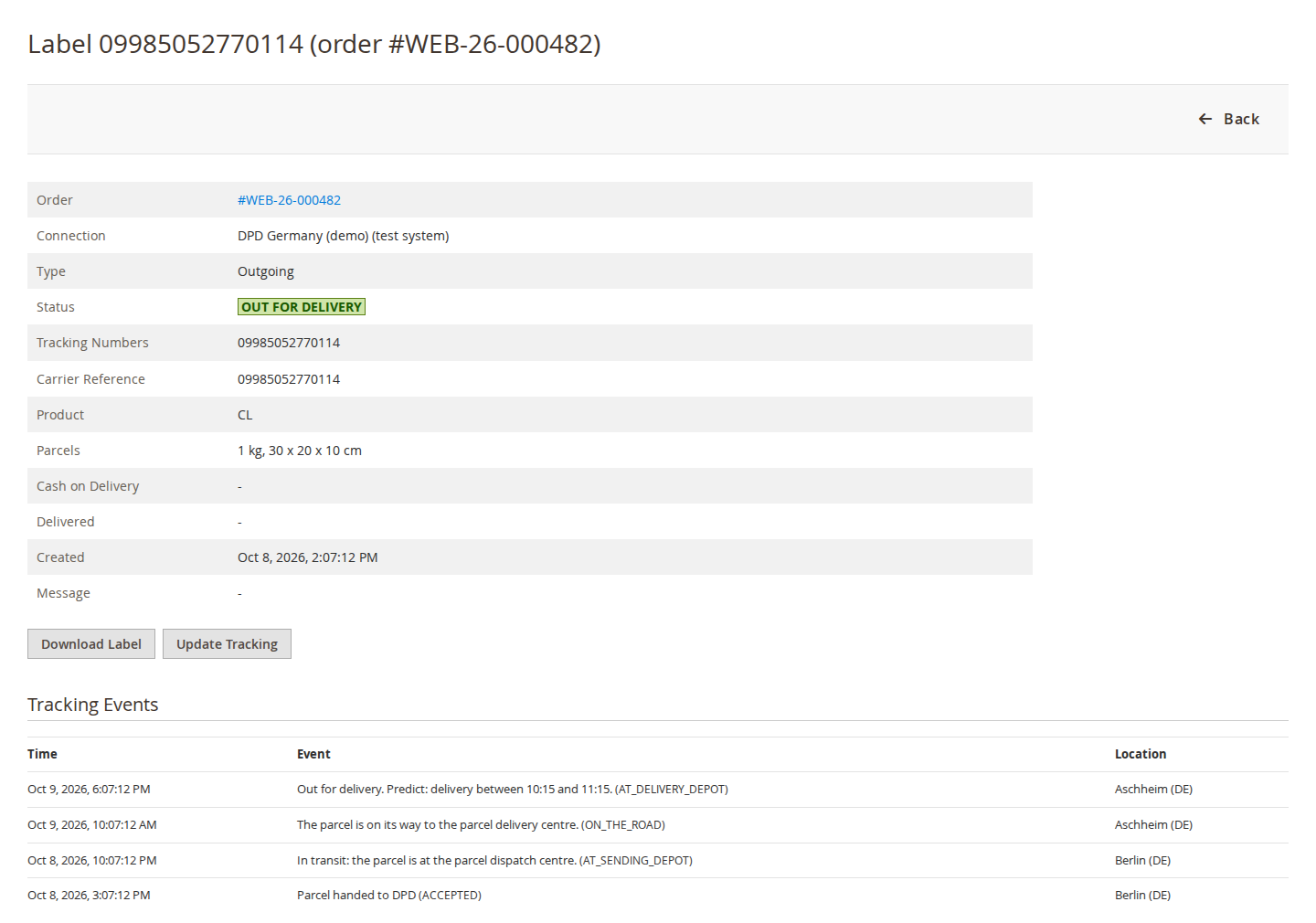
- Softaware > Shipping Connect > Shipments and Labels lists every label with status, last event and delivery date; the label page shows all events with time and location.
- Update Tracking checks now. The customer's tracking link opens the DPD tracking page (German or English).
- Settings under Stores > Configuration > Softaware > Shipping Connect > Tracking: Track Parcels Automatically, Parcels per Cron Run, Stop Tracking After (Days), Order Status When Delivered, E-mail Customer When, Tracking E-mail Template and Sender.
8. Return labels
In the order view click Create Return Label. The module asks DPD for a return parcel label for the order's address; it is stored like any label and can be downloaded. The label page has a signed download link (30 days) you can send to the customer. Softaware Returns can create the same DPD return labels from its return page.
9. Command line
bin/magento softaware:shipping:adapters                       # installed carriers and what they support
bin/magento softaware:shipping:test-connection [connection id] # test credentials
bin/magento softaware:shipping:create-label <order number> [-c connection] [-s CL] [-p parcels] [-w kg] [--return] [--no-email]
bin/magento softaware:shipping:track [--order number] [--label id] [--limit n]
10. Permissions (ACL)
Under Softaware > Shipping Connect: View Shipments and Labels, Create Shipments and Labels, Cancel Labels, Create Return Labels, Manage Carrier Connections, View API Log, Settings. Creating labels also creates the Magento shipment, so the role needs Sales > Operations > Orders > Actions > Ship as well.
11. Data sent to DPD
Recipient name, company, address, phone and e-mail (Predict or parcel shop notification), parcel weights and sizes, and the order number as reference. Parcel shop searches send only the postcode or town and the country. Every request is written to Softaware > Shipping Connect > API Log with passwords and tokens masked; set the retention in the API Log settings.
12. Troubleshooting
| Problem | What to check |
|---|---|
| Test Connection: "DPD login failed" | Delis ID and password, and the sandbox switch: stage credentials only work with Sandbox on, live credentials only with Sandbox off. Live access must be activated by DPD for your Delis ID. |
| "DPD rejected the shipment: ..." | DPD's fault code and message are shown. Common causes: a product your contract does not include, a missing house number, a postcode that does not match the country. |
| No pickup method at checkout | Connection enabled, method switched on, address country in the method's countries, website set correctly, and Shipping Connect enabled for the store view. |
| No parcel shops found | The postcode or town and country. Look at the API Log entry of the search. |
| Labels say "DEMO" | The connection is in Sandbox / Test Mode. Switch it off and enter your live Delis ID. |
| Tracking does not update | Magento cron must run; "Track Parcels Automatically" must be on. DPD tracks 14-digit parcel numbers. |
13. Uninstall
bin/magento module:disable Softaware_ShippingDpd
composer remove softaware/module-shipping-dpd
bin/magento setup:upgrade
Existing labels and tracking history stay in Shipping Core's tables; DPD connections can no longer be used until the package is installed again.
Changelog
Release notes
1.0.2
Latest
- Product listing, FAQ and user guide (docs/)
1.0.1
- Connection form: says where the Delis ID comes from and what the stage (sandbox) system is; field labels in title case; the stage test user is shown as "Test system: sandboxdpd".
- Requires Shipping Core 1.1 (
CredentialsHelpInterface).
1.0.0
- DPD Germany adapter for Softaware Shipping Connect (moved from the former single module softaware/module-shipping-connect 1.0.0; adapter codes unchanged, so existing connections keep working).
FAQ
Questions, answered
Something else on your mind? The developers who wrote the module answer before and after you buy.
Ask a question →Already installed it? Open a support ticket
What do I need from DPD?
A DPD Germany customer contract with web service access for your Delis ID. Ask your DPD sales contact to activate web service access; you then enter the Delis ID and its web service password in the carrier connection. The module does not create a DPD account for you.
Can I test before I have a contract?
Yes. Switch Sandbox / Test Mode on and use DPD's public stage system with the test user sandboxdpd (the password is in the DPD developer documentation). Stage labels are marked "DEMO" and are not valid for shipping.
Which countries does it cover?
DPD Germany only (DPD's German web services). DPD in the Netherlands, Belgium and the UK (including DPD Local) use different APIs and are not part of this package. You can still ship to other countries with the DPD products that DPD Germany offers for them, for example DPD Express International.
What is Shipping Connect and why do I also need Shipping Core?
Shipping Connect is SoftAware's shipping framework for Magento. The free package softaware/module-shipping-core holds the checkout methods, the pickup point map, labels, tracking, returns and the API log; this package adds the DPD Germany connection. Composer installs Shipping Core automatically.
Which DPD products can I use?
DPD CLASSIC, DPD 8:30, DPD 12:00, DPD 18:00, DPD Express International, DPD PARCELLetter and DPD MAX. Which of them you may book depends on your DPD contract. Parcel shop delivery uses DPD CLASSIC.
How do customers choose a DPD Pickup parcel shop?
Add a checkout method with Delivery = Pickup point / locker. At checkout the customer clicks "Choose pickup point", searches by postcode or town and picks a parcel shop from the list or the map (distance, type and opening hours are shown). The point is required before the payment step and is checked again when the order is placed. The parcel shop is stored with the order, and the label is booked with DPD parcel shop delivery to that shop (DPD notifies the customer by e-mail when the parcel arrives there).
Does it work with Hyvä?
Yes, the Hyvä storefront uses the pickup point search through the Luma checkout fallback (Hyva_LumaCheckout), and the customer account order view shows the chosen point on Luma and Hyvä. The separate Hyvä Checkout product is not supported yet.
Which label formats are supported?
PDF in A6 or A4, and ZPL (203 dpi, A6) for thermal printers. A shipment can have several parcels; DPD returns one tracking number per parcel and the module adds them all to the Magento shipment.
Can I cancel a DPD label?
No. The DPD web services have no cancel call. DPD does not charge for labels that are never scanned, so simply do not use the label.
Does it support cash on delivery?
No. DPD removed cash on delivery from the shipment web service version this package uses (4.4 and later).
How does tracking work?
A cron job every 15 minutes checks open parcels, reads DPD's tracking events and stores them with the status and the delivery date. You can set an order status for delivered orders and send customers e-mails on milestones. "Update Tracking" on the label page checks a parcel straight away.
Can I create return labels?
Yes. In the order view click Create Return Label. The return label comes from DPD and can be downloaded in the admin; the label page also has a signed download link for the customer. Softaware Returns can use the same return labels.
What data is sent to DPD?
Recipient name, company, address, phone and e-mail (for Predict or the parcel shop notification), parcel weights and sizes, and the order number as reference. Credentials are stored encrypted and every request is written to the API log with passwords and tokens masked.
Support