SEO Suite
Technical SEO for Magento 2 in one module: JSON-LD structured data, meta templates, canonical and robots rules, hreflang, Open Graph, a redirect manager with 404 log, XML sitemap extras and an SEO audit, for Luma and Hyvä.
- Magento 2.4.7 – 2.4.9
- PHP 8.2 – 8.5
- Version 1.3.1
One-off payment, with 12 months of updates.
What is included
- 12 months of new versions and fixes; the versions released in that time stay yours
- Install with Composer, or download a zip from your account
- Licence for one production domain, staging and development copies included
- 30-day money-back guarantee, refund policy
No subscription or automatic renewal. Keep using the versions included in your update period. Update and licence details
Key features
- Product, ProductGroup, BreadcrumbList and Organisation JSON-LD
- Meta title and description templates with variables
- Canonical URLs and meta robots by page type
Composer package softaware/module-seo-suite
-
Markup search engines can read
Product, ProductGroup, breadcrumbs and organisation as JSON-LD, with the theme's duplicate microdata removed, so each page has one Product and one BreadcrumbList.
-
Keep the traffic you earned
Old URLs answer with a 301 to the right page, deleted products and categories get automatic redirects, and the 404 log shows what still breaks.
-
No page-speed cost
Everything is rendered on the server and cached with the page. The module adds no JavaScript files to the storefront, on Luma or on Hyvä.
All features
What is included
Structured data (JSON-LD)
- Product with offers, GTIN, MPN, brand, ratings and reviews
- Configurable products as ProductGroup with one variant per child
- BreadcrumbList, ItemList, WebSite and Organisation
- Shipping details and return policy from your settings
- Optional LocalBusiness on a CMS page
- Removes Luma and Hyvä microdata to avoid duplicates
Meta, canonical and robots
- Meta templates for products, categories and CMS pages
- Separate title for filtered or paginated category pages
- Meta Generator writes the templates into the catalogue
- Canonical without filters and sort parameters
- Meta robots by page type, URL pattern or per page
- Image alt and title templates
International and social
- Hreflang between store views with x-default
- Hreflang Key to pair CMS pages with different URLs
- Hreflang links in the XML sitemap (optional)
- Open Graph and Twitter Card tags with product price and availability
Redirects, sitemap and audit
- Redirect manager with CSV import and export
- Automatic 301s for deleted products and categories
- 404 log with retention and ignore patterns
- Exclude pages from the XML sitemap, add category images
- SEO audit with CSV export and six CLI commands
Feature tour
Everything your shoppers and your team see
01 / 06
Every old URL goes somewhere
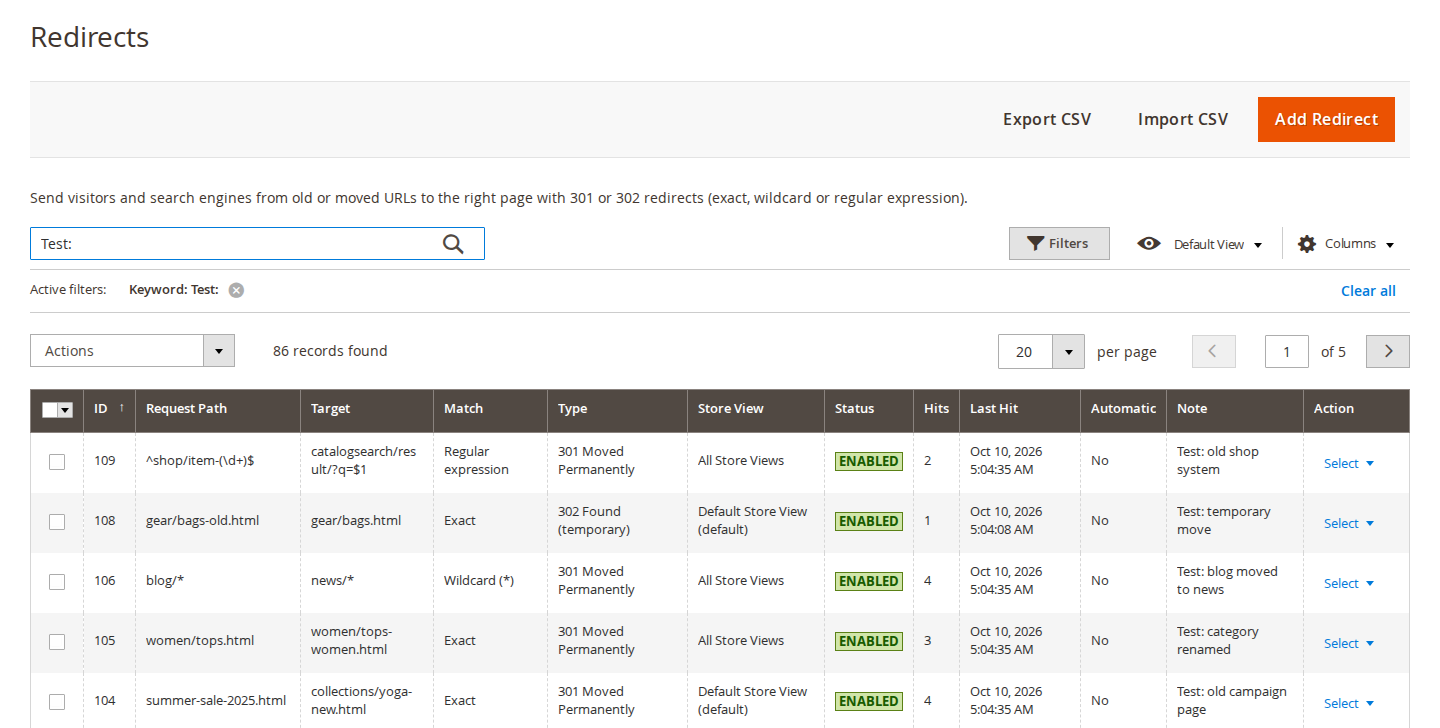
Exact, wildcard (blog/* to news/*) or regular expression rules, 301 or 302, per store view or all, with priority, hit counter and notes. Import and export as CSV.
02 / 06
One rule for a whole section
A * in the request path carries the matched part over to the target. Chains of rules are answered with one redirect to the final page, and loops are ignored.
03 / 06
See which URLs break, then fix them
Storefront 404s per store view and URL with hits, last referrer and user agent. Create Redirect opens the redirect form with the path filled in.
04 / 06
Find the gaps in the catalogue
Missing, long or duplicate titles and descriptions, missing images and alt text, thin content and NOINDEX pages, by severity. Weekly by cron, on demand, or from the command line.
05 / 06
Good meta data for every page
Title, description and keyword templates for products, categories and CMS pages, with variables such as {{name}}, {{price}}, {{brand}} and optional segments in square brackets.
06 / 06
Test pages, one click away
Sample product, category, CMS and home URLs for each store view, with links to Google's Rich Results Test and the Schema.org validator.
Live demo
Try it before you install it
A full Magento store with the module installed, on Luma and on Hyvä. The admin demo signs you in with one click.
Compatibility
Requirements and compatibility
| Magento | 2.4.7 – 2.4.9 |
|---|---|
| PHP | 8.2 – 8.5 |
| Latest version | 1.3.1 |
| composer.json requires | php ~8.2.0||~8.3.0||~8.4.0||~8.5.0 magento/framework ~103.0.7 softaware/module-core ^1.0 magento/module-backend * magento/module-catalog * magento/module-catalog-inventory * magento/module-catalog-url-rewrite * magento/module-cms * magento/module-config * magento/module-configurable-product * magento/module-cron * magento/module-directory * magento/module-eav * magento/module-review * magento/module-sitemap * magento/module-store * magento/module-theme * magento/module-ui * magento/module-url-rewrite * |
Installation
Up and running in minutes
After you buy, create a Composer key in your account. Then, in the root of your Magento project:
-
01Add the repository and your key (once per project)
composer config repositories.softaware composer https://repo.softawarecommerce.com
composer config --auth http-basic.repo.softawarecommerce.com PUBLIC_KEY PRIVATE_KEY
-
02Install the module
composer require softaware/module-seo-suite -
03Enable it
bin/magento setup:upgrade
bin/magento setup:di:compile
bin/magento setup:static-content:deploy
bin/magento cache:flush
The last three are only needed in production mode.
Prefer a zip? Every version you are entitled to can be downloaded from My modules. More about Composer access
User guide
How to set up and use SEO Suite
For version 1.3.1. The same guide comes with the module, in docs/user-guide.md.
Technical SEO for Magento 2 on Luma and Hyvä. This guide covers installation, every setting and day-to-day use.
- Demo (Luma, view the page source): https://demo.softawarecommerce.com/montana-wind-jacket.html
- Demo (Hyvä, view the page source): https://demo.softawarecommerce.com/hyva/montana-wind-jacket.html
- Admin demo: https://demo.softawarecommerce.com/try-admin/seo-suite
- Changelog: Release notes · Questions: FAQ
1. Requirements
| Magento | Open Source or Adobe Commerce 2.4.7 to 2.4.9 |
| PHP | 8.2 to 8.5 |
| Themes | Luma, Blank and themes based on them; Hyvä (tested with 1.5) |
| Other | softaware/module-core (installed automatically); Magento cron must run |
2. Installation
Install with Composer from repo.softawarecommerce.com. The access keys are in your account on softawarecommerce.com; see Composer access for details.
composer config repositories.softaware composer https://repo.softawarecommerce.com
composer config --auth http-basic.repo.softawarecommerce.com PUBLIC_KEY PRIVATE_KEY
composer require softaware/module-seo-suite
bin/magento setup:upgrade
bin/magento setup:di:compile            # production mode only
bin/magento setup:static-content:deploy # production mode only
bin/magento cache:flush
To update later: composer update softaware/module-seo-suite, then the same bin/magento commands.
After installation structured data, meta templates, canonical, robots, hreflang, Open Graph, redirects and the 404 log are on. Shipping, return policy and LocalBusiness markup are off until you fill them in.
The admin menu has Softaware > SEO Suite with Redirects, 404 Log, SEO Audit, Meta Generator, Structured Data Test and Settings.
3. Quick start
- Open Stores > Configuration > Softaware > SEO Suite and check General > Enabled = Yes.
- Under Structured Data: Product, choose your Brand Attribute and, if you have them, the GTIN and MPN attributes.
- If you offer fixed shipping and returns, fill in Structured Data: Shipping and Structured Data: Return Policy and set them to Enabled.
- Flush the full-page cache and open Softaware > SEO Suite > Structured Data Test to check sample pages in Google's Rich Results Test (the store must be reachable from the internet).
- Open SEO Audit and click Run Audit Now to see where the catalogue needs work.
4. Settings
Stores > Configuration > Softaware > SEO Suite (also Softaware > SEO Suite > Settings). Most settings can be set per website and store view.
General
| Setting | What it does |
|---|---|
| Enabled | Master switch. When No, the module adds nothing to the storefront, the sitemap or the redirects. |
| Test Pages | Link to the Structured Data Test page. |
Structured Data (JSON-LD)
| Setting | What it does |
|---|---|
| Enabled | JSON-LD for products, categories, CMS pages and the home page. |
| Remove Theme Microdata | Removes the schema.org microdata written by Luma and Hyvä templates and Hyvä's own BreadcrumbList, so each page has one Product and one BreadcrumbList. |
| BreadcrumbList, ItemList, WebSite, SearchAction | Each can be switched off. WebSite takes an optional WebSite Alternate Name. |
Structured Data: Organisation
Enabled, Output On (home page only, or every page), Type (OnlineStore by default, Store, Organization or Corporation), Name, Legal Name, Logo (empty = the theme logo), Description, Profiles (sameAs) (one URL per line), Customer Service Telephone and Email (empty = Store Information values), Contact Languages, and Include Address and VAT Number from Store Information.
Structured Data: Product
| Setting | What it does |
|---|---|
| Description From | Product attribute used for the description (default: short description). |
| Brand Attribute, Default Brand | Brand from an attribute (default: Manufacturer) or a fixed value. |
| GTIN Attribute | EAN, UPC, ISBN or GTIN; gtin8, gtin12, gtin13 or gtin14 is chosen from the number of digits. |
| MPN Attribute | Manufacturer part number, optional. |
| Condition Attribute, Default Condition | Values containing "used" or "refurbished" map to UsedCondition or RefurbishedCondition; otherwise the default (New). |
| priceValidUntil (Days Ahead) | Used when there is no special price end date. 0 = leave it out. |
| Add Ratings and Reviews, Number of Reviews | aggregateRating and the latest approved reviews with a rating, only when reviews exist (default 10). |
| Configurable Products as ProductGroup, Maximum Variants | One ProductGroup with a Product per child (hasVariant, variesBy), up to 100 children by default. No = one Product with the lowest price. |
Structured Data: Shipping and Return Policy
Shipping adds shippingDetails to offers: Ship To Countries, Shipping Rate (0 = free), Free Shipping From, handling and transit times in working days. Return Policy adds hasMerchantReturnPolicy to the organisation and to offers: Applicable Countries, Policy, Return Window (Days), Return Method, Return Fees and Return Shipping Fee. Both are off by default.
Structured Data: Local Business
Off by default. Choose the CMS page (Output On CMS Page, for example contact-us), the Business Type, Name, Latitude and Longitude, Opening Hours (one rule per line, for example Mo-Fr 09:00-17:30) and Price Range.
Meta Templates
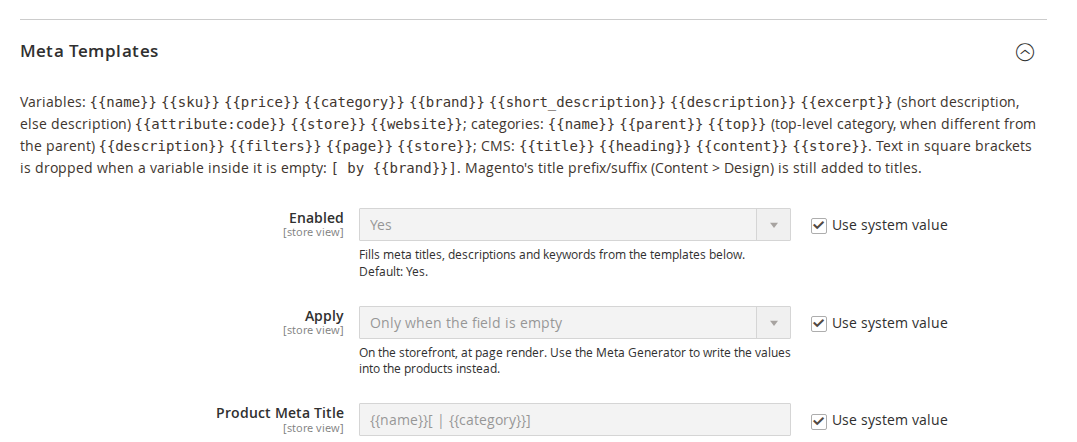
| Setting | What it does | |
|---|---|---|
| Enabled | Fills meta titles, descriptions and keywords from the templates. | |
| Apply | Only when the field is empty (default) or Always (overwrite), at page render. | |
| Product Meta Title / Description / Keywords | Defaults: `{{name}}[ \ | {{category}}], {{name}}[ by {{brand}}][ for {{price}}]. [{{excerpt}}], {{name}}[, {{category}}][, {{brand}}]` |
| Category Meta Title / Description / Keywords | Defaults: `{{name}}[ - {{parent}}][ \ | {{top}}], {{name}}[: {{description}}], {{name}}[, {{parent}}]` |
| Category Title With Filters | Used instead of the category title when layered navigation filters or a page number apply, for example {{name}}[ - {{filters}}][ - Page {{page}}]. | |
| CMS Page Meta Title / Description / Keywords | Defaults: {{title}}, [{{content}}] (start of the page text), empty. | |
| Maximum Description Length | Generated descriptions are cut at a word boundary (default 160 characters). 0 = no limit. |
Variables: {{name}}, {{sku}}, {{price}}, {{category}}, {{categories}}, {{brand}}, {{short_description}}, {{description}}, {{excerpt}}, {{attribute:code}} (option labels are resolved), {{store}}, {{website}}; for categories also {{parent}}, {{top}}, {{filters}} and {{page}}; for CMS pages {{title}}, {{heading}} and {{content}}. Text in square brackets is dropped when a variable inside it is empty, so {{name}}[ by {{brand}}] never ends in "by". Magento's own title prefix and suffix are still added.
Product Image Alt and Title
Enabled, Apply (only when the image has no label, or always), Alt Text Template (default {{name}}[ - {{attribute:color}}]) and Title Template for product list images. Used for the product page gallery and product lists.
Meta Robots
| Setting | What it does |
|---|---|
| Keep Store-wide NOINDEX | When Magento's default robots value is NOINDEX,NOFOLLOW (staging sites), the rules are not applied. On by default. |
| Filtered or Sorted Category Pages | Default NOINDEX, FOLLOW. |
| Paginated Category Pages (Page 2+) | Default: do not change. |
| Search Results | Default NOINDEX, FOLLOW. |
| Account, Cart, Checkout, Wishlist, Compare | Default NOINDEX, NOFOLLOW. |
| 404 Page | Default NOINDEX, FOLLOW. |
| Custom Rules by URL | Patterns such as sale/* or *?color=* with a robots value; the first match wins. |
A Meta Robots value on a product, category or CMS page wins over all rules.
Canonical URLs
Canonical links on home, CMS, category and product pages, replacing Magento's own. Product Canonical URL: without category path (default), shortest or longest category path. Paginated Category Pages: each page to itself (?p=2, default) or all pages to page 1. Filters and sort parameters are always removed.
Hreflang
Enabled, Include This Store View (No for a store view that duplicates another language, such as a second theme), Language Code (empty = from the store locale), x-default Store View, and Only Store Views of the Same Website. Only store views where the product is enabled and visible, or the category active, are listed.
Open Graph and Twitter Cards
Open Graph (replaces Magento's product Open Graph tags), Twitter Cards, X (Twitter) Account, Facebook App ID and a Fallback Image (1200 x 630 px works best) for pages without an image.
Redirects and 404 Log
| Setting | What it does |
|---|---|
| Redirects Enabled | Answers old URLs with the rules under SEO Suite > Redirects. |
| Pass Query String On | Appends the original query string (for example utm_ parameters) when the target has none. |
| When a Product Is Deleted, Redirect To | Its deepest category (default), search results for its name, the home page, or nothing. |
| When a Category Is Deleted, Redirect To | Parent category (default), the home page, or nothing. |
| Log 404 Pages | Records storefront 404s under SEO Suite > 404 Log. |
| Do Not Log | One pattern per line; defaults *.php, wp-*, *.map, .well-known/*. |
| Keep Log Entries (Days) | Entries not seen for longer are removed by cron (default 90). 0 = keep. |
XML Sitemap
Honour "Exclude from XML Sitemap", Leave Out Pages Set to NOINDEX, Add Category Images and Add Hreflang Links (off by default). These extend Magento's own sitemap generation.
SEO Audit
Run Weekly (Sunday night by cron), Title Longer Than (60), Meta Description Shorter Than (70) and Longer Than (160) characters, and Thin Content Below (50 words).
5. Product, category and CMS page fields
The edit forms get extra fields in the Search Engine Optimization section: Meta Robots and Exclude from XML Sitemap on products, categories and CMS pages, and Hreflang Key on CMS pages. Give CMS pages with different URLs in different languages the same Hreflang Key to link them.
6. Redirects
Softaware > SEO Suite > Redirects lists all rules with keyword search, filters and a column chooser. Add Redirect opens the form:
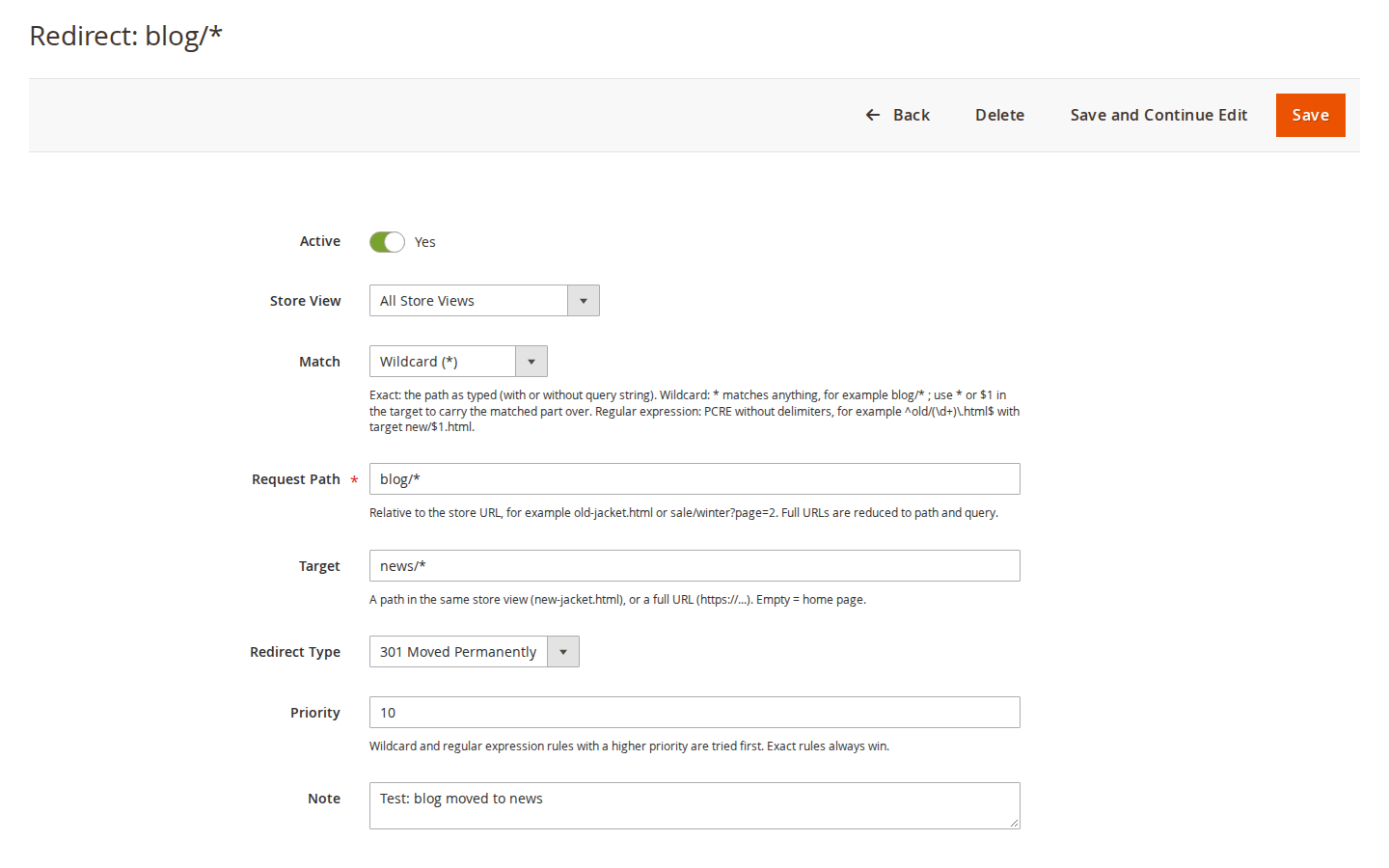
- Match: Exact (the path as typed, with or without query string), Wildcard (
*matches anything and*or$1in the target carries the matched part over) or Regular expression (PCRE without delimiters, for example^old/(\d+)\.html$tonew/$1.html). - Request Path is relative to the store URL. Target is a path in the same store view, a full URL, or empty for the home page.
- Redirect Type 301 or 302, Store View (one or all), Priority (pattern rules with a higher priority are tried first; exact rules always win) and a Note.
Hits are counted per rule; rules for deleted products and categories are marked Automatic. Chains (A to B to C) are answered with one redirect to C; loops are ignored and logged. Saving an exact rule for a URL that is still a cached page removes that page from the full-page cache (built-in and Varnish); after saving a wildcard or regex rule, refresh the page cache under System > Cache Management.
Import CSV and Export CSV: columns source,target,redirect_type,match_type,store,is_active,priority,note (store is a store view code or all; only source and target are required). The import has a check-only mode.
7. 404 Log
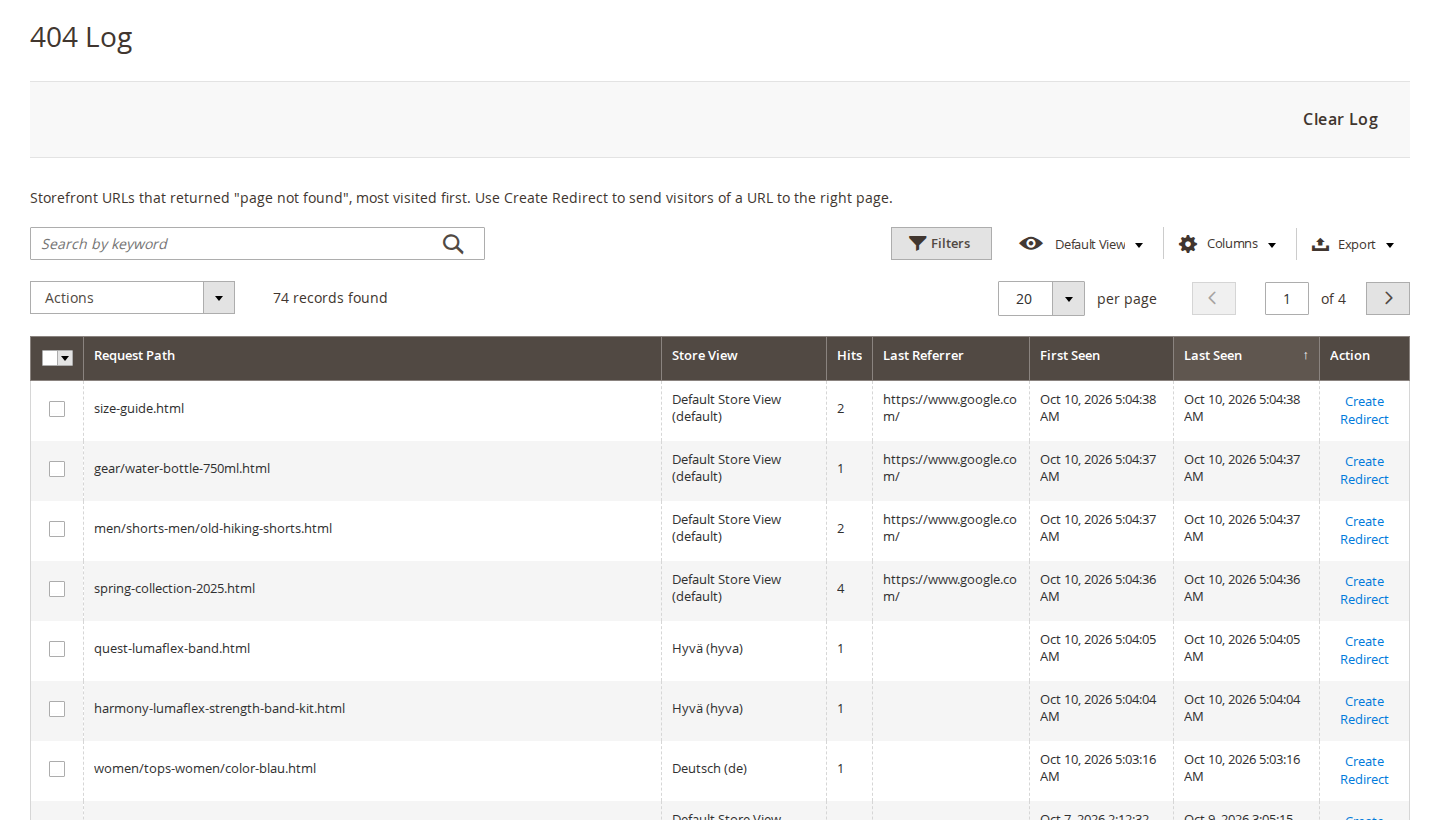
Softaware > SEO Suite > 404 Log lists storefront URLs that returned "page not found", per store view, with hits, first and last seen date, last referrer and user agent. Create Redirect opens the redirect form with the request path and store view filled in and Active set to Yes; choose the target and save. Clear Log, mass delete and CSV export are available. The log holds up to 50,000 entries.
8. SEO Audit
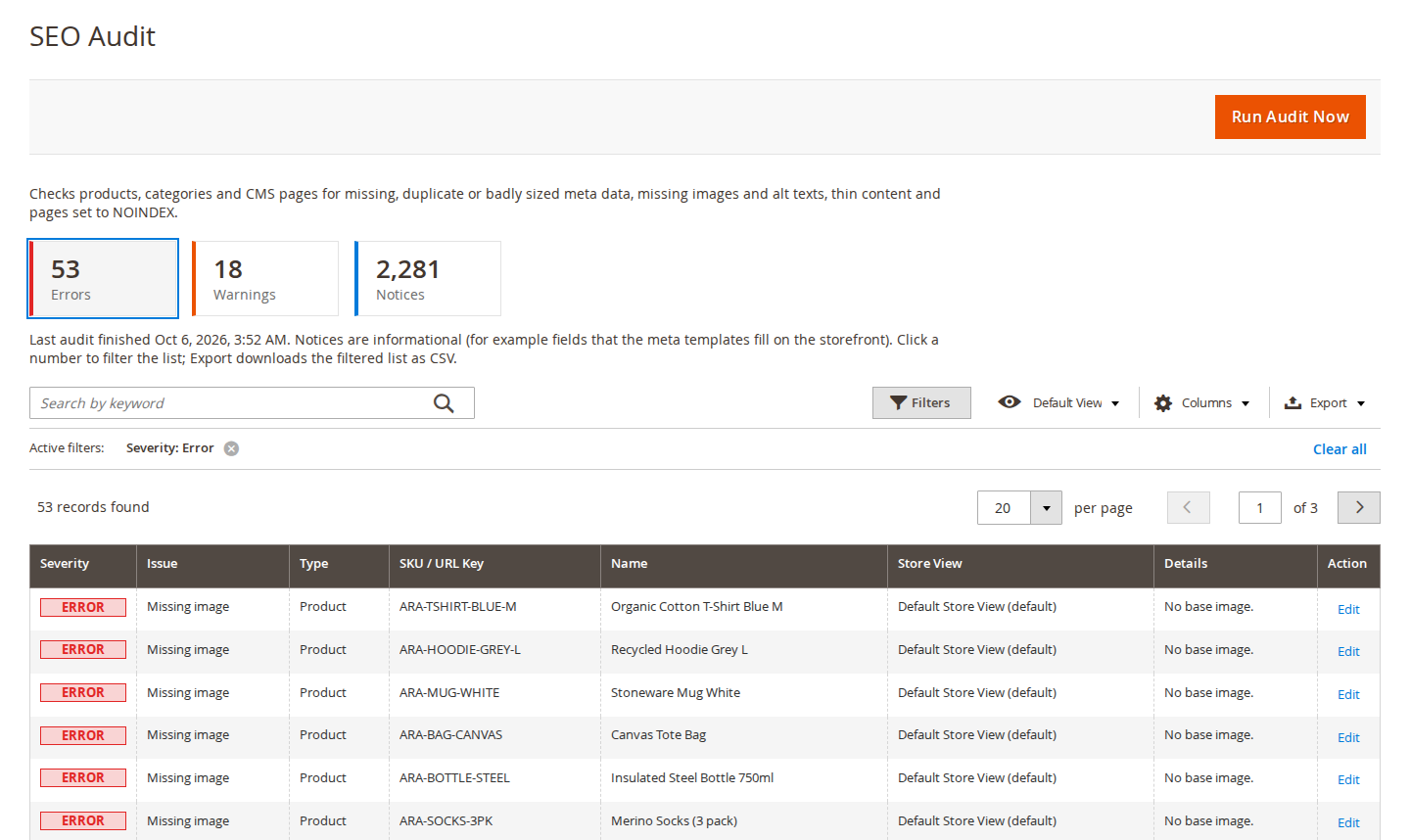
Softaware > SEO Suite > SEO Audit checks products, categories and CMS pages per store view for missing, too long or duplicate meta titles; missing, too short, too long or duplicate meta descriptions; missing images and image alt text; thin content; no URL rewrite (no canonical URL); and pages set to NOINDEX. Each issue is an error, a warning or a notice (a notice when a template fills the gap on the storefront). The Errors, Warnings and Notices tiles filter the list; Edit opens the page; Export downloads the filtered list as CSV.
Run Audit Now queues an audit that cron picks up within a minute. It also runs weekly and from the command line.
9. Meta Generator
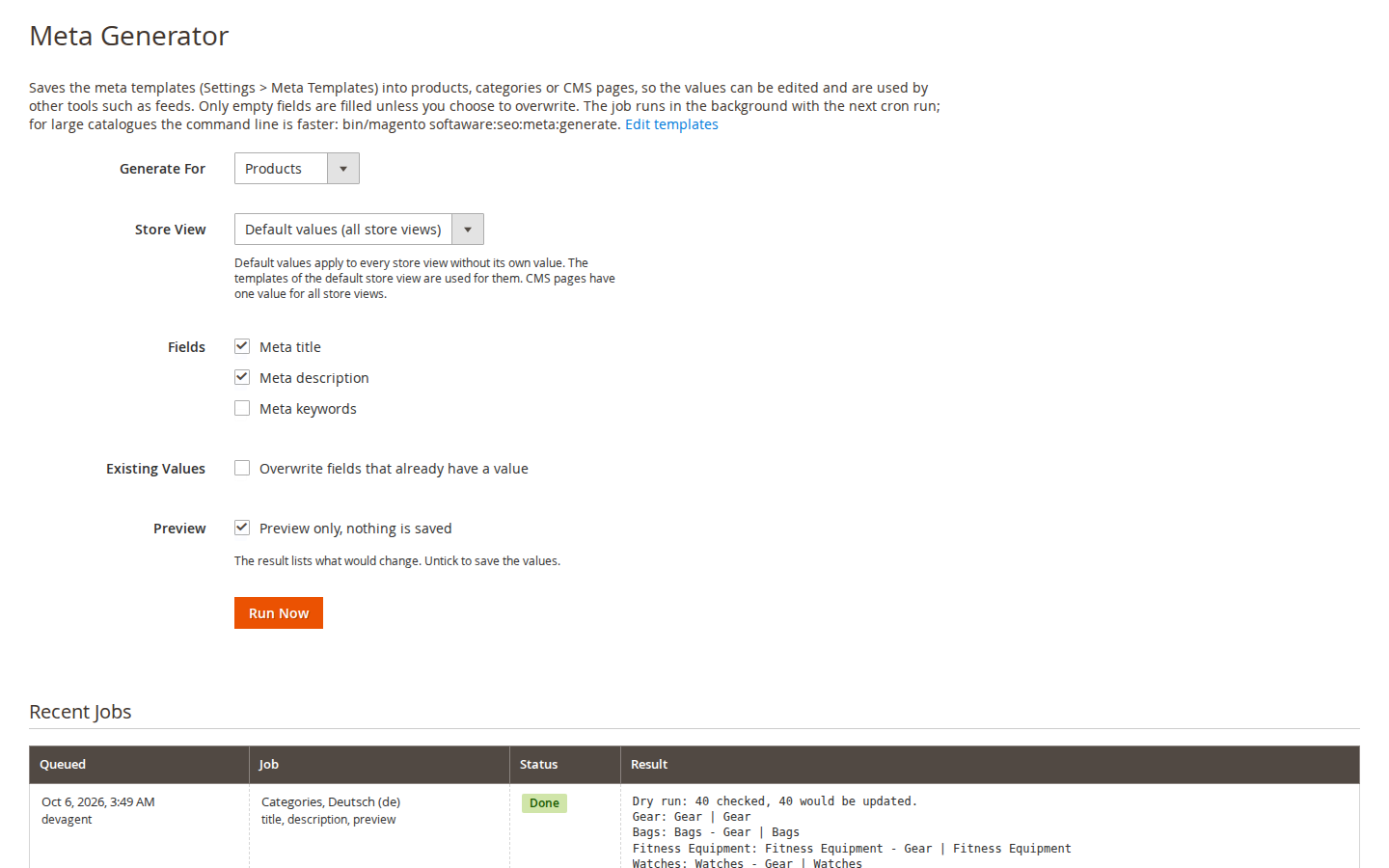
Softaware > SEO Suite > Meta Generator writes the template results into products, categories or CMS pages (useful for feeds and other tools). Choose Generate For, Store View, the Fields, whether to overwrite existing values, and Preview only to see what would change. The job runs with the next cron run; results appear under Recent Jobs.
10. Structured Data Test
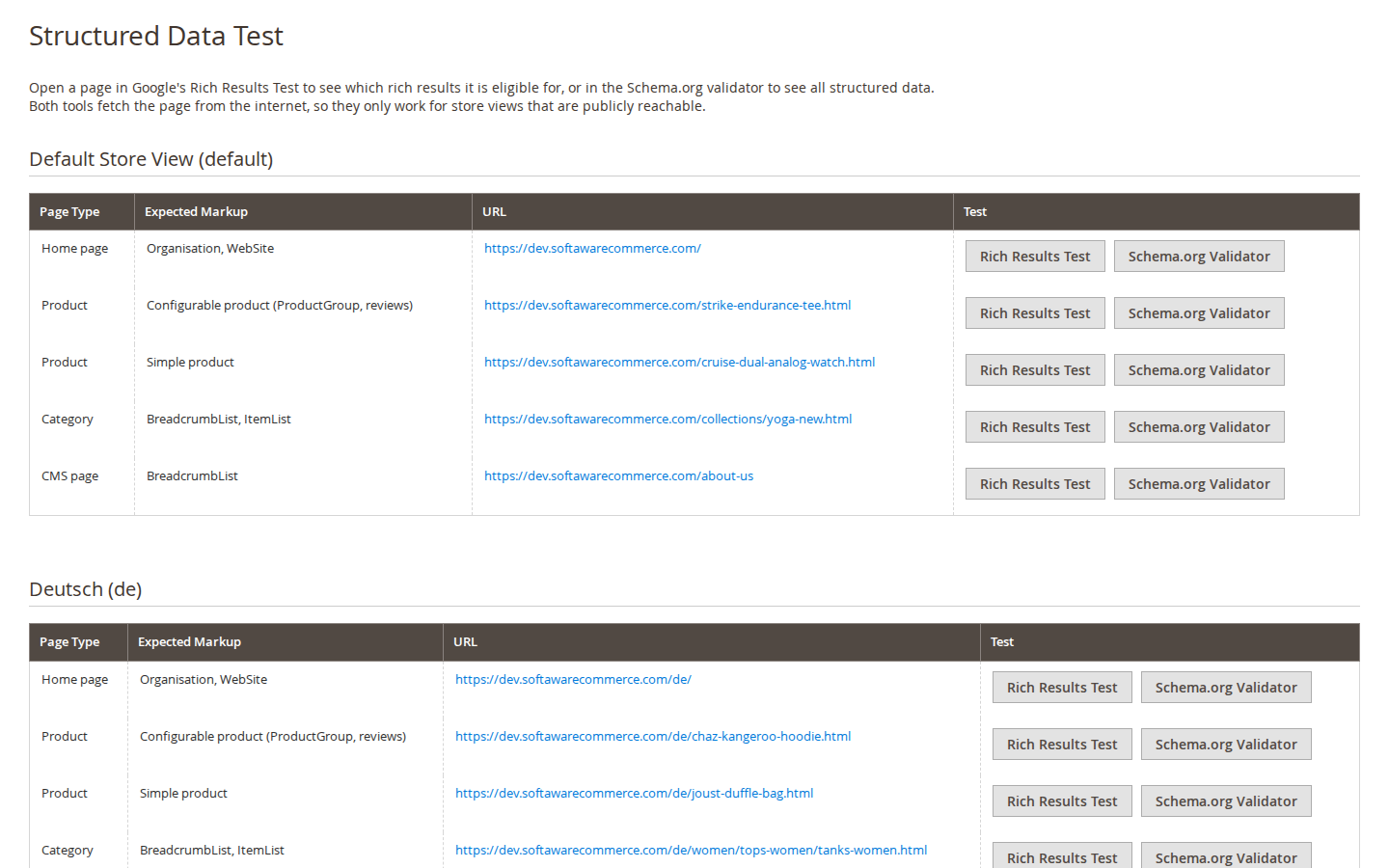
Sample URLs per store view (home, configurable product, simple product, category, CMS page) with the markup to expect and buttons for Google's Rich Results Test and the Schema.org validator. Both tools fetch the page from the internet, so they only work for store views that are publicly reachable.
11. Command line
bin/magento softaware:seo:audit [--store=<code>]...
bin/magento softaware:seo:meta:generate --entity=product|category|cms [--store=<code>|admin]
    [--fields=title,description,keywords] [--overwrite] [--dry-run] [--limit=N]
bin/magento softaware:seo:redirect:import <file.csv> [--dry-run]
bin/magento softaware:seo:redirect:export [<file.csv>]
bin/magento softaware:seo:redirect:test <path-or-url> [--store=<code>]
bin/magento softaware:seo:404:clean
Cron jobs: softaware_seo_process_jobs (every minute, audit and generator jobs from the admin), softaware_seo_weekly_audit (Sunday 02:23) and softaware_seo_clean_404_log (daily).
12. Permissions (ACL)
System > Permissions > User Roles > Role Resources > Softaware > SEO Suite: Redirects, 404 Log, SEO Audit, Meta Generator, Structured Data Test and SEO Suite Configuration can be granted separately.
13. Troubleshooting
| Problem | Solution |
|---|---|
| Nothing changes on the storefront | Check General > Enabled for the store view and flush the full-page cache. |
| Meta robots stays NOINDEX,NOFOLLOW | Magento's default robots value is NOINDEX,NOFOLLOW and Keep Store-wide NOINDEX is on. Change the default under Content > Design > Configuration, or switch the protection off. |
| A redirect does not work | Run bin/magento softaware:seo:redirect:test <url>. A wildcard or regex rule needs a page cache refresh. URLs ending in .php may be blocked by the web server before Magento sees them. |
| Saving a rule shows a loop warning | The rule forms a loop with other rules (A to B to A); the storefront ignores the loop. Change one of the targets. |
| The Rich Results Test cannot open a page | The store view must be reachable from the internet (not a local or password-protected site). |
| Brand is missing in the markup | Set Brand Attribute or Default Brand under Structured Data: Product. |
| An audit or generator job stays queued | Magento cron is not running. Check bin/magento cron:run and the server crontab. |
14. Uninstall
bin/magento module:disable Softaware_Seo
composer remove softaware/module-seo-suite
bin/magento setup:upgrade
The module's tables and the product and category attributes seo_robots and seo_exclude_sitemap stay in the database; remove them yourself if you no longer need the data. Redirects you want to keep can be exported as CSV first.
Changelog
Release notes
1.3.1
Latest
- 404 Log > Create Redirect: the redirect form now opens with Active set to Yes, so the saved redirect is active (the prefilled value was an integer and did not match the toggle's value map).
- Stores > Configuration > SoftAware > SEO: field comments of Meta Templates and Product Image Alt and Title show the default templates with their
{{...}}variables (Magento's config reader removed them).
1.3.0
- Keyword search in the Redirects (request path, target, note), 404 Log (request path) and SEO Audit (SKU / URL key, name, details) grids.
- SEO Audit: the Errors / Warnings / Notices tiles are buttons that filter the issue list by severity.
- Redirects and 404 Log: one-sentence introductions, empty states ("Add Your First Redirect") instead of empty tables, and a notice when redirects or 404 logging are switched off. Redirect status is an Enabled / Disabled badge; Last Hit and Automatic are hidden by default (Columns menu). Long URLs wrap instead of making the grid wider than the page. Delete confirmations have specific titles.
- SEO Audit: severity shown as badges (error red, warning orange, notice green), an introduction, and a clearer status line for queued, running, failed and finished audits; numbers are formatted.
- Meta Generator: shorter introduction, "Existing Values" and "Preview" as separate rows, button "Run Now" aligned with the fields, standard section heading for Recent Jobs.
- Settings: every field has a short comment with its default; "Test Pages" capitalised; Customer Service Email is validated. Menu item "Configuration" renamed "Settings".
1.2.0
- Requires
softaware/module-coreinstead ofsoftaware/module-base. The admin menu and ACL now sit underSoftaware_Core::core("Softaware"); roles that had access keep it (migrated by module-core). After updating all SoftAware modules,softaware/module-basecan be removed.
1.1.0
- Redirect chains are answered with one redirect to the final target (fewer hops for visitors and crawlers).
bin/magento softaware:seo:redirect:test <url> [--store=<code>]: shows which rules answer a URL and where it ends.- Warning in the admin when a saved exact redirect forms a loop with other rules.
- Wildcard/regex redirects whose target starts with the captured text (
old/*->*) could send visitors to any external site (/old/https://evil.example). Whether a target is external is now decided by the rule, never by the request; captured text is URL-encoded where needed and absolute targets keep their host. - 404 log capped at 50,000 entries so that bots requesting random URLs cannot grow the table without limit.
- Redirect CSV export protects cells starting with = + - @ against spreadsheet formula injection (reversed on import).
- Redirect loops between rules (A -> B -> A, or
blog/*->blog/archive/*) produced endless redirects; they are now ignored and logged. - Automatic redirects for deleted products/categories hid a new product or category that later used the same URL.
- A redirect for a URL that was still a cached page only worked after the full-page cache was cleaned; saving the rule now cleans that page's cache (pattern rules invalidate the page cache).
- Hreflang alternates (head and XML sitemap) included store views where the product is disabled or not visible or the category inactive; the sitemap did not check this at all.
- Microdata removal returned an empty page if PCRE hit its backtracking limit on a very large page.
1.0.0
- JSON-LD structured data: Organisation, WebSite with SearchAction, BreadcrumbList, Product / ProductGroup with offers, shipping and return policy, ratings and reviews, ItemList, LocalBusiness.
- Removal of Luma/Hyvä schema.org microdata and Hyvä's BreadcrumbList.
- Structured Data Test admin page with links to Google's Rich Results Test and the Schema.org validator.
- Meta title/description/keywords templates for products, categories and CMS pages; Meta Generator (admin and CLI).
- Meta robots rules by page type, URL pattern and per product/category/CMS page.
- Canonical URLs for home, CMS, category (filters, pagination) and product pages.
- Hreflang with x-default, in the page head and optionally in the XML sitemap.
- Open Graph and Twitter Card tags.
- Redirect manager (exact, wildcard, regex; CSV import/export; hit counter), 404 log, redirects for deleted products and categories.
- XML sitemap: exclusion by product/category/CMS field and NOINDEX, category images, hreflang.
- SEO audit with CSV export, weekly by cron.
- Product image alt/title templates.
FAQ
Questions, answered
Something else on your mind? The developers who wrote the module answer before and after you buy.
Ask a question →Already installed it? Open a support ticket
Does it work with Hyvä?
Yes. Everything the module adds to the storefront is rendered on the server, in the page <head> or as JSON-LD, so it works the same on Luma and Hyvä (tested with Hyvä 1.5). It also switches off Hyvä's own BreadcrumbList JSON-LD and removes the schema.org microdata that Luma and Hyvä templates write, so search engines see one Product and one BreadcrumbList per page. The checkout is not touched.
Will it slow my store down?
The head data is built once per page render and stored in the full-page cache with the page. On product pages it uses a handful of indexed queries; the ItemList on category pages reuses the product collection the page has already loaded. The redirect router only runs on GET and HEAD requests that are not served from the full-page cache. No JavaScript files are added to the storefront.
Which structured data types does it output?
Organisation (Organization, OnlineStore, Store or Corporation), WebSite with SearchAction on the home page, BreadcrumbList on product, category and CMS pages, Product with offers, identifiers, ratings and reviews, ProductGroup for configurable products (one hasVariant Product per child), ItemList on category pages, and an optional LocalBusiness on a CMS page you choose. Shipping details and a return policy can be added from your settings.
Does it guarantee rich results in Google?
No tool can. Google decides whether to show rich results. The module outputs markup that follows Google's documentation for merchant listings, product variants, breadcrumbs and organisations, and the Structured Data Test page links each sample page to Google's Rich Results Test so you can check it yourself.
Do I have to write a meta title for every product?
No. Templates fill empty fields on the storefront, for example {{name}}[ | {{category}}]. Text in square brackets is dropped when a variable inside it is empty. If you want the values stored in the catalogue (for feeds or other tools), the Meta Generator writes them into products, categories or CMS pages, with a preview mode.
How do I move an old site or a renamed section?
Add redirects under Softaware > SEO Suite > Redirects, or import them as CSV (columns source,target, redirect_type,match_type,store,is_active,priority,note; only source and target are required). Wildcard rules such as blog/* to news/* carry the matched part over, and regular expressions are supported for anything more complex. Use the check-only mode to validate a file before importing it.
What happens when I delete a product or a category?
By default the module creates a 301 redirect for every URL the product had, to its deepest category (you can choose search results for its name, the home page, or nothing). A deleted category redirects to its parent category or the home page. If a new product or category later uses the same URL, the page is shown and the automatic redirect is skipped.
What about redirect chains and loops?
When rule A points to B and rule B points to C, visitors get one redirect straight to C. Loops between rules are ignored on the storefront, logged once a day in var/log/system.log, and reported in the admin when you save such an exact rule.
Can bots fill up the 404 log?
The log is capped at 50,000 entries. When it is full, only URLs already in the log are counted until old entries are removed by the daily clean-up (90 days by default) or in the admin. Patterns such as *.php and wp-* are not logged by default, and you can add your own.
Does it support multiple languages and store views?
Yes. Hreflang links connect the store views of a website (optionally across websites) with an x-default, in the page head and optionally in the XML sitemap. Store views can be left out, the language code can be set per store view, and CMS pages with different URLs can be paired with a Hreflang Key. Most settings work per store view.
Can I keep my staging site out of search engines?
Yes. With "Keep Store-wide NOINDEX" on (the default), a site whose Magento default robots setting is NOINDEX,NOFOLLOW is left alone, so the robots rules do not turn staging pages back to INDEX.
Which Magento versions are supported?
Magento Open Source and Adobe Commerce 2.4.7 to 2.4.9 on PHP 8.2 to 8.5. The module requires softaware/module-core, which Composer installs automatically.
Support