Returns & RMA
Customers and guests request returns from their orders on Luma and Hyvä, and your team approves, receives and refunds them in the Magento admin, with every step logged and emailed.
- Magento 2.4.7 – 2.4.9
- PHP 8.2 – 8.5
- Version 1.1.2
One-off payment, with 12 months of updates.
What is included
- 12 months of new versions and fixes; the versions released in that time stay yours
- Install with Composer, or download a zip from your account
- Licence for one production domain, staging and development copies included
- 30-day money-back guarantee, refund policy
No subscription or automatic renewal. Keep using the versions included in your update period. Update and licence details
Key features
- Return requests from My Account and the order page
- Guest returns with signed, expiring links
- Reason and condition per item, photos, refund or exchange
Composer package softaware/module-returns
-
Customers do it themselves
Shoppers choose the items, quantities, reason and condition, add photos and send the request. No back-and-forth by email to find out what is coming back.
-
Your rules, applied every time
Only shipped, unrefunded quantities inside the return window can be returned. Excluded products and categories are never offered.
-
One place for the whole return
Items, photos, messages, internal notes, status history and the credit memo sit on one admin page. Reports show what comes back and why.
All features
What is included
Storefront (Luma and Hyvä)
- My Account > My Returns with "Orders you can return"
- Return Items button and the last return date on the order page
- Returns column in My Orders
- Guest returns at /returns/guest
- Return page with status, instructions, label, tracking and messages
- Customers can cancel a pending return (optional)
Eligibility
- Return window in days (default 14)
- Counted from the delivery date, or the last shipment or invoice
- Order statuses that allow returns
- Only shipped quantities, minus refunded and already returned ones
- Exclude products, or whole categories, from returns
Admin workflow
- Approve with instructions and PDF return labels
- Mark as received, with optional return to stock (MSI-aware)
- Prefilled credit memo; the return closes itself when it is saved
- Close without a refund for exchanges or repairs
- Create a return for a customer from the order
- Returns tabs on the order and customer pages
Rules and emails
- Your own reasons, conditions and resolutions
- Custom statuses with colours and an email switch
- Automatic approval by reason and order total (off by default)
- Nine translatable email templates, per store view
- Reports by reason, product, month, status, condition or resolution, with CSV export
Developers
- REST API: read, search, create, change status
- GraphQL for signed-in customers
- Events for delivery dates, return labels and closed returns
- CLI: check an order, preview an email
- Separate ACL permissions for view, manage, statuses and reports
Feature tour
Everything your shoppers and your team see
01 / 07
Everything you need to know, in one request
Customers tick the items, set the quantity, pick a reason and a condition for each one, choose refund or exchange, add a comment and photos, and accept your returns policy.
02 / 07
No account needed
Guests find their order with the order number, email address and billing postcode. They get a signed link that expires, and failed lookups are limited per IP address, email address and order number.
03 / 07
Native Hyvä templates
Alpine.js and Tailwind templates for Hyvä are picked automatically; Luma and its child themes work out of the box. The form stacks neatly on phones.
04 / 07
Every return at a glance
Sales > Returns lists every return with its order, customer, status, items and resolution. Filter, search by keyword and change the status of several returns at once.
05 / 07
Approve, receive, refund
Approve per item with instructions and an optional PDF label, mark items as received and return them to stock, then open Magento's credit memo with the received items already filled in.
06 / 07
Talk to the customer on the return
Messages and files in both directions, internal notes your customer never sees, and a status history that records who changed what and whether the customer was emailed.
07 / 07
Statuses that match your process
Rename the built-in statuses, pick colours and sort order, and add your own steps such as "Inspecting", each with its own customer email switch.
Live demo
Try it before you install it
A full Magento store with the module installed, on Luma and on Hyvä. The admin demo signs you in with one click.
Compatibility
Requirements and compatibility
| Magento | 2.4.7 – 2.4.9 |
|---|---|
| PHP | 8.2 – 8.5 |
| Latest version | 1.1.2 |
| composer.json requires | php ~8.2.0||~8.3.0||~8.4.0||~8.5.0 magento/framework ~103.0.7 softaware/module-core ^1.0 magento/module-backend * magento/module-catalog * magento/module-catalog-inventory * magento/module-cms * magento/module-config * magento/module-customer * magento/module-eav * magento/module-email * magento/module-graph-ql * magento/module-sales * magento/module-store * magento/module-ui * magento/module-user * |
Installation
Up and running in minutes
After you buy, create a Composer key in your account. Then, in the root of your Magento project:
-
01Add the repository and your key (once per project)
composer config repositories.softaware composer https://repo.softawarecommerce.com
composer config --auth http-basic.repo.softawarecommerce.com PUBLIC_KEY PRIVATE_KEY
-
02Install the module
composer require softaware/module-returns -
03Enable it
bin/magento setup:upgrade
bin/magento setup:di:compile
bin/magento setup:static-content:deploy
bin/magento cache:flush
The last three are only needed in production mode.
Prefer a zip? Every version you are entitled to can be downloaded from My modules. More about Composer access
User guide
How to set up and use Returns & RMA
For version 1.1.2. The same guide comes with the module, in docs/user-guide.md.
Let customers and guests request returns from their orders, and handle every return in the Magento admin: approve, receive, refund or close, with a conversation, a status history and emails at every step. This guide covers installation, configuration and day-to-day use.
- Demo, guest returns (Luma): https://demo.softawarecommerce.com/returns/guest/
- Demo, guest returns (Hyvä): https://demo.softawarecommerce.com/hyva/returns/guest/
- Admin demo: https://demo.softawarecommerce.com/try-admin/returns
- Changelog: Release notes · Questions: FAQ
1. Requirements
| Magento | Open Source or Adobe Commerce 2.4.7 to 2.4.9 |
| PHP | 8.2 to 8.5 |
| Themes | Luma, Blank and themes based on them; Hyvä (tested with 1.5) |
| Inventory | Works with and without Magento Inventory (MSI) |
| Other | softaware/module-core (installed automatically) |
The return pages do not touch the checkout. On Adobe Commerce, which has its own returns feature, use one of the two workflows so customers see one way to return items.
2. Installation
With Composer. Use the Composer keys from your account on softawarecommerce.com (see https://softawarecommerce.com/shop/composer-access/):
composer config repositories.softaware composer https://repo.softawarecommerce.com
composer config --auth http-basic.repo.softawarecommerce.com PUBLIC_KEY PRIVATE_KEY
composer require softaware/module-returns
bin/magento setup:upgrade
bin/magento setup:di:compile            # production mode only
bin/magento setup:static-content:deploy # production mode only
bin/magento cache:flush
On Hyvä, the module's templates are picked automatically and the module registers itself for Tailwind source scanning. Run your usual Hyvä CSS build after installing so the return pages are styled.
To update later: composer update softaware/module-returns, then the same bin/magento commands.
3. Quick start
- Open Stores > Configuration > Softaware > Returns & RMA (also Softaware > Returns & RMA > Settings).
- General > Enabled is Yes by default. Check Return Window (Days) and Order Statuses That Allow Returns.
- Processing > Default Return Instructions: add your returns address. This text is sent to the customer with every approval.
- Optional: create a returns policy CMS page and select it in General > Returns Policy Page. Customers then have to tick "I have read the returns policy" before they send a return.
- Emails > Staff Email Addresses: who is told about new returns and customer messages.
- Save and flush the cache. Customers now see My Returns in their account and a Return Items button on their orders, and guests can use
/returns/guest.
4. Settings
All settings are under Stores > Configuration > Softaware > Returns & RMA. Most can be set per website or store view.
General
| Setting | What it does | Default |
|---|---|---|
| Enabled | When No, customers cannot see or create returns. Existing returns stay in the admin. | Yes |
| Return Window (Days) | How long after delivery (or shipment or invoice) items can be returned. | 14 |
| When No Delivery Date Is Known, Count From | Date of the last shipment or of the invoice. A delivery date from a carrier integration always wins. | Last shipment |
| Order Statuses That Allow Returns | Orders in other statuses cannot be returned. Only shipped quantities can be returned, whatever the status. | Complete, Processing |
| Return Number Prefix | R gives R000001. Store views with the same prefix share one number sequence. | R |
| Returns Policy Page | CMS page linked from the "I have read the returns policy" checkbox. No page means no checkbox. | none |
| Customers Can Cancel Pending Returns | Customers can withdraw a return while it is still pending. | Yes |
Reasons, Conditions and Resolutions
Three lists of code and label pairs. Customers choose one reason and one condition per item, and one resolution per return. Codes (lower-case letters, digits and underscores) are stored with each return and used in reports, so keep them stable; change and translate the labels per store view freely.
- Return Reasons (default): Wrong size or fit, Not as described, Faulty or damaged on arrival, Wrong item sent, Quality not as expected, Changed my mind, Other.
- Item Conditions (default): Unopened; Opened, not used; Used; Damaged.
- Resolutions (default): Refund, Exchange. "refund" is handled with a credit memo. Other resolutions are recorded with the return and handled by your team, or by an extension listening to the
softaware_returns_return_closedevent.
Photos
| Setting | What it does | Default |
|---|---|---|
| Customers Can Add Photos | Show the photo upload on the return form. | Yes |
| Photo Required | At least one photo is needed to send a return. | No |
| Maximum Photos per Return | 1 to 20. | 5 |
| Maximum Size per File (MB) | JPEG, PNG, WebP and GIF. PHP's upload_max_filesize must be at least this large. | 5 |
Guest Returns
| Setting | What it does | Default |
|---|---|---|
| Allow Guest Returns | Guests find their order at /returns/guest with the order number, email and billing postcode. | Yes |
| Guest Link Valid For (Hours) | Guests use signed links; after this time they look the order up again. | 168 |
| Failed Lookups Allowed per Hour | Counted per IP address, per email address and per order number. | 10 |
Processing
| Setting | What it does | Default |
|---|---|---|
| Default Return Instructions | Prefilled on approval and sent in the approval email. Put your returns address here. Can be changed per return. | A short packing note |
| Return Received Items to Stock by Default | Preselects "Return to stock" when items are marked as received. | Yes |
| Inventory Source for Returned Items | MSI only. Empty puts items back into the source they were shipped from. | empty |
| Refund Shipping on Credit Memos from Returns | Includes the remaining shipping amount in the prefilled credit memo. You can change it before refunding. | No |
Under UK and EU law the original standard delivery cost must be refunded when a whole order is withdrawn; you can always add it on the credit memo.
Automatic Approval
| Setting | What it does | Default |
|---|---|---|
| Approve Matching Returns Automatically | A return is approved straight away when every item has one of the chosen reasons and the order total is not above the limit. The customer receives the approval email with the default instructions. | No |
| Reasons | Reasons that qualify. | Wrong size or fit, Changed my mind |
| Maximum Order Total | Grand total in the base currency. Empty means no limit. | 100 |
Emails
| Setting | What it does | Default |
|---|---|---|
| Send Emails to Customers | All customer emails of the module. | Yes |
| Sender | Store email identity used as the sender. | General Contact |
| Staff Email Addresses | Comma-separated. Empty uses the General Contact address. | empty |
| Email Staff About New Returns | Notify the staff addresses when a customer sends a return. | Yes |
| Email Staff About Customer Messages | Notify the staff addresses when a customer writes in a return. | Yes |
Nine templates can be replaced with your own (create them from the defaults under Marketing > Email Templates): Return Received (Customer), New Return (Staff), Return Approved, Return Rejected, Parcel Received, Refunded / Closed, Other Status Changes, New Message from Staff (Customer) and New Message from Customer (Staff).
5. The customer's side
Signed-in customers
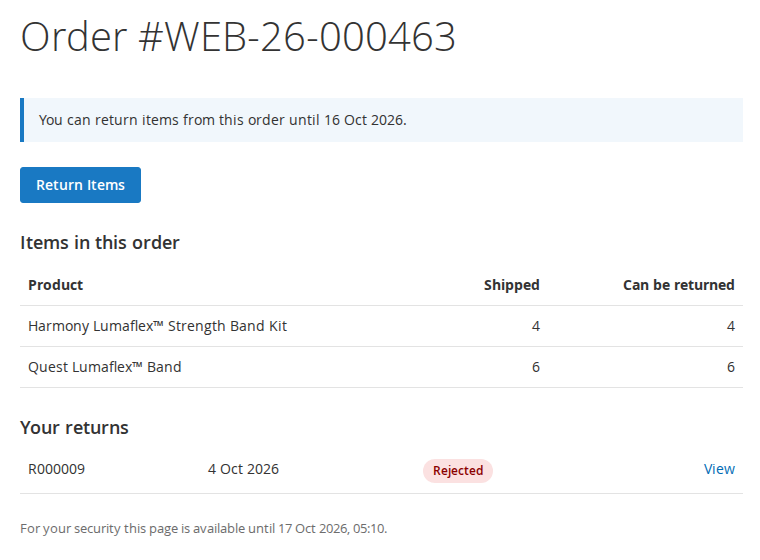
- My Account > My Returns lists their returns and the orders they can still return, with the last return date.
- The order page shows the return window end date and a Return Items button; My Orders has a Returns column.
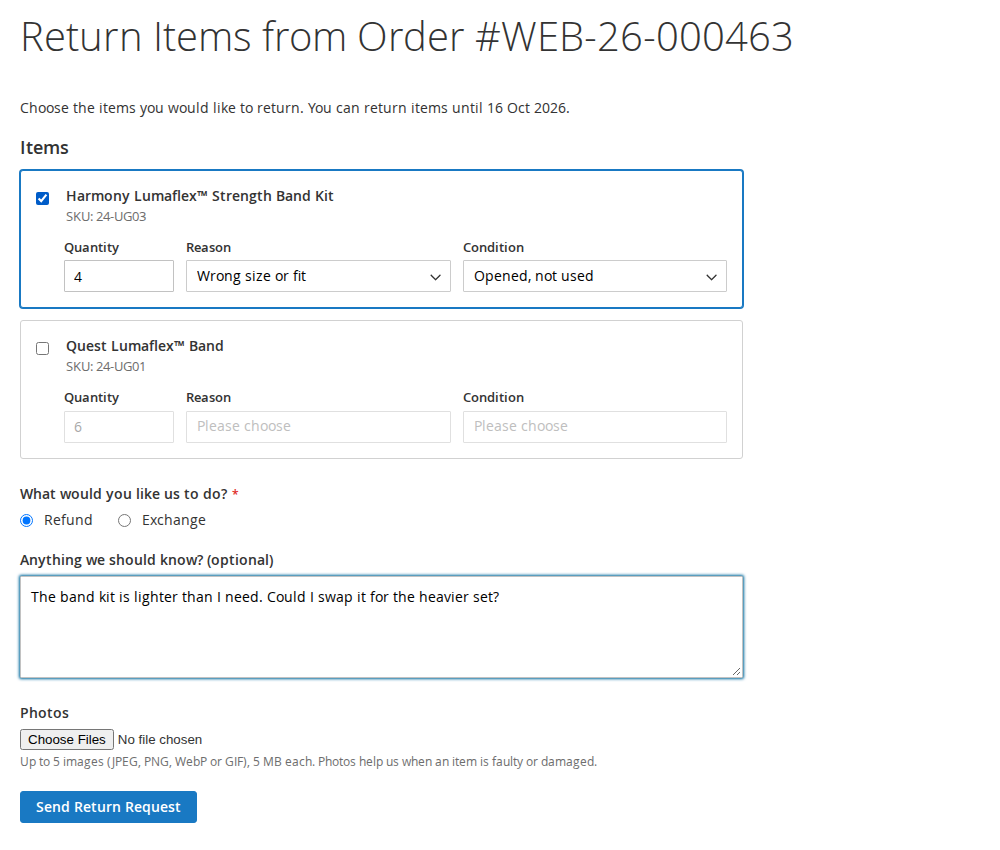
- The return form lists the returnable items with the maximum quantity. For each ticked item the customer sets the quantity, reason and condition, then chooses a resolution, adds an optional comment and photos and, if a policy page is set, accepts the returns policy. Configurable products are returned on the parent line, dynamic bundles per component and fixed bundles as a whole.
- The return page shows the status and what happens next, the return instructions and label download once approved, the customer's photos, a field for the tracking number of the return parcel, and a conversation with your team (messages and files). A pending return can be cancelled if you allow it.
Guests
At /returns/guest the guest enters the order number, email address and billing postcode. The order page then shows what can be returned and any earlier returns, and the guest continues with the same form and return page through signed links. If the order belongs to a customer account, the guest is asked to sign in.
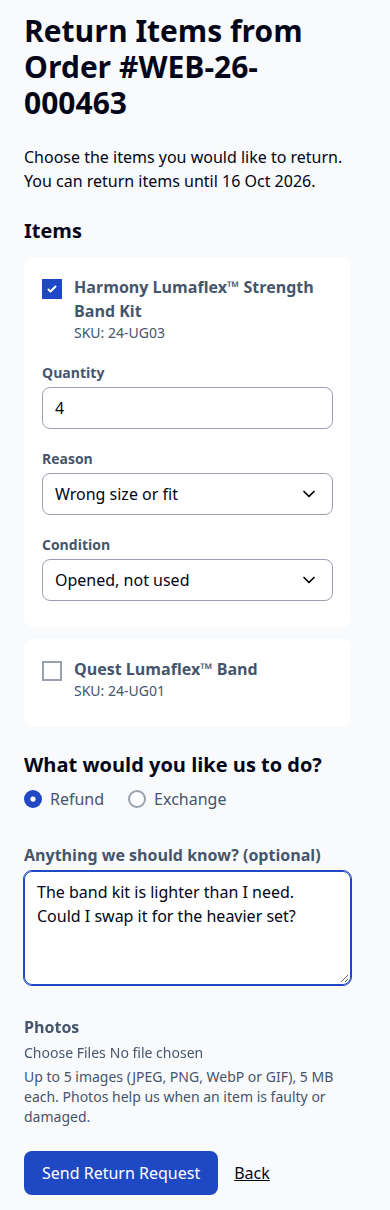
On Hyvä the same pages use the module's Hyvä templates, and they work on phones:
6. Handling returns in the admin
The returns grid
Sales > Returns (also Softaware > Returns & RMA > Returns) lists every return with its order, customer, status, items and resolution. Use the filters, the keyword search and the Change Status mass action. "Updated" and "Store View" are available under Columns.
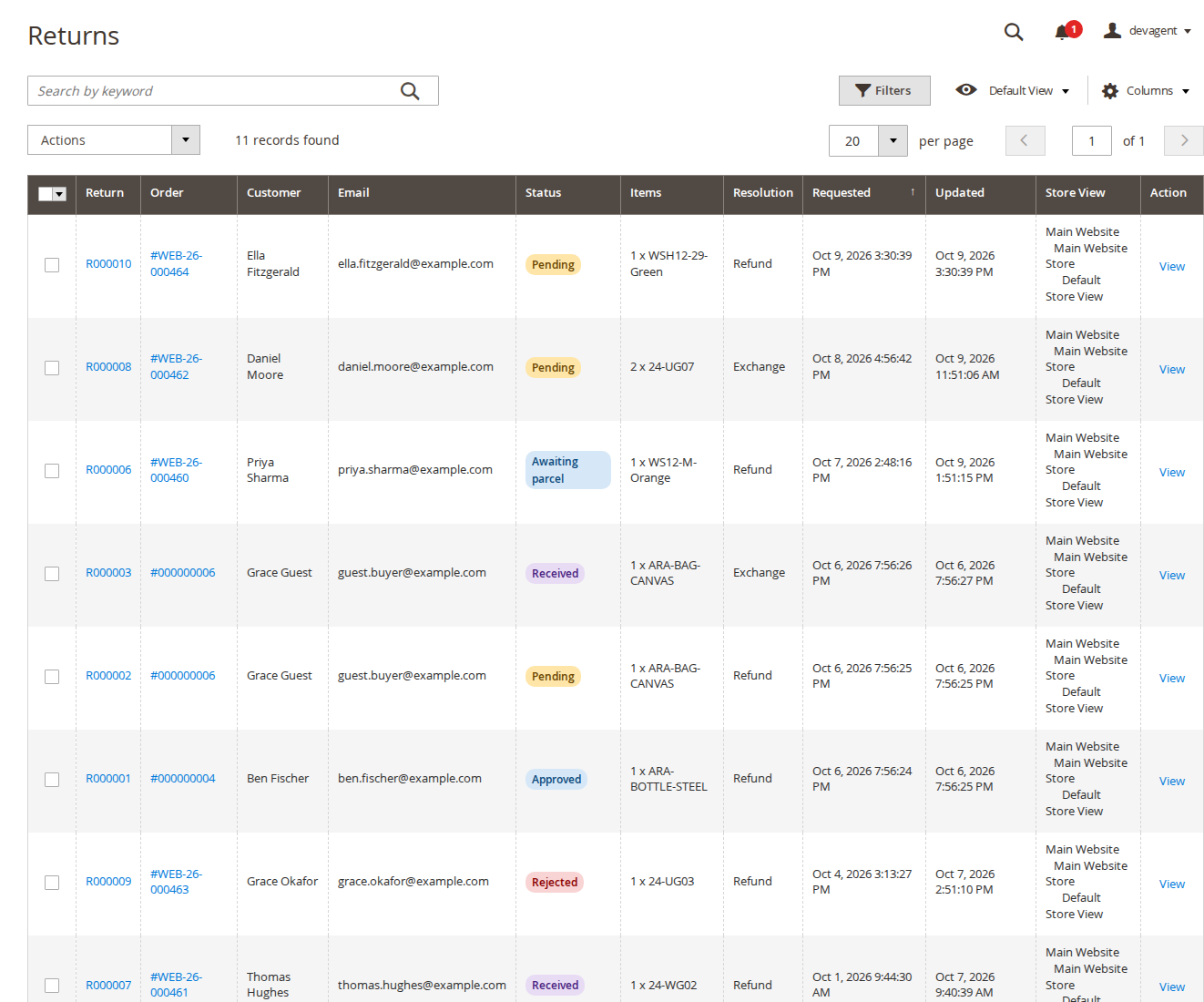
The order page and the customer page also have a Returns tab. Staff can create a return for a customer from the order: Order > Returns > Create Return.
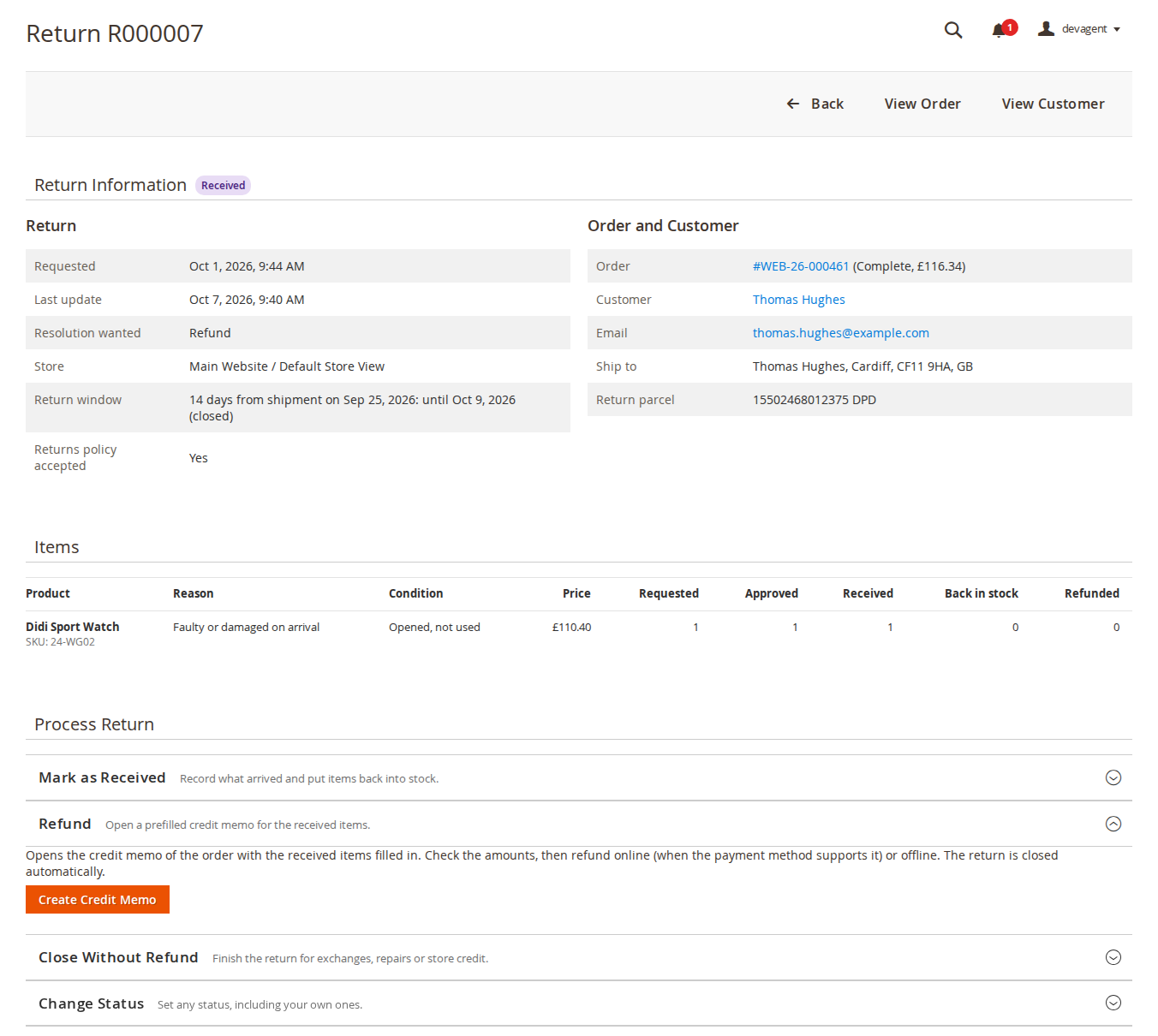
The return page
The page shows the return and order details, the items with requested, approved, received, back-in-stock and refunded quantities, the reasons, conditions and photos, and the Process Return actions:
- Approve Return: set the approved quantity per item, edit the instructions and optionally add a PDF return label. If a carrier integration offers return labels, a "Create: …" button appears for each one.
- Reject Return: give a reason; it is sent to the customer.
- Mark as Received: record the received quantity per item, tick Return to stock where the item can be sold again, and add an optional note (for example the inspection result).
- Refund: Create Credit Memo opens Magento's credit memo with the received items filled in. Check the amounts, then refund online (when the payment method supports it) or offline. When the credit memo is saved, the return is closed automatically and the customer is always sent the Refunded / Closed email (unless customer emails are switched off for the store view).
- Close Without Refund: for exchanges, repairs or store credit handled outside Magento.
- Change Status: any status, including your own ones.
Most actions have an "Email the customer" option. Rejecting and closing without a refund ask for confirmation first.
Conversation and history
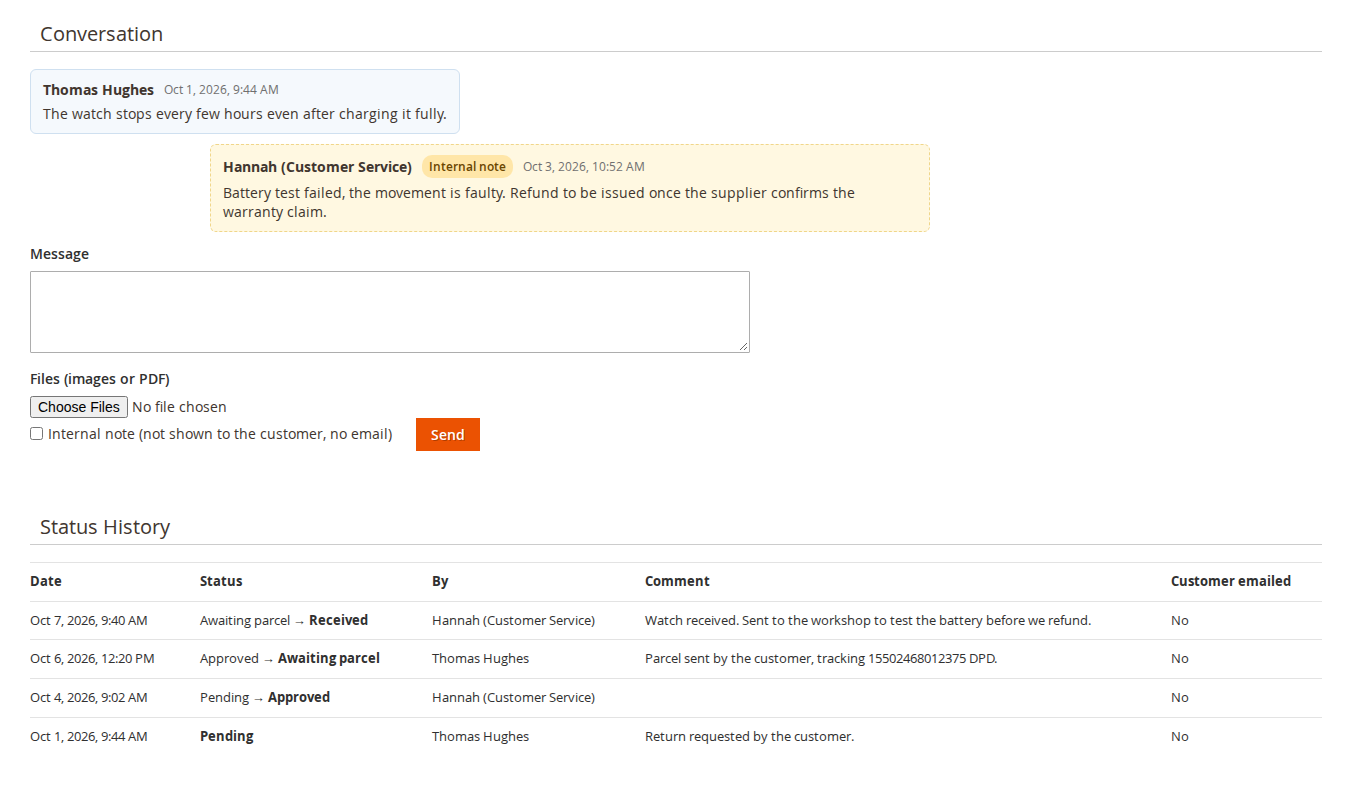
Below the actions, Instructions, Label and Tracking shows what was sent to the customer and lets you edit the instructions, labels, tracking number, carrier and resolution. The Conversation holds messages and files in both directions; tick Internal note for notes that the customer never sees and that send no email. Status History records every change with the date, who made it, the comment and whether the customer was emailed.
Statuses
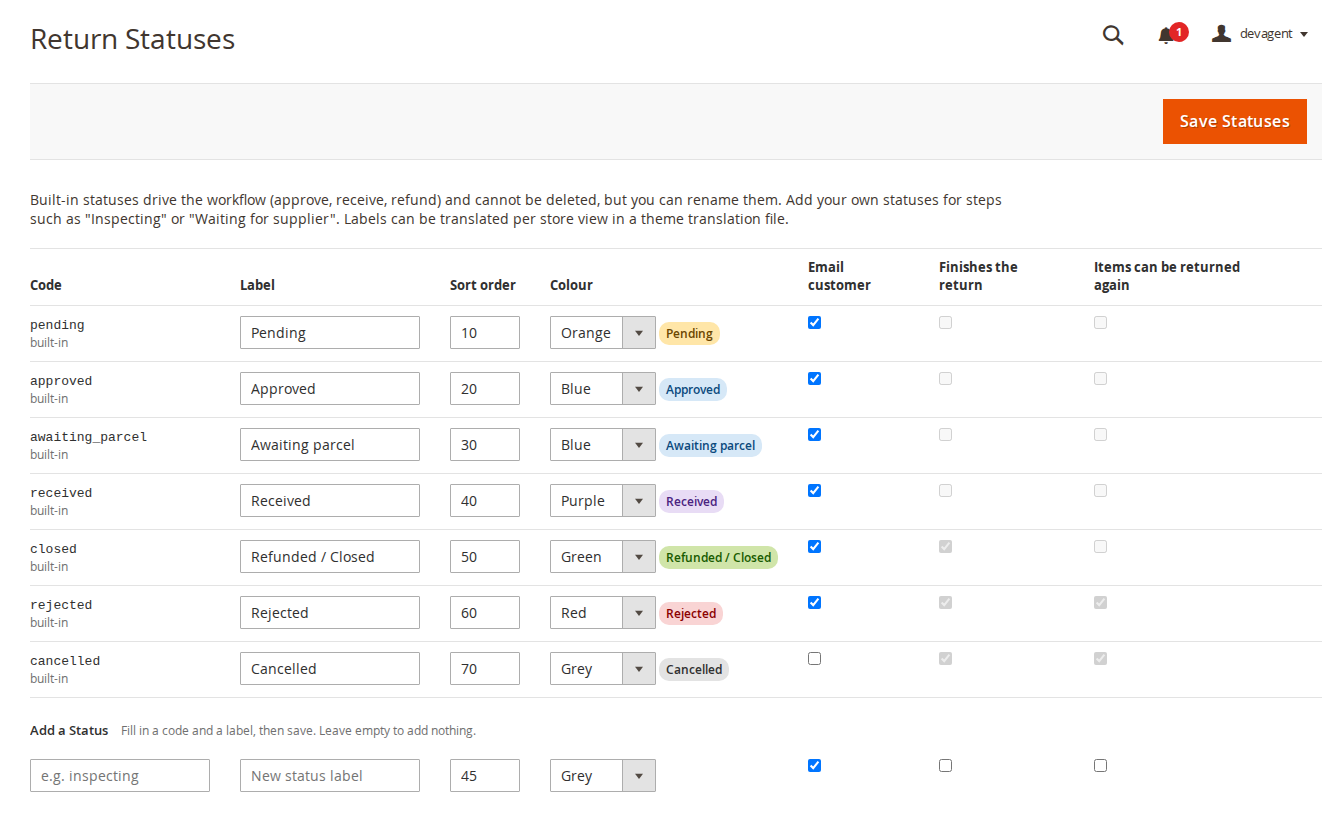
Softaware > Returns & RMA > Statuses lists the built-in statuses (Pending, Approved, Awaiting parcel, Received, Refunded / Closed, Rejected, Cancelled). Rename them, change colour and sort order, or add your own, for example "Inspecting". For your own statuses you decide whether the customer is emailed, whether the status finishes the return and whether the items can be returned again. Built-in statuses cannot be deleted.
Reports
Softaware > Returns & RMA > Reports groups returns by reason, product, month, status, condition or resolution for a period and store view, with the number of returns and items, their value and their share. Rejected and cancelled returns can be included. Export CSV downloads the same table.
Excluding products
- Product edit: Exclude from Returns = Yes.
- Category edit: Exclude Products from Returns = Yes; this also covers products in subcategories.
7. CLI
bin/magento softaware:returns:check-order <order number>
bin/magento softaware:returns:email-preview <return number> <type> [-o file.html]
check-order shows the return window, whether the customer can start a return and the returnable quantity of each line, which answers "why can't my customer return this?". email-preview renders an email without sending it; types are customer_new, staff_new, approved, rejected, received, closed, status, customer_message and staff_message.
8. API and integrations
- REST (admin or integration token, with ACL):
GET /V1/softaware-returns/:returnId,GET /V1/softaware-returns(search criteria),POST /V1/softaware-returns,PUT /V1/softaware-returns/:returnId/status. - GraphQL for signed-in customers:
softawareReturns,softawareReturnableItems(order_number),softawareCreateReturn(input). - Delivery date: observe
softaware_returns_delivery_dateor implementSoftaware\Returns\Api\DeliveryDateProviderInterface, and the window starts on the delivery date. - Return labels:
softaware_returns_label_optionsandsoftaware_returns_label_createlet a carrier module add "Create: …" buttons and store the PDF and tracking number with the return. - Other events:
softaware_returns_return_created,softaware_returns_status_changed,softaware_returns_return_closed.
9. Permissions (ACL)
Under System > Permissions > User Roles > Role Resources: Softaware > Returns & RMA with View Returns, Manage Returns (approve, receive, refund, reply), Return Statuses and Return Reports, and Stores > Settings > Configuration > Softaware Returns & RMA for the settings. A role with View Returns only sees returns without the action panels.
10. Troubleshooting
- The Return Items button is missing. Run
bin/magento softaware:returns:check-order <order number>: it shows whether the window has ended, the order status is not allowed, nothing has shipped yet, everything is already returned or refunded, or the products are excluded. - A guest cannot find the order. The postcode must be the billing postcode, and too many failed attempts block further lookups for an hour. The counters are stored in the Magento cache.
- The consent checkbox does not appear. Select a page in General > Returns Policy Page.
- Photos are refused. Check the file type (JPEG, PNG, WebP or GIF), the size limit and PHP's
upload_max_filesize. - No emails arrive. Check Send Emails to Customers, the staff addresses and that the store can send mail.
- Hyvä pages look unstyled. Rebuild the Hyvä theme CSS after installing or updating.
11. Uninstall
bin/magento module:disable Softaware_Returns
composer remove softaware/module-returns
bin/magento setup:upgrade
bin/magento cache:flush
The module's tables (softaware_return*) and the files in var/softaware_returns stay in place until you remove them; this keeps the return history if you install the module again.
Changelog
Release notes
1.1.2
Latest
docs/listing.json,docs/faq.md,docs/user-guide.mdand screenshots indocs/images/.
- Hyvä: the guest return pages (order lookup, guest order, return form) were squeezed into a narrow column on desktop because they used the theme's two-column default layout. Guest return pages now use the one-column layout on every theme.
1.1.1
- Admin return page: the page actions bar now has Back, View Order and View Customer buttons; the duplicate "Return R…" heading became "Return Information" with the status badge.
- Process Return: the action panels use Magento's collapsible block style (chevron, one-line hint, the next step open) instead of plain boxes.
- Rejecting a return, closing it without a refund and deleting a status now ask for confirmation in a Magento dialog (deleting a status used the browser's own dialog before).
- New return page: Back and Create Return moved to the page actions bar, a short introduction replaces the duplicate order heading, and the item table no longer runs off the page at narrow widths.
- Return Statuses: Save Statuses moved to the page actions bar, the "Add a Status" row is labelled, every input has an accessible label and the form validates before saving.
- Returns grid: shows an explanation and a "Go to Orders" button instead of an empty table when there are no returns yet; "Updated" and "Store View" are hidden by default (available under Columns), so the grid fits at 1024 px.
- Return page: "Instructions, Label and Tracking" separates what was sent (Return Instructions, Return Labels) from the "Edit Details" form; panel titles use title case.
- Return Statuses: the table scrolls inside the page at narrow widths instead of widening the page.
- Reports: a short introduction, and number columns are right-aligned.
- Customer page, Returns tab: a section heading and a hint on how to create a return, like the order tab.
- Settings: the General group opens first, every field explains its default, email template fields are hidden when the matching email is switched off and say when each email is sent, "Staff Email Addresses" is validated, and the menu item is called "Settings" like in the other modules.
1.1.0
- Requires
softaware/module-coreinstead ofsoftaware/module-base. The admin menu and ACL now sit underSoftaware_Core::core("Softaware"); roles that had access keep it (migrated by module-core). After updating all SoftAware modules,softaware/module-basecan be removed.
1.0.0
First release.
- Customer and guest returns on Luma and Hyvä: My Returns, Return Items on the order page and in My Orders, guest lookup (order number, email, billing postcode) with signed, expiring links and a per-IP, per-email and per-order limit.
- Return form with per-item quantity, reason and condition, resolution, comment, photos and returns-policy consent.
- Return window (default 14 days) from the delivery date (integration) or the last shipment/invoice, allowed order statuses, product and category exclusions, quantity limits that respect shipped, refunded and already returned items.
- Admin: Sales > Returns grid with mass status change, return page with approve / reject / receive (return to stock, MSI-aware) / credit memo prefilled from received items ("Return to Stock" ticked only for received items not yet restocked) / close / cancel, conversation with internal notes, status history; order and customer tabs; staff-created returns; status management; reports with CSV export.
- Emails for every step, automatic approval rule (off by default), return labels (upload or carrier integration events).
- REST API (read, create, status change) and GraphQL for customers; CLI
softaware:returns:check-orderandsoftaware:returns:email-preview.
FAQ
Questions, answered
Something else on your mind? The developers who wrote the module answer before and after you buy.
Ask a question →Already installed it? Open a support ticket
Where do customers start a return?
Signed-in customers use My Account > My Returns, the Return Items button on the order page or the Returns column in My Orders. Guests go to /returns/guest and enter their order number, email address and billing postcode. The button and the order page show the last day on which items can be returned.
Can guests return items without creating an account?
Yes, if Allow Guest Returns is on (the default). After a successful lookup the guest gets a signed link that expires after 168 hours by default. Failed lookups are limited per IP address, per email address and per order number (10 per hour by default), so the details of one order cannot be guessed. If the order belongs to a customer account, the guest is asked to sign in instead.
How is the return window calculated?
The window is a number of days (default 14). It starts on the delivery date when a carrier integration provides one; otherwise it starts on the date of the last shipment or, if you choose, the invoice. Staff can still create a return after the window has ended, and the return page says so.
Which items and quantities can be returned?
Only shipped quantities, minus what has been refunded and what is already in an open or finished return. Rejected and cancelled returns free their items again. Products with Exclude from Returns set to Yes, and products in a category (or subcategory) with Exclude Products from Returns, are never offered. You also choose which order statuses allow returns (default Complete and Processing).
Can I change the reasons, conditions and resolutions?
Yes. Each list is a set of codes and labels under Stores > Configuration > Softaware > Returns & RMA > Reasons, Conditions and Resolutions. Labels can be changed and translated per store view; codes are stored with each return and used in reports, so keep them stable. Refund and Exchange are included; you can add your own resolutions.
Can I add my own statuses?
Yes, in Softaware > Returns & RMA > Statuses. Built-in statuses (Pending, Approved, Awaiting parcel, Received, Refunded / Closed, Rejected, Cancelled) drive the workflow and cannot be deleted, but you can rename them and change their colour and sort order. Your own statuses, for example "Inspecting", can email the customer or not, finish the return or not, and free the items or not.
How does the refund work?
Once the items are received, Create Credit Memo opens Magento's own credit memo with the received items filled in (shipping is not refunded unless you change the setting). You check the amounts and refund online, when the payment method supports it, or offline. When the credit memo is saved, the return closes itself and remembers the refunded quantities. Items you already put back into stock on receipt are not returned to stock a second time.
Is the customer told when the refund is done?
Yes, always. Saving the credit memo for a return sends the customer the Refunded / Closed email; there is no switch to skip it for a single refund. The only thing that stops it is turning Send Emails to Customers off for the store view, which stops all customer emails of the module. Other staff actions (approve, reject, receive, close, change status, reply) have an "Email the customer" option on the return page.
What about exchanges and store credit?
Use Close Without Refund when the return was settled another way, for example an exchange or a repair. The module does not create exchange orders or store credit itself; the softaware_returns_return_closed event carries the resolution code, so an exchange or store credit extension can act on it.
Do returned items go back into stock?
When you mark items as received you can tick Return to stock per item (on by default). With Magento Inventory (MSI) the stock goes back to the source the order was shipped from, or to a source you set; without MSI it goes back to the default stock.
Can returns be approved automatically?
Yes, with Automatic Approval (off by default): a return is approved straight away when every item has one of the reasons you choose and the order total is not above your limit.
Can customers send photos?
Yes. By default up to 5 photos of 5 MB each (JPEG, PNG, WebP or GIF), and you can make a photo required. Uploads are checked by extension, real file type and file signature, stored outside the web root and shown only to the customer and to staff with access.
Does it work with Hyvä?
Yes. Hyvä templates are included and picked automatically; the module registers itself for Tailwind source scanning, so rebuild your theme CSS after installing. Luma, Blank and their child themes work out of the box.
Is there an API?
REST endpoints (admin and integration tokens) read, search and create returns and change their status. GraphQL lets signed-in customers list their returns, see the returnable items of an order and create a return.
Does it replace Adobe Commerce's own returns?
It is a separate module with its own tables and pages. On Adobe Commerce, which has its own returns feature, use one of the two workflows so customers see one way to return items.
Support