Request a Quote
Shoppers ask for a price from the product page or the cart, you reply with a proposal from the admin, and the agreed prices go into their cart, locked. Quick order and hidden prices included.
- Magento 2.4.7 – 2.4.9
- PHP 8.2 – 8.5
- Version 1.2.3
One-off payment, with 12 months of updates.
What is included
- 12 months of new versions and fixes; the versions released in that time stay yours
- Install with Composer, or download a zip from your account
- Licence for one production domain, staging and development copies included
- 30-day money-back guarantee, refund policy
No subscription or automatic renewal. Keep using the versions included in your update period. Update and licence details
Key features
- "Add to Quote" on product pages, lists and the cart
- Guests and chosen customer groups
- Admin proposals with per-line prices and a valid-until date
Composer package softaware/module-request-quote
-
Win bulk and trade orders
Schools, clubs and businesses ask for a price on the quantities they need instead of leaving the shop to send an email.
-
The agreed price, in the cart
Accepting a proposal adds every line at the agreed price and quantity. Customers check out as usual; the order links back to the quote.
-
Prices that cannot be bent
Quantities and prices of quoted lines are checked again before every totals run, in the cart, REST and GraphQL, and stop applying when the quote expires.
All features
What is included
Storefront
- "Add to Quote" on the product page, optionally on category and search lists
- "Request a Quote for This Cart" moves the cart lines into a quote
- Quote basket with quantities, contact details and a comment
- Header link with the number of products in the quote
- Luma and Hyvä templates included
Proposals and workflow
- Proposed unit price per line or a discount on all lines
- Valid-until date, 14 days by default
- Messages both ways and internal notes
- Statuses: New, Proposal Sent, Accepted, Ordered, Rejected, Expired, Cancelled
- Reopen a closed request with a new proposal
Cart and order
- Accepted lines added at the agreed price and quantity
- Quote reference on the cart line, order and emails
- No further cart price rule discounts on quoted lines
- Request marked Ordered and linked to the order
- Dynamic bundles supported
Quick order and hidden prices
- Quick order page with SKU suggestions, pasted lists and CSV upload
- Stock, price and option check before adding
- Hide prices and "Add to Cart" for chosen customer groups
- All products, or flagged products and chosen categories
- Hidden products blocked from the cart on the server, REST and GraphQL included
Feature tour
Everything your shoppers and your team see
01 / 06
"Add to Quote" next to "Add to Cart"
Works for every product type the cart supports and keeps the chosen options and quantity. Optional on category and search lists, and "Request a Quote for This Cart" in the shopping cart.
02 / 06
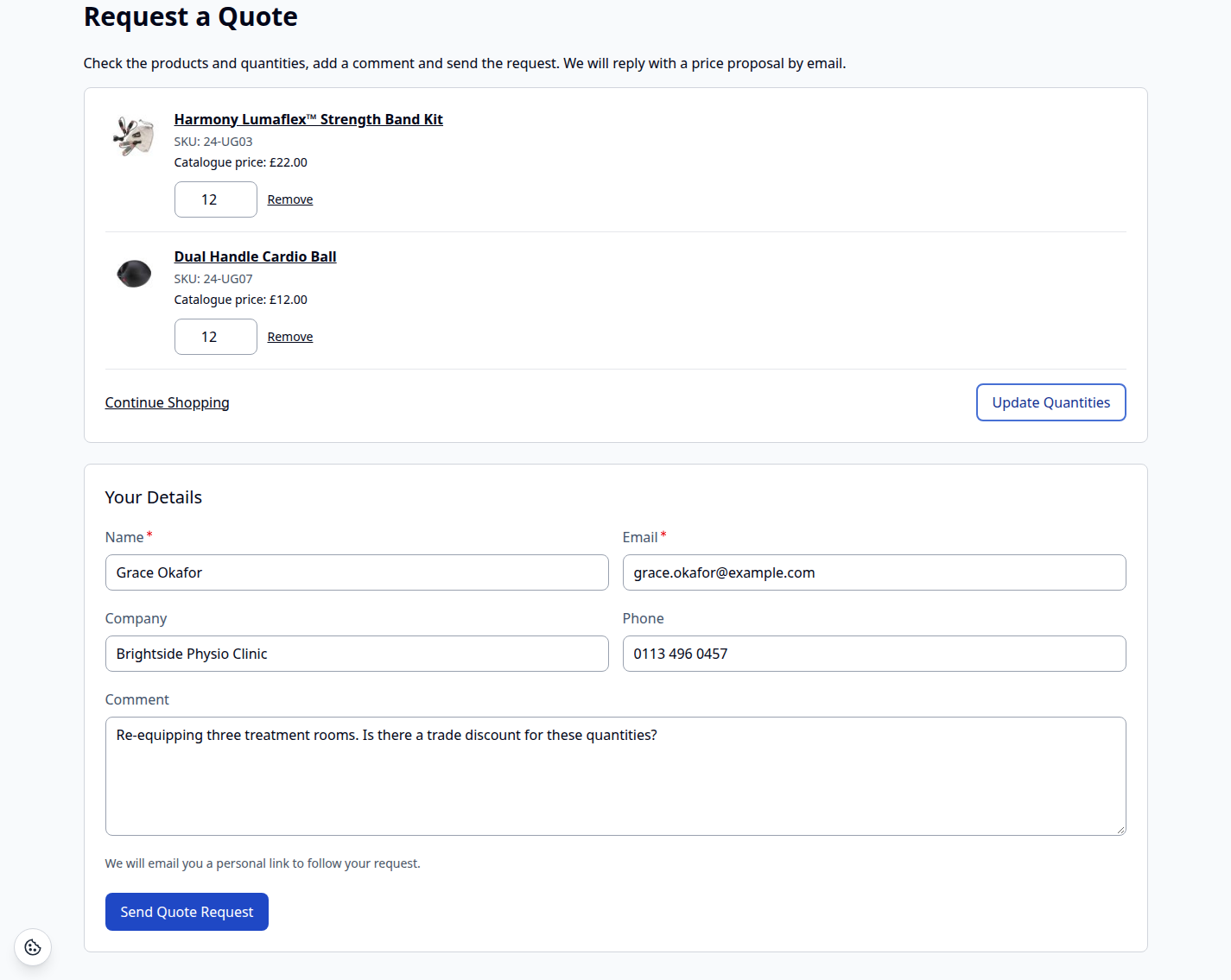
Check the quantities, add a comment, send
The quote basket shows the catalogue prices for reference. Guests give their name and email address and get a personal link to follow the request. Shown here on Hyvä.
03 / 06
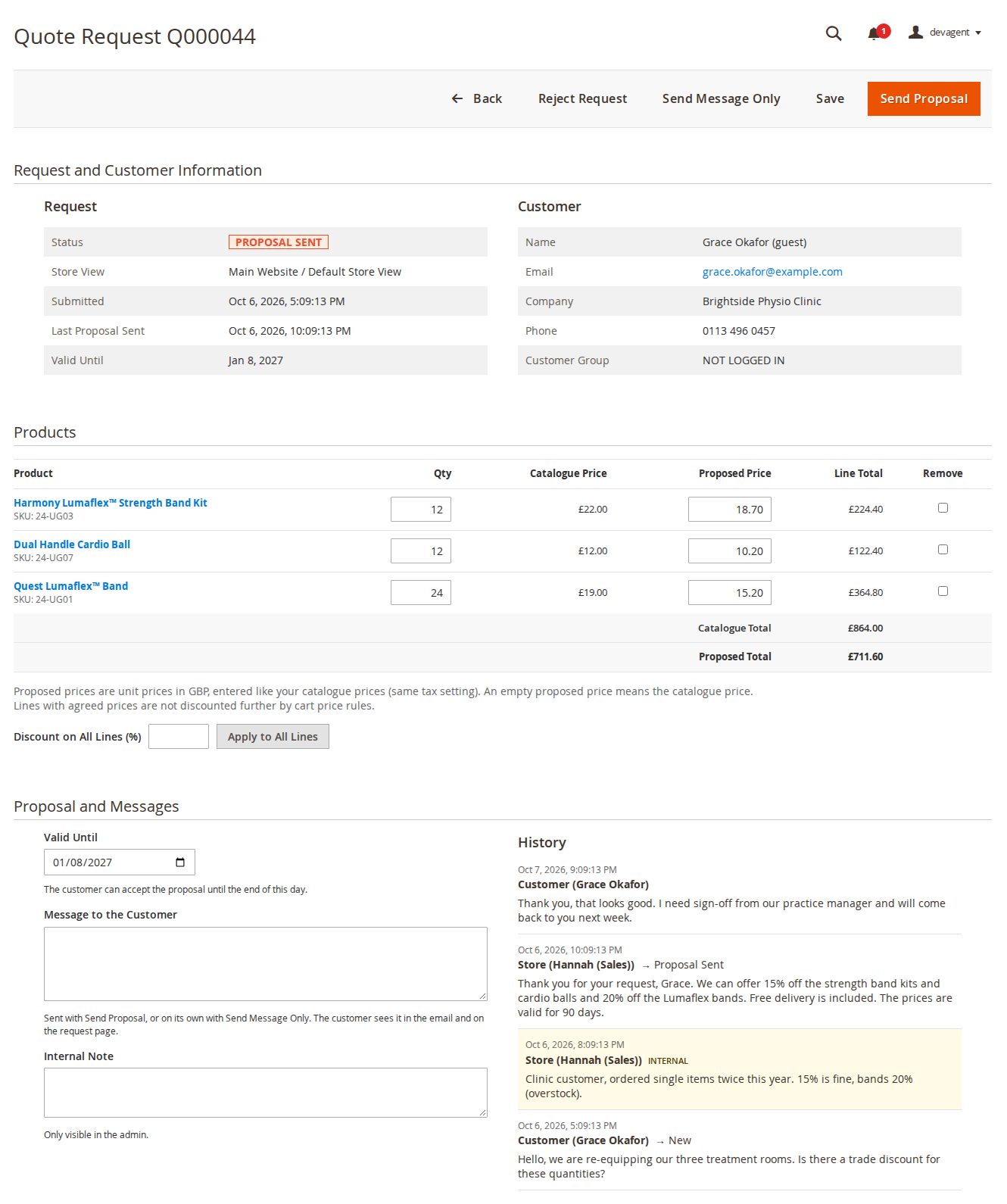
Price every line, then send the proposal
Change quantities, enter proposed unit prices or a discount on all lines, set the valid-until date and write to the customer. Internal notes stay in the admin.
04 / 06
Accept and add to cart in one click
Customers see the proposed prices and the valid-until date under My Quote Requests. They accept, reject or send a message; guests do the same from their emailed link.
05 / 06
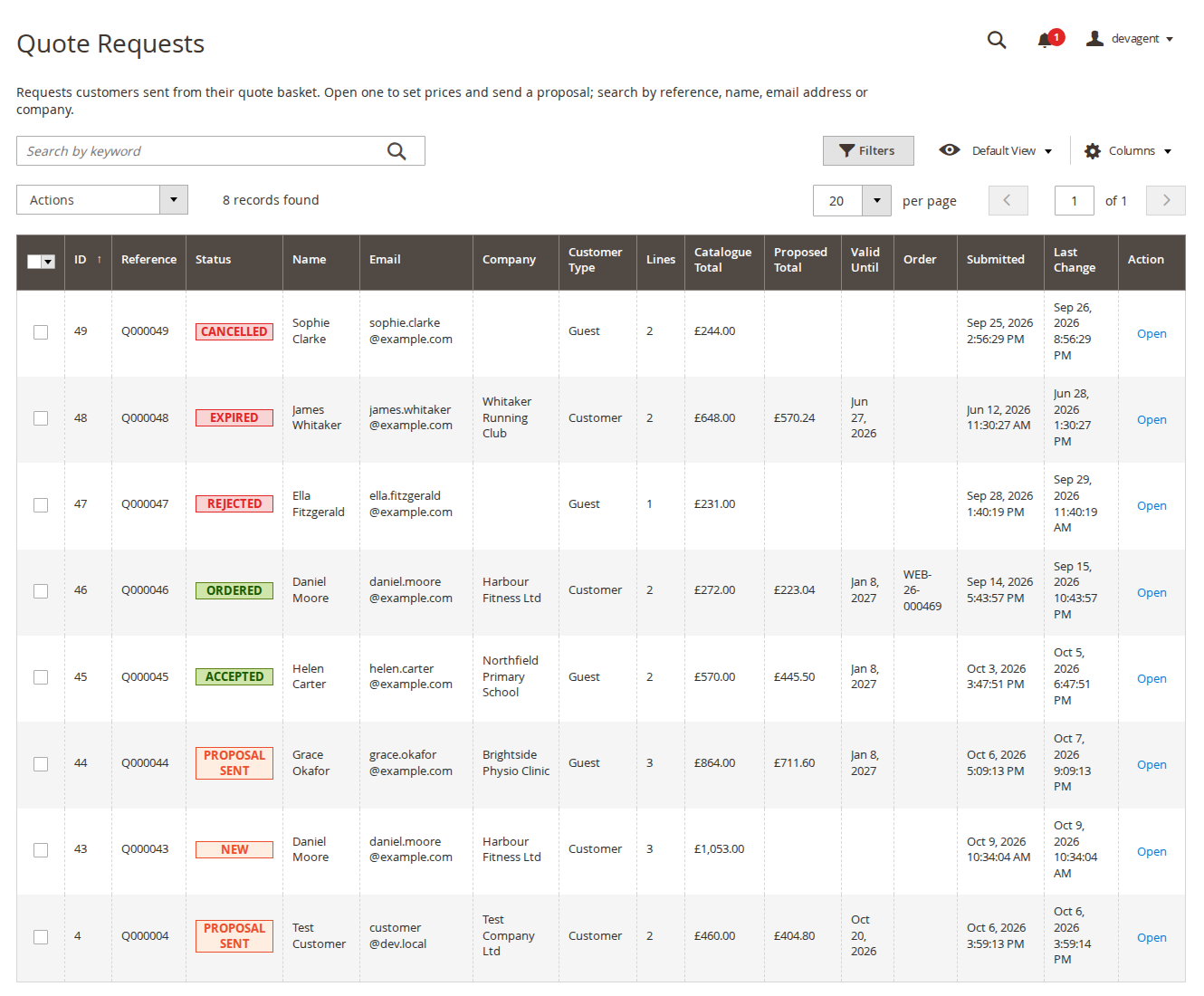
Every request and its status at a glance
Colour status badges, proposed totals, valid-until dates and linked orders. Search by reference, name, email address or company.
06 / 06
Order by SKU, on any screen
Type SKUs with suggestions, paste a list or upload a CSV file. "Check" shows stock, prices and missing options before the products go into the cart or a quote.
Live demo
Try it before you install it
A full Magento store with the module installed, on Luma and on Hyvä. The admin demo signs you in with one click.
Compatibility
Requirements and compatibility
| Magento | 2.4.7 – 2.4.9 |
|---|---|
| PHP | 8.2 – 8.5 |
| Latest version | 1.2.3 |
| composer.json requires | php ~8.2.0||~8.3.0||~8.4.0||~8.5.0 magento/framework ~103.0.7 softaware/module-core ^1.0 magento/module-backend * magento/module-catalog * magento/module-checkout * magento/module-config * magento/module-configurable-product * magento/module-customer * magento/module-directory * magento/module-eav * magento/module-email * magento/module-quote * magento/module-sales * magento/module-sales-rule * magento/module-store * magento/module-ui * |
Installation
Up and running in minutes
After you buy, create a Composer key in your account. Then, in the root of your Magento project:
-
01Add the repository and your key (once per project)
composer config repositories.softaware composer https://repo.softawarecommerce.com
composer config --auth http-basic.repo.softawarecommerce.com PUBLIC_KEY PRIVATE_KEY
-
02Install the module
composer require softaware/module-request-quote -
03Enable it
bin/magento setup:upgrade
bin/magento setup:di:compile
bin/magento setup:static-content:deploy
bin/magento cache:flush
The last three are only needed in production mode.
Prefer a zip? Every version you are entitled to can be downloaded from My modules. More about Composer access
User guide
How to set up and use Request a Quote
For version 1.2.3. The same guide comes with the module, in docs/user-guide.md.
Let shoppers ask for a price instead of leaving your shop: they collect products in a quote basket, you reply with a proposal from the admin, and the agreed prices go into their cart. The module also adds a Quick Order page and optional hidden prices for chosen customer groups. This guide covers installation, configuration and day-to-day use.
- Demo (Luma): https://demo.softawarecommerce.com/joust-duffle-bag.html
- Demo (Hyvä): https://demo.softawarecommerce.com/hyva/joust-duffle-bag.html
- Quick order demo: https://demo.softawarecommerce.com/hyva/quickorder/
- Admin demo: https://demo.softawarecommerce.com/try-admin/request-quote (seven example requests, one per status)
- Changelog: Release notes · Questions: FAQ
1. Requirements
| Magento | Open Source or Adobe Commerce 2.4.7 to 2.4.9 |
| PHP | 8.2 to 8.5 |
| Themes | Luma, Blank and themes based on them; Hyvä 1.3+ (the checkout uses the Luma fallback on Hyvä) |
| Other | softaware/module-core (installed automatically) |
2. Installation
Install with Composer from repo.softawarecommerce.com. The access keys are in your account on softawarecommerce.com; see Composer access for details.
composer config repositories.softaware composer https://repo.softawarecommerce.com
composer config --auth http-basic.repo.softawarecommerce.com PUBLIC_KEY PRIVATE_KEY
composer require softaware/module-request-quote
bin/magento setup:upgrade
bin/magento setup:di:compile            # production mode only
bin/magento setup:static-content:deploy # production mode only
bin/magento cache:flush
On Hyvä the module registers itself for Tailwind source scanning. If you build your theme's CSS yourself, run your usual Hyvä build after installing so the module's classes are included.
To update later: composer update softaware/module-request-quote, then the same bin/magento commands.
The module works straight after installation: quote requests and Quick Order are on for everyone (guests included), Hide Prices is off. Make sure Magento's cron runs, because proposals expire by cron.
3. Settings
Stores > Configuration > Softaware > Request a Quote, also under Softaware > Request a Quote > Settings. Every setting can be set per website and store view.
General
| Setting | What it does |
|---|---|
| Enabled | Switches off quote requests, Quick Order and hidden prices together. Default: Yes. |
Quote Requests
| Setting | What it does |
|---|---|
| Enable Quote Requests | Customers can collect products in a quote basket and ask for a price. Default: Yes. |
| Customer Groups | Who can request a quote. Empty means everyone, guests included. Default: empty. |
| Show Quote Buttons On | Product page ("Add to Quote"), category and search lists ("Add to Quote"), shopping cart ("Request a Quote for This Cart"). Default: product page and shopping cart. Products with a hidden price always get a "Request a Quote" button. |
| Proposals Valid For (Days) | Sets the valid-until date of a new proposal (1 to 365 days); you can change it on each request. Default: 14. |
| Requests per Hour per IP Address | Spam protection: quote requests one visitor can send per hour. 0 means no limit. Default: 5. |
Emails
| Setting | What it does |
|---|---|
| Send Store Notifications To | Email addresses separated by commas. Empty means the General Contact address. |
| Email Sender | The store email identity the emails are sent from. Default: General Contact. |
| New Request (to the Store) | Template for a new request. |
| Customer Accepted, Rejected or Replied (to the Store) | Template for customer updates. |
| Request Received (to the Customer) | Confirmation to the customer. |
| Proposal or Message (to the Customer) | Proposal, message or rejection from the store. |
To change the wording, create a template from the module's template under Marketing > Email Templates and select it here. Replies go to the other side (Reply-To).
Hide Prices
| Setting | What it does |
|---|---|
| Enable Hide Prices | Turn on to hide prices and "Add to Cart". Default: No. |
| For Customer Groups | Customers in these groups see no prices. Default: NOT LOGGED IN (guests). |
| Apply To | All products, or only products with "Hide Price" = Yes and products in the categories below. Default: All products. |
| Categories | Shown for "selected" products. Subcategories are included. |
| Text Instead of the Price | Shown where the price would be; links to the sign-in page for guests. Empty means no text. Default: "Log in to see prices". |
| Show "Request a Quote" Instead of "Add to Cart" | Only for customer groups that can request a quote. Default: Yes. |
Single products are flagged with the product attribute Hide Price (Yes/No, website scope, group Product Details). Saving these settings refreshes the page and block caches.
Quick Order
| Setting | What it does |
|---|---|
| Enable Quick Order | The page /quickorder. Default: Yes. |
| Customer Groups | Who can use Quick Order. Empty means everyone, guests included. Default: empty. |
| Show Links | "Quick Order" links in the header and in My Account. Default: Yes. |
4. How customers request a quote
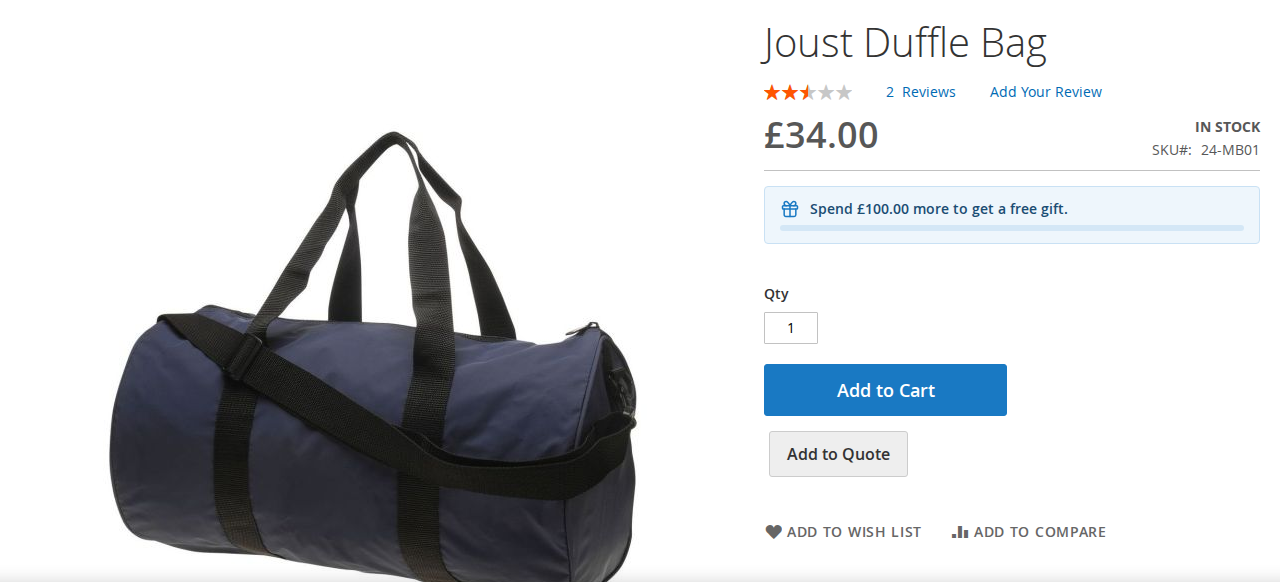
- On the product page the customer chooses options and a quantity and clicks Add to Quote. If you enabled it, the button is also on category and search lists. In the cart, Request a Quote for This Cart moves the cart lines into the quote (Softaware Free Gift lines and lines from an accepted quote stay in the cart).
- The header shows the number of products in the quote (Luma top links, Hyvä header icon).
- The quote basket (
/requestquote/basket) lists the products with their catalogue prices for reference. The customer changes quantities, removes lines, fills in name, email, company and phone, adds a comment and clicks Send Quote Request. Quantities above the stock level are allowed; stock is checked when the customer accepts. - The customer gets a confirmation email and the store gets a notification. Guests receive a personal link to follow the request.
5. Working on requests in the admin
Quote Requests grid
Softaware > Request a Quote > Quote Requests lists the requests with reference (Q000044), status badge, name, email, company, proposed total, valid-until date, linked order and submitted date. More columns (ID, customer or guest, store view, lines, catalogue total, last change) are under Columns. Search by reference, name, email address or company; filter by any column; delete with the mass action (lines and history are deleted, orders are not affected).
Request page
Open a request to see the request and customer details, the lines and the history.
- Lines: change the quantity, enter a proposed unit price or tick Remove. An empty proposed price means the catalogue price. Discount on All Lines (%) with Apply to All Lines fills every line at once.
- Valid Until: the customer can accept until the end of this day.
- Message to the Customer: sent with Send Proposal, or on its own with Send Message Only.
- Internal Note: only visible in the admin; it appears in the history marked as internal.
The page actions bar has Back, Reject Request (asks for confirmation), Send Message Only, Save and Send Proposal. Proposed prices are unit prices in the website's base currency, entered like your catalogue prices (same "prices include tax" setting).
Statuses
| Status | Meaning |
|---|---|
| New | Sent by the customer, waiting for your proposal. |
| Proposal Sent | You sent prices; the customer can accept until the valid-until date. |
| Accepted | The customer accepted; the lines are in their cart at the agreed prices. The lines are read-only; send a new proposal to change them. |
| Ordered | The customer placed the order; the request links to it. |
| Rejected | Rejected by the store (New or Proposal Sent only) or by the customer (also after accepting, until they order). |
| Expired | The valid-until date passed (checked hourly). |
| Cancelled | The customer cancelled before receiving a proposal. |
Rejected, Expired and Cancelled requests can be reopened on purpose: the button then reads Reopen and Send Proposal and asks for confirmation, for example to offer a better price after a rejection. Ordered requests cannot get a new proposal.
6. Accepting a proposal and the cart
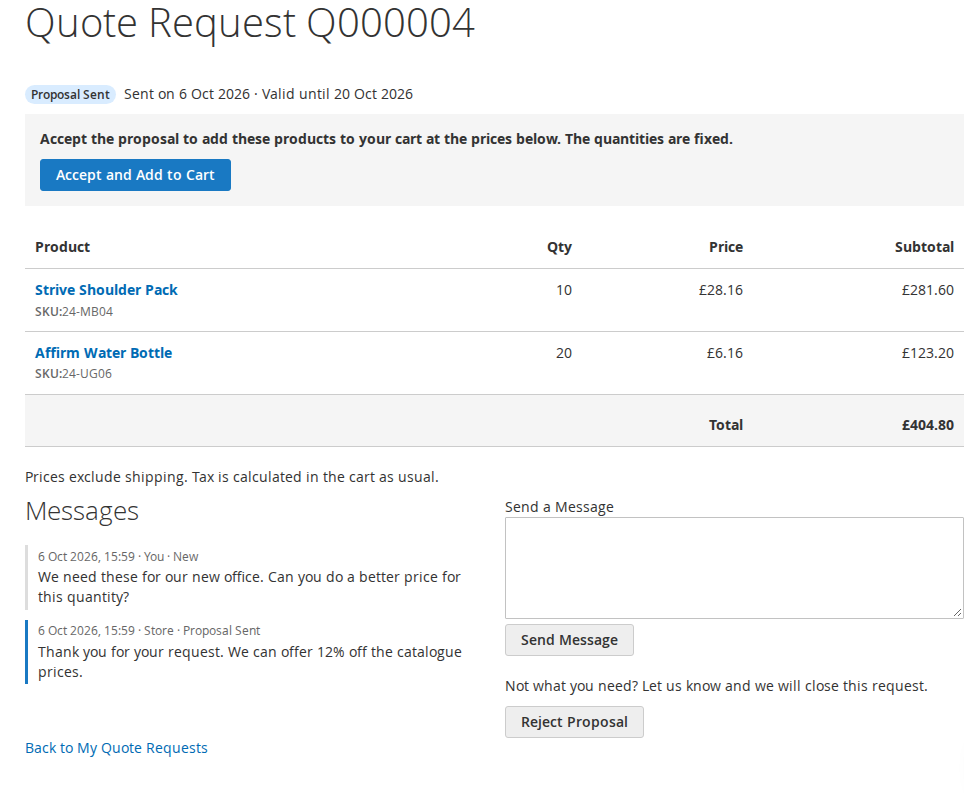
Customers find their requests under My Account > My Quote Requests; guests open the link from their email. The request page shows the proposed prices, the valid-until date and the messages, with Accept and Add to Cart, Reject Proposal, Cancel Request (before a proposal) and Send a Message.
Accepting adds every line to the cart with the agreed unit price and quantity:
- The line shows the quote reference, for example "Quote: Q000012 (agreed price, fixed quantity)", in the cart, checkout, order and emails.
- The quantity and price cannot be changed. The quantity is set back before every totals calculation (cart, mini cart, REST and GraphQL) with a notice in the cart. Only one cart line per quote line gets the agreed price.
- Removing lines is fine. Add to Cart Again puts missing lines back without duplicates.
- Agreed prices are not discounted further by cart price rules. Bundles with dynamic prices are supported: the agreed price is spread over the bundle's items.
- A guest cart merged at sign-in keeps the prices.
- The agreed price applies only while the request is Accepted and not expired. Otherwise the line falls back to the normal price.
When the order is placed, the request becomes Ordered, is linked to the order, and the order gets the internal comment "Prices from quote request Q000012".
7. Quick Order
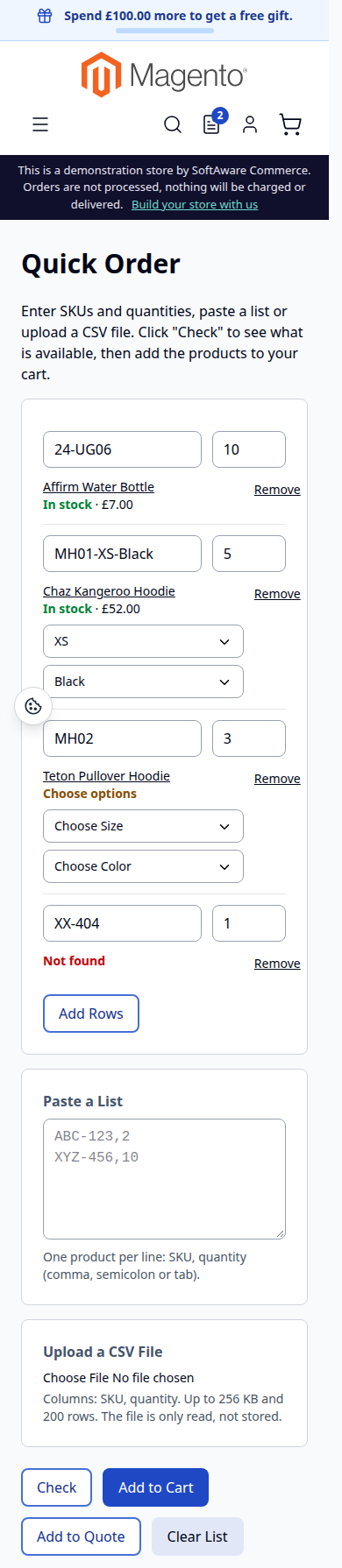
The page /quickorder (links in the header and My Account) lets customers:
- type SKUs and quantities in rows, with suggestions by SKU or name from 3 characters (up to 10 products visible in the store), and add more rows with Add Rows;
- paste a list with one
SKU,qtyper line (comma, semicolon or tab); - upload a CSV file (columns SKU and quantity, up to 256 KB and 200 rows; the file is only read, not stored).
Check shows each row as in stock, out of stock, not found or "Choose options" (with drop-downs for configurable products; the SKU of a configurable product's child is turned into the parent with its options), with the product name and price. Add to Cart or Add to Quote then adds the rows; rows that could not be added stay on the page with the reason.
8. Hidden prices
With Hide Prices on, customers in the chosen groups see no prices and no "Add to Cart" on category and search lists, the product page, widgets, related and up-sell products, compare and the wish list. They see the text you set (for guests linked to the sign-in page) and a "Request a Quote" button on the product page when their group may request quotes. Hidden products cannot be added to the cart from the storefront, wish list, Quick Order, REST or GraphQL; accepted quote lines are the exception. GraphQL price fields are empty for those groups and the Open Graph price tag is left out.
Other extensions that print prices themselves (structured data, analytics data layers) should skip the price when the product's can_show_price flag is false.
9. CLI commands
# Render an email without sending it
bin/magento softaware:request-quote:email-preview --request=<id> --type=<admin_new|admin_update|customer_received|customer_update> [--message=...] [-o file.html]

# Expire proposals past their valid-until date (also runs hourly by cron)
bin/magento softaware:request-quote:expire

# Create one example request in status "Proposal Sent" (no emails)
bin/magento softaware:request-quote:seed-demo [--store=1] [--email=...] [--name=...] [--skus="SKU:qty,..."] [--discount=12]
Cron jobs (group default): softaware_rfq_expire (hourly) and softaware_rfq_clean_baskets (daily; removes quote baskets that were never sent and untouched for 30 days).
10. Permissions (ACL)
Under System > Permissions > User Roles > Role Resources:
| Resource | Allows |
|---|---|
| Softaware > Request a Quote > View Quote Requests | Open the grid and request pages (read only). |
| ... > Edit, Send Proposals and Delete | Change lines, send proposals and messages, reject, delete. |
| Stores > Settings > Configuration > Softaware Request a Quote | The settings section. |
11. Troubleshooting
- No "Add to Quote" button: check General > Enabled, Enable Quote Requests, Show Quote Buttons On and the customer's group. Buttons follow the product's saleable state, so out-of-stock products do not show one.
- Proposals never expire: Magento's cron is not running. Run
bin/magento softaware:request-quote:expireonce and set up cron. - "You have sent several quote requests in a short time": the per-IP limit was reached. Behind a proxy or CDN, configure Magento's real-IP header so visitors are not counted as one address.
- No emails arrive: check Send Store Notifications To and the email sender, and preview the email with
softaware:request-quote:email-preview. - Hyvä buttons unstyled: rebuild your theme's Tailwind CSS.
- Prices still visible after enabling Hide Prices: flush the full page cache once; other extensions printing prices need to respect
can_show_price.
12. Uninstall
bin/magento module:disable Softaware_RequestQuote
composer remove softaware/module-request-quote
bin/magento setup:upgrade
bin/magento cache:flush
The tables softaware_rfq_request, softaware_rfq_request_item and softaware_rfq_history and the product attribute softaware_hide_price stay in the database; remove them yourself if you no longer need the data.
Changelog
Release notes
1.2.3
Latest
docs/listing.json,docs/faq.md,docs/user-guide.mdand screenshots indocs/images/.
1.2.2
Fixed
- README: the module requires
softaware/module-core^1.0 (the README said ^1.2; composer.json was right).
1.2.1
- An accepted quote request can no longer be rejected by the store: the request page no longer offers Reject Request, and the service layer (
Workflow::adminReject()) refuses it too, so a forged or stale form post cannot either. Reject is offered for New and Proposal Sent only. The customer can still withdraw an accepted quote. - Sending a proposal for a rejected, expired or cancelled request is a deliberate reopen; the button now says *Reopen and Send Proposal* and asks for confirmation. The rule lives in
Workflow::canSendProposal()/isReopen(), used by the page and the service.
1.2.0
- Quote Requests grid: keyword search by reference (Q000004 or 4), name, email address or company.
- Quote Requests grid: status shown as Magento status badges (New and Proposal Sent orange, Accepted and Ordered green, Rejected, Expired and Cancelled red), a one-line introduction, an explanation with a link to the settings instead of an empty table, and fewer default columns (ID, customer type, store view, lines, catalogue total and last change are under Columns); long email addresses wrap so the grid fits at 1024 px.
- Request page: Back, Reject Request, Send Message Only, Save and Send Proposal moved to Magento's page actions bar (stays visible while scrolling); Reject Request asks for confirmation in an admin dialog. The status badge sits in a "Request and Customer Information" section, totals and number columns are right-aligned, the history shows date, author and status change as a clean list, and the valid-until date field explains when it ends.
- Settings: General opens first, every field has "Use system value" and a comment with its default, the email field checks the addresses, the number fields are validated, multiselects are only as tall as their options, the Hide Prices switch is called "Enable Hide Prices", and the menu item is called "Settings".
- Status label "Proposal sent" is now "Proposal Sent" (admin and storefront).
1.1.1
- etc/di.xml declared Softaware\RequestQuote\Model\HidePrice twice, which is invalid against Magento's di.xsd (no change in behaviour).
1.1.0
- Requires
softaware/module-coreinstead ofsoftaware/module-base. The admin menu and ACL now sit underSoftaware_Core::core("Softaware"); roles that had access keep it (migrated by module-core). After updating all SoftAware modules,softaware/module-basecan be removed.
1.0.0
- Quote basket: "Add to Quote" on the product page (all product types, options kept), optional "Add to Quote" on category and search lists, "Request a Quote for This Cart" in the cart (free gift lines and accepted quote lines stay in the cart). Guests and/or chosen customer groups; contact details and comment; header quote count.
- Admin: Softaware > Request a Quote > Quote Requests grid and request page (quantities, proposed unit prices, % discount on all lines, valid-until date, customer message, internal note, send proposal / message / reject, history log). ACL for viewing and for managing.
- My Account > My Quote Requests and signed, expiring guest links: accept, reject, cancel, reply.
- Accepted quotes go into the cart with the agreed price and quantity locked (re-applied on every totals collection, one priced line per quote line, no further cart rule discounts, dynamic bundles supported); order link and "Ordered" status; proposals expire after their valid-until date (hourly cron).
- Emails to the store (new request, customer update) and the customer (request received, proposal or message).
- Quick order page (/quickorder): SKU rows with suggestions, pasted lists, CSV upload (read in memory), check step with stock and options, child SKUs of configurable products, add to cart or quote; per customer group.
- Hide price for chosen customer groups (all products, or "Hide Price" products and chosen categories): price boxes, Hyvä product page, Open Graph price and GraphQL prices hidden; "Log in to see prices" text and a "Request a Quote" button instead of "Add to Cart"; adding those products to the cart blocked on the server (storefront, REST, GraphQL).
- Per-IP limits for quote submissions and SKU suggestions; honeypot field.
- CLI:
softaware:request-quote:email-preview,softaware:request-quote:expire,softaware:request-quote:seed-demo.
FAQ
Questions, answered
Something else on your mind? The developers who wrote the module answer before and after you buy.
Ask a question →Already installed it? Open a support ticket
Can guests request a quote?
Yes, unless you limit quote requests to chosen customer groups. Guests give their name and email address in the quote basket. They get a personal link by email to see the proposal, accept it, reject it or reply. A new link is sent with every email and older links stop working; links are valid for 90 days.
Which products can be added to a quote?
Every product type the cart supports, with the options the customer chose on the product page (sizes, colours, bundle selections). Products with a file upload option cannot be quoted; those show a message instead.
How does the customer pay the agreed price?
When the customer accepts the proposal, every line goes into the cart with the agreed unit price and quantity. They check out as usual with any payment and shipping method. When the order is placed the request becomes "Ordered", is linked to the order, and the order gets an internal comment with the quote reference.
Can the customer change the quantity or get the agreed price twice?
No. The quantity of a quoted line is set back before every totals calculation (cart, mini cart, REST and GraphQL) with a notice in the cart, and only one cart line per quote line gets the agreed price. The same product added normally is a separate line at the normal price. Removing quoted lines is allowed.
Do cart price rules give an extra discount on quoted lines?
No. Lines with agreed prices are not discounted further by cart price rules. Other lines in the same cart are discounted as usual.
What happens when a proposal expires?
Every proposal has a valid-until date (14 days by default, changeable per request). After that date an hourly cron job sets the request to "Expired", it can no longer be accepted, and quoted lines still in a cart fall back to the normal price. You can reopen the request with a new proposal.
Can I reject a request after the customer has accepted it?
No. An accepted quote is an agreement, so the store can only send a new proposal. The customer can still withdraw it (Reject Proposal) until they order. The store can reject New and Proposal Sent requests.
Can I add products to a request in the admin?
Not in this version. You can change quantities and prices and remove lines. The customer can send a new request with other products.
What is Quick Order?
A page at /quickorder where customers enter SKUs and quantities (with suggestions as they type), paste a list or upload a CSV file of up to 200 rows. "Check" shows stock, price and missing options for each row, then the products go into the cart or a quote request. You can limit it to customer groups or switch it off.
Can I hide prices for guests?
Yes, with Hide Prices (off by default). For the customer groups you choose, prices and "Add to Cart" are hidden on lists, product pages, widgets, compare and the wish list, and a text such as "Log in to see prices" appears instead, with a "Request a Quote" button where that group may request quotes. Adding those products to the cart is blocked on the server too, including REST and GraphQL. You can hide prices for all products or only for chosen products and categories.
Does it work with Hyvä?
Yes. Hyvä templates are included for the product page, lists, cart button, quote basket, My Quote Requests and Quick Order. The checkout on Hyvä uses the Luma checkout fallback.
Does it conflict with Adobe Commerce B2B Negotiable Quotes?
The module uses its own tables and names (softaware_rfq_*), so both can be installed. Running two quote workflows side by side is rarely useful, though.
Which emails are sent?
To the store: new request, and the customer accepted, rejected, cancelled or replied. To the customer: request received, and proposal, message or rejection from the store. All four templates can be replaced under Marketing > Email Templates, per store view.
Support