Product Compliance
Show GPSR product safety information and the lowest price before a reduction on your Magento product pages, with a completeness report that lists what is still missing.
- Magento 2.4.7 – 2.4.9
- PHP 8.2 – 8.5
- Version 1.1.4
One-off payment, with 12 months of updates.
What is included
- 12 months of new versions and fixes; the versions released in that time stay yours
- Install with Composer, or download a zip from your account
- Licence for one production domain, staging and development copies included
- 30-day money-back guarantee, refund policy
No subscription or automatic renewal. Keep using the versions included in your update period. Update and licence details
Key features
- Product Safety section for Luma and Hyvä
- Manufacturers and responsible persons in the EU
- Safety documents, pictograms and warnings
Composer package softaware/module-product-compliance
-
Safety details with the product
Manufacturer, responsible person in the EU, product identification, warnings and documents in one section of the product page.
-
Prior price beside the reduction
When a product shows a reduced price, the lowest price before the reduction is shown with it, from a price history the module records itself.
-
See what is missing
The completeness report lists every product and store view with missing manufacturer, responsible person, safety information, identifiers or image.
All features
What is included
Product safety (GPSR)
- Manufacturers and responsible persons in the EU
- Product identifiers, safety information and warnings per store view
- Safety documents and pictograms: upload or external https link
- Product and global recall or safety notices
- Tab, main column or your own layout, on Luma and Hyvä
Less data entry
- Defaults by brand, category, attribute set and store view
- Product grid action "Product Safety: Assign"
- CSV import with a check mode, and CSV export
- Optional listing of Softaware Product Attachments
Lowest price before a reduction
- Automatic rules by store country: EU, Türkiye or off
- Price history recorded from Magento's price index, per website
- Prior price fixed when a reduction starts
- Optional struck-through price and percentage from the prior price
- Configurable variants, product lists and GraphQL
Admin and developers
- Completeness report with CSV and XML export
- Price History section in the product form
- Separate ACL permissions
- CLI: backfill, show, prune, report, import and export
- GraphQL fields and service contracts for feeds
Feature tour
Everything your shoppers and your team see
01 / 07
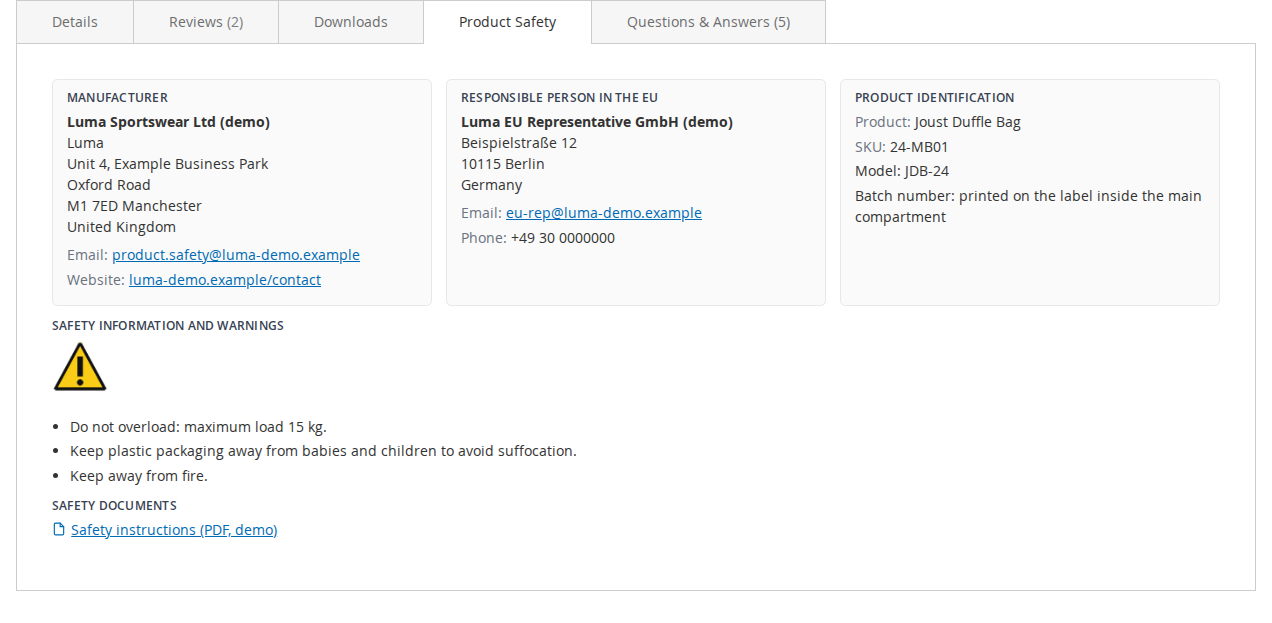
A Product Safety tab on Luma
Manufacturer and responsible person with postal and electronic address, product identification, warnings with pictograms, and links to safety documents.
02 / 07
The same section on Hyvä
The section is cached with the page and refreshed when a manufacturer or document changes. Show it as a tab, in the main column below Add to Cart, or leave it to your theme.
03 / 07
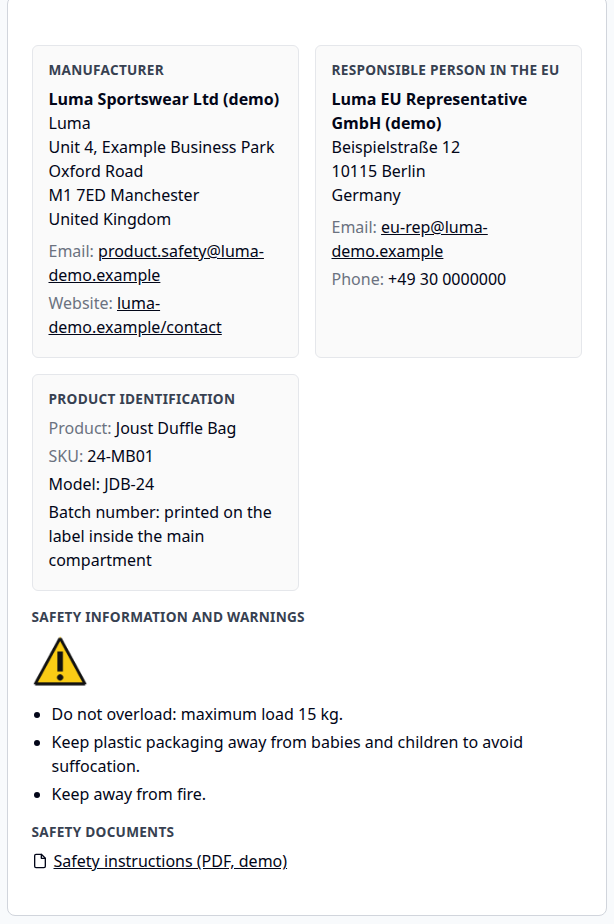
Readable on small screens
The cards stack into one column on phones, so addresses and warnings stay easy to read.
04 / 07
The lowest price before the reduction
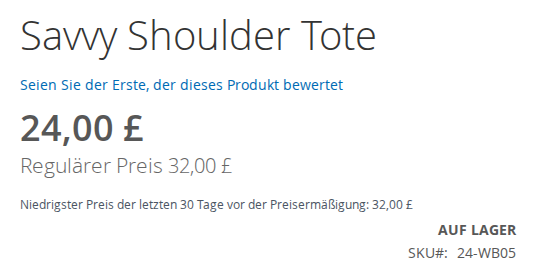
A line near the price on product pages and product lists, only while a reduction is shown. Rules per store view: EU (30 days), Türkiye (10 days) or off. Shown here in the German store view.
05 / 07
Every gap, per store view
Where each manufacturer and responsible person comes from (product, brand, category, attribute set or store default) and what is missing. Rebuilt nightly or on demand, export to CSV or XML.
06 / 07
Enter each operator once
Manufacturers and responsible persons with address, email, website and phone. Each one can be the default for brands, categories and attribute sets.
07 / 07
Price history in the product form
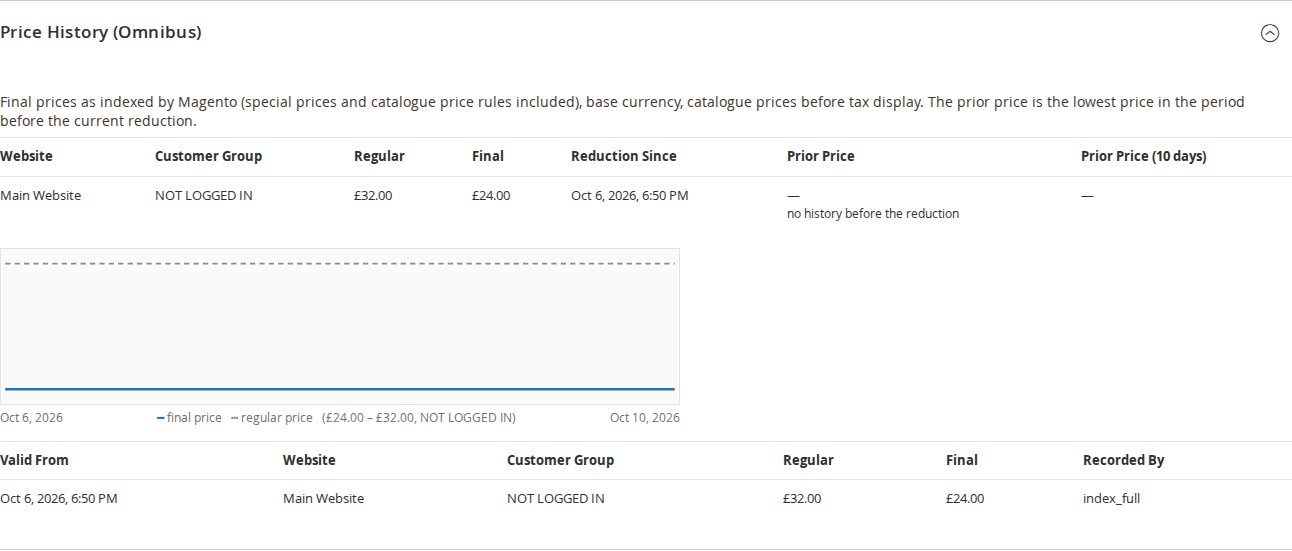
Current state per website and customer group, a 90-day chart and the latest recorded changes, so you can see which prior price is shown and why.
Live demo
Try it before you install it
A full Magento store with the module installed, on Luma and on Hyvä. The admin demo signs you in with one click.
Compatibility
Requirements and compatibility
| Magento | 2.4.7 – 2.4.9 |
|---|---|
| PHP | 8.2 – 8.5 |
| Latest version | 1.1.4 |
| composer.json requires | php ~8.2.0||~8.3.0||~8.4.0||~8.5.0 magento/framework ~103.0.7 softaware/module-core ^1.0 magento/module-backend * magento/module-catalog * magento/module-catalog-graph-ql * magento/module-config * magento/module-configurable-product * magento/module-customer * magento/module-directory * magento/module-eav * magento/module-graph-ql * magento/module-media-storage * magento/module-store * magento/module-ui * |
Installation
Up and running in minutes
After you buy, create a Composer key in your account. Then, in the root of your Magento project:
-
01Add the repository and your key (once per project)
composer config repositories.softaware composer https://repo.softawarecommerce.com
composer config --auth http-basic.repo.softawarecommerce.com PUBLIC_KEY PRIVATE_KEY
-
02Install the module
composer require softaware/module-product-compliance -
03Enable it
bin/magento setup:upgrade
bin/magento setup:di:compile
bin/magento setup:static-content:deploy
bin/magento cache:flush
The last three are only needed in production mode.
Prefer a zip? Every version you are entitled to can be downloaded from My modules. More about Composer access
User guide
How to set up and use Product Compliance
For version 1.1.4. The same guide comes with the module, in docs/user-guide.md.
Show product safety information (manufacturer, responsible person in the EU, product identification, warnings and safety documents) and the lowest price before a reduction on your product pages, for Luma and Hyvä. This guide covers installation, configuration and day-to-day use.
The module helps you display information; it does not decide what your products need and is not legal advice. You remain responsible for the content you enter.
- Demo, product page (Luma): https://demo.softawarecommerce.com/joust-duffle-bag.html
- Demo, product page (Hyvä): https://demo.softawarecommerce.com/hyva/joust-duffle-bag.html
- Admin demo: https://demo.softawarecommerce.com/try-admin/product-compliance
- Changelog: Release notes · Questions: FAQ
1. Requirements
| Magento | Open Source or Adobe Commerce 2.4.7 to 2.4.9 |
| PHP | 8.2 to 8.5 |
| Themes | Luma, Blank and themes based on them; Hyvä (tested with 1.5) |
| Other | softaware/module-core (installed automatically) |
The checkout is not changed. Softaware Product Attachments is optional: when installed, its public attachments can be listed under "Safety documents".
2. Installation
With Composer. Use the Composer keys from your account on softawarecommerce.com (see https://softawarecommerce.com/shop/composer-access/):
composer config repositories.softaware composer https://repo.softawarecommerce.com
composer config --auth http-basic.repo.softawarecommerce.com PUBLIC_KEY PRIVATE_KEY
composer require softaware/module-product-compliance
bin/magento setup:upgrade
bin/magento setup:di:compile            # production mode only
bin/magento setup:static-content:deploy # production mode only
bin/magento cache:flush
bin/magento softaware:omnibus:backfill  # records all current prices once
On Hyvä, the module registers itself for Tailwind source scanning. Run your usual Hyvä CSS build after installing so the Product Safety section is styled.
To update later: composer update softaware/module-product-compliance, then the same bin/magento commands (the backfill is only needed once).
3. Quick start
- Softaware > Product Compliance > Manufacturers and Responsible Persons: click Add Manufacturer or Responsible Person and enter your manufacturer. If the manufacturer is outside the EU, add the responsible person in the EU as a second record.
- Link them to products in one of these ways: set them on a product (group Product Safety (GPSR)), make them the default for brands, categories or attribute sets in the record's Use as Default For section, or choose Default Manufacturer in the configuration.
- Add warnings in the product's Safety Information and Warnings (GPSR) field, one per line.
- Optional: upload safety documents and pictograms under Softaware > Product Compliance > Safety Documents and Pictograms and select them on the product.
- Open Softaware > Product Compliance > Completeness Report, click Check Products Now and work through the Missing column.
The lowest price line needs no setup: prices are recorded from installation on, and the line appears in store views whose rules are EU or Türkiye (see section 6).
4. Settings
Stores > Configuration > Softaware > Product Compliance (also Softaware > Product Compliance > Configuration). Every field says its default and has "Use system value".
General
- Enabled (default Yes): when No, nothing is shown on the storefront (product safety, recall notices, lowest prices). Price recording has its own switch.
Product Safety (GPSR)
- Show Product Safety Section (default Yes).
- Position on the Product Page: Tab / section in the product details (default), Main column below Add to Cart, or Not shown (own layout or theme).
- Section Title: empty shows "Product Safety" (translated).
- Tab Sort Order (default 30): position among the product page tabs.
- Default Manufacturer and Default Responsible Person (EU): used for products without their own value or a brand, category or attribute set default.
- Brand Attribute (global): a dropdown attribute holding the brand, for example
manufacturer. Its values can then be linked to a manufacturer or responsible person in their form. - List Product Attachments (default No): only with Softaware Product Attachments; lists the product's attachments that need no sign-in under "Safety documents".
- Maximum Document Size (MB) (default 10): for uploaded documents and pictograms (PDF, JPG, PNG, GIF, WebP).
Recall and Safety Notice
- Show Global Notice (default No): a notice for all products, for example a product recall.
- Notice Text, Link (an https:// URL or a page path of this store), Link Text (default "More information").
- Show On: All pages (default) or Product pages only.
Notices for single products are set on the product (fields Recall or Safety Notice and Recall Notice Link).
Completeness Report
- Product Types (default simple, configurable, bundle and grouped), Attribute Sets and Categories (none selected means all).
- Only Products Visible on Their Own (default Yes): leaves out "Not Visible Individually" products such as configurable variants; their parent is checked.
- Checks: what counts as missing. Manufacturer missing; Responsible person missing (manufacturer outside the EU or unknown); No safety information or warnings; No product identifiers text; No product image. Default: all except the identifiers text.
Lowest Price Before a Reduction (Omnibus)
- Show Lowest Price (default Yes).
- Rules: Automatic (by store country) (default), EU (30 days, Aldi Süd), Türkiye (10 days), or Off (no lowest price, struck-through prices unchanged). Automatic uses General > Country Options > Default Country: EU/EEA countries use the EU rules, Türkiye its own rules, all other countries including the United Kingdom are off.
- Struck-through Price Is the Prior Price (EU rules, default Yes): the struck-through price and any percentage use the lowest price before the reduction; no reduction is shown when the product is not cheaper than that. Always on with the Türkiye rules.
- Show "Lowest Price" Text (default Yes) and Text: empty shows "Lowest price in the 30 days before the reduction: £X" (translated). In your own text,
%1is the price and%2the number of days. - Show Percentage Reduction (default No): a "−20%" style badge calculated from the prior price, rounded down.
- Show on Product Lists and Show on Product Page (both default Yes).
- No Price History Before the Reduction: Use the regular price (default) or Do not show a reduction.
- Excluded Categories (Perishable Goods): products in these categories and their subcategories are left alone.
- Global settings: Record Prices (default Yes), Period (Days) (30 to 365, default 30), Record All Customer Groups (default No: NOT LOGGED IN prices are recorded and shown to everybody), Keep History (Days) (35 to 3650, default 60).
5. Product safety in daily use
Manufacturers and responsible persons
Softaware > Product Compliance > Manufacturers and Responsible Persons lists all records with type, name, trade name, city, country, email, Default For and status. Mass actions: Activate, Deactivate, Delete.
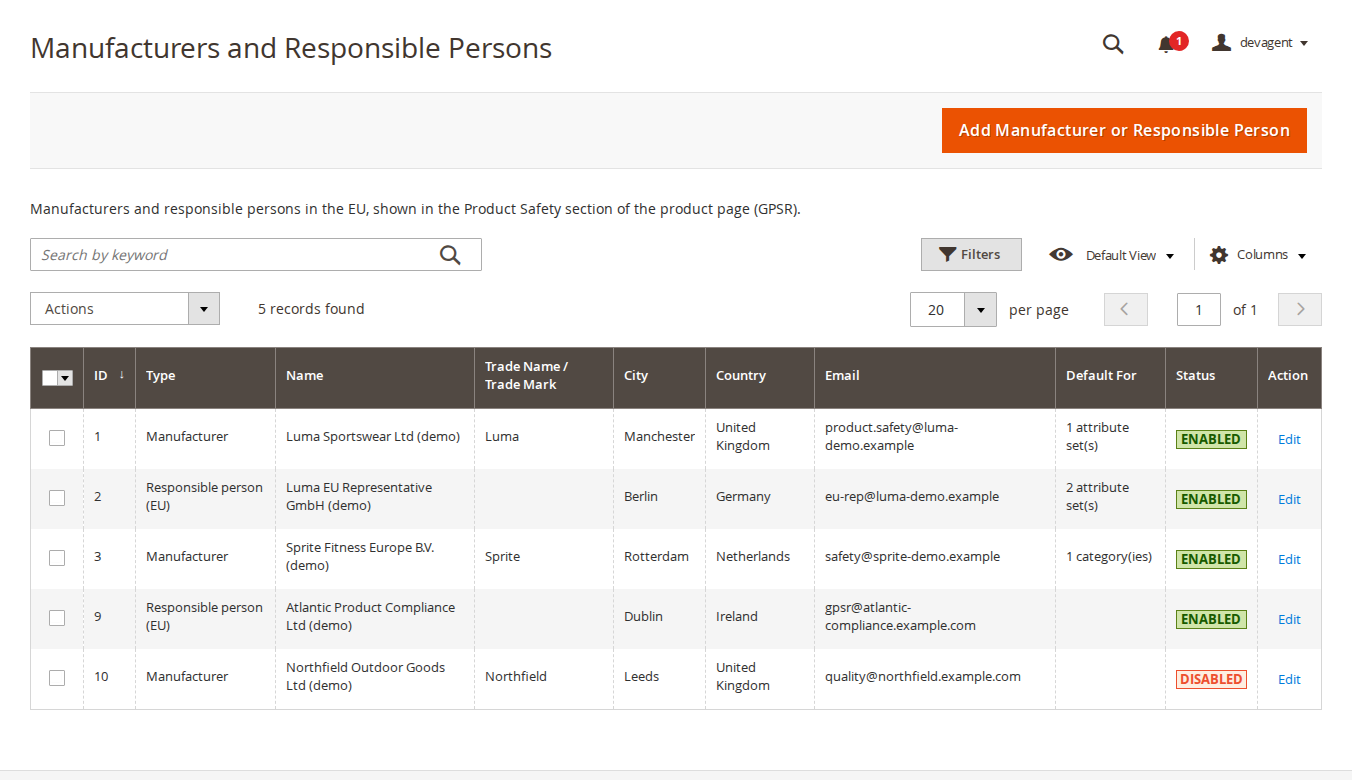
The form has Enabled, Type (Manufacturer or Responsible person (EU)), Name, Registered Trade Name or Trade Mark, Street Address, Postcode, City, Region, Country, Established in the EU (From the country, Yes (EU or Northern Ireland), or No), Email, Website or Contact Page, Phone and Internal Note. Use as Default For links the record to Brands, Categories and Attribute Sets.
Product values
Every attribute set gets the group Product Safety (GPSR):
| Field | Scope |
|---|---|
| GPSR Applies to This Product (No for products outside the GPSR, such as services or gift cards) | global |
| Manufacturer (GPSR), Responsible Person in the EU (GPSR) | global |
| Product Identifiers (GPSR): model, batch or serial number, plain text | store view |
| Safety Information and Warnings (GPSR): one warning per line | store view |
| Safety Documents and Pictograms (GPSR) | global |
| Recall or Safety Notice, Recall Notice Link | store view |
Leave the manufacturer and responsible person empty to use the defaults. Products without a stored "GPSR Applies to This Product" value (for example products created before the module was installed) count as Yes, and the product form shows Yes for them.
Safety documents and pictograms
Under Softaware > Product Compliance > Safety Documents and Pictograms, each record has Kind (Document (link) or Pictogram (image)), Title, File or Or External URL (https), Store Views and Sort Order. Uploads are checked by extension, content type and image header; SVG and scripts are refused, and files are stored under pub/media/softaware_compliance with random-suffixed names. Pictograms are shown as images next to the warnings; documents are listed as links.
Mass assign
In Catalog > Products, select products and choose Actions > Product Safety: Assign. Tick Change for each field to update: GPSR Applies, manufacturer, responsible person, documents (Add the selected, Remove the selected, or Replace with the selected), and the texts for all store views or one store view.
What shoppers see
The Product Safety section shows the manufacturer and responsible person cards, Product identification (product name, SKU and your identifiers text), Safety information and warnings with pictograms, and Safety documents. On phones the cards stack into one column.
A recall or safety notice (from the product or the global setting) is shown at the top of the page.
Completeness report
Softaware > Product Compliance > Completeness Report has one row per product and store view: store view, SKU, product, type, attribute set, status, Manufacturer (Source), Responsible Person (Source), safety info, documents, recall notice, issues and Missing. The source says where the value came from: Product, Brand, Category, Attribute set or Store default. Use the filters and Export (CSV or XML).
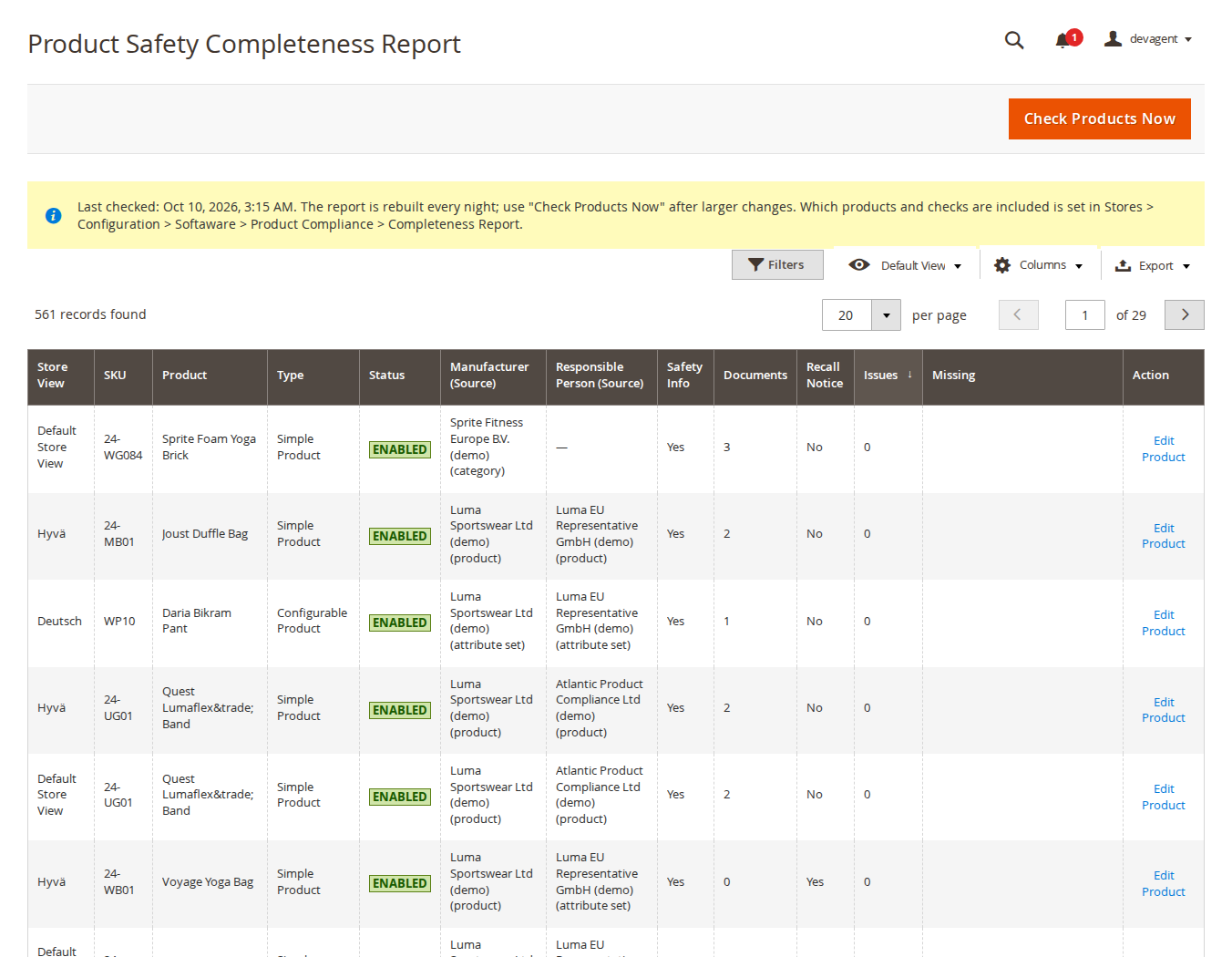
The report is rebuilt every night at 03:15 and when you click Check Products Now. Products with "GPSR Applies to This Product" set to No are left out.
Import and export
Softaware > Product Compliance > Import / Export: Export CSV writes one row per product with the values saved on the product (defaults from brands, categories or attribute sets are not written). Columns: sku, store_code, applies, manufacturer, responsible_person, identifiers, safety_information, documents, recall_notice, recall_url. On import, a missing column is not changed and an empty cell clears the value; rows with a store_code change only that store view's texts. Manufacturers can be given by ID or exact name, documents by IDs or titles separated by |. Click Check File first; nothing is written when any row has an error. Exported cells starting with = + - @ are protected.
6. Lowest price before a reduction
How it works
Prices are recorded from Magento's price index after every price reindex (product save, mass update, import, catalogue price rules, special price start and end) and daily at 01:35, per website and for customer group NOT LOGGED IN (or all groups). Only changes are stored. When a reduction starts, the lowest final price of the period before is stored as the prior price (earlier reductions included) and kept while the reduction continues, also when it is deepened. New products use the lowest price since the first record.
What shoppers see
While a reduction is shown, a line appears near the price on product pages and product lists, for example "Lowest price in the 30 days before the reduction: £32.00" (Türkiye rules: "Lowest price in the 10 days before the discount"). Texts are translated in German and Turkish. For configurable products, the line follows the selected variant.
Price history in the product form
The product form section Price History (Omnibus) shows, per website and customer group, the regular and final price, Reduction Since and Prior Price, a 90-day chart and the latest recorded changes.
Limits
Tier prices and quantity discounts are not recorded or shown. Bundle products are recorded, but no line is shown because their price is a range. Configurable and grouped parents in lists show no line; their variants and grouped rows do.
7. Command line
bin/magento softaware:omnibus:backfill [--assume-regular]   # record all current prices (safe to repeat)
bin/magento softaware:omnibus:show <sku> [-w website] [-g group] [-l rows]
bin/magento softaware:omnibus:prune                         # remove history older than Keep History
bin/magento softaware:gpsr:report                           # rebuild the completeness report
bin/magento softaware:gpsr:export <file> [--store=<code>]
bin/magento softaware:gpsr:import <file> [--check]
--assume-regular uses the regular price as the prior price for reductions that were already running when recording started. Only use it if you know that price applied before those reductions.
Cron jobs (group default): softaware_compliance_omnibus_daily at 01:35 (record and prune) and softaware_compliance_gpsr_report at 03:15 (report and removal of abandoned uploads).
8. GraphQL and integrations
ProductInterface gets softaware_product_safety (manufacturer, responsible person, identifiers, safety information, documents, recall notice) and softaware_omnibus (prior price, percentage, label and more). Feeds and integrations can use the service contracts ProductSafetyInfoProviderInterface and PriorPriceProviderInterface, or the product attributes (sw_gpsr_*, sw_recall_*) for the values saved on the product.
9. Permissions (ACL)
Under Softaware > Product Compliance in System > Permissions > User Roles:
- Manage Manufacturers and Responsible Persons
- Manage Safety Documents
- Edit Product Compliance Data (Mass Assign, Import)
- View Completeness Report and Export
- View Price History
The configuration section is Stores > Settings > Configuration > Softaware Product Compliance.
10. Troubleshooting
- The Product Safety section does not appear. Check Enabled and Show Product Safety Section, that the position is not "Not shown", that the product has "GPSR Applies to This Product" not set to No, and that it has product safety data (for example a manufacturer, set on the product or by a default). Flush the page cache after configuration changes. Up to version 1.1.3, saving an older product without a "GPSR Applies" value in the admin could set it to No; check the field on the product.
- No lowest price line. The line only appears while a reduction is shown. Check Rules for the store view (the automatic rules are off for countries outside the EU/EEA and Türkiye, including the UK), and that the product is not in an excluded category. For reductions that started before installation, see No Price History Before the Reduction.
- The prior price looks wrong. Run
bin/magento softaware:omnibus:show <sku>to see the recorded history, or open the product's Price History (Omnibus) section. Prices come from the price index; if the index is behind, the last recorded prices are used. - The report is out of date. Click Check Products Now or run
softaware:gpsr:report. - Hyvä section unstyled. Run your Hyvä CSS build so the module's classes are included.
- The global notice did not change. Refresh the full page cache after changing it.
11. Uninstall
bin/magento module:disable Softaware_ProductCompliance
composer remove softaware/module-product-compliance
bin/magento setup:upgrade
Uploaded documents in pub/media/softaware_compliance stay on disk until you delete them.
Changelog
Release notes
1.1.4
Latest
docs/listing.json,docs/faq.md,docs/user-guide.mdand screenshots indocs/images/.
- Product edit form: on existing products without a stored "GPSR Applies to This Product" value (for example products created before the module was installed), the toggle showed No although the storefront treats these products as covered and shows the product safety section. Magento applies the attribute default (Yes) to new products only. The form now shows the effective value (no value = Yes), so saving such a product no longer stores No and hides its product safety section. Stored values (Yes or No) are shown unchanged. Products that were saved in the admin with 1.1.3 or earlier may have received No this way; they cannot be told apart from products deliberately set to No, so no data is changed on upgrade. To review them, filter Catalog > Products by "GPSR Applies to This Product" = No (add the column under Columns) and set the ones that are consumer products back to Yes (or use Product Safety: Assign in the Actions menu).
- Completeness Report: product names containing HTML entities (for example "Lumaflex™" in the sample data) showed the entity instead of the character. Names are now decoded and still displayed as plain text.
1.1.3
1.1.3 (2026-10-10)
Fixed
- Admin edit page: the Save and Save and Continue Edit buttons had no click action of their own, so Magento also gave them a link to the current admin route's index page. Depending on timing, a click opened that page (404) instead of saving. The buttons now only save.
1.1.2
- Catalog > Products: "Product Safety: Assign" is no longer listed in the Actions menu for admin users without the product safety edit right (choosing it ended on an access-denied page).
1.1.1
- Admin grids: the Edit link, Store Views, Preview and "Default For" columns of the Manufacturers and Documents grids and the Manufacturer / Responsible Person and Edit Product columns of the Completeness Report were always empty (the values were written to a copy of the row). Edit links now use explicit routes, so they also work after the grid is filtered, sorted or paged.
- Admin polish. Manufacturers and Documents grids: one-line introduction, status as an Enabled/Disabled badge, empty states with the primary action, and "Add Manufacturer or Responsible Person" instead of "Add New". The Completeness Report shows the product status as a badge, hides the product type by default and gives the "Missing" list a readable width.
- Forms: "Active" is now "Enabled". The Product Safety: Assign page has Back and Save in the standard page actions bar. Inline styles (pictogram thumbnails, assign page, import/export page, price history section of the product form) moved to a small admin stylesheet; the import notes are a list; the price history lists customer group 0 as "NOT LOGGED IN" in both tables.
- Settings: every field says its default, "Use system value" is available on all fields, and the long comments (lowest-price rules, struck-through price, recording) are shorter.
1.1.0
- Requires
softaware/module-coreinstead ofsoftaware/module-base. The admin menu and ACL now sit underSoftaware_Core::core("Softaware"); roles that had access keep it (migrated by module-core). After updating all SoftAware modules,softaware/module-basecan be removed.
1.0.0
- GPSR (Regulation (EU) 2023/988, Art. 19): manufacturers and responsible persons (grid, form, defaults by brand, category, attribute set and store view), product attributes, safety documents and pictograms with validated uploads, "Product Safety" tab/section for Luma and Hyvä, product and global recall/safety notices.
- Completeness report per product and store view (nightly, "Check Products Now", CLI), product grid mass action "Product Safety: Assign", CSV import/export (admin and CLI) with check mode and formula protection.
- Omnibus prior price (Directive 98/6/EC Art. 6a): change-only price history from the price index per website and customer group, prior price fixed at the start of a reduction (earlier reductions included, progressive reductions keep the first prior price, new products use the lowest price since the first record), daily recording and pruning, backfill, show and prune commands.
- Storefront line "Lowest price in the 30 days before the reduction", optional percentage badge, Aldi Süd mode (struck-through price and percentage from the prior price; no reduction shown when the product is not cheaper), configurable variants, category exclusions for perishable goods.
- Rules per store view, default "Automatic (by store country)": EU/EEA countries use the EU rules (30 days, Aldi Süd mode), Türkiye the Türkiye rules (10 days, "before the discount" wording), all other countries including the United Kingdom are off; explicit EU / Türkiye / Off choices.
- Product form section "Price History (Omnibus)"; GraphQL fields
softaware_omnibusandsoftaware_product_safety; service contracts for feeds; optional listing of Softaware Product Attachments; translations en_US, de_DE, tr_TR.
FAQ
Questions, answered
Something else on your mind? The developers who wrote the module answer before and after you buy.
Ask a question →Already installed it? Open a support ticket
Is this legal advice? Does installing the module make my shop compliant?
No. The module is a tool to store and display information: it helps you display product safety information and the lowest price before a reduction on your product pages. It does not decide which information your products need, and it cannot check whether the content you enter is correct or sufficient. You remain responsible for the content and for how your shop meets the rules that apply to you. Please check with your legal adviser.
Which rules is it built around?
The product safety fields follow the information listed for online offers in Article 19 of the EU General Product Safety Regulation (EU) 2023/988: manufacturer, responsible person in the EU, product identification and warnings or safety information. The lowest price line follows the price indication rule that the Omnibus Directive (EU) 2019/2161 added to Directive 98/6/EC (Article 6a), with a separate "Türkiye (10 days)" option. National rules were not checked.
What does the Product Safety section show?
The manufacturer and, when set, the responsible person in the EU with name, trade name, postal address, email, website or contact page and phone; the product name, SKU and your identifiers text (for example model or batch number); safety information and warnings, one per line, with pictograms; and links to safety documents. It appears as a tab in the product details, in the main column below Add to Cart, or not at all if you place it in your own layout.
Do I have to fill in every product?
No. Each manufacturer or responsible person can be the default for brand values, categories (with subcategories) and attribute sets, and there is a store view default in the configuration. The order is: product, brand, category (deepest first), attribute set, store default. The completeness report shows where each value came from.
How do I find products with missing information?
Open Softaware > Product Compliance > Completeness Report. It lists each product and store view with what is missing: manufacturer, responsible person (when the manufacturer is outside the EU or unknown), safety information, identifiers text and product image. You choose which checks count in the configuration. The report is rebuilt every night and with "Check Products Now", and can be exported to CSV or XML.
How is the lowest price before a reduction worked out?
The module records prices from Magento's price index after every price reindex and once a day, per website, and stores only changes. When a reduction starts (final price below the regular price), it stores the lowest final price of the 30 days before (10 days with the Türkiye rules), earlier reductions included, and keeps that prior price while the reduction lasts. New products use the lowest price since the first record. Special prices and catalogue price rules are covered; tier prices are not.
My store sells in the UK. Will the lowest price line appear?
Not with the default. "Automatic (by store country)" uses each store view's default country: EU/EEA countries use the EU rules, Türkiye the Türkiye rules, and all other countries, including the United Kingdom, are off. You can choose EU, Türkiye or Off per store view by hand, for example EU for a store view that sells into Northern Ireland.
What about reductions that were already running when I installed it?
They have no recorded history. No Price History Before the Reduction decides what happens: use the regular price (default) or show no reduction. The CLI command softaware:omnibus:backfill records all current prices right away; its --assume-regular option uses the regular price as the prior price for running reductions, which you should only use if you know that price really applied before.
Does it change the struck-through price?
Only if you want it to. With the EU rules, Struck-through Price Is the Prior Price (default Yes) makes the struck-through price and the optional percentage use the prior price, and no reduction is shown when the product is not cheaper than that. With the Türkiye rules this is always on. Set it to No to keep Magento's own struck-through price.
Does it work with Hyvä?
Yes. The Product Safety section, the recall notices and the lowest price line work on Luma and Hyvä (tested with Hyvä 1.5), including configurable products where the line follows the selected variant. The module registers itself for Tailwind; run your usual Hyvä CSS build after installing.
Will it slow down my product pages?
The Product Safety section is cached with the page and refreshed when a manufacturer or document changes. Product lists read the price data of all products with one query, and nothing is calculated per request beyond a price comparison, so full page cache keeps working.
Can I fill it in from a spreadsheet or another system?
Yes. Softaware > Product Compliance > Import / Export (and the CLI) exports one row per product and imports the same format. "Check File" reports errors first, and nothing is written when any row has an error. The values are also available in GraphQL (softaware_product_safety, softaware_omnibus) and as product attributes for feeds.
Support