GA4 & Google Tag Manager
GA4 ecommerce tracking for Magento 2 on Luma and Hyvä: a complete dataLayer for Google Tag Manager or gtag.js, Google Consent Mode, server-side refunds and a GTM container you import in one step.
- Magento 2.4.7 – 2.4.9
- PHP 8.2 – 8.5
- Version 1.2.2
One-off payment, with 12 months of updates.
What is included
- 12 months of new versions and fixes; the versions released in that time stay yours
- Install with Composer, or download a zip from your account
- Licence for one production domain, staging and development copies included
- 30-day money-back guarantee, refund policy
No subscription or automatic renewal. Keep using the versions included in your update period. Update and licence details
Key features
- Google Tag Manager or gtag.js
- All GA4 ecommerce events with full item data
- Luma and Hyvä, no compatibility module
Composer package softaware/module-ga4-gtm
-
Revenue you can trust
Cart changes are detected on the server and every event carries an id, so AJAX adds, page reloads and merged carts are not counted twice. Purchase is flagged in the database and never sent again.
-
No tags to build by hand
Enter your GTM container ID and GA4 measurement ID, download the container from the admin and import it into Google Tag Manager with Merge. The tags, triggers and variables are already built.
-
Consent first
Google Consent Mode defaults are printed before the tag. With Softaware Cookie Consent you can also hold GTM or gtag.js back until the visitor accepts Analytics or Marketing.
All features
What is included
Events
- view_item_list and select_item (category, search, related, upsell, cross-sell)
- view_item, add_to_cart, remove_from_cart, add_to_wishlist
- view_cart, begin_checkout, add_shipping_info, add_payment_info
- purchase (once per order) and refund (server-side)
- login, sign_up and search
Tags and consent
- GTM snippet in the head plus noscript iframe, or gtag.js
- Custom GTM script domain for server-side tagging
- Consent Mode defaults: from Softaware Cookie Consent, denied, granted or left to your consent tool
- Load tags only after Analytics or Marketing consent (with Softaware Cookie Consent)
- Debug mode: console log of every push and GA4 DebugView
Data quality
- Cart changes compared with the stored quantity per line
- Event ids remembered in the browser, no double pushes
- Purchase flagged per order in the database
- Refund value follows the purchase value rules (tax, shipping)
- Free gifts and custom prices reported at the cart price
Admin and developers
- Settings per website and store view
- GTM container export in the admin and on the CLI
- CLI: list, dry-run and send queued refunds
- window.swGa4.push() and a server-side event queue for your own events
- Separate ACL permissions for settings and export
Feature tour
Everything your shoppers and your team see
01 / 06
A real add_to_cart, ready for GA4
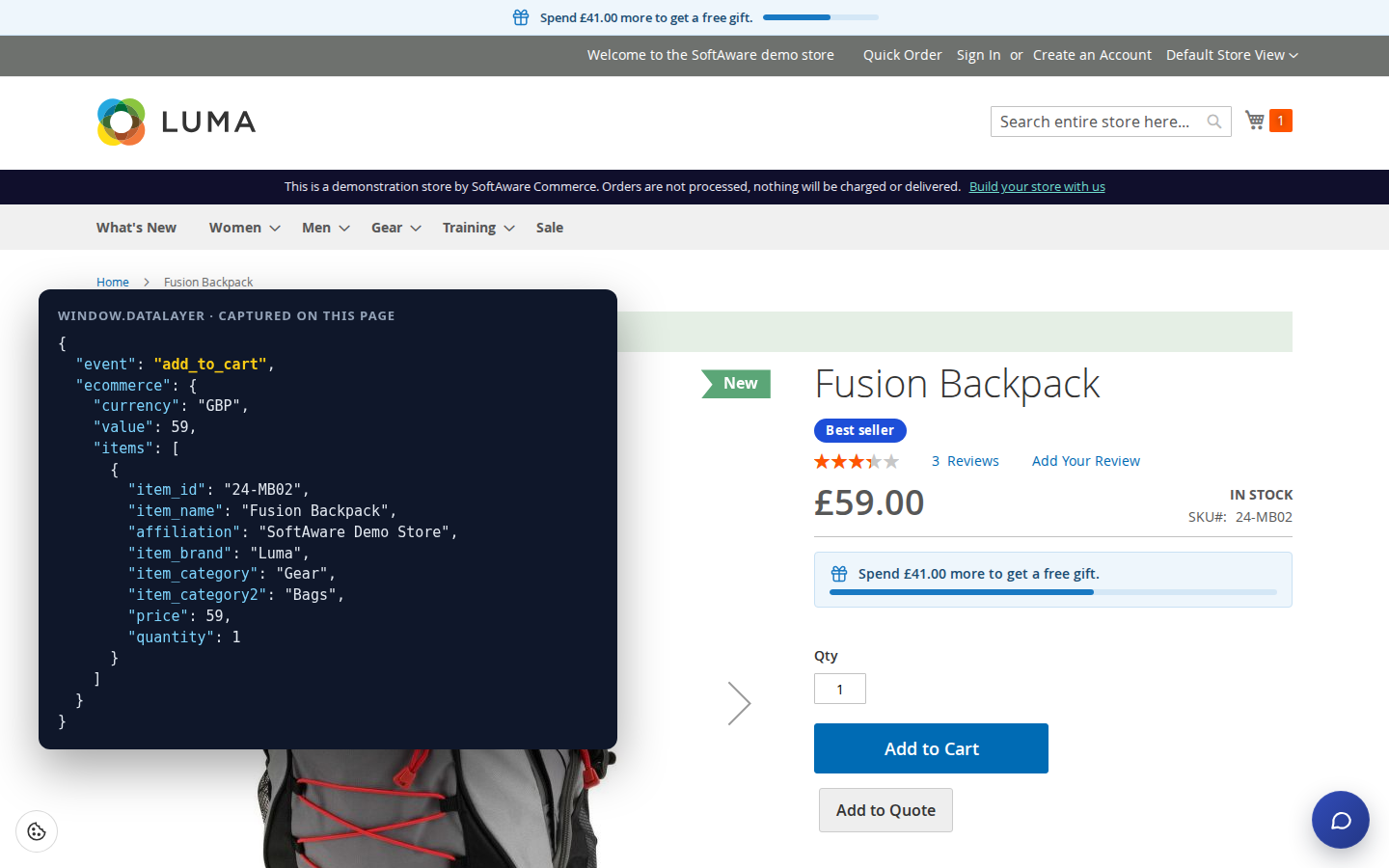
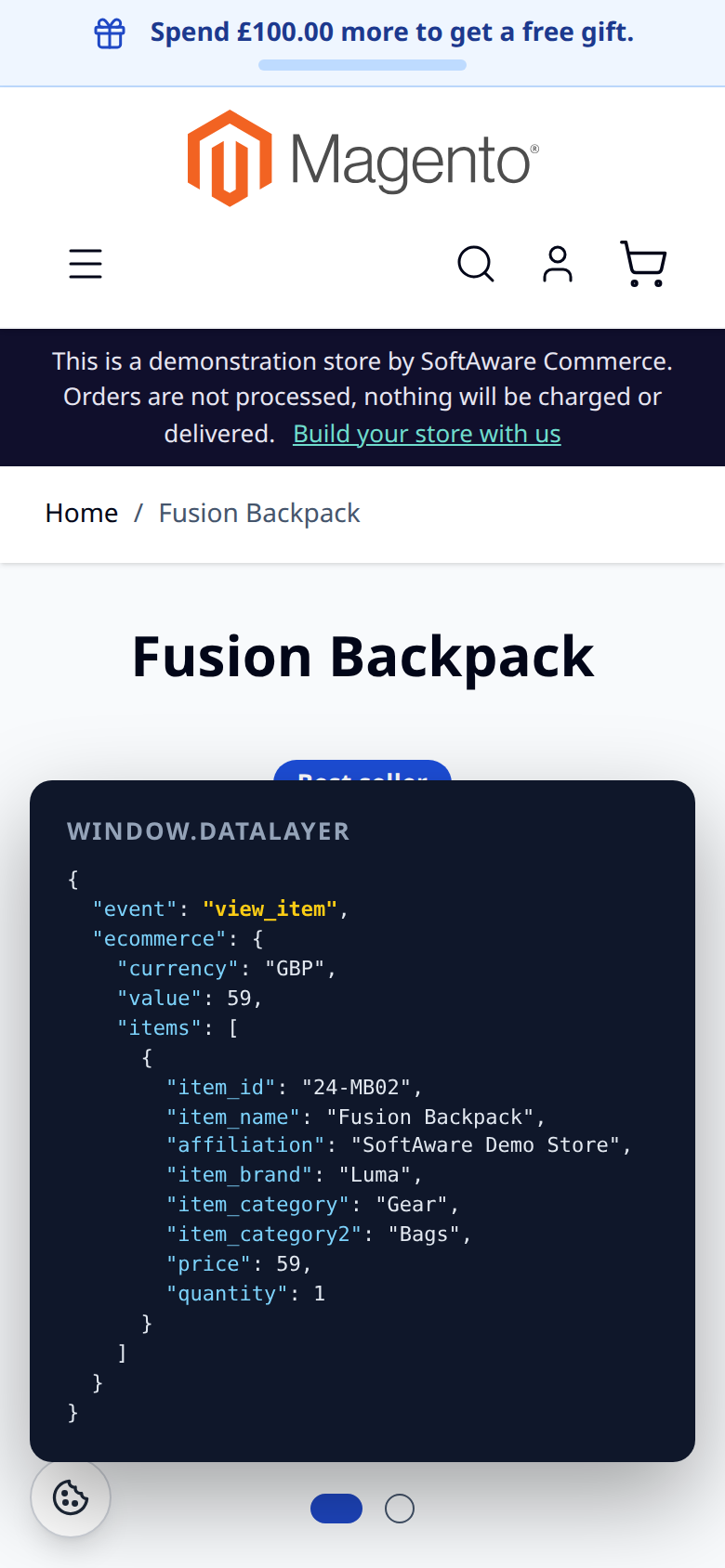
Every cart change pushes add_to_cart or remove_from_cart with currency, value and full item data: item ID, name, brand, up to five category levels, variant, price and quantity.
02 / 06
Product lists on Hyvä and Luma
view_item_list for category pages, search results, related, upsell and cross-sell products, with list ID, list name and position. A click on a product in one of these lists sends select_item.
03 / 06
The same data on every device
Events come from the page data and the private customer-data section, so they are the same on phones and desktops and safe with the full-page cache.
04 / 06
Tag, consent and debug in one place
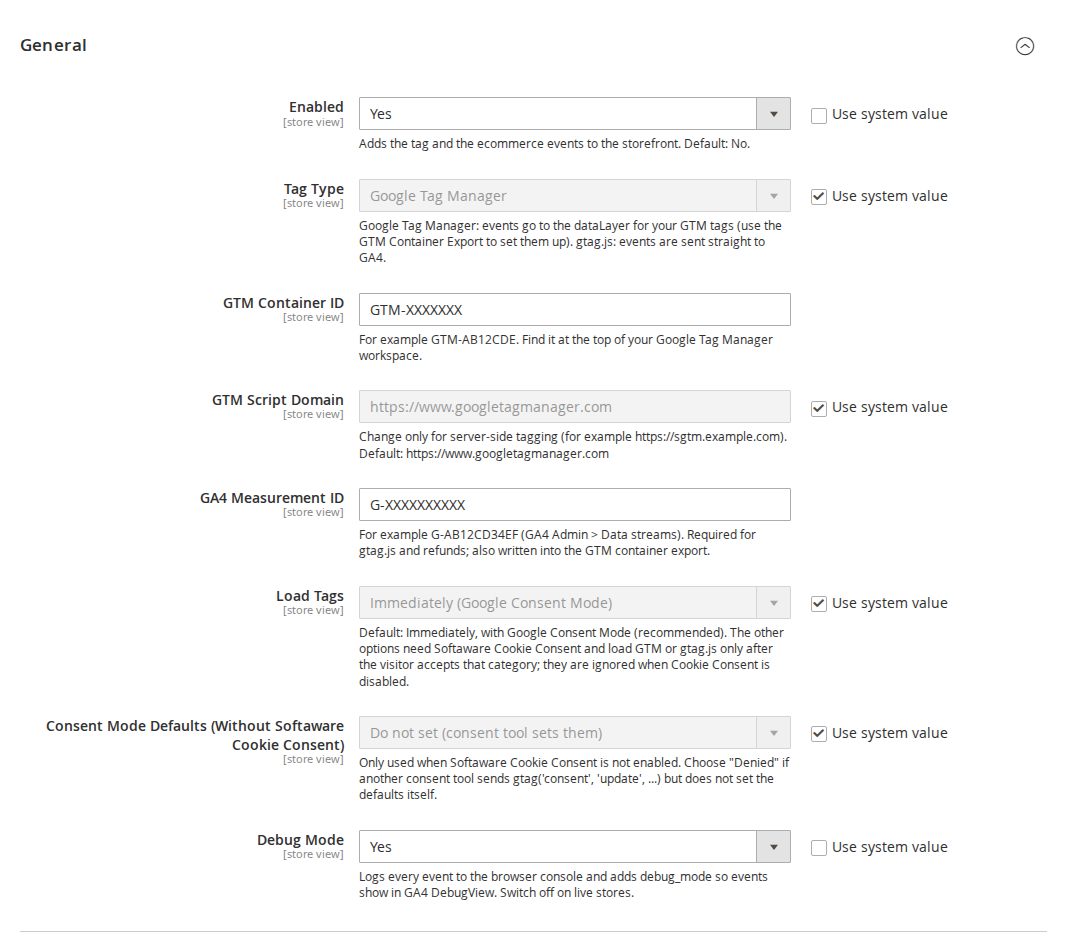
Choose Google Tag Manager or gtag.js, set the container ID, a custom script domain for server-side tagging, the GA4 measurement ID, when tags load and the Consent Mode defaults.
05 / 06
Item data that matches your feed
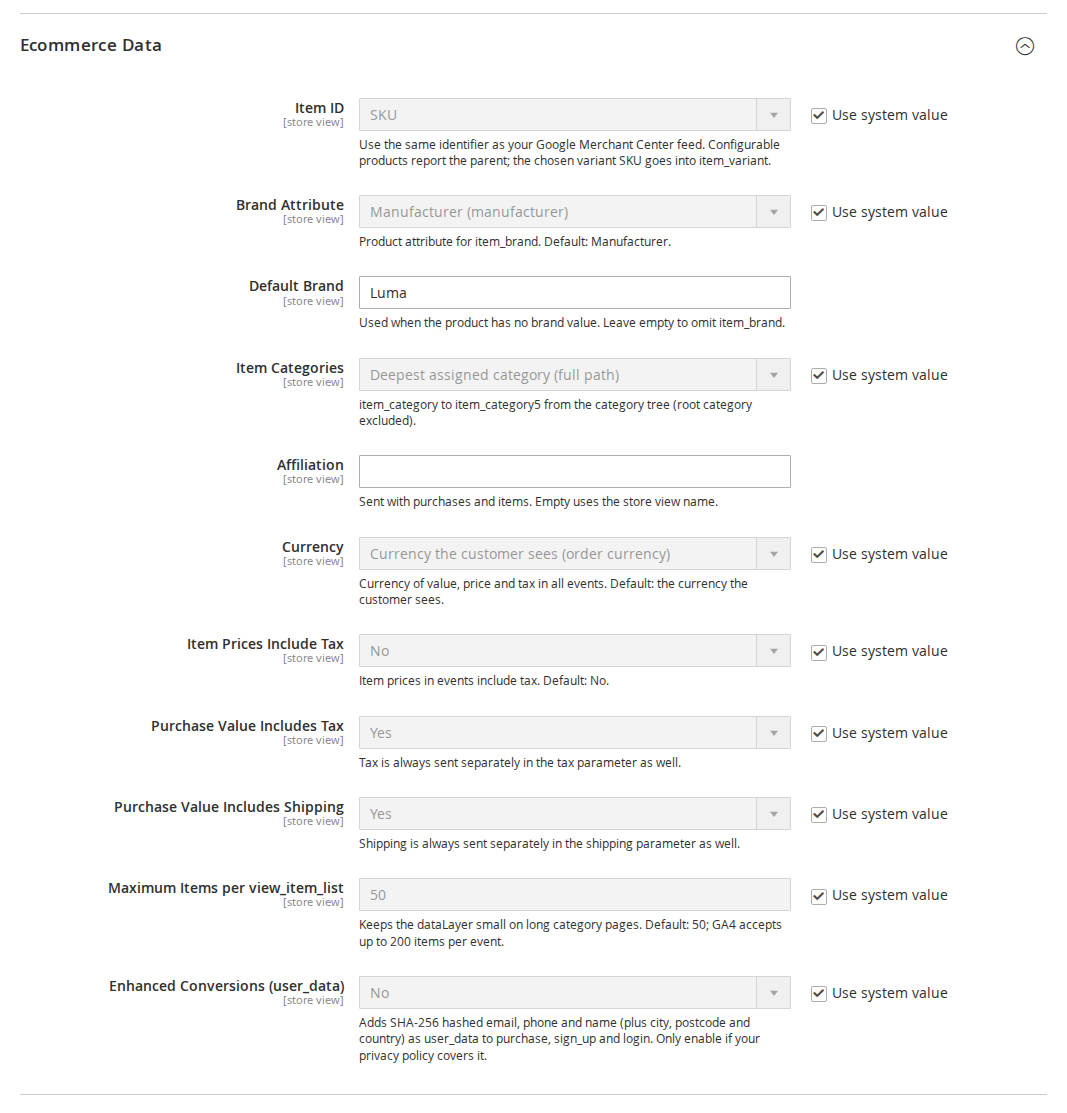
SKU or product ID as item_id, the brand attribute, category path, affiliation, currency, and whether prices and the purchase value include tax and shipping.
06 / 06
Import the tags instead of building them
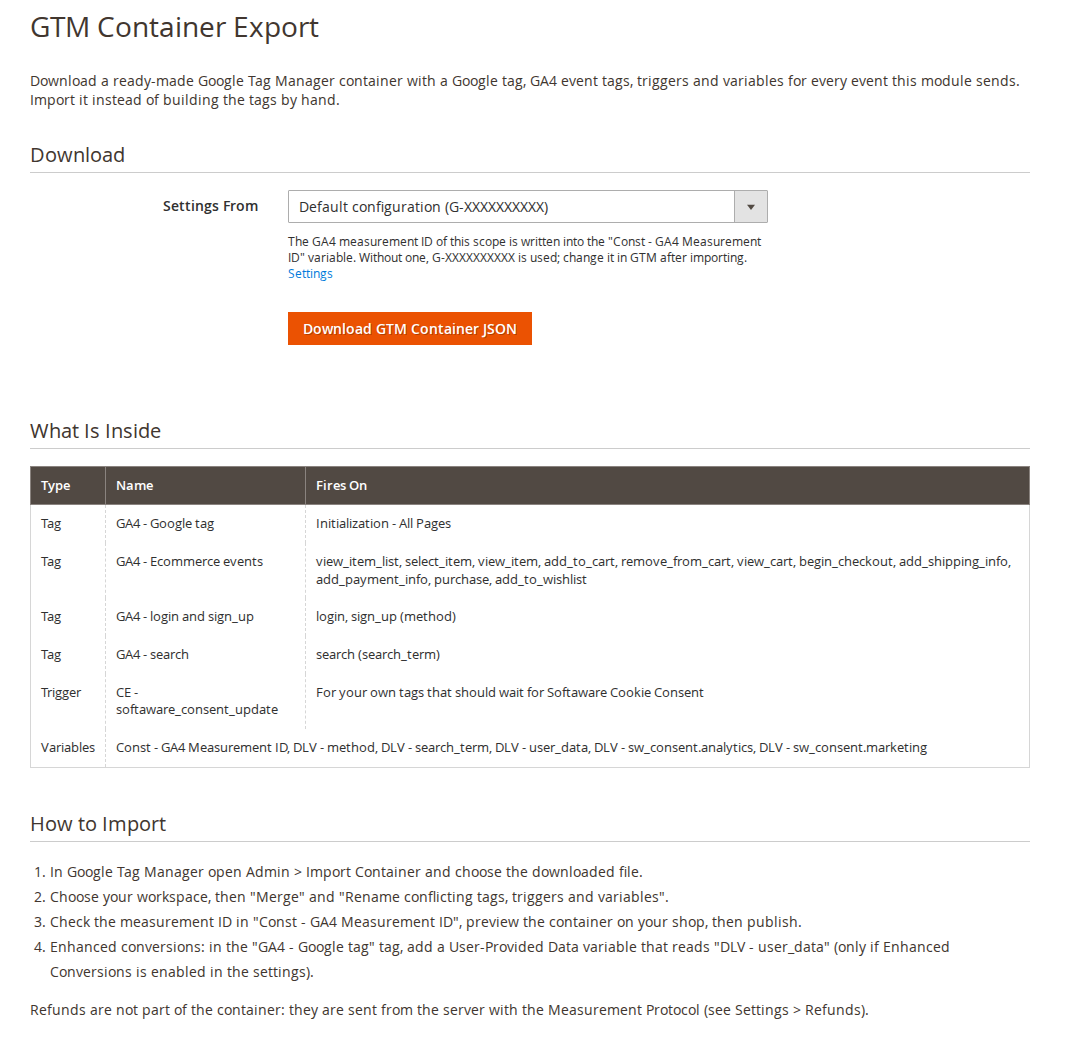
Softaware > GA4 & GTM > GTM Container Export downloads a container JSON with a Google tag, GA4 event tags, triggers and variables for every event the module sends.
Live demo
Try it before you install it
A full Magento store with the module installed, on Luma and on Hyvä. The admin demo signs you in with one click.
Compatibility
Requirements and compatibility
| Magento | 2.4.7 – 2.4.9 |
|---|---|
| PHP | 8.2 – 8.5 |
| Latest version | 1.2.2 |
| composer.json requires | php ~8.2.0||~8.3.0||~8.4.0||~8.5.0 magento/framework ~103.0.7 softaware/module-core ^1.0 magento/module-backend * magento/module-catalog * magento/module-checkout * magento/module-config * magento/module-csp * magento/module-customer * magento/module-quote * magento/module-sales * magento/module-search * magento/module-store * magento/module-tax * |
Installation
Up and running in minutes
After you buy, create a Composer key in your account. Then, in the root of your Magento project:
-
01Add the repository and your key (once per project)
composer config repositories.softaware composer https://repo.softawarecommerce.com
composer config --auth http-basic.repo.softawarecommerce.com PUBLIC_KEY PRIVATE_KEY
-
02Install the module
composer require softaware/module-ga4-gtm -
03Enable it
bin/magento setup:upgrade
bin/magento setup:di:compile
bin/magento setup:static-content:deploy
bin/magento cache:flush
The last three are only needed in production mode.
Prefer a zip? Every version you are entitled to can be downloaded from My modules. More about Composer access
User guide
How to set up and use GA4 & Google Tag Manager
For version 1.2.2. The same guide comes with the module, in docs/user-guide.md.
GA4 ecommerce tracking for Luma and Hyvä: Google Tag Manager or gtag.js, a complete GA4 dataLayer, Google Consent Mode, refunds sent from the server through the Measurement Protocol, and a GTM container you can import in one step. This guide covers installation, every setting and day-to-day use.
- Admin demo: https://demo.softawarecommerce.com/try-admin/ga4-gtm
- Composer access: https://softawarecommerce.com/shop/composer-access/
- Changelog: Release notes · Questions: FAQ
1. Requirements
| Magento | Open Source or Adobe Commerce 2.4.7 to 2.4.9 |
| PHP | 8.2 to 8.5 |
| Themes | Luma, Blank and themes based on them; Hyvä 1.3+ (no compatibility module needed) |
| Other | softaware/module-core (installed automatically) |
| Optional | softaware/module-cookie-consent for the consent banner and "load after consent" |
| A GTM container ID and/or a GA4 measurement ID; a Measurement Protocol API secret for refunds |
2. Installation
With Composer. Use the Composer keys from your account on softawarecommerce.com (see https://softawarecommerce.com/shop/composer-access/):
composer config repositories.softaware composer https://repo.softawarecommerce.com
composer config --auth http-basic.repo.softawarecommerce.com PUBLIC_KEY PRIVATE_KEY
composer require softaware/module-ga4-gtm
bin/magento setup:upgrade
bin/magento setup:di:compile            # production mode only
bin/magento setup:static-content:deploy # production mode only
bin/magento cache:flush
To update later: composer update softaware/module-ga4-gtm, then the same bin/magento commands.
Magento cron must run (it sends the refunds). Nothing else is needed on Hyvä: the module ships its own Hyvä layout handles.
3. Quick start with Google Tag Manager
- Go to Stores > Configuration > Softaware > GA4 & Google Tag Manager (also under Softaware > GA4 & GTM > Settings).
- General > Enabled = Yes, Tag Type = Google Tag Manager.
- Enter your GTM Container ID (for example GTM-AB12CDE) and your GA4 Measurement ID (for example G-AB12CD34EF). Save and flush the cache.
- Open Softaware > GA4 & GTM > GTM Container Export, pick the store view in Settings From and click Download GTM Container JSON.
- In Google Tag Manager open Admin > Import Container, choose the file, your workspace, Merge and "Rename conflicting tags, triggers and variables". Check the measurement ID in the variable "Const - GA4 Measurement ID", preview the container on your shop, then publish.
With gtag.js instead: set Tag Type = gtag.js (GA4 directly) and the measurement ID; there is no container to import.
4. Settings
All settings are under Stores > Configuration > Softaware > GA4 & Google Tag Manager and can be set per website and per store view.
General
| Setting | What it does |
|---|---|
| Enabled | Adds the tag and the ecommerce events to the storefront. Default: No. |
| Tag Type | Google Tag Manager: events go to the dataLayer for your GTM tags. gtag.js (GA4 directly): events are sent straight to GA4. |
| GTM Container ID | For example GTM-AB12CDE (top of your GTM workspace). Shown for Google Tag Manager only. |
| GTM Script Domain | Change only for server-side tagging (for example https://sgtm.example.com). Default: https://www.googletagmanager.com |
| GA4 Measurement ID | For example G-AB12CD34EF (GA4 Admin > Data streams). Required for gtag.js and refunds; also written into the GTM container export. |
| Load Tags | Immediately (Google Consent Mode) (default), After "Analytics" consent or After "Marketing" consent. The two "after" options need Softaware Cookie Consent and are ignored when it is disabled. |
| Consent Mode Defaults (Without Softaware Cookie Consent) | Do not set (consent tool sets them), Denied until updated or Granted (no consent required). Only used when Softaware Cookie Consent is not enabled. |
| Debug Mode | Logs every event to the browser console and adds debug_mode so events show in GA4 DebugView. Switch off on live stores. |
Ecommerce Data
| Setting | What it does |
|---|---|
| Item ID | SKU or Product ID. Use the same identifier as your Google Merchant Center feed. Configurable products report the parent; the chosen variant SKU goes into item_variant. |
| Brand Attribute | Product attribute for item_brand. Default: Manufacturer. |
| Default Brand | Used when the product has no brand value. Leave empty to omit item_brand. |
| Item Categories | Deepest assigned category (full path) or First assigned category (full path), sent as item_category to item_category5 (root category excluded). |
| Affiliation | Sent with purchases and items. Empty uses the store view name. |
| Currency | Currency the customer sees (order currency) (default) or Base currency, for value, price and tax in all events. |
| Item Prices Include Tax | Item prices in events include tax. Default: No. |
| Purchase Value Includes Tax | Whether value includes tax. Tax is always sent separately in the tax parameter as well. |
| Purchase Value Includes Shipping | Whether value includes shipping. Shipping is always sent separately in the shipping parameter as well. |
| Maximum Items per view_item_list | Keeps the dataLayer small on long category pages. Default: 50; GA4 accepts up to 200. |
| Enhanced Conversions (user_data) | Adds SHA-256 hashed email, phone and name (plus city, postcode and country) as user_data to purchase, sign_up and login. Only enable if your privacy policy covers it. |
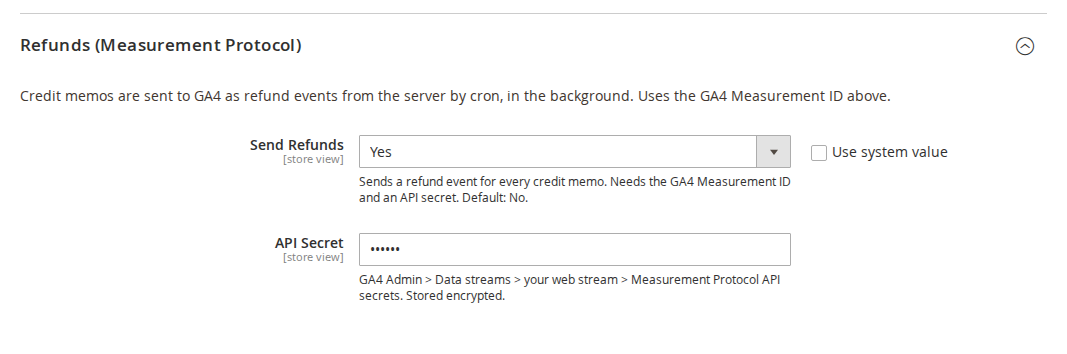
Refunds (Measurement Protocol)
| Setting | What it does |
|---|---|
| Send Refunds | Sends a refund event for every credit memo. Needs the GA4 Measurement ID and an API secret. Default: No. |
| API Secret | GA4 Admin > Data streams > your web stream > Measurement Protocol API secrets. Stored encrypted. |
5. The events
| Event | When | Theme |
|---|---|---|
| view_item_list | Category pages, search results, related, upsell and cross-sell lists | Luma and Hyvä |
| select_item | A click on a product link inside one of these lists | Luma and Hyvä |
| view_item | Product page | Luma and Hyvä |
| add_to_cart / remove_from_cart | Any cart change: product page, AJAX add from a list, mini-cart, cart page quantity or remove, wish list, reorder | Luma and Hyvä |
| add_to_wishlist | A product added to the wish list | Luma and Hyvä |
| view_cart | Cart page | Luma and Hyvä |
| begin_checkout | Checkout page | Magento checkout |
| add_shipping_info / add_payment_info | Shipping method and payment method chosen in the checkout | Magento checkout |
| purchase | Order success page, once per order | All |
| refund | Credit memo created (sent from the server) | Not in the browser |
| login / sign_up / search | Customer login, registration, search results page | Luma and Hyvä |
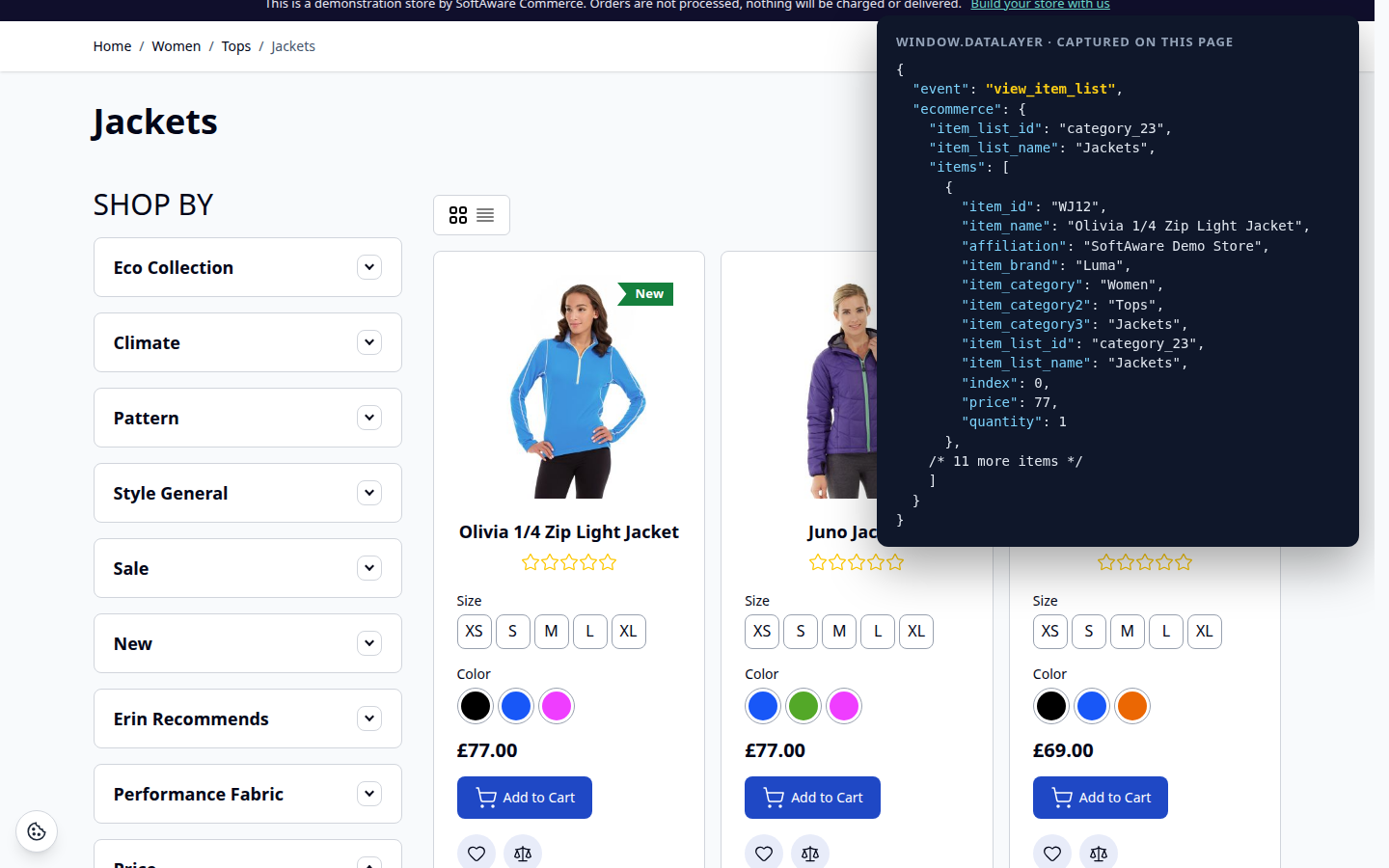
How events reach the dataLayer
- Page events (view_item_list, view_item, view_cart, begin_checkout, purchase, search) are printed in the page as JSON and pushed when the page loads.
- Events that belong to the visitor (cart changes, wish list, login, sign-up) are queued on the server and delivered through the private customer-data section
softaware-ga4, so they work with the full-page cache. - Cart changes are detected by comparing each cart line with its stored quantity. An AJAX add and a full page reload are both counted once, and a guest cart merged at login is not counted.
- Every event has an id, and the browser remembers the ids it has already pushed. If a page navigates away before the section response arrives, the next page fetches the section once.
- Purchase is flagged in the table
softaware_ga4_orderand never output twice for the same order. - Cart events use the cart's own currency. Lines with a custom price (for example free gifts) are reported at that price, even when it is 0.
To check the events, switch on Debug Mode and open the browser console: every push is logged as [Softaware GA4] <event>. You can also inspect window.dataLayer, or use GTM Preview and GA4 DebugView.
6. Consent
- With Softaware Cookie Consent: the Consent Mode defaults come from that module and are printed before the tag. Nothing else is needed. The GTM
<noscript>iframe is left out, because a visitor without JavaScript cannot give consent. With Load Tags = After "Analytics" consent (or Marketing), GTM or gtag.js is loaded only after the visitor accepts that category. - With another consent tool: set Consent Mode Defaults to Denied until updated if your tool sends
gtag('consent', 'update', ...)but does not set the defaults itself, or Do not set if it sets them. - Without consent requirements: choose Granted (no consent required).
The defaults cover ad_storage, ad_user_data, ad_personalization, analytics_storage, functionality_storage and personalization_storage. The GTM container includes a trigger "CE - softaware_consent_update" and variables for the Softaware Cookie Consent categories, for your own tags that should wait for consent.
7. Refunds
- Create a GA4 Measurement Protocol API secret (GA4 Admin > Data streams > your web stream).
- In Refunds (Measurement Protocol) set Send Refunds = Yes and paste the API Secret. The GA4 Measurement ID in General must be set.
- From then on, every credit memo queues a refund event with the order number as transaction_id, the value, tax, shipping, affiliation and the refunded items. Cron sends queued refunds every five minutes.
The GA client ID and session ID are saved when the order is placed, so GA4 can link the refund to the visitor. If no client ID was available (consent denied, orders created in the admin), a generated one is used: the refund is attributed to the transaction but not to a session. The refund value follows the purchase value settings (tax and shipping), so a full refund cancels the purchase revenue exactly. A failed send is retried up to five times, and a refund is claimed before it is sent, so cron and the CLI cannot send it twice.
8. CLI commands
| Command | What it does |
|---|---|
bin/magento softaware:ga4:refunds | Lists queued refunds. |
bin/magento softaware:ga4:refunds --dry-run | Prints the Measurement Protocol payloads without sending them. |
bin/magento softaware:ga4:refunds --send | Sends pending refunds now (cron does this every five minutes). |
bin/magento softaware:ga4:gtm-export [--store=default] [--output=container.json] | Writes the GTM container JSON, using the measurement ID of that store view. |
9. For developers
- Push your own events in the browser:
window.swGa4.push('event_name', {currency: 'GBP', value: 10, items: [...]}). - Queue an event on the server (delivered on the next section load):
Softaware\Ga4\Model\EventQueue::add($event, $params). - Register a product list for view_item_list and select_item:
Softaware\Ga4\Model\ListRegistry::add($id, $name, $products). - Add page events: implement
Softaware\Ga4\Api\PageEventProviderInterfaceand add it to theprovidersargument of the blocksoftaware.ga4.datalayerin a layout handle. - Build items:
Softaware\Ga4\Model\ItemBuilder::fromProduct(),fromQuoteItem(),fromOrderItem().
10. Permissions (ACL)
Under System > Permissions > User Roles > Role Resources > Softaware > GA4 & GTM:
| Resource | Gives access to |
|---|---|
Softaware_Ga4::export | GTM Container Export |
Softaware_Ga4::config | The GA4 & Google Tag Manager settings |
11. Troubleshooting
- No events in the dataLayer: check Enabled for the store view, the container or measurement ID, and flush the cache. With Load Tags set to an "after consent" option, nothing loads until the visitor accepts that category.
- Events in the dataLayer but not in GA4: with GTM, the container must be published and contain the GA4 tags (import the export file). Use GTM Preview and GA4 DebugView with Debug Mode = Yes.
- No add_shipping_info or add_payment_info: these are implemented for the Magento (Luma) checkout. A one-step checkout needs an adapter that calls
window.swGa4.push(). add_payment_info also fires for a method the checkout pre-selects. - A CMS product widget sends no view_item_list: its block HTML is cached, so these lists are not reported.
- Refunds are not arriving: check Send Refunds, the API secret and the measurement ID, make sure Magento cron runs, then run
bin/magento softaware:ga4:refundsto see the queue and its last error.--dry-runshows the payload. - Enhanced conversions without phone numbers: Google requires E.164, so phone numbers are only sent when stored in international format (+44...).
12. Uninstall
bin/magento module:disable Softaware_Ga4
composer remove softaware/module-ga4-gtm
bin/magento setup:upgrade
bin/magento cache:flush
Then remove the imported tags from your GTM container if you no longer need them. The tables softaware_ga4_order and softaware_ga4_refund can be dropped once the module is removed.
Changelog
Release notes
1.2.2
Latest
docs/listing.json,docs/faq.md,docs/user-guide.mdand screenshots indocs/images/.
1.2.1
- GTM Container Export page: the download form is a standard admin fieldset (label beside the store selector, button aligned with the field), section headings and the event table use the admin styles from a small module CSS file instead of inline styles, and a notice explains when no store view has the module enabled or a store view uses gtag.js (where the container is not needed).
- Settings: every field has a short comment with its default (Enabled, Currency, Item Prices Include Tax, Send Refunds and others), and the measurement ID comment says where to find it.
1.2.0
- Requires
softaware/module-coreinstead ofsoftaware/module-base. The admin menu and ACL now sit underSoftaware_Core::core("Softaware"); roles that had access keep it (migrated by module-core). After updating all SoftAware modules,softaware/module-basecan be removed.
1.1.0
add_to_wishlistevent (Luma and Hyvä), delivered through the customer-data section; included in the GTM container export.
- Refund value now follows *Purchase Value Includes Tax / Shipping*, like the purchase event. Before, refunds always sent the credit memo grand total, so with tax or shipping excluded a full refund made revenue negative.
- A queued refund could be sent twice when cron and
softaware:ga4:refunds --sendran at the same time; it is now claimed (optimistic lock on the attempt counter) before it is sent. - Cart events (add_to_cart, remove_from_cart, view_cart, begin_checkout) use the cart's currency instead of the session's display currency.
- Cart lines with a custom price of 0 (free gifts) were reported at the catalogue price in add_to_cart.
- The GTM
<noscript>iframe is no longer printed while Softaware Cookie Consent is active: without JavaScript a visitor cannot consent, so GTM must not load.
1.0.0
- Google Tag Manager (head + noscript, optional server-side tagging domain) or gtag.js with a GA4 measurement ID.
- Google Consent Mode: works with Softaware Cookie Consent automatically; own defaults when no consent module is used; optional "load only after consent".
- GA4 ecommerce events with full item data: view_item_list (category, search, related, upsell, cross-sell), select_item, view_item, add_to_cart, remove_from_cart, view_cart, begin_checkout, add_shipping_info, add_payment_info, purchase (once per order), plus login, sign_up and search.
- Cart events for every kind of cart change (AJAX and page reloads, Luma and Hyvä) through the customer-data section
softaware-ga4; de-duplicated in the browser. - Refunds from credit memos through the Measurement Protocol (cron, encrypted API secret).
- Enhanced conversions: optional SHA-256 hashed user_data.
- GTM container export (admin page and CLI).
- Debug mode with console logging and GA4 DebugView support.
FAQ
Questions, answered
Something else on your mind? The developers who wrote the module answer before and after you buy.
Ask a question →Already installed it? Open a support ticket
Which events does the module send?
The GA4 recommended ecommerce events: view_item_list, select_item, view_item, add_to_cart, remove_from_cart, add_to_wishlist, view_cart, begin_checkout, add_shipping_info, add_payment_info, purchase and refund, plus login, sign_up and search. Items carry item_id, item_name, item_brand, item_category to item_category5, item_variant (the child SKU of configurable products), list ID, list name and position in lists, affiliation, discount, price and quantity.
Do I need Google Tag Manager?
No. Choose Tag Type = Google Tag Manager to push the events to the dataLayer for your GTM tags, or gtag.js to send them straight to GA4 with your measurement ID. With GTM, the admin gives you a ready-made container to import.
Does it work with Hyvä?
Yes, on Hyvä 1.3 and later, without a separate compatibility module. Product lists, product pages, cart changes, wish list, login, sign-up and search are tracked on Hyvä and Luma. The Hyvä storefront uses the Luma checkout fallback, so the checkout events are the Luma ones.
Which checkouts are supported for add_shipping_info and add_payment_info?
The standard Magento (Luma) checkout, which Hyvä themes also use by default. One-step checkouts such as Hyvä Checkout need a small adapter that calls window.swGa4.push() when the shopper picks a shipping or payment method. All other events, including purchase on the success page, do not depend on the checkout.
How does it avoid counting a cart change twice?
Cart changes are detected on the server: each cart line is compared with its stored quantity, so an AJAX add and a full page reload are counted once, and a guest cart merged at login is not counted again. The events reach the browser through the private customer-data section softaware-ga4, and every event has an id that the browser remembers. The purchase event is flagged per order in the database and never output twice, even when the shopper reloads the success page.
Does it support Google Consent Mode?
Yes, including the ad_user_data and ad_personalization signals. With Softaware Cookie Consent enabled, the consent defaults come from that module and are printed before the tag. Without it, you choose the defaults in the settings: denied until updated, granted, or not set (when your own consent tool sets them). With Softaware Cookie Consent you can also load GTM or gtag.js only after the visitor accepts Analytics or Marketing.
How are refunds tracked?
When you create a credit memo, the module queues a refund event with the order number, value, tax, shipping and the refunded items. Cron sends it to GA4 through the Measurement Protocol every five minutes, using the GA client ID and session saved when the order was placed. The API secret is stored encrypted and is never sent to the browser. You can list, dry-run and send queued refunds with bin/magento softaware:ga4:refunds.
Will a refund cancel the right amount of revenue?
Yes. The refund value follows the same Purchase Value Includes Tax and Purchase Value Includes Shipping settings as the purchase event, so a full refund cancels the purchase revenue exactly.
Are orders created in the admin tracked?
The purchase event is sent from the order success page in the shopper's browser, so orders created in the admin do not send a purchase. Refunds for any order are sent from the server; when no GA client ID was saved, a generated one is used, so the refund is attributed to the transaction but not to a session.
What are enhanced conversions?
An option that adds SHA-256 hashed email, phone and name (plus city, postcode and country) as user_data to the purchase, sign_up and login events. It is off by default; only switch it on if your privacy policy covers it. Phone numbers are only sent when stored in international format (for example +44...).
Can I use server-side tagging?
Yes. Set GTM Script Domain to your tagging server (for example https://sgtm.example.com) and GTM is loaded from there.
Can I add my own events?
Yes. In the browser call window.swGa4.push('event_name', {...}). On the server, queue an event with Softaware\Ga4\Model\EventQueue::add(), or add page events by implementing Softaware\Ga4\Api\PageEventProviderInterface. The user guide has the details.
Support