Cookie Consent
A free cookie banner and preferences window for Magento 2 with Google Consent Mode v2, scripts that wait for consent and an optional consent log, on Luma and Hyvä.
- Magento 2.4.7 – 2.4.9
- PHP 8.2 – 8.5
- Hyvä and Luma
- Version 1.3.1
Free
No payment needed, with 12 months of updates.
Add it to your cart and complete the free checkout. Your ZIP downloads and Composer access will be in your account.
What is included
- 12 months of new versions and fixes; the versions released in that time stay yours
- Install with Composer, or download a zip from your account
- Licence for one production domain, staging and development copies included
No subscription or automatic renewal. Keep using the versions included in your update period. Update and licence details
Key features
- Cookie banner as a bar or a box
- Preferences window with one switch per category
- Google Consent Mode v2 defaults at the top of the head
Composer package softaware/module-cookie-consent
-
Tags wait for the visitor
Pixels, analytics and chat widgets you add in the admin are output as inactive markup and only run once their cookie category is accepted.
-
Google tags get the right signal
Consent Mode v2 defaults are printed before any CSS, JavaScript or tag manager, and returning visitors get their stored choice on the first hit.
-
Clear choices for shoppers
Accept all, reject all or choose per category, in an accessible window that visitors can reopen at any time from the footer or a floating button.
All features
What is included
Banner and preferences
- Bar (top or bottom) or box (bottom left, bottom right, centre)
- Accept all, Reject all and Manage preferences buttons
- Optional cookie policy link
- Footer link, floating button, CMS widget or any #cookie-settings link to reopen
- Keyboard friendly: focus trap, Escape, labelled switches
Categories and cookies
- Necessary (always on), Preferences, Analytics, Marketing
- Your own categories with their Google consent types
- Consent stored in a first-party cookie with version and expiry
- Raise the consent version to ask everybody again
- Cookies of refused categories deleted in the browser
Google Consent Mode v2
- consent default before any tag, consent update on every choice
- Optional regions, wait_for_update, ads_data_redaction, url_passthrough
- dataLayer event softaware_consent_update for GTM triggers
- Replaces Magento's own cookie restriction notice
Scripts and developers
- Admin-managed snippets per category, position and store view
- Scripts, iframes, images and stylesheets held back until consent
- Design Configuration scripts can wait for a category
- JavaScript API (SwConsent) and a PHP ScriptBlocker
- CLI: bump the consent version, clean the log
Feature tour
Everything your shoppers and your team see
01 / 06
A banner that fits your theme
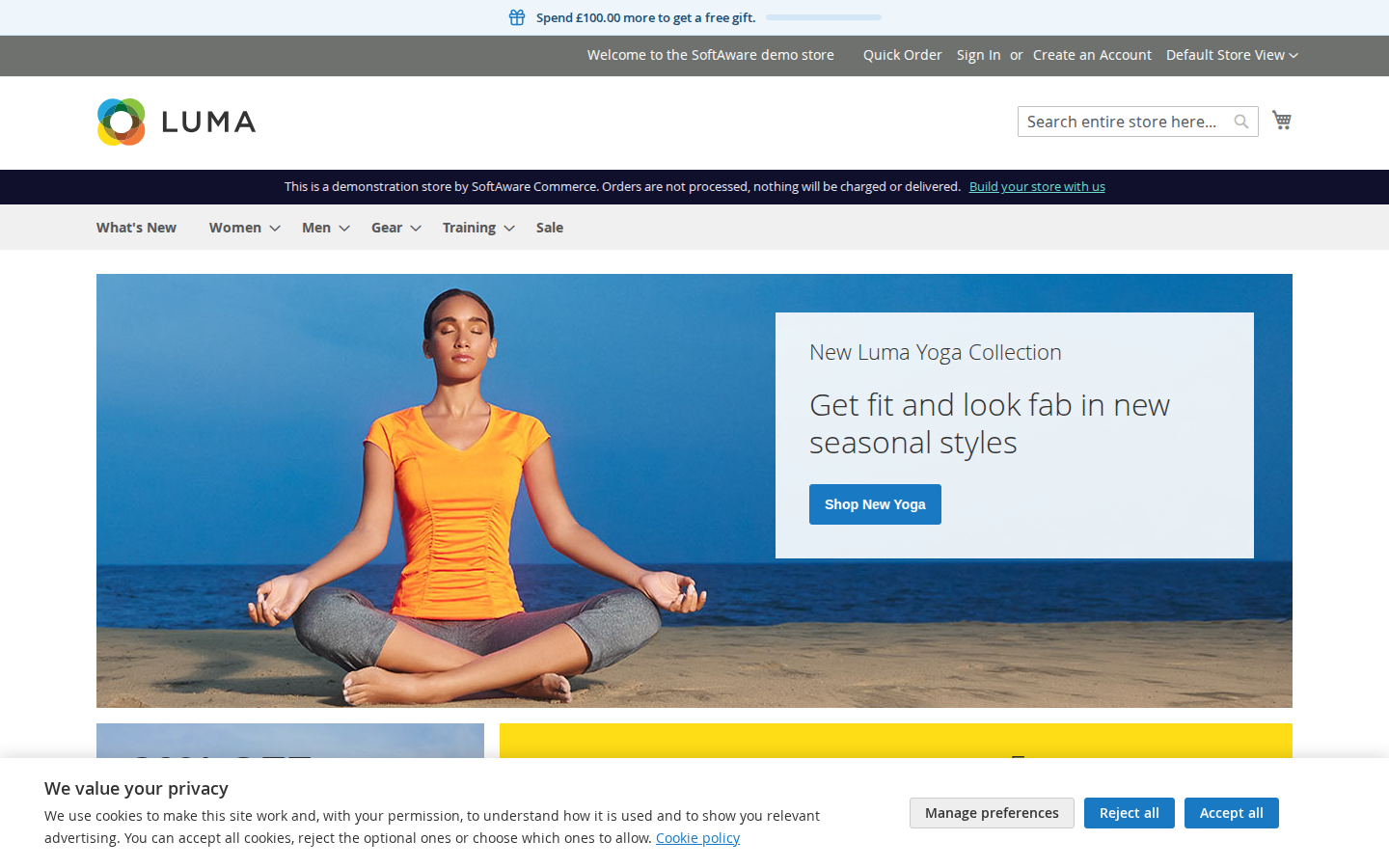
Full-width bar at the top or bottom, or a box in a corner or the centre. It uses your theme's fonts and buttons, or your own colours.
02 / 06
One switch per category
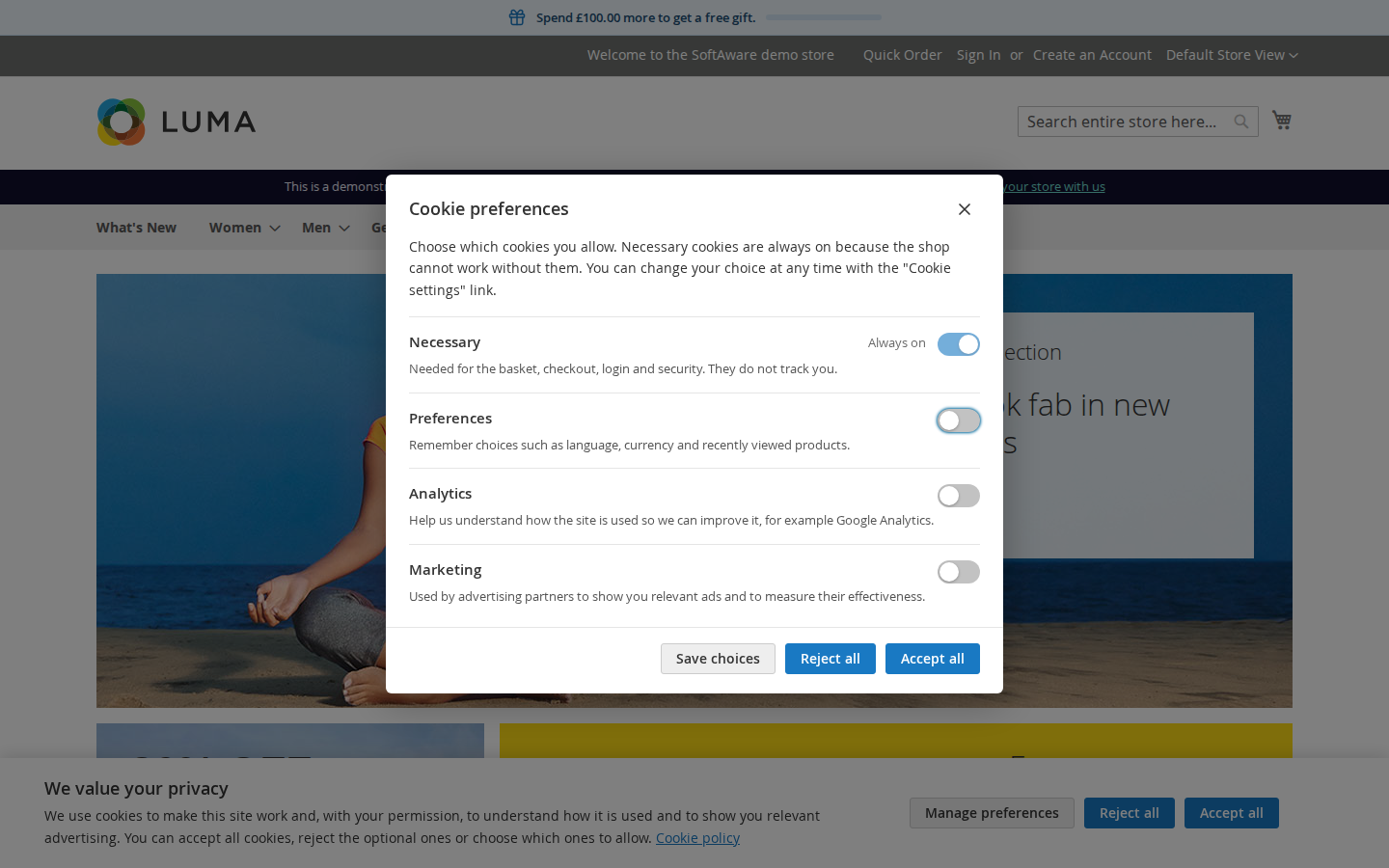
Necessary, Preferences, Analytics and Marketing, plus categories of your own. Every text is a store view setting, so each language gets its own wording.
03 / 06
Native Hyvä templates
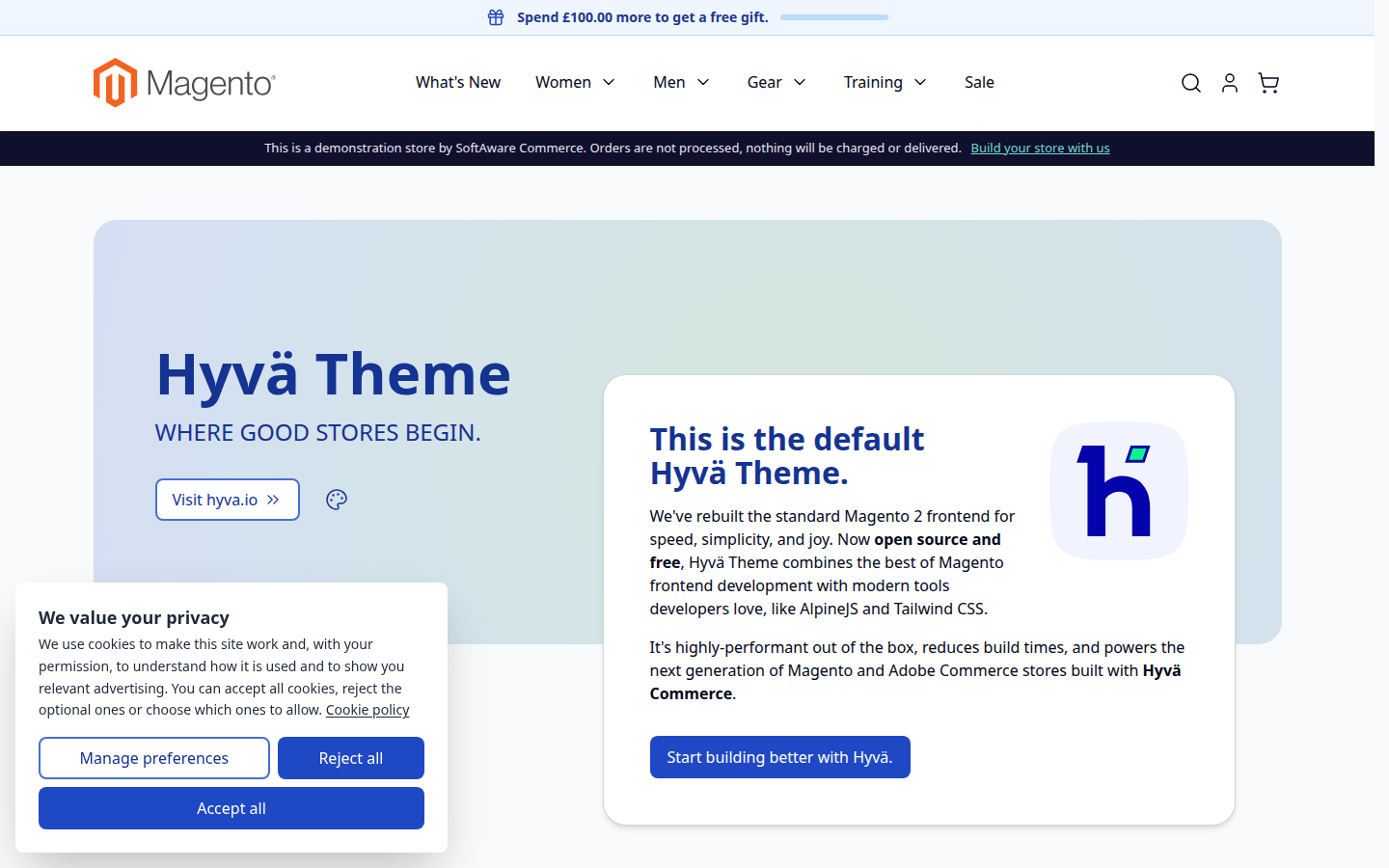
Tailwind templates for Hyvä 1.3+, driven by the same small vanilla script as Luma and picked automatically. Luma, Blank and their child themes get their own templates.
04 / 06
Comfortable on phones
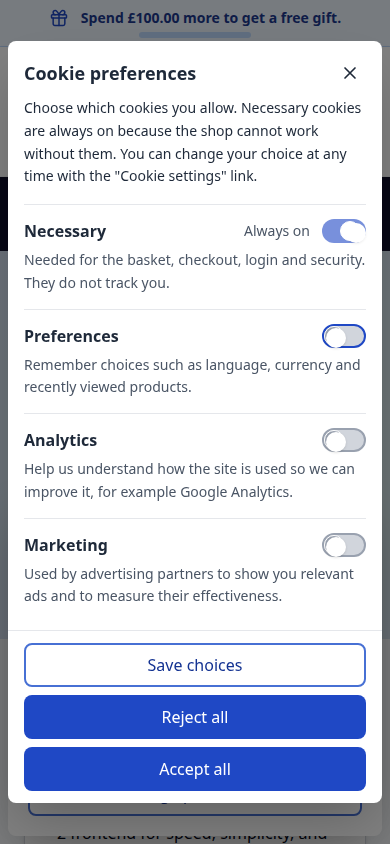
Buttons stack into full-width rows and the preferences window scrolls inside the screen, with a focus trap and Escape to close.
05 / 06
Paste the snippet, pick the category
Each snippet has a category, a position (page head or end of body) and store views. The grid also lists scripts in Design Configuration that still load without consent.
06 / 06
Every choice on record
Optional log with a random consent ID, the choice, the accepted categories, the consent version and a keyed hash of the IP address. Export to CSV or XML.
Live demo
Try it before you install it
A full Magento store with the module installed, on Luma and on Hyvä. The admin demo signs you in with one click.
Compatibility
Requirements and compatibility
| Magento | 2.4.7 – 2.4.9 |
|---|---|
| Storefront themes | Luma Blank Hyvä |
| PHP | 8.2 – 8.5 |
| Latest version | 1.3.1 |
| composer.json requires | php ~8.2.0||~8.3.0||~8.4.0||~8.5.0 magento/framework ~103.0.7 softaware/module-core ^1.0 magento/module-backend * magento/module-config * magento/module-cookie * magento/module-store * magento/module-ui * magento/module-widget * magento/module-csp * magento/module-page-cache * magento/module-theme * |
Installation
Up and running in minutes
Get it free, create a Composer key in your account, then in the root of your Magento project:
-
01Add the repository and your key (once per project)
composer config repositories.softaware composer https://repo.softawarecommerce.com
composer config --auth http-basic.repo.softawarecommerce.com PUBLIC_KEY PRIVATE_KEY
-
02Install the module
composer require softaware/module-cookie-consent -
03Enable it
bin/magento setup:upgrade
bin/magento setup:di:compile
bin/magento setup:static-content:deploy
bin/magento cache:flush
The last three are only needed in production mode.
Prefer a zip? Every version you are entitled to can be downloaded from My modules. More about Composer access
User guide
How to set up and use Cookie Consent
For version 1.3.1. The same guide comes with the module, in docs/user-guide.md.
A cookie banner and preferences window with Google Consent Mode v2, third-party scripts that wait for consent and an optional consent log. This guide covers installation, every setting and day-to-day use.
- Demo (Luma): https://demo.softawarecommerce.com/
- Demo (Hyvä): https://demo.softawarecommerce.com/hyva/
- Admin demo: https://demo.softawarecommerce.com/try-admin/cookie-consent
- Changelog: Release notes · Questions: FAQ
A note before you start: the module does what this guide describes and nothing more. Which tags you run, how you categorise them and what your cookie policy says are your decisions; take legal advice if you are unsure what applies to your shop.
1. Requirements
| Magento | Open Source or Adobe Commerce 2.4.7 to 2.4.9 |
| PHP | 8.2 to 8.5 |
| Themes | Luma, Blank and themes based on them; Hyvä 1.3+ |
| Other | softaware/module-core (installed automatically) |
2. Installation
Cookie Consent is free. Install it with Composer from repo.softawarecommerce.com, using the Composer keys from your account on softawarecommerce.com (see https://softawarecommerce.com/shop/composer-access/):
composer config repositories.softaware composer https://repo.softawarecommerce.com
composer config --auth http-basic.repo.softawarecommerce.com PUBLIC_KEY PRIVATE_KEY
composer require softaware/module-cookie-consent
bin/magento setup:upgrade
bin/magento setup:di:compile            # production mode only
bin/magento setup:static-content:deploy # production mode only
bin/magento cache:flush
On Hyvä the module's templates are picked automatically, and the module registers itself for Tailwind source scanning. If you build your theme's CSS yourself, run your usual Hyvä build after installing.
To update later: composer update softaware/module-cookie-consent, then the same bin/magento commands.
3. Quick start
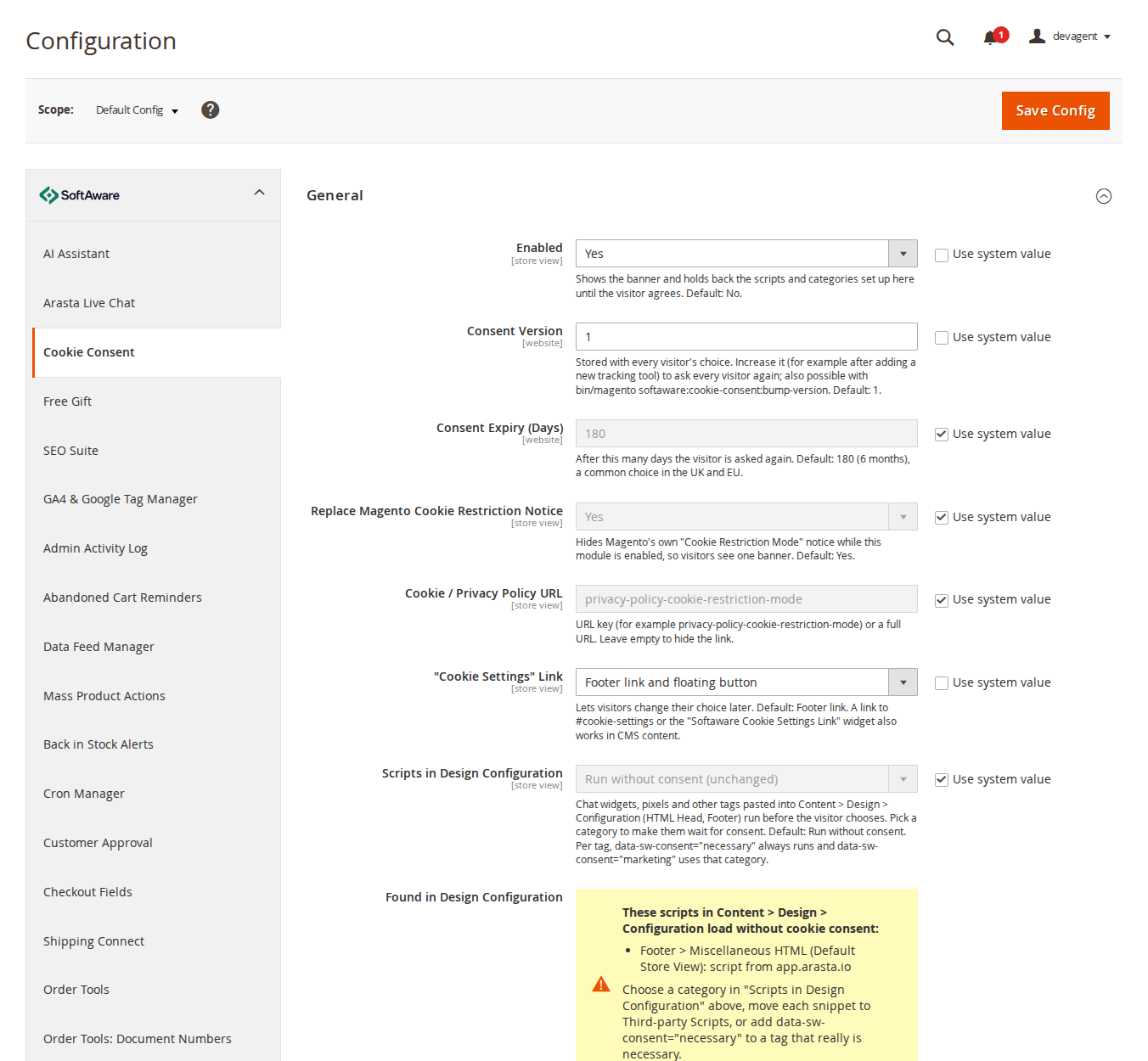
- Open Stores > Configuration > Softaware > Cookie Consent (also under Softaware > Cookie Consent > Settings).
- General > Enabled = Yes. The module is off after installation, so nothing changes until you switch it on.
- Set Cookie / Privacy Policy URL to your cookie policy page.
- Check the texts under Banner, Preferences Window and Cookie Categories for each store view.
- Move your tracking snippets to Softaware > Cookie Consent > Third-party Scripts (section 5), or set General > Scripts in Design Configuration to a category (section 6).
- Save Config and flush the cache. Open the shop in a private window: the banner appears.
4. Settings
Texts and most options can be set per store view. Consent version, expiry and the consent log switches are set per website, the log retention globally. Most fields show their default under the input.
General
| Setting | What it does |
|---|---|
| Enabled | Shows the banner and holds back the scripts and categories set up here until the visitor agrees. Default: No. |
| Consent Version | Stored with every visitor's choice. Increase it to ask every visitor again (also possible from the command line, section 10). Default: 1. |
| Consent Expiry (Days) | After this many days the visitor is asked again. Default: 180. |
| Replace Magento Cookie Restriction Notice | Hides Magento's own "Cookie Restriction Mode" notice while the module is enabled, so visitors see one banner. Default: Yes. |
| Cookie / Privacy Policy URL | A URL key (for example privacy-policy-cookie-restriction-mode) or a full URL. Empty hides the link. |
| "Cookie Settings" Link | How visitors reopen the preferences: Footer link, Floating button, Footer link and floating button, or None (widget or #cookie-settings links only). Default: Footer link. |
| Scripts in Design Configuration | Run without consent (unchanged) or Wait for consent: <category>. See section 6. |
| Found in Design Configuration | Read-only list of scripts in Content > Design > Configuration that currently load without consent. |
Banner
| Setting | What it does |
|---|---|
| Layout | Bar (full width) or Box. Default: Bar. |
| Position | Bar: Bottom or Top. Box: Bottom left, Bottom right or Centre of the screen. |
| Show "Reject All" on the Banner | Shows the "Reject all" button next to "Accept all". Default: Yes. |
| Title, Message | Heading and text. The message allows basic tags (b, strong, em, a, br). |
| Button and link texts | "Accept All", "Reject All", "Settings" (opens the preferences window), policy link text and the "Cookie settings" link text. |
Preferences Window
Title, introduction, the "Save Choices" button, the "Always On" text shown for necessary cookies, and the label of the close button read out by screen readers.
Cookie Categories
| Setting | What it does |
|---|---|
| Necessary: Name, Description | Always on; visitors cannot switch it off. |
| Preferences: Show, Name, Description | When hidden, functionality_storage and personalization_storage are treated as necessary (granted). |
| Analytics: Name, Description | Always shown. |
| Marketing: Show, Name, Description | When hidden, the ad_* consent types stay denied. |
| Additional Categories | Your own categories: Code (lower-case letters, digits, underscores), Name, Description and optional Google Consent Types (comma-separated). A consent type is granted only when every category mapped to it is accepted. |
| Cookies to Delete When Refused | One line per category, for example analytics: _ga, _ga_*, _gid. When a category is refused or withdrawn, these first-party cookies are deleted in the browser, and again on later pages while it stays refused. Pre-filled for Google Analytics, Clarity, Hotjar, Meta, Google Ads, Microsoft Ads, TikTok and Pinterest. Shop cookies (session, form key, basket) are never deleted. |
Google Consent Mode v2
| Setting | What it does |
|---|---|
| Enabled | Prints gtag('consent', 'default', ...) at the top of the page head and sends gtag('consent', 'update', ...) when the visitor chooses. Default: Yes. |
| Wait for Update (ms) | How long Google tags wait for a consent update. Default: 500. |
| Redact Ads Data | Redacts ad click identifiers while ad_storage is denied. Default: Yes. |
| URL Passthrough | Passes ad click information through page URLs when cookies are not allowed. Default: No. |
| Regions Requiring Consent | Optional ISO 3166-2 codes, for example GB, DE, US-CA. Empty: denied defaults everywhere. The banner is still shown to every visitor. |
| Default for Other Regions | Consent default outside the listed regions until the visitor chooses. Default: Granted. |
Categories map to Google consent types as follows: Necessary to security_storage; Preferences to functionality_storage and personalization_storage; Analytics to analytics_storage; Marketing to ad_storage, ad_user_data and ad_personalization.
Appearance
By default the banner uses your theme's fonts and buttons (Luma .action.primary, Hyvä btn btn-primary). Set Use Custom Colours = Yes to choose background, text, button background, button text and link/switch colours (hex values), and optionally a Font Family.
Consent Log
| Setting | What it does |
|---|---|
| Record Consent Choices | Stores each choice (section 8). Default: No. |
| Truncate IP Before Hashing | Removes the last part of the IP address (last octet for IPv4, last 80 bits for IPv6) before it is hashed. Default: Yes. |
| Keep Entries For (Days) | Older entries are deleted by a daily cron job; 0 keeps them. Default: 730. |
5. Third-party Scripts
Softaware > Cookie Consent > Third-party Scripts holds the vendor snippets that must wait for consent, such as a Meta Pixel, Hotjar or a chat widget.
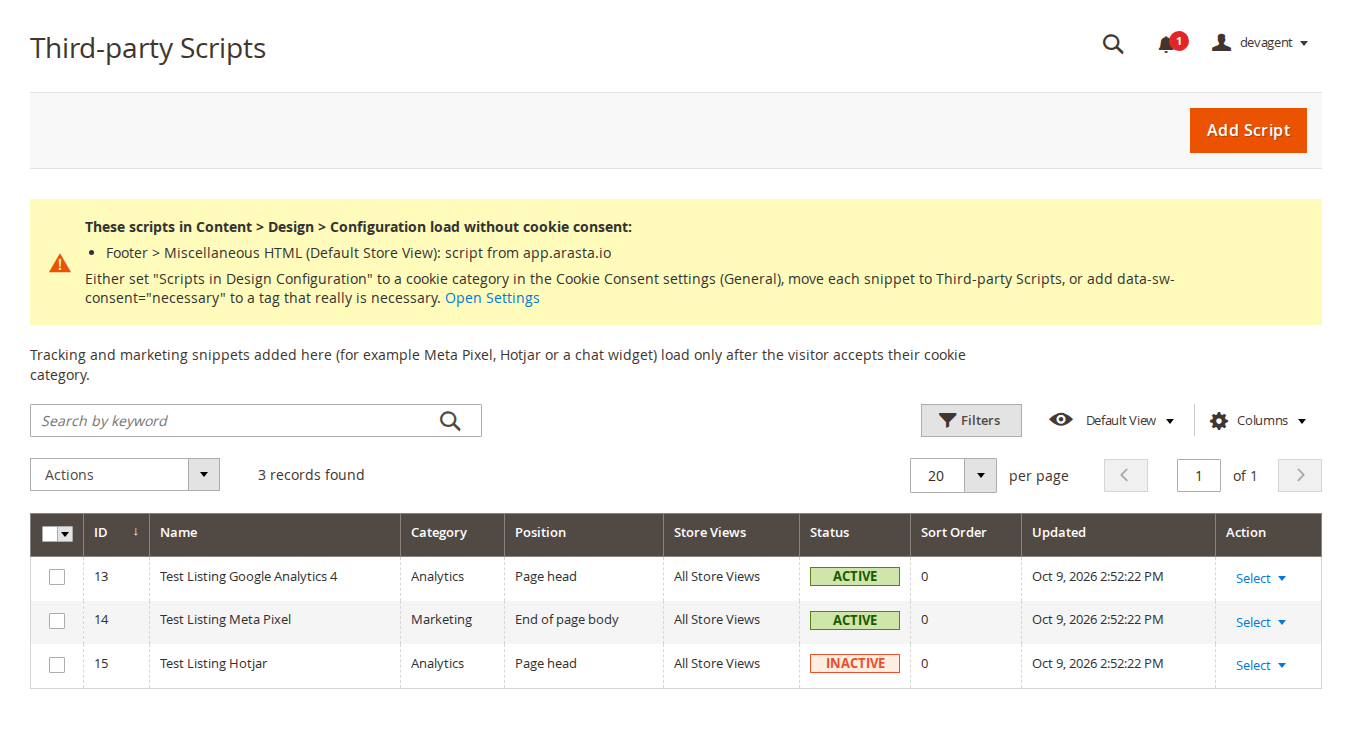
Click Add Script and fill in:
- Active, Name
- Cookie Category: the category the visitor must accept
- Position: Page head or End of page body, as the vendor's instructions say
- Store Views and Sort Order
- Snippet (HTML): paste the vendor's code as it is
On the storefront, <script> tags are output as type="text/plain" data-sw-consent="<category>"; sources of img, iframe, source, video, audio and embed tags become data-sw-src / data-sw-srcset, and external stylesheets data-sw-href. Once the category is accepted they are activated in their original order. Remote hosts are added to the Content Security Policy, and inline scripts get a CSP nonce on pages with a strict policy (checkout). A snippet with an unclosed <script> tag is refused when you save it.
Inside a snippet, data-sw-consent="necessary" on a single tag keeps that tag running without consent, and data-sw-consent="marketing" (or any other category code) uses that category for that tag instead of the snippet's.
The grid has keyword search on the name, filters, an Active / Inactive badge and mass delete.
6. Scripts in Design Configuration
Chat widgets and pixels are often pasted into Content > Design > Configuration, under HTML Head > Scripts and Style Sheets or Footer > Miscellaneous HTML. By default they run as before. Set General > Scripts in Design Configuration to a category (for example Wait for consent: Preferences) and these scripts, iframes and third-party images and stylesheets wait for that category too. Images and stylesheets from your own domain keep loading.
The settings page and the Third-party Scripts grid list every such script that still loads without consent, per store view, so you can see what is left to sort out.
7. What your visitors see
First visit. The banner with "Accept all", "Reject all" (if shown) and "Manage preferences", plus the policy link.
Preferences window. One switch per category, with the necessary category marked "Always on". "Save choices" keeps the switches as they are. The window is a modal dialog: focus moves into it, Tab stays inside, Escape closes it and focus returns to the button that opened it.
The stored choice. The first-party cookie sw_consent holds the version, a random ID, the time and the accepted categories. Visitors are asked again when the consent version changes or the choice expires.
Changing their mind. The footer link, the floating button, the CMS widget Softaware Cookie Settings Link, or any link to #cookie-settings (or element with data-sw-cc-open) opens the preferences again. Withdrawing a category deletes its listed cookies and reloads the page, so scripts that already ran stop.
Hyvä and mobile. Hyvä templates are included; on phones the buttons stack and the window scrolls inside the screen.
| Hyvä | Mobile |
|---|---|
 |  |
8. Consent log
With Record Consent Choices on, every choice is stored and shown under Softaware > Cookie Consent > Consent Log: date, consent ID, choice (Accepted all, Rejected all, Custom choice), accepted categories, consent version, store view and IP hash. The consent ID is the random ID stored in the visitor's sw_consent cookie.
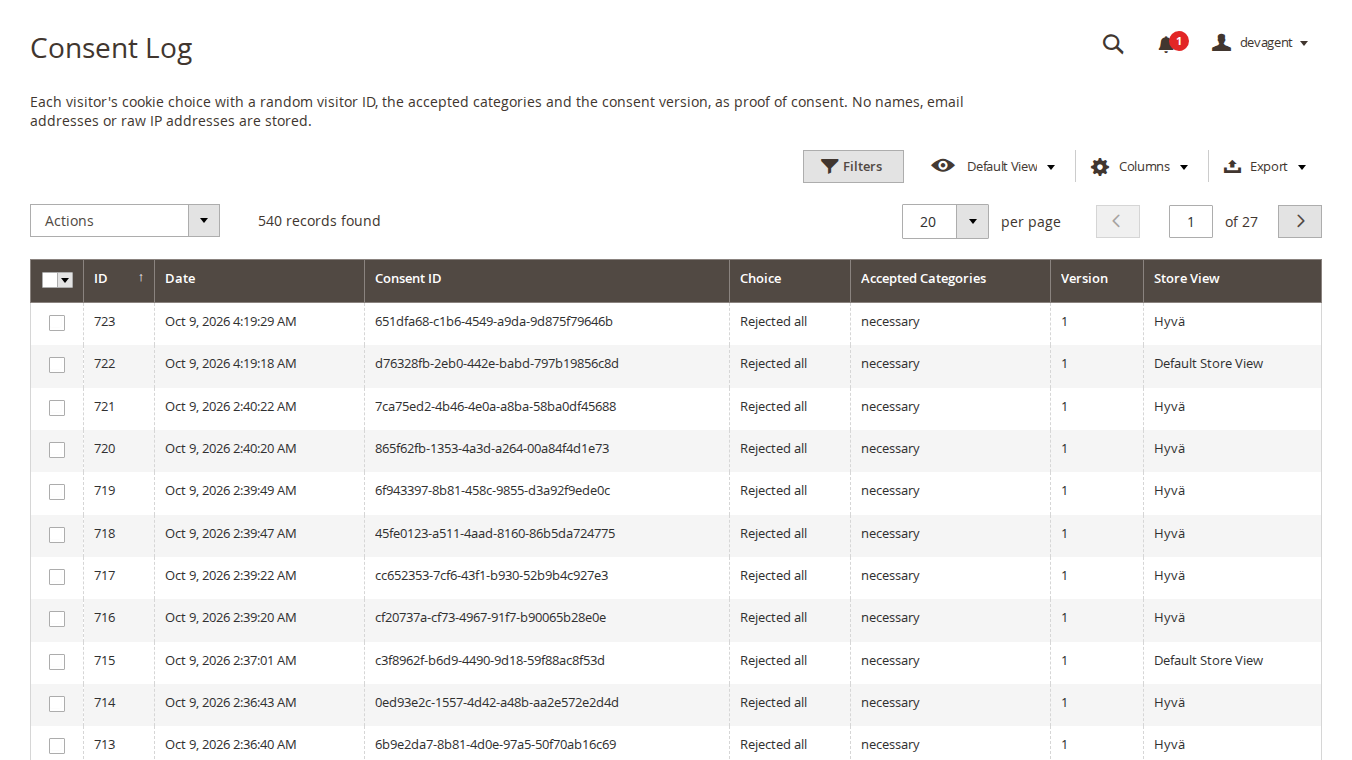
The IP address is stored only as a keyed hash (HMAC-SHA256 with your installation's key), optionally truncated first. No names, email addresses or raw IP addresses are stored. The grid has filters (including store view), CSV and XML export and mass delete. The public logging endpoint stores at most 60 entries per (truncated) IP address and hour.
9. Google Tag Manager and developers
dataLayer. On every page with a stored choice and on every new choice, this event is pushed:
{event: 'softaware_consent_update', sw_consent_trigger: 'stored' | 'user',
 sw_consent: {necessary: 'granted', analytics: 'denied', ...},
 sw_consent_categories: 'necessary,analytics', sw_consent_version: 1}
JavaScript (window.SwConsent, available from the head):
SwConsent.has('analytics');
SwConsent.whenGranted('marketing', function () { /* load pixel */ });
SwConsent.onChange(function (detail) { /* detail.categories, detail.trigger */ });
SwConsent.open(); SwConsent.acceptAll(); SwConsent.rejectAll(); SwConsent.save(['necessary', 'analytics']);
Markup that waits for consent:
<script type="text/plain" data-sw-consent="analytics">/* runs after consent */</script>
<iframe data-sw-consent="marketing" data-sw-src="https://www.youtube-nocookie.com/embed/..."></iframe>
PHP: inject Softaware\CookieConsent\Model\ScriptBlocker (or use the view model Softaware\CookieConsent\ViewModel\ScriptBlocker in templates) and call block($html, 'marketing') or attributes('analytics'). When the module is disabled both return the markup unchanged.
10. Command line
bin/magento softaware:cookie-consent:bump-version
bin/magento softaware:cookie-consent:log:clean [--days=N]
bump-version increases the consent version in every scope where it is set and cleans the config and full-page caches, so every visitor is asked again. log:clean deletes log entries older than the retention period (or --days); the cron job does the same every night at 03:17.
11. Permissions (ACL)
Under Softaware > Cookie Consent in System > Permissions > User Roles:
| Resource | Allows |
|---|---|
| Manage Third-party Scripts (site JavaScript) | Adding and editing scripts. This puts JavaScript on every storefront page, including checkout: give it only to people you would also let edit Content > Design > Configuration. |
| View Consent Log | Viewing and exporting the log. |
| Delete Consent Log Entries | Mass delete in the log. |
| Cookie Consent Settings | The configuration section. |
12. Troubleshooting
| Problem | Solution |
|---|---|
| The banner does not appear | Check General > Enabled for the store view, flush the cache and open the shop in a private window (a stored choice hides the banner). |
| Two cookie notices | Set Replace Magento Cookie Restriction Notice = Yes. |
| A tag still loads before consent | It is probably hard-coded in a template or CMS block. Move it to Third-party Scripts or add data-sw-consent markup. Check the "Found in Design Configuration" list too. |
| A script runs after consent but its requests are blocked | A blocked script's own CSP needs (for example connect-src of a pixel) still have to be allowed in your CSP whitelist. |
| A tracking cookie stays after "Reject all" | Only first-party cookies listed under Cookies to Delete When Refused can be deleted. Add its name, or note that cookies of other domains cannot be deleted by your shop. |
| The consent log stays empty | Turn on Consent Log > Record Consent Choices; the grid shows a notice while it is off. |
13. Uninstall
bin/magento module:disable Softaware_CookieConsent
composer remove softaware/module-cookie-consent
bin/magento setup:upgrade
bin/magento cache:flush
The visitors' sw_consent cookies expire on their own. Scripts you moved to Third-party Scripts are no longer output, so move them back to your theme or tag manager first if you still need them. The module's database tables (scripts and consent log) are kept.
Changelog
Release notes
1.3.1
Latest
1.3.1 (2026-10-09)
Added
- Product listing, FAQ and user guide (docs/)
1.3.0
- Third-party Scripts grid: keyword search (script name).
- Consent Log grid: Store View filter.
- Third-party Scripts: page title matches the menu ("Third-party Scripts"), one-sentence introduction, and an empty state with "Add Your First Script" instead of an empty table. Status is shown as an Active / Inactive badge. A notice appears when Cookie Consent is switched off.
- Consent Log: introduction, an empty state, a notice when Record Consent Choices is off, and the store view on one line instead of three (rows are a third of the height).
- Script form: notes for Position, Store Views and Sort Order.
- Settings: every field has a short comment with its default; long comments shortened; "Keep Entries For (Days)" is hidden while the consent log is off; "Wait for Update (ms)" accepts only 0 or more.
- The design-configuration warning uses a module CSS file instead of inline styles and a shorter text on the settings page.
1.2.0
- Requires
softaware/module-coreinstead ofsoftaware/module-base. The admin menu and ACL now sit underSoftaware_Core::core("Softaware"); roles that had access keep it (migrated by module-core). After updating all SoftAware modules,softaware/module-basecan be removed.
1.1.0
- *General > Scripts in Design Configuration*: scripts, iframes and third-party images/stylesheets pasted into Content > Design > Configuration (HTML Head > Scripts and Style Sheets, Footer > Miscellaneous HTML) can wait for a cookie category. Default: unchanged. The settings page and the Third-party Scripts grid list every script there that loads without consent.
- *Cookie Categories > Cookies to Delete When Refused*: first-party tracking cookies (pre-filled for GA, Clarity, Hotjar, Meta, Google Ads, Microsoft Ads, TikTok, Pinterest) are deleted when a category is refused or withdrawn.
data-sw-consent="necessary"on a single tag keeps it running;data-sw-consent="<category>"overrides the snippet's category for that tag.
- Consent Mode v2: with Regions set and "Default Outside These Regions" = Denied, no default was sent for visitors outside the regions, so Google tags treated consent as granted there. A global denied default is now sent.
- A normal
<script>that carried adata-sw-consentattribute was run a second time by consent.js. - Third-party Scripts: an
<img srcset>,<source>,<video>/<audio>,<embed>or external stylesheet in a snippet loaded before consent; they are now gated too. Snippets with an unclosed<script>tag are refused.
- Consent log endpoint: at most 60 entries per (truncated) IP hash and hour (new index on ip_hash, created_at), and the logged consent version is capped at the current version.
- ACL title of "Manage Third-party Scripts" now says that it allows adding JavaScript to the storefront.
1.0.0
- Cookie banner (bar or box, five positions) and accessible preferences window (keyboard, focus trap, ARIA).
- Categories: necessary (always on), preferences, analytics, marketing, plus custom categories; texts per store view.
- Accept all / reject all / save choices; "Cookie settings" footer link, floating button, CMS widget and
#cookie-settingslinks. - Consent stored in the first-party cookie
sw_consentwith version and timestamp; version bump and expiry re-ask visitors. - Google Consent Mode v2: defaults at the top of
<head>(regions, wait_for_update, ads_data_redaction, url_passthrough),consent updateon choice and on every page for returning visitors; dataLayer eventsoftaware_consent_update. - Consent-gated third-party scripts managed in the admin (per category, position and store view) and a PHP/JS API for developers.
- Optional consent log (random id, choice, version, keyed IP hash) with admin grid, CSV/XML export and retention cron.
- Replaces Magento's cookie restriction notice; Luma and Hyvä templates; full-page-cache safe.
- CLI:
softaware:cookie-consent:bump-version,softaware:cookie-consent:log:clean.
FAQ
Questions, answered
Something else on your mind? The developers who wrote the module answer before and after you buy.
Ask a question →Already installed it? Open a support ticket
Is Cookie Consent free?
Yes. The module is free to download from softawarecommerce.com and is installed with Composer like our other modules. It needs softaware/module-core, which Composer installs automatically.
Will this module make my shop legally compliant?
No module can promise that on its own. Cookie Consent gives you the tools: a banner with "Accept all", "Reject all" and per-category choices, scripts that wait for consent, Google Consent Mode v2 signals and an optional log of the choices. Whether your set-up meets the rules that apply to you depends on which tags you run, how you categorise them and what your cookie policy says. Ask your legal adviser if you are unsure.
Which scripts are held back until the visitor agrees?
Snippets you add under Softaware > Cookie Consent > Third-party Scripts, any markup with the data-sw-consent attribute, and (when you choose a category under General > Scripts in Design Configuration) the scripts in Content > Design > Configuration (HTML Head and Footer). Scripts hard-coded in templates or CMS blocks are not changed automatically: move them to Third-party Scripts or add the data-sw-consent markup. The settings page and the Third-party Scripts grid list every Design Configuration script that still loads without consent.
Does it work with Google Tag Manager and Google Consent Mode v2?
Yes. With Consent Mode switched on, gtag('consent', 'default', ...) is printed directly after the page title, before any CSS, JavaScript or tag manager. After a choice, and on every later page for returning visitors, gtag('consent', 'update', ...) is sent. A dataLayer event softaware_consent_update with the accepted categories is pushed as well, so you can use it as a GTM trigger.
Does it work with full-page cache?
Yes. The banner and the scripts contain only store configuration, and the visitor's choice is read in the browser from the sw_consent cookie. Pages stay cacheable.
Does it work with Hyvä?
Yes. Hyvä templates (Tailwind, Hyvä 1.3+) are included and picked automatically; Luma, Blank and their child themes have their own templates. On Hyvä the checkout uses the Luma checkout, so the Luma banner appears there.
How do visitors change their mind?
Through the "Cookie settings" link in the footer, a floating button, the CMS widget "Softaware Cookie Settings Link", or any link to #cookie-settings. When a visitor withdraws a category, matching first-party cookies are deleted and the page reloads, so scripts that already ran stop.
How do I ask every visitor again, for example after adding a new tracking tool?
Increase General > Consent Version, or run bin/magento softaware:cookie-consent:bump-version. Visitors whose stored choice has an older version see the banner again. Choices also expire after Consent Expiry (Days) (default 180).
What does the consent log store?
When Consent Log > Record Consent Choices is on: a random consent ID created in the browser, the store view, the choice (accepted all, rejected all or a custom choice), the accepted categories, the consent version, the time and a keyed hash (HMAC-SHA256) of the IP address, optionally truncated before hashing. No names, email addresses or raw IP addresses are stored. Old entries are deleted by a daily cron job after the number of days you set.
Are cookies deleted when a visitor refuses a category?
First-party cookies listed under Cookie Categories > Cookies to Delete When Refused are deleted in the browser (the list comes pre-filled for Google Analytics, Clarity, Hotjar, Meta, Google Ads, Microsoft Ads, TikTok and Pinterest). Cookies set on other domains cannot be deleted by your shop. Shop cookies such as the session, form key and basket are never deleted.
Can I show the banner only to visitors in some countries?
No. The banner is shown to every visitor, because pages are cached and there is no server-side geolocation. Regions Requiring Consent only changes Google's default consent state for the listed regions.
What happens to Magento's own cookie notice?
While the module is enabled, Magento's "Cookie Restriction Mode" notice is switched off (setting Replace Magento Cookie Restriction Notice, default Yes), so visitors see one banner.
Which Magento and PHP versions are supported?
Magento Open Source and Adobe Commerce 2.4.7 to 2.4.9, PHP 8.2 to 8.5.
Support