Checkout Fields
Add your own fields to the Magento checkout without code, such as a delivery date, PO number, order comment or a dropdown, and find the answers on the order, in the order grid, in emails and on the invoice PDF.
- Magento 2.4.7 – 2.4.9
- PHP 8.2 – 8.5
- Version 1.2.2
One-off payment, with 12 months of updates.
What is included
- 12 months of new versions and fixes; the versions released in that time stay yours
- Install with Composer, or download a zip from your account
- Licence for one production domain, staging and development copies included
- 30-day money-back guarantee, refund policy
No subscription or automatic renewal. Keep using the versions included in your update period. Update and licence details
Key features
- Eight field types, including a delivery date calendar
- Four positions in the shipping and payment steps
- Show fields per store view, customer group or shipping method
Composer package softaware/module-checkout-fields
-
Ask at the right moment
Fields sit inside the checkout steps, next to the shipping methods or the payment methods, so customers answer while they order.
-
Delivery dates you can keep
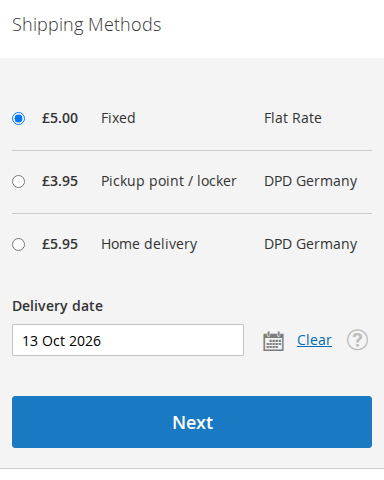
Earliest and latest day, days without delivery, a cut-off time and optional time slots. The calendar only offers allowed days.
-
Answers where your team works
Values show on the order page and as columns in Sales > Orders, ready to filter, sort and export with the other order data.
All features
What is included
Field types
- Text and text area
- Dropdown and radio buttons
- Checkbox (yes/no) and multiple-choice checkboxes
- Date
- Delivery date with cut-off time and time slots
Who sees a field
- Store views and customer groups
- Only for selected shipping methods
- Labels and options translated per store view
- Required or optional, with default value, placeholder and tooltip
- Validation: numbers only, reference, email address, phone number, maximum length
Where values appear
- Admin order page, with Edit Values
- Sales > Orders columns with filter, sorting and CSV/Excel export
- Customer account, guest and print order views (Luma and Hyvä)
- Order, invoice and shipment emails
- Invoice PDF
Safe and developer friendly
- Values checked on the server when saved and when the order is placed
- HTML refused, values always shown as plain text
- Label and shown value kept on each order
- REST and GraphQL for carts and orders
- Separate ACL permissions and a CLI command
Feature tour
Everything your shoppers and your team see
01 / 07
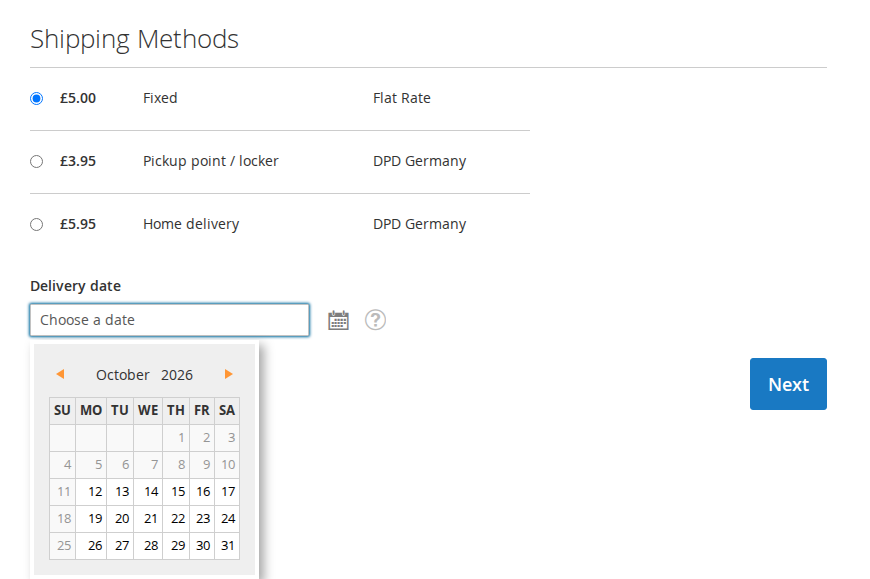
A delivery date next to the shipping methods
The Delivery date field opens a calendar that skips the weekdays and dates you switch off and the days before the earliest delivery. The server checks the date again when the order is placed.
02 / 07
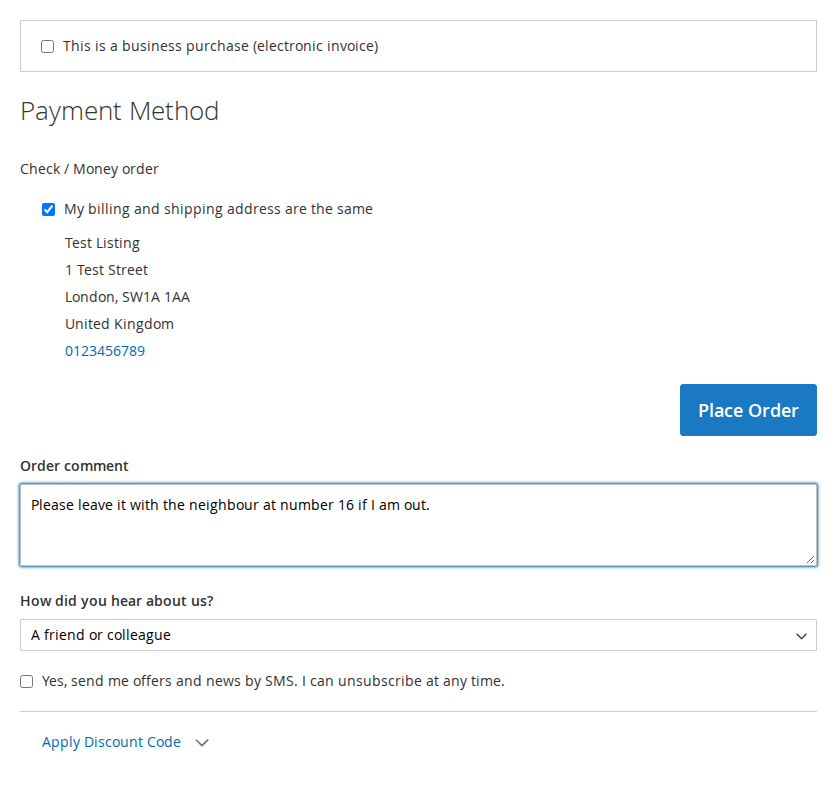
Order comment and a dropdown before Place Order
Text areas, text inputs, dropdowns, radio buttons and checkboxes can sit above or below the payment methods.
03 / 07
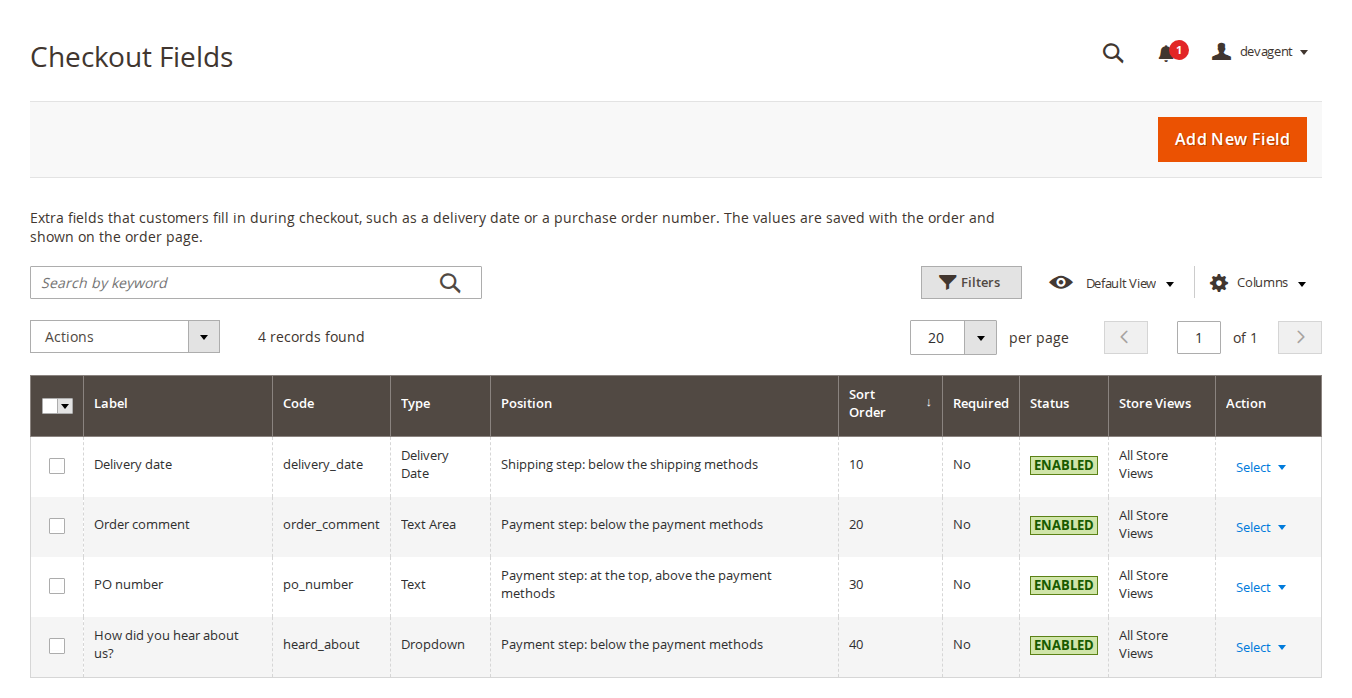
All checkout fields in one grid
Softaware > Checkout Fields > Manage Fields lists every field with its type, position, sort order and status. Search by label or code and enable or disable several fields at once.
04 / 07
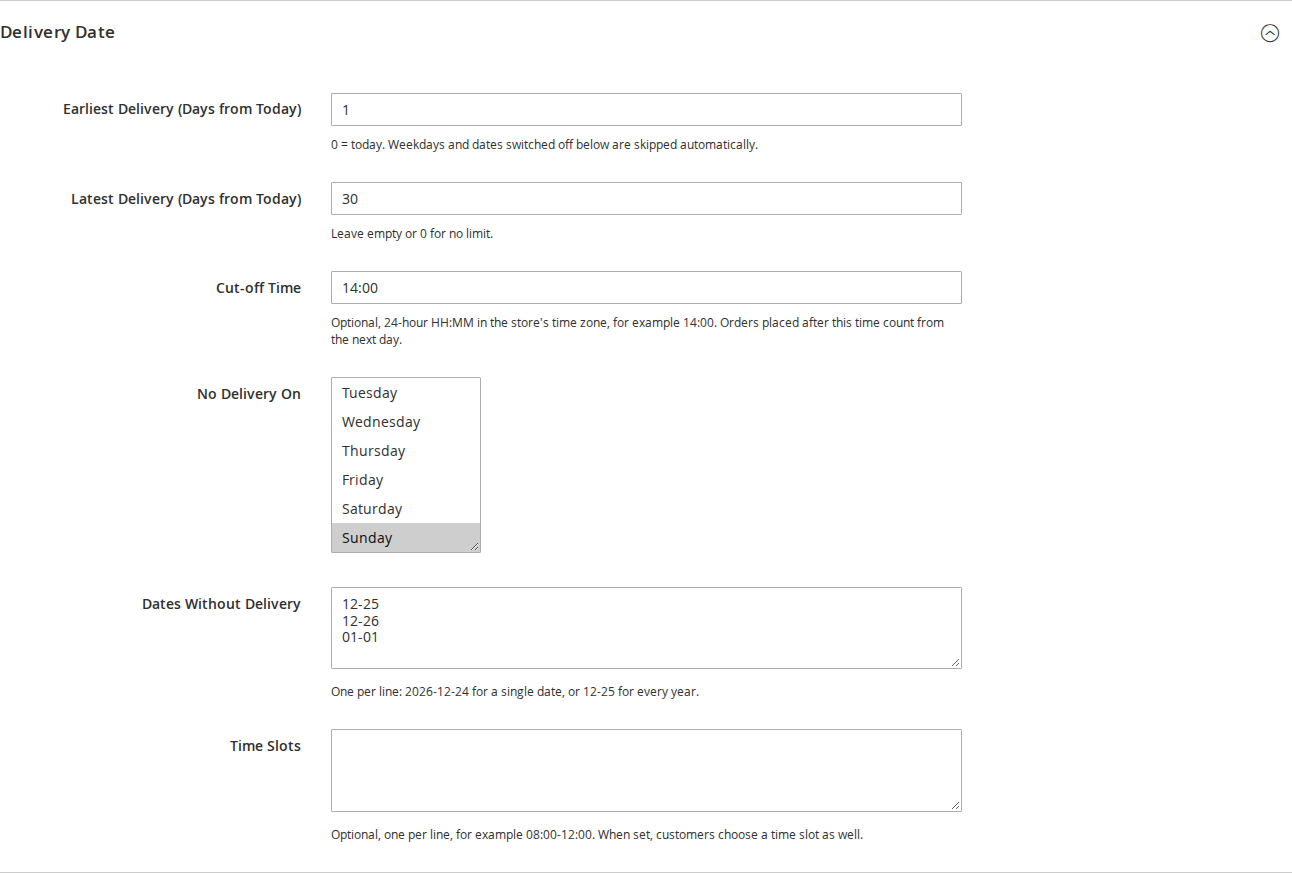
Delivery rules without code
Earliest and latest delivery in days from today, cut-off time in the store's time zone, weekdays and dates without delivery, and optional time slots.
05 / 07
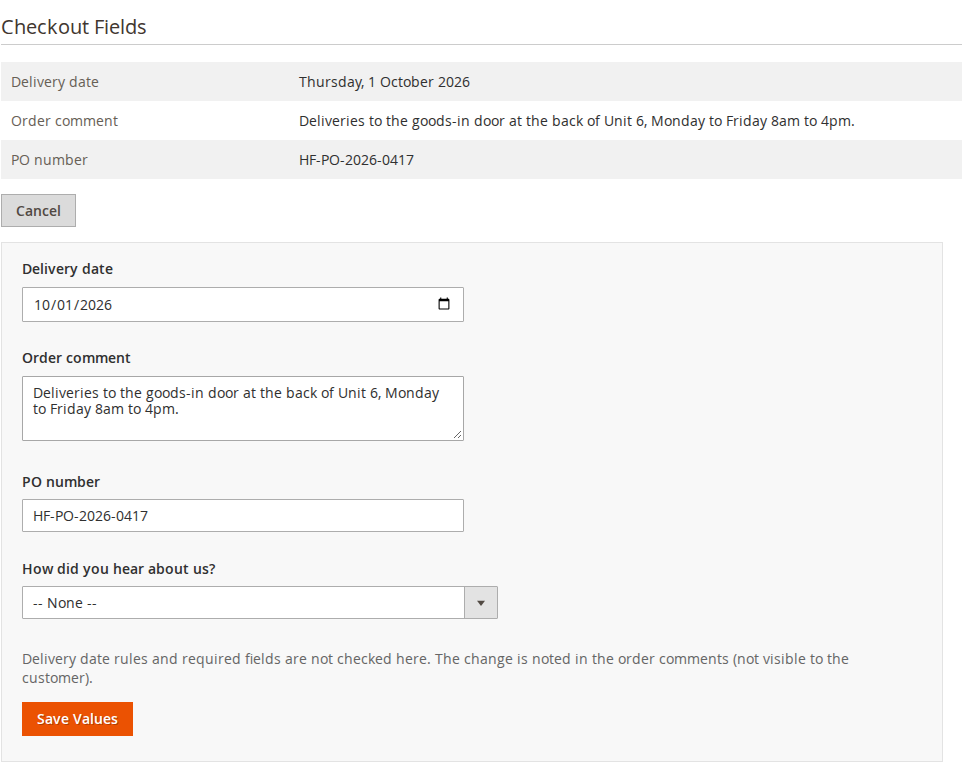
Values on the order, with Edit Values
The Checkout Fields box shows what the customer entered. Admin users with the permission can correct a value, and each change is noted in the order comments.
06 / 07
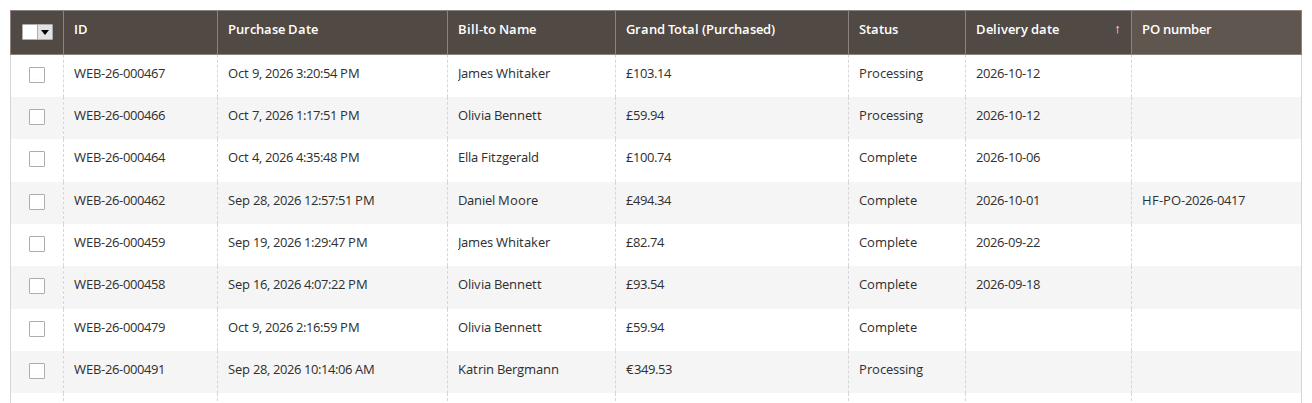
One column per field in Sales > Orders
Mark a field as Order Grid Column to filter, sort and export orders by delivery date or PO number.
07 / 07
Works on phones and with Hyvä
The fields are part of the Luma checkout, which Hyvä stores use through the Hyvä Luma Checkout fallback.
Live demo
Try it before you install it
A full Magento store with the module installed, on Luma and on Hyvä. The admin demo signs you in with one click.
Compatibility
Requirements and compatibility
| Magento | 2.4.7 – 2.4.9 |
|---|---|
| PHP | 8.2 – 8.5 |
| Latest version | 1.2.2 |
| composer.json requires | php ~8.2.0||~8.3.0||~8.4.0||~8.5.0 magento/framework ~103.0.7 softaware/module-core ^1.0 magento/module-authorization * magento/module-backend * magento/module-checkout * magento/module-config * magento/module-customer * magento/module-graph-ql * magento/module-quote * magento/module-sales * magento/module-sales-graph-ql * magento/module-shipping * magento/module-store * magento/module-ui * |
Installation
Up and running in minutes
After you buy, create a Composer key in your account. Then, in the root of your Magento project:
-
01Add the repository and your key (once per project)
composer config repositories.softaware composer https://repo.softawarecommerce.com
composer config --auth http-basic.repo.softawarecommerce.com PUBLIC_KEY PRIVATE_KEY
-
02Install the module
composer require softaware/module-checkout-fields -
03Enable it
bin/magento setup:upgrade
bin/magento setup:di:compile
bin/magento setup:static-content:deploy
bin/magento cache:flush
The last three are only needed in production mode.
Prefer a zip? Every version you are entitled to can be downloaded from My modules. More about Composer access
User guide
How to set up and use Checkout Fields
For version 1.2.2. The same guide comes with the module, in docs/user-guide.md.
Add your own fields to the Magento checkout without code: a delivery date, an order comment, a PO number, "How did you hear about us?" and anything else your shop needs to know. Values are checked on the server, saved with the order and shown on the admin order page, in the order grid, in the customer account, in order emails and on the invoice PDF. This guide covers installation, every setting and day-to-day use.
- Demo (Luma): https://demo.softawarecommerce.com/radiant-tee.html (add the product to the cart and go to checkout)
- Demo (Hyvä, Luma checkout fallback): https://demo.softawarecommerce.com/hyva/radiant-tee.html
- Admin demo: https://demo.softawarecommerce.com/try-admin/checkout-fields
- Changelog: Release notes · Questions: FAQ
The demo store has four fields (Delivery date, Order comment, PO number and a "How did you hear about us?" dropdown) and values on ten demo orders, so the admin demo shows the order grid columns and the Checkout Fields box on the order page. PO number is limited to the Wholesale customer group, so storefront visitors see the other three.
1. Requirements
| Magento | Magento Open Source or Adobe Commerce 2.4.7 to 2.4.9 |
| PHP | 8.2 to 8.5 |
| Themes | Luma checkout (Luma, Blank and themes based on them); Hyvä 1.3 or later with Hyvä Luma Checkout |
| Other | softaware/module-core (installed automatically); Magento's GraphQL modules (magento/module-graph-ql, magento/module-sales-graph-ql) |
Hyvä Checkout (the separate commercial checkout) is not supported. The customer account, guest order and print views have Hyvä templates.
2. Installation
Install with Composer from repo.softawarecommerce.com. Your access keys and the full set-up are described at https://softawarecommerce.com/shop/composer-access/.
composer config repositories.softaware composer https://repo.softawarecommerce.com
composer config --auth http-basic.repo.softawarecommerce.com PUBLIC_KEY PRIVATE_KEY
composer require softaware/module-checkout-fields
bin/magento setup:upgrade
bin/magento setup:di:compile            # production mode only
bin/magento setup:static-content:deploy # production mode only
bin/magento cache:flush
Installing adds three example fields, all switched off, so your live checkout does not change: Delivery date, Order comment and PO number (PO number only for the Wholesale customer group, if that group exists). On Hyvä, run your usual Tailwind build after installing; the module registers itself for Hyvä's Tailwind source scanning.
To update later: composer update softaware/module-checkout-fields, then the same bin/magento commands.
3. Quick start
- Go to Softaware > Checkout Fields > Manage Fields.
- Tick the example fields you want, choose Actions > Enable, or open one and adjust it first.
- Or click Add New Field, enter a label and a code, pick the type and the position, and click Save Field.
- Add a product to the cart on the storefront and go to checkout: the field appears in the step you chose.
- Place a test order and open it under Sales > Orders: the values are in the Checkout Fields box.
4. Settings
Stores > Configuration > Softaware > Checkout Fields (also under Softaware > Checkout Fields > Settings). Both settings can be set per website and store view.
| Setting | Default | What it does |
|---|---|---|
| General > Enabled | Yes | When No, no fields are shown in the checkout and nothing is checked when orders are placed. Values already saved on orders are still shown in the admin. |
| General > Add to Order Emails Automatically | Yes | Adds the fields marked "Show to Customer" below the items in order, invoice and shipment emails. |
If you use custom email templates, set Add to Order Emails Automatically to No and place the block where you want it:
{{layout handle="softaware_checkout_fields_email" order_id=$order_id area="frontend"}}5. Managing fields
Softaware > Checkout Fields > Manage Fields lists every field with label, code, type, position, sort order, required, status and store views. Search by keyword (label or code), filter, and use Actions to enable, disable or delete several fields at once. The form is split into sections in the order a field is set up.
General
| Setting | Notes |
|---|---|
| Enabled | Switch the field on or off. |
| Label | Shown to customers. Translations per store view are in "Labels per Store View". |
| Code | Lower-case letters, numbers and underscores, starting with a letter, for example po_number. Used in the API and the order grid. It cannot be changed later. |
| Type | Text, Text Area, Dropdown, Radio Buttons, Checkbox (Yes/No), Checkboxes (multiple choice), Date, Delivery Date. |
| Position in Checkout | Shipping step: below the shipping address; Shipping step: below the shipping methods; Payment step: at the top, above the payment methods; Payment step: below the payment methods. |
| Sort Order | Lower numbers come first within a position. |
| Required | The customer cannot continue (and the order is not placed) without a value. |
| Tooltip | Optional help text next to the field. |
| Default Value | For lists enter the option value (several separated by commas); for a checkbox enter 1 to tick it. Not used for dates. |
Text Input (text and text area)
| Setting | Notes |
|---|---|
| Placeholder | Grey hint text inside the empty field. |
| Validation | None, Numbers only, Reference (letters, numbers, spaces and . / -), Email address, Phone number. A fixed list, so there are no free regular expressions to get wrong. |
| Maximum Length | In characters. Empty means the maximum: 255 for text, 2,000 for a text area. |
Options (dropdown, radio buttons, multiple-choice checkboxes)
Click Add Option for each choice and enter its value and label. Option labels can be translated per store view.
Delivery Date
| Setting | Notes |
|---|---|
| Earliest Delivery (Days from Today) | 0 means today. Weekdays and dates switched off are skipped automatically. |
| Latest Delivery (Days from Today) | Empty or 0 for no limit. |
| Cut-off Time | Optional, 24-hour HH:MM in the store's time zone, for example 14:00. Orders placed after this time count from the next day. |
| No Delivery On | Weekdays without delivery, for example Sunday. |
| Dates Without Delivery | One per line: 2026-12-24 for a single date, or 12-25 for every year. |
| Time Slots | Optional, one per line, for example 08:00-12:00. When set, customers choose a time slot as well. |
Delivery days are calendar days. The calendar in the checkout only offers allowed days, and the server checks the date (and the time slot) again when the order is placed.
Who Sees the Field
| Setting | Notes |
|---|---|
| Store Views | The store views that show the field. |
| Customer Groups | Leave empty for all groups. NOT LOGGED IN is guest checkout. |
| Only for Shipping Methods | Leave empty to show the field for every shipping method. The list shows the methods of active carriers. The field appears when the customer selects one of them. |
Labels per Store View
A label for each store view, for example "Wie haben Sie von uns erfahren?" on a German store view. Empty means the default label. Placeholder and tooltip use the same text on every store view.
Where the Value Is Shown
| Setting | Notes |
|---|---|
| Show to Customer | In the customer account, guest and print order views, and in order, invoice and shipment emails. |
| Order Grid Column | Adds a column to Sales > Orders that you can filter, sort and export. |
| Show on Invoice PDF | Prints the value on the invoice PDF. |
The admin order page always shows the values to users with the "View Values on Orders" permission.
6. In the checkout
Fields appear in the Luma checkout at the position you chose, sorted by sort order. Required fields are marked like Magento's own fields and are checked before the customer moves on to the next step.
Values are saved on the cart as the customer goes through the checkout and are checked on the server: unknown field codes, values for fields the customer cannot see, HTML, options that do not exist and dates that are not allowed are refused. When the order is placed, required fields and delivery date rules are checked again, and the values are copied to the order together with the label and the value as shown.
The fields follow the checkout layout on phones. Hyvä stores show the same fields through the Hyvä Luma Checkout fallback.
7. Values on orders
Order page
Sales > Orders > (order) shows a Checkout Fields box with every value of the order. Users with the "Edit Values on Orders" permission click Edit Values, change or add values and click Save Values. Delivery date rules and required fields are not checked here, so your team can record what was agreed with the customer. Each change is noted in the order comments (not visible to the customer). Cancel closes the form without saving.
Order grid
Every field with Order Grid Column = Yes adds a column to Sales > Orders. Use Columns to show or hide it, filter and sort by it, and export it with Magento's CSV and Excel XML export. Dates are stored as YYYY-MM-DD, so they sort in date order. Exported values that start with =, +, - or @ get a leading apostrophe, so spreadsheet programs do not run them as formulas.
Customer account, emails and invoice PDF
Fields with Show to Customer = Yes appear on the order page in the customer account, the guest order view and the print view (Luma and Hyvä), and below the items in order, invoice and shipment emails. Fields with Show on Invoice PDF = Yes are printed on the invoice PDF.
Old orders
Each order keeps its own copy of the label and the shown value. Renaming a field, changing an option label or deleting a field does not change orders that were already placed.
8. REST and GraphQL
REST, values of a cart (the Luma checkout uses these endpoints too):
GET  /V1/guest-carts/:cartId/softaware-checkout-fields      (masked cart ID, guest carts only)
PUT  /V1/guest-carts/:cartId/softaware-checkout-fields      {"values": [{"code": "delivery_date", "value": "2026-10-14"}]}
GET  /V1/carts/mine/softaware-checkout-fields               (customer token)
PUT  /V1/carts/mine/softaware-checkout-fields               {"values": [...]}
Values are text; option values separated by commas; 1 for a ticked checkbox; YYYY-MM-DD for dates; YYYY-MM-DD <time slot> for delivery dates with time slots. An empty value removes it. Values sent are saved, other values of the cart stay. Guest endpoints only accept active carts without a customer.
Orders (GET /V1/orders/:id, GET /V1/orders) include extension_attributes.softaware_checkout_fields (code, label, value, display_value) for integrations with the "View Values on Orders" permission.
GraphQL:
query { softawareCheckoutFields(cart_id: "MASKED_ID") { code label type position required value } }

mutation { setSoftawareCheckoutFieldValues(input: { cart_id: "MASKED_ID",
  values: [{ code: "order_comment", value: "Please ring twice" }] }) { fields { code value } } }

query { customer { orders { items { number softaware_checkout_fields { code label value display_value } } } } }
Cart access follows Magento's rules: guest carts for guests, customer carts only for their customer, current store only. Required fields and delivery date rules are checked again by placeOrder.
9. CLI
bin/magento softaware:checkout-fields                                     # list all fields
bin/magento softaware:checkout-fields delivery_date order_comment --enable
bin/magento softaware:checkout-fields po_number --disable
10. Permissions
System > Permissions > User Roles > Role Resources, under Softaware > Checkout Fields:
| Resource | Allows |
|---|---|
| Manage Checkout Fields | The Manage Fields grid and form. |
| View Values on Orders | The Checkout Fields box on the order page, the order grid columns and the REST order data. |
| Edit Values on Orders | Edit Values on the order page (inside View Values on Orders). |
| Settings | The configuration section. |
11. Troubleshooting
A field does not appear in the checkout. Check that the module and the field are enabled, and that the field allows the current store view, the customer's group (NOT LOGGED IN for guests) and, if set, the selected shipping method. Fields of the shipping step are not shown when the cart has only virtual or downloadable products. Flush the cache after changes.
The calendar offers no days. The earliest and latest day, the weekdays and dates without delivery and the cut-off time may leave no allowed day in the range. Increase Latest Delivery or leave it empty.
The order grid column is missing. Check Order Grid Column on the field, then open Columns in Sales > Orders: a saved grid view may have the column hidden. The user also needs "View Values on Orders".
Values are missing in emails. Check Show to Customer on the field and Add to Order Emails Automatically. With a custom email template, add the layout handle shown in section 4.
An order has no values. Orders created in the admin (Create New Order), through multi-address checkout, Instant Purchase, an integration or PayPal Express started from the cart do not go through the checkout fields. Required fields never block those orders; add values afterwards with Edit Values.
12. Limitations
- Admin order creation has no checkout fields; use Edit Values on the order page afterwards.
- Multi-address checkout, Instant Purchase and Hyvä Checkout (commercial) are not supported.
- If a guest signs in during checkout, values already saved on the guest cart are not moved to the customer's cart.
- Values are not copied by Reorder and are not shown on shipment or credit memo PDFs.
- No file upload field type.
13. Data and privacy
Values are stored in softaware_checkout_field_quote (carts, deleted with the cart) and softaware_checkout_field_order (orders, deleted with the order). Deleting a customer does not delete their orders in Magento, so the values stay with those orders until the orders are deleted. Do not create fields that ask for sensitive data you do not need.
14. Uninstall
bin/magento module:disable Softaware_CheckoutFields
composer remove softaware/module-checkout-fields
bin/magento setup:upgrade
bin/magento cache:flush
The fields and the values are stored in the tables softaware_checkout_field, softaware_checkout_field_quote and softaware_checkout_field_order. Back up the database before you uninstall if you want to keep the values, and check afterwards whether the tables are still there; drop them yourself once you no longer need them.
Changelog
Release notes
1.2.2
Latest
docs/listing.json,docs/faq.md,docs/user-guide.mdand screenshots indocs/images/.
1.2.1
1.2.1 (2026-10-10)
Fixed
- Admin edit page: the Save and Save and Continue Edit buttons had no click action of their own, so Magento also gave them a link to the current admin route's index page. Depending on timing, a click opened that page (404) instead of saving. The buttons now only save.
1.2.0
- Fields grid: keyword search by label or code.
- Fields grid: status shown as Magento status badges (Enabled / Disabled), a one-line introduction above the grid, and an explanation with a "Create Your First Field" button instead of an empty table when no field exists.
- Field form: split into collapsible sections in the order a field is set up (General, the settings of the chosen type, Who Sees the Field, Labels per Store View, Where the Value Is Shown); "(Days from Today)" in title case; the cut-off time is checked in the browser (HH:MM) before saving; the shipping method list is wider so long method names are not cut off.
- Order page: the Checkout Fields box opens its edit form with "Edit Values" and closes it with "Cancel"; the form sits in a framed panel so it is clearly separate from the saved values.
- Settings: General opens first and the comments name the defaults.
1.1.0
- Requires
softaware/module-coreinstead ofsoftaware/module-base. The admin menu and ACL now sit underSoftaware_Core::core("Softaware"); roles that had access keep it (migrated by module-core). After updating all SoftAware modules,softaware/module-basecan be removed.
1.0.0
- Checkout fields managed under Softaware > Checkout Fields: text, text area, dropdown, radio buttons, checkbox, multiple-choice checkboxes, date and delivery date; labels and options per store view; required, default, placeholder, tooltip, validation from a fixed list, maximum length; store views, customer groups and shipping methods; four positions in the Luma checkout (also used by Hyvä Luma Checkout).
- Delivery date: earliest/latest day, weekdays and dates without delivery, cut-off time, time slots; checked on the server when the order is placed.
- Values saved on the cart through REST (guest and customer endpoints) and GraphQL, checked again on place order, and stored with the order (label and shown value kept as a copy).
- Values shown on the admin order page (with edit and order comment), as order grid columns (filter, sort, export), in the customer account, guest and print order views (Luma and Hyvä), in order, invoice and shipment emails, on the invoice PDF, and as REST/GraphQL order data.
- Example fields (Delivery date, Order comment, PO number) added on install, switched off.
- CLI
softaware:checkout-fieldsto list, enable and disable fields.
FAQ
Questions, answered
Something else on your mind? The developers who wrote the module answer before and after you buy.
Ask a question →Already installed it? Open a support ticket
Which field types can I add?
Text, text area, dropdown, radio buttons, checkbox (yes/no), checkboxes (multiple choice), date and delivery date. Each field has a label, a code, required or optional, a default value, a placeholder, a tooltip and a sort order.
Where in the checkout do the fields appear?
You choose one of four positions per field: below the shipping address, below the shipping methods, at the top of the payment step (above the payment methods) or below the payment methods. Fields of the shipping step are not shown for orders without shipping (virtual and downloadable products only).
Does it work with Hyvä?
Yes, with the Hyvä Luma Checkout fallback (hyva-themes/magento2-luma-checkout), which Hyvä stores use for the checkout. The customer account, guest order and print views have their own Hyvä templates. Hyvä Checkout (the separate commercial checkout) is not supported.
How does the delivery date work?
You set the earliest and latest delivery in days from today, the weekdays without delivery, single dates (2026-12-24) or yearly dates (12-25) without delivery, an optional cut-off time and optional time slots. Orders placed after the cut-off time count from the next day. The calendar only offers allowed days, and the server checks the date again when the order is placed.
Can I show a field only to some customers?
Yes. Each field can be limited to store views, to customer groups (for example a PO number only for a trade group) and to shipping methods (for example a "Safe place" field only for local delivery).
Where do the values end up?
On the admin order page (Checkout Fields box), as columns in Sales > Orders, in the customer account, guest and print order views, in order, invoice and shipment emails and on the invoice PDF. Each place has its own switch per field: Show to Customer, Order Grid Column and Show on Invoice PDF. REST and GraphQL return the values too.
Can my team correct a value after the order was placed?
Yes. Admin users with the "Edit Values on Orders" permission click Edit Values in the Checkout Fields box on the order page. Each change is written to the order comments, not visible to the customer.
Are the values validated?
Yes, on the server, both when they are saved on the cart and again when the order is placed: required fields, allowed options, dates and time slots, maximum length and the validation rule you chose (numbers only, reference, email address or phone number). HTML is refused, and values are always shown as plain text.
What happens to old orders if I rename or delete a field?
Nothing changes on them. Every order keeps a copy of the label and of the value as it was shown, so old orders stay readable after you rename a field, change an option or delete the field.
Can I use the fields in my own email templates?
Yes. By default the values are added below the items in order, invoice and shipment emails. If you use custom templates, set "Add to Order Emails Automatically" to No and place the block yourself with {{layout handle="softaware_checkout_fields_email" order_id=$order_id area="frontend"}}.
Can I set values through the API?
Yes. REST endpoints read and save the values of guest and customer carts, and orders include the values as the extension attribute softaware_checkout_fields. GraphQL has a field list query, a mutation to set values and the values on customer orders.
Is there anything it does not cover?
Admin order creation has no checkout fields (add values afterwards with Edit Values), multi-address checkout and Instant Purchase are not supported, there is no file upload field, and values are not copied by Reorder or shown on shipment and credit memo PDFs.
Support