Arasta Live Chat
Free Magento 2 module for Arasta live chat: the chat widget on every page without touching the theme, signed-in customers recognised and orders linked to the chats that led to them.
- Magento 2.4.7 – 2.4.9
- PHP 8.2 – 8.5
- Hyvä and Luma
- Version 2.0.1
Free
No payment needed, with 12 months of updates.
Add it to your cart and complete the free checkout. Your ZIP downloads and Composer access will be in your account.
What is included
- 12 months of new versions and fixes; the versions released in that time stay yours
- Install with Composer, or download a zip from your account
- Licence for one production domain, staging and development copies included
No subscription or automatic renewal. Keep using the versions included in your update period. Update and licence details
Key features
- Arasta chat widget on every page, including checkout
- Signed-in customers recognised with a signed token
- Orders linked to the conversation
Composer package softaware/module-arasta-live-chat
-
No theme edits
Paste the Store ID from your Arasta embed code into the settings. The module adds the widget to every page, on Luma and Hyvä.
-
Customers you can trust
Signed-in customers reach your agents with a short-lived token signed with your secret, so nobody can chat in someone else's name.
-
See which chats lead to orders
Orders placed after a chat are linked to the conversation and sent to Arasta with the order number, total and currency.
All features
What is included
Widget
- Loader tag on every storefront page, including checkout
- Loaded asynchronously, added once
- Default loader URL prefilled
- Different Store ID per store view
- Enabled switch per store view
Customer identity
- HS256 token with customer ID and email
- Lifetime from 60 seconds to one hour
- Expired tokens replaced in the browser
- Private customer data, never in full-page cache
- Guest cart ID for conversation tagging
Orders
- Conversation ID stored on the cart and the order
- Signed order link sent to Arasta at checkout
- 3-second timeout, never blocks the checkout
- Failures logged, not shown to shoppers
Security
- Signing secret stored encrypted and marked sensitive
- HTTPS-only loader URL
- Masked cart IDs never reach customer carts
- Content Security Policy whitelist for app.arasta.io
- Own ACL resources for settings and API
Integration
- Invoice PDF endpoint (store's own template)
- Version and capability endpoint
- Public cart tagging endpoint for the widget
- Upgrade path from platform/module-connector
Compatibility
- Magento Open Source and Adobe Commerce 2.4.7 to 2.4.9
- PHP 8.2 to 8.5
- Luma, Blank and child themes
- Hyvä 1.3+
Feature tour
Everything your shoppers and your team see
01 / 04
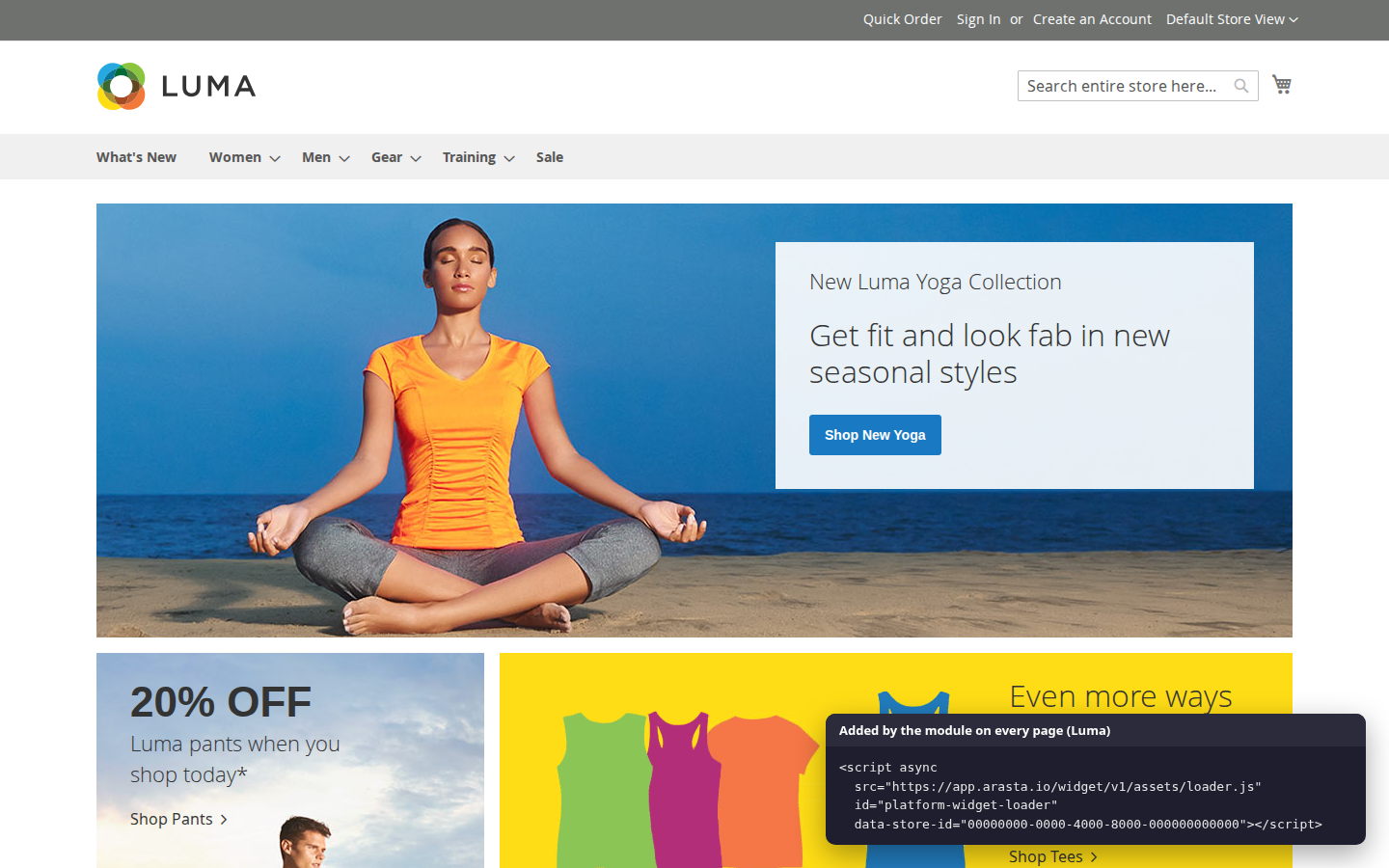
The embed code, added for you
The same loader tag as Arasta's embed code, added once and asynchronously on every page, including the cart and checkout.
02 / 04
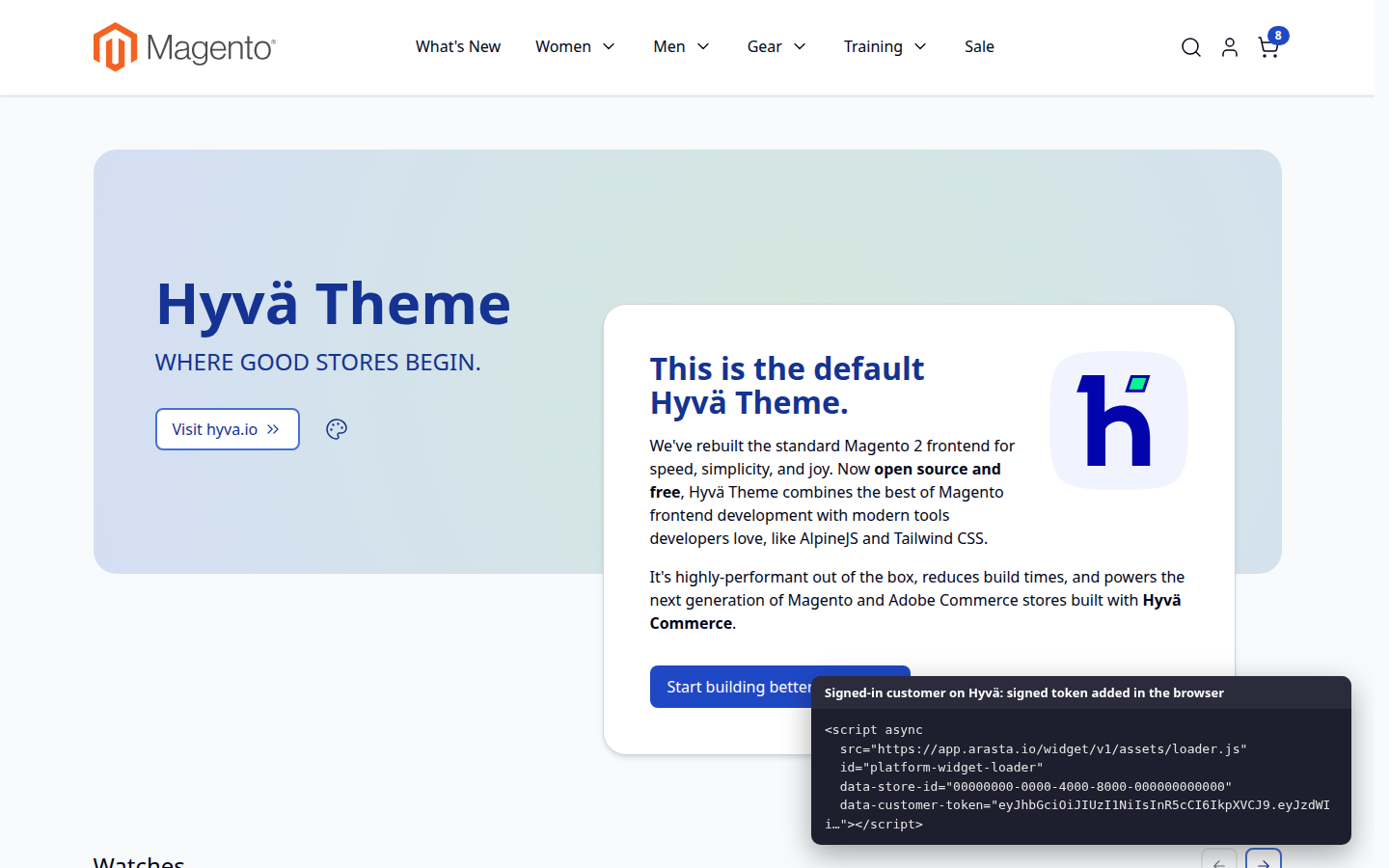
Native Hyvä template
Vanilla JavaScript with Hyvä private content, no RequireJS. For signed-in customers the signed token is added in the browser, never in cached pages.
03 / 04
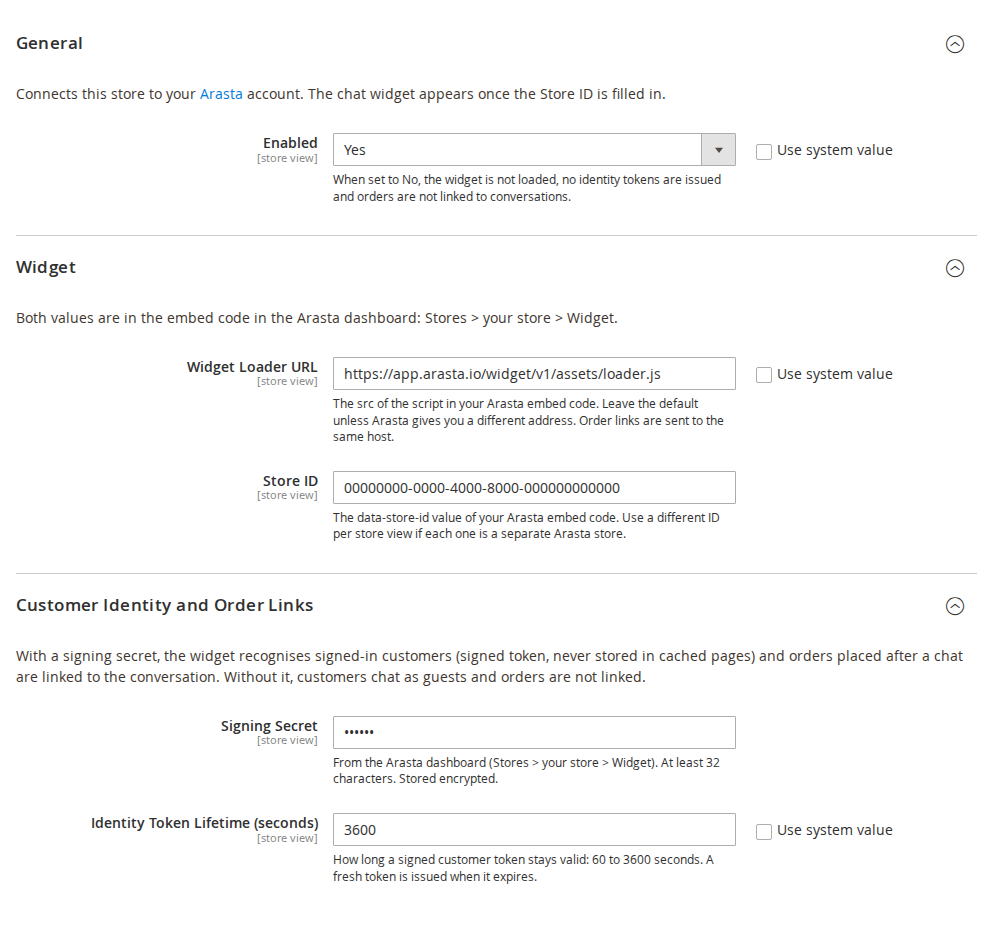
Four fields, per store view
Loader URL, Store ID, signing secret (stored encrypted) and token lifetime, with an Enabled switch for each store view.
04 / 04
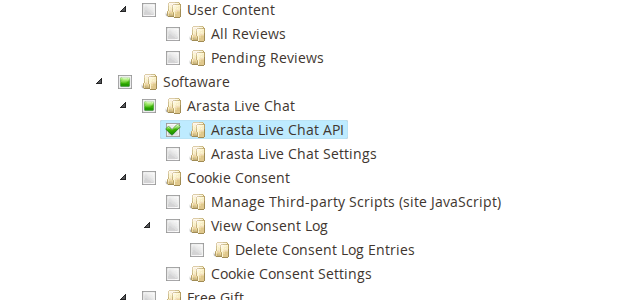
One permission for the Arasta integration
Tick Arasta Live Chat API in the integration and Arasta can fetch your invoice PDFs and check which features your store supports.
Live demo
Try it before you install it
A full Magento store with the module installed, on Luma and on Hyvä. The admin demo signs you in with one click.
Compatibility
Requirements and compatibility
| Magento | 2.4.7 – 2.4.9 |
|---|---|
| Storefront themes | Luma Blank Hyvä |
| PHP | 8.2 – 8.5 |
| Latest version | 2.0.1 |
| composer.json requires | php ~8.2.0||~8.3.0||~8.4.0||~8.5.0 magento/framework ~103.0.7 softaware/module-core ^1.0 magento/module-authorization * magento/module-backend * magento/module-checkout * magento/module-config * magento/module-csp * magento/module-customer * magento/module-integration * magento/module-quote * magento/module-sales * magento/module-store * |
Installation
Up and running in minutes
Get it free, create a Composer key in your account, then in the root of your Magento project:
-
01Add the repository and your key (once per project)
composer config repositories.softaware composer https://repo.softawarecommerce.com
composer config --auth http-basic.repo.softawarecommerce.com PUBLIC_KEY PRIVATE_KEY
-
02Install the module
composer require softaware/module-arasta-live-chat -
03Enable it
bin/magento setup:upgrade
bin/magento setup:di:compile
bin/magento setup:static-content:deploy
bin/magento cache:flush
The last three are only needed in production mode.
Prefer a zip? Every version you are entitled to can be downloaded from My modules. More about Composer access
User guide
How to set up and use Arasta Live Chat
For version 2.0.1. The same guide comes with the module, in docs/user-guide.md.
Connects your store to Arasta, SoftAware's live chat and support platform: the chat widget on every storefront page, signed-in customers recognised in the chat, invoice PDFs for your agents, and orders linked to the conversation that led to them.
- Demo (Luma): https://demo.softawarecommerce.com/
- Demo (Hyvä): https://demo.softawarecommerce.com/hyva/
- Admin demo: https://demo.softawarecommerce.com/try-admin/arasta-live-chat
- Changelog: Release notes · Questions: FAQ
1. Requirements
| Magento | Open Source or Adobe Commerce 2.4.7 to 2.4.9 |
| PHP | 8.2 to 8.5 |
| Themes | Luma, Blank and themes based on them; Hyvä 1.3+ |
| Other | An Arasta account; softaware/module-core (installed automatically) |
2. Installation
composer config repositories.softaware composer https://repo.softawarecommerce.com
composer config --auth http-basic.repo.softawarecommerce.com PUBLIC_KEY PRIVATE_KEY
composer require softaware/module-arasta-live-chat
bin/magento setup:upgrade
bin/magento setup:di:compile            # production mode only
bin/magento setup:static-content:deploy # production mode only
bin/magento cache:flush
On Hyvä, the module's template is used automatically; no Tailwind build is needed (the module adds no CSS).
If you used the previous package platform/module-connector, remove it first (composer remove platform/module-connector). Your settings and the integration's API permission are carried over by setup:upgrade; see the README section "Upgrading from platform/module-connector 1.x".
To update later: composer update softaware/module-arasta-live-chat, then the same bin/magento commands.
3. Quick start
- In the Arasta dashboard open Stores > your store > Widget and copy the embed code. It looks like this:
<script src="https://app.arasta.io/widget/v1/assets/loader.js" data-store-id="YOUR-STORE-ID" async></script>- In Magento go to Stores > Configuration > Softaware > Arasta Live Chat.
- Paste the
data-store-idvalue into Store ID. Keep the default Widget Loader URL unless Arasta gave you a different one. - To recognise signed-in customers and link orders, paste the Signing Secret from the same Arasta page.
- Save. Flush the full-page cache if your storefront still shows the old pages.
- Create the Arasta integration (section 6) so that Arasta can fetch invoice PDFs.
Remove any Arasta <script> tag you added to your theme or a CMS block by hand; otherwise the widget is loaded twice.
4. Settings
All settings can be set for the default scope, a website or a store view. Use different Store IDs per store view when each one is a separate store in Arasta.
General
- Enabled: Yes by default. When No, the widget is not loaded, no identity tokens are issued, carts are not tagged and orders are not linked. The invoice PDF and version endpoints stay available to the integration.
Widget
- Widget Loader URL: the
srcof the embed code. Defaulthttps://app.arasta.io/widget/v1/assets/loader.js. Must start withhttps://. Order links are sent to the same host. - Store ID: the
data-store-idof the embed code. The widget is only added when this is filled in.
Customer Identity and Order Links
- Signing Secret: from the Arasta dashboard, at least 32 characters, stored encrypted. Without it customers chat as guests and orders are not linked.
- Identity Token Lifetime (seconds): 60 to 3600, default 3600. A new token is fetched in the background before the current one expires.
You can also set any of these with bin/magento config:set (add --lock-env to keep a value in app/etc/env.php), for example bin/magento config:set --lock-env softaware_arasta_live_chat/identity/signing_secret '<secret>'.
5. What happens on the storefront
On every page, including the cart and checkout, the module adds the loader exactly as in the embed code:
<script src="https://app.arasta.io/widget/v1/assets/loader.js" id="platform-widget-loader"
data-store-id="YOUR-STORE-ID" async></script>- Signed-in customers (with a signing secret): the tag also gets
data-customer-token, a signed token with the customer ID and email address, valid for the configured lifetime. Arasta checks the signature, so the chat shows the right customer and nobody can pretend to be someone else. - Guests with a cart: the tag gets
data-cart-id(the cart's masked ID). When a chat starts, the widget sends the conversation ID to the store, which stores it on the cart. - The token and cart ID are loaded in the browser after the page (Magento customer data on Luma, private content on Hyvä). Full-page-cached HTML never contains them, so caching stays fully effective.
Order links. When an order is placed from a cart that carries a conversation ID, the order number, total, currency and conversation ID are posted to Arasta, signed with the signing secret. Agents then see the order in the conversation. The request has a 3-second timeout and never blocks the checkout; failures are logged (var/log/system.log, "Arasta Live Chat: order link …"). The conversation ID is also stored on the order (sales_order.platform_conversation_id).
6. The Arasta integration (REST API)
Arasta reads invoice PDFs and checks which features your store supports through Magento's REST API.
- System > Extensions > Integrations > Add New Integration (or edit the one you already use for Arasta).
- On the API tab choose Custom and tick the resources Arasta asks for plus Softaware > Arasta Live Chat > Arasta Live Chat API.
- Save, Activate (or Reauthorize) and enter the tokens in Arasta.
| Endpoint | Purpose |
|---|---|
GET /rest/V1/platform/invoices/{invoiceId}/pdf | The invoice PDF from your store's own template (base64) |
GET /rest/V1/platform/version | Module version, Magento version and the supported features |
POST /rest/V1/platform/quote/attribute | Called by the widget in the shopper's browser to tag the cart |
The first two need the integration permission above. The third is public by design: it only accepts a conversation ID in UUID format, and finds the cart from the signed-in customer's session or the guest's masked cart ID; a masked ID never gives access to a customer's cart.
7. Content Security Policy
app.arasta.io is whitelisted for scripts, connections (including WebSocket), images, styles, fonts and frames, so the widget also loads on pages where Magento enforces CSP (checkout). If you set a different loader host, the module allows that host on the storefront automatically.
8. Permissions
Under System > Permissions > User Roles > Role Resources:
- Softaware > Arasta Live Chat > Arasta Live Chat Settings: the configuration section.
- Softaware > Arasta Live Chat > Arasta Live Chat API: the REST endpoints (meant for the Arasta integration).
9. Privacy
The module passes the signed-in customer's ID and email address to the Arasta widget, and sends the order number, total, currency and conversation ID of orders placed after a chat to Arasta. What the widget itself collects is covered by your agreement with Arasta. List Arasta as a processor in your privacy notice and, if you use a cookie banner, classify the chat widget according to your Arasta setup.
10. Troubleshooting
- No widget on the storefront: check that the module is enabled for the store view and the Store ID is set, then flush the full-page cache. View the page source and search for
platform-widget-loader. - Widget appears twice: remove the hand-made Arasta
<script>from your theme, CMS blocks or tag manager. - Customers are not recognised: set the Signing Secret (same value as in Arasta) and sign in again.
- Orders are not linked: the Signing Secret must be set; check
var/log/system.logfor "Arasta Live Chat: order link" messages; the server must be able to reach the loader host over HTTPS. - REST answers "The consumer isn't authorized": tick Arasta Live Chat API in the integration and reauthorise it.
- Saving the settings fails: the Signing Secret must be at least 32 characters and the Loader URL must start with
https://.
Changelog
Release notes
2.0.1
Latest
2.0.1 (2026-10-09)
Changed
- Docs (listing, FAQ, user guide, README): dashes replaced with plain punctuation ("2.4.7 to 2.4.9", "PHP 8.2 to 8.5") and the link to the Arasta website removed. No code changes.
2.0.0
The connector is now a SoftAware module: package softaware/module-arasta-live-chat, module Softaware_ArastaLiveChat, namespace Softaware\ArastaLiveChat. The contract with Arasta is unchanged: REST URLs and response shapes, the capabilities reported by /V1/platform/version, the identity token (HS256, claims sub, email, iat, exp) and the data-customer-token / data-cart-id attributes, the order link body and its X-Platform-Signature header, and the platform_conversation_id columns.
Changed
- Renamed from
platform/module-connector/Platform_Connector(see "Upgrading from 1.x" in the README). The two packages conflict in Composer. - Depends on
softaware/module-core^1.0. Composer: Mage-OS mirror repository,versionfield and PHPStan setup removed; licence proprietary. - The loader tag now matches Arasta's embed code:
data-store-id(wasdata-store-key),async, default loader URLhttps://app.arasta.io/widget/v1/assets/loader.js. - Settings moved from
platform_connector/*tosoftaware_arasta_live_chat/*(widget/store_keyis nowwidget/store_id). A data patch copies saved values; values only in env.php/config.php under the old paths are still read as a fallback. - ACL resource
Platform_Connector::apiis nowSoftaware_ArastaLiveChat::api("Arasta Live Chat API", under Softaware > Arasta Live Chat). The data patch grants it to every role and integration that had the old one. - Layout block
platform.connector.widgetis nowsoftaware.arasta.widget.
Added
- PHP 8.5 support (PHP 8.2 – 8.5).
- Admin settings: Stores > Configuration > Softaware > Arasta Live Chat (Enabled, Widget Loader URL, Store ID, Signing Secret stored encrypted, Identity Token Lifetime), per website and store view, with their own ACL resource
Softaware_ArastaLiveChat::config. The secret must be at least 32 characters and the loader URL must be https. - Enabled switch: when off, no widget, no identity token, no quote tagging and no order links.
- Hyvä support: vanilla JavaScript template using Hyvä private content (no RequireJS), picked through
hyva_default.xml; Hyvä CSP-safe (inline script registered withHyvaCsp). - Content Security Policy:
app.arasta.iowhitelisted (script, connect incl.wss://, img, style, font, frame); a custom loader host from the admin is allowed on the storefront automatically. - Expired identity tokens cached in the browser are refreshed before they are handed to the widget, and a fresh token is fetched shortly before the current one expires.
- The identity section is reloaded when a guest gets a cart and after an order is placed, so
data-cart-idis current on Luma. - The signing secret is marked as sensitive (not written to
config.phpbyapp:config:dump).
Fixed
- Orders were not linked to conversations on Magento 2.4.x:
QuoteManagementdrops custom columns when it builds the order, soplatform_conversation_idnever reached the order and no order link was sent. The ID is now copied onsales_model_service_quote_submit_before. - The token expiry reported to the browser now matches the token's
expwhen the lifetime is set below 60 seconds. - A signing secret shorter than 32 characters set outside the admin no longer breaks the customer-data request; no token is issued and a warning is logged.
- The quote attribute service narrows the cart repository's
CartInterfacetoQuotebefore using its data accessors (fix made after the 1.1.0 tag).
FAQ
Questions, answered
Something else on your mind? The developers who wrote the module answer before and after you buy.
Ask a question →Already installed it? Open a support ticket
What does the module do?
It adds the Arasta chat widget to your storefront, lets the widget recognise signed-in customers with a signed token, gives Arasta access to your invoice PDFs through the REST API, and links orders placed after a chat to that conversation.
Does it cost anything?
The module is free. You need an Arasta account for the chat itself.
Do I still need to paste the Arasta embed code into my theme?
No. Enter the Store ID from the embed code in Stores > Configuration > Softaware > Arasta Live Chat and remove any embed code you added by hand, otherwise the widget loads twice.
Does it work with Hyvä?
Yes. A Hyvä template without RequireJS is included and picked automatically. The Hyvä checkout uses the Luma fallback, where the Luma template is used.
Is the widget shown on the checkout?
Yes, on every storefront page including the cart and checkout. app.arasta.io is whitelisted in the Content Security Policy, so the widget also loads where Magento enforces CSP.
Does it slow down my store or break full-page caching?
The loader is added with async and does not block the page. The customer token and cart ID are loaded separately as private customer data, so cached pages stay the same for everyone and never contain personal data.
How are signed-in customers recognised?
For signed-in customers the store creates a short-lived token signed with your Arasta signing secret, with the customer ID and email address. Arasta checks the signature, so the chat cannot be opened in someone else's name.
What happens without a signing secret?
The widget works and customers chat as guests. Orders are not linked to conversations.
Can I use different Arasta stores for different store views?
Yes. All settings can be set per website and store view.
Which permission does the Arasta integration need?
Softaware > Arasta Live Chat > Arasta Live Chat API (Softaware_ArastaLiveChat::api), next to the resources Arasta asks for. Reauthorise the integration after changing its permissions.
Can a checkout fail because Arasta is unavailable?
No. The order link is sent with a 3-second timeout and any error is only logged.
I used platform/module-connector before. What changes?
Remove the old package and install this one. setup:upgrade copies your settings and gives the Arasta integration the new API permission. The endpoints and the data exchanged with Arasta are unchanged.
Which data is sent to Arasta?
The signed-in customer's ID and email address (in the token), and for orders placed after a chat the order number, total, currency and conversation ID. List Arasta as a processor in your privacy notice.
Support