Abandoned Cart
Up to three reminder emails for shoppers who leave items in their basket, with the basket contents, a signed link that restores it, an optional single-use coupon and an unsubscribe link.
- Magento 2.4.7 – 2.4.9
- PHP 8.2 – 8.5
- Version 1.3.3
One-off payment, with 12 months of updates.
What is included
- 12 months of new versions and fixes; the versions released in that time stay yours
- Install with Composer, or download a zip from your account
- Licence for one production domain, staging and development copies included
- 30-day money-back guarantee, refund policy
No subscription or automatic renewal. Keep using the versions included in your update period. Update and licence details
Key features
- Up to three reminders, each with its own delay and template
- Cart items with image, options, quantity and price
- Signed "Return to your basket" restore link
Composer package softaware/module-abandoned-cart
-
Back to the basket in one click
The restore link reopens the cart in the browser that still holds it, or copies the items (and the coupon) into the shopper's own cart anywhere else.
-
Your schedule, your words
Choose when each of the three reminders goes out, which email template it uses per store view, and which one carries a coupon.
-
Respectful by design
Send to everyone or to newsletter subscribers only, per reminder. Anyone who used the unsubscribe link is always skipped, and one address gets at most one series.
All features
What is included
Finding abandoned carts
- Carts with items, not ordered and idle for a set number of minutes
- Signed-in customers, and guests once their email address is captured
- Guest capture from the checkout email field, newsletter and sign-in forms
- Exclude store views, customer groups and carts below a minimum subtotal
- Old carts ignored when the module is first switched on
Reminders and coupons
- Up to three reminders with their own delay and store-view template
- "Send To" per reminder: everyone or newsletter subscribers only
- Unique single-use coupon codes with an expiry, unused expired codes deleted
- Stops when an order is placed, the cart is emptied or merged, or the customer unsubscribes
- Only the newest cart of an email address is reminded
Links and privacy
- Restore links signed with HMAC-SHA256 and a per-cart secret, with an expiry
- Customer carts open only after signing in
- Unsubscribe confirmation page (Luma and Hyvä) and opt-out list per website
- One-click List-Unsubscribe headers (RFC 8058) on Magento 2.4.8 and later
- Records deleted with the customer account and after a set history period
Admin and developers
- Abandoned Carts grid with preview, send now, stop and delete
- Mail Log with status, coupon, opens, clicks and orders
- Recovery Report by day, week or month and store view
- Send Test Email page and email preview
- CLI: run, preview, test, stats and unsubscribe; separate ACL permissions
Feature tour
Everything your shoppers and your team see
01 / 06
The basket, as the shopper left it
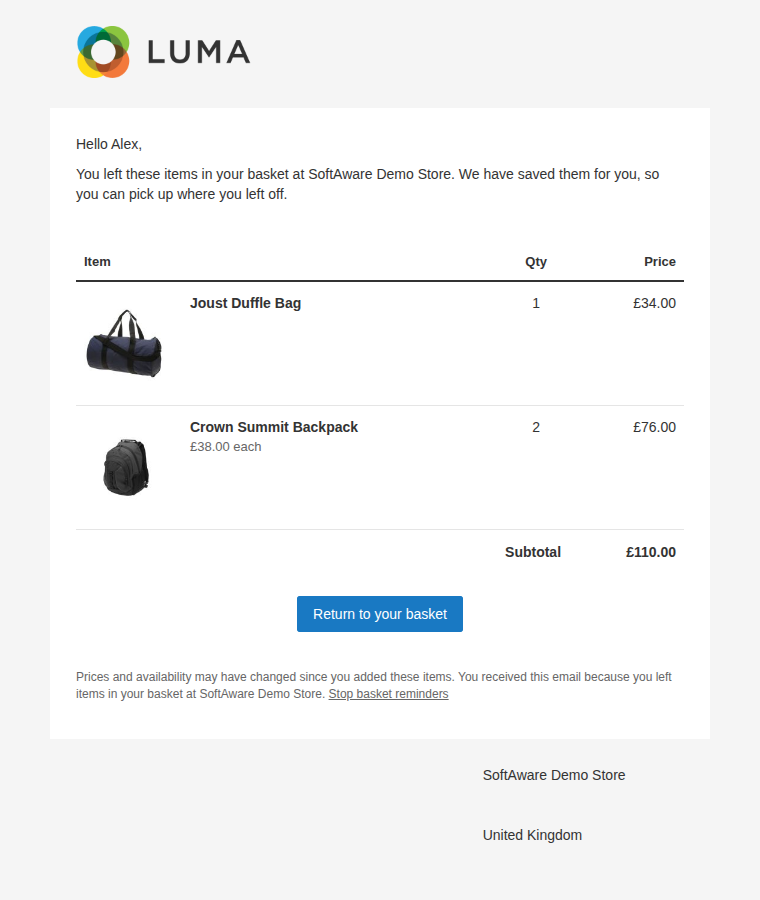
Every reminder lists the cart items with image, name, chosen options, quantity and price, the subtotal, a "Return to your basket" button and a "Stop basket reminders" link.
02 / 06
A unique code when you want one
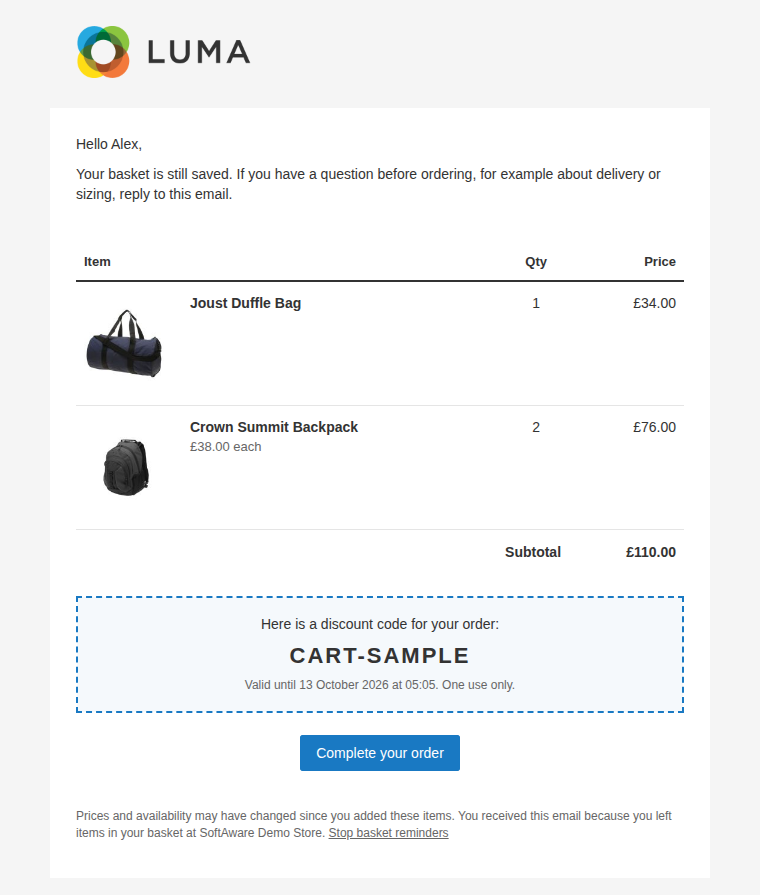
Pick a cart price rule with auto-generated codes for any reminder. Each email gets its own single-use code with an expiry, and it can be applied automatically when the basket is restored.
03 / 06
Every cart and where it stands
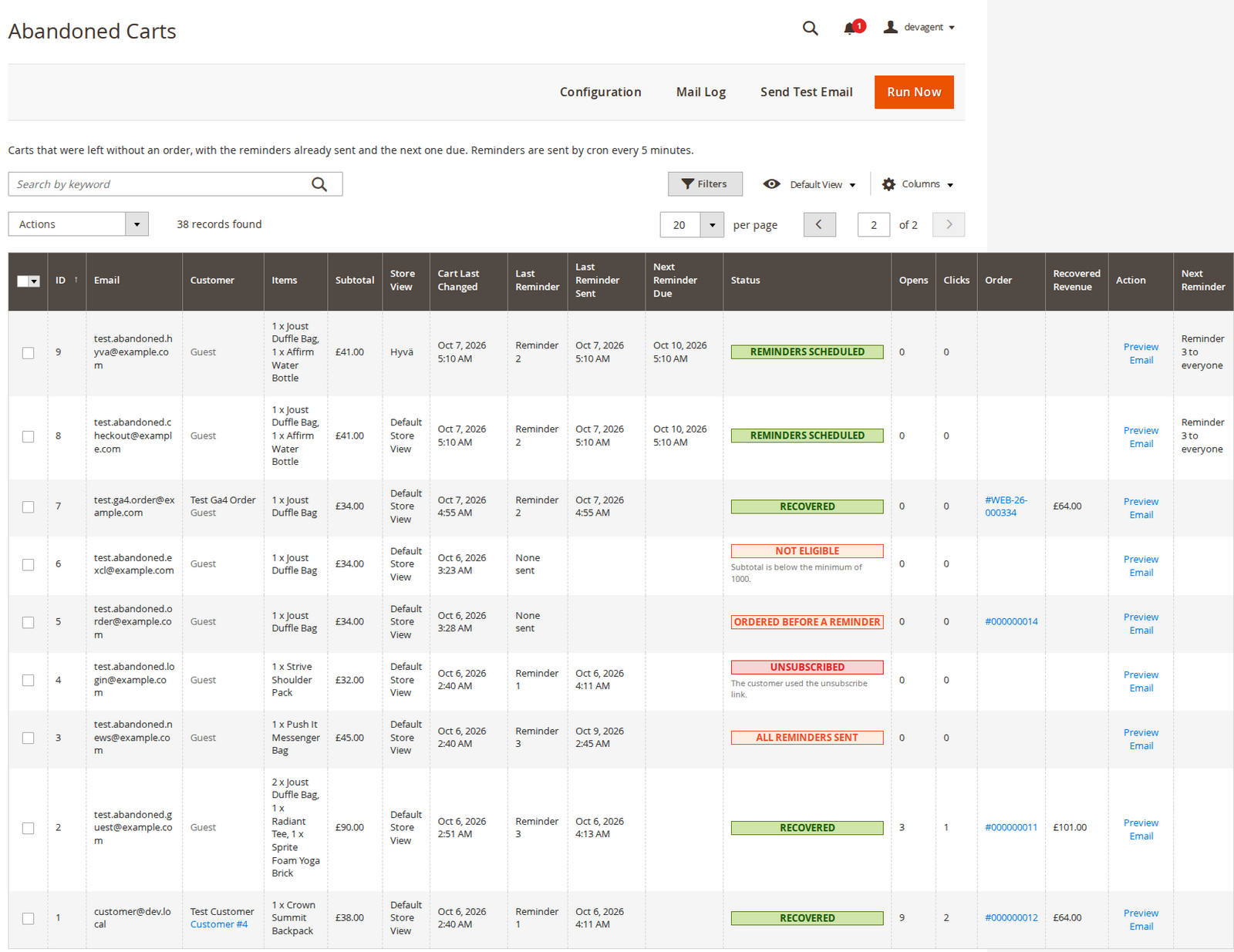
Customer, items, subtotal, last and next reminder, and a status with the reason: scheduled, recovered, unsubscribed, ordered before a reminder or not eligible. Preview, send now or stop from the row.
04 / 06
Three reminders, set up per store view
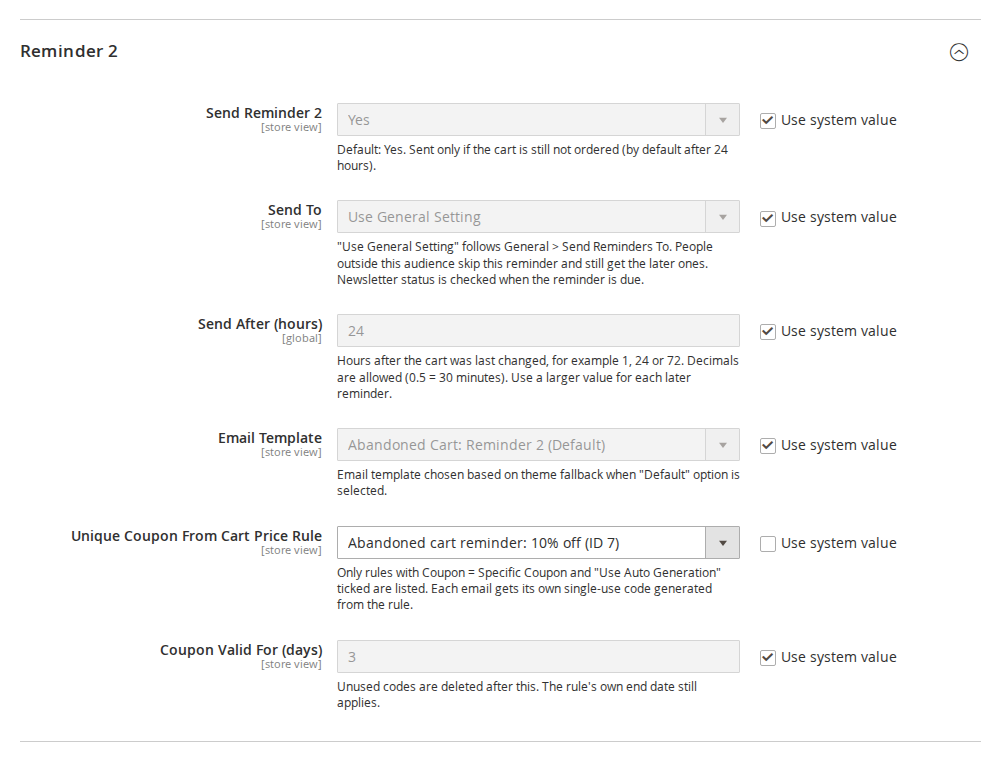
Each reminder has its own switch, audience, delay in hours, email template, coupon rule and coupon lifetime.
05 / 06
A clear way out, on Luma and Hyvä
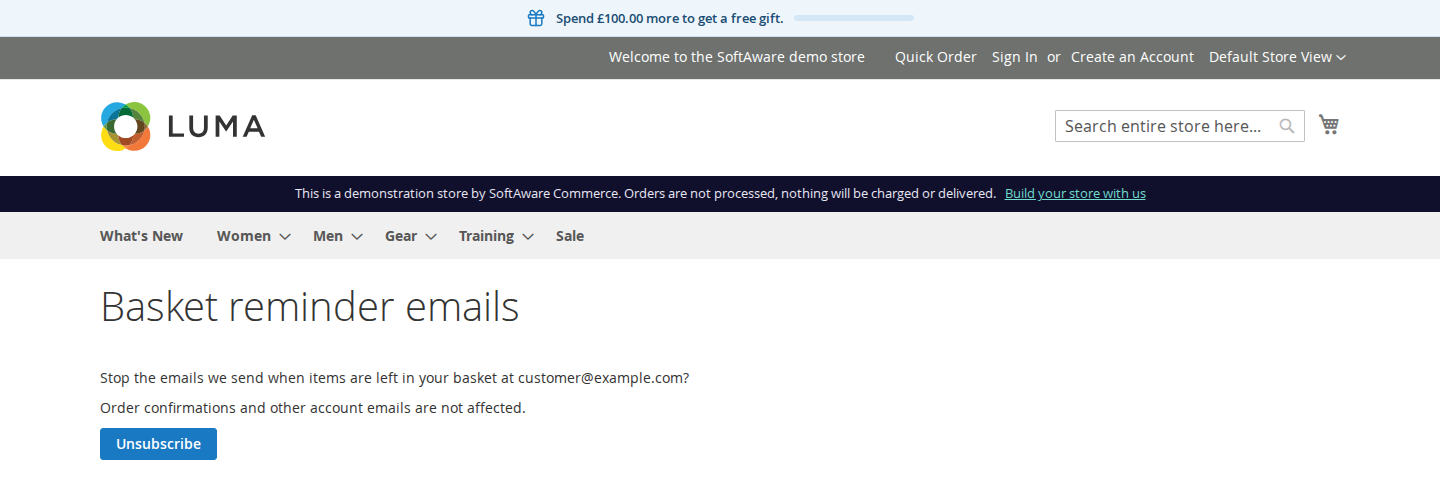
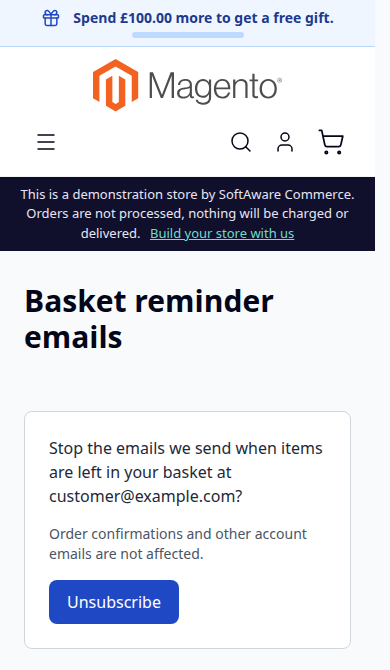
The signed unsubscribe link opens a confirmation page, so mail scanners that open links do not unsubscribe anyone. Customers can switch reminders back on from the same page.
06 / 06
See it before your customers do
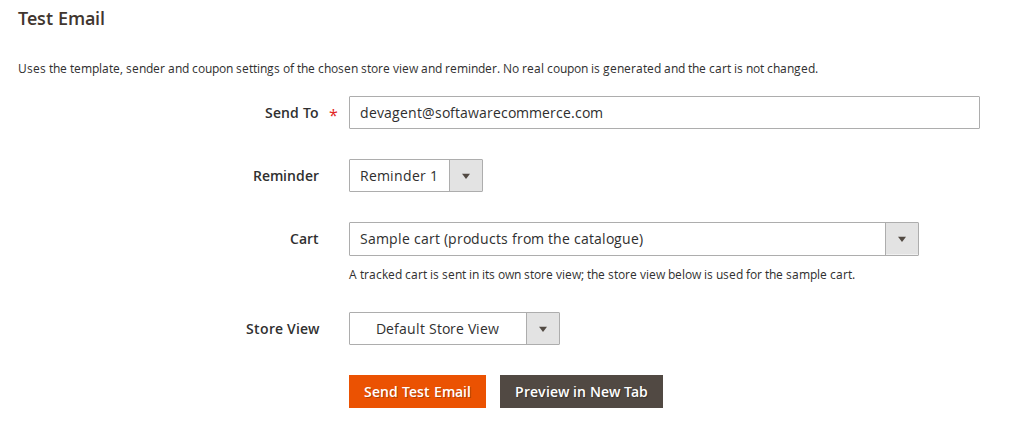
Send a test of any reminder to any address with a sample cart from the catalogue or a tracked cart, or preview it in a new tab. No real coupon is generated.
Live demo
Try it before you install it
A full Magento store with the module installed, on Luma and on Hyvä. The admin demo signs you in with one click.
Compatibility
Requirements and compatibility
| Magento | 2.4.7 – 2.4.9 |
|---|---|
| PHP | 8.2 – 8.5 |
| Latest version | 1.3.3 |
| composer.json requires | php ~8.2.0||~8.3.0||~8.4.0||~8.5.0 magento/framework ~103.0.7 softaware/module-core ^1.0 magento/module-backend * magento/module-catalog * magento/module-checkout * magento/module-config * magento/module-customer * magento/module-directory * magento/module-email * magento/module-newsletter * magento/module-quote * magento/module-sales * magento/module-sales-rule * magento/module-store * magento/module-tax * magento/module-ui * |
Installation
Up and running in minutes
After you buy, create a Composer key in your account. Then, in the root of your Magento project:
-
01Add the repository and your key (once per project)
composer config repositories.softaware composer https://repo.softawarecommerce.com
composer config --auth http-basic.repo.softawarecommerce.com PUBLIC_KEY PRIVATE_KEY
-
02Install the module
composer require softaware/module-abandoned-cart -
03Enable it
bin/magento setup:upgrade
bin/magento setup:di:compile
bin/magento setup:static-content:deploy
bin/magento cache:flush
The last three are only needed in production mode.
Prefer a zip? Every version you are entitled to can be downloaded from My modules. More about Composer access
User guide
How to set up and use Abandoned Cart
For version 1.3.3. The same guide comes with the module, in docs/user-guide.md.
Send up to three reminder emails to shoppers who leave items in their basket. Each email shows the basket contents, a signed link that restores the basket, an optional single-use coupon and an unsubscribe link. This guide covers installation, configuration and day-to-day use.
- Demo (Luma): https://demo.softawarecommerce.com/
- Demo (Hyvä): https://demo.softawarecommerce.com/hyva/
- Admin demo: https://demo.softawarecommerce.com/try-admin/abandoned-cart
- Changelog: Release notes · Questions: FAQ
1. Requirements
| Magento | Open Source or Adobe Commerce 2.4.7 to 2.4.9 |
| PHP | 8.2 to 8.5 |
| Themes | Luma, Blank and themes based on them; Hyvä (unsubscribe page template included) |
| Checkout capture | Luma checkout, and Hyvä's Luma checkout fallback |
| Other | softaware/module-core (installed automatically), Magento cron running |
One-click List-Unsubscribe headers need Magento 2.4.8 or later; on 2.4.7 the emails are sent without them and the unsubscribe link in the email still works.
2. Installation
With Composer. Use the Composer keys from your account on softawarecommerce.com (see https://softawarecommerce.com/shop/composer-access/):
composer config repositories.softaware composer https://repo.softawarecommerce.com
composer config --auth http-basic.repo.softawarecommerce.com PUBLIC_KEY PRIVATE_KEY
composer require softaware/module-abandoned-cart
bin/magento setup:upgrade
bin/magento setup:di:compile            # production mode only
bin/magento setup:static-content:deploy # production mode only
bin/magento cache:flush
To update later: composer update softaware/module-abandoned-cart, then the same bin/magento commands.
The module is installed switched off. Nothing is tracked or sent until you set Enabled to Yes.
3. Quick start
- Go to Stores > Configuration > Softaware > Abandoned Cart Reminders (or Softaware > Abandoned Cart Reminders > Configuration).
- Under General, set Enabled to Yes and choose Send Reminders To.
- Optional: create a cart price rule for the coupon (see section 5) and choose it under Reminder 2 or Reminder 3 > Unique Coupon From Cart Price Rule.
- Open Softaware > Abandoned Cart Reminders > Send Test Email, send a test to yourself or click Preview in New Tab.
- Make sure Magento cron runs. The job
softaware_abandoned_cart_processruns every 5 minutes, records abandoned carts and sends one batch of due reminders.
4. Settings
All settings are under Stores > Configuration > Softaware > Abandoned Cart Reminders. The scope of each field is shown next to it.
General
| Setting | What it does |
|---|---|
| Enabled | Switches the module on or off for the scope. When off, carts are not tracked and no reminders are sent. Default: No. |
| Cart Counts as Abandoned After (minutes) | Minutes since the cart was last changed. No reminder is sent while a cart is still being changed. Default: 60. |
| Ignore Carts Older Than (days) | Carts last changed before this are never picked up. Default: 7. |
| Exclude Store Views | Carts from these store views are never reminded. |
| Exclude Customer Groups | Customers in these groups are never reminded, for example Wholesale. NOT LOGGED IN excludes guests. |
| Minimum Subtotal | In the base currency. Leave empty for no minimum. |
| Send Reminders To | Everyone with a known email address or Newsletter subscribers only. Each reminder can override this. People who used the unsubscribe link are always skipped. |
| Capture Guest Email From | Checkout email field, Newsletter sign-up form, Sign-in forms (email typed by a guest). Guests are only reminded when an address was captured from one of these. |
| Email Sender | The store email identity the reminders are sent from. Default: General Contact. |
Reminder 1, Reminder 2, Reminder 3
| Setting | What it does |
|---|---|
| Send Reminder N | Switches this reminder on or off. Default: Yes. |
| Send To | Use General Setting (default), Everyone with a known email address or Newsletter subscribers only. People outside the audience skip this reminder and still get the later ones. Newsletter status is checked when the reminder is due. |
| Send After (hours) | Hours after the cart was last changed. Defaults: 1, 24 and 72. Decimals are allowed (0.5 = 30 minutes). Use a larger value for each later reminder. |
| Email Template | "Abandoned Cart: Reminder N" by default, or your own copy from Marketing > Email Templates. |
| Unique Coupon From Cart Price Rule | Optional. Each email gets its own single-use code from the rule. |
| Coupon Valid For (days) | Unused codes are deleted after this. The rule's own end date still applies. Default: 3. |
Coupon Codes
| Setting | What it does |
|---|---|
| Code Prefix | Default: CART-. Codes look like CART-7KQ2M9XA. |
| Code Length (without prefix) | 6 to 32 characters. Default: 8. |
| Apply Coupon When the Cart Is Restored | The code from the email is applied when the customer follows the restore link. Default: Yes. |
Links and Tracking
| Setting | What it does |
|---|---|
| Restore Link Valid For (days) | Counted from when the email was sent. Default: 14. Unsubscribe links do not expire. |
| Track Opens | Adds a 1x1 tracking image. Open counts are an estimate, because many mail apps block or preload images. Default: Yes. |
| Count as Recovered Within (days) | An order counts as recovered if it is placed from the reminded cart, or by the same email address within this many days of the last reminder. Default: 7. |
Advanced
| Setting | What it does |
|---|---|
| Emails per Cron Run | Default: 100. Remaining reminders are sent on the next run. |
| Keep a Copy of Each Email in the Mail Log | Lets you open exactly what was sent ("View Email"). Default: No. |
| Delete History After (days) | Cart records and mail log entries older than this are deleted, and leave the report. Default: 365. |
5. Coupons
- Go to Marketing > Cart Price Rules > Add New Rule.
- Set the discount you want, Coupon = Specific Coupon and tick Use Auto Generation. Save.
- Choose the rule under Reminder N > Unique Coupon From Cart Price Rule. Only rules set up this way are listed.
Each email gets its own code with usage limit 1. If the same address still has an unused code from the same rule that is valid for at least another day, that code is sent again instead of a new one, and the mail log says so. Unused expired codes are deleted by the hourly cron job softaware_abandoned_cart_cleanup. To limit discounts for signed-in customers further, set "Uses per Customer" on the rule.
6. What your customers see
The reminder email greets the customer by first name when it is known and lists the cart items with image, name, chosen options, quantity and price, the subtotal, the coupon box when a code was generated, a button back to the basket and a "Stop basket reminders" link. The three default templates have different subjects and wording, for example "You left something in your basket at (store name)" for the first reminder.
The restore link works like this:
- In the browser that still holds the guest cart, the cart is simply reopened.
- In any other browser, the items (and the coupon) are copied into that browser's own cart. The original cart never moves to another session.
- A customer cart is never opened without signing in: the customer is asked to sign in and lands in their cart.
- The mini cart shows the restored basket straight away (Luma and Hyvä).
The unsubscribe page asks the shopper to confirm. Opening the link alone does not unsubscribe, because mail scanners open links. Customers can switch reminders back on from the same page. Unsubscribing from basket reminders does not change the newsletter subscription, and the other way round.
| Luma | Hyvä (mobile) |
|---|---|
 |  |
7. Who gets a reminder
A reminder is sent when all of these are true:
- the store view is enabled and not excluded, the customer group is not excluded and the subtotal reaches the minimum;
- the email address is known and has not used the unsubscribe link on that website;
- the reminder's audience includes the address (newsletter status is read when the reminder is due);
- this is the most recently changed cart of the address on the website. Older carts show "A newer basket for this email address is being reminded", and reminders for different carts of one address are at least 24 hours apart.
A reminder that is not for the address is skipped (mail log status "Skipped", note "Not a newsletter subscriber") and the cart moves on to the next one. "Send Next Reminder Now" in the admin is not limited by the 24-hour rule.
8. Admin tools
All under Softaware > Abandoned Cart Reminders.
- Abandoned Carts: customer, items, subtotal, last change, reminder stage, last and next reminder, which reminder is next and who it goes to, status with reason, and the order when there is one. Row actions: Preview Email, Send Next Reminder Now, Stop Reminders. Mass actions: Send Next Reminder Now, Stop Reminders, Delete Records. Run Now runs the cron job straight away. Opens, Clicks, Store View, Recovered Revenue and the "who it goes to" text are under Columns.
- Mail Log: every email with status (Sent, Failed, Skipped), notes, coupon, opens, clicks and whether it led to an order. With "Keep a Copy of Each Email" on, View Email shows the stored copy.
- Recovery Report: abandoned and reminded carts, emails sent, opened and clicked, recovered carts, recovery rate and recovered revenue by day, week or month, per store view, with totals and a chart.
- Send Test Email: any address, any reminder, a sample cart from the catalogue or a tracked cart, and Preview in New Tab. No real coupon is generated and the cart is not changed.
9. Command line
bin/magento softaware:abandoned-cart:run [--collect-only] [--send-only] [--dry-run] [--limit=N]
bin/magento softaware:abandoned-cart:preview [--cart=ID] [--store=ID] [--reminder=1|2|3] [--output=file.html]
bin/magento softaware:abandoned-cart:test <email> [--cart=ID] [--store=ID] [--reminder=1|2|3]
bin/magento softaware:abandoned-cart:stats [--from=Y-m-d] [--to=Y-m-d] [--period=day|week|month] [--store=ID]
bin/magento softaware:abandoned-cart:unsubscribe <email> [--website=ID|code] [--remove]
bin/magento softaware:abandoned-cart:unsubscribe --list [<email>] [--website=ID|code]rundoes what the cron job does;--dry-runlists the reminders that would be sent.previewrenders a reminder without sending it;testsends one to an address (logged as a test).statsprints the report figures by period.unsubscribeadds an address to the opt-out list (all websites unless--websiteis given) and stops its open reminders, for example when a customer asks by phone;--removeallows reminders again.
10. Permissions (ACL)
Under System > Permissions > User Roles > Role Resources > Softaware > Abandoned Cart Reminders:
| Resource | Allows |
|---|---|
| Abandoned Carts | The Abandoned Carts grid and email preview |
| Send Reminders and Test Emails | Send Next Reminder Now, Run Now, Send Test Email |
| Stop and Delete | Stop Reminders, Delete Records and deleting Mail Log entries |
| Mail Log | The Mail Log |
| Recovery Report | The Recovery Report |
| Abandoned Cart Configuration | The configuration section |
11. Privacy (GDPR)
- Guest addresses are stored on the guest's own cart record only.
- When a customer account is deleted, its abandoned cart records and mail log entries are deleted too.
- Carts that were never emailed are deleted after 30 days (or after "Ignore Carts Older Than", if longer); everything else after "Delete History After". The unsubscribe list is kept, so unsubscribed addresses stay unsubscribed.
- Choose "Send Reminders To" according to your local rules on marketing email, and mention basket reminders in your privacy policy.
12. Troubleshooting
| Problem | Solution |
|---|---|
| No carts appear in the grid | Check General > Enabled for the store view, that cron runs, and that the cart is idle for longer than "Cart Counts as Abandoned After". Guests need a captured email address. Click Run Now to run the job straight away. |
| A cart shows "Not eligible" | The status note gives the reason, for example the subtotal is below the minimum, the address is not a newsletter subscriber, or a newer basket for the address is being reminded. |
| Emails are logged but not received | With "Disable Email Communications" on (Stores > Configuration > Advanced > System), emails are rendered and logged with a note but not delivered. Otherwise check your mail transport. |
| No coupon in the email | The rule must have Coupon = Specific Coupon and "Use Auto Generation", be active and not expired. The mail log notes why a code was not generated. |
| A restore link says it has expired | Links are valid for "Restore Link Valid For" days after sending. Rotating the store's crypt key also invalidates links already sent. |
| Guest emails are not captured on a custom checkout | The checkout capture supports the Luma checkout. Other checkouts need a small integration that posts the address to abandonedcart/capture/email. |
| Report revenue looks mixed | Recovered revenue is summed in each order's base currency; with several base currencies the total mixes them. |
13. Uninstall
bin/magento module:disable Softaware_AbandonedCart
composer remove softaware/module-abandoned-cart
bin/magento setup:upgrade
bin/magento cache:flush
The tables softaware_abandoned_cart, softaware_abandoned_cart_log and softaware_abandoned_cart_unsubscribe stay in the database until you drop them. Generated coupon codes stay on their cart price rules.
Changelog
Release notes
1.3.3
Latest
docs/listing.json,docs/faq.md,docs/user-guide.mdand screenshots indocs/images/for the product page.
1.3.2
Fixed
- Removed a dead option-helper entry for configurable products from
etc/di.xml(the class does not exist in any Magento version; configurable options already came from the catalog helper, so the reminder e-mails look the same). - README: the module requires
softaware/module-core^1.0 (the README said ^1.2; composer.json was right).
1.3.1
- Admin polish: the Abandoned Carts and Mail Log grids open with a one-line introduction and, when there is nothing to show yet, an explanation with the next step (Open Configuration / Send Test Email) instead of an empty table.
- Grids fit the page at 1280-1440 px. Hidden by default (still available under Columns): in Abandoned Carts, Opens, Clicks, Store View, Recovered Revenue (shown in the Mail Log and the Recovery Report) and the "Next Reminder" audience text; in the Mail Log, Subject, Cart ID and Store View. Dates are shown without seconds and keep the date on one line, long email addresses wrap instead of widening the table, status badges stay on one line, and Mail Log revenue is formatted as money.
- Settings: every field has a short comment with its default (excluded store views and groups, email sender, reminder switches, code length) and "Use system value" is available on all fields.
- Inline styles in grid cells and on the Send Test Email page moved to a small admin stylesheet (
view/adminhtml/web/css/admin.css); the test page notice no longer touches the form heading.
1.3.0
- Requires
softaware/module-coreinstead ofsoftaware/module-base. The admin menu and ACL now sit underSoftaware_Core::core("Softaware"); roles that had access keep it (migrated by module-core). After updating all SoftAware modules,softaware/module-basecan be removed.
1.2.0
- "Send To" for each reminder (Reminder 1/2/3 > Send To, store-view scope): *Use General Setting* (default, so existing setups behave as before), *Everyone with a known email address* or *Newsletter subscribers only*. For example, reminder 1 to everyone and the coupon reminder to newsletter subscribers only.
- Who may receive a reminder is decided when it is due, using the current newsletter status for the cart's website. A reminder that is not for the address is skipped and the cart moves on to the next reminder; it never stays due. The opt-out list (unsubscribe link) still wins over every setting.
- Mail log status "Skipped" with the note "Not a newsletter subscriber. Reminder N is sent to newsletter subscribers only."
- "Next Reminder" column in the Abandoned Carts grid: which reminder is next and who it goes to.
- Column
skipped_reminderonsoftaware_abandoned_cart(last reminder skipped for its audience).
- With "Newsletter subscribers only", a cart is now marked "Not eligible" when it is collected only if none of its reminders is for the address (unchanged when every reminder uses the general setting). Someone who leaves the newsletter after the cart was collected now gets a "Skipped" mail log entry for each later subscriber-only reminder instead of the cart being stopped at once.
1.1.0
- Email addresses with a quoted local part (such as
"<svg/onload=...>"@example.com, accepted by PHP's email filter) are no longer captured or emailed, and the address is escaped in the admin "Send Next Reminder Now" confirmation, which renders HTML. A guest could use this for stored XSS in the admin. - Guest restore links no longer move the reminded cart itself into another browser's session; the items are copied into that browser's own cart. Before, a link forced on a victim (it is a GET request) put the attacker's cart in the victim's session, and the attacker could later reopen it and read the checkout details.
- Someone typing another person's address into many guest carts no longer causes one reminder series per cart: at most one email a day reaches that address (see Changed).
List-UnsubscribeandList-Unsubscribe-Post(RFC 8058 one-click) headers on reminder emails, with a signed POST endpointabandonedcart/unsubscribe/oneclick(Magento 2.4.8+).- CLI command
softaware:abandoned-cart:unsubscribeto add, remove or list addresses on the opt-out list.
- Only the most recently changed cart of an email address (per website) is reminded, and reminders for different carts of the same address are at least 24 hours apart. Admin "send now" is not limited.
- An unused, still valid coupon from the same rule is sent again to the same address instead of a new code.
- Never-emailed "not eligible" cart records are deleted after 30 days instead of after the full history period.
- Carts of store views where reminders are off or excluded, and carts that failed with an unexpected error, stayed due and could fill every batch, so no other reminders were sent.
- Two jobs (cron, CLI, Run Now, Send Now) could send the same reminder twice, and a reminder run could overwrite an order recorded in the meantime (recovered cart shown as stopped). Each send now locks the cart and works on the current record.
- Deleting a customer account now deletes its abandoned cart records and mail log entries; no reminder is sent for a deleted account.
- After following a restore link, the mini cart (Luma and Hyvä) and the Hyvä message now show the restored basket straight away.
1.0.0
First release.
- Detects abandoned carts (signed-in customers and guests whose email was captured) after a configurable idle time; excludes store views, customer groups and carts below a minimum subtotal.
- Captures guest email addresses from the checkout email field, the newsletter form and the sign-in forms.
- Up to three reminders with their own delay, store-specific email template and optional unique coupon generated from a cart price rule, with expiry.
- Cart items in the email (image, name, options, quantity, price), signed restore-cart link with expiry, unsubscribe link.
- Tracking of sent, opened (optional pixel), clicked and recovered carts, with recovered revenue.
- Admin: abandoned carts grid with "send now", stop and delete; mail log grid; recovery report; test email form and preview.
- Cron (every 5 minutes, batched) and CLI commands
softaware:abandoned-cart:run|preview|test|stats.
FAQ
Questions, answered
Something else on your mind? The developers who wrote the module answer before and after you buy.
Ask a question →Already installed it? Open a support ticket
When does a cart count as abandoned?
When it has items, has not been ordered and has not changed for the number of minutes you set (60 by default). No reminder is sent while the shopper is still changing the cart. Carts older than "Ignore Carts Older Than" (7 days by default) are never picked up, so switching the module on does not email old carts.
Are guests reminded too?
Yes, once their email address is known. The module captures it from the Luma checkout email field (also used by Hyvä stores through the Luma checkout fallback), the newsletter sign-up form and the sign-in forms. Each source can be switched off. Signed-in customers are always known.
How many reminders are sent, and when?
Up to three. Each has its own switch, delay in hours after the cart was last changed (1, 24 and 72 by default), email template per store view and optional coupon. If reminders are sent late, the gap between them is kept, so nobody gets two emails in a row.
What stops the reminders?
An order placed from the cart, the cart being emptied or merged, the customer unsubscribing, or you clicking "Stop Reminders" in the admin. When one email address has several carts on a website, only the most recently changed one is reminded.
How do the coupons work?
Create a cart price rule with Coupon = Specific Coupon and "Use Auto Generation" ticked, then choose it for a reminder. Each email gets its own single-use code, valid for the number of days you set (never past the rule's end date). If the same address still has an unused, valid code from the same rule, that code is sent again instead of a new one. Unused expired codes are deleted by an hourly cron job. The code can be applied automatically when the customer follows the restore link.
Is the restore link safe if an email is forwarded?
The link is signed and expires after a set number of days (14 by default). In the browser that still holds the guest cart, the cart is reopened. In any other browser the items and the coupon are copied into that browser's own cart, so the original cart never moves to another session. Customer carts are never opened without signing in.
Can I send reminders only to newsletter subscribers?
Yes. "Send Reminders To" can be set to everyone with a known email address or to newsletter subscribers only, and each reminder can override it with its own "Send To", for example the first reminder to everyone and the coupon reminder to subscribers only. Newsletter status is checked when each reminder is due. Check your local rules on marketing email before you choose.
How do customers unsubscribe?
Every reminder has a "Stop basket reminders" link to a confirmation page (Luma and Hyvä templates included). Opening the link alone does not unsubscribe, because mail scanners open links; the shopper confirms with a click and can switch reminders back on from the same page. On Magento 2.4.8 and later the emails also carry one-click List-Unsubscribe headers, so mail apps can show their own "Unsubscribe" button. You can add or remove addresses with the softaware:abandoned-cart:unsubscribe command.
Can I change the email design and wording?
Yes. The default templates are "Abandoned Cart: Reminder 1/2/3" under Marketing > Email Templates. Load one, edit your copy and choose it in the configuration for each store view. The item table is rendered by Softaware_AbandonedCart::email/items.phtml, which your theme can override.
What does the module track?
Emails sent, opened (optional 1x1 image), clicked, recovered carts (an order from the reminded cart, or by the same email address on the same website within the attribution window) and recovered revenue (order base grand total). Open counts are an estimate, because many mail apps block or preload images.
Can I test the emails without emailing customers?
Yes. Softaware > Abandoned Cart Reminders > Send Test Email sends any reminder to any address with a sample cart or a tracked cart, and "Preview in New Tab" shows it without sending. No real coupon is generated for a test. On the command line, softaware:abandoned-cart:preview writes the HTML to a file.
Does it work with Hyvä Checkout or one-step checkouts?
Reminders, restore links and the unsubscribe page work on any storefront. The checkout email capture is built for the Luma checkout (and Hyvä's Luma checkout fallback). Other checkouts need a small integration that posts the email address to abandonedcart/capture/email. The newsletter and sign-in capture work regardless of the checkout.
Support